
A sub- laptop budget forces real trade-offs: do you prioritize a new warranty and modern features, or chase maxed-out RAM and storage from the refurbished market? The difference between a snappy daily driver and a frustrating paperweight often comes down to three specs—RAM, storage type, and the processor generation—not the brand name on the lid. This guide cuts through the noise to find the machines that actually deliver usable performance for work, school, and streaming without demanding a premium credit check.
I’m Min — the co-founder and writer behind Gadgets Feed. I’ve spent hundreds of hours peeling back marketing descriptions on budget laptops, cross-referencing real customer benchmarks with technical spec sheets, and identifying which components get quietly downgraded at this price tier so you don’t learn the hard way. This guide uses that research to separate genuinely capable 400-dollar laptops from underpowered traps.
Whether you need a rugged student laptop, a work-from-home machine with a comfortable keyboard, or the biggest screen and storage for the smallest cash outlay, this breakdown of the best 400 dollar laptop options on Amazon will help you make a confident buying decision.
How To Choose The Best 400 Dollar Laptop
In this narrow price band, you are choosing between an entry-level modern CPU with less RAM or a higher-tier refurbished machine with more memory and storage. Neither is wrong, but the decision dictates how the laptop will feel in year two. The following factors are the critical decision points.
Processor Architecture: Efficiency vs. Raw Power
Modern Intel N-series (N100, N150, N305) and AMD Ryzen 3/5 chips are built on smaller nodes that sip power and run cool, making them ideal for thin, fanless chassis. An older Intel Core i5 from the 8th generation—found in many refurbished enterprise laptops—still offers higher multi-threaded performance for productivity tasks but trades battery life and runs hotter. For a student hauling a laptop between classes, a modern N-series or Ryzen 3 is often the better daily companion despite a lower benchmark score.
Memory Architecture: Soldered vs. Socketed
At this budget, many ultra-slim laptops come with RAM soldered directly to the motherboard. That means you are locked into whatever capacity the unit ships with. A machine with 8GB of soldered RAM may feel cramped within two years as browser tabs accumulate and Windows updates grow heavier. Models with a SODIMM slot allow you to upgrade from 8GB to 16GB or 32GB later. The trade-off is thickness—upgradeable laptops are slightly heavier but offer significantly longer usable life.
Display Resolution and Panel Quality
A 1366×768 (HD) panel shows 1,049,000 pixels; a 1920×1080 (FHD) panel shows 2,073,600 pixels—nearly double the detail. At the budget tier, FHD displays also tend to have better contrast and brightness (250 nits or higher), making them usable in a sunlit room. If you are reading text or spreadsheets for hours, the jump from HD to FHD reduces eye fatigue significantly. Anti-glare coatings are a bonus worth seeking out.
Storage Type and Expansion
A PCIe NVMe SSD can be 15 times faster than a traditional hard drive for boot and app loading. The key spec to check is whether the SSD uses NVMe protocol or the older SATA interface. Some budget machines pair a small NVMe drive with a microSD card slot or an external drive bundled in the box—functional for media files, but you cannot install applications on external storage at NVMe speeds. A 256GB NVMe drive is the practical minimum for a typical workload with Windows and a handful of applications.
Quick Comparison
On smaller screens, swipe sideways to see the full table.
| Model | Category | Best For | Key Spec | Amazon |
|---|---|---|---|---|
| ASUS Vivobook Go 15.6 | Ultraportable | Students needing battery life | AMD Ryzen 5 7520U, 4.3GHz boost | Amazon |
| Acer Aspire 3 A315-24P-R7VH | Efficient | Daily productivity on battery | AMD Ryzen 3 7320U, 4.1GHz boost | Amazon |
| NIMO N151 | Feature-Packed | Users wanting backlit keyboard & fingerprint | Intel N100, 3.4GHz, 16GB RAM | Amazon |
| Lenovo IdeaPad 1 | Value Option | Office 365 included out of box | Intel Celeron N4500, 2.8GHz boost | Amazon |
| HP 14-ep0299nr | Eco-Friendly | Light web browsing & email | Intel Core i3-N305, 3.8GHz, 8GB | Amazon |
| Auusda Business Laptop | Storage King | Massive file storage needs | Quad-core, 3.4GHz, 16GB, 1TB NVMe | Amazon |
| Dell Latitude 5400 (Renewed) | Refurbished Power | Heavy multitasking on a budget | Core i5-8265U, 32GB RAM, 1TB SSD | Amazon |
| HP 14 with Lifetime Office | Office Bundle | Students needing included software | Intel N150, 3.6GHz, 16GB | Amazon |
| Dell 15 DC15250 | High Refresh | Smoothest scrolling and light gaming | Intel Core 3 100U, 120Hz FHD display | Amazon |
In‑Depth Reviews
1. ASUS Vivobook Go 15.6

This is the rare budget machine where you do not feel like you are compromising on the core experience. The AMD Ryzen 5 7520U processor delivers a 4.3 GHz boost clock—beating most Intel N-series chips in multi-threaded tasks while maintaining excellent thermal efficiency. Combined with 512GB of NVMe storage and a 15.6-inch FHD NanoEdge display, this laptop handles document work, streaming, and even light gaming like Rocksmith 2014 without the stutter common at this price point.
The chassis carries a military-grade durability rating (MIL-STD-810H), meaning it survives drops and bumps that would crack a typical entry-level shell. ASUS also includes a webcam shield for privacy, and the 45Wh battery supports fast charging from 0 to 60% in around 49 minutes. The keyboard developed a more comfortable feel after a brief break-in period, and the full-size layout with a numeric keypad is a genuine productivity booster for data entry.
The one downside is that the 8GB RAM is soldered and non-upgradeable. If your workflow involves running multiple virtual machines or dozens of Chrome tabs, you may hit the ceiling within a year. However, for a single-user college or home office scenario, the Ryzen 5’s efficiency and the machine’s lightweight 3.75-pound build make it the most balanced overall pick in this class.
Why it’s great
- Ryzen 5 7520U outperforms most Intel N-series at this price
- MIL-STD-810H certified for durability
- Fast charging and decent 45Wh battery life
Good to know
- 8GB RAM is soldered, not upgradeable
- Plasticky build feel despite military rating
- Wi-Fi 5 instead of Wi-Fi 6
2. Acer Aspire 3 A315-24P-R7VH

The Acer Aspire 3 prioritizes runtime over raw specs, and in a budget laptop, that is often the smarter trade. The Ryzen 3 7320U quad-core processor sips power while still offering a 4.1 GHz boost clock, and the 8GB LPDDR5 memory is faster than the DDR4 found in most competitors. The 15.6-inch FHD IPS display with narrow bezels looks significantly sharper than the HD panels still appearing on some models in this price range.
Real-world battery tests put the Aspire 3 at around 9 to 11 hours of mixed use depending on screen brightness and workload—enough to get through a full day of classes or a cross-country flight without hunting for an outlet. The Temporal Noise Reduction (TNR) webcam is a genuine step up from the grainy sensors on most budget laptops, delivering cleaner video for Zoom calls even in dim lighting. Acer’s PurifiedVoice with AI noise cancellation filters keyboard clatter from your audio feed.
The pain point here is storage: the base 128GB NVMe SSD fills up fast once you install Office, a browser, and a few apps. The SSD is upgradeable (M.2 slot), but the RAM is soldered with no expansion slot, so you cannot increase the 8GB ceiling later. If you are a light user who primarily works in the cloud, this machine’s endurance and display quality make it an excellent choice.
Why it’s great
- Industry-leading battery life for the price
- FHD IPS display with great viewing angles
- Superior TNR webcam and AI noise-canceling mic
Good to know
- 128GB SSD is small, though upgradeable
- RAM is soldered at 8GB, no future expansion
- Fan can be audible under sustained load
3. Dell 15 DC15250

If smooth scrolling changes how you feel about a laptop, the Dell 15 DC15250 is the only machine under budget with a 120Hz FHD display. That means every scroll through a document, webpage, or PDF feels fluid rather than stuttery, an upgrade that becomes obvious within minutes of use. The Intel Core 3 100U processor is a 12th-gen chip with a 4.7 GHz turbo frequency—enough headroom for office suites, light programming, and even running Fallout New Vegas at 60FPS on high settings.
The chassis is built around ergonomics: the lifted hinge tilts the keyboard into a comfortable typing angle, and the inclusion of a dedicated numeric keypad and calculator hotkey makes this a workstation-friendly layout for accounting or data-heavy tasks. Dell backs this unit with a 1-year onsite service warranty, meaning a technician comes to you if a hardware issue cannot be solved remotely—a rare safety net at this price point. ComfortView software also reduces blue light emissions to minimize eye fatigue during long sessions.
The compromises are typical for a premium-focused build: only 8GB of RAM and no fingerprint reader. The battery life is average compared to the Ryzen-powered competition, and the webcam quality is merely passable. But for anyone who spends eight hours a day staring at a screen, the 120Hz panel is a legitimate productivity and comfort advantage that no other laptop under offers.
Why it’s great
- Only laptop with 120Hz FHD display at this price
- Ergonomic lifted hinge and comfortable keyboard with numpad
- 1-year onsite Dell service warranty
Good to know
- 8GB RAM may limit heavy multitasking
- Battery life is below average for the category
- Webcam quality is mediocre
4. Dell Latitude 5400 (Renewed)

For the buyer who values raw productivity specs over thinness and modern aesthetics, the Dell Latitude 5400 is the performance king of the budget tier. This refurbished 14-inch business laptop packs a quad-core Intel Core i5-8265U (up to 3.9 GHz), a staggering 32GB of DDR4 RAM, and a 1TB NVMe SSD—specs that would cost two to three times as much in a new machine. The 1920×1080 FHD display is standard but perfectly adequate for spreadsheets, coding, and document work.
The Latitude series is built to enterprise standards: the chassis is serviceable, meaning you can replace the battery, keyboard, or RAM sticks yourself with standard tools. The inclusion of a Thunderbolt port adds eGPU or high-speed docking station support, a feature almost unheard of at this price. Windows 11 Pro runs without hiccup on these specs, and users report that after clearing the initial Windows update backlog, the machine runs as fast as a modern mid-range laptop.
The risks are inherent to buying refurbished: the unit is used, the battery may have some wear, and the warranty is typically 90 days from the seller rather than a full year from a manufacturer. A small number of units have reported fan failures or loose USB ports. If you are comfortable with the refurb gamble, this Latitude offers the highest RAM and storage ceiling of any machine on this list, making it ideal for virtualization, large databases, or anyone who hoards browser tabs.
Why it’s great
- 32GB RAM and 1TB SSD crush multitasking
- Thunderbolt port for docks and eGPUs
- Enterprise build quality, user-serviceable parts
Good to know
- Refurbished unit with potential battery wear
- Only 90-day warranty from seller
- Design is thicker and heavier than modern ultrabooks
5. Auusda Business Laptop

The Auusda Business Laptop is the storage champion of the new-budget segment, pairing 16GB of DDR4 RAM with a 1TB PCIe NVMe SSD in a chassis that weighs just 3.7 pounds. For a student or freelancer who stores large project files, design assets, or a media library locally, this configuration eliminates the headache of juggling external drives. The fast SSD means booting into Windows 11 Pro takes seconds, and the 16GB RAM ceiling is sufficient for running a dozen Chrome tabs alongside Office without slowdown.
The 15.6-inch FHD IPS display with a 180-degree hinge is practical for sharing your screen in a collaboration setting, and the full-size backlit keyboard with a numeric keypad makes late-night typing sessions comfortable. A fingerprint reader adds biometric security that is missing from many competitors, and the bundled 500GB external drive (included with some configurations) doubles as an automatic backup target. The quad-core processor hits 3.4 GHz and includes integrated graphics that handle 4K video output via a Mini HDMI port.
The catch is processor transparency: early units were advertised with an Intel N95 but shipped with a lower-clocked N150. The listing now says “up to 3.4GHz,” which is technically accurate but feels misleading. The battery also runs closer to 3.5 hours in real-world use rather than the advertised six hours, so this is primarily a desk-bound machine. If you need a portable desktop replacement with unbeatable RAM and storage for the money, and you plan to keep it plugged in, the Auusda delivers.
Why it’s great
- 16GB RAM and 1TB NVMe SSD outclass most budget laptops
- Backlit keyboard and fingerprint reader included
- 180-degree hinge is practical for presentations
Good to know
- Processor listed ambiguously (N150 vs N95)
- Battery life is short at ~3.5 hours
- Build quality feels mid-range, not premium
6. HP 14-ep0299nr
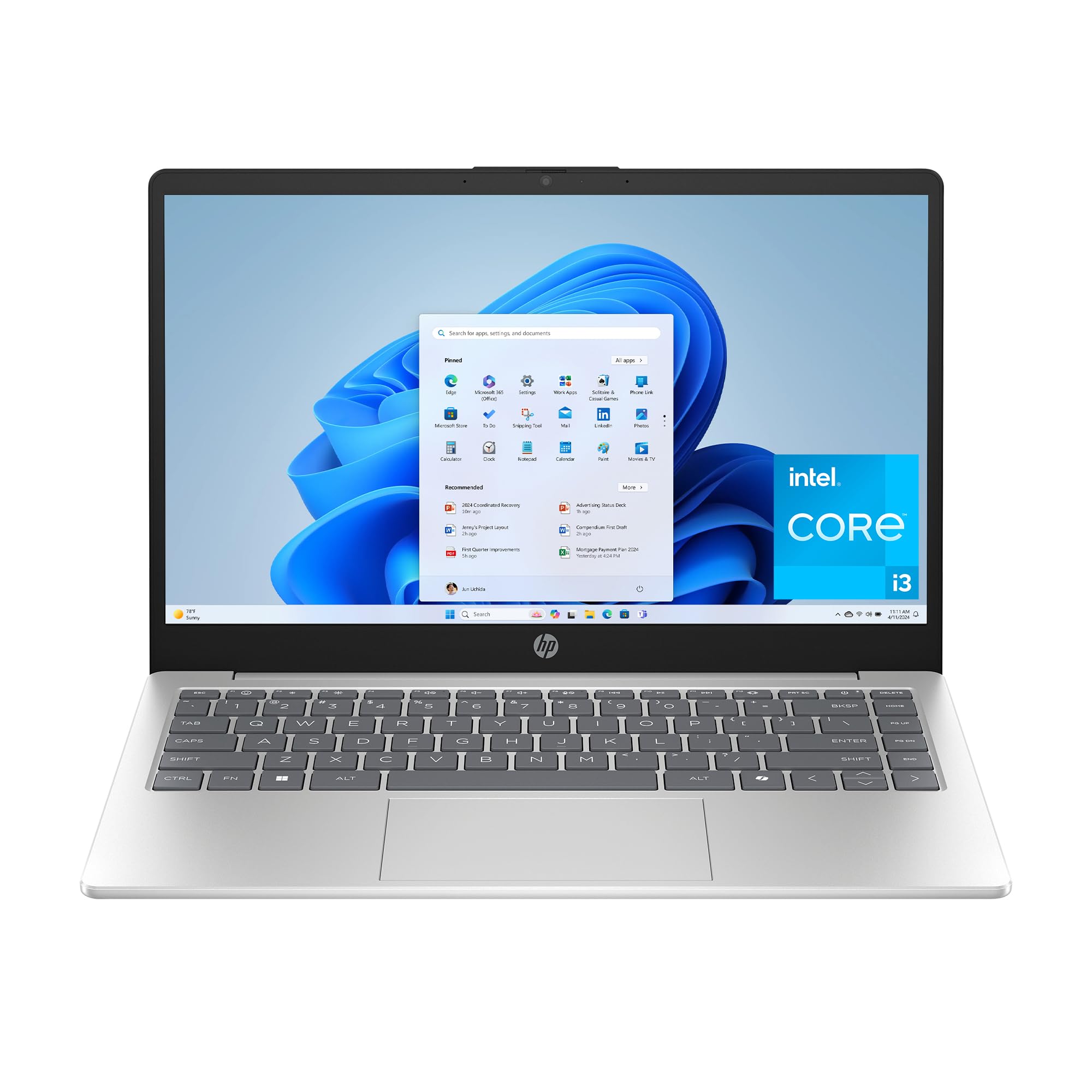
The HP 14-ep0299nr runs on an Intel Core i3-N305, an 8-core Alder Lake-N processor that offers significantly better multi-threaded performance than the dual-core Celerons still haunting this price bracket. Paired with 8GB of DDR4 RAM and a 256GB NVMe SSD, this configuration is tuned for the mainstream user: web browsing, email, streaming, and light Office work. The HD anti-glare display (1366×768) is the weakest link, but the non-reflective panel genuinely reduces eye strain in bright rooms compared to a glossy screen.
HP loaded this machine with thoughtful quality-of-life features: a physical camera shutter for privacy, a dedicated microphone mute button with an active LED indicator, and HP Fast Charge that takes the battery from 0 to 50% in about 45 minutes. The battery life is rated at 8.45 hours, which aligns with real-world use if you keep brightness moderate. The chassis is built with ocean-bound plastic in the bezel and speaker enclosures, making this the most eco-conscious option here.
Performance is adequate but not future-proof. The 8GB RAM is likely soldered (not upgradeable), and the 1366×768 display feels dated next to the FHD panels on the ASUS and Acer options. Heavy multitaskers will notice the RAM ceiling quickly. For a retiree, a student on a tight budget doing primarily browser-based work, or a secondary travel laptop, the HP 14 delivers a smooth experience with modern security features and a low environmental footprint.
Why it’s great
- 8-core i3-N305 outperforms Celeron/Pentium competitors
- Physical camera shutter and mic mute LED
- 0 to 50% charge in ~45 minutes with Fast Charge
Good to know
- HD 1366×768 display is lower resolution than FHD options
- 8GB RAM is likely not upgradeable
- 256GB storage is adequate but not generous
7. Lenovo IdeaPad 1

The Lenovo IdeaPad 1 punches above its weight by pairing a generous 12GB of RAM and a 512GB NVMe SSD with a screen that actually does them justice: a 15.6-inch FHD (1920×1080) 60Hz display with an anti-glare matte finish. The Intel Celeron N4500 processor is the weakest component here—this is a dual-core chip with a 2.8 GHz turbo, meaning it will handle Office, web browsing, and streaming without complaint but will struggle with heavy multitasking or any modern game beyond simple titles.
Lenovo sweetens the deal by including a 1-year subscription to Microsoft 365, which saves you around if you were going to buy Office anyway. The chassis is surprisingly thin and lightweight at 3.4 pounds, and the inclusion of an SD card reader, Wi-Fi 6, and a numeric keypad makes this feel like a complete package for productivity. The 12GB RAM is unusual at this tier—most competitors offer 8GB—and it translates to smoother tab management and quicker app switching in daily use.
The Celeron N4500 is the bottleneck. If your workload involves video calls while running multiple applications, the processor may show its limits. The keyboard layout is also slightly different from traditional Lenovo designs, which some users find takes adjustment. For the buyer whose priorities are a big FHD screen, ample RAM, and an office suite included out of the box—and who does not need CPU-intensive performance—the IdeaPad 1 is a fantastic value.
Why it’s great
- 12GB RAM is rare and valuable at this price
- FHD display with anti-glare matte finish
- Includes 1-year Microsoft 365 subscription
Good to know
- Celeron N4500 is the weakest processor on this list
- Not suitable for gaming or heavy multitasking
- Keyboard layout differs from other Lenovo models
8. HP 14 with Lifetime Office & Bundle
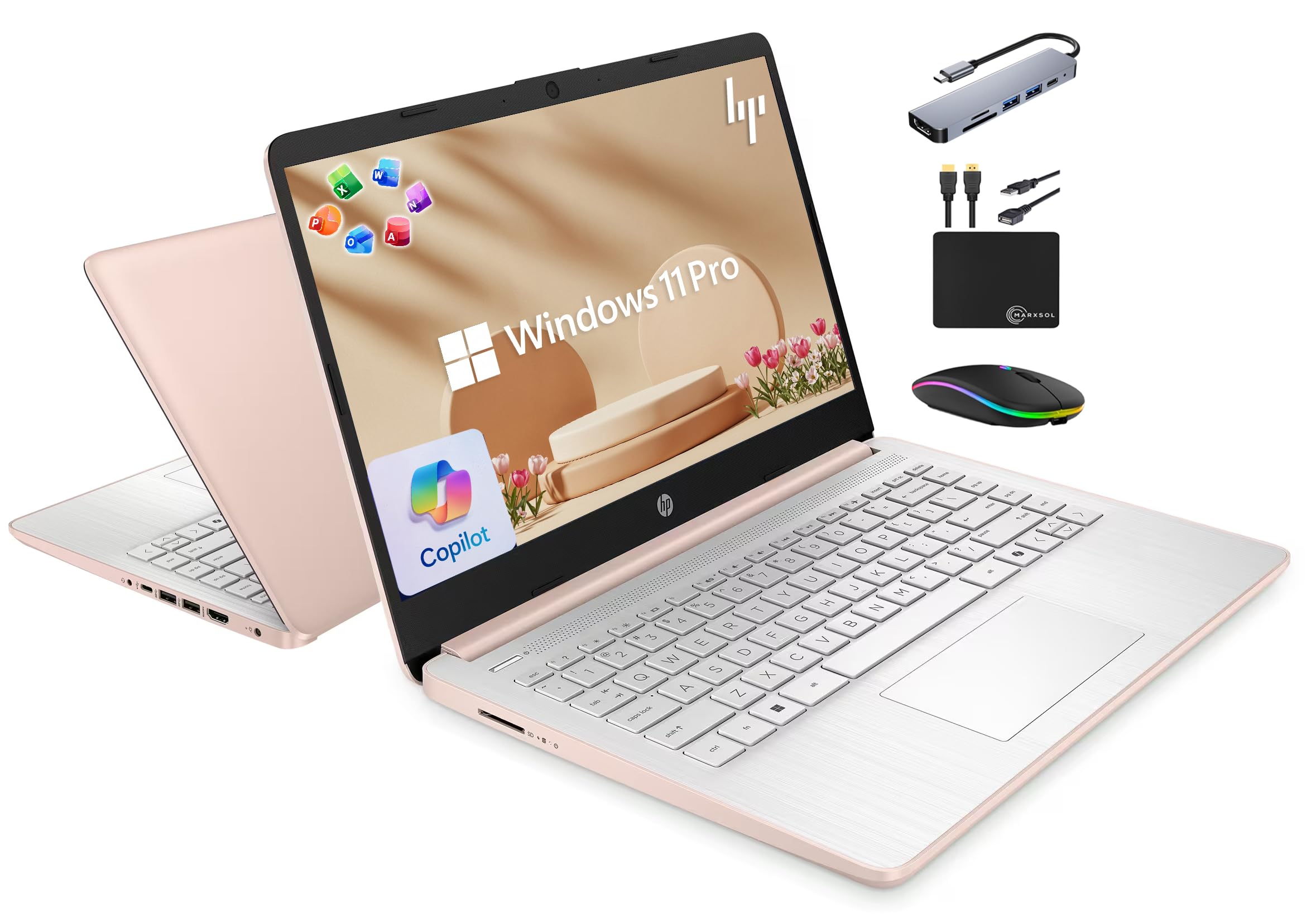
This HP 14-inch laptop is the definition of a bundle play. The base hardware—Intel N150 processor, 16GB RAM, and 128GB UFS storage plus a 500GB external drive—is decent for basic tasks. But the real value is the inclusion of Lifetime Microsoft Office 2024, which eliminates the subscription cost forever. Combined with a 6-in-1 USB-C docking station, HDMI cable, wireless mouse, and mouse pad, this is a near-complete workstation kit that saves you significant money on accessories.
The Intel N150 is a quad-core processor reaching 3.6 GHz, and paired with 16GB of DDR4 RAM, it handles Office apps, web browsing, and streaming with zero lag reported even after six months of use. The 14-inch HD display (1366×768) is adequate for documents but not as sharp as FHD competitors. The rose gold color option is a unique aesthetic choice not found elsewhere in this bracket, and the bundled MarxsolAccessory hub adds three USB 3.0 ports and a 4K HDMI output, expanding connectivity significantly.
The UFS storage (128GB) is slower than a standard NVMe SSD, which affects boot times and file transfer speeds. The 500GB external drive helps with storage capacity but is not suitable for running applications at NVMe speeds. Users also report that the initial Windows setup forces a Microsoft 365 trial, which requires a trip into account settings to decline. If Office 2024 is a must-have and you prefer a single purchase over a subscription, this bundle is the most cost-effective route into the ecosystem.
Why it’s great
- Lifetime Office 2024 included with no subscription
- 16GB RAM is generous for the price
- Comes with docking station, mouse, and external drive
Good to know
- 128GB UFS storage is slower than NVMe SSDs
- HD display (1366×768) is lower resolution
- Forced Microsoft 365 trial during setup, a minor annoyance
9. NIMO N151

The NIMO N151 is a feature-first laptop that brings premium touches—a backlit keyboard, a fingerprint reader, and a 15.6-inch FHD anti-glare display—to a chassis that costs well under . Powered by the 12th-gen Intel N100 processor (4 cores, 4 threads, up to 3.4 GHz), it delivers a claimed 45% performance improvement over previous-generation budget chips. With 16GB of RAM and a 1TB NVMe SSD, this is one of the most complete spec sheets in the new-budget category.
The 85% screen-to-body ratio with ultra-narrow bezels gives the N151 a more modern look than the thick-bezel designs of many competitors. The backlit keyboard is genuinely useful for working in dim environments, and the fingerprint sensor supports Windows Hello for password-free login. Wi-Fi 6 and Bluetooth 5.2 ensure fast, stable wireless connections, and the 65W USB-C PD charger keeps the battery topped up quickly. Users report that the N100 runs Windows 10 significantly faster than Windows 11, so a clean OS install may be worth considering for a speed boost.
Where the NIMO stumbles is battery life—expect around 2 to 4 hours depending on workload, which is the shortest runtime of any laptop on this list. The RAM is also soldered with no upgrade slot, so the 16GB you buy is all you will ever have. Replacement parts are difficult to source, and there is no Ethernet port. For a stationary desk setup where the laptop rarely leaves the charger, these compromises are manageable. For a mobile student, the battery life may be a dealbreaker.
Why it’s great
- Backlit keyboard and fingerprint reader at a budget price
- 16GB RAM + 1TB NVMe storage is hard to beat
- Narrow bezels and FHD anti-glare display
Good to know
- Battery life of 2-4 hours is the worst in this class
- RAM is soldered, not upgradeable
- Replacement parts are difficult to find
FAQ
Is 8GB of RAM enough for a 400 dollar laptop in 2025?
Should I buy a refurbished business laptop or a new budget laptop?
Final Thoughts: The Verdict
For most users, the best 400 dollar laptop winner is the ASUS Vivobook Go 15.6 because its Ryzen 5 processor, FHD display, and military-grade durability deliver the best balance of performance, portability, and longevity in a new machine. If you want maximum RAM and storage for heavy multitasking, grab the Dell Latitude 5400 (Renewed). And for the smoothest display experience—the only 120Hz panel in this budget tier—nothing beats the Dell 15 DC15250.