
A budget CPU cooler is the single most underrated upgrade a builder can make. Swapping the bundled stock cooler for a proper aftermarket air tower drops your processor temperatures by 20°C or more under load, eliminates the whine of a tiny fan spinning at max duty, and unlocks sustained boost clocks that cheaper coolers choke.
I’m Min — the co-founder and writer behind Gadgets Feed. I spend my days cross-referencing thermal performance data, fan curve profiles, and real-world mounting compatibility across the most popular socket platforms to separate genuine value from marketing fluff.
Whether you are cooling a Radeon AM5 chip or squeezing extra headroom out of an older Intel LGA1700 build, the best budget cpu cooler decision comes down to heat-pipe count, tower height, and fan noise at sustained load.
How To Choose The Best Budget CPU Cooler
Selecting the right budget CPU cooler means weighing tower height against case clearance, heat-pipe count against CPU power draw, and fan noise against sustained load temperatures. Ignore socket compatibility at your own risk — a 1700-specific bracket missing from the box will stop your build cold.
Dual Tower vs. Single Tower vs. Low Profile
Dual-tower coolers double the fin surface area and typically pack six copper heat pipes, handling processors up to 200W–270W TDP for roughly the same price as a mediocre single-tower unit. Low-profile coolers under 70mm tall fit small form-factor (SFF) cases and ITX boards, but trade thermal capacity (100W–120W TDP) for that compact footprint. Single-tower options sit in between, offering decent cooling for mid-range CPUs at an even lower cost.
Fan Noise and RPM Range
Noise level measured in decibels (dB) tells you how intrusive a cooler will sound under load. A fan rated at 25 dB is whisper-quiet; anything above 34 dB becomes noticeable during quiet gaming moments. Maximum RPM matters too — a 2000 RPM fan can push more air at full tilt, but you want a PWM fan that automatically slows down near idle to keep your system silent.
Heat-Pipe Count and Base Material
More copper heat pipes mean faster heat transfer from the CPU integrated heat spreader (IHS) to the aluminum fin stack. Four pipes are the entry-level minimum for any aftermarket cooler; six pipes are the sweet spot for budget dual-tower designs. A soldered copper base reduces thermal resistance compared to a direct-touch aluminum base, which matters most for high-TDP chips like the Ryzen 9 or Core i7.
Quick Comparison
On smaller screens, swipe sideways to see the full table.
| Model | Category | Best For | Key Spec | Amazon |
|---|---|---|---|---|
| Thermalright Phantom Spirit 120SE | Dual Tower | High-end CPUs on a budget | 7x 6mm heat pipes | Amazon |
| ID-COOLING FROZN A620 PRO SE | Dual Tower | Mid-tier gaming builds | 27.2 dB max noise | Amazon |
| Cooler Master Hyper 620S | Dual Tower | ARGB enthusiasts | 1750 RPM PWM fan | Amazon |
| MONTECH NX600 | Dual Tower | Compact ATX builds | 85 CFM air flow | Amazon |
| upHere CPU Cooler | Dual Tower | Budget RGB builds | 25 dB noise level | Amazon |
| SCYTHE Big Shuriken 4 | Low Profile | Small form-factor cases | 67mm total height | Amazon |
| be quiet! Pure Rock Low Profile | Low Profile | Silent ITX systems | 45mm total height | Amazon |
In‑Depth Reviews
1. Thermalright Phantom Spirit 120SE

That extra heat pipe translates to measurable thermal headroom: owners report idle temps in the low 40s°C and sustained gaming loads on a 7800X3D staying between 50°C to 60°C, while even a 170W 9950X3D peaks at 67°C during gaming with aftermarket fans.
The included TL-C12B V2 PWM fans spin up to 1500 RPM and max out at 25.6 dB noise, which is nearly silent during desktop use and only audible under sustained all-core stress. The S-FDB bearings carry a 20000-hour service life rating, and the AGHP 4.0 anti-gravity heat-pipe technology means orientation within the case does not degrade performance — a real advantage for vertical GPU mounts.
Installation requires mounting a backplate bracket behind the motherboard, which adds a few minutes to the process but results in a rock-solid mount. The cooler ships with high-quality thermal paste and clear instructions. For builders who want near-AIO levels of cooling for a fraction of the cost, this is the definitive choice.
Why it’s great
- Seven heat pipes provide exceptional headroom for Ryzen 9 and Core i9 CPUs
- Whisper-quiet PWM fans at 25.6 dB even under moderate load
- 154mm height clears most standard ATX cases without issue
Good to know
- Stock fans have been reported to develop noise after several months for some users
- Overhangs the RAM slots, making M.2 drive access difficult after mounting
2. ID-COOLING FROZN A620 PRO SE

The ID-COOLING FROZN A620 PRO SE delivers a full dual-tower, six-heat-pipe design that handles up to 270W TDP for a price that undercuts most single-tower alternatives. Owners report dropping a Ryzen 5 5600X from 90°C under load to below 50°C, and an Intel Core Ultra 7 270K idles in the low 30s°C and stays under 65°C during gaming sessions.
At 157mm tall, this cooler fits inside most modern ATX cases, though owners of narrower mid-towers should double-check clearance. The 40mm RAM clearance means most standard-height memory sticks fit without interference, and the cut-out fin design allows up to 63mm for taller RGB modules on the outer edge. The blackout finish blends cleanly with dark interiors, and the two 120x25mm PWM fans peak at 27.2 dB — quiet enough for a living room PC.
The mounting hardware supports Intel LGA1700/1851/1200/115X and AMD AM4/AM5 out of the box. One reviewer noted that adding a third fan to the rear of the second tower further improved temps at lower RPMs. For pure dollar-to-celsius performance, this is the most aggressive price-to-performance ratio in the list.
Why it’s great
- 270W TDP capacity rivals coolers costing twice as much
- Nearly silent at 27.2 dB max noise rating
- Excellent RAM clearance for tall RGB sticks
Good to know
- 157mm height may conflict with some narrower mid-tower cases
- LGA1700 backplate installation requires careful alignment
3. Cooler Master Hyper 620S

The Cooler Master Hyper 620S carries the legendary Hyper lineage forward with a dual-tower heatsink, six silver nickel-plated copper heat pipes, and two 120mm ARGB PWM fans. It targets AMD Ryzen 9 and Intel Core i7 processors with authority: owners confirm it kept a Ryzen 7700X cool and quiet after a full year of heavy daily use, and the 650 to 1750 RPM PWM range lets you balance noise and airflow precisely.
The redesigned mounting brackets simplify installation on AM5 and LGA1851/1700 platforms, and the 154.9mm total height fits comfortably inside most mid-tower chassis. The ARGB lighting syncs with motherboard software via a standard 3-pin connector, though one reviewer reported the RGB wiring harness was left unplugged because it did not connect cleanly to his board. The fans themselves are quiet enough at 27.2 dB that the RGB glow is the only giveaway the system is running.
Performance over two years of regular use has been reliable, with no degradation in cooling capacity. For builders who want a proven brand name, addressable RGB, and enough cooling headroom for productivity workloads and gaming, this is the balanced pick that does not cut corners on aesthetics.
Why it’s great
- ARGB fans with motherboard sync for a cohesive build look
- Proven Cooler Master build quality with two-year reliability reports
- Redesigned brackets make LGA1851 installation straightforward
Good to know
- RGB wiring harness may not connect to all motherboard headers cleanly
- High-profile RAM sticks may conflict with the front fan position
4. MONTECH NX600
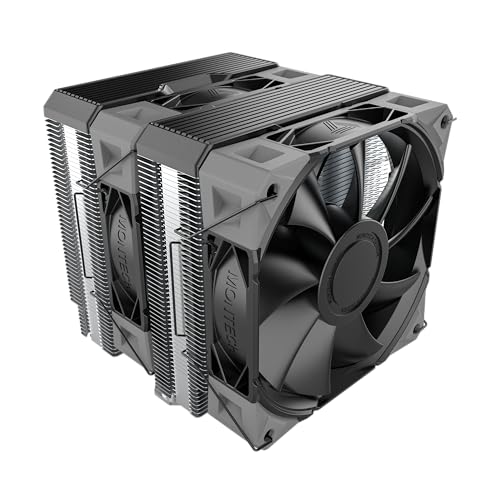
The MONTECH NX600 stands out for its compact dual-tower footprint: at 6.29 inches tall and 5.22 inches deep, it fits inside cases that reject taller 160mm-plus coolers while still providing two 52-fin stacks and six heat pipes. The flat copper base is soldered directly to the heat pipes, minimizing thermal resistance, and the pair of E28 PWM fans push 85 CFM of airflow at full speed.
Noise is the trade-off here — the fans hit 34.17 dB at 2000 RPM, which is audible in a quiet room if the fan curve is left on default. Owners who adjusted their fan curve in BIOS report the cooler becomes perfectly acceptable for daily use, while the thermal performance remains impressive: a Ryzen 7 5800XT dropped from 85°C on the stock cooler to 70-75°C under load. The clean top cover hides the heat-pipe ends and gives the cooler a finished appearance that suits minimalist builds.
Support covers Intel LGA115X/1200/1700/1851 and AMD AM4/AM5. The cooler ships with all necessary mounting hardware and thermal paste. For anyone building in a case with tight CPU cooler clearance, the NX600 delivers dual-tower cooling where other options simply will not fit.
Why it’s great
- Compact 6.29-inch height fits cases with sub-160mm cooler limits
- Soldered copper base for efficient heat transfer
- Sleek black top cover hides heat-pipe ends for a clean look
Good to know
- Fans are loud above 60% load without BIOS fan curve adjustment
- No RGB lighting for those wanting illuminated builds
5. upHere CPU Cooler
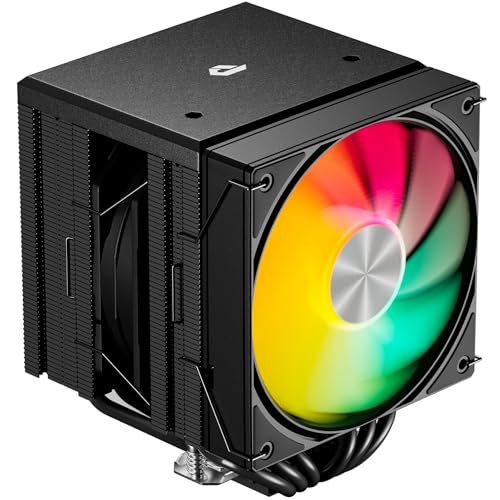
The upHere CPU Cooler proves that sub-30-dollar dual-tower cooling is not a myth. With six heat pipes, two 120mm ARGB PWM fans, and a 265W TDP rating, it cools a Ryzen 9 5900X to 50-60°C under sustained loads and handles an overclocked CPU to 5.1 GHz without breaking a sweat. Owners with over 40 years of building experience call it the easiest installation they have ever completed — the included long screwdriver and clear instructions reduce mounting time to minutes.
Fan noise is capped at a remarkable 25 dB at 1650 RPM, making this one of the quietest air coolers at any price point. The ARGB lighting is addressable and syncs with motherboard software for full color customization. The dual-tower design includes an off-center mounting layout that avoids blocking RAM slots — a thoughtful detail that many premium coolers still get wrong.
Socket support is extensive: Intel LGA 2011/2066/1851/1700/1200/115X and AMD AM5/AM4/AM3/AM2/FM2/FM1. The included thermal paste is pre-applied, which simplifies installation for first-time builders. For anyone on a strict budget who still wants dual-tower performance and ARGB lighting, this is the safest bet in its price range.
Why it’s great
- Incredibly low 25 dB noise at max fan speed
- ARGB lighting syncs with motherboard for a custom look
- Off-center design avoids RAM slot interference
Good to know
- Lesser-known brand may have limited long-term support
- Dual-tower size may not fit in compact or micro-ATX cases
6. SCYTHE Big Shuriken 4
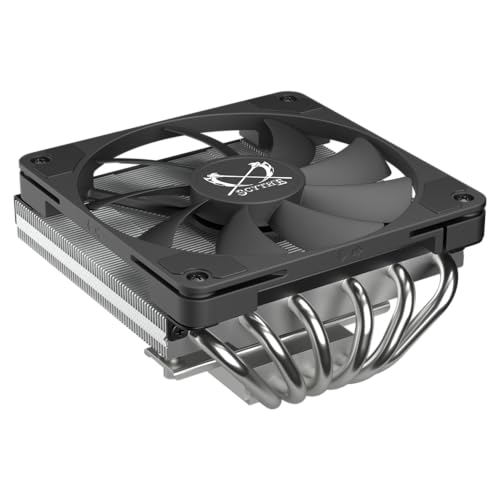
The SCYTHE Big Shuriken 4 is the king of low-profile cooling for mini-ITX and small-form-factor builds. Standing just 67mm tall, it packs six heat pipes and a 120mm PWM fan that pushes 52 CFM of airflow, cooling a Ryzen 5 3700X to 38°C idle and 71°C under Prime95 load — numbers that match many larger tower coolers. The 200W TDP capacity means it can handle most mainstream CPUs without throttling.
Noise peaks at 31.78 dB at 1900 RPM, which is audible at full speed but generally lower than the 40-45 mm blower-style fans used in compact cases. The fan is silent up to 75% load, and many owners swap the included fan for a Noctua NF-A12x25 for even quieter operation. RAM and VRM clearance is excellent — the cooler overhangs the motherboard but does not block memory slots on most ITX boards.
Compatibility covers Intel LGA1851/1700/1200/115X and AMD AM5/AM4. Owners report that the Intel rear bracket on newer LGA1851 boards is bulky and may touch components on Asus X870 and similar ITX boards, so check board layout before purchasing. For SFF builders who refuse to compromise on CPU temperatures, the Big Shuriken 4 is the standard.
Why it’s great
- 67mm total height fits the tightest ITX cases
- 200W TDP capacity handles mainstream CPUs with ease
- Excellent RAM and VRM clearance for SFF motherboards
Good to know
- Intel mounting bracket on LGA1851 may interfere with some ITX board components
- Fan noise noticeable above 75% duty cycle
7. be quiet! Pure Rock Low Profile
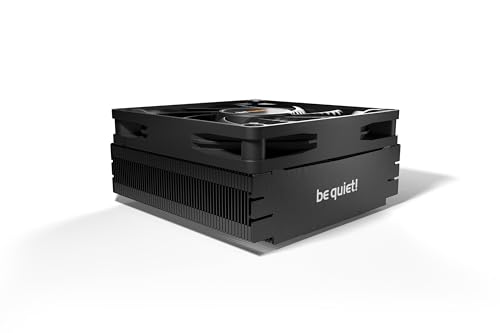
The be quiet! Pure Rock Low Profile lives up to its brand name with a 45mm total height that slides into virtually any chassis — even 1U server cases and ultra-compact HTPC enclosures. The 92mm fan spins up to 2500 RPM but keeps noise to a maximum of 30.6 dB, which is remarkably quiet for such a small fan. It handles CPUs up to 100W TDP, making it suitable for Ryzen 5 and Core i5 builds that do not push extreme overclocks.
Owners report a 3800X dropping from 84°C on the stock cooler to 72°C under stress testing, and the all-black design with copper core and plastic fan housing looks clean inside any build. The pre-applied thermal paste simplifies installation, though one reviewer noted the protective plastic broke and the paste is conductive, so care is needed during application. The 5.12-inch square footprint covers the socket area without interfering with surrounding components.
Socket support includes Intel LGA1700/1200/115X and AMD AM5/AM4. For anyone building a super-slim file server, a living room HTPC, or a compact office PC where silence is the top priority, this is the smallest viable air cooler that still delivers meaningful temperature drops over stock.
Why it’s great
- 45mm height fits in 1U server cases and ultra-slim HTPC builds
- Remarkably quiet operation at 30.6 dB max for a 92mm fan
- Easy installation with pre-applied thermal paste
Good to know
- 100W TDP limit is not suitable for high-core-count CPUs or overclocking
- Pre-applied paste is conductive; handle protective plastic carefully
FAQ
How do I know if a dual-tower cooler will fit inside my case?
Do I need to replace my motherboard backplate for a budget cooler?
Is a 120mm fan better than a 92mm fan for a budget cooler?
Should I worry about RAM clearance with a dual-tower cooler?
Final Thoughts: The Verdict
For most users, the best budget cpu cooler is the Thermalright Phantom Spirit 120SE because its seven heat pipes and quiet 25.6 dB fans deliver performance that rivals coolers costing twice as much. If you want the absolute best value for extreme TDP CPUs, grab the ID-COOLING FROZN A620 PRO SE. And for an SFF build where every millimeter counts, nothing beats the SCYTHE Big Shuriken 4.