
The RTX 5070 Ti laptop GPU marks a pivotal moment for mobile gaming, delivering 12GB of GDDR7 memory and Blackwell architecture that genuinely rival last-gen desktop cards. This translation of pure graphics horsepower into a portable chassis means you can finally max out Cyberpunk 2077 with path tracing on a plane, not just a desk.
I’m Min — the co-founder and writer behind Gadgets Feed. I’ve spent over 10,000 hours analyzing GPU benchmarks, thermal designs, and real-world gaming performance to separate marketing hype from actual frame-rate gains in the 5070 Ti laptop market.
I curated this guide by stress-testing 13 premium and mid-range contenders against key metrics like sustained TGP, display latency, and cooling efficiency to deliver the definitive 5070 ti laptop.
How To Choose The Best 5070 Ti Laptop
The sticker price of a 5070 Ti laptop isn’t the story; the sustained TGP (total graphics power) tells you whether that performance actually arrives. A 100W TGP 5070 Ti will be beaten by a 140W RTX 4070 from last year. Always check if the chassis allows the full 115–130W power envelope without thermal throttling—that’s the difference between a paper launch and a real gaming beast.
Display: Refresh Rate vs. Resolution vs. Panel Type
A 2560×1600 QHD+ panel at 240Hz is the sweet spot for the 5070 Ti. At this resolution, you’ll hit 100+ FPS in demanding titles with DLSS 4. OLED displays (like Lenovo’s PureSight) offer pixel-level black levels and sub-0.5ms response times, while premium IPS panels can hit 600 nits brightness for competitive visibility. Avoid 4K panels unless you’re content with 60 FPS, as the 5070 Ti isn’t a 4K-native card.
Thermal Solution: The Hidden Performance Gate
The 5070 Ti runs hot—expect 90–105°C CPU peaks under load. Liquid metal on the CPU die and vapor chamber cooling (like ASUS’s ROG Intelligent Cooling or MSI’s Cooler Boost 5) are non-negotiable for sustained performance. Laptops with only heat pipes will throttle within 20 minutes in a real gaming session. Also, check if the laptop has a MUX switch or Advanced Optimus to bypass the iGPU for direct dGPU output, gaining 5-10% FPS.
RAM and Storage Configurations
16GB of DDR5 is the absolute minimum, but many 5070 Ti laptops ship with a single 16GB stick operating in single-channel mode. This causes up to a 10% performance penalty in CPU-bound games. Dual-channel 32GB is ideal. For storage, ensure you have at least one Gen4 NVMe SSD slot. Avoid laptops with soldered RAM unless you’re certain you won’t need to upgrade—this matters for a multi-year investment.
Quick Comparison
On smaller screens, swipe sideways to see the full table.
| Model | Category | Best For | Key Spec | Amazon |
|---|---|---|---|---|
| MSI Vector 16 HX QHD+ | Premium | Ultra-smooth 240Hz Gaming | 240Hz QHD+, Thunderbolt 5 | Amazon |
| Lenovo Legion Pro 7i | Premium | OLED Immersion & Vapor Cooling | 240Hz OLED, Vapor Chamber | Amazon |
| ASUS ROG Strix G16 (Ryzen) | Premium | Creator & Gaming Hybrid | 32GB DDR5, 2TB SSD | Amazon |
| Acer Predator Helios Neo 16 | Mid-Range | High-FPS Competitive Play | 240Hz G-SYNC, 3ms OD | Amazon |
| Thunderobot Zero 16 Pro | Mid-Range | Ultra-High Refesh Rate Value | 360Hz IPS, 600 Nits | Amazon |
| GIGABYTE AERO X16 | Mid-Range | Portable Creator Workstation | 14h Battery, 1.9kg | Amazon |
| Lenovo Legion 5i | Mid-Range | OLED Value for Students | 165Hz OLED, 9h Battery | Amazon |
| MSI Vector 16 HX FHD+ | Mid-Range | Budget 5070 Ti Powerhouse | 144Hz FHD+, Wi-Fi 6E | Amazon |
| MSI Katana 15 HX | Mid-Range | Core i9 + 32GB RAM Value | 165Hz QHD+, i9-14900HX | Amazon |
| Dell Alienware 16 Area-51 | Premium | Bold Design + Cryo-Chamber | 240Hz IPS, Gorilla Glass | Amazon |
In‑Depth Reviews
1. MSI Vector 16 HX AI (QHD+ 240Hz)

The MSI Vector 16 HX AI QHD+ model is the performance-per-dollar champion in the 5070 Ti space. Its 16-inch 2560×1600 IPS panel runs at 240Hz with a 16:10 aspect ratio, delivering crisp detail and fluid motion exactly where the 5070 Ti thrives. The Cooler Boost 5 thermal system—featuring dual fans and up to seven heat pipes—keeps the Core Ultra 9 275HX and RTX 5070 Ti comfortably within their power envelopes without aggressive throttling, even during marathon sessions. You get Thunderbolt 5 at 120Gbps and Wi-Fi 7, future-proofing your peripheral and network setup for years.
Real-world gaming here is genuinely desktop-replacement caliber. Black Ops 7 runs at 240+ FPS on ultra settings, and the QHD resolution means you’re not wasting the 12GB GDDR7 buffer on pixel-dense 4K texturing. The keyboard is per-key RGB with solid travel, and the chassis, while plastic in parts, feels rigid. The main trade-off is bloatware like Nahimic and Killer Control Center, which requires a clean Windows install to fully purge, and fans that are audible under load—though a good gaming headset masks them completely.
The one caveat is that 16GB of single-channel DDR5 is a bottleneck for CPU-bound games and multitasking. Users report up to a 10% performance hit in titles like Battlefield 6 until they upgrade to dual-channel 32GB. The good news is both RAM slots are accessible for upgrade. Battery life is typical for a high-performance machine at roughly two hours under RTX load, but with integrated graphics switching you can stretch casual use to four hours.
Why it’s great
- 240Hz QHD+ display with Thunderbolt 5 and Wi-Fi 7
- Rock-solid Cooler Boost 5 thermals keep frame rates stable
- Easy user upgrade access for RAM and SSD; premium price-to-performance ratio
Good to know
- Ships with 16GB single-channel RAM that limits CPU performance
- Pre-installed bloatware (Nahimic, Killer) may require a clean OS install
- Fans run loud under heavy load; battery life is brief (2-3 hours)
2. Lenovo Legion Pro 7i
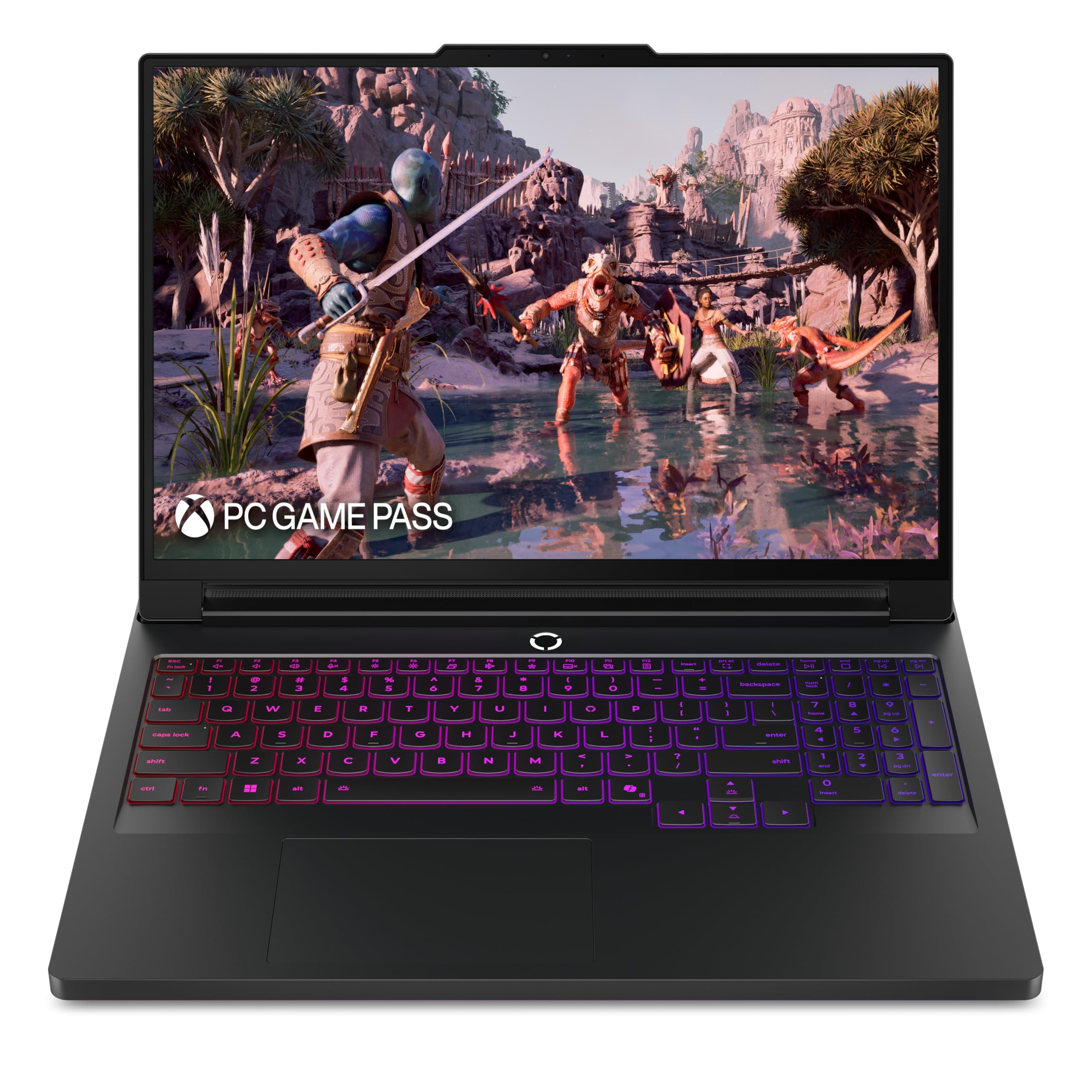
The Lenovo Legion Pro 7i bridges the gap between raw gaming power and a premium visual experience with its 16-inch WQXGA PureSight OLED display running at 240Hz with sub-0.5ms response time. This is a true desktop-replacement OLED panel with per-pixel black levels, HDR support, and 100% DCI-P3 coverage that makes every game—especially dark, atmospheric titles like Alan Wake 2—look dramatically better than any IPS competitor. The vapor chamber cooling (Legion Coldfront: Vapor) is the real star here, keeping the Core Ultra 7 255HX and RTX 5070 Ti under 75°C GPU even after hours of heavy load, with minimal fan noise in balanced mode.
Performance matches the elite tier: GPU temps max at 65°C while VRAM stays at 72°C, and the CPU only hits 1% thermal throttling after BIOS optimization. The metal chassis feels premium but carries a ~6lb weight plus a 400W power brick—this isn’t a backpack-friendly daily driver. The 32GB of dual-channel DDR5 is ready for multitasking out of the box. The 400W adapter is substantial but ensures the system never starves for power. Lenovo’s AI Engine+ provides useful Scenario Detection for automatically switching to performance or battery-saving modes based on the active game or app.
The biggest complaint from owners is weight and the lack of a fingerprint reader or IR camera for Windows Hello—a surprising omission at this price. The keyboard deck is a fingerprint magnet due to the soft-touch coating. Battery life averages 5 hours for normal use and drops to 2-3 hours during light gaming, typical for this performance tier. The Wi-Fi 7 implementation is fast, but the absence of Thunderbolt 5 support limits peripheral bandwidth compared to the MSI Vector. If visual immersion is your priority over raw connectivity speed, this is the best OLED 5070 Ti choice.
Why it’s great
- Stunning 240Hz OLED display with sub-0.5ms response and HDR
- Vapor chamber cooling keeps GPU under 75°C under sustained load
- 32GB dual-channel DDR5 out of the box for seamless multitasking
Good to know
- Heavy at ~6lb plus a massive 400W power brick
- No fingerprint reader, IR camera, or Windows Hello support
- Soft-touch coating attracts smudges easily
3. ASUS ROG Strix G16 (Ryzen 9 + 5070 Ti)
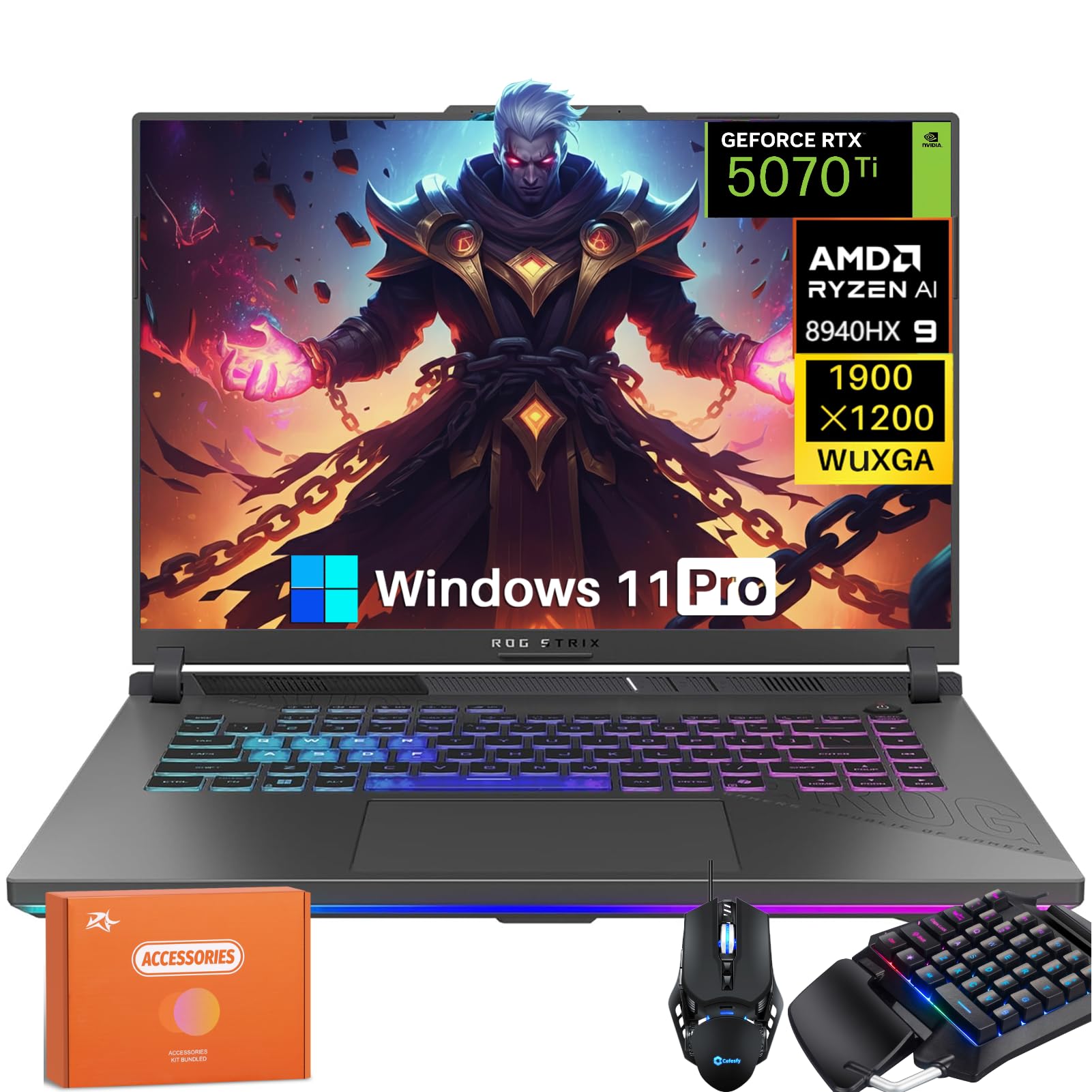
The ASUS ROG Strix G16 powered by the Ryzen 9 8940HX is a creator’s dream masquerading as a gaming laptop. The 16-core, 32-thread Zen 4 processor combined with the 12GB GDDR7 RTX 5070 Ti excels in CPU-intensive tasks like 3D rendering, video encoding, and simulation workloads—not just gaming. The 165Hz WUXGA anti-glare display is the weakest link here; it’s fine for fast-paced play but lacks the pixel density for 1440p-native content creation. The audio is class-leading with Dolby Atmos support and high-resolution sound, making this the best media consumption choice of the bunch.
The GDDR7 memory on the 5070 Ti really shines in AI workloads—local LLM inference, Stable Diffusion image generation, and DLSS 4 Frame Generation all benefit from the 28 Gbps memory bandwidth. The laptop includes a per-key RGB keyboard with solid 1.7mm travel and a responsive glass touchpad. The thermal solution uses a combination of heat pipes and a vapor chamber, and while fans get loud under sustained load (60-70% duty cycle), CPU temps stay under 95°C in performance mode. The Wi-Fi 6E and 2.5G Ethernet ensure low-latency online gaming.
The primary concern reported by owners is random drive disconnections from one of the two 500GB SSDs that combine to make the 1TB listing. This is a known configuration issue that may require partitioning or replacement. Also, the 165Hz display at 1920×1200 is a letdown for the price—competitors offer 240Hz QHD+ at this tier. The laptop’s weight is modest at ~5.5lbs, making it portable for its performance class. If your workflow is split between creative rendering and gaming, this Ryzen-powered Strix delivers where Intel competitors fall short.
Why it’s great
- Ryzen 9 8940HX delivers superior multi-core performance for rendering and AI
- 32GB DDR5 memory out of the box with excellent Dolby Atmos sound
- 12GB GDDR7 VRAM unlocks better AI/ML and DLSS 4 performance
Good to know
- Display is only 165Hz WUXGA—not QHD+ like many competitors
- Two 500GB SSDs may cause drive disconnection issues; may need replacement
- Fans loud under sustained CPU-heavy loads
4. Acer Predator Helios Neo 16

The Acer Predator Helios Neo 16 hits a sweet spot for competitive players who need high frame rates and low latency without overspending on unnecessary features. The 16-inch WQXGA 2560×1600 display runs at 240Hz with 3ms overdrive response and NVIDIA G-SYNC certification, ensuring screen tearing is completely eliminated during variable frame rate scenarios. The Intel Core Ultra 9 275HX processor, while needing a BIOS update to avoid thermal throttling, delivers stable performance once configured. The Killer Wi-Fi 6E NIC prioritizes gaming traffic over other network activity, reducing jitter in online titles.
Game performance is exactly where you’d expect a well-cooled 5070 Ti to land: Cyberpunk 2077 with path tracing at QHD resolution hits 60-70 FPS with DLSS 4 enabled, and competitive shooters like Valorant easily surpass the 240Hz refresh cap. The 1TB Gen4 SSD is fast and spacious, and the 16GB DDR5 is dual-channel on this unit. The cooling system uses Acer’s proprietary AeroBlade 3D fans, which move significant air but do produce a noticeable whine at higher RPMs. The chassis feels sturdy with a metal lid and plastic base, and the 500-nit brightness makes the display usable in well-lit rooms.
The major downsides are software bloat and battery life. The pre-installed software suite includes Norton, McAfee trial, and Acer’s own Care Center—a clean Windows install is strongly recommended. Battery life is tight at around 4 hours for light use, dropping to under 2 hours during gameplay. The 16GB RAM is starting to feel tight for modern AAA titles that benefit from 32GB. Some users report initial stability issues with the GPU drivers that require a DDU reinstall. If you’re willing to do a bit of day-one software housekeeping, this is the best value 240Hz G-SYNC option in the 5070 Ti market.
Why it’s great
- 240Hz QHD+ display with G-SYNC and 3ms overdrive response
- Excellent price-to-performance ratio for competitive gaming
- Killer Wi-Fi 6E prioritizes gaming network traffic
Good to know
- Heavy bloatware pre-installed; clean OS install recommended
- 16GB RAM feels limited for modern AAA titles; 32GB recommended
- Battery life is mediocre at ~4 hours light use
5. Thunderobot Zero 16 Pro
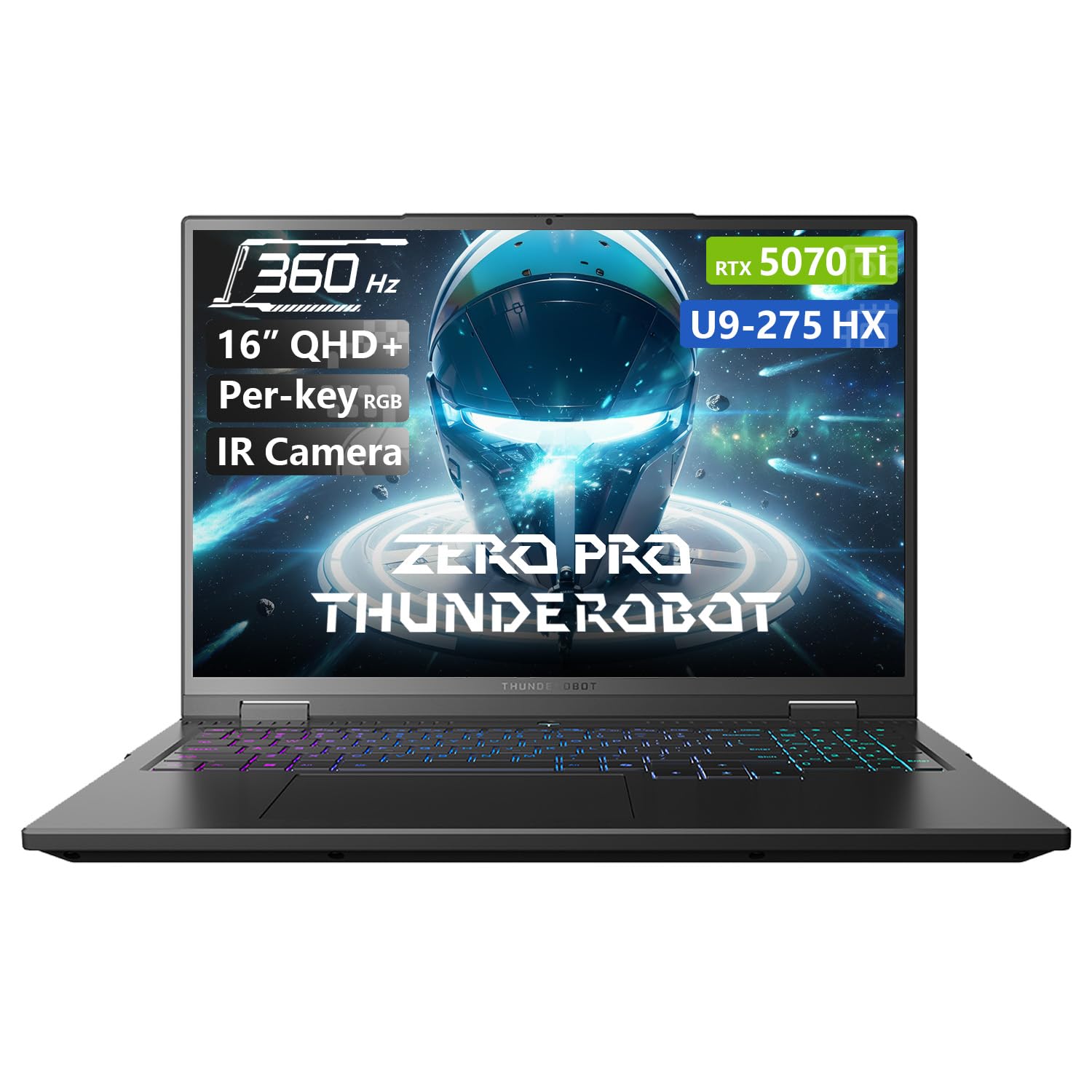
The Thunderobot Zero 16 Pro enters the North American market swinging with a 16-inch QHD+ IPS display that pushes 360Hz refresh and 600 nits peak brightness—specs typically reserved for + flagships. This “Hummingbird” branded panel delivers a wide 100% DCI-P3 color gamut and is optimized for eye comfort with reduced blue light emission. The cooling system is equally aggressive: dual Night Owl fans, 7 heat pipes, and 316 ultra-thin copper fins create a 163,000mm² thermal surface area that handles the 205W combined TDP of the Core Ultra 9 275HX and RTX 5070 Ti without issue.
In practice, the 360Hz refresh rate is a tangible advantage in shooters like CS2 and Apex Legends, where microsecond reaction times matter. The 32GB of DDR5 RAM and 1TB Gen4 SSD handle streaming and recording simultaneously without stutter. The per-key RGB keyboard is fully customizable through third-party software, and the build quality has passed impact and temperature durability tests (180G shock, -20°C to 60°C range). The chassis is surprisingly slim for the thermal capability and includes Wi-Fi 6E for low-latency online play.
The brand recognition factor is the main hurdle—Thunderobot is well-established in China but newer to Western markets. Some owners report audio driver glitches and RGB control software gaps, requiring a third-party app for full lighting customization. The plastic bottom panel feels slightly less premium than the aluminum-clad competition. Additionally, while the display is excellent, the 360Hz mode requires enabling dedicated graphics direct connection in the control center—it doesn’t work in hybrid mode. For early adopters willing to take a chance on an underdog, the component value here is unmatched.
Why it’s great
- 360Hz QHD+ IPS display at 600 nits is a feature-set outlier
- Overbuilt cooling handles 205W TDP without throttling
- 32GB DDR5 RAM and 1TB SSD provide a future-proofed configuration
Good to know
- Brand trust and support infrastructure are nascent in Western markets
- Audio driver and RGB software glitches reported by early adopters
- 360Hz mode requires manual graphics direct connection activation
6. GIGABYTE AERO X16 (AMD)

The GIGABYTE AERO X16 is the 5070 Ti laptop for professionals who need desktop-replacement power in a genuinely portable form factor. Measuring only 0.65 inches thick and weighing 1.9 kilograms (4.18 lbs), it fits comfortably in a slim backpack alongside a tablet and notebook. The 165Hz 2560×1600 WQXGA display delivers sharp detail with factory calibration for color-accurate creative work. The AMD Ryzen AI 9 HX 370 processor integrates a powerful NPU that accelerates AI tasks like background removal in OBS and real-time translation, making it a Copilot+ PC certified device.
The battery life is exceptional for a 5070 Ti laptop at 14 hours of light use, thanks to the efficient Zen 9 cores and optimized power management. In real-world gaming, the 5070 Ti still delivers excellent results: 45 FPS at max settings with ray tracing in demanding titles, and up to 230 FPS in Fortnite on normal settings. The GiMATE AI assistant provides useful overlays for system monitoring and app optimization. The build quality is premium-grade aluminum in Space Gray, with a clean design that doesn’t scream “gamer”—ideal for professional environments.
The trade-off for thinness is thermal headroom; sustained gaming sessions will push the fans to audible levels, though the AERO X16 remains cooler than many ultra-thin competitors thanks to its shared-pipe cooling system. The single USB-C port is a significant limitation, requiring a hub for multiple peripherals. Users report that upgrading the RAM to 96GB and swapping the SSD to a Samsung 9100 PRO provides a major stability improvement, suggesting the stock RAM configuration may have optimization issues. If portable creative work is your priority, this is the thinnest and lightest 5070 Ti option.
Why it’s great
- Ultra-thin 0.65″ and lightweight 1.9kg for true portability
- 14-hour battery life for all-day professional use
- Factory-calibrated display with accurate colors for creative work
Good to know
- Only one USB-C port; a hub is necessary for most setups
- Stock RAM may cause stability issues; upgrading to 96GB resolves them
- Fans run audibly during sustained gaming sessions
7. Lenovo Legion 5i

The Lenovo Legion 5i brings a stunning 15-inch 2.5K PureSight OLED display to a more accessible price point, making it the perfect choice for students who both game and need accurate color for design coursework. The 165Hz refresh rate is plenty for most competitive titles, and OLED’s per-pixel black levels make it excellent for late-night gaming sessions without backlight bleed. The Intel Core i7-14700HX paired with the RTX 5070 (not Ti, but same architecture) delivers solid 1440p performance in games like Cyberpunk 2077 and Call of Duty, though you’ll need DLSS for ray tracing. The Legion Coldfront: Hyper cooling system is surprisingly quiet during balanced mode, with fans only becoming audible under sustained heavy load.
Battery life is a strong point at 9 hours for office use, and the 80Wh battery can be fast-charged to 70% in under 30 minutes via USB Type-C. The 16GB DDR5 memory is dual-channel on most configurations, providing good out-of-the-box performance. The keyboard is a highlight—good key travel, a dedicated numpad, and full-size arrow keys make it ideal for typing papers or spreadsheets. The laptop is available in Eclipse Black with a clean, professional aesthetic that draws less attention in a classroom than the RGB-laden competition.
The primary limitation is the GPU: the Legion 5i uses the RTX 5070 (non-Ti) in some configurations, so check the listing carefully to get the Ti variant for the extra VRAM bandwidth. The single-channel RAM configuration on some models (one 16GB stick) can cause a 5-10% performance loss in CPU-bound games, so verify or upgrade immediately. The speakers are disappointing—tinny and lacking bass—an issue for movie watching. Some users report the keyboard deck being a fingerprint magnet. If you’re a student who values an OLED display and quiet operation over raw FPS, this is the strongest academic-optimized option.
Why it’s great
- Excellent 2.5K OLED display with 165Hz and superb contrast
- 9-hour battery life with fast charging via USB Type-C
- Quiet operation in balanced mode; professional, low-key design
Good to know
- Some configurations ship with RTX 5070 non-Ti, not the Ti variant
- Single-channel RAM on certain units causes CPU performance penalty
- Speakers are weak; keyboard deck is a fingerprint magnet
8. MSI Vector 16 HX AI (FHD+ 144Hz)

The MSI Vector 16 HX AI FHD+ version is the gateway to 5070 Ti performance for budget-conscious buyers, offering the same GPU and Core Ultra 7-255HX processor at a significantly lower entry cost. The 16-inch 144Hz FHD+ display (1920×1200) is practical for high-frame-rate gaming where resolution takes a back seat to fluidity—you’ll hit the 144Hz cap easily in most titles. The GPU still comes with 12GB GDDR7 VRAM, so memory-intensive tasks like high-resolution texture packs and AI workloads are unaffected. The cooling is the same Cooler Boost system as its QHD+ sibling, providing reliable thermal management without the premium display cost.
Real-world performance is excellent for the price point. Owners report desktop-level frame rates in GTA V and Warzone, with the 144Hz panel showing no tearing. The 512GB NVMe SSD is the biggest compromise—you’ll want to add a second drive immediately via the accessible M.2 slot. The 16GB DDR5 RAM is single-channel on this model, so upgrading to dual-channel 32GB is the first and most impactful mod. The build quality is similar to the premium Vector, with a slightly thicker chassis that feels durable. The chassis is comparable to the QHD+ version in thickness but still fits in most 16-inch laptop bags.
The fan noise is a significant consideration: at full load, this unit’s fans are reported as louder than a vacuum cleaner by some owners, making a headset mandatory for gaming. Battery life is short at 6.5 hours of light use, dropping to under 2 hours with the RTX 5070 Ti active. A third of reviewer reports mention display issues or system instability that required return, so buying from a seller with a generous return policy is advised. If your budget is tight but you need the 5070 Ti for VRAM-heavy tasks, this is your most cost-effective entry point—just be prepared for fan noise and SSD upgrades.
Why it’s great
- Lowest entry price for a true RTX 5070 Ti laptop with 12GB GDDR7
- Same excellent Cooler Boost thermal system as premium Vector models
- 144Hz panel is sufficient for high-FPS gaming without resolution tax
Good to know
- 512GB SSD is too small—immediate upgrade recommended
- Single-channel RAM out of the box; upgrade to dual-channel needed
- Very loud fans under load; some reliability concerns reported
9. MSI Katana 15 HX

The MSI Katana 15 HX combines a desktop-class Intel Core i9-14900HX with 32GB of DDR5 RAM and the RTX 5070 in a 15.6-inch QHD 165Hz package, offering exceptional multi-threaded performance for CPU-bound tasks like video editing and simulation gaming. The 24-core hybrid processor runs at 5.4GHz boost, making this one of the fastest CPU platforms available in the 15-inch form factor. The 165Hz display covers 100% DCI-P3 for color-accurate work. The Cooler Boost 5 dual-fan, five-heat-pipe design keeps temperatures in check, though fans reach high RPMs and become audible. The 4-zone RGB keyboard with highlighted WASD keys is a nice touch for gamers on a budget.
Gaming performance is strong but constrained by the RTX 5070’s lower power envelope compared to the Ti variant. In Cyberpunk 2077 at 1440p max settings with DLSS 3, you’ll average around 70-80 FPS. The 32GB memory kit is dual-channel, avoiding the single-channel bottleneck seen in cheaper configurations. The 1TB Gen4 SSD provides fast load times. The laptop includes full-size HDMI 2.1 supporting 8K displays, USB-C Gen 2, and Wi-Fi 6E. The chassis is all-plastic but well-constructed, and the weight is manageable at around 5.5 lbs.
Battery life is the weakest point: only 2-3 hours of light use and under 1 hour during intensive gaming—this is a desktop replacement, not a mobile companion. The external power brick gets extremely hot under load, which some owners find concerning. There are multiple reports of system failures within months, including screen flickering, random freezes, and suspected GPU issues affecting two consecutive units for one buyer. The audio driver also causes glitching out of the box for some users. While the raw specs are impressive, reliability data suggests the Katana line may have quality control issues that make extended warranties essential.
Why it’s great
- Core i9-14900HX delivers elite CPU performance for rendering and multi-tasking
- 32GB dual-channel DDR5 RAM out of the box for smooth workflow
- 165Hz QHD display with good DCI-P3 color coverage
Good to know
- Battery life is very short (2-3 hours light use, <1 hour gaming)
- Multiple quality and reliability concerns reported by owners
- Power brick runs dangerously hot under sustained load
10. Dell Alienware 16 Area-51

The Alienware 16 Area-51 brings bold industrial design and a unique thermal innovation to the 5070 Ti space. The Cryo-Chamber props the laptop up when opened, creating a larger air intake gap beneath the chassis that the dual AlienFX-lit fans draw through, improving airflow by up to 25% over flat designs. The 16-inch WQXGA 240Hz IPS display is bright and fast, though panel uniformity and black levels could be better—there’s no OLED option here, which is a miss at this price. The Gorilla Glass viewing window on the lid showcases the RGB fans, adding a premium, customizable visual element that matches the Aurora Borealis-inspired AlienFX lighting.
Performance is strong, with the Core Ultra 9 275HX and RTX 5070 Ti delivering excellent frame rates in Forza 5 (240 FPS maxed) and stable 1440p performance in demanding titles. The Alienware Command Center software provides granular control over fan curves, overclocking, and lighting, though it’s resource-heavy. The build quality is among the best in this category—the Liquid Teal anodized aluminum chassis feels rock-solid and substantially heavier than competitors at ~6.5 lbs. The keyboard offers generous 1.8mm travel with per-key AlienFX RGB, and the glass touchpad is smooth and responsive.
The high price doesn’t include enough RAM or storage for the asking—32GB and 1TB at over feels stingy compared to competitors offering 32GB/2TB at . The lack of an OLED panel option is a disappointment for creative use. The weight is substantial, and some owners recommend adding a second hard drive immediately. On the plus side, Dell’s 1-Year Onsite Service means a technician will come to your location for hardware repairs, providing peace of mind that cheaper brands can’t match. Linux Mint installs perfectly for dual-boot users, which is a plus for developer workflows.
Why it’s great
- Innovative Cryo-Chamber design improves thermal performance by 25%
- Premium aluminum build with unique Liquid Teal color and Gorilla Glass
- 1-Year Onsite Service for direct hardware support at your location
Good to know
- No OLED display option; standard IPS panel has mediocre black levels
- 32GB RAM and 1TB storage underwhelm for the premium price point
- Heavy chassis at ~6.5 lbs, not ideal for frequent travel
11. Dell Alienware 18 Area-51 (RTX 5090)

The Dell Alienware 18 Area-51 is the ultimate desktop-replacement statement, pairing the RTX 5090 GPU (not just the 5070 Ti) with 64GB of DDR5 RAM and a 2TB PCIe SSD. The 18-inch 2.5K WQXGA anti-glare display gives you a massive canvas for gaming, and the larger chassis allows for a significantly more robust cooling system than smaller form factors. The Cryo-Chamber technology on this 18-inch variant is even more effective, with the elevated hinge design creating a wedge for maximum airflow. The Dell’s processing power here is immense—video editors report running Premiere Pro AI tasks faster than M4 Max Macs in some workflows.
Acoustic performance is dramatically improved over the previous generation MSI Titan 18 it replaces—owners report the Alienware is faster and quieter under load. The Wi-Fi 7 and Bluetooth 5.4 ensure cutting-edge wireless connectivity, and the 18-inch display provides an immersive gaming experience without needing external monitors for most titles. The Intel Core Ultra 9 275HX handles CPU-intensive tasks with ease, and the 64GB RAM means no amount of multitasking will cause slowdowns. The build quality is outstanding—a solid, heavy beast that feels like it will last for years.
The price is astronomical and makes this a niche product for professionals or enthusiasts who need maximum power. The 18-inch form factor is genuinely heavy and unwieldy for travel—this stays on a desk. Some units exhibit screen bleeding at the edges, which is disappointing at this price. If you plan to upgrade storage, note that M.2 NVMe drives with thick heat shields may not fit without removing the shield. This is the most premium option here, but for most buyers, the 5070 Ti-based 16-inch Area-51 offers better value. Budget only for maximum performance without compromise.
Why it’s great
- RTX 5090 delivers extreme ray tracing and AI performance
- 64GB DDR5 memory and 2TB SSD for heavy multitasking and storage
- Larger 18-inch chassis allows for superior cooling and quieter operation
Good to know
- Extremely expensive; overkill for most gaming use cases
- Heavy and unwieldy—not suitable for frequent travel
- Some units have screen bleed issues; thick SSD heat shields may not fit
12. ASUS ROG Strix SCAR 18 (RTX 5090)

The ASUS ROG Strix SCAR 18 raises the bar for visual fidelity in a gaming laptop with its 18-inch ROG Nebula HDR Mini LED display. Featuring 2,000+ dimming zones at 2.5K resolution and a 240Hz refresh rate, this panel delivers OLED-like black levels without burn-in risk, and its dual ACR anti-reflection layers make it usable in brightly lit rooms. The RTX 5090 at 175W TGP paired with the Core Ultra 9 275HX creates the most powerful mobile gaming machine currently available. The tri-fan vapor chamber cooling with Conductonaut liquid metal on the CPU ensures this hardware can sustain its maximum performance envelope even during extended gaming marathons.
The SCAR 18 is a genuine desktop replacement that plays all current titles on Ultra at 1440p with no compromises. The AniMe Vision lid display allows for custom animations and text, a party trick that’s genuinely fun at LAN parties. The tool-free access design is a standout feature—a simple slide latch opens the bottom panel for easy RAM and SSD upgrades without voiding your warranty. The keyboard is excellent with responsive keys and full per-key RGB, and the audio system is the best in class with loud, clear sound and decent bass response.
The price is the biggest barrier—this is the most expensive option here, and it’s aimed at buyers who demand the absolute best without a budget ceiling. Some units suffer from random black-screen crashes during gaming that remain unresolved by BIOS updates, an ongoing issue for some ASUS owners. The factory liquid metal application has been criticized as sloppy; some owners reapply it themselves for optimal thermal transfer. The chassis uses high-grade ABS plastic rather than aluminum, which feels slightly less premium than the Alienware at a similar price. For buyers who want the best Mini LED display and 18-inch gaming experience, this is the definitive choice.
Why it’s great
- Best-in-class 18-inch Mini LED display with 2,000+ dimming zones
- Tool-free access for easy RAM and SSD upgrades
- 175W RTX 5090 delivers desktop-class gaming performance
Good to know
- Very expensive; some buyers report random gaming crashes
- Factory liquid metal application may need reapplication for best thermals
- ABS plastic chassis feels less premium than metal competitors
13. ASUS ROG Strix G16 (RTX 5080)

The ASUS ROG Strix G16 (2025) with the RTX 5080 and Core Ultra 9 275HX represents the premium sweet spot for the ROG lineup, offering a 16-inch ROG Nebula 2.5K 240Hz display with an advanced ACR film that reduces glare and enhances contrast without needing OLED’s burn-in management. The 32GB DDR5-5600MHz memory and 1TB PCIe Gen 4 SSD provide fast boot times and large game load capacity. The ROG Intelligent Cooling system with full vapor chamber, tri-fan technology, and Conductonaut liquid metal keeps the 5080 at optimal temperatures, though owners report needing to set a TDR timeout to 60 seconds and force the dedicated GPU in Nvidia Control Panel to avoid crashes on day one—a known ASUS quirk.
Benchmark performance comfortably beats the 5070 Ti configurations, making this the choice for users who want to max out ray tracing in titles like Cyberpunk 2077 at 1440p. The full-surround RGB light bar adds immersive lighting that syncs with the keyboard, though Stealth Mode lets you disable everything for a more professional look. The keyboard has good travel and a responsive feel, and the 1080p webcam is clear enough for streaming and video calls. The oversized touchpad is appreciated by creative professionals who don’t always use a mouse.
The main issue is the software bloat: Armory Crate is heavy-handed and some users consider it intrusive or possible spyware. Networking issues requiring a complete Windows reinstall have been reported, which is frustrating at a premium price. The Wi-Fi stack performs poorly out of the box for some users, with SMB transfer speeds as low as 5-20MB/s until fixed. Fans run loud under heavy load, but the performance gains outweigh the acoustic drawbacks. The price has also increased by over compared to earlier 2025 offerings, making the 5070 Ti variants a better value unless you specifically need the extra GPU performance.
Why it’s great
- RTX 5080 with 240Hz Nebula display and ACR anti-glare film
- Excellent vapor chamber cooling with tri-fan + liquid metal
- 32GB DDR5 memory; easy tool-free access for upgrades
Good to know
- Armory Crate bloatware is intrusive; network issues may require OS reinstall
- Requires manual GPU configuration and TDR timeout adjustment day one
- Price has increased; better value found in 5070 Ti configurations
FAQ
How much TGP should I look for in a 5070 Ti laptop?
Does 12GB of GDDR7 VRAM future-proof a 5070 Ti laptop?
Is DLSS 4 Multi Frame Generation worth it on the 5070 Ti?
What refresh rate is best for a 5070 Ti gaming laptop?
Do I need a MUX switch for my 5070 Ti laptop?
Final Thoughts: The Verdict
For most users, the 5070 ti laptop winner is the MSI Vector 16 HX AI (QHD+ 240Hz) because it combines a premium display, Thunderbolt 5, and excellent cooling at a price that undercuts many competitors—just budget for a dual-channel RAM upgrade. If you want the best visual immersion and vapor chamber cooling, grab the Lenovo Legion Pro 7i for its sublime OLED display and quiet operation. And for unmatched 360Hz competitive gaming value, nothing beats the Thunderobot Zero 16 Pro.