
A home automation system that talks to itself—lights that dim when the movie starts, a door lock that greets you before your hand touches the handle, and a screen that shows four camera feeds the second the doorbell rings—is the difference between a house full of gadgets and a home that actually listens. The catch is that most systems arrive fragmented, each device speaking a different protocol while you juggle five apps for one routine.
I’m Min — the co-founder and writer behind Gadgets Feed. I’ve spent hundreds of hours dissecting the mesh of Zigbee, Z-Wave, Thread, and Matter standards to separate the hubs that truly unify your home from the ones that simply add another dongle to the pile.
Whether you are starting from scratch or integrating dozens of existing devices, the right foundation changes everything. This guide breaks down the top hardware and strategies to help you build best home automation system that fits your actual daily routines.
How To Choose The Best Home Automation System
Building a smart home that doesn’t infuriate you on day three comes down to three questions: Which wireless protocol covers your devices? Does the hub process rules locally or in the cloud? And can the system grow without forcing you to replace everything next year? Ignore the brand-name hype and start with these filters.
Protocol Support — Zigbee, Z-Wave, Thread, and Wi-Fi
The single biggest mistake new buyers make is buying a hub that speaks only one language. If your lights run on Zigbee, your door lock uses Z-Wave, and your sensors connect over Thread, a hub that supports all three saves you from running three separate bridges. Zigbee is great for battery-powered sensors because of its mesh networking, while Z-Wave’s 800 Series Long Range can push signal through concrete basements. Thread is the newer player, offering low-latency, self-healing mesh that works natively with Matter. A hub with only Wi-Fi support will bog down your router and struggle the moment your internet blinks out.
Local Processing vs. Cloud-Dependent Automation
An automation hub that executes routines inside your home (local processing) will respond in milliseconds and keep working during a Comcast outage. Hubs that send every “turn off the lights” command to a remote server add roughly 400ms to 1.5 seconds of lag per action and stop working entirely when the cloud goes dark. Check the hub’s CPU speed and RAM: a quad-core 1.7 GHz processor with 4 GB DDR4 can handle hundreds of simultaneous rules. Anything less than 1 GB of RAM will stutter once you pass 30 devices.
Hub Capacity and Expandability
Your first smart home might have five bulbs and a lock. In two years, you could have 50 sensors, 10 cameras, and motion-activated water valves. A good hub supports 100-plus devices and 30-plus accessories without begging for a second hub. Look for published device limits—Philips Hue Bridge Pro supports 150 lights and 50 accessories, while the Tapo H500 handles 16 cameras and 64 sensors. Also check for local storage (eMMC or SATA expansion) if you want to keep camera footage without a monthly cloud subscription.
Matter and Apple HomeKey Compatibility
Matter is the industry’s attempt at universal glue, but it isn’t magic. You still need a Matter controller (often a hub or a smart speaker from Apple, Amazon, or Google) and a Thread border router for low-power devices. If you live in the Apple ecosystem, look for hubs that function as both a Thread border router and a HomeKit controller. For the lock category, UWB (Ultra-Wideband) hands-free unlocking requires a Thread-enabled Apple Home hub and an iPhone 11 or later—verify this before you buy a lock expecting magic.
Quick Comparison
On smaller screens, swipe sideways to see the full table.
| Model | Category | Best For | Key Spec | Amazon |
|---|---|---|---|---|
| Hubitat Elevation C-8 Pro | Premium | Ultimate local control | Z-Wave 800 LR, Zigbee 3.0, Matter 1.5 | Amazon |
| Home Assistant Green | Premium | DIY power users | 4GB RAM, 32GB storage, quad-core | Amazon |
| PHILIPS Hue Bridge Pro | Premium | Large-scale smart lighting | 1.7 GHz quad-core, 150+ lights | Amazon |
| Aqara G5 Pro Camera Hub | Premium | Security + automation hub | 4MP camera, Zigbee/Thread border router | Amazon |
| eufy Smart Display E10 | Premium | Centralized video monitoring | 8” touchscreen, 64GB eMMC | Amazon |
| Aqara UWB Smart Lock U400 | Mid-Range | Hands-free entry | Matter over Thread, UWB auto-unlock | Amazon |
| Emporia Vue 3 Energy Monitor | Mid-Range | Real-time energy automation | 16 branch sensors, UL certified | Amazon |
| Tapo CentralHub H500 | Mid-Range | Multi-camera local storage | 16 cameras, 16GB + SATA expandable | Amazon |
| Philips Hue Starter Kit | Budget | First smart lighting system | Bridge + 2 color bulbs, 800LM | Amazon |
In‑Depth Reviews
1. Hubitat Elevation C-8 Pro Smart Home Hub
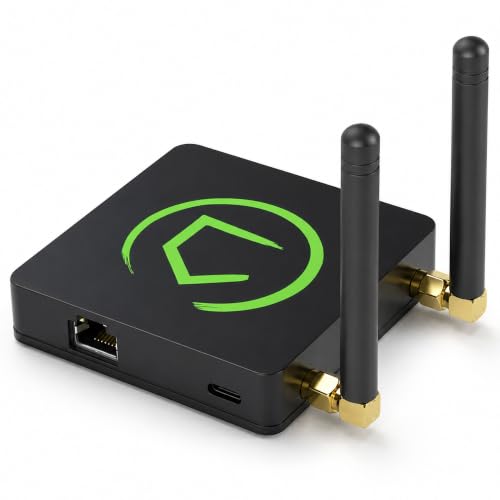
The Hubitat C-8 Pro is the closest thing to a private server for your smart home. It runs all automation rules locally on the hub rather than shipping commands to a cloud service, which means the lights stay fast even when your ISP goes down. With support for Z-Wave 800 Series Long Range, Zigbee 3.0, Matter 1.5, and Bluetooth, it covers nearly every wireless protocol currently on the market. The two external antennas provide stronger signal penetration for larger homes, and the hub works with over 1,000 devices across 100 brands.
Setup requires a bit more technical patience than a consumer-brand hub—you will need to consult the compatibility docs and may need to re-add some legacy Z-Wave devices manually. The built-in rules engine is powerful once you learn its logic: you can create conditional triggers based on time, sensor state, device battery level, and even AI-enhanced scheduling. The 2.56-ounce chassis is surprisingly light, but the processing chops come from a quiet, fanless design that sips power while handling complex automations.
The C-8 Pro earns its spot at the top because it prioritizes reliability over convenience. For users who want their automations to fire instantly and survive internet outages, this hub is the most versatile single-box solution right now. It pairs well with everything from old Z-Wave door sensors to the newest Matter locks.
Why it’s great
- Full local execution — no cloud dependency for core automations
- Supports Z-Wave 800 LR, Zigbee 3.0, Matter 1.5, and Bluetooth in one box
- High-gain external antennas improve range in dense homes
Good to know
- Setup and rule creation require more technical effort than plug-and-play hubs
- Alexa integration can be finicky with legacy Z-Wave and Zigbee devices
2. Home Assistant Green

Home Assistant Green is the official, pre-configured hardware from Nabu Casa that ships with Home Assistant OS already installed. Just plug in power and Ethernet, and you bypass the famously steep Raspberry Pi setup process. Inside the fanless white enclosure lives a quad-core ARM processor, 4 GB of LPDDR4X RAM, and 32 GB of eMMC storage—more than enough to handle hundreds of devices and complex automation scripts without stuttering.
The real superpower here is integration density. Home Assistant can talk to almost anything: Zigbee and Z-Wave require an external USB dongle (not included), but the software supports thousands of integrations—from Tuya switches to UniFi cameras to Tesla wall connectors. The learning curve is real; you will likely spend several evenings building dashboards and debugging YAML. But once tuned, the system breaks down every walled garden. An Arlo doorbell can trigger a Lutron light without any cloud bridge in between.
Green consumes only a couple of watts at idle and supports automatic backups. It does not include built-in Zigbee or Z-Wave radios, so factor in the cost of a – USB stick if you need those. This is the best option for users who want total control, local data privacy, and the ability to keep their smart home alive indefinitely without subscription fees.
Why it’s great
- Pre-loaded Home Assistant OS — no SD card or Pi setup required
- Supports thousands of device integrations across every major protocol
- Extremely low power draw (2W) with silent, fanless cooling
Good to know
- No built-in Zigbee or Z-Wave radios — you must add a USB dongle
- Steep learning curve for complex automations and dashboards
3. PHILIPS Hue Bridge Pro

The Hue Bridge Pro is an incremental but meaningful upgrade over the standard Hue Bridge, driven by a 1.7 GHz quad-core Cortex-A35 CPU and 4 GB of DDR4 SDRAM. That extra horsepower translates to near-instant response when you trigger a scene across 50 bulbs—no more half-second lag before the living room dims. The Pro supports up to 150 lights and 50 accessories, a significant jump that matters once your system extends beyond a single room.
Migration from an older Hue Bridge v2 is straightforward via the Hue app, though expect to spend about an hour per hub if you have a large setup. The new MotionAware feature uses existing Hue bulbs and sensors to detect motion and trigger lighting without needing a separate motion sensor—clever for hallway and bathroom automation. Security receives a bump with the Zigbee Trust Center, which encrypts device pairing to prevent unauthorized access. The Bridge Pro works with Apple Home, Alexa, Google Assistant, and Samsung SmartThings.
The catch is that you are still locked into the Philips ecosystem for full functionality. Third-party Zigbee bulbs work but won’t unlock all Hue-specific effects. This hub is the obvious choice for anyone already invested in Hue bulbs or planning to build a lighting-first smart home.
Why it’s great
- 1.7 GHz quad-core CPU delivers instant response across 150+ lights
- MotionAware uses existing bulbs as motion detectors
- 4 GB DDR4 RAM stores up to 500 personalized scenes
Good to know
- Full features require Hue-brand bulbs and accessories
- Migration from older bridge can be time-consuming with large setups
4. Aqara 4MP Camera Hub G5 Pro WiFi

The Aqara G5 Pro WiFi is a security camera that also functions as a Zigbee and Thread border router—essentially it replaces a separate hub if you are building an Aqara-focused smart home. The 4MP sensor with a 1/1.8-inch sensor and f/1.0 aperture delivers true color night vision without infrared, meaning you get crisp, full-color footage in near-dark conditions. The built-in spotlight doubles as a deterrent and improves nighttime visibility.
Local AI detection is handled by an onboard NPU that recognizes people, vehicles, animals, packages, and lingering behavior, plus it can detect abnormal sounds like baby crying, alarms, and coughing. This processing happens locally, so automations triggered by these events survive internet outages. The G5 Pro supports HomeKit Secure Video with an iCloud subscription, or you can store footage on the built-in 8 GB eMMC or via RTSP to a NAS. Dual-band Wi-Fi (2.4/5 GHz) with WPA3 encryption gives you flexibility between range and speed.
The drawbacks are that outdoor weatherproofing feels solid, but the USB-C power connector is not as robust as hardwired solutions from Ring. The camera mount also benefits from the separate angled bracket for tight eaves. This is an exceptional choice for users who want one device that handles both high-quality outdoor surveillance and acts as the hub for a larger Aqara sensor network.
Why it’s great
- 4MP color night vision with f/1.0 aperture — no IR washout
- Built-in Thread and Zigbee border router for Aqara sensors
- Local AI detection works without internet
Good to know
- USB-C power connector is not weather-sealed as well as hardwired competitors
- Only works as a hub for Aqara Zigbee devices, not third-party Zigbee
5. eufy Security eufy Smart Display E10
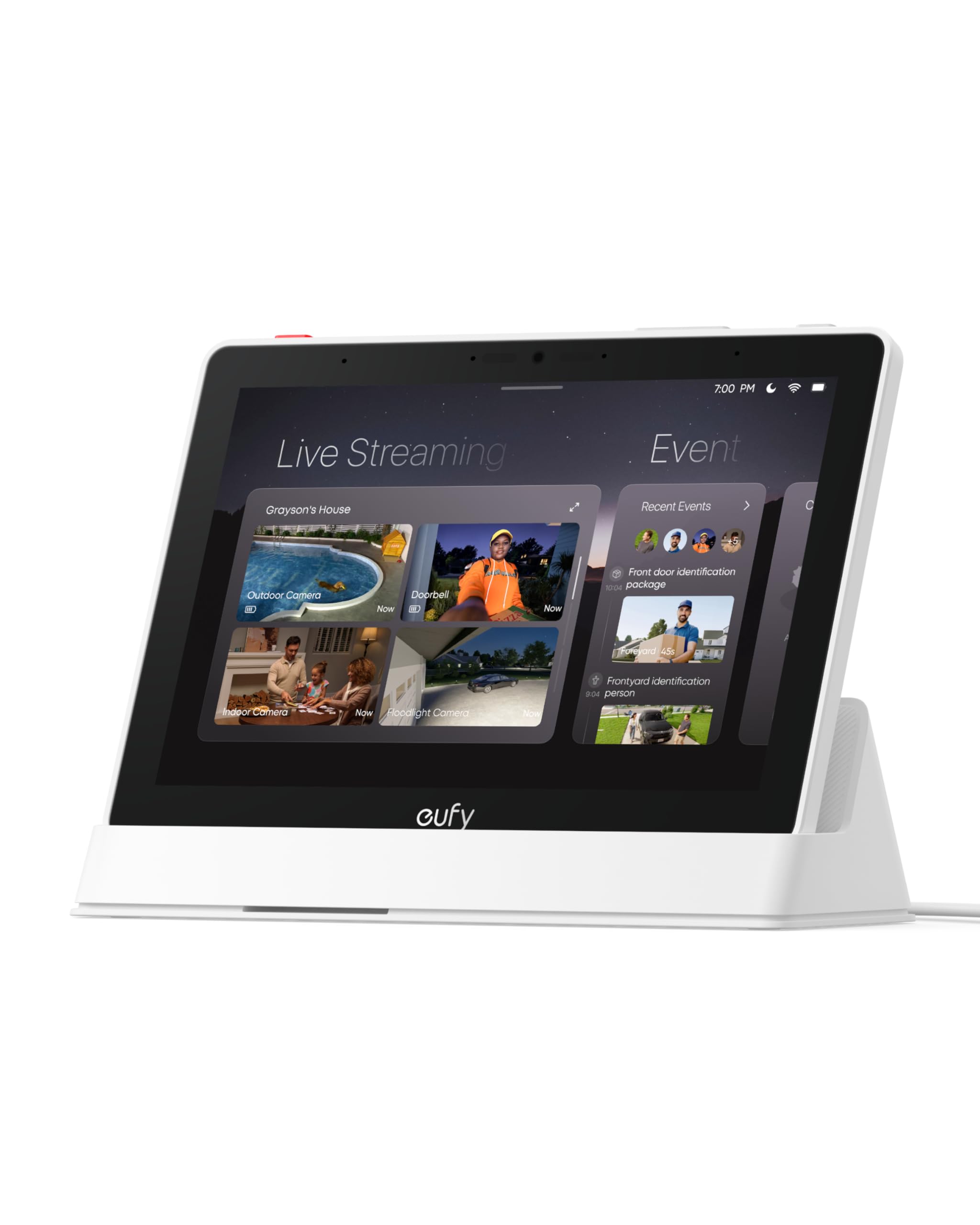
The eufy Smart Display E10 is a dedicated monitoring panel that turns your security cameras into a glanceable dashboard. The 8-inch touchscreen automatically lights up with a live feed and voice alert when someone rings the doorbell, unlocks a door, or triggers a motion event. The four-view grid lets you watch your front door, backyard, nursery, and garage simultaneously without juggling tabs on your phone.
All historical footage is downloaded to the onboard 64 GB eMMC storage, which means instant playback with zero buffering—no waiting for cloud servers to serve a clip. The E10 compiles daily summaries using facial and package recognition from a connected HomeBase 3, giving you a quick video recap of the day’s events. The unit is rechargeable and portable; you can pick it off its charging base and carry it to the kitchen while cooking, or mount it on a wall in the entryway.
The display only works with modern eufy security gear (Cameras and Doorbells that pair with HomeBase 3), so it is useless outside the eufy ecosystem. Some users report connectivity issues when streaming more than two camera feeds simultaneously. Battery life could be better—you will likely keep it on the charging base most of the time. For eufy loyalists, however, it is noticeably faster and more focused than repurposing an Amazon Echo Show for security.
Why it’s great
- Instant local playback from 64GB eMMC — no buffering or cloud delays
- Four-camera live view on one screen
- Rechargeable and portable; detaches from base for mobile use
Good to know
- Only works with modern eufy cameras and HomeBase 3
- Streaming stability drops with three or more simultaneous feeds
6. Aqara UWB Smart Lock U400
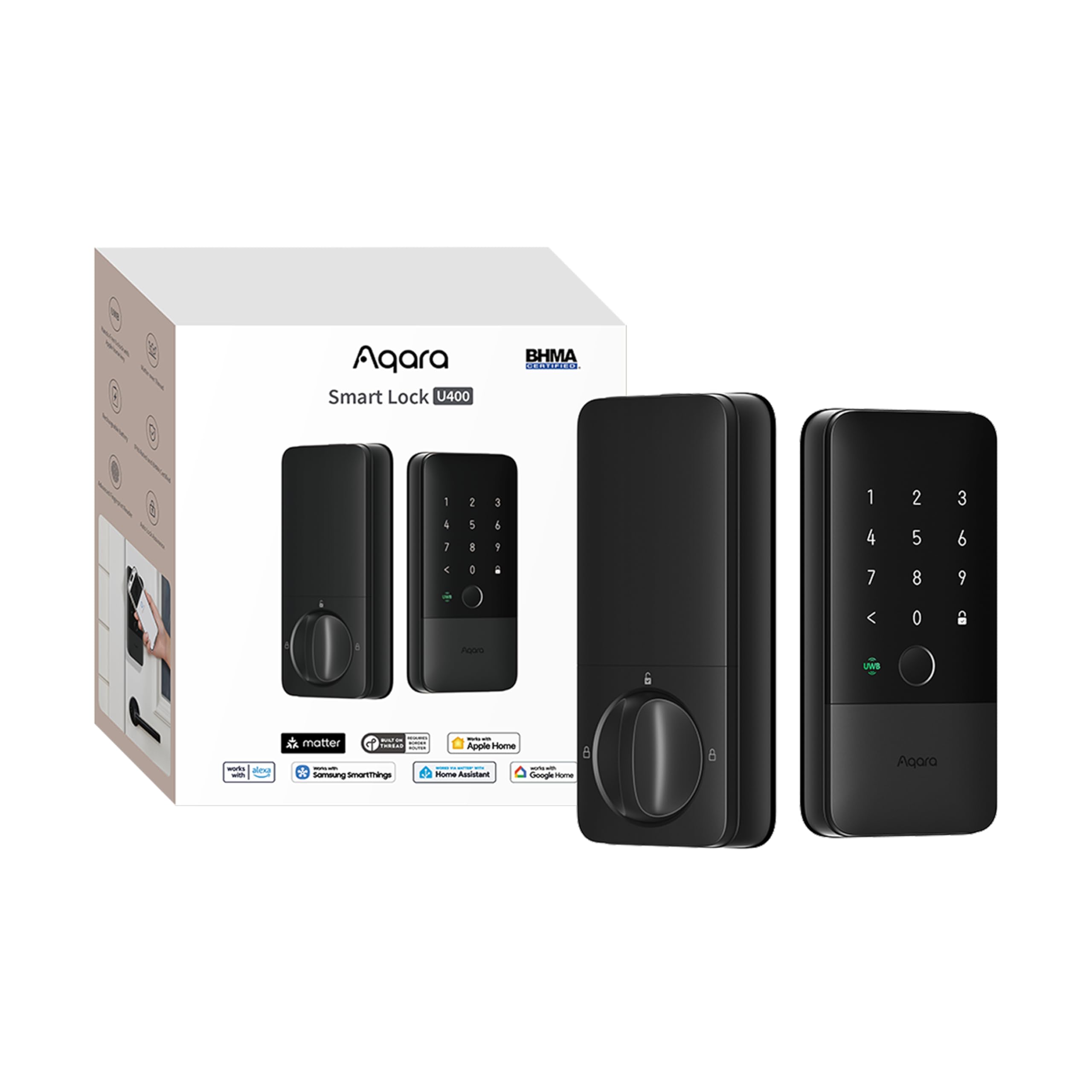
The Aqara U400 leverages Ultra-Wideband (UWB) technology to detect your approach and unlock the door before your hand touches the handle. It uses precise distance and direction sensing so the lock knows you are walking toward the door, not just standing nearby, reducing false triggers. The UWB feature requires an Apple Thread-enabled Matter controller and an iPhone 11 or newer (or Apple Watch Series 6+)—a significant ecosystem lock-in that buyers should verify before purchase.
Beyond UWB, the U400 offers a full arsenal of entry methods: Apple Home Key tap-to-unlock, fingerprint sensor, touchscreen passcode, NFC card (sold separately), voice assistant, and a physical key. The rechargeable lithium battery lasts up to six months per charge and can be recharged via USB-C without removing the lock from the door. The BHMA certification and IP65 weather rating ensure the lock withstands outdoor exposure and physical tampering.
The interior panel uses more plastic than the premium aluminum suggests, and the UWB unlocking reliability varies—some users report about a 50 percent success rate in specific walking patterns. The fingerprint sensor is finicky during initial registration but works well once trained. For a forward-looking smart lock that integrates with Matter and Thread, the U400 is impressive conceptually, but early adopters should temper expectations for the hands-free feature.
Why it’s great
- UWB detects direction and intent for true hands-free unlocking
- Matter over Thread enables multi-ecosystem compatibility
- Rechargeable battery with USB-C charging without removing the lock
Good to know
- UWB unlocking requires specific Apple hardware—not universal
- Interior build uses plastic panels; UWB reliability is inconsistent in some setups
7. Emporia Vue 3 Home Energy Monitor
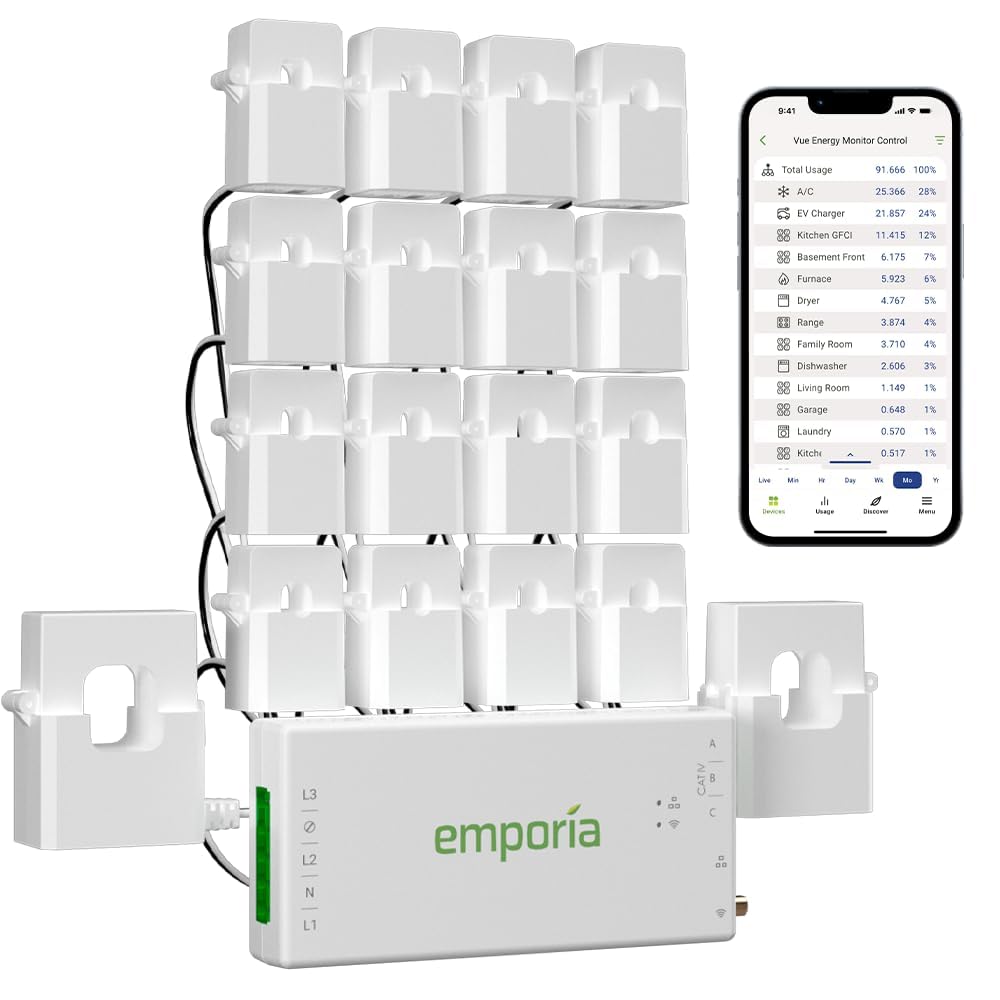
The Emporia Vue 3 is a whole-home energy monitor that takes your home automation system beyond lights and locks into actual energy savings. It installs inside your electrical panel using 16 clamp-on branch sensors (50A each) plus two larger sensors for the main lines. The system measures real power consumption at the circuit level with ±2 percent accuracy and reports 1-second data in the app when actively open. You can create automation rules to turn off smart plugs or adjust thermostat setpoints when peak demand pricing hits.
The UL certification is a serious differentiator—not all energy monitors pass UL safety testing, and the Emporia’s certification means the sensors, transformer, and wiring harness have been tested for fire and shock hazards. The accompanying app tracks time-of-use rates, solar net metering, and appliance-level consumption. It works with third-party thermostats, EV chargers, and smart plugs to automate energy-saving actions based on real-time data.
The main drawback is that the monitor requires a 2.4 GHz Wi-Fi connection and stores detailed data in the cloud for most features. Local control via Home Assistant is possible with custom firmware (ESPHome), but that voids the cloud app integration. The 16 included sensors may not be enough for a large 200A panel with many circuits. That said, users report saving per month or more after identifying phantom loads and inefficient appliances.
Why it’s great
- UL certified for safe electrical panel installation
- 16 branch sensors provide per-circuit granularity
- Integrates with smart plugs and thermostats for automated energy savings
Good to know
- Requires 2.4 GHz Wi-Fi; advanced features depend on cloud connectivity
- 16 sensors may not cover all circuits in a large breaker panel
8. Tapo CentralHub H500

The Tapo H500 centralizes up to 16 Tapo cameras and 64 sub-GHz sensors into a single hub with expandable local storage. It ships with 16 GB of built-in eMMC storage, and you can add a 2.5-inch SATA HDD or SSD (up to 16TB) for continuous recording without monthly fees. The HDMI output lets you display up to four live camera feeds on a TV or monitor, turning an unused screen into a security dashboard.
Beyond storage, the H500 adds facial recognition to existing Tapo cameras, filtering out familiar faces so you only get alerts for strangers. The built-in 110 dB alarm and chime can sound when an intruder is detected or when someone rings the smart doorbell. The hub supports offline mode so footage stays local and accessible during network outages. Setup is simple through the Tapo app, and the unit can connect via Wi-Fi or wired Ethernet for redundant networking.
Some users report that the facial recognition feature does not work consistently across all cameras, and the HDMI screen mirroring is more useful for less tech-savvy family members than for advanced monitoring. The SATA slot only supports 2.5-inch drives, not M.2 NVMe. Overall, this is the best option for a subscription-free, multi-camera setup within the Tapo ecosystem.
Why it’s great
- Expandable local storage via 2.5-inch SATA — no cloud subscription needed
- HDMI output for live multi-camera viewing on a bigger screen
- Offline mode keeps recordings accessible during internet outages
Good to know
- Facial recognition is inconsistent across all connected cameras
- Only supports 2.5-inch SATA drives, not M.2 or NVMe
9. Philips Hue Smart Light Bulbs Starter Kit

This entry-level kit includes the Hue Bridge and two white-and-color ambiance A19 bulbs, providing the core hardware needed to explore the Hue ecosystem. The 800-lumen output (equivalent to a 60W incandescent) works well for general room lighting, and the 16-million-color palette allows for custom scenes that shift from warm candlelight to vibrant party modes. The Hue Bridge connects via Zigbee, keeping the bulbs off your Wi-Fi network and reducing router congestion.
Setup is straightforward: screw in the bulbs, plug the Bridge into your router, and the Hue app walks you through discovery in about 10 minutes. The Bridge unlocks automations, geofencing, and remote access that the Bluetooth-only mode lacks. Voice control works with Alexa and Google Assistant after a quick skill setup. The Hue app offers pre-made scenes like “Energize” (cool bright white for focus) and “Relax” (warm dim for winding down), plus you can create custom routines that trigger at sunset or when you arrive home.
The two-bulb kit is a deliberate gateway—once you experience the responsiveness of the Hue ecosystem, you will likely want more bulbs for the living room, bedroom, and exterior. The price per bulb is higher than generic Zigbee alternatives, but the build quality and color accuracy justify the premium for lighting enthusiasts. This is the lowest-cost way to evaluate whether you want to invest in a Philips Hue-based system.
Why it’s great
- Complete starter pack with Bridge and two color bulbs
- 16 million colors with smooth dimming and scene presets
- Zigbee connectivity keeps bulbs off your Wi-Fi
Good to know
- Two bulbs only — you will likely need to buy more immediately
- Premium pricing compared to generic Zigbee bulbs
FAQ
Will a Zigbee hub work with Z-Wave devices?
What is the difference between Matter and Thread in a home automation system?
Can I control my home automation system when the internet is down?
How many devices can a typical hub handle before slowing down?
Final Thoughts: The Verdict
For most users, the best home automation system winner is the Hubitat Elevation C-8 Pro because it offers the broadest protocol support (Z-Wave 800 LR, Zigbee 3.0, Matter 1.5) with truly local processing that keeps your home running fast during internet outages. If you want total control and are comfortable with a steeper learning curve, grab the Home Assistant Green. And for a lighting-first approach with a dedicated focus on security and energy monitoring, the Aqara G5 Pro and Emporia Vue 3 make excellent complementary additions to whatever hub you choose.