
Finding a laptop that handles spreadsheets, video calls, and a dozen browser tabs without stuttering—while also respecting your bank account—remains the defining challenge of the budget work laptop market. Too many entry-level machines promise productivity but deliver frustrating lag the moment you open a second app. The real goal is a system where RAM, storage speed, and processor architecture converge to eliminate that friction.
I’m Min — the co-founder and writer behind Gadgets Feed. I’ve spent countless hours analyzing spec sheets, benchmarking real-world performance, and cross-referencing user feedback to separate the true workhorses from the marketing fluff in this crowded space.
Whether you are setting up a home office or equipping a remote team, this guide cuts through the noise to reveal the best budget laptop for work that actually delivers reliable performance without breaking the bank.
How To Choose The Best Budget Laptop For Work
Not every cheap laptop can handle real work. The distinction between a machine that slows you down and one that keeps pace comes down to three core components: memory, storage, and processor architecture. Prioritizing the right specs from the start prevents buyer’s remorse six months in.
RAM: The Multitasking Bottleneck
For professional use, 8GB of RAM is the absolute minimum for Windows 11. However, 16GB is the practical sweet spot if you routinely juggle a dozen browser tabs, Slack, Zoom, and Office apps simultaneously. More RAM directly reduces the time you spend waiting for apps to reload.
Storage: Speed Over Capacity
A fast NVMe SSD makes a bigger difference to daily feel than a larger hard drive ever will. Avoid eMMC or UFS storage if possible—these formats are slower and can bottleneck even a decent processor. A 256GB NVMe SSD is the baseline for a responsive work machine.
Processor: Core Counts More Than Clock Speed
Modern processors from the Intel Core i3 or AMD Ryzen 3 family with four or more cores handle office workloads efficiently. Avoid older Celeron or Pentium chips if you expect to run multiple applications at once. The core count determines how well the laptop handles parallel tasks.
Quick Comparison
On smaller screens, swipe sideways to see the full table.
| Model | Category | Best For | Key Spec | Amazon |
|---|---|---|---|---|
| Acer Aspire Go 15 | Mid-Range | Balanced daily work | Intel Core 3 N355, 8GB DDR5 | Amazon |
| HP 15 Laptop 2025 | Premium Bundle | All-in-one value with extras | Intel N150, 16GB RAM, 628GB | Amazon |
| ASUS Vivobook Go 15 | Mid-Range | AMD reliability for students | Ryzen 3 7320U, 8GB DDR5 | Amazon |
| ASUS Vivobook 14 | Premium | Premium portability | i3-1215U, 16GB RAM, 512GB SSD | Amazon |
| Lenovo IdeaPad 1 | Mid-Range | Large storage for documents | 12GB RAM, 512GB+128GB SSD | Amazon |
| Dell 15 DC15250 | Premium | Onsite service and support | Intel Core 3 100U, 512GB SSD | Amazon |
| HP 15-dy5599nr | Mid-Range | Trusted brand, solid basics | 12th Gen i3, 8GB RAM, 128GB SSD | Amazon |
| Jumper S7Hi | Budget | Entry-level with Office 365 | 12GB RAM, 640GB ROM | Amazon |
| Auusda Business Laptop | Budget | Max RAM and storage on a budget | 16GB DDR4, 1TB NVMe SSD | Amazon |
| NIMO 17.3 | High-End | Powerful work and creative tasks | Ryzen 7 8745HS, 16GB DDR5 | Amazon |
| HP 17.3 Business | High-End | Massive memory for heavy workflows | 64GB RAM, 2TB SSD | Amazon |
In‑Depth Reviews
1. Acer Aspire Go 15

The Acer Aspire Go 15 nails the fundamentals that matter most for a work laptop: a modern 8-core Intel Core 3 N355 processor, 8GB of DDR5 RAM, and a sharp 15.6-inch FHD IPS display. Boot-up is instant thanks to the 128GB UFS storage, and the 12.5-hour battery life easily outlasts a full workday. Dual USB-C ports with 45W charging and Wi-Fi 6 round out a connectivity suite that feels forward-looking at this price tier.
Real-world performance is steady across Google Workspace, Microsoft Office, and video conferencing apps. The 720p webcam benefits from Acer’s TNR low-light technology, which noticeably cleans up grain in dim home offices. AcerSense software gives you one-touch control over battery and storage health, which is a rare convenience in this segment.
The build uses recycled plastics, and the lid scratches more easily than metal alternatives—but for a machine that prioritizes internal performance and battery longevity, this is a minor trade-off. The combination of a Copilot key, DDR5 memory, and a 12-hour runtime makes this the most balanced daily driver for professional use.
Why it’s great
- Exceptional 12.5-hour battery life for all-day work
- Modern 8-core Intel Core 3 processor with DDR5 RAM
- Dual USB-C ports with 45W fast charging
Good to know
- Plastic chassis scratches easily
- 128GB UFS storage fills quickly with local files
2. HP 14″ Laptop 2025 Business Student Slim
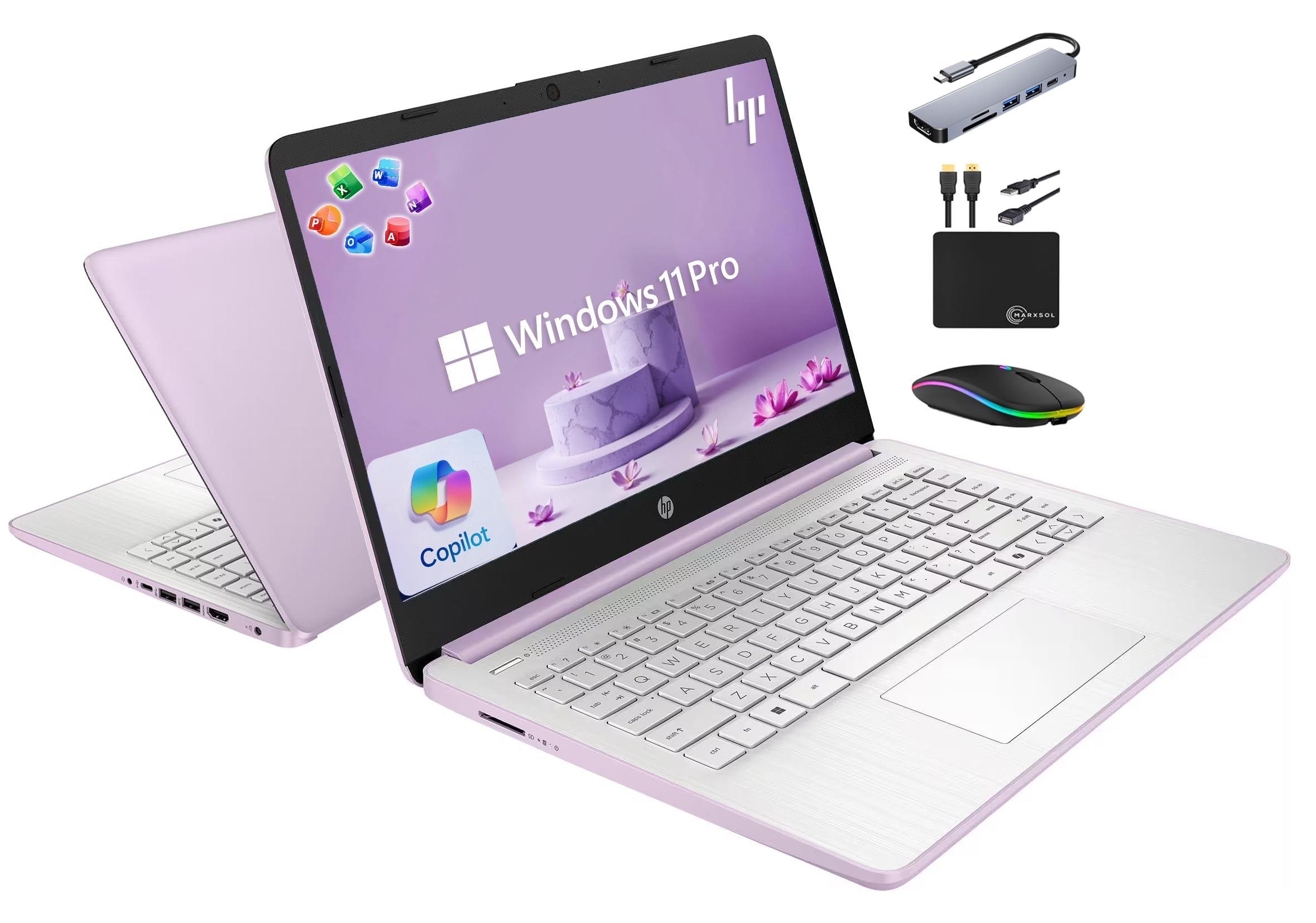
The HP 14 delivers a bundle that redefines value for a budget work laptop. With 16GB of DDR4 RAM and 628GB of total storage (128GB UFS plus a 500GB external drive), this machine handles heavy multitasking without breaking a sweat. The quad-core Intel N150 processor with Turbo Boost up to 3.6 GHz provides responsive performance for daily office tasks and web applications.
What sets this package apart is the inclusion of a lifetime Microsoft Office 2024 license and a 6-in-1 USB-C docking station hub. You also get a wireless mouse, HDMI cable, and an external drive—accessories that normally add significant cost. The 14-inch display with a 720p HP True Vision camera is adequate for video calls and document work, though the 1366×768 resolution is noticeably less sharp than FHD panels.
Buyers should note that Office 2024 may not be pre-installed out of the box; the seller provides a download link upon request. The lavender color adds a distinctive aesthetic, and the inclusion of Copilot AI support keeps this laptop aligned with the latest Windows features. For budget-conscious professionals who need a complete setup from day one, this is hard to beat.
Why it’s great
- 16GB RAM for seamless multitasking
- Includes lifetime Office 2024 and docking station
- Complete accessory bundle (mouse, HDMI cable, external drive)
Good to know
- 1366×768 display resolution, not full HD
- Office 2024 requires manual download from seller
3. ASUS Vivobook Go 15

The ASUS Vivobook Go 15 proves that AMD’s Ryzen 3 7320U processor is a formidable contender in the budget work laptop arena. This quad-core chip with integrated Radeon graphics delivers snappy performance for office suites and web apps, while the 15.6-inch NanoEdge FHD display with 45% NTSC color gamut provides crisp, vibrant visuals. The 8GB of DDR5 RAM and 128GB SSD are adequate for light to moderate multitasking.
Military-grade durability is a standout feature here—ASUS built this laptop to survive bumps and drops that would damage lesser machines. The 180-degree hinge is useful for collaborative settings, and the physical webcam shutter provides real privacy assurance during video calls. Fast charging via USB-C means you can top up the battery quickly between meetings.
The main limitation is the 128GB SSD, which leaves only about 35GB free after Windows setup. An external drive is almost mandatory for storing large files. The lack of an HDMI 2.0 port (it uses HDMI 1.4) means 4K output is capped at 30Hz. Still, for a reliable, road-ready machine with solid AMD performance, the Vivobook Go is a strong choice.
Why it’s great
- Military-grade durability for rugged use
- Smooth Ryzen 3 performance with DDR5 RAM
- Fast charging via USB-C port
Good to know
- Very limited 35GB free storage after initial setup
- HDMI 1.4 limits 4K output to 30Hz
4. ASUS Vivobook Laptop 14″

The ASUS Vivobook 14 strikes an excellent balance between portability and performance. Its 12th Gen Intel Core i3-1215U processor (6 cores, 8 threads) paired with 16GB of DDR4 RAM delivers noticeably snappier multitasking than typical 8GB budget laptops. The 512GB NVMe SSD provides ample fast storage for documents and media, and the 14-inch FHD IPS display is bright and antiglare—perfect for long work sessions.
Weighing under 3.5 pounds, this is a genuinely portable machine for professionals who move between desks and coffee shops. The Wi-Fi 6 connectivity ensures stable video calls and fast file transfers, while the full complement of ports (USB-C, dual USB-A, HDMI 1.4) covers most peripheral needs without a dongle. The touchpad is responsive and supports multi-finger gestures reliably.
A few design quirks warrant mention: the power button is integrated into the keyboard row, which can lead to accidental presses, and the number pad keys are slightly cramped due to the 14-inch chassis. Some units have reported unresponsive touchpad or dead pixel issues, so inspect upon arrival. For most office tasks, this is a powerful, lightweight workhorse that outperforms its price tag.
Why it’s great
- 16GB RAM handles heavy multitasking effortlessly
- Lightweight and portable under 3.5 pounds
- Fast 512GB NVMe SSD and Wi-Fi 6
Good to know
- Power button placement causes accidental presses
- Quality control issues reported (dead pixels, touchpad)
5. Lenovo IdeaPad 1

The Lenovo IdeaPad 1 takes a unique approach to storage by combining a 512GB NVMe SSD with an additional 128GB eMMC drive, giving you a total of 640GB of space. This is an unusually generous amount for a budget work laptop, and it means you can store large project files, media libraries, and virtual machines locally without worrying about running out of room. The 12GB of RAM is a practical sweet spot between 8GB and 16GB, offering smooth multitasking for productivity suites.
The 15.6-inch FHD IPS display with antiglare coating is comfortable for all-day work, and the included 1-year Office 365 subscription adds immediate value for business users. Wi-Fi 6 support ensures fast and stable connections, and the SD card reader is a welcome addition for photographers and content managers who frequently transfer files from cameras.
The Intel Celeron N4500 processor is the weakest component here—it’s a dual-core chip that can feel sluggish when running multiple heavy applications simultaneously. Boot times and basic office tasks are fine, but video conferencing with screen sharing can cause noticeable lag. The IdeaPad 1 is best suited for document-focused workflows where storage capacity matters more than raw processing speed.
Why it’s great
- Massive 640GB total storage (512GB SSD + 128GB eMMC)
- 12GB RAM provides good multitasking headroom
- Includes 1-year Office 365 and SD card reader
Good to know
- Celeron N4500 processor can feel slow under heavy loads
- Reported freezing issues during extended use
6. Dell 15 DC15250

The Dell 15 DC15250 brings enterprise-grade support to the budget work laptop category. The 1-year onsite service means a technician will come to your home or office if an issue cannot be resolved remotely—a safety net rarely found at this price point. The Intel Core 3 100U processor with a 4.7 GHz turbo boost and 512GB SSD provides responsive daily performance for office tasks and light creative work.
The 15.6-inch FHD display supports a 120Hz refresh rate, which makes scrolling through documents and web pages noticeably smoother than the standard 60Hz panels found on most budget laptops. Dell’s ComfortView software reduces blue light emissions, and the lifted hinge design creates an ergonomic typing angle that reduces wrist strain during long sessions. Bluetooth 5.3 is the latest standard for wireless peripherals.
Battery life is the main compromise here—it’s adequate for a few hours but won’t last a full workday off the charger. The laptop also ships with some pre-installed software that you may want to remove. The inclusion of a numeric keypad and calculator hotkey makes this a particularly good fit for finance and accounting professionals who work with numbers all day.
Why it’s great
- 1-year onsite service for peace of mind
- 120Hz FHD display provides smooth scrolling
- Ergonomic lifted hinge and numeric keypad
Good to know
- Battery life is shorter than competitors
- Ships with unnecessary pre-installed software
7. HP 15-dy5599nr

The HP 15-dy5599nr is a straightforward, no-surprises work laptop from a trusted brand. The 12th Gen Intel Core i3-1215U processor provides competent performance for email, web browsing, and Office applications, while the 128GB SSD ensures quick boot times. The 8GB of RAM is the baseline for Windows 11 and handles light multitasking without major slowdowns, though power users will want more.
The 15.6-inch FHD IPS display with micro-edge bezels delivers sharp visuals with good color reproduction, and the thin and light design makes it easy to carry between home and office. HP QuickDrop allows wireless file transfer between the laptop and your phone, which is useful for sharing documents on the go. The HP True Vision HD camera with automatic noise removal improves video call quality in noisy environments.
The 128GB SSD fills up quickly if you store many files locally, and Windows S mode can restrict app installations until you disable it. The laptop’s plastic construction feels a bit loose around the frame, though it holds together fine with normal use. For a reliable, no-frills work machine from a major OEM, this HP delivers consistent value.
Why it’s great
- Reliable 12th Gen Intel Core i3 performance
- Sharp FHD IPS display with micro-edge bezels
- HP QuickDrop for easy phone file sharing
Good to know
- Only 128GB storage—external drive recommended
- Build quality feels slightly loose in spots
8. Jumper S7Hi

The Jumper S7Hi offers an impressive 12GB of RAM and 640GB of combined storage (128GB eMMC + 512GB SSD) at an entry-level price point. This configuration handles the basics of office work—Word, Excel, web browsing, and email—with reasonable smoothness. The 15.6-inch FHD IPS display provides clear visuals for documents and spreadsheets, and the numeric keypad is convenient for data entry tasks.
The inclusion of a 1-year Office 365 license adds immediate productivity value out of the box. The laptop runs Windows 11 Home, and the Intel Celeron 5205U processor is sufficient for single-tasking workflows. The slim silver chassis is more attractive than most budget laptops, and the 38Wh battery provides adequate runtime for a few hours of untethered work.
Performance limitations become apparent when multitasking heavily—the dual-core Celeron processor and eMMC storage can cause lag when switching between multiple apps. The laptop uses Bluetooth 4.2 and Wi-Fi 5, which are older standards that affect peripheral compatibility and network speeds. This is best suited for basic office tasks where budget is the primary constraint.
Why it’s great
- 12GB RAM and 640GB storage for the price
- Includes 1-year Office 365 subscription
- FHD display and numeric keypad
Good to know
- Celeron processor struggles with heavy multitasking
- Uses older Wi-Fi 5 and Bluetooth 4.2 standards
9. Auusda Business Laptop

The Auusda Business Laptop punches well above its weight class with 16GB of DDR4 RAM and a 1TB NVMe SSD—specs typically found in laptops costing significantly more. The quad-core processor runs at up to 3.4 GHz and handles office productivity, light photo editing, and browser-based work with ease. The SSD is user-upgradable up to 8TB, making this a future-proof choice for professionals who accumulate data quickly.
The 15.6-inch FHD IPS display with thin bezels provides excellent screen real estate, and the 180-degree hinge allows for flexible positioning during presentations. The backlit keyboard with numeric keypad is comfortable for extended typing sessions, and the fingerprint reader enables quick, secure login. The included protective keyboard cover and 2-year warranty add tangible value.
There’s some confusion around the exact processor model—the listing mentions a 12th Gen chip, but some units shipped with an Intel N150 instead. The build quality feels good for the price, but the brand is less established than Acer or HP, which may concern some buyers regarding long-term support.
Why it’s great
- Massive 16GB RAM and 1TB NVMe SSD configuration
- Upgradable storage up to 8TB
- Includes backlit keyboard, fingerprint reader, and 2-year warranty
Good to know
- Processor model may differ from advertised spec
- Battery life averages only 6 hours
10. NIMO 17.3″ Laptop

The NIMO 17.3-inch laptop is a desktop replacement that redefines what a budget work machine can do. The AMD Ryzen 7 8745HS processor with 8 cores and integrated Radeon 780M graphics delivers performance that rivals much more expensive laptops, handling 4K video editing, virtual machines, and AI-assisted workflows without hesitation. The 16GB of DDR5 RAM (upgradable to 64GB) and 1TB PCIe 4.0 SSD ensure zero lag when switching between demanding applications.
The 17.3-inch display supports up to 4K resolution, and the 180-degree hinge makes collaborative sessions effortless. Connectivity is future-proof with USB4 (supporting external GPUs), HDMI 2.1 for 8K displays, and Wi-Fi 6E. The 100W USB-C Power Delivery charger is compact and keeps the laptop running at full speed. Despite the large screen, the metal chassis weighs under 4.6 pounds—impressive for this class.
The speaker quality is mediocre, lacking bass and clarity at higher volumes, so external speakers or headphones are recommended for media consumption. Battery life under heavy load is around 3-4 hours, which is typical for a high-performance 17-inch machine. The fingerprint reader works well, and the backlit keyboard is comfortable for extended typing sessions. This is the right choice if your work demands serious processing power.
Why it’s great
- Ryzen 7 processor rivals premium desktop performance
- USB4, HDMI 2.1, and Wi-Fi 6E connectivity
- Upgradable to 64GB RAM and dual PCIe 4.0 SSDs
Good to know
- Speakers are weak—external audio needed
- Battery drains quickly under heavy workloads
11. HP 17.3″ Business Laptop

The HP 17.3 Business Laptop offers an astonishing 64GB of DDR4 RAM and 2TB of SSD storage (with an additional 256GB docking station)—specs that put it in workstation territory. The 10-core Intel Core i5 processor with Iris Xe graphics handles massive multitasking, large databases, and video editing projects with ease. This is a machine designed for professionals who need to run multiple virtual machines or process enormous datasets locally.
The 17.3-inch display runs at 1600×900 resolution, which is lower than the FHD standard found on smaller, cheaper competitors. This is a clear compromise that limits fine detail in spreadsheets and design work. The inclusion of a docking station with extra USB ports and micro SD slots expands connectivity, and the bundle includes PLUSERA earphones. Windows 11 Pro comes with a lifetime Microsoft Office license, which is a significant value-add for business users.
Notable drawbacks include the lack of a backlit keyboard—surprising at this price point—and reports of overheating that can cause the system to shut down under sustained load. The battery life is typical for a 17-inch powerhouse, meaning it’s best used plugged in at a desk. If your workflow absolutely demands 64GB of RAM on a budget, this HP delivers, but be prepared to manage its thermal and display limitations.
Why it’s great
- Unmatched 64GB RAM and 2TB storage for budget segment
- Includes Windows 11 Pro and lifetime Office license
- Comes with docking station and earphones
Good to know
- 1600×900 display resolution is below FHD
- Overheating and shutdown issues reported
- No backlit keyboard
FAQ
Is 8GB of RAM enough for a work laptop in 2025?
What processor should I look for in a budget work laptop?
Can a budget work laptop handle video conferencing reliably?
Final Thoughts: The Verdict
For most users, the best budget laptop for work winner is the Acer Aspire Go 15 because it combines a modern 8-core processor, DDR5 RAM, exceptional 12-hour battery life, and fast USB-C charging in a balanced package that handles all-day productivity without compromise. If you need maximum multitasking power and a complete accessory bundle, grab the HP 14 with 16GB RAM and lifetime Office. And for raw processing muscle or massive memory requirements, nothing beats the NIMO 17.3 with its Ryzen 7 processor or the HP 17.3 with 64GB RAM.