
Medium format film holds detail that 35mm simply cannot touch, but the transition from acetate to a digital file is where most of those prized 6×6 or 6×7 centimeters of data get lost. A dedicated scanner designed for 120 negative film is the only reliable way to extract the full tonal range and resolution from those larger frames without cropping into the composition or flattening the midtones.
I’m Min — the co-founder and writer behind Gadgets Feed. I’ve spent countless hours researching optical sensor technologies, DMax values, and scan software workflows to separate the converters that genuinely reproduce medium-format grain from those that simply interpolate their way to a file.
Whether you are archiving decades of family portraits or digitizing a fresh roll of Portra 400, this guide breaks down the specs and real-world performance of the best 120 negative scanner choices currently available on the market.
How To Choose The Best 120 Negative Scanner
A scanner that works beautifully for 35mm slides can completely fail a 6×7 medium-format negative because the film area exceeds the sensor’s native coverage. The selection process starts with optical resolution and DMax, not advertised megapixel counts.
Optical Resolution vs. Interpolated Resolution
True optical resolution describes what the sensor and lens system actually capture. A flatbed scanner like the Epson Perfection V800 offers 6400 dpi optical resolution, which allows genuine enlargement of a 6×6 frame without introducing software guesswork. Interpolated numbers such as “22MP” or “7200 dpi” are marketing overlays that stretch the original data rather than reveal new detail.
Sensor Type: CCD vs. CIS
CCD sensors dominate the premium and pro-grade segment because they produce deeper color separation and less noise at higher DMax values. CIS sensors, often found in compact one-touch converters, struggle to capture the full tonal range of a large negative. For 120 film, a CCD-based unit is strongly preferred if preserving shadow and highlight gradation is the goal.
DMax and Bit Depth
DMax measures the maximum optical density a scanner can read. A DMax of 3.6 or higher is necessary to separate subtle tones in an underexposed negative. 48-bit color depth (16 bits per channel) preserves enough data for aggressive post-processing without posterization, which is critical when correcting color casts from expired film stocks.
Quick Comparison
On smaller screens, swipe sideways to see the full table.
| Model | Category | Best For | Key Spec | Amazon |
|---|---|---|---|---|
| Epson Perfection V800 | Flatbed CCD | Medium & Large Format Film | 6400 dpi Optical / 4.0 DMax | Amazon |
| Plustek OpticFilm 135i Ai | Dedicated 35mm | High-End 35mm Archiving | 7200 dpi / 48-bit / 3rd Gen Lens | Amazon |
| KODAK REELS 8mm/Super 8 | Film Digitizer | 8mm / Super 8 Motion Picture | 1080p / 8.08 MP Sensor | Amazon |
| Plustek OpticFilm 8200i SE | Dedicated 35mm | 35mm Slides & Negatives | 7200 dpi / IR Dust Removal | Amazon |
| Magnasonic Super 8/8mm | Film Digitizer | 8mm Reel Conversion | 1080p / 2.3-inch Screen | Amazon |
| HP FS700 Touch Screen | Standalone Converter | Quick Batch Scanning | 7-Inch LCD / 13 MP CMOS | Amazon |
| HP FS500 Touch Screen | Standalone Converter | Travel & Quick Scanning | 5-Inch LCD / USB-C Power | Amazon |
| ClearClick QuickConvert 2.0 | Standalone Converter | Photos & 35mm Film | 5-Inch LCD / 14 MP Optical | Amazon |
| KODAK Slide N Scan Max | Standalone Converter | Mass Slide Conversion | 7-Inch Tilt LCD / 13 MP Sensor | Amazon |
In‑Depth Reviews
1. Epson Perfection V800 Photo Scanner

The Epson Perfection V800 stands as the definitive flatbed solution for photographers who shoot 120, 4×5, or any format larger than 35mm. Its Dual Lens System switches between a high-resolution lens for film and a wide-coverage lens for reflective media, and the 6400 dpi optical resolution extracts genuine detail from a 6×7 frame without relying on interpolation. The 4.0 DMax delivers smooth tonal transitions in shadow areas, which is essential when scanning underexposed negative film where the density varies widely across the frame.
Epson Scan software provides professional-level controls including unsharp mask, Digital ICE for dust removal, and multi-exposure mode that captures the highlight and shadow values separately before combining them into a single file. The V800 ships with two film holders: one for 35mm strips and one for 120/220 medium format strips, though the 120 holder holds only three 6×6 frames or two 6×7 frames per pass. The unit connects via USB 2.0 and weighs 20.9 pounds, making it a semi-permanent workstation rather than a portable tool.
Customer feedback consistently highlights the massive time savings in editing — the onboard auto adjustments handle color and exposure corrections for a dozen slides in under seven minutes at 2400 dpi. Some users report that the 35mm holder could grip four-frame strips more securely, and the Digital ICE feature occasionally distorts fine edges like hair or nostrils if over-applied. For pure medium-format scanning with genuine optical quality, the V800 remains the benchmark.
Why it’s great
- True 6400 dpi optical resolution with CCD sensor extracts real medium-format detail
- 4.0 DMax preserves shadow gradation across dense negatives
- Dual Lens System optimizes coverage for both film and reflective originals
Good to know
- 120 film holder only accommodates 2-3 frames per pass
- Dust removal mode can distort fine edges in complex images
2. Plustek OpticFilm 135i Ai
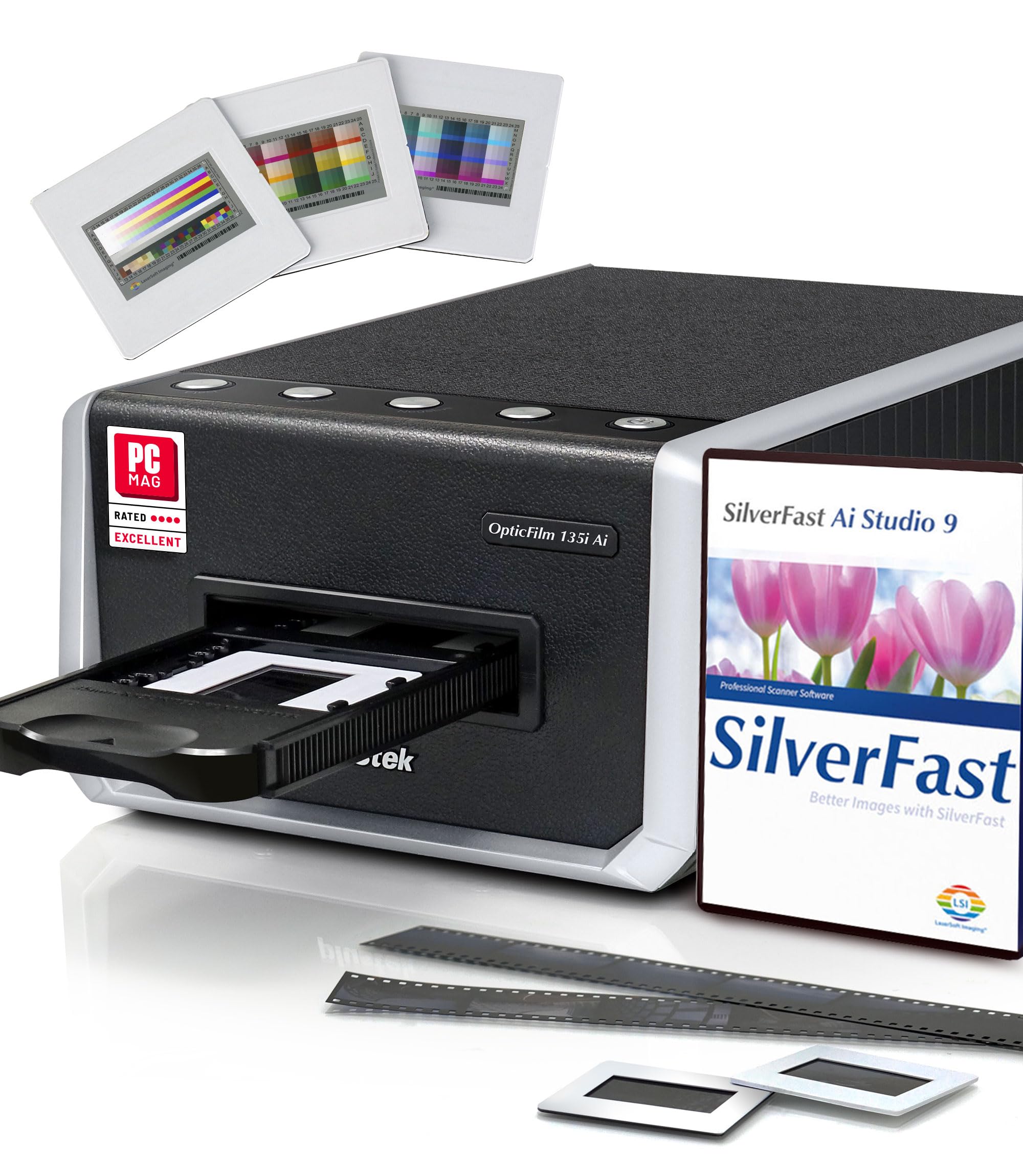
The 2025 Plustek OpticFilm 135i Ai is a dedicated 35mm film scanner that pushes resolution to 7200 dpi with a newly designed third-generation 5-element lens that reduces chromatic aberration and light refraction at the edges. This scanner is designed for archivists and serious enthusiasts who shoot 35mm film — it is not a 120 medium-format scanner, but its technology sets the standard for what a dedicated film scanner can achieve. The integrated infrared channel (iSRD) detects and removes dust and scratches without blurring the underlying grain, and the Advanced IT8 Calibration Target ensures color-accurate output across every scan.
SilverFast Ai Studio 9 is bundled with the unit, offering 48-bit color depth, multi-exposure, and batch-scanning capabilities. The scanner ships with two sets of film holders that can hold four mounted slides or six frames from a 35mm strip per batch, significantly increasing throughput. The 135i Ai also supports panoramic 35mm frames up to 226mm wide when paired with the optional panoramic holder, covering the wider aspect ratios used in XPan and similar cameras. Setup can be challenging on newer Mac hardware — some Mac M4 users report the scanner not being recognized by SilverFast, though QuickScan Plus works without issue.
Users who have scanned over 700 slides report that the iSRD feature catches most surface defects but still misses larger particles, so pre-cleaning with a blower is recommended. The tray mechanism cycles fully out and back in before each frame, which is thorough but adds time and places mechanical wear on the loading assembly. For pure 35mm archival quality where color fidelity and grain reproduction are the priority, the 135i Ai justifies its premium position through hardware that actually resolves what the camera captured.
Why it’s great
- 7200 dpi optical resolution with 5-element lens maintains edge sharpness
- iSRD infrared dust removal works without blurring the film grain
- Bundled SilverFast Ai Studio includes IT8 calibration for color accuracy
Good to know
- Software compatibility issues reported with Mac M4 systems
- 35mm only — no medium-format support
3. KODAK REELS 8mm & Super 8 Digitizer

The KODAK REELS Digitizer brings an 8.08-megapixel sensor to the 8mm and Super 8 conversion space, offering noticeably better clarity than the 3.5MP sensors found in budget reel converters. It scans frame by frame at 2 frames per second and outputs 1080p MP4 files directly to an SD card without requiring a computer. The unit accepts reels from 3 inches up to 9 inches, making it compatible with most home-movie formats from the mid-20th century.
The 5-inch touchscreen interface allows zoom, exposure adjustment, tint correction, and frame alignment directly on the device. The scanner outputs video at 20 fps, which is slightly faster than the original 16-18 fps of most 8mm film, so an external video editor is recommended to slow the playback speed back to the native frame rate. Users report that scanning a 3-inch reel takes approximately 30 minutes, and a full 7-inch reel can take over four hours — the process requires occasional supervision to re-thread the film if sprocket holes are damaged.
Customers who have digitized over 30 reels confirm that the KODAK REELS produces outstanding clarity for the price point but the unit must be monitored for film jams caused by broken sprocket holes. Some units exhibit a flickering artifact on footage with rapidly changing lighting, which requires third-party stabilization software to correct. For bulk 8mm conversion without the + cost of professional transfer services, the KODAK REELS delivers high-definition results with careful operation.
Why it’s great
- 8.08 MP sensor captures more detail than typical budget reel scanners
- Accepts 3 to 9-inch reels for broad compatibility
- Standalone operation with 5-inch touchscreen for on-device adjustments
Good to know
- Scan speed of 2 fps means 4+ hours for a 7-inch reel
- Flickering in high-contrast scenes may require post-processing
4. Plustek OpticFilm 8200i SE

The Plustek OpticFilm 8200i SE is a dedicated 35mm film scanner that delivers 7200 dpi optical resolution and integrated infrared dust removal at a price point well below the 135i Ai. It supports 48-bit color depth and a dynamic range of 3.6 DMax, which is sufficient for most color negative and slide films. The scanner bundles SilverFast SE Plus 9, which includes the iSRD dust removal function and multi-exposure mode that combines two passes of the same frame to recover highlight and shadow detail.
The workflow is straightforward: load a strip of up to six frames into the film holder, insert it into the scanner, and select the resolution and output format in SilverFast or VueScan. Users report that scanning four frames at 7200 dpi with infrared cleaning enabled takes roughly 27 minutes per batch, so a full 36-exposure roll at maximum resolution requires about three hours of scanning time. For most archival work, the recommended setting is 3600 dpi with JPEG output and iSRD enabled, which balances file size and speed while maintaining ample resolution for 8×10 prints.
Customers appreciate that the hardware is identical to the more expensive AI version — the price difference is purely in the software bundle. The infrared dust removal catches roughly 75% of surface defects, drastically reducing manual retouching time. The primary drawbacks are the USB 2.0 connection (a USB-C adapter is required for modern laptops without Type-A ports) and the learning curve of SilverFast, which some users bypass by purchasing VueScan for a simpler batch-scanning experience. For dedicated 35mm scanning with professional output, the 8200i SE offers the best value in its class.
Why it’s great
- 7200 dpi optical resolution captures fine grain detail from 35mm film
- Integrated infrared channel removes dust without softening the image
- Same hardware as the AI model at a significantly lower price
Good to know
- Batch scanning is slow — 27 minutes for 4 frames at max resolution
- USB 2.0 connection requires an adapter for USB-C-only laptops
5. Magnasonic Super 8/8mm Film Scanner FS81

The Magnasonic FS81 automatically converts 3-inch, 5-inch, and 7-inch reels of Super 8 and standard 8mm film into digital MP4 files with a single button press. It scans at 2 frames per second and outputs at 1080p resolution through a 2.3-inch built-in LCD screen or via the RCA video-out cable to a television. The unit operates entirely without a computer, saving files directly to an SD card up to 32GB.
Setting up the film path requires patience — the spooling mechanism must be aligned carefully, and old film with broken sprocket holes or splices will cause the scanner to stop mid-reel. Users who have scanned over 100 reels report that the default settings work well for most footage, and the on-device controls allow adjustment of brightness, sharpness, and framing. A 3-inch reel takes approximately 35 to 40 minutes to scan, while a 7-inch reel takes around 90 minutes. The output video plays at 20 fps, which is faster than the original 16 or 18 fps, so a video editor is needed to slow the footage down for natural motion.
Customer reviews praise the scanner for preserving old memories safely — unlike a projector, there is no risk of burning the film. The unit is heavier than compact converters at 4.4 pounds, but it feels solid and well-constructed. Some users report that the advancing mechanism can be glitchy with film that has missing sprocket holes, requiring multiple restart attempts per reel. For anyone with a substantial Super 8 legacy to digitize, the Magnasonic FS81 is a dedicated tool that delivers consistent results once the initial learning curve is overcome.
Why it’s great
- Automatic frame-by-frame digitization with push-button operation
- Accepts 3-inch to 7-inch reels for broad film format compatibility
- RCA video output allows real-time preview on a TV or monitor
Good to know
- Sprocket hole damage on old film causes frequent stops and restarts
- Output at 20 fps requires external software to match original frame rate
6. HP Touch Screen Film & Slide Scanner (FS700)
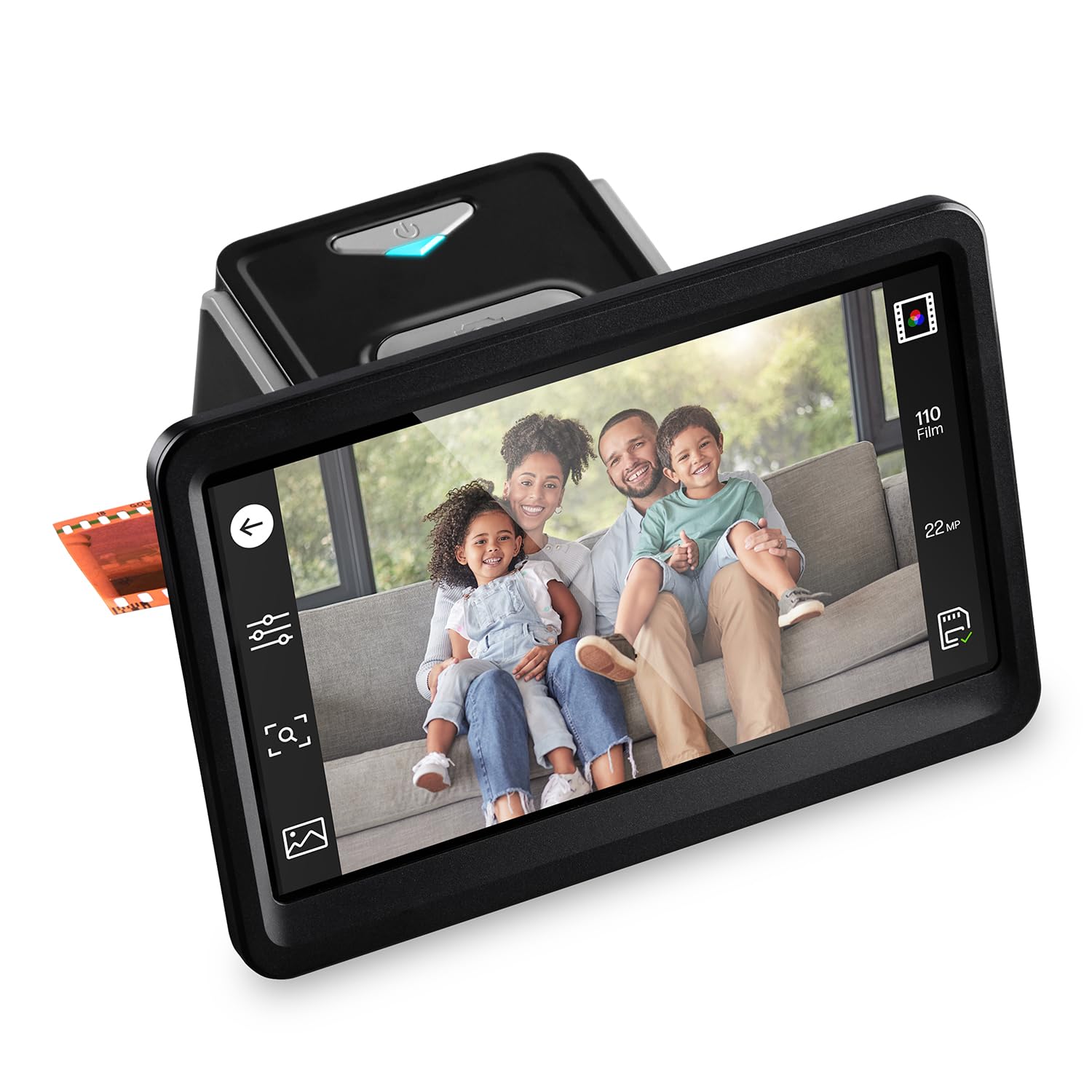
The HP FilmScan FS700 combines a large 7-inch tilting touchscreen LCD with a 13MP CMOS sensor to create a standalone film converter that requires no computer. It supports 135, 126, and 110 film formats, plus 50mm slides via the included adapter. The quick-feed tray allows continuous scanning of film strips without repositioning, and the onboard editing tools handle cropping, color adjustment, and brightness changes directly on the device.
The 7-inch display also functions as a digital picture frame in gallery mode, which is a thoughtful touch for sharing results immediately after scanning. Connectivity includes USB for file transfer to a computer and HDMI for slideshow playback on a larger screen, making it a versatile tool for family archiving. The 22MP interpolation claim is software-based — the real sensor output is 13MP, which is still adequate for 8×10 prints and online sharing. Plastic film adapters feel somewhat fragile, but no jams have been reported in long-term use.
Customers who scanned a half-century of negatives praise the FS700 for its ease of use — one user described the unboxing as the hardest part of the setup. The crop feature is less useful than expected, but the brightness and contrast controls are effective for correcting underexposed frames. Some users note that cheaper alternatives exist at this price tier, but the combination of a large touchscreen, HDMI output, and rapid batch scanning gives the FS700 an edge for users who want to digitize hundreds of slides quickly without learning professional scanning software.
Why it’s great
- Large 7-inch tilting touchscreen provides clear previews and easy editing
- HDMI output allows slideshow playback on a TV without a computer
- Quick-feed tray enables fast batch scanning of film strips
Good to know
- 22MP claim is interpolated — real optical resolution is 13MP
- Plastic film adapters feel less durable than metal alternatives
7. HP Touch Screen Film & Slide Scanner (FS500)

The HP FilmScan FS500 is the smaller sibling of the FS700, featuring a 5-inch all-angle touchscreen LCD and a 13MP CMOS sensor with 22MP interpolation. It supports the same 135, 126, and 110 formats plus 50mm slides, and it is powered through a USB-C connection that works from a PC USB port or an external 5V adapter. This is the most travel-friendly dedicated film scanner in the lineup, weighing just 13.4 ounces with dimensions smaller than a tablet.
The quick-load tray allows fast insertion of film strips, and the onboard gallery mode turns the screen into a digital picture frame when not scanning. The unit saves directly to an SD card, eliminating the need for a computer during the digitization process. Customers who transferred over 2,000 slides report that the image quality is very good when the source slide is in decent condition, and the scanner ran continuously for two months without any hardware failure. The red saturation can occasionally be heavy, but this is correctable in post-processing.
Some users note that the FS500 feels expensive for what is likely a one-time-use device, but the speed of digitization — roughly 1,000 slides in two afternoons — makes it a worthwhile investment for large collections. The unit requires an SD card (not included), and the internal components can collect dust over time, requiring periodic cleaning. For users who need a compact, standalone converter for 35mm slides and negatives, the FS500 delivers consistent results with minimal setup time.
Why it’s great
- Ultra-compact design at 13.4 ounces, ideal for travel
- USB-C power works with portable battery packs and laptop ports
- Onboard editing tools allow brightness and color adjustments without a computer
Good to know
- Red saturation may need correction in post-processing software
- Dust buildup on the internal sensor requires periodic cleaning
8. ClearClick QuickConvert 2.0

The ClearClick QuickConvert 2.0 stands out for its ability to scan photos without removing them from plastic album sleeves — simply remove the base plate and feed the album page through the top slot. It captures 14 megapixels optically (22MP interpolated) for photos up to 4×6, 35mm slides, and 110/126/135 negatives. The 5-inch preview LCD screen shows the image before saving, and the built-in rechargeable battery allows cord-free operation for portable scanning sessions.
The scanning speed is genuinely fast — about 2 to 3 seconds per image — and the unit saves JPEG files directly to an SD card without any driver installation. ClearClick includes a 2-year warranty and tech support from their USA-based small business, which is rare in this category. The QuickConvert 2.0 does not support 5×7 photos, but it can scan part of a larger photo by selecting a 4×6 area. The color balance on brightened images can shift toward a bluish tint, and some users report a yellow-green cast on specific film stocks that requires the included PhotoPad Professional software to correct.
Customers who scanned fragile 1920s-1960s album photos praise the QuickConvert for preserving the original album layout without damaging the paper or adhesive. The fixed-size settings (4×6, 3.5×5, 4×4) work for standard prints but require trimming for non-standard photo sizes. The battery life is sufficient for scanning several hundred images on a single charge, making it the most practical option for digitizing historic photo albums that cannot be disassembled.
Why it’s great
- Scans photos directly from album sleeves without removing them
- Built-in rechargeable battery enables cord-free operation anywhere
- 2-second scan speed makes it the fastest option for high-volume work
Good to know
- Color balance can shift blue or yellow-green depending on film type
- Does not support 5×7 photos or formats larger than 4×6
9. KODAK Slide N Scan Max

The KODAK Slide N Scan Max is a standalone digitizer built around a 13MP CMOS sensor that produces 4320×2880 pixel images from 135, 110, and 126 film formats. It features a tiltable 7-inch LCD screen for previewing and editing images, plus a quick-feed tray that allows continuous scanning without manually repositioning each frame. The unit saves directly to SD/SDHC cards up to 32GB and requires no computer connection.
The real-time exposure and color adjustment system is a standout feature — users can correct brightness and white balance before saving the image, which reduces post-processing time significantly. The scanner processes roughly 175 slides per hour, making it one of the faster options for mass digitization of 35mm slides. The color negative mode works well for standard color negatives, and the auto-exposure system compensates effectively for slides with varying density. However, the scanner crops the edges of the frame — there is no over-scan mode that captures the full film border — and it does not support 127 format slides natively.
Customers who digitized over 5,000 slides confirm that the Slide N Scan Max delivers excellent quality for the price point, but the edge cropping means that tightly composed slides will lose a few millimeters of the frame. The exposure compensation is limited to +/—2 EV, which may not be sufficient for severely underexposed slides. Some users report that slides occasionally get stuck inside the feed tray when pushed in quickly, requiring careful manual extraction. For budget-conscious users with large slide collections who can tolerate slight edge cropping, the Slide N Scan Max offers the best scan-per-dollar ratio in the standalone category.
Why it’s great
- Up to 175 slides per hour for rapid mass digitization
- Real-time exposure and color adjustment reduce post-processing
- Large tiltable 7-inch LCD screen provides comfortable previewing
Good to know
- Crops edges of the frame — no full-border capture mode available
- Slides can occasionally jam in the feed tray if inserted too quickly
FAQ
Can a 35mm dedicated scanner digitize 120 medium-format negatives?
Why does my standalone film scanner crop the edges of the frame?
Final Thoughts: The Verdict
For most users, the 120 negative scanner winner is the Epson Perfection V800 because it is the only scanner that genuinely covers medium-format film at 6400 dpi optical resolution with a 4.0 DMax that preserves shadow detail. If you need dedicated 35mm archival quality with infrared dust removal, grab the Plustek OpticFilm 135i Ai. And for converting 8mm home movies to digital without expensive transfer services, nothing beats the KODAK REELS Digitizer.