
That sickening moment when a critical architectural drawing or an oversized legal document won’t fit on a standard letter-size scanner bed is a workflow killer. For engineers, architects, artists, and small-office managers, the inability to handle A3 (11.7″ x 16.5″) media means either stitching together multiple scans or outsourcing—both of which waste time and introduce errors. A dedicated large-format solution eliminates that bottleneck, turning a chaotic scanning session into a single, fluid action.
I’m Min — the co-founder and writer behind Gadgets Feed. My research for this guide involved cross-referencing print engine technologies, scan resolutions, and ADF throughput specs across dozens of models to identify which units genuinely handle heavy A3 workflows without compromising speed or image quality.
After weeks of poring over technical documentation and thousands of verified user reports, I’ve narrowed the field to the eleven top contenders that define the a3 printer scanner market today for professionals who refuse to compromise on format flexibility.
How To Choose The Best A3 Printer Scanner
Selecting an A3 printer-scanner combo is more complex than picking a standard office inkjet. The form factor, print technology, and scanning speed all shift meaningfully once the media size crosses the A4 threshold. You are not just buying a larger frame—you are buying a machine engineered to feed, align, and output sheets that are physically unwieldy. Here is exactly what to look for.
True A3 Flatbed Depth vs. Letter-Size ADF with A3 Support
Many machines market “A3 scanning” but can only handle A3 through a document feeder—their flatbed is capped at letter or legal size. This matters if you scan books, bound reports, or architectural blueprints that cannot be fed through an ADF. For those tasks, you need a flatbed with a glass surface measuring at least 11.7″ x 16.5″. Pure ADF-based A3 support is fine for loose sheets, but a true A3 flatbed is non-negotiable for delicate or bound originals.
Print Engine Technology: PrecisionCore vs. Laser Toner
Heat-free PrecisionCore inkjets (Epson) use piezoelectric microelectromechanical systems to fire ink without heat, which means lower power consumption and instant start-up—no warm-up time. Laser toner (Canon, Brother, HP, Xerox) uses fusing heat to bond plastic toner onto paper, which delivers sharper text on plain paper and water-resistant output. For heavy A3 text documents, laser is typically faster and more durable. For color graphics on coated media, a high-end inkjet can produce wider gamut and finer detail.
Duplex ADF Scan Speed — The Real Bottleneck
A single-pass duplex ADF that scans both sides of a 50-page A3 document in one pass (typically 80–100 images per minute) is vastly faster than a single-pass scanner that requires flipping the stack. Look for “one-pass duplex” in the spec sheet. Machines that only offer “two-pass duplex” (scan side A, then flip and scan side B) effectively halve your scanning speed for double-sided originals—a costly time penalty when processing large-format reports.
Paper Handling and Tray Configuration
A3 paper trays are physically large. Confirm that the machine’s paper path supports A3 without curling damage. Premium units offer dual in-trays: one dedicated to A3, one for letter. This eliminates manual tray swapping. Also check the output tray capacity—a 50-sheet output is quickly overwhelmed when printing large-format marketing collateral or CAD drawings. A 250-sheet output tray or a rear straight-through path for heavy cardstock is essential.
Quick Comparison
On smaller screens, swipe sideways to see the full table.
| Model | Category | Best For | Key Spec | Amazon |
|---|---|---|---|---|
| Canon imageCLASS MF445dw | Monochrome Laser | High-speed duplex scanning | 40 ppm, single-pass duplex ADF | Amazon |
| Canon imageCLASS MF462dw | Monochrome Laser | Expandable paper capacity | 37 ppm, up to 900 sheets | Amazon |
| Epson EcoTank Pro ET-16600 | Wide-Format Inkjet | True A3 flatbed + low ink cost | 25 ppm, 4800×2400 dpi | Amazon |
| Brother MFC-L3720CDW | Color Laser | Color laser with cloud scanning | 19 ppm, 3.5″ touchscreen | Amazon |
| HP Color LaserJet Pro MFP 3301fdw | Color Laser | Small-team color productivity | 26 ppm, single-pass duplex ADF | Amazon |
| Xerox C235dni | Color Laser | Budget-friendly color laser | 24 ppm, Wi-Fi + AirPrint | Amazon |
| Canon MegaTank MAXIFY GX2020 | Inkjet Supertank | High-volume color with low ink cost | 15 ppm, 35-sheet ADF | Amazon |
| Epson Workforce Pro WF-4834 | Inkjet All-in-One | Heat-free high-volume printing | 25 ppm, 500-sheet capacity | Amazon |
| HP LaserJet Pro MFP 3101fdw | Monochrome Laser | Fast B/W for small teams | 35 ppm, intelligent Wi-Fi | Amazon |
| Brother MFC-L2820DW | Monochrome Laser | Compact monochrome for small office | 34 ppm, 50-sheet ADF | Amazon |
| Plustek OS1180 | Dedicated Flatbed Scanner | True A3 flatbed scanning | 1200 dpi, A3 glass bed | Amazon |
In‑Depth Reviews
1. Canon imageCLASS MF445dw

The MF445dw is the monochrome laser workhorse that delivers 40 ppm output and a single-pass duplex ADF that scans both sides of an A3 document in one pass at up to 100 images per minute. That makes it the undisputed speed king for high-volume A3 scanning tasks in legal, accounting, and education settings.
The 5-inch color touchscreen with customizable Application Library shortcuts means you can program one-button scan-to-FTP or scan-to-email routines. Canon’s 3-year limited warranty provides genuine peace of mind for a machine expected to handle tens of thousands of pages annually. The included 3,100-page toner cartridge further reduces the initial cost of ownership.
Where it falls short is color—this is strictly monochrome. Non-pure black colors in scanned originals will appear pixelated on output. Also, the touchscreen requires deliberate taps; users reporting occasional unresponsiveness during rapid multi-task workflows. For a pure black-and-white A3 production environment, however, few machines match its raw throughput.
Why it’s great
- Single-pass duplex ADF scans 100 ipm for A3 double-sided documents.
- 40 ppm print speed with 5.3-second first-page-out.
- 3-year warranty and full 3,100-page starter cartridge.
Good to know
- Monochrome only—color graphics scan but output in grayscale.
- Third-party toner may be blocked by firmware updates.
- Touchscreen requires firm press; occasional missed taps reported.
2. Canon imageCLASS MF462dw

The MF462dw shares the same single-pass duplex ADF technology as its sibling but adds an expandable paper path that can hold up to 900 sheets when paired with the optional cassette AH-1. For offices that constantly run A3 paper, this means fewer refill interruptions and more continuous throughput.
Its 37 ppm black-and-white engine is only marginally slower than the MF445dw, but the 5-inch color touchscreen and Application Library deliver the same intuitive smart-phone-like interface. The 50-sheet ADF handles multi-page A3 stacks without hesitation, and the auto-duplex printing saves paper on large-format drafts.
The included starter toner (Cartridge 070 Black Standard, 3,000-page yield) gets you operational out of the box, but the high-capacity cartridge (070H, 6,700-page yield) is where the real cost-per-page savings kick in. The MF462dw also includes a dedicated 100-sheet multipurpose tray for heavy cardstock or envelopes without disturbing the main cassette.
Why it’s great
- Expandable to 900 sheets—best paper capacity in this tier.
- Single-pass duplex ADF with 100 ipm scanning speed.
- 3-year limited warranty and high-yield toner option.
Good to know
- Monochrome only; no color support.
- Touchscreen occasionally needs deliberate pressing.
- Optional paper cassette not included in base price.
3. Epson EcoTank Pro ET-16600
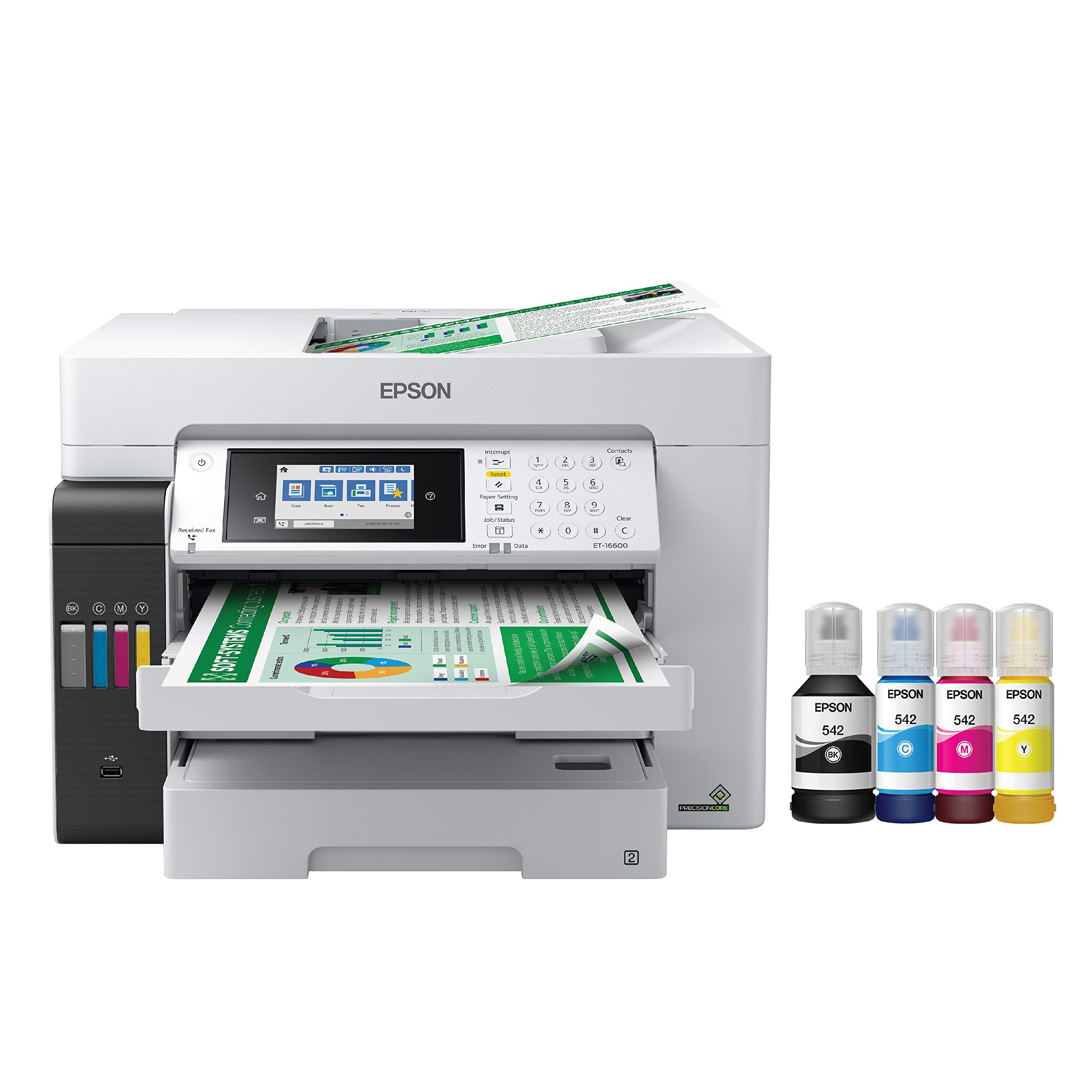
The ET-16600 is the only true A3 flatbed in this roundup, offering a glass scanning surface that accommodates oversized, bound, or delicate originals up to 11.7″ x 17″. Its PrecisionCore heat-free inkjet technology prints at 4800 x 2400 dpi, delivering exceptional color fidelity for architectural renderings, marketing collateral, and fine-art prints.
The supertank refillable ink system delivers an incredibly low cost per page with included bottles providing enough ink for roughly two years of moderate use. The 50-sheet ADF auto-duplex scans both sides of A3 sheets without manual flipping, and the 4.3-inch touchscreen provides straightforward navigation for complex scan-to-file workflows.
The trade-offs are size and build quality perception. The ET-16600 is heavy and requires a dedicated 24″ x 32″ footprint. Some users report that the motorized output tray and plastic chassis feel less robust than similarly priced laser alternatives. Additionally, the initial ink fill consumes about 20% of the supplied bottles for system priming, which is normal but worth knowing.
Why it’s great
- True A3 flatbed for bound originals—no other all-in-one here offers this.
- Ultra-low ink cost per page with included 2-year supply of bottles.
- 4800 x 2400 dpi print resolution for high-quality graphics.
Good to know
- Large and heavy—requires a substantial desk or stand.
- Reported printhead failures in some units after 12-18 months.
- Epson warranty may be strict on third-party ink usage.
4. Brother MFC-L3720CDW

The MFC-L3720CDW is a full-color laser all-in-one that produces vibrant, water-resistant A3 output using Brother Genuine toner. Its dual-band wireless networking (2.4 GHz/5 GHz) ensures stable connections even in busy multi-device environments, and the 50-sheet ADF with single-pass scanning is surprisingly fast for its class.
The 3.5-inch color touchscreen supports up to 48 customizable shortcuts, giving users quick access to scan-to-Google Drive, scan-to-Dropbox, or scan-to-OneNote workflows. The color laser engine delivers sharp text and uniform color fills on plain paper, making it a strong choice for marketing materials and presentation decks.
The “Replace Waste Toner” error after approximately 1,000 pages in some units is a known pain point. The waste toner box is a consumable that needs periodic replacement, and if ignored, the machine will lock up. Brother’s firmware updates may also restrict generic toner cartridges, so budget for genuine consumables.
Why it’s great
- Color laser output with water-resistant prints on plain paper.
- 48 customizable shortcuts on the touchscreen simplify workflows.
- Dual-band Wi-Fi and Wi-Fi Direct for flexible office networking.
Good to know
- Waste toner box replacement may be needed after ~1,000 pages.
- Firmware updates can block third-party toner cartridges.
- Print speed at 19 ppm is slower than monochrome rivals.
5. HP Color LaserJet Pro MFP 3301fdw

The 3301fdw ups the color-multifunction game with a 26 ppm color engine that uses HP’s next-generation TerraJet toner for more vivid color saturation. Its single-pass duplex ADF scans both sides of an A3 document simultaneously, and the dual-band Wi-Fi with auto-reset detects and resolves connection drops without user intervention.
The 250-sheet input tray, auto-duplex printing, and a responsive color touchscreen make this a strong candidate for small teams producing high-quality color reports. The HP Smart app adds mobile scan-to-email and remote monitoring capabilities.
HP’s firmware security measures block non-HP cartridges, and periodic updates reinforce that restriction. Several users reported color print defects (streaks, missing toner) with the starter toner that required weeks to resolve through HP support. If you use HP Genuine toner and maintain the warranty, the machine performs reliably.
Why it’s great
- 26 ppm color laser—fastest color MFP in this comparison.
- Single-pass duplex ADF scans both sides of A3 in one pass.
- TerraJet toner delivers more vivid color saturation than previous HP generations.
Good to know
- Firmware actively blocks non-HP toner cartridges.
- Starter toner yield is low (~50 pages for color).
- Color print defects reported with some starter toner units.
6. Xerox C235dni

The Xerox C235dni brings color laser functionality to the budget-friendly tier without sacrificing print quality. With 24 ppm black-and-white and 24 ppm color speed, it matches the fastest color all-in-ones in this list at a significantly lower entry point. Included starter toner yields 500 pages, enough to evaluate the machine’s output before investing in high-yield cartridges.
Wireless setup via the Xerox Easy Assist App is genuinely fast, and the built-in Wi-Fi supports Apple AirPrint and Mopria for mobile printing. The 250-sheet input tray and 50-sheet ADF are standard for the class, but the machine’s compact footprint makes it suitable for desks where space is at a premium.
The 500-page starter toner will deplete quickly in a busy office—factor the cost of a high-yield cartridge into your budget immediately. Some users noted the ADF hinges felt weak on early units, and the machine can be sensitive to paper quality (generic copy paper may cause faint output). Use 24 lb laser paper for best results.
Why it’s great
- 24 ppm color laser at a budget-friendly price point.
- Easy smartphone setup with Xerox Easy Assist App.
- Works with Apple AirPrint, Mopria, and Wi-Fi Direct.
Good to know
- 500-page starter toner is very limited—factor in a high-yield cartridge.
- Sensitive to paper quality; best results with 24 lb laser paper.
- ADF hinge durability concerns reported by some users.
7. Canon MegaTank MAXIFY GX2020

The MAXIFY GX2020 uses Canon’s MegaTank refillable ink system—specifically pigment-based GI-25 bottles—which keeps the cost per color page extraordinarily low. One full set of ink bottles yields up to 3,000 black and 3,000 color pages, effectively eliminating the cartridge replacement treadmill that frustrates so many office inkjet users.
Its 15 ppm black / 10 ppm color print speed is slower than laser alternatives, but the trade-off is exceptional color quality on glossy and plain paper. The 2.7-inch color touchscreen handles navigation, and the 35-sheet ADF is sufficient for smaller batch scanning. Duplex printing is automatic.
The GX2020’s printing can be loud during operation, and cardstock printing shows a pronounced curl that may require manual flattening. Some users reported initial ink filling consumed a surprising amount of ink for priming the internal system. For high-volume color text documents on plain paper, the MegaTank’s cost efficiency is unmatched, but for speed-critical monochrome workflows, a laser is faster.
Why it’s great
- Ultra-low ink cost with 3,000-page yield per ink set.
- Pigment-based inks for water-resistant prints on plain paper.
- Auto-duplex printing and 35-sheet ADF included.
Good to know
- Color print speed (10 ppm) slower than color lasers.
- Cardstock printing produces pronounced paper curl.
- Reported initial priming uses a noticeable amount of ink.
8. Epson Workforce Pro WF-4834

The WF-4834 leverages Epson’s PrecisionCore heat-free technology to deliver 25 ppm black / 12 ppm color with instant start-up—no warm-up time at all. Its 500-sheet dual-tray paper capacity (two 250-sheet cassettes) means fewer refill interruptions during large A3 print runs.
The 4.3-inch color touchscreen and Epson Smart Panel App provide intuitive control, including scan-to-cloud and scan-to-email workflows. The 50-sheet ADF supports automatic duplex scanning and copying, and the DURABrite Ultra pigment ink produces smudge-resistant prints on plain paper.
Envelope printing is notoriously unreliable—users report jams on about 75% of attempts if the envelopes are not manually fed and aligned. The WF-4834 is also not a true A3 flatbed device; its flatbed is letter-size. For A3 scanning, you must use the ADF. Overall, it is a dependable high-volume inkjet for general office needs with the caveats above.
Why it’s great
- Heat-free PrecisionCore technology means instant start-up and low power draw.
- 500-sheet dual-tray paper capacity reduces refill frequency.
- DURABrite Ultra pigment ink resists smudging and water damage.
Good to know
- Envelope printing jams frequently (75% failure rate reported).
- Flatbed is letter-size only; A3 scanning requires the ADF.
- Not as fast as laser alternatives for pure monochrome text.
9. HP LaserJet Pro MFP 3101fdw

The 3101fdw is a monochrome laser designed for small teams handling up to 35 ppm. Its intelligent Wi-Fi automatically finds the strongest connection and reconnects after a disruption, which eliminates the single most common support call in shared offices. Auto duplex and a 50-sheet ADF round out the core functionality.
HP Wolf Pro Security provides customizable protection for sensitive documents, making this a viable choice for legal and financial environments where data security is a concern. The MFP supports Ethernet, USB, and Bluetooth for flexible connectivity, and works with AirPrint, Android, and Chromebook devices out of the box.
The machine uses HP cartridges with chips that block third-party replacements. Users who attempt to use off-brand cartridges will find the printer unresponsive after a firmware update. Some copies arrive with poor print quality (fuzzy text, faded graphics) that may require immediate return or service.
Why it’s great
- Intelligent Wi-Fi with auto-reconnect—ideal for shared offices.
- 35 ppm print speed with auto duplex.
- HP Wolf Pro Security for business-grade data protection.
Good to know
- Firmware updates actively block third-party toner cartridges.
- Some units shipped with substandard print quality (faded/fuzzy).
- Starter toner yield is low; budget for high-yield cartridge immediately.
10. Brother MFC-L2820DW

The MFC-L2820DW packs 34 ppm monochrome laser printing, a 50-sheet ADF, and a 2.7-inch touchscreen into a genuinely compact frame that fits on a small desk without dominating the workspace. Its dual-band wireless (2.4 GHz/5 GHz) plus Ethernet provides flexible networking, and the Brother Mobile Connect App allows print/scan from anywhere.
The Refresh EZ Print Subscription Service ensures you never run out of toner—Brother automatically ships replacement cartridges when levels are low. The machine scans up to 23.6 ipm black and 7.9 ipm color, and its 8.5-second first-page-out time is competitive for a small-office laser.
Setup can be confusing due to sparse printed instructions—several users reported needing to manually enter Wi-Fi credentials after the automatic setup failed. The 2.7-inch touchscreen is functional but less responsive than the larger screens on premium models. For a compact, reliable monochrome workhorse, it is difficult to beat at this price tier.
Why it’s great
- Compact footprint with 34 ppm laser output—great for small desks.
- Refresh EZ Print Subscription automates toner replenishment.
- Dual-band wireless and Ethernet for flexible connectivity.
Good to know
- Setup instructions are sparse; may require manual Wi-Fi configuration.
- Touchscreen can be less responsive than larger color panels.
- Scan speed color (7.9 ipm) is slower than main competitors.
11. Plustek OS1180

The OS1180 is a dedicated A3 flatbed scanner—no printing function—designed specifically for artists, librarians, and professionals who need to digitize oversized originals without the bulk of a multifunction printer. Its 11.7″ x 17″ glass bed handles ledger, tabloid, and A3 sheets in approximately 9 seconds per scan at 300 dpi.
The LED light source requires zero warm-up time, reducing power consumption. The bundled ABBYY FineReader 12 Sprint OCR software and DocAction file-sharing utility provide professional-grade text recognition and digital archiving capabilities. Color depth of 48 bits preserves subtle tonal variations in artwork and photographs.
The OS1180’s CIS sensor is adequate for most office scanning tasks but lacks the dynamic range of more expensive CCD sensors, which means shadow detail in dark documents can appear slightly crushed. Some users report driver stability issues on newer operating systems, requiring a restart of the scanner to recover. For pure A3 scan quality at this price, however, it is an outstanding value.
Why it’s great
- True A3 flatbed for oversized and bound originals—9-second scan speed.
- 48-bit color depth preserves fine tonal detail in artwork.
- Includes ABBYY OCR and DocAction software for professional archiving.
Good to know
- CIS sensor has less dynamic range than premium CCD scanners.
- Driver stability issues on some newer operating systems.
- No document feeder—each sheet must be placed manually on the glass.
FAQ
Can I use an A3 printer-scanner without a dedicated wide-format paper tray?
Why does my A3 scanner show a “paper mismatch” error when I try to scan a bound book?
What does a 50-sheet ADF mean for A3 scanning productivity?
Final Thoughts: The Verdict
For most users, the a3 printer scanner winner is the Canon imageCLASS MF445dw because its 40 ppm print speed and single-pass duplex ADF deliver the highest scanning throughput for A3 workflows without sacrificing paper capacity or build quality. If you need color output, grab the Brother MFC-L3720CDW for vibrant color laser prints with cloud-scanning convenience. And for true A3 flatbed scanning of bound originals, nothing beats the Epson EcoTank Pro ET-16600.