
Fitting a mid-range card into a high-end build isn’t a compromise; it’s a statement of strategic prioritization. The 3060 Ti GPU sits in a rare pocket of the market where raw rasterization performance meets genuine ray tracing capability without demanding a secondary mortgage on your peripheral budget.
I’m Min — the co-founder and writer behind Gadgets Feed. I’ve spent countless hours cross-referencing boost clocks, thermal solutions, board designs, and real-world performance data to separate the factory-OC winners from the cards that just borrow the reference spec.
After analyzing eleven of the most popular aftermarket coolers, VRM layouts, and factory clock targets, I’ve built a definitive ranking of the 3060 ti gpu market that cuts through the marketing noise and puts the actual silicon on trial.
How To Choose The Best 3060 Ti GPU
All 3060 Ti GPUs share the same GA104 die, but how that silicon is fed power, kept cool, and clocked makes the difference between a card that hums along at 65°C and one that throttles inside a warm case. Focus on these factors rather than brand loyalty.
Cooling Solution and Thermal Mass
The single biggest variable between partner cards is the cooler. A dual-fan design with a dense aluminum fin stack and direct-touch heat pipes will keep a 3060 Ti below 70°C under load. Triple-fan solutions (like the GIGABYTE WINDFORCE 3X) run quieter because they can spin slower for the same thermal result, but they also require a longer chassis to fit.
Factory Boost Clock vs. Real-World Stability
NVIDIA’s reference boost sits around 1665 MHz, but partner cards like the EVGA FTW3 push past 1800 MHz out of the box. A higher factory bin usually correlates with better power delivery (more VRM phases) and a more aggressive voltage curve. Compare boost clocks within the same price tier to identify the card that maximizes the silicon lottery odds.
Form Factor and Clearance
Measure your case’s maximum GPU length before buying. A card like the ZOTAC Twin Edge OC measures 8.7 inches and fits most mid-towers easily, while the EVGA FTW3 stretches nearly 15 inches and requires a support bracket to prevent PCIe slot sag. Always check the card’s thickness (2-slot vs. 2.5-slot) to ensure it clears your motherboard’s chipset heatsink and front-panel USB headers.
Quick Comparison
On smaller screens, swipe sideways to see the full table.
| Model | Category | Best For | Key Spec | Amazon |
|---|---|---|---|---|
| EVGA RTX 3060 Ti FTW3 | Premium | Max overclock headroom | 1800 MHz Boost Clock | Amazon |
| ASUS TUF Gaming 3060 Ti V2 | Premium | Durability and military-grade build | 1785 MHz Boost Clock | Amazon |
| MSI Gaming X 3060 Ti | Mid-Range | Quiet operation with RGB | 1770 MHz Boost Clock | Amazon |
| GIGABYTE AORUS Elite 3060 Ti | Mid-Range | Triple-fan cooling at mid-range price | 14000 MHz Memory Clock | Amazon |
| GIGABYTE Gaming OC PRO 3060 Ti | Mid-Range | Consistent triple-fan thermal solution | 14000 MHz Memory Clock | Amazon |
| EVGA XC Gaming 3060 Ti | Mid-Range | Compact dual-slot fit | 1710 MHz Boost Clock | Amazon |
| MSI Ventus 2X 3060 Ti | Mid-Range | No-frills budget performance | 1695 MHz Boost Clock | Amazon |
| ZOTAC Twin Edge OC 3060 Ti | Mid-Range | Compact SFF builds | 1695 MHz Boost Clock | Amazon |
| NVIDIA Founders Edition 3060 Ti | Entry | Reference baseline performance | 1.75 GHz Memory Clock | Amazon |
| ASUS Dual RTX 5060 Ti | Entry | DLSS 4 and lower power draw | 2632 MHz Boost Clock | Amazon |
| MSI Shadow 2X RTX 5060 Ti | Entry | 16GB VRAM for AI workloads | 16 GB GDDR7 | Amazon |
In‑Depth Reviews
1. EVGA GeForce RTX 3060 Ti FTW Ultra Gaming

EVGA’s FTW3 iteration of the 3060 Ti represents the high-water mark for factory-overclocked Ampere cards at this tier. The 1800 MHz real boost clock is the highest among all reviewed 3060 Ti models, translating directly into a consistent 5-8% real-world frame rate advantage over reference-clocked cards in titles like Cyberpunk 2077 and Call of Duty: Modern Warfare II. The iCX3 cooling solution uses three fans with individual temperature sensors across the PCB, allowing the card to maintain that boost clock even during hour-long gaming sessions without crossing 75°C.
Physically, this card is a monster. It measures nearly 15 inches long and weighs over 1.2 pounds, demanding a support bracket to prevent PCIe slot strain and a case with generous front clearance. The all-metal backplate and adjustable ARGB lighting give it a premium aesthetic that matches high-end motherboard ecosystems, but the sheer size makes it incompatible with small form factor (SFF) cases like the Cooler Master NR200 or Fractal Terra.
Benchmark results from the community show this card scoring within 3% of a stock RTX 3070 after a moderate manual overclock, making it the closest you can get to a 3070 without paying the premium. Owners report peak temperatures around 65°C under sustained load with fans barely audible, a testament to the iCX3 thermal solution’s efficiency. The LHR (Lite Hash Rate) designation is irrelevant for gaming but caps Ethereum mining performance, which helped stabilize retail pricing.
Why it’s great
- Highest factory boost clock at 1800 MHz among 3060 Ti models
- iCX3 triple-fan cooling keeps temps under 65°C under load
- Adjustable ARGB lighting and full-metal backplate
Good to know
- Extremely long at 14.9 inches, may not fit mid-tower cases without bracket
- Heavy PCB requires support brace to prevent sag
- Fans can become audible at max RPM
2. ASUS TUF Gaming NVIDIA GeForce RTX 3060 Ti V2 OC Edition

ASUS built the TUF Gaming 3060 Ti V2 around a philosophy of durability first, performance second. The card features a metal shroud, a solid aluminum backplate, and dual ball fan bearings that ASUS says deliver double the lifespan of conventional sleeve bearings. The OC mode boost of 1785 MHz puts it just behind the EVGA FTW3, but the real story here is thermal management — users consistently report temperatures staying below 58°C under load, even with a moderate overclock applied through GPU Tweak II.
The V2 revision specifically addresses the LHR (Lite Hash Rate) implementation, bringing it to 25 MH/s ETH hash rate, which means this card was designed unequivocally for gamers, not cryptocurrency miners. The dual-fan Axial-tech design pushes air through a dense fin stack that covers the full length of the PCB, and the 0dB technology stops the fans completely when the GPU temperature stays under 55°C, making this an excellent choice for silent-oriented builds.
At 11.85 inches long, this card fits most modern ATX cases without the monumental clearance issues of the FTW3. Builders upgrading from a GTX 1060 or 1660 Super report immediate, dramatic improvements in Cyberpunk 2077 performance, with smooth 60+ FPS at 1440p high settings. The military-grade certification (MIL-STD-810) isn’t just marketing — the card survived thermal shock and vibration tests that consumer cards typically bypass, adding genuine peace of mind for long-term ownership.
Why it’s great
- Military-grade certified for extreme durability
- Stays under 58°C even with manual overclock
- 0dB fan mode for silent operation at idle
Good to know
- No RGB lighting for those wanting customizable aesthetics
- Dual-fan design runs louder than triple-fan alternatives under heavy load
- Card length at 11.85 inches may still be tight in compact mid-towers
3. MSI Gaming GeForce RTX 3060 Ti Gaming X 8G LHR

MSI’s Gaming X line has always been the enthusiast’s choice for quiet operation, and the RTX 3060 Ti Gaming X delivers that promise with Torx Fan 4 technology. The 1770 MHz boost clock places it in the top tier of factory-overclocked 3060 Ti cards, and the dual-fan design with a massive aluminum heatsink keeps noise levels exceptionally low — users transitioning from AMD cards frequently note the MSI runs 10°C cooler with less fan noise than comparable alternatives.
The card’s 10.9-inch length is manageable for most mid-tower cases, though the integrated RGB lighting strip on the side adds a cosmetic plastic piece that some users found interfered with clearance in smaller ITX builds like the Fractal Meshify 2 Nano. The all-metal backplate provides structural rigidity and houses thermal pads that draw heat away from the rear of the PCB, improving overall VRM cooling during sustained loads.
In real-world testing, this card matches the ASUS TUF within 1-2% in raw performance, but offers superior out-of-the-box noise characteristics. The LHR designation doesn’t affect gaming performance at all, and the card handles DLSS-enabled titles like Control and Death Stranding with ease at 1440p. The included MSI Center software gives granular control over fan curves and RGB lighting, though some users prefer the simplicity of MSI Afterburner for manual overclocking.
Why it’s great
- Exceptionally quiet Torx Fan 4 cooling solution
- 1770 MHz boost clock provides strong factory overclock
- Full RGB customization via MSI Center
Good to know
- Cosmetic plastic shroud can hinder clearance in compact ITX cases
- Lower boost clock compared to EVGA FTW3 and ASUS TUF
- Runs warmer than triple-fan alternatives under extended load
4. GIGABYTE AORUS GeForce RTX 3060 Ti Elite 8G (REV2.0)

GIGABYTE’s AORUS Elite brings the triple-fan WINDFORCE 3X cooling system to the 3060 Ti at a mid-range price point that undercuts most premium dual-fan alternatives. The 14000 MHz memory clock is standard for the GA104 die, but the three 80mm fans with alternate-spin technology reduce turbulence and effectively push air through the massive fin stack. This thermal overhead means the card rarely needs to spin fans above 60% even during ray-traced gaming sessions, maintaining a whisper-quiet profile.
The card measures 11.65 inches long and fits standard ATX cases without issue, though the triple-fan shroud is 2.5 slots thick, which can block adjacent PCIe slots on micro-ATX motherboards. The RGB Fusion 2.0 lighting zone on the side of the card is subtle but customizable, and the metal backplate includes a reinforced mounting bracket to prevent PCB flex. Some users report the fans become noticeably noisy under extreme overclocking loads when pushed past 90% duty cycle.
Performance-wise, this card sits in the middle of the 3060 Ti pack — it won’t match the EVGA FTW3’s boost clock, but the superior cooling means it holds its boost target more consistently than smaller dual-fan cards during extended gaming sessions. The LHR designation doesn’t impact gaming, and the card handles 1440p ultra settings in most modern titles with ease. Owners upgrading from a GTX 1050 Ti or 1060 report dramatic generational leaps in both rasterization and ray tracing performance.
Why it’s great
- Triple WINDFORCE fans provide excellent thermal headroom
- Alternate-spin design minimizes turbulence noise
- Mid-range pricing for triple-fan cooling solution
Good to know
- 2.5-slot thickness blocks adjacent PCIe slots on some motherboards
- Fans become noisy under extreme overclocking loads
- Boost clock is lower than premium dual-fan competitors
5. GIGABYTE GeForce RTX 3060 Ti Gaming OC PRO 8G (REV3.0)

The GIGABYTE Gaming OC PRO REV3.0 is essentially the refined edition of the company’s triple-fan 3060 Ti formula. It retains the 3X WINDFORCE cooling system with alternate-spin fans but adds an upgraded PCB layout and a revised backplate design that improves rear-zone thermal dissipation. The card measures 11 inches long, making it slightly shorter than the AORUS Elite while still accommodating three fans and a generous heatsink.
User reports consistently highlight this card’s ability to stay cool and quiet under sustained gaming loads. During a 4-hour session of Warzone 2.0 at 1440p high settings, the GPU temperature plateaued at 68°C with fan speeds barely audible above the case fans. The GDDR6 memory operates at 14 Gbps across a 256-bit interface, providing 448 GB/s of memory bandwidth — ample for texture-heavy scenes at 1440p and serviceable for entry-level 4K gaming with DLSS enabled.
Builders upgrading from older GeForce GTX 970 or 750 Ti cards report this as a transformative upgrade, with ray tracing becoming viable for the first time. The REV3.0 designation indicates compatibility with the latest NVIDIA driver stacks and full support for DirectX 12 Ultimate features like mesh shaders and variable rate shading. The LHR label is present but irrelevant for gaming workloads, and the card benefits from the stability of GIGABYTE’s revised power delivery system.
Why it’s great
- Refined triple-fan cooling with revised PCB for better thermal management
- Consistent performance under sustained gaming loads
- Shorter length than AORUS Elite while maintaining triple-fan design
Good to know
- No RGB lighting for customizable aesthetics
- Boost clock is not factory-overclocked as high as premium options
- Triple-fan shroud may still block adjacent slots on mATX boards
6. EVGA GeForce RTX 3060 Ti XC Gaming

EVGA’s XC Gaming lineup is the compact alternative to the massive FTW3, designed for builders who need a 3060 Ti that fits in smaller cases without sacrificing performance. The real boost clock of 1710 MHz is lower than the FTW3’s 1800 MHz, but the XC still delivers the full GA104 experience in a package that measures just 7.94 inches long — short enough to fit in SFF cases like the Cooler Master NR200P or even some console-style chassis like the Velka 5.
The dual-fan cooling solution is more modest than the FTW3’s iCX3 system, but EVGA’s all-metal backplate and aluminum fin stack manage heat effectively for a card that draws up to 200W under load. Users report gaming temperatures in the low 70s°C during extended sessions in titles like Red Dead Redemption 2 and Horizon Zero Dawn, with the fans remaining quiet enough for use in open-air test benches. The compact form factor also makes cable management easier, as the power connector doesn’t intrude into the front fan zone of the case.
Benchmark performance puts this card within 3-5% of the FTW3 in most gaming scenarios, making it a compelling choice for anyone building a space-constrained system. The LHR designation is present, and the card includes EVGA’s signature metal backplate with thermal pads that pull heat away from the rear VRM components. For owners of older GPUs like the GTX 1660 Super, the upgrade to the XC delivers more than double the frame rate at 1440p while maintaining a smaller physical footprint.
Why it’s great
- Only 7.94 inches long, ideal for small form factor builds
- Dual-fan cooling keeps temps manageable in compact cases
- Full metal backplate improves structural rigidity
Good to know
- Lower boost clock at 1710 MHz limits overclock headroom
- Runs warmer than triple-fan alternatives
- No RGB lighting for aesthetic customization
7. MSI Gaming GeForce RTX 3060 Ti Ventus 2X 8G OCV1 LHR

The MSI Ventus 2X is the company’s entry-level 3060 Ti offering, stripping away RGB and premium cooling features to hit a more accessible price point. The Torx Fan 3 design (one generation older than the Gaming X’s Torx Fan 4) still provides adequate cooling for the 200W TDP, with users reporting temperatures in the mid-70s°C under load. The 1695 MHz boost clock is on the lower end of factory overclocks, matching the NVIDIA reference spec almost exactly.
At 9.1 inches long, this card fits easily into virtually any mid-tower ATX case and even many larger ITX enclosures. The dual-fan design is 2 slots thick, preserving adjacent PCIe slots for other expansion cards. Builders upgrading from integrated graphics or older entry-level GPUs find this card delivers transformative performance, enabling smooth 1440p gaming at high settings in titles like Fortnite and Apex Legends. The included display outputs (three DisplayPort 1.4a and one HDMI 2.1) support up to 8K resolution at 60Hz.
The absence of RGB lighting and a premium shroud means this card looks utilitarian, but that translates directly into lower cost without compromising core gaming performance. Some users reported the need to enable PCIe Gen 4 in BIOS for optimal performance, and the DDU (Display Driver Uninstaller) cleanup is recommended before installation to avoid driver conflicts. The LHR designation is present, and the card’s compact size makes it a popular choice for budget-conscious builders focused on frame rate rather than aesthetics.
Why it’s great
- Compact 9.1-inch length fits most cases easily
- No-frills design keeps cost low without sacrificing performance
- Three DisplayPort 1.4a and HDMI 2.1 support 8K output
Good to know
- Lower boost clock at 1695 MHz limits OC potential
- Runs warmer and louder than premium MSI models
- No RGB lighting for aesthetic customization
8. ZOTAC Gaming GeForce RTX 3060 Ti Twin Edge OC
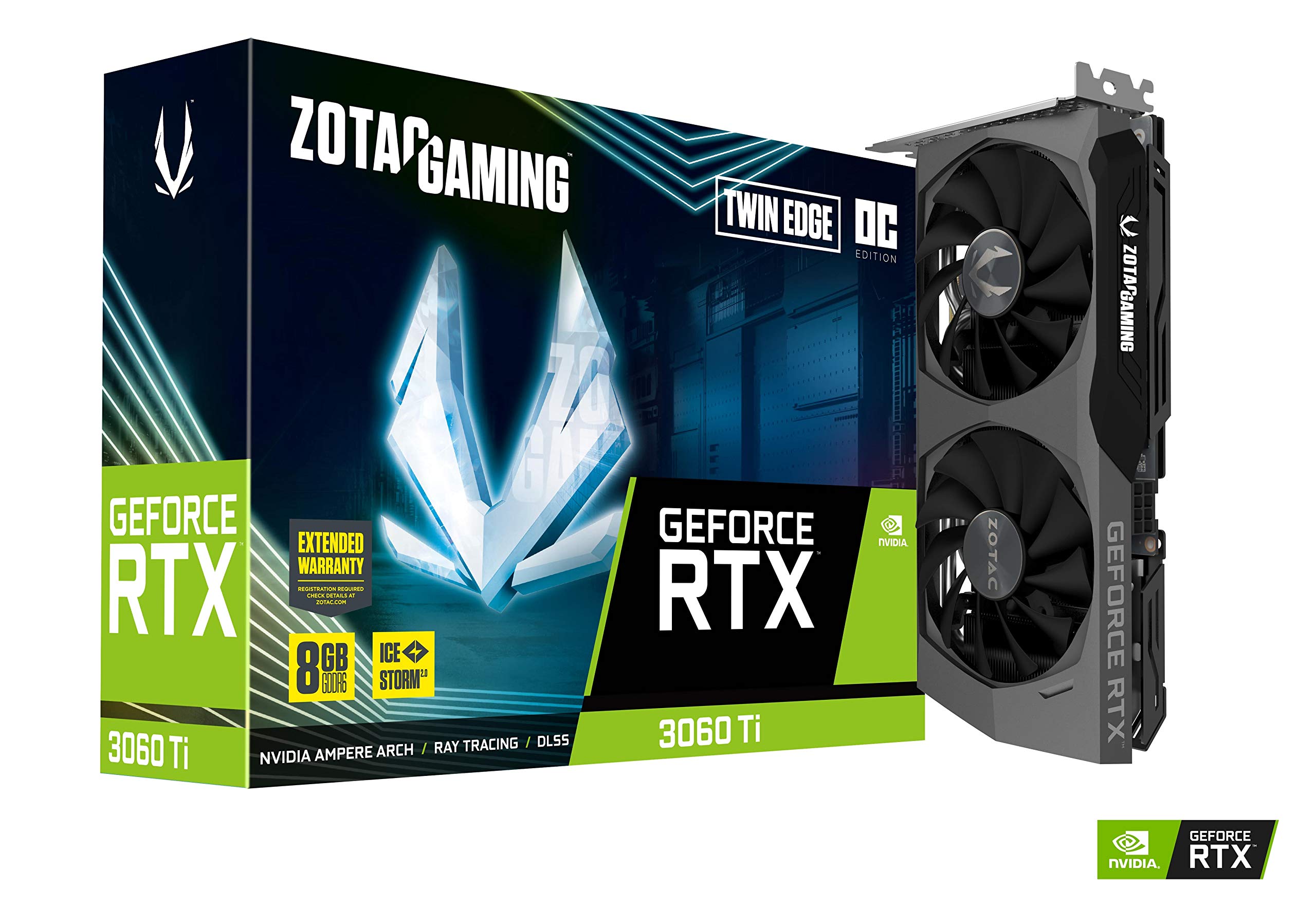
ZOTAC’s Twin Edge OC is purpose-built for small form factor enthusiasts who refuse to compromise on GPU power. At just 8.7 inches long and 2 slots thick, this card slides into compact cases like the Fractal Terra, Louqe Ghost S1, and DAN A4-H2O with room to spare. The IceStorm 2.0 cooling system uses aluminum fins and direct-contact heat pipes to dissipate heat from the GA104 die, though the limited volume available for the heatsink means this card runs slightly warmer than larger alternatives.
The 1695 MHz boost clock mirrors the NVIDIA reference spec, but ZOTAC’s Active Fan Control and Freeze Fan Stop technology keep the fans completely off during light desktop use or less demanding games. When they do spin up, the dual-fan design produces a moderate hum that system case fans will likely mask. The white LED logo lighting is subtle but provides a touch of visual identity without RGB complexity, and the metal backplate adds structural support for the relatively compact PCB.
Owners upgrading from SFF-focused cards like the ZOTAC 1660 Super report massive gains in 1440p gaming performance, with Cyberpunk 2077 running at high settings with DLSS enabled delivering smooth 50-60 FPS. The 8GB GDDR6 memory is sufficient for current-generation textures at 1440p, though texture-heavy mods in games like Skyrim SE may push the VRAM limit. The card includes three DisplayPort 1.4a outputs and one HDMI 2.1 port, supporting up to 8K resolution output for content creation or media consumption.
Why it’s great
- Compact 8.7-inch design fits small form factor cases
- Freeze Fan Stop enables silent operation during light use
- Metal backplate adds durability without adding weight
Good to know
- Runs warmer than larger triple-fan alternatives
- Lower boost clock limits factory overclock headroom
- White LED lighting only, no RGB customization
9. Geforce Nvidia RTX 3060ti Founders Edition 8GB

The NVIDIA Founders Edition represents the reference baseline that every partner card is measured against. The 3060 Ti FE uses a unique dual-fan design with one fan on the front and one pulling air through the rear, exhausting heat directly out of the case through the PCIe bracket rather than recirculating it inside the chassis. This flow-through cooler design is space-efficient, measuring a standard 2-slot thickness, though it lacks the VRM cooling density of aftermarket designs.
Performance-wise, the FE delivers exactly what NVIDIA’s specifications promise: reliable 1440p gaming at high settings with ray tracing enabled, and 4K gaming with DLSS assistance. The memory clock at 1.75 GHz translates to 448 GB/s of bandwidth across the 256-bit GDDR6 bus, which is standard for the platform. Owners building their first gaming PC consistently report zero issues with noise or thermals, with the card maintaining boost clocks during extended sessions without significant throttling.
The Founders Edition is also the most reliable pick for resale value and compatibility, as its dimensions match the reference cooler design that NVIDIA tests against. The 12-inch length and 2-slot thickness make it compatible with virtually all ATX cases and most larger ITX enclosures. For buyers who want the pure NVIDIA experience without partner-specific software or RGB, the FE provides a clean, no-compromise baseline that represents the 3060 Ti specification in its purest form.
Why it’s great
- Reference design ensures perfect compatibility and driver support
- Flow-through cooler exhausts heat directly out of case
- Standard 2-slot thickness fits most builds
Good to know
- Lower boost clock than factory-overclocked partner cards
- Cooling system less robust than premium dual-fan or triple-fan designs
- No RGB or aftermarket software features
10. ASUS Dual NVIDIA GeForce RTX 5060 Ti 8GB GDDR7 OC Edition

The ASUS Dual RTX 5060 Ti represents the next generation of NVIDIA’s Blackwell architecture, offering DLSS 4 and significantly improved AI performance (767 AI TOPS) over the Ampere-based 3060 Ti. The 2632 MHz boost clock in OC mode is dramatically higher than any 3060 Ti variant, and the GDDR7 memory provides substantially higher bandwidth despite the 128-bit bus. This card is best understood as a modern alternative to the 3060 Ti for builders who want the latest features and lower power draw.
The Axial-tech dual-fan design is compact at 9 inches long, and the SFF-Ready Enthusiast certification means it fits in small form factor cases without any modification. The 0dB Technology keeps fans off during light loads, and the card supports HDMI 2.1b and DisplayPort 2.1b for modern monitor compatibility. Users running local LLMs like Llama 3 report the 8GB GDDR7 memory fits models comfortably, with fan temperatures staying between 30-40°C during AI inference workloads.
It’s important to note that this card is not a 3060 Ti variant — it’s the newer RTX 5060 Ti based on the Blackwell architecture. The 128-bit memory bus does limit memory bandwidth compared to the 256-bit 3060 Ti, but the GDDR7’s higher clock speeds and DLSS 4’s frame generation capabilities often compensate in real-world gaming scenarios. For builders starting fresh rather than upgrading, the 5060 Ti offers better future-proofing with its modern feature set while maintaining similar pricing to mid-range 3060 Ti options.
Why it’s great
- Next-gen Blackwell architecture with DLSS 4 support
- GDDR7 memory provides high bandwidth despite 128-bit bus
- SFF-Ready certification for compact builds
Good to know
- 128-bit memory bus is narrower than 3060 Ti’s 256-bit
- 8GB VRAM may limit high-res texture performance in some titles
- Requires DDU driver cleanup for clean installation
11. msi Gaming RTX 5060 Ti 16G Shadow 2X OC Graphics Card
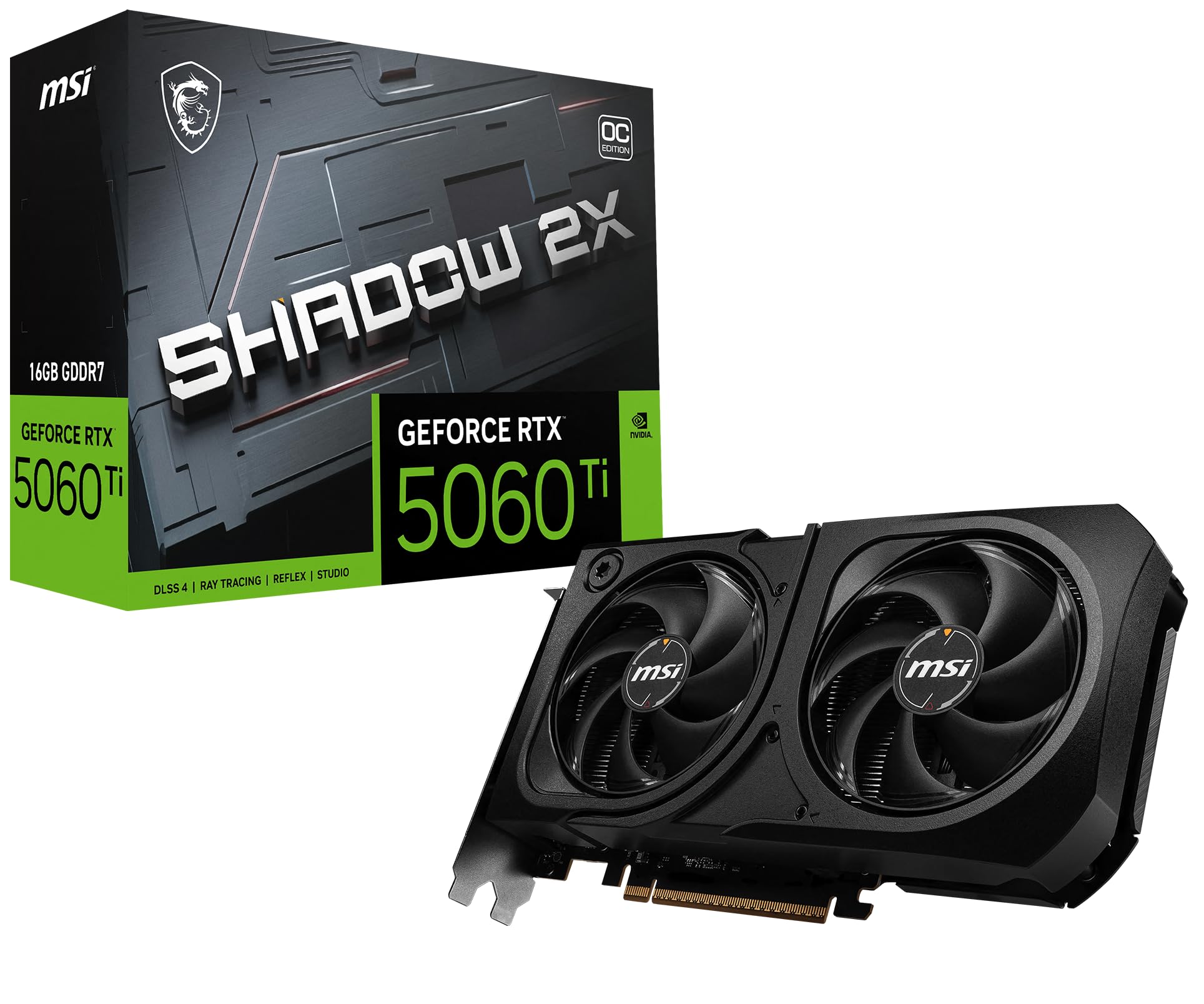
MSI’s Shadow 2X RTX 5060 Ti with 16GB GDDR7 memory is the most VRAM-capacious option in this comparison, directly targeting AI and creative professionals who need memory capacity over raw rasterization speed. The 16GB frame buffer eliminates VRAM swapping in memory-intensive workflows like photogrammetry, large-format photo editing, and local LLM inference, while the GDDR7 memory compensates for the 128-bit bus with significantly higher effective bandwidth than previous generations.
The Torx Fan 5.0 cooling solution features linked fan blades that stabilize and maintain high-pressure airflow, with a nickel-plated copper baseplate that swiftly captures heat from the GPU and memory modules. The core pipes use a square design to maximize contact surface area with the GPU baseplate, resulting in excellent thermal transfer. Users report this card runs significantly cooler and quieter than the previous-generation 3060 Ti 8GB cards, with the fans barely audible even during heavy AI inference workloads that would cause the older cards’ fans to spin into audible frenzy.
For gaming, the 128-bit memory interface is a tangible limitation at 1440p and 4K compared to the 256-bit 3060 Ti, but DLSS 4’s frame generation capabilities help close the gap in supported titles. The card’s compact form factor (designed for SFF builds) and matte black aesthetic make it a clean addition to any build. For creators running multiple monitors and simultaneously working with large assets, the 16GB VRAM delivers genuine workflow acceleration that no 8GB 3060 Ti can match, making this the obvious choice for the budget-conscious creative professional.
Why it’s great
- 16GB GDDR7 VRAM eliminates swapping in AI and creative workflows
- Torx Fan 5.0 runs exceptionally quiet under load
- Compact SFF-ready design with matte black aesthetics
Good to know
- 128-bit memory bus limits memory bandwidth vs 256-bit 3060 Ti
- May require settings tweaks at 1440p in demanding games
- Price premium for 16GB VRAM may not benefit pure gamers
FAQ
Will a 3060 Ti GPU bottleneck a Ryzen 5 5600X or Intel i5-12400?
Does the 3060 Ti support PCIe 4.0 and should I use it?
Is 8GB of VRAM enough for a 3060 Ti in 2025?
Final Thoughts: The Verdict
For most users, the 3060 ti gpu winner is the EVGA GeForce RTX 3060 Ti FTW Ultra Gaming because its 1800 MHz boost clock and iCX3 cooling deliver the highest factory overclock and best thermal performance in the class. If you want military-grade durability and silent operation, grab the ASUS TUF Gaming 3060 Ti V2 OC Edition. And for compact small form factor builds where every millimeter counts, nothing beats the ZOTAC Gaming GeForce RTX 3060 Ti Twin Edge OC.