
Upgrading to an external AC1300 adapter is often the most practical fix for a desktop or older laptop with weak built-in Wi-Fi. The real challenge isn’t finding one — it’s identifying which adapter delivers consistent 867 Mbps on the 5 GHz band without dropping the connection during a video call or gaming session.
I’m Min — the co-founder and writer behind Gadgets Feed. I’ve spent countless hours analyzing the real-world performance data and customer feedback on AC1300 adapters, focusing on driver reliability, sustained throughput, and antenna effectiveness across common home environments.
This guide breaks down the most reliable options available today to help you find a stable, fast best ac1300 wifi adapter suited for your specific setup and budget.
How To Choose The Best AC1300 WiFi Adapter
An AC1300 adapter is a dual-band device rated for 400 Mbps on the 2.4 GHz band and 867 Mbps on the 5 GHz band, totaling 1300 Mbps. The real-world performance you get depends on three key factors: the underlying chipset, the USB interface standard, and the antenna design.
Chipset and Driver Support
The chipset determines how well an adapter performs and, more importantly, how long its drivers remain compatible. Realtek chipsets like the RTL8822BU are common in AC1300 adapters and offer wide Windows compatibility. Some adapters rely on a driver CD, while newer models pre-load drivers onto the device memory for true plug-and-play on Windows 10 and 11.
USB Interface and Throughput
AC1300 adapters should use a USB 3.0 interface, as USB 2.0 tops out at 480 Mbps and creates a bottleneck for the 5 GHz band. A USB 3.0 connection allows the adapter to reach its full potential, especially when handling HD streaming or large file transfers on the 867 Mbps channel.
Antenna Configuration and Placement
Most AC1300 adapters use two external 5 dBi antennas for improved range and signal penetration through walls. Some premium designs include four antennas or a magnetic base for flexible placement. A dedicated USB extension cable also helps you position the adapter away from the PC case, reducing interference.
Quick Comparison
On smaller screens, swipe sideways to see the full table.
| Model | Category | Best For | Key Spec | Amazon |
|---|---|---|---|---|
| TP-Link Archer T4U Plus | Mid-Range | Overall balanced performance | RTL88x2BU chipset, 5dBi dual antennas | Amazon |
| WAVLINK WN692A3 | Premium | Magnetic antenna placement | Magnetic base, 3dBi dual antennas, USB cable | Amazon |
| Nineplus N12 | Mid-Range | Easy plug-and-play setup | 12 grams, 5dBi dual antennas | Amazon |
| Dohaeris AC1300 + BT 5.0 | Budget | Integrated Bluetooth 5.0 | RTL8822BU chipset, 5dBi single antenna | Amazon |
| BrosTrend AX1800 | Premium | WiFi 6 backward compatibility | 1201 Mbps on 5GHz, 5dBi antennas | Amazon |
| BrosTrend AC1200 Bridge | Premium | Wired device WiFi connection | Ethernet bridge, AC1200, driver-free | Amazon |
| NEWFAST U329 | Premium | Maximum antenna range | 4x 6dBi antennas, MU-MIMO, USB 3.0 | Amazon |
In‑Depth Reviews
1. TP-Link Archer T4U Plus

The TP-Link Archer T4U Plus is the most well-rounded AC1300 adapter in this roundup. It uses a proven RTL88x2BU chipset and ships with a 1-meter USB 3.0 extension cable, allowing you to place the dual 5dBi antennas in an optimal position away from the metal case of your PC. Real-world tests show sustained 5 GHz throughput exceeding 500 Mbps at 30 feet through two walls, making it a reliable choice for gaming and 4K streaming.
Setup is straightforward on Windows 10 and 11 — the onboard driver memory enables plug-and-play without a CD. It also supports macOS 10.9 through 10.14, though Linux users will need to find alternative drivers. The adjustable, multi-directional antennas let you fine-tune signal reception, and the included cradle keeps the adapter stable on your desk.
One minor quirk reported by users: the adapter can take up to two minutes to establish a connection after boot, and occasionally it may require a quick unplug and re-plug to lock onto the 5 GHz band. Once connected, however, it maintains a stable link with no random disconnections, which is the priority for most buyers.
Why it’s great
- Consistent 500+ Mbps throughput through multiple walls
- Plug-and-play driver memory eliminates CD usage
- Included USB extension cable for ideal antenna placement
Good to know
- Slow connection time (up to 2 minutes) on first boot
- Occasional need to re-plug for instant 5 GHz band lock
2. WAVLINK WN692A3

The WAVLINK WN692A3 stands out for its magnetic antenna base, which lets you attach the adapter securely to a metal PC case or desk leg for optimal placement. This design reduces clutter and prevents the adapter from being knocked off your desk. The unit includes a 3-foot USB 3.0 cable, giving you flexibility to route the adapter away from USB port interference.
Performance is solid for an AC1300 adapter: users report consistent 600 Mbps on the 2.4 GHz band and peak speeds approaching the 867 Mbps ceiling on 5 GHz in close proximity. The WPS button makes password-free pairing simple — press it on both the adapter and your router to establish a secure connection in seconds. It also supports Soft AP mode, turning your wired PC into a hotspot for other devices.
Setup on Windows 8 through 11 is plug-and-play, but older systems like Windows 7 and macOS require a manual driver download. The magnetic base works only on ferrous metal surfaces, so users with aluminum or plastic chassis will need the desktop cradle instead. Some users noted the antenna gain is listed at 3dBi rather than the 5dBi found on competitors, though the magnetic placement often compensates for this difference.
Why it’s great
- Magnetic base for flexible, secure placement on metal surfaces
- WPS button enables quick, password-free connections
- Soft AP mode turns PC into a WiFi hotspot
Good to know
- Antennas are 3dBi, not the standard 5dBi found on many competitors
- Driver needed for Windows XP/Vista/7 and macOS
3. Nineplus N12

The Nineplus N12 is a lightweight AC1300 adapter weighing only 12 grams, making it one of the most portable options for laptop users who need backup connectivity. Despite its low weight, it packs dual 5dBi high-gain antennas that deliver full signal strength and stable speeds. Users report a dramatic improvement over built-in laptop WiFi, with zero disconnections after setup.
Plug-and-play functionality works on Windows 10 and 11 without driver installation — the adapter is recognized immediately and pulls full 867 Mbps on the 5 GHz band. For Windows 7 and XP, a manual driver download from the website is required. The two external antennas are adjustable, but the adapter protrudes significantly from the USB port, which can block adjacent ports on closely spaced laptops or desktops.
Build quality feels slightly less premium than the TP-Link or WAVLINK options, with some users describing the antennas as flimsy. The 2-year warranty and responsive online technical support add peace of mind. For the price, this adapter solves the most common problem — a non-functional built-in WiFi card — without any complex configuration.
Why it’s great
- Extremely lightweight at 12 grams for portable use
- Plug-and-play on Windows 10/11 with full 5 GHz speed
- 2-year warranty with online tech support
Good to know
- Antennas feel flimsy compared to competitors
- Protrudes significantly and may block adjacent USB ports
4. Dohaeris AC1300 + BT 5.0

The Dohaeris AC1300 adapter offers an integrated Bluetooth 5.0 module alongside the standard AC1300 WiFi functionality, making it a practical choice for users who also need wireless peripheral support. It uses the RTL8822BU chipset, which provides broad compatibility with Windows 7 through 11. The Bluetooth range extends to 10 meters, and users report no latency issues when using wireless mice or keyboards.
WiFi performance is standard for the AC1300 class: 400 Mbps on 2.4 GHz and 867 Mbps on 5 GHz. The single protruding antenna is larger than most, which improves signal reception but also makes the adapter vulnerable to accidental knocks. Several users reported that the WiFi stopped working after about a month, while Bluetooth continued to function, suggesting potential quality control issues with the WiFi component.
Setup requires a driver CD, which is inconvenient for modern PCs without optical drives. The adapter is also quite wide and can block adjacent USB ports. The 2-year warranty offers some protection, but the reliability concerns make this a riskier bet compared to the TP-Link or Nineplus. It works well initially but has a higher reported failure rate over time.
Why it’s great
- Combines AC1300 WiFi with Bluetooth 5.0 in one dongle
- Bluetooth functions reliably even when WiFi has issues
- 2-year warranty provides coverage for potential failures
Good to know
- WiFi component has reported reliability issues after one month
- Requires driver CD, bulky design blocks adjacent ports
5. BrosTrend AX1800

The BrosTrend AX1800 is technically a WiFi 6 adapter, but its 5 GHz speed of 1201 Mbps makes it 38% faster than standard AC1300 adapters while remaining backward compatible with older routers. This is a forward-looking choice for users planning to upgrade their router soon. It uses OFDMA and MU-MIMO technologies to handle multiple data streams efficiently, reducing lag in congested network environments.
In real-world tests, users upgrading from an AC1200 adapter saw an improvement from 230 Mbps to 305 Mbps on the same internet plan, demonstrating the benefit of the newer chipset. The adapter includes two 5dBi high-gain antennas and a 3.3-foot USB 3.0 extension cable for flexible placement. It delivered 248 Mbps from a basement location with thick concrete walls, compared to 123 Mbps from built-in WiFi.
The main drawback is driver compatibility: this adapter supports Windows 11 and 10 only, with no Linux support. Some users experienced random 20-second disconnections after a month of use, and the rapidly blinking blue LED can be distracting in a dark room. The micro-B USB 3.0 connector is more secure than the USB-C-based design of earlier models, but it requires a manual driver download before the first connection.
Why it’s great
- 38% faster than standard AC1300 with WiFi 6 technology
- OFDMA and MU-MIMO reduce lag in busy networks
- Strong concrete wall penetration, nearly double built-in WiFi
Good to know
- Windows 11/10 only, no Linux or macOS support
- Random disconnections reported after prolonged use
6. BrosTrend AC1200 WiFi to Ethernet Adapter

The BrosTrend AC1200 bridge adapter takes a fundamentally different approach: instead of plugging into a USB port, it connects to any Ethernet-capable device and bridges it to your WiFi network. This makes it an excellent solution for smart TVs, game consoles, Blu-ray players, and printers that lack built-in wireless but have an RJ45 port. No driver installation is required on any operating system — the adapter appears as a standard Ethernet connection.
Speed tops out at 867 Mbps on the 5 GHz band and 300 Mbps on 2.4 GHz, consistent with the AC1200 standard. The dual adjustable antennas provide adequate range, with stable connections maintained at about 70 feet on 2.4 GHz through typical household construction. Users with pool automation equipment and other specialized Ethernet devices have successfully used this adapter as a cost-effective wireless bridge replacement.
Setup is straightforward with WPS: press the button on the adapter and your router to pair. For initial configuration without WPS, some basic network knowledge is required to connect via a web interface. The unit is also physically larger than a standard USB adapter and requires a nearby power outlet, as it draws power directly from the wall rather than through USB.
Why it’s great
- Driver-free, works with any Ethernet device including game consoles and printers
- WPS setup for quick pairing without configuration
- Stable connection at 70 feet range on 2.4 GHz
Good to know
- Requires a nearby power outlet, not a USB-powered device
- Initial setup may need network knowledge if WPS is unavailable
7. NEWFAST U329
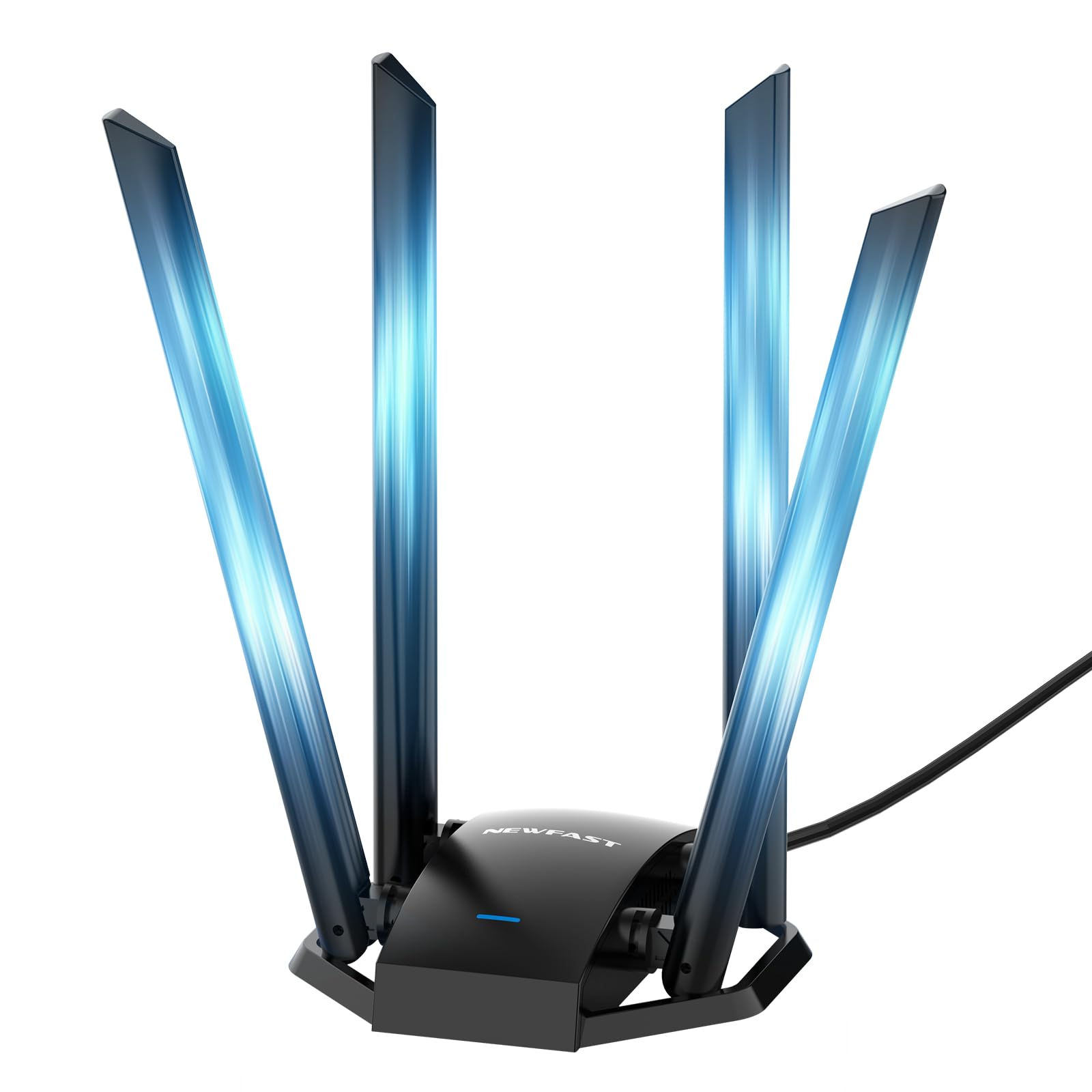
This antenna array provides the widest coverage and strongest signal penetration through multiple walls and floors, making it ideal for users in large homes or offices who struggle with weak signals in distant rooms. MU-MIMO support allows multiple devices to communicate simultaneously without performance degradation.
Speed ratings are standard for AC1300 at 867 Mbps on 5 GHz and 300 Mbps on 2.4 GHz, but the four-antenna design helps maintain those speeds at greater distances. Users in the farthest corner of a home report stable connections for HD streaming and video calls after installation, with no lag or dropouts. The adapter also includes a 3.28-foot USB 3.0 Type-C cable, allowing flexible placement away from the PC case.
Setup is straightforward on Windows 10 and 11 with pre-installed drivers that auto-run on connection. For Windows 7, 8, and XP, manual driver installation is required. The Soft AP mode converts a wired Ethernet connection into a WiFi hotspot, useful for creating a temporary network. The main considerations are the adapter’s larger physical footprint and the need to ensure all four antennas are properly angled for optimal reception.
Why it’s great
- Four 6dbi antennas provide the best range and signal penetration
- MU-MIMO maintains performance with multiple connected devices
- Includes 3.28-foot USB 3.0 Type-C cable for flexible placement
Good to know
- Larger physical footprint than standard dual-antenna adapters
- Driver installation required for Windows XP, 7, and 8
FAQ
Can an AC1300 adapter work with a WiFi 6 router?
Why does my AC1300 adapter show only 400 Mbps on 5 GHz?
Do all AC1300 adapters work with Linux or macOS?
Final Thoughts: The Verdict
For most users, the best ac1300 wifi adapter winner is the TP-Link Archer T4U Plus because it combines proven chipset stability, dual 5dBi high-gain antennas, and a convenient USB extension cable at a price that balances performance and value. If you prioritize magnetic placement and Soft AP flexibility, grab the WAVLINK WN692A3. And for maximum range in a large home, nothing beats the NEWFAST U329 with its four 6dBi antennas and MU-MIMO support.