
A graphics card with three fans isn’t just a visual flex—it’s a thermal strategy. The third fan allows the heatsink to run at lower RPMs while moving more air, which directly translates to higher sustained clock speeds and lower noise under load. For anyone pushing 1440p or 4K resolutions, that thermal headroom is the difference between a stable frame rate and a throttled stutter-fest.
I’m Min — the co-founder and writer behind Gadgets Feed. I’ve spent hundreds of hours analyzing PCB layouts, fin-stack densities, and fan curve behavior to find which triple-fan coolers actually outperform their dual-fan siblings in real-world gaming sessions.
After poring over specs and user benchmarks, I’ve narrowed the field to the models that justify their footprint. This guide ranks the best 3 fan gpu options by thermal performance, VRAM capacity, and noise efficiency so you can buy with confidence.
How To Choose The Best 3 Fan GPU
Three fans are not a guarantee of superior cooling—the fin-stack density, baseplate material, and fan blade design matter just as much. Before you buy, consider these three core factors to ensure your triple-fan investment pays off.
VRAM Capacity and Your Target Resolution
The amount of video memory dictates how high you can push texture detail without stuttering. An 8GB card is sufficient for 1080p high settings today, but 12GB gives you comfortable headroom at 1440p, and 16GB is the sweet spot for 4K textures and ray tracing. Check the memory type too—GDDR7 offers higher bandwidth than GDDR6, which matters for loading high-res assets quickly.
Physical Dimensions and Case Fit
Triple-fan cards are long—typically 11 to 13 inches—and often occupy 2.5 to 3.2 slots. Measure your case’s maximum GPU length and clearance from the motherboard PCIe slot to the side panel. A card that doesn’t fit can block front fans or drive bays, so always verify the dimensions before ordering.
Fan Curve Behavior and Noise Profile
Look for cards with zero-RPM fan mode, which keeps fans off entirely during light loads. Under gaming stress, the ideal triple-fan design maintains temperatures below 70°C while staying quiet enough that you won’t hear it over headphones. Models with larger, slower-spinning fans generally produce less noise than smaller fans spinning faster.
Quick Comparison
On smaller screens, swipe sideways to see the full table.
| Model | Category | Best For | Key Spec | Amazon |
|---|---|---|---|---|
| GIGABYTE RTX 4070 Windforce OC 12G | Premium Mid-Range | Silent 1440p gaming with DLSS 3 | 12GB GDDR6X / 192-bit / 3 Fans | Amazon |
| PNY RTX 5070 Epic-X ARGB OC | Mid-Range | AI-assisted gaming and creation | 12GB GDDR7 / 192-bit / 3 Fans | Amazon |
| ASRock RX 9070 XT Challenger OC | Premium | 4K gaming with RDNA 4 | 16GB GDDR6 / 256-bit / 3 Fans | Amazon |
| MSI RTX 5070 Ti Ventus 3X OC | High-End | High-refresh 1440p and HEVC workflows | 16GB GDDR7 / 256-bit / 3 Fans | Amazon |
| ASUS ROG Strix RTX 5070 Ti OC | Enthusiast | Overclocking and premium build quality | 16GB GDDR7 / 256-bit / 3.2-slot | Amazon |
| PNY RTX 4080 Super Verto OC | High-End | 4K max settings with ray tracing | 16GB GDDR6X / 256-bit / 3 Fans | Amazon |
| ZOTAC RTX 5070 Solid Triple Fan | Mid-Range | Reliable 1440p on a tighter budget | 12GB GDDR7 / 192-bit / 3 Fans | Amazon |
| GIGABYTE RX 9060 XT Gaming OC 16G | Mid-Range | High-FPS 1080p with 16GB VRAM | 16GB GDDR6 / 128-bit / 3 Fans | Amazon |
| XFX Swift RX 9060 XT OC Triple Fan | Mid-Range | Cool-running 1080p with good value | 16GB GDDR6 / 128-bit / 3 Fans | Amazon |
| MSI RTX 3070 Ventus 3X OC | Budget Entry | 1440p gaming on a last-gen budget | 8GB GDDR6 / 256-bit / 3 Fans | Amazon |
| GIGABYTE RTX 5060 Windforce OC 8G | Budget Entry | Entry-level 1080p with DLSS 4 | 8GB GDDR7 / 128-bit / 2 Fans | Amazon |
In‑Depth Reviews
1. GIGABYTE GeForce RTX 4070 Windforce OC 12G

The GIGABYTE RTX 4070 Windforce OC uses a triple-fan setup with alternate-spinning fans to reduce turbulence, keeping load temperatures around 65°C while drawing only 175W. The 12GB of GDDR6X memory on a 192-bit bus delivers consistent 100+ FPS in Cyberpunk 2077 at 1440p with DLSS 3 enabled, and the single 8-pin power connector means no PSU upgrade is needed for most builds.
User reports confirm idle temperatures of 30–37°C with fans completely stopped thanks to the 0dB mode, and max load temps stay below 50°C in well-ventilated cases. The included anti-sag bracket and metal backplate add structural rigidity, which is important for a 10.28-inch card that weighs nearly a pound.
If you want ray-traced 1440p gaming with DLSS 3 frame generation and silent operation, this is the card that balances thermal performance with power efficiency better than any other triple-fan model at this tier.
Why it’s great
- Extremely quiet triple-fan cooling with zero-RPM idle
- Single 8-pin power—no adapter hassle
- Strong 1440p ray tracing performance with DLSS 3
Good to know
- No RGB lighting if that matters for your build
- 12GB VRAM is adequate but not future-proof for 4K
- Documentation is sparse; watch for 6+2 pin vs 8-pin issue
2. PNY NVIDIA GeForce RTX 5070 Epic-X ARGB OC Triple Fan

The PNY RTX 5070 Epic-X leverages the Blackwell architecture with 6,144 CUDA cores and 12GB of GDDR7 memory clocked at 28 Gbps across a 192-bit bus. Its triple-fan design pushes boost speeds to 2,685 MHz out of the box, and users report excellent 1440p performance with frame rates well above the RTX 4070 Super in rasterized titles, even without DLSS or frame generation enabled.
Buyers consistently note the quiet fan operation at load and the effective cooling that reduced overall case temperatures compared to their previous GPUs. The card includes a dual 8-pin to 12-pin power adapter and fits standard mid-tower cases, though the 2.4-slot thickness requires careful clearance measurement. The ARGB lighting is addressable via common motherboard software.
For gamers who want DLSS 4, the full 80 ROPS implementation, and a factory overclock that leaves extra headroom for manual tuning, the PNY Epic-X delivers Blackwell features in a well-cooled triple-fan package that won’t break the bank.
Why it’s great
- 8% factory overclock with extra manual tuning headroom
- Very quiet fans under full gaming load
- Includes dual 8-pin to 12-pin adapter for wide PSU compatibility
Good to know
- 12GB VRAM may limit future 4K texture packs
- Requires 750W PSU minimum
- No DisplayPort 2.1 on all outputs
3. ASRock Radeon RX 9070 XT Challenger 16GB OC

The ASRock RX 9070 XT Challenger packs 16GB of GDDR6 on a 256-bit bus with a boost clock of 2,970 MHz, making it a formidable 4K gaming card for the price. Its triple-fan cooling system with striped axial fan technology keeps the card under 70°C even in extended gaming sessions, and the 0dB silent mode stops fans completely during desktop use and light workloads.
User feedback highlights excellent out-of-box stability at 1440p max settings with no tuning required, and the card overclocks well through AMD Adrenaline. The physical LED switch is a nice touch—you can disable the white lighting without needing software. Note the card’s 2.5-slot thickness and 12.5-inch length require a spacious case with at least 750W PSU.
For gamers prioritizing raw frame rates and VRAM quantity over ray tracing, the RX 9070 XT Challenger offers RDNA 4’s efficiency at a price that often undercuts comparable Nvidia options with similar memory capacity.
Why it’s great
- 16GB VRAM for 4K textures and modding
- Triple-fan cooling stays cool and quiet under load
- Physical LED switch for easy lighting control
Good to know
- RGB software can be buggy; hold settings, not live control
- White LED is not changeable on this model
- Requires 750W+ PSU and generous case clearance
4. MSI GeForce RTX 5070 Ti 16G Ventus 3X OC

The MSI Ventus 3X OC uses three TORX Fan 5.0 blades linked by ring arcs to stabilize high-pressure airflow across a nickel-plated copper baseplate. The 16GB of GDDR7 on a 256-bit bus delivers bandwidth that effortlessly handles 1440p 240Hz gaming and heavy creative workloads like HEVC video editing from Canon XF705 cameras—something the RTX 4070 Ti choked on.
Users report excellent out-of-box stability and quiet operation, with the card staying cool enough that the fans rarely spin up audibly during less demanding titles. The square-design core pipes maximize contact with the GPU die for efficient heat transfer. At 11.98 inches, it’s a large card, so verify case clearance, but the black aesthetic fits cleanly into any build without RGB distractions.
If you need 16GB of VRAM for future titles or professional video work, the Ventus 3X OC offers a compelling blend of memory capacity and GDDR7 speed in a ventilated, no-nonsense package.
Why it’s great
- 16GB GDDR7 handles 4K textures and professional HEVC files
- TORX Fan 5.0 delivers high static pressure with low noise
- Nickel-plated baseplate ensures fast thermal transfer
Good to know
- LED lighting is barely visible through the shroud
- Requires 750W+ PSU with at least two 8-pin connectors
- Length may not fit compact mid-tower cases
5. ASUS ROG Strix NVIDIA GeForce RTX 5070 Ti 16GB OC Edition

The ASUS ROG Strix RTX 5070 Ti OC is a 3.2-slot monster with three Axial-tech fans scaled up to move more air through a massive fin array. It pushes 1,492 AI TOPS and a boost clock of 2,625 MHz out of the box, with a phase-change GPU thermal pad that outperforms traditional thermal paste under sustained loads. The MaxContact design ensures the heatsink base has the flattest possible surface against the GPU die.
Buyers upgrading from cards like the RTX 1660 Super report massive gains in 4K video editing and Cyberpunk 2077 benchmarking, with the card running quietly even during extended render sessions. The included GPU support stand and ROG-themed accessories add a premium unboxing experience, but the 13.1-inch length and 3.6-pound weight demand a large case with robust PCIe slot reinforcement.
For enthusiasts who want the best bin, the best cooler, and the best build quality in the RTX 5070 Ti lineup, the ROG Strix justifies its premium with thermals that stay under 65°C under load and headroom for aggressive overclocking.
Why it’s great
- Phase-change thermal pad for superior long-term thermal performance
- Extremely quiet, even at full load
- Includes GPU support stand and premium accessories
Good to know
- Very large—13.1 inches long, 3.2 slots wide
- Premium price reflects ROG tax
- May not fit smaller mid-tower cases
6. PNY GeForce RTX 4080 Super 16GB Verto OC Triple Fan

The PNY RTX 4080 Super Verto OC leverages the Ada Lovelace architecture with 10,240 CUDA cores and 16GB of GDDR6X memory providing 736 GB/sec of bandwidth. Its triple-fan design keeps the card under 70°C during 4K gaming, where users report 90–100 FPS in Cyberpunk 2077 with ray tracing high, DLSS quality, and frame generation enabled. The all-black, no-RGB aesthetic appeals to clean-build enthusiasts.
Users note that the card is massive—13 inches and three slots—so case compatibility is critical. The previously reported fan controller issue (wild fan revving that ignored custom curves) appears isolated to early batches, with most recent buyers enjoying stable performance. A custom fan curve in MSI Afterburner is generally recommended to optimize the noise-to-cooling balance.
If you’re building a 4K gaming rig and want VRAM capacity and raster performance that competes with higher-priced flagships, the 4080 Super Verto OC delivers triple-digit frame rates at 4K max settings without the RGB bling.
Why it’s great
- 16GB GDDR6X with 736 GB/sec bandwidth for 4K textures
- All-black design fits no-RGB builds perfectly
- Includes anti-sag support bracket
Good to know
- Requires 3x 8-pin power adapters
- Some early units had fan curve issues
- Very large—measure your case carefully
7. ZOTAC NVIDIA GEFORCE RTX 5070 Solid Triple Fan 12GB
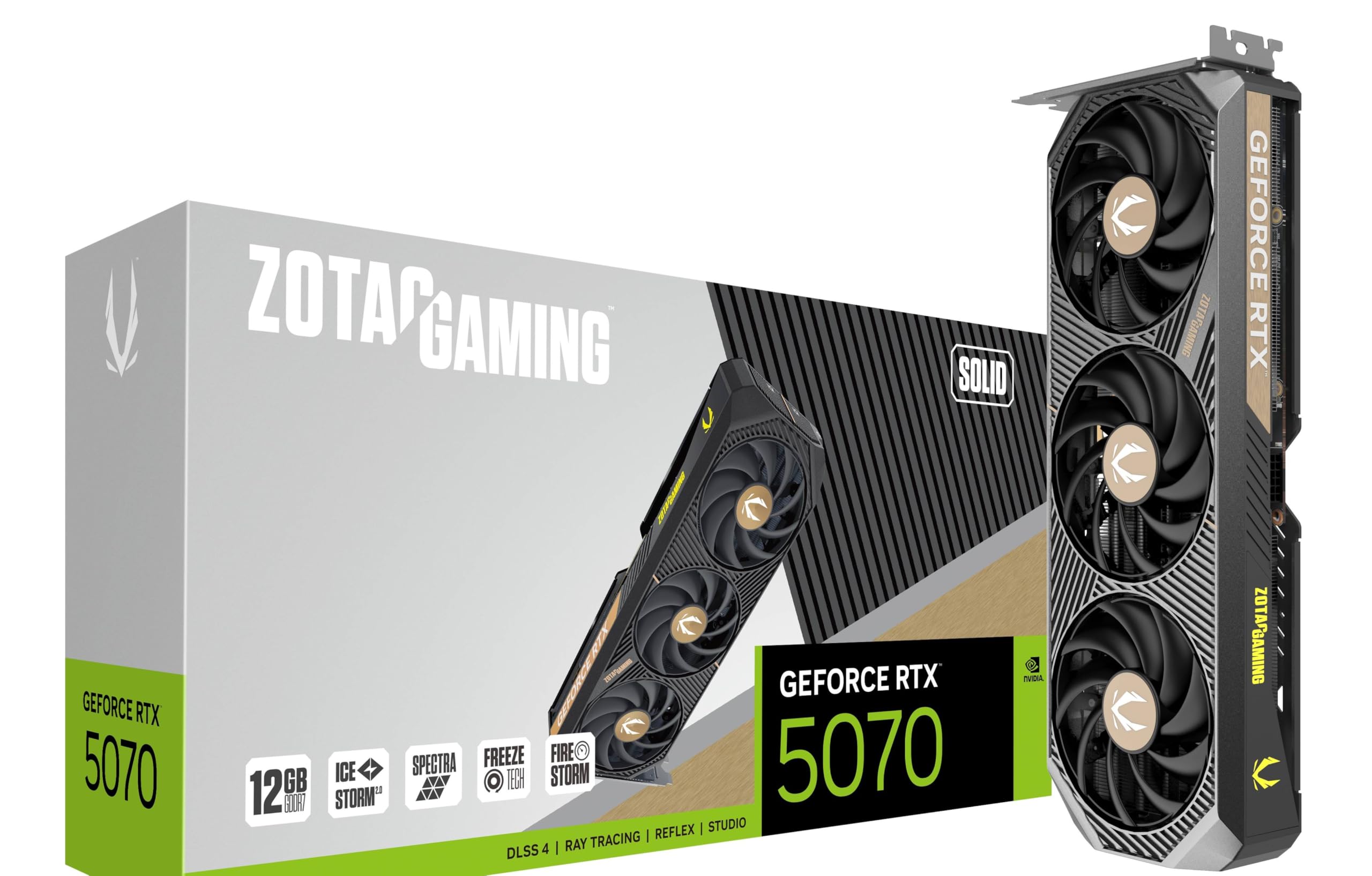
The ZOTAC RTX 5070 Solid provides a straightforward triple-fan implementation of the RTX 5070 with 12GB of GDDR7 memory. Users upgrading from the RTX 3060 report a night-and-day difference in 1440p gaming, with the card handling modern titles at high settings without breaking a sweat. The thermal performance is solid, with the three fans spinning at moderate speeds to keep noise levels reasonable—barely audible over headphones.
Buyers mention that the card offers good value for money in the 1440p segment, especially when purchased at MSRP. The build quality is typical ZOTAC—functional, no frills, with a dual-slot design that fits most mid-tower cases. The card’s 11.98-inch length is standard for triple-fan models, so verify clearance, but it’s not unusually large for its class.
For budget-conscious gamers who want RTX 50-series features and reliable 1440p performance without paying a premium for RGB or overbuilt coolers, the ZOTAC Solid is a no-nonsense choice that delivers consistent frame rates.
Why it’s great
- Good thermal performance with quiet triple fans
- Excellent price-to-performance at MSRP
- GDDR7 memory at a budget-friendly entry point
Good to know
- 12GB VRAM is fine for 1440p, limited for 4K
- No RGB or premium aesthetic touches
- Limited overclocking headroom compared to premium models
8. GIGABYTE Radeon RX 9060 XT Gaming OC 16G

The GIGABYTE RX 9060 XT Gaming OC delivers 16GB of GDDR6 memory in a triple-fan package that runs cool enough to maintain high clock speeds during extended sessions. The WINDFORCE cooling system uses Hawk Fans with nano-carbon lubricant for longevity, plus server-grade thermal conductive gel on the GPU die. Users report excellent 1080p performance with 240 FPS in competitive titles like Fortnite, and solid 1440p gaming with high settings.
The card includes RGB Fusion lighting and a sturdy metal backplate, and its 11.06-inch length is manageable for most mid-tower cases. The zero-RPM fan mode keeps the card silent during desktop use. Standard 8-pin power connectors mean no adapter nightmares. The 16GB VRAM provides extra headroom for texture-heavy games and modding beyond what 8GB cards can handle.
If you want the highest VRAM capacity available at a mid-range price point for 1080p high-FPS gaming, the GIGABYTE RX 9060 XT Gaming OC offers value that 8GB competition simply can’t match.
Why it’s great
- 16GB VRAM at a mid-range price point is rare and valuable
- WINDFORCE Hawk fans provide quiet, effective cooling
- Zero-RPM fan mode for silent desktop use
Good to know
- Ray tracing performance falls behind Nvidia equivalents
- 128-bit memory bus limits bandwidth compared to 256-bit cards
- Card is large; check case clearance
9. XFX Swift AMD Radeon RX 9060 XT OC Triple Fan 16GB

The XFX Swift RX 9060 XT OC matches the 16GB GDDR6 specification with a boost clock up to 3,320 MHz, making it one of the highest-clocked mid-range cards available. Its triple-fan cooling solution is overbuilt for the card’s 180W typical power draw, resulting in load temperatures that stay below 55°C in tropical climates. The SK Hynix memory handles the high boost frequencies without thermal issues.
Users who undervolt this card report even better efficiency—dropping 80mV and gaining 250 MHz on the memory clock—while maintaining all gaming performance. At 1080p ultra, it handles everything except the most demanding titles (like Ark: Ascended) with ease. The card’s dual 1440p and 4K monitor support makes it versatile for both gaming and productivity setups.
If 16GB VRAM at a competitive price is your priority and you don’t need Nvidia’s ray tracing or DLSS features, the XFX Swift offers excellent raw performance and thermal headroom that leaves room for manual tuning.
Why it’s great
- 16GB GDDR6 with boost clock up to 3,320 MHz
- Very cool operation—stays under 55°C under load
- Excellent undervolt and overclock potential
Good to know
- Ray tracing performance is behind Nvidia competitors
- FSR3 with ray tracing can look blurry
- Card draws 180W under full load vs 100W for previous gen
10. MSI Gaming GeForce RTX 3070 Ventus 3X OC 8GB

The MSI RTX 3070 Ventus 3X OC remains relevant for 1440p gaming with a 256-bit memory bus that provides solid bandwidth despite the limited 8GB GDDR6 capacity. The Ampere architecture still delivers strong rasterized performance, and users report excellent 1440p 144Hz ultra results—around 100 FPS in modern titles. The triple TORX Fan 3.0 design keeps the card quiet, with fans only spinning above 60°C.
Buyers consistently note the card’s build quality and thermal performance, with one user reporting a max temperature of 63°C after seven months of use. The 12-inch length and 2.1-inch width mean a substantial footprint—check case clearance carefully. The card requires two 8-pin connectors, and no adapters are included in the box.
If you’re building a budget-conscious 1440p rig and don’t mind being limited to 8GB VRAM for less texture-demanding titles, the Ventus 3X OC is a proven performer with a well-engineered cooler that will last years.
Why it’s great
- Excellent 1440p performance with 256-bit memory bus
- Very quiet operation—fans off until 60°C
- Proven, reliable build quality
Good to know
- 8GB VRAM limits texture quality in newer titles
- No RGB design may disappoint some builders
- Requires careful case measurement—12 inches long
11. GIGABYTE GeForce RTX 5060 Windforce OC 8G

The GIGABYTE RTX 5060 Windforce OC brings Blackwell architecture and GDDR7 memory to the entry-level segment, with a WINDFORCE dual-fan cooling system that keeps the card cool during 1080p gaming. Users report over 250 FPS in competitive titles and smooth 60+ FPS in demanding games like Cyberpunk 2077 at medium-to-high settings. The DLSS 4 support is a significant upgrade over previous generation entry-level cards.
Many customers upgraded from GTX 1660-class cards and report roughly double the capability. The card runs on a standard 750W PSU and pairs well with Ryzen 5700 processors. One important note: users strongly recommend running DDU (Display Driver Uninstaller) before swapping GPUs to avoid installation issues. The 8GB GDDR7 is sufficient for 1080p but will require settings management for 1440p or texture-heavy titles.
For budget builders who want the most modern architecture and features like DLSS 4 without spending more than necessary, the Windforce OC 8G is the entry point to Blackwell performance that won’t break your PSU budget.
Why it’s great
- Blackwell architecture and DLSS 4 at an entry price
- GDDR7 memory ensures higher bandwidth than GDDR6 competitors
- Low power draw—works with standard 750W PSU
Good to know
- 8GB VRAM limits 1440p usability
- Dual-fan design, not triple-fan despite being in this guide
- Run DDU before installation to avoid driver conflicts
FAQ
Is a triple-fan GPU always quieter than a dual-fan one?
Will a 750W power supply handle any triple-fan GPU in this guide?
How do I measure if a triple-fan GPU will fit in my case?
Do I need to worry about GPU sag with a heavy triple-fan card?
Final Thoughts: The Verdict
For most users, the best 3 fan gpu winner is the GIGABYTE RTX 4070 Windforce OC 12G because it offers the ideal balance of thermal performance, power efficiency, and DLSS 3 support without requiring a PSU upgrade. If you want the most VRAM for your money, grab the GIGABYTE RX 9060 XT Gaming OC 16G. And for uncompromising 4K gaming, nothing beats the PNY RTX 4080 Super Verto OC.