
You open your laptop in a cramped airplane tray table, a client meeting, or on the sofa, only to have the screen spring back at an awkward angle that forces you to hunch over. That limited hinge range is a constant friction point that many buyers don’t realize they can avoid entirely. The 180° hinge is the solution — it lets the display lay completely flat, opening up collaboration, sharing, and ergonomic positioning options that a standard 130° lid simply cannot deliver.
I’m Min — the co-founder and writer behind Gadgets Feed. I’ve spent hundreds of hours analyzing the technical specifications, build quality, and real-world hinge mechanics of convertible and flat-lay laptops to identify which models actually deliver on the promise of a full 180-degree recline without sacrificing durability or display quality.
Whether you need a collaborative workstation for client presentations, a versatile education device that can lay flat for group work, or a premium business tool that adapts to any environment, finding the right 180° laptop hinges on understanding hinge build, touchscreen capability, processor power, and battery endurance.
How To Choose The Best 180° Laptop
Not all 180° hinges are built to last. The best models use a multi-gear synchro-hinge mechanism that distributes stress evenly across the chassis. A poorly designed hinge will develop wobble or looseness within months of daily use. You also need to consider whether you need a full 360° convertible or simply a 180° lay-flat for desk-sharing — the intended use case changes the portability and build trade-offs.
Hinge Build Quality and Mechanism Type
The hinge is the single most critical component. Look for laptops that advertise a metal alloy synchro-hinge, which keeps the screen stable at any angle. Some premium models include a 360° hinge that lets the laptop fold fully into tablet mode, while others stop at 180° for a more rigid, wobble-free experience ideal for professional environments. A MIL-STD-810 certified hinge ensures it survives thousands of open-close cycles.
Display and Touchscreen Responsiveness
When your laptop lays flat, the display becomes a shared surface. A minimum of 1080p (Full HD) resolution is essential for clarity, but 2.5K (2560×1600) panels offer much sharper text and image detail, especially for creative work. Touch responsiveness and multitouch support (10-point minimum) are non-negotiable if you plan to use the screen as a collaboration or drawing surface. A bright panel — 400 nits or higher — reduces glare when the screen is angled flat under office lighting.
Performance and RAM for Multitasking
If you are using the 180° mode for sharing presentations, taking notes, or running collaboration software, you need at least 16GB of RAM. The processor should be a recent-generation Intel Core Ultra (Series 1 or 2) or equivalent, which provides both raw speed and an integrated NPU for AI-assisted tasks like real-time transcription or background blur. Storage-wise, 512GB PCIe SSD is the baseline, while 1TB or higher suits heavy file users.
Quick Comparison
On smaller screens, swipe sideways to see the full table.
| Model | Category | Best For | Key Spec | Amazon |
|---|---|---|---|---|
| HP OmniBook X Flip 14 | Mid-Range | AI-Enhanced Productivity | Intel Ultra 5 226V / 40 TOPS NPU | Amazon |
| Samsung Galaxy Book5 360 | Mid-Range | Seamless Ecosystem | 31-Hour Battery / AMOLED Touch | Amazon |
| Lenovo Yoga 7i 16 | Mid-Range | Large 16″ 2K Workspace | Intel Ultra 7 155U / 16GB DDR5 | Amazon |
| GEEKOM GeekBook X16 Pro | Mid-Range | Lightweight Powerhouse | 2.8 lbs / Core Ultra 9 / 32GB RAM | Amazon |
| HP OmniBook 7 Flip 16 | Premium | Business & Creative Pro | Intel Ultra 7 258V / Arc 140V GPU | Amazon |
| LG Gram 17 Touch | Premium | Ultra-Light 17″ Travel | 3.2 lbs / 2560×1600 Touch | Amazon |
| ASUS Zenbook Duo | Premium | Dual Screen Multitasking | Dual 14″ 3K 120Hz OLED / Ultra 9 | Amazon |
| LG Gram 17 Pro (Ultra 9) | Premium | Enterprise Creative Power | 4TB SSD / 24-Hour Battery | Amazon |
| HP Pavilion x360 14 | Budget-Friendly | Entry-Level Convertible | Intel i5-1035G1 / 512GB SSD | Amazon |
| Alienware 18 Area-51 (5090) | Premium | Ultimate Gaming Beast | RTX 5090 / 64GB DDR5 / Ultra 9 | Amazon |
| Alienware 18 Area-51 (5080) | Premium | High-FPS Gaming Rig | RTX 5080 / 300Hz 3ms Display | Amazon |
In‑Depth Reviews
1. ASUS Zenbook Duo

The ASUS Zenbook Duo redefines the 180° laptop concept by giving you two 14-inch 3K OLED 120Hz touchscreens that can be deployed in tandem. The detachable Bluetooth keyboard and built-in kickstand allow you to use both displays stacked vertically or side-by-side in Desktop mode, providing an unprecedented multitasking canvas. The Intel Core Ultra 9 285H processor, 32GB of LPDDR5x RAM, and Intel Arc graphics deliver AI-ready performance that handles video editing, coding, and creative workflows without compromises.
Each Lumina OLED display supports 100% DCI-P3 color accuracy and 500 nits HDR peak brightness, making this the best display-equipped device on the list for color-critical work. The 75Wh battery provides up to 12 hours of video playback, and the included ASUS Pen 2.0 with MPP 2.0 support makes digital note-taking and sketching feel natural on either screen. The chassis meets MIL-STD-810H durability standards.
At just 3.64 pounds, the Zenbook Duo is heavier than a standard ultrabook, but its dual-screen versatility justifies the weight for professionals who need a mobile multi-monitor setup. The hinge mechanism is robust, allowing a full 180° lay-flat for Sharing mode without screen wobble, and the kickstand provides solid stability on any surface. The only tradeoffs are reflective OLED screens and a bottom-firing speaker that lacks deep bass.
Why it’s great
- Dual 14″ 3K OLED 120Hz displays provide an unmatched multitasking experience
- Intel Core Ultra 9 285H with 32GB RAM handles demanding AI and creative workloads
- Included ASUS Pen 2.0 and MIL-STD-810H durability add real value
Good to know
- Heavier than single-screen ultrabooks at 3.64 lbs
- OLED screens can be reflective in bright environments
- Battery life drains faster in dual-screen mode
2. LG Gram 17 Touch (Ultra 7)

The LG Gram 17 Touch is the flagship of the ultra-light 17-inch category, weighing just 3.2 pounds while packing a massive 2560×1600 WQXGA touchscreen. The 180° hinge on this model is remarkably smooth and stable, resisting screen wobble even when tapped in flat mode. The Intel Core Ultra 7 258V processor with built-in NPU provides AI acceleration for real-time transcription, background blur, and productivity copilot features.
The 99% DCI-P3 color gamut and 320 nits of brightness make this an excellent choice for creative professionals who need a large, color-accurate canvas that can lay flat for client reviews. The anti-glare coating reduces reflections significantly, which is crucial when the screen is positioned flat under overhead office lights. Thunderbolt 4 and Wi-Fi 7 ensure fast data transfers and stable connectivity.
The 32GB of LPDDR5X RAM and 2TB SSD provide ample headroom for heavy multitasking, and the 80Wh battery delivers all-day endurance. The speakers are bottom-firing and can sound muffled on soft surfaces, but the overall build quality and hinge reliability are top-tier. This laptop is ideal for professionals who need a large, portable, shared screen without the weight penalty.
Why it’s great
- Ultra-light 3.2 lb chassis with a large 17″ 2.5K touchscreen
- 99% DCI-P3 color gamut and anti-glare coating for accurate, glare-free flat-mode use
- Thunderbolt 4 and Wi-Fi 7 for fast connectivity
Good to know
- 320 nits brightness is adequate but not class-leading
- Bottom-firing speakers sound muffled on soft surfaces
- Some users report touchpad sensitivity quirks
3. LG Gram 17 Pro (Ultra 9)

The LG Gram 17 Pro is built for the professional who needs massive local storage and all-day battery life. With a 4TB PCIe Gen4 SSD and 32GB of RAM, this machine can host large media libraries, VM images, and project files without relying on external drives. The Intel Core Ultra 9 288V processor with a 47 TOPS NPU delivers the highest AI processing power in the LG lineup, enabling features like real-time captions and advanced Copilot+ capabilities.
The 17-inch WQXGA (2560×1600) anti-glare touchscreen covers 99% DCI-P3, making it suitable for professional photo and video editing. The display lays flat to 180° with no wobble, and the 3.2-pound chassis makes it one of the most portable large-screen convertibles available. The 77Wh battery provides up to 24 hours of video playback, which is extraordinary for a 17-inch touchscreen laptop.
Connectivity is comprehensive with dual Thunderbolt 4 ports, HDMI 2.1, and Wi-Fi 7. The MIL-STD-810 durability certification means the hinge and chassis can withstand the rigors of travel. The primary drawbacks are the plastic chassis feel and a glossy screen that benefits from a matte protector in bright environments. For creative professionals who need a long-lasting, large-canvas 180° laptop with enormous storage, this is a top choice.
Why it’s great
- Massive 4TB SSD eliminates need for external storage
- 24-hour battery life is class-leading for a 17″ touchscreen
- Ultra-light 3.2 lbs with MIL-STD-810 durability
Good to know
- Chassis is mostly plastic, not metal alloy
- Real-world battery is closer to 11 hours under heavy use
- RAM soldered and non-upgradable
4. HP OmniBook 7 Flip 16

The HP OmniBook 7 Flip 16 is a premium 360° convertible built for consultants and business professionals who need a device that transitions seamlessly between laptop, tent, stand, and tablet modes. The 180°+ hinge mechanism is smooth and secure, supporting a full lay-flat position for collaborative whiteboarding with the included HP USB-C Rechargeable MPP2.0 Stylus. The 16-inch WUXGA IPS touchscreen with 400 nits brightness delivers vibrant visuals with micro-edge bezels.
Under the hood, the Intel Core Ultra 7 258V (Series 2) with a 47 TOPS NPU provides 30% better energy efficiency than the previous generation, enabling up to 10 hours of battery life. The Intel Arc 140V GPU with access to 16GB of system memory handles local AI image generation and video editing tasks smoothly. The 32GB of DDR5 RAM and 1TB PCIe SSD provide ample capacity for heavy multitasking.
The 5MP IR camera with temporal noise reduction ensures crisp video calls in any lighting, and the backlit keyboard is comfortable for late-night work. Wi-Fi 7 and Bluetooth 5.4 keep connectivity future-proofed. Some users report a dim backlit keyboard and the lack of dedicated END/HOME keys as minor annoyances. Overall, the OmniBook 7 Flip is one of the best-balanced premium convertibles for business and creative work.
Why it’s great
- Includes a rechargeable MPP2.0 stylus for note-taking and drawing
- Intel Arc 140V GPU with 16GB system memory for AI and creative workloads
- 5MP IR camera with temporal noise reduction for clear video calls
Good to know
- Backlit keyboard brightness is dim compared to competitors
- No dedicated END/HOME keys on the keyboard
- Some units may arrive with touchpad issues
5. HP OmniBook X Flip 14
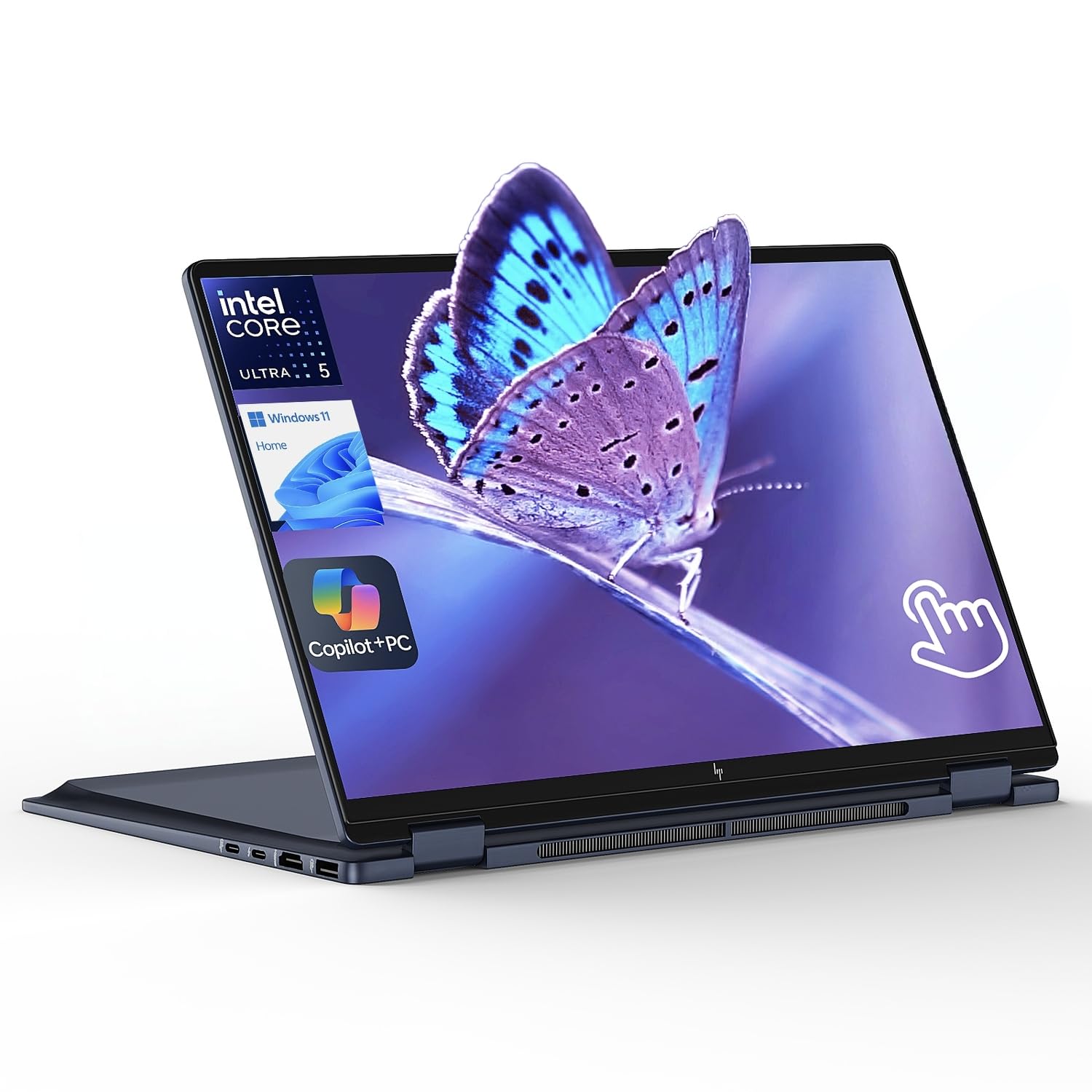
The HP OmniBook X Flip 14 delivers the most compelling balance of price and AI-ready performance in the 180° convertible space. The Intel Core Ultra 5 226V processor with a 40 TOPS NPU brings on-device AI acceleration for tasks like real-time background blur, Windows Studio Effects, and Copilot queries without draining battery life. The 14-inch WUXGA (1920×1200) IPS touchscreen with 400 nits brightness and an 89.5% screen-to-body ratio provides a bright, vivid canvas for collaboration.
With 16GB of LPDDR5X RAM and a 512GB SSD, this laptop handles multitasking between office suites, video calls, and web browsing with ease. The battery life reaches up to 22 hours, making it one of the longest-lasting convertible laptops available. The 360° hinge allows the screen to lay completely flat for sharing, and the backlit keyboard makes typing comfortable in any lighting.
Connectivity is strong with dual Thunderbolt 4 ports, HDMI 2.1, and USB-A ports, and the 2.9-pound chassis is extremely portable. The AI-powered features like walk-away lock and wake-on-approach add a layer of security that is rare at this price point. The main compromise is the 512GB SSD, which may fill quickly for media-heavy users, and the absence of a bundled stylus.
Why it’s great
- 22-hour battery life is extraordinary for a convertible
- 40 TOPS NPU enables on-device AI features without cloud dependence
- Dual Thunderbolt 4 and HDMI 2.1 for flexible multi-monitor setups
Good to know
- 512GB SSD may be insufficient for heavy media storage
- No stylus included in the box
- Some units may arrive with packaging damage
6. GEEKOM GeekBook X16 Pro

The GEEKOM GeekBook X16 Pro is an engineering marvel, packing a 16-inch 2.5K (2560×1600) 120Hz IPS display and Intel Core Ultra 9 185H processor into a chassis that weighs just 2.8 pounds. This is the lightest 16-inch laptop with a 180° hinge on the market. The aerospace-grade magnesium alloy CNC unibody chassis feels premium and resists fingerprints, while the 17-hour battery life from the 77Wh cell keeps you productive all day.
The 16:10 aspect ratio display provides extra vertical screen real estate for documents, code, and timelines, and the 100% sRGB color gamut with 400 nits brightness makes it suitable for photo editing. The 120Hz refresh rate ensures smooth scrolling and responsive touch input when used in flat mode. The IceBlade 2.0 cooling system with dual fans and two heat pipes keeps the Ultra 9 185H running at peak performance without thermal throttling.
With 32GB of LPDDR5x RAM and a 2TB PCIe Gen4 SSD, this laptop has no storage or memory bottlenecks for demanding creative workflows. The 65W GaN charger is compact and charges the battery to 80% in about an hour. The primary drawbacks are a loud fan under heavy load and a touchpad that only clicks at the far corners. For travelers and students who need a large, high-refresh display in the lightest possible package, the GeekBook X16 Pro is a standout.
Why it’s great
- Only 2.8 lbs yet packs a 16″ 2.5K 120Hz display
- Intel Core Ultra 9 185H with 32GB RAM and 2TB SSD
- IceBlade 2.0 cooling prevents thermal throttling
Good to know
- Fans can be loud under sustained heavy load
- Touchpad only clicks at the far corners
- RAM is soldered and non-upgradable
7. Lenovo Yoga 7i 16

The Lenovo Yoga 7i 16 offers a strong mid-range package with a 16-inch 2K (1920×1200) IPS touchscreen that provides vivid colors and wide viewing angles. The 360° flip-and-fold design allows seamless switching between laptop, tablet, tent, and stand modes, with the screen laying completely flat for collaboration. The Intel Core Ultra 7 155U processor with 12 cores delivers efficient multitasking performance for office work, web browsing, and media consumption.
With 16GB of DDR5 RAM and a 1TB PCIe SSD, this laptop offers generous storage that is often reserved for more expensive models. Wi-Fi 6E ensures stable connectivity in crowded network environments, and the two Thunderbolt 4 ports provide fast data transfers and external display support. The fingerprint reader adds convenient biometric security that works reliably with Windows Hello.
The backlit keyboard is comfortable for extended typing sessions, and the 2K display’s 16:10 aspect ratio provides more vertical space than a standard 16:9 panel. The battery life is solid but not exceptional compared to the Samsung Galaxy Book5 360. The Lenovo Vantage software includes some pre-installed bloatware, which is a minor annoyance. For users who prioritize a large, sharp display and ample storage at a mid-range price, the Yoga 7i 16 is a strong contender.
Why it’s great
- 16″ 2K IPS display with 16:10 aspect ratio for extra vertical space
- 1TB SSD and 16GB DDR5 RAM provide generous capacity
- Thunderbolt 4 and Wi-Fi 6E for fast connectivity
Good to know
- Lenovo Vantage and Microsoft bloatware pre-installed
- Slightly heavier than some competitors at this screen size
- Battery life is good but not class-leading
8. Samsung Galaxy Book5 360

The Samsung Galaxy Book5 360 is the battery champion of the 180° laptop category, boasting up to 31 hours of video playback on a single charge. This remarkable endurance is paired with a stunning 15.6-inch FHD AMOLED touchscreen that delivers deep blacks and vibrant colors, making it ideal for media consumption and content creation on the go. The Intel Core Ultra processor (Series 2) provides AI acceleration for features like AI Select, Cocreator in Paint, and real-time translation via Live Captions.
The 360° hinge allows the screen to lay completely flat, and the Samsung ecosystem integration — Phone Link, Quick Share, and Auto Hotspot — makes it the best choice for existing Samsung smartphone and tablet users. The 16GB of RAM and 512GB SSD provide sufficient capacity for daily productivity, though the storage is not as generous as some competitors at this price.
The Dolby Atmos quad speakers deliver immersive audio for presentations and entertainment. Some users have reported screen edge cracking with heavy use, and the 512GB SSD may fill quickly for creative professionals. However, the combination of AMOLED quality, ecosystem integration, and class-leading battery life makes the Galaxy Book5 360 one of the most compelling 180° laptops for students and Samsung users.
Why it’s great
- 31-hour battery life is the best in this category
- FHD AMOLED touchscreen delivers vibrant colors and deep blacks
- Seamless Samsung ecosystem integration with Phone Link and Quick Share
Good to know
- Some units may develop screen edge cracking over time
- 512GB SSD may be insufficient for heavy media files
- No dedicated GPU for demanding creative or gaming tasks
9. HP Pavilion x360 14

The HP Pavilion x360 14 is the entry-level gateway to the 180° convertible experience. With a 10th-generation Intel Core i5-1035G1 processor, 8GB of DDR4 RAM, and a 512GB PCIe NVMe SSD, it delivers adequate performance for web browsing, document editing, and video streaming. The 14-inch HD touchscreen display with micro-edge glass provides a decent canvas for casual use, and the 360° hinge allows the screen to lay flat for sharing or watching videos in tent mode.
The 10.5-hour battery life is respectable for a budget device, and the backlit keyboard adds usability in low-light environments. The Intel UHD Graphics are sufficient for light photo editing and 1080p video playback but will struggle with modern games or heavy creative software. The build quality is plastic but feels solid enough for daily use.
The main limitations are the lower HD resolution (1366×768), which is less sharp than the Full HD panels found on most modern laptops, and the 8GB of RAM, which may feel constrained with many browser tabs open. This is best suited for students or casual users who need a basic convertible for note-taking and light productivity without spending more than necessary.
Why it’s great
- Most affordable entry point into 180° convertible laptops
- 512GB SSD provides solid storage for a budget device
- Backlit keyboard and 10.5-hour battery are decent for the price
Good to know
- HD (1366×768) display is noticeably less sharp than Full HD panels
- 8GB RAM may limit heavy multitasking
- 10th-gen i5 processor is several generations behind current models
10. Alienware 18 Area-51 (RTX 5090)

The Alienware 18 Area-51 with an RTX 5090 is the most powerful 180° laptop on this list, designed for gamers and creators who demand uncompromising performance. The 18-inch WQXGA (2560×1600) anti-glare display with a 300Hz refresh rate and 3ms response time provides the smoothest gaming experience available in a portable form factor. The Intel Core Ultra 9 275HX processor combined with 64GB of DDR5 RAM and the NVIDIA GeForce RTX 5090 GPU delivers desktop-class gaming and rendering performance.
The Cryo-Chamber cooling system props up the laptop for increased airflow, keeping the components within thermal limits even under sustained gaming loads. The AlienFX RGB lighting system with ambient aurora-inspired effects creates a premium gaming atmosphere. The 2TB PCIe Gen4 SSD provides ample storage for a modern game library, and the Wi-Fi 7 and Bluetooth 5.4 connectivity ensures lag-free online gaming.
The hinge mechanism allows a full 180° lay-flat position, which is useful for sharing the screen during local multiplayer gaming or for using the laptop as a surface for creative drawing tablets. The laptop is extremely heavy at over 8 pounds and runs hot in performance mode, but the build quality is rugged and tank-like. For mobile gamers who need the absolute highest frame rates and a screen that can lay flat for versatile positioning, the Alienware 18 Area-51 is the ultimate machine.
Why it’s great
- NVIDIA RTX 5090 GPU delivers desktop-class gaming performance
- 18″ 300Hz 3ms display provides the smoothest gaming visuals
- 64GB DDR5 RAM and 2TB SSD for massive game libraries
Good to know
- Extremely heavy at over 8 lbs — not portable by ultrabook standards
- Runs hot under sustained gaming loads
- Very high price point limits accessibility
11. Alienware 18 Area-51 (RTX 5080)

The Alienware 18 Area-51 with the RTX 5080 offers a more balanced price-to-performance ratio compared to its RTX 5090 sibling while still delivering elite gaming capabilities. The 18-inch WQXGA 300Hz 3ms display is identical in quality, providing the same ultra-smooth visual experience. The Intel Core Ultra 9 275HX processor and 32GB of DDR5 RAM provide ample horsepower for high-refresh gaming and streaming.
The Cryo-Chamber with clear Gorilla Glass panel provides a view of the AlienFX fans and keeps the system cool under load. The RTX 5080 with NVIDIA Max-Q technology delivers excellent battery life and performance optimization for gaming on the go. The 2TB SSD provides generous storage, and the 1-year Dell Onsite Service offers peace of mind.
The 180° hinge on this model is solid, though the sheer weight and size of the 18-inch chassis make it less practical for frequent flat-mode use compared to smaller convertibles. Some users have reported hardware issues like defective touchpads and audio problems, though these appear to be isolated incidents. For competitive gamers who want RTX 50-series performance at a slightly more accessible selection, the RTX 5080 version is the smarter choice.
Why it’s great
- NVIDIA RTX 5080 with Max-Q delivers gaming performance with optimized battery life
- 18″ 300Hz 3ms display is among the fastest in any laptop
- Strong build quality with rugged, tank-like chassis
Good to know
- Heavy and not designed for frequent portability
- Some units may experience hardware or hinge issues
- No dedicated SSD card slot for easy storage expansion
FAQ
What is the difference between a 180° laptop and a 360° convertible?
Can a 180° laptop be used for digital drawing or note-taking?
Does a 180° hinge affect the structural integrity of a laptop over time?
Why would I need a 180° laptop instead of a standard laptop?
Final Thoughts: The Verdict
For most users, the 180° laptop winner is the ASUS Zenbook Duo because its dual 14-inch 3K OLED 120Hz displays provide an unmatched multitasking canvas that truly leverages the 180° hinge for productive, collaborative work. If you want the best battery life with seamless ecosystem integration, grab the Samsung Galaxy Book5 360. And for creative professionals who need a massive 17-inch color-accurate touchscreen in an ultra-light package, nothing beats the LG Gram 17 Touch.