
The days of fumbling for a key while balancing groceries or rushing out the door with the nagging feeling you forgot to lock up are over. A modern access lock replaces that metal key with a fingerprint scan, a touchscreen code, or a tap on your phone, giving you control you can feel in your pocket. But with options ranging from simple keypad deadbolts to full WiFi-enabled biometric units, picking the right one means understanding what specs actually matter for your door and your lifestyle.
I’m Min — the co-founder and writer behind Gadgets Feed. I’ve spent hundreds of hours combing through technical spec sheets, user reports, and market data to find the access locks that deliver real security and convenience without forcing you to overpay for features you’ll never use.
After comparing battery life, build materials, connectivity protocols, and real-world reliability, I’ve narrowed the field down to the models that earn a spot on any shortlist for the best access locks you can buy right now.
How To Choose The Best Access Lock
An access lock is more than a replacement for your old deadbolt. It’s a gateway device that manages who enters your home and when. The three biggest decision points are how you want to unlock it, how it connects, and how tough the hardware actually is.
Unlock Methods That Fit Your Life
Keypad-only locks are the simplest and most affordable, but they require you to remember a code and expose the keypad to wear. Biometric models add a fingerprint sensor that unlocks in under a second, ideal for hands-free access. Full WiFi locks let you unlock from anywhere and grant temporary codes to guests, but they demand a stable 2.4GHz network. If you want remote control without a monthly fee, look for built-in WiFi rather than a model requiring a separate gateway hub.
Battery Life and Power Management
Most deadbolts run on 4 to 8 AA alkaline batteries, giving roughly 8 to 12 months of life. A low-battery indicator is non-negotiable. Some premium options now include a rechargeable battery pack that charges via USB-C, eliminating disposable battery waste. Check whether the lock has an emergency power port (typically 9V or USB-C) for temporary power if the batteries die while you’re outside.
Build Quality and Certification
Look for BHMA/ANSI Grade 2 or Grade 3 certification. Grade 2 locks are rated for heavy residential use and offer better pick resistance. Grade 3 is the standard minimum for residential deadbolts. The exterior should be zinc alloy or aluminum, not plastic. An IP55 or IP54 weather rating ensures the lock survives rain, snow, and direct sun without seizing up or fading.
Quick Comparison
On smaller screens, swipe sideways to see the full table.
| Model | Category | Best For | Key Spec | Amazon |
|---|---|---|---|---|
| Tapo DL110 | Premium Biometric WiFi | Best Overall Performance | Rechargeable battery / BHMA Grade 2 | Amazon |
| Veise VE07-L | Premium Fingerprint | Heavy-duty Handleset | Zinc alloy handles / 50+ fingerprints | Amazon |
| Philips DDL242X | WiFi Biometric | Brand Trust & Build Quality | Built-in WiFi / 100 passcodes | Amazon |
| TEEHO TE012W | WiFi Fingerprint | Best Value Built-in WiFi | Built-in WiFi / BHMA Grade 3 | Amazon |
| Veise VE017 | 8-in-1 Smart Lock | Most Unlock Methods | AI fingerprint / AES-128 local storage | Amazon |
| Kwikset Powerbolt 240 | Keypad Deadbolt | Budget-Friendly Reliability | 12 user codes / 12-month battery | Amazon |
| TEEHO TE001 | Keypad Entry | Entry-Level Value | 20 access codes / IP54 weather rated | Amazon |
In‑Depth Reviews
1. Tapo Smart Wi-Fi Door Lock DL110

The Tapo DL110 stands apart because it combines six unlock methods — fingerprint, passcode, WiFi app, Bluetooth, voice assistant, and backup key — with a BHMA Grade 2 certification that exceeds the residential standard. The fingerprint sensor reads in an average of 0.42 seconds, and the lock supports up to 100 saved fingerprints, making it ideal for larger households.
The biggest differentiator here is the removable rechargeable battery pack, which delivers a full year on a single charge and charges via USB-C. No more buying AA packs every few months. The Tapo app provides resident profiles with permanent codes, plus one-time or scheduled codes for guests, all managed without a subscription. The auto-lock timer is adjustable directly in the app.
Installation takes under 20 minutes with a screwdriver, and the lock fits standard 1-3/8″ to 2″ door thicknesses. The integrated WiFi works on 2.4GHz networks, and the lock is also compatible with Alexa and Google Assistant for voice control. The only minor trade-off is the polished finish, which shows fingerprints more readily than matte options do.
Why it’s great
- Grade 2 security rating offers higher pick and drill resistance than Grade 3 locks
- Rechargeable battery pack eliminates recurring AA battery costs
- Fingerprint sensor works reliably even when wet or dirty
Good to know
- Polished black finish can show smudges and fingerprints
- No built-in door sensor to confirm closed position
2. Veise VE07-L Smart Lock
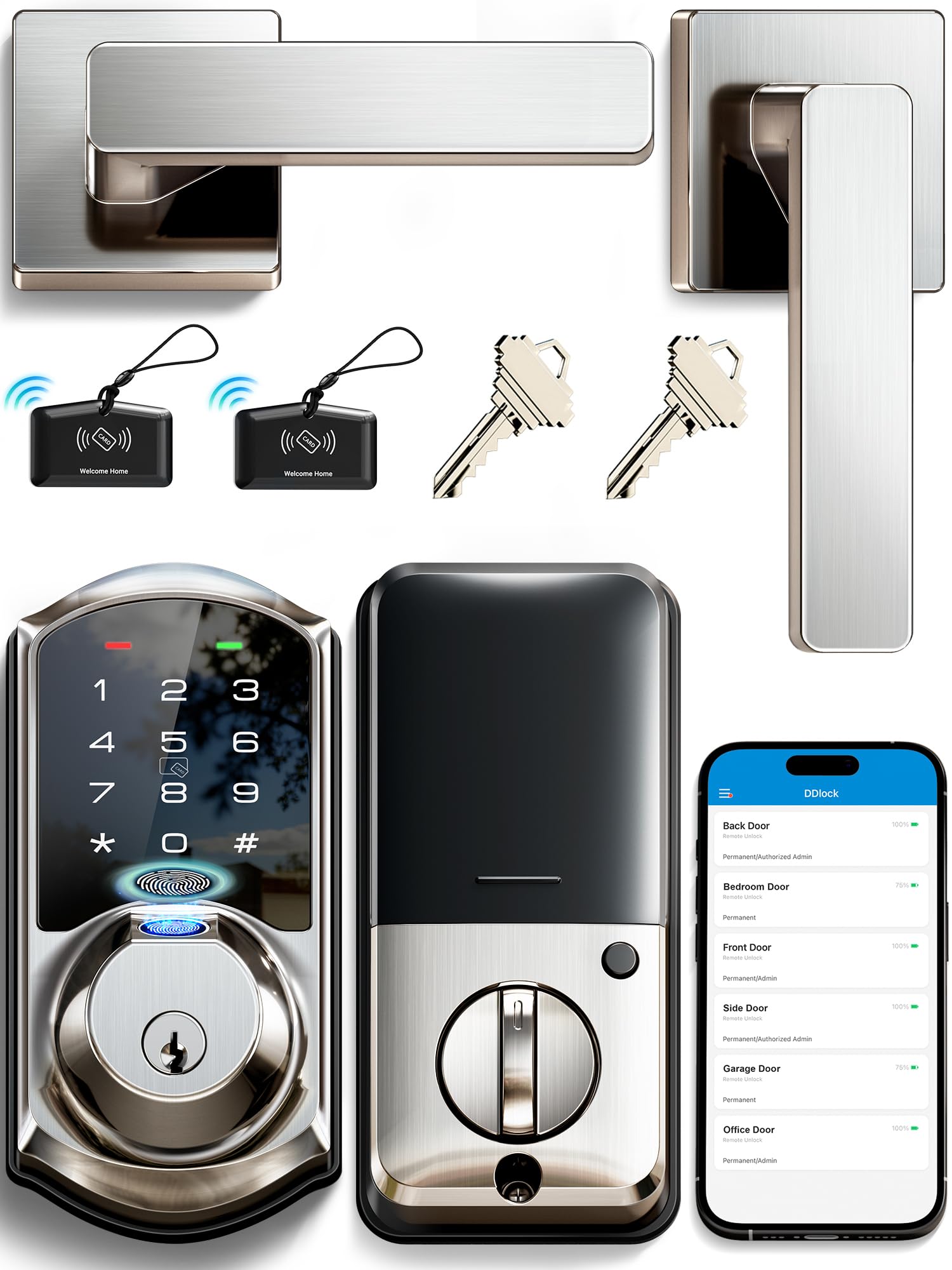
The Veise VE07-L is the only model in this roundup that includes a full handleset, meaning you get two zinc alloy levers plus the deadbolt mechanism. This makes it the right choice if you want the look and feel of a premium entry set rather than just a deadbolt replacement. The scratch-resistant zinc alloy handles are heavy and feel solid in the hand.
Unlock options include fingerprint, app, Apple Watch, web portal, codes, eKeys, fobs, and mechanical key. The AI self-learning fingerprint technology stores 50+ prints and improves recognition accuracy over time. You can manage up to 250 codes, including permanent, recurring, scheduled, and one-time codes, all through the app with no hidden fees. The auto-lock timer is adjustable from 5 to 900 seconds.
This lock is BHMA/ANSI Grade 3 certified with an IP55 weatherproof rating, operating between -35°F and 160°F. All access data is AES-encrypted and stored locally on the lock chip. The main caveat is that remote app control and Alexa/Google integration require the separately sold Veise G2 gateway, adding to the total cost. Without it, the lock operates purely via Bluetooth.
Why it’s great
- Includes full zinc alloy handleset instead of just a deadbolt
- AI fingerprint sensor improves accuracy with repeated use
- IP55 rating handles extreme temperatures and weather exposure
Good to know
- Requires separate WiFi gateway for remote access and voice control
- Touchscreen wake requires tapping the number pad first before entering code
3. Philips DDL242X-1HW WiFi Door Lock

Philips brings its engineering reputation to the DDL242X, a WiFi-enabled deadbolt with built-in connectivity — no extra hub required. It supports five unlock methods: app, passcode, fingerprint, physical key, and voice control via Alexa or Google Assistant. The fingerprint reader sits underneath a sliding cover that also hides a mechanical keyhole, keeping the exterior clean.
You can store up to 100 custom passcodes and generate unlimited one-time or scheduled codes for guests. The auto-lock timer is adjustable between 10 and 180 seconds. Real-time entry alerts and a full access history log are available through the Philips Home Access app. The lock requires 8 AA alkaline batteries, delivering roughly 8 months of battery life depending on usage frequency.
The aluminum body construction feels premium and lightweight at 1.4 pounds. Installation requires only a screwdriver and fits doors 1-3/8″ to 2″ thick. The hidden keyhole is a security plus, making it harder for a lock picker to access. The downside is the 8-battery requirement, which doubles replacement cost compared to 4-battery models. Also, the lock lacks a door sensor to verify the door is fully closed before auto-locking.
Why it’s great
- Built-in WiFi eliminates need for separate gateway hub
- Hidden keyhole under fingerprint reader improves tamper resistance
- US-based customer support with phone availability six days a week
Good to know
- Runs on 8 AA batteries, doubling replacement frequency versus 4-battery models
- No door position sensor to confirm door is fully shut
4. TEEHO TE012W WiFi Smart Lock
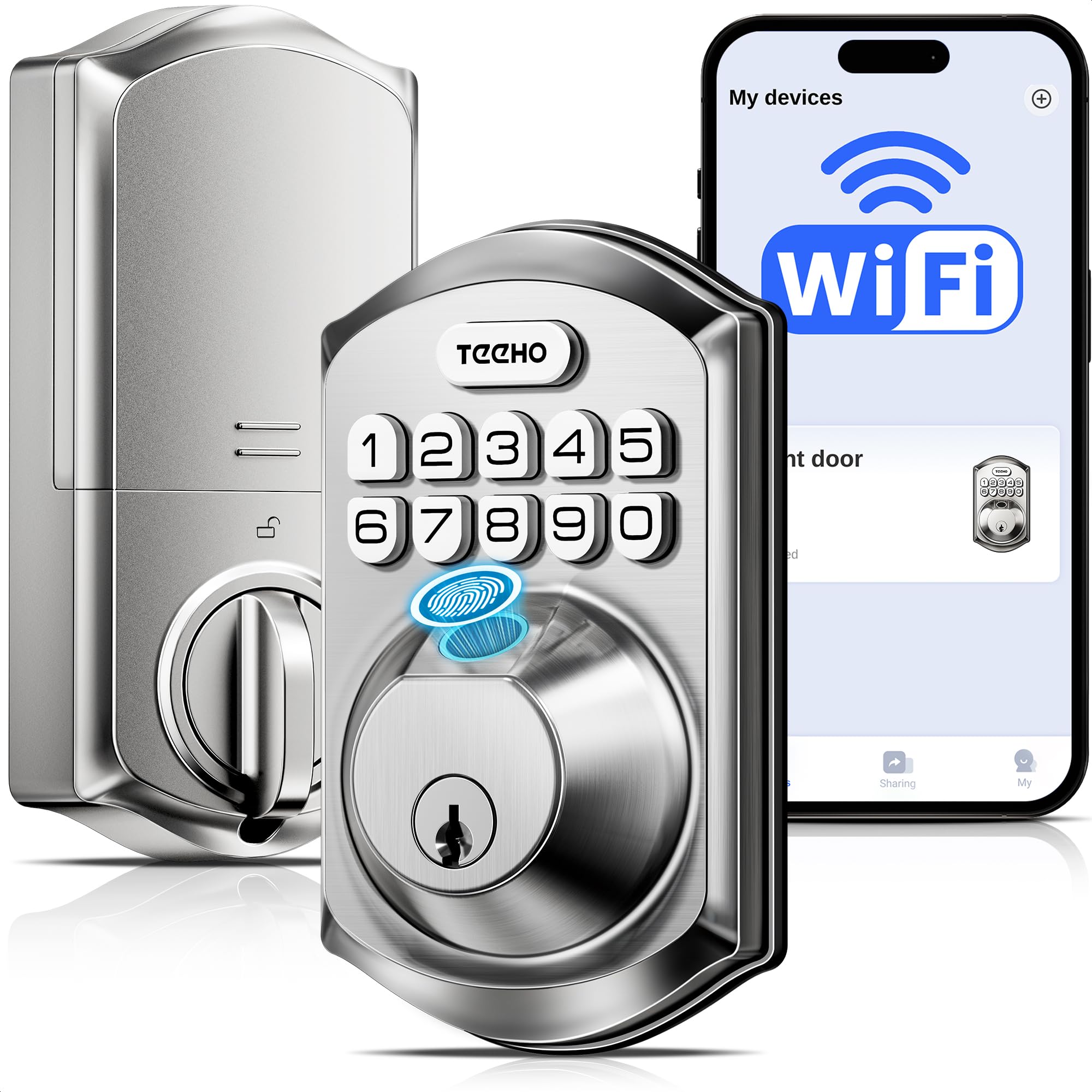
The TEEHO TE012W packs built-in WiFi, a fingerprint sensor, and BHMA Grade 3 certification into a mid-range price point that undercuts most competitors by a wide margin. It connects directly to 2.4GHz WiFi without a hub, giving you remote lock/unlock, access logs, and instant alerts through the KK Home app. The fingerprint sensor supports up to 20 users, and the keypad accepts up to 100 codes.
Security features include break-in detection (locks for 3 minutes after 10 incorrect attempts with an app alert), anti-peeping passwords that let you pad random digits before and after the real code, and AES-128 encrypted local data storage. The auto-lock timer is programmable from 10 to 180 seconds, and one-touch locking works by holding any key for 2 seconds. The IP55 weather rating means it handles rain and snow without issues.
The lock uses 8 AA batteries with an estimated 8-month lifespan. Some users report the fingerprint sensor is less reliable in very cold temperatures. The KK Home app, while functional, is developed by a Chinese company and is relatively large at 120MB. The interior assembly has a plastic feel compared to all-metal alternatives. Despite these trade-offs, the TE012W offers feature parity with locks costing significantly more.
Why it’s great
- Built-in WiFi with no hub required at a price well below the category average
- Break-in detection sends instant alerts after too many failed attempts
- Anti-peeping password mode with random digit padding protects your PIN
Good to know
- Fingerprint sensor accuracy can drop in freezing weather
- Interior housing has a plastic feel rather than all-metal construction
5. Veise VE017 8-in-1 Smart Lock
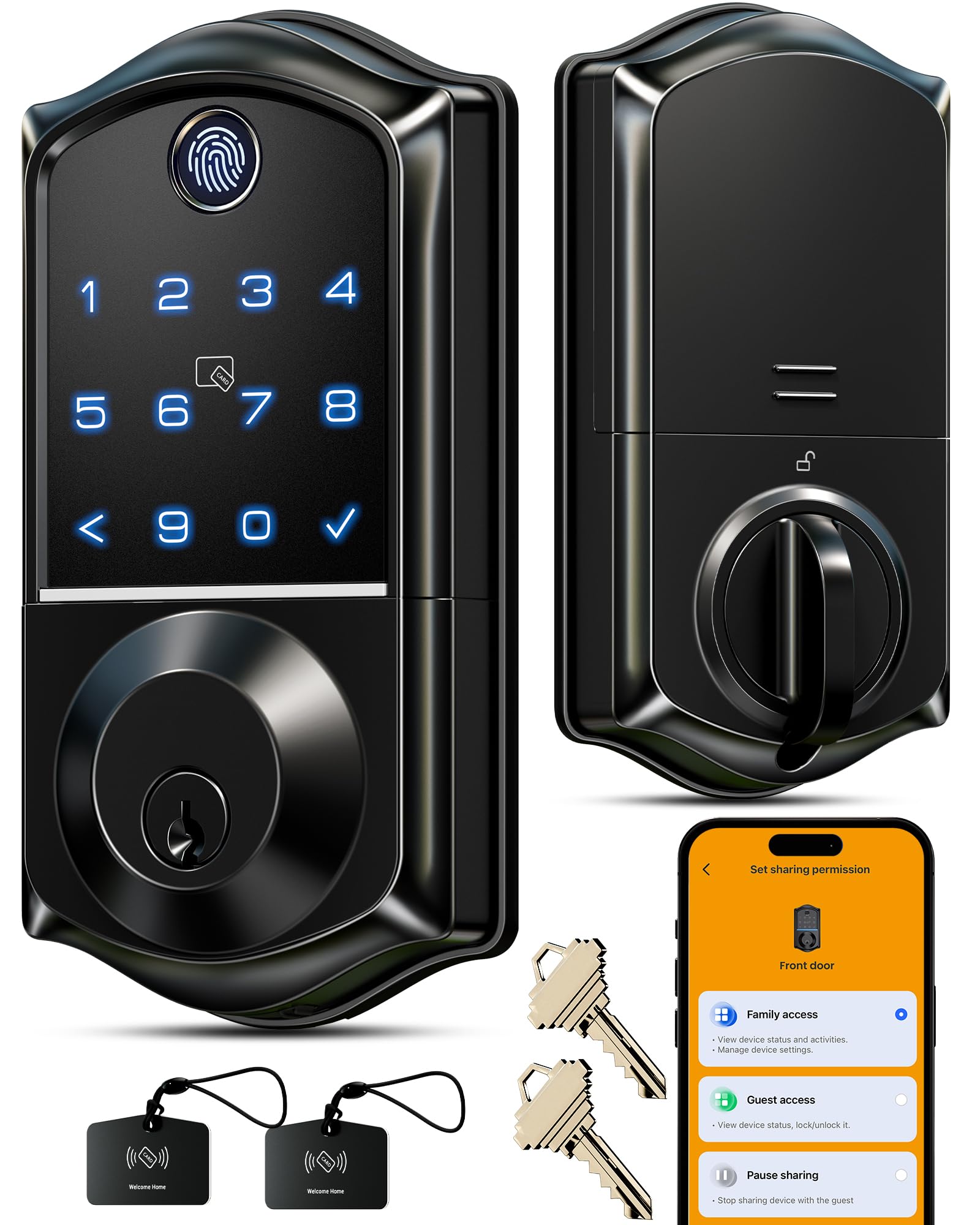
The Veise VE017 uses Swedish FPC fingerprint sensor technology paired with an on-device AI chip that verifies prints in under 0.2 seconds with 99.99% accuracy. The AI continuously learns and refines recognition patterns, meaning it gets more accurate the more you use it. You can add, rename, or delete fingerprints directly through the KK Home app.
Unlock options are the most extensive in this lineup: fingerprint, app, authorized access via eKeys, fob card, passcode, code sharing, voice control with Alexa/Google (requires G1 Gateway), and mechanical key. Password management supports unlimited one-time codes, unlimited remote duration codes, permanent codes, and recurring codes. The anti-peeping privacy code feature lets you enter random digits before or after the real code to hide your PIN from onlookers.
All access data — entry records, user credentials, and fingerprints — is AES-128 encrypted and stored locally on the lock, eliminating cloud-based privacy risks. The all-zinc alloy body is IP55 rated and certified to BHMA/ANSI standards. Installation auto-detects left- or right-handed doors and takes about 15 minutes. The VE017 uses 4 AA batteries with a rated 12-month lifespan. The main drawback is that WiFi remote access requires the separately sold Veise G1 Gateway, and the 4-battery setup means less power overhead than 8-battery models.
Why it’s great
- AI self-learning fingerprint sensor improves accuracy over time
- All data encrypted and stored locally on the device, not in the cloud
- Eight distinct unlock methods offer maximum flexibility for all users
Good to know
- Remote WiFi access and voice control require a separate G1 Gateway purchase
- App connectivity can be unreliable when you are not on the local network
6. Kwikset Powerbolt 240

The Kwikset Powerbolt 240 is a straightforward 5-button keypad deadbolt that focuses on doing the basics well. It supports up to 12 user codes plus 2 one-time user codes, all managed through the keypad programming. The auto-lock timer can be set to 30 seconds, 1 minute, 3 minutes, 5 minutes, or 10 minutes, giving you flexibility without needing a smartphone app.
Security features include an intrusion alert that sounds an alarm and disables the keypad for 1 minute after 3 consecutive incorrect code entries. Vacation mode disables the keypad entirely while you’re away. The bright LED backlight makes code entry easy in low light, activated by simply tapping the keypad. The motorized deadbolt locks with one touch of a button.
The lock operates on 4 AA alkaline batteries with a rated 12-month battery life. Installation uses a screwdriver and is guided by the BILT 3D interactive app. The main compromise is the plastic casing on the interior assembly — the deadbolt is metal, but the keypad housing feels less premium than zinc alloy competitors. Some users report that the button cap can degrade with prolonged direct sun exposure. It also only includes one backup key, which is a minor inconvenience.
Why it’s great
- Simple, reliable keypad deadbolt with no app or WiFi complexity
- Intrusion alarm with keypad lockout after 3 failed attempts adds real security
- Vacation mode fully disables keypad for peace of mind when traveling
Good to know
- Plastic keypad housing is less durable than all-metal alternatives
- Only one backup key included in the box
7. TEEHO TE001 Keyless Entry Lock

The TEEHO TE001 is a no-frills keypad deadbolt that offers 20 access codes — 19 for family members plus a single-use temporary code for guests. It operates entirely offline, so there’s no app, no WiFi, and no connectivity to worry about. The auto-lock timer is programmable from 10 to 99 seconds, and one-touch locking works by holding any key on the keypad for 2 seconds.
The lock body is aluminum alloy construction with an IP54 weather resistance rating, making it suitable for exterior doors exposed to rain and moisture. The motorized deadbolt operates smoothly and includes two SC1 backup keys in case the batteries die. The backlit keypad makes code entry easy at night, and the low-battery indicator shows a red light when power drops below 15%.
Installation is straightforward with just a screwdriver and works on standard 2-1/8″ door holes. The TE001 uses 4 AA batteries with a rated 365-day battery life. The key limitation is the lack of smart home integration — you cannot check lock status remotely or generate codes from your phone. Also, the keypad supports codes up to 8 digits, which is slightly shorter than some competitors that allow 10-digit sequences. TEEHO offers a 2-year warranty and lifetime customer service via phone and email.
Why it’s great
- Offline operation means zero app setup or WiFi configuration required
- Aluminum alloy construction with IP54 weather rating for outdoor durability
- 20 user codes plus a single-use guest code cover most household needs
Good to know
- No app or remote access means you cannot monitor lock status away from home
- Code length is limited to a maximum of 8 digits
FAQ
Can I use an access lock on a metal door?
What happens if the WiFi goes down or the battery dies?
Final Thoughts: The Verdict
For most users, the best access locks winner is the Tapo DL110 because it pairs a BHMA Grade 2 security rating with a rechargeable battery and a fast, reliable fingerprint sensor at a price that undercuts other Grade 2 options. If you want the premium feel of a full handleset with heavy zinc alloy construction, grab the Veise VE07-L. And for the best value in a built-in WiFi smart lock that won’t break the bank, nothing beats the TEEHO TE012W.