
Your motherboard ran out of SATA ports. You have drives ready to go, but the system simply won’t see them. That is the exact moment you need a storage controller — a simple expansion card that unlocks the internal bays your PC was built to fill.
I’m Min — the co-founder and writer behind Gadgets Feed. I’ve spent countless hours analyzing chipset compatibility, bandwidth bottlenecks, and real-world user reports across dozens of basic expansion cards to separate the plug-and-play solutions from the ones that cause more problems than they solve.
When your machine needs more internal storage capacity without jumping to a full RAID setup, the right basic storage controller delivers exactly that — additional native SATA ports that your operating system sees as internal drives, ready for immediate use.
How To Choose The Best Basic Storage Controller
A basic storage controller’s job is simple: add more SATA ports to your system. But not every card handles that job equally. The chipset, PCIe interface, and OS driver support determine whether your expansion is seamless or a troubleshooting nightmare.
Chipset Matters Most
The ASMedia ASM1166 chipset is the current gold standard for basic expansion in this category. It offers excellent Linux and Windows compatibility without extra drivers and supports up to six to ten ports on a single x2 PCIe 3.0 link. The older JMicron JMB582 and Marvell 9215 chips require specific drivers on Windows and can cause detection issues with certain motherboards, especially newer Intel and AMD platforms. For a true plug-and-play experience, prioritize ASM1166-based cards.
PCIe Bandwidth and Port Count
A single PCIe 3.0 lane provides roughly 1 GB/s of bandwidth. A six-port SATA III card can push up to 3 Gbps per port, but the aggregate bandwidth is capped by the PCIe link. For mechanical hard drives, this is rarely a bottleneck. For multiple SSDs running simultaneously, a card using PCIe x2 or x4 lanes provides headroom. The 10-port cards rely on a port multiplier configuration — each port shares the upstream bandwidth, so performance scales with how many drives actively transfer data.
Driver and OS Support
Most ASM1166-based cards are truly plug-and-play on Linux, macOS, and modern Windows versions. Cards based on JMicron or Marvell chipsets often require a driver installation on Windows to function correctly, and some lose compatibility with Windows 11 24H2 and newer builds. If you run TrueNAS, unRAID, or any Linux-based NAS, an ASM1166 card with no driver requirement saves significant setup time. Always check recent customer reviews for your specific motherboard chipset before purchasing.
Quick Comparison
On smaller screens, swipe sideways to see the full table.
| Model | Category | Best For | Key Spec | Amazon |
|---|---|---|---|---|
| GLOTRENDS SA3026-C | Mid-Range | Multi-OS NAS builds | ASM1166, PCIe 3.0 x2, 6 ports | Amazon |
| 10Gtek 10-Port | Mid-Range | High drive count at low cost | JMB582+JMB575, PCIe 3.0 x1, 10 ports | Amazon |
| YBBOTT 6-Port | Budget | Simple desktop expansion | ASM1166, PCIe x1, 6 ports | Amazon |
| StarTech PEXESAT322I | Mid-Range | Internal + eSATA flexibility | ASM1061, PCIe 2.0 x1, 2 ports | Amazon |
| MZHOU 10-Port | Mid-Range | TrueNAS / unRAID media servers | ASM1166+JMB575, PCIe x4, 10 ports | Amazon |
| ACTIMED 10-Port | Mid-Range | Large storage pools with heatsink | ASM1064+JB575, PCIe 3.0 x1, 10 ports | Amazon |
| StarTech PEXSAT34RH | Premium | Hardware RAID with SSD caching | Marvell, PCIe 2.0 x1, 4 ports, RAID 0/1/10 | Amazon |
In‑Depth Reviews
1. GLOTRENDS SA3026-C 6-Port PCIe X4 SATA Expansion Card

The GLOTRENDS SA3026-C earns the top spot because it nails the fundamentals: a genuine ASM1166 chipset, PCIe 3.0 x2 bandwidth for up to 16 GT/s throughput, and seamless compatibility across Windows, macOS, Linux, and NAS distributions. Each of the six SATA III ports delivers up to 277 MB/s individually, and the card supports hot-plug on most motherboards without any driver installation.
Real-world reports confirm it works out of the box with TrueNAS, unRAID, Ubuntu, and even newer Intel Z890 chipsets. The included kit is thoughtful: six SATA cables, a 1:5 SATA power splitter, and both standard and low-profile brackets cover most build scenarios. The six built-in activity LEDs make drive monitoring straightforward — steady red means idle, flashing means read or write activity.
The only honest limitation is the PCIe x2 lane constraint. If you fill all six ports with fast SSDs stroking simultaneously, aggregate throughput is capped at around 2 GB/s. For HDDs and mixed workloads, this is rarely noticeable. The supplied SATA cables are on the shorter side, so planning your cable routing inside the case is advisable.
Why it’s great
- True plug-and-play on Linux, macOS, and Windows without drivers
- Six SATA III ports with individual activity LEDs for easy monitoring
- Includes power splitter and dual brackets for full and low-profile cases
Good to know
- PCIe x2 upstream limits aggregate bandwidth under heavy multi-SSD loads
- Included SATA cables are relatively short for some case layouts
2. MZHOU 10-Port PCIe SATA Controller Card

The MZHOU 10-Port card packs the ASM1166 plus a JMB575 port multiplier onto a PCIe x4 form factor, giving you ten SATA III 6 Gbps ports for less than many six-port cards cost. This chipset combination is widely regarded for stability in Linux-based NAS environments, and user feedback confirms it works immediately with TrueNAS, unRAID, and Windows 11 without additional driver work.
Each of the ten ports supports the full SATA III spec, and the card comes with ten SATA cables, a low-profile bracket, and a 1-to-4 power splitter. The PCIe x4 physical slot allows up to 2 GB/s of upstream bandwidth, though the port multiplier architecture means all ten drives share that pipe. For media servers or backup arrays filled with spinning disks, this is rarely a limiting factor.
There are two important caveats. First, the card does not support any form of hardware RAID — it presents drives individually to the OS, which is exactly what you want for software RAID solutions like ZFS or Storage Spaces. Second, some early batches shipped with firmware version 221118-0048 that caused issues on certain Intel 600-series motherboards; downgrading to the -0000 revision resolves it. Check the firmware version on arrival.
Why it’s great
- Ten SATA III ports at a price per port that beats most competitors
- ASM1166 chipset ensures plug-and-play across major OS platforms
- PCIe x4 slot provides solid aggregate bandwidth for HDD arrays
Good to know
- Firmware version may require manual downgrade on some Intel motherboards
- No hardware RAID — purely JBOD presentation for software RAID setups
3. ACTIMED 10-Port PCI-E X1 to SATA 3.0 Controller Card

The ACTIMED card takes a different engineering approach, pairing the ASM1064 controller with a JB575 port multiplier and adding an aluminum heatsink for thermal management. This is a smart choice if your case has limited airflow near the PCIe slots, as sustained multi-drive operation generates noticeable chipset heat. The heatsink keeps temps in check without requiring a dedicated fan.
Compatibility is broad — users report success with unRAID, Ubuntu, and Windows 10/11 after installing the correct Marvell 9215 driver. The kit includes ten SATA cables, a low-profile bracket, a power splitter cable, and a driver CD, giving you everything needed for a clean install. The PCIe x1 interface keeps the card compatible with even budget motherboards that have few free lanes.
The reliability picture is mixed. While most users report stable long-term operation, a small subset has experienced intermittent drive detection failures after several months, likely related to signal integrity on the port multiplier bus. Installing the proper driver as soon as you boot is critical — Windows’ default driver may only recognize up to three ports. If you need absolute rock-solid stability for a critical server, an LSI-based SAS HBA is a safer bet.
Why it’s great
- Dedicated aluminum heatsink improves thermal stability in tight cases
- PCIe x1 compatibility means it fits in nearly any motherboard
- Ten ports with full SATA III 6 Gbps support on each channel
Good to know
- Requires specific Marvell 9215 driver on Windows for full port detection
- Occasional long-term reliability concerns with port multiplier bus
4. StarTech.com PEXSAT34RH 4 Port RAID Controller Card

This StarTech card breaks away from the basic expansion mold by offering true hardware RAID 0, 1, and 10 via a Marvell RAID controller, plus the HyperDuo feature that automatically caches frequently accessed files from a mechanical drive onto a faster SSD. For users who want data redundancy at the controller level rather than software RAID, this is the only card on this list that delivers it natively.
The card provides four SATA III 6 Gbps ports through a PCIe 2.0 x1 interface. Setup requires entering the Marvell BIOS during boot to configure RAID arrays, and the Marvell Storage Utility software allows ongoing management within Windows. The HyperDuo SSD caching is supported in Windows only, but standard JBOD and RAID modes work across Windows, macOS, and Linux.
Two issues temper the premium positioning. First, some users report instability with Windows 10 and newer motherboards — ghost disks and I/O errors can appear, requiring firmware updates that must be flashed from DOS mode. Second, HyperDuo does not work on RAID1 logical volumes, only on individual physical drives. This is a specialized tool for users who specifically need hardware RAID on a legacy system, not a general-purpose expansion card.
Why it’s great
- True hardware RAID 0/1/10 with dedicated Marvell controller
- HyperDuo feature provides automatic SSD caching for HDD arrays
- Includes full and low-profile brackets for flexible installation
Good to know
- Firmware updates may be required for stable operation on newer motherboards
- HyperDuo only supports caching on individual drives, not RAID1 volumes
5. StarTech PEXESAT322I 2 Port eSATA / SATA Controller Card

If your need is specific — connecting an external eSATA enclosure or adding a single internal drive alongside it — the StarTech PEXESAT322I offers a unique configurable port design. Each of the two ports can switch between internal SATA and external eSATA via on-card jumpers, letting you choose the exact connectivity profile for your setup.
The ASM1061 chipset supports SATA III 6 Gbps with NCQ and FIS-based port multiplier, making this card compatible with multi-bay eSATA enclosures. The package includes both full-height and low-profile brackets and a single 7-pin SATA cable. It draws power entirely from the PCIe slot and runs cool enough for fanless operation.
Linux compatibility is excellent — the ASM1061 is recognized without drivers and works reliably with port-multiplied enclosures. Windows compatibility is more finicky. Several users report that the card’s driver must be installed before connecting drives, and some have experienced DRIVER_POWER_STATE_FAILURE BSODs that require a workaround of disabling and re-enabling the driver. For Windows users without an eSATA-specific need, a standard internal SATA expansion card is simpler.
Why it’s great
- Configurable ports work as internal SATA or external eSATA
- Excellent Linux support with automatic driver recognition
- Compact low-profile design fits small form factor builds
Good to know
- Windows driver installation required before connecting drives
- Some users report BSOD issues requiring driver re-enable workaround
6. YBBOTT 6-Port PCIe SATA Expansion Card

The YBBOTT 6-Port card proves you don’t need to spend heavily for reliable SATA expansion. It uses the same ASM1166 chipset found on cards costing nearly double, delivering genuine plug-and-play compatibility across Windows 8/10, Ubuntu, and Linux distros. Users report it works with TrueNAS and Fedora without any configuration — drives appear immediately on boot.
The kit is generous for the price point: six SATA cables, both full-height and low-profile brackets, a driver CD (unnecessary for most modern OS), and a power splitter cable. The card itself is compact at 0.2 kg and fits easily into any standard PCIe x1, x4, x8, or x16 slot. The six activity LEDs offer the same monitoring capability as pricier competitors.
The trade-offs are primarily in build refinement. Some users note sparse solder points around the SATA ports and the PCIe edge connector, though no functional issues have been reported as a result. The card supports software RAID through the OS but does not support hardware RAID or third-party chipset RAID. For a budget-friendly way to add six HDD bays to a home server or desktop, this card delivers remarkable value.
Why it’s great
- ASM1166 chipset provides premium-level compatibility at a budget price
- Includes full accessory kit with cables, brackets, and power splitter
- Genuinely plug-and-play on Linux without any driver work
Good to know
- Build quality shows occasional sparse soldering on ports
- No hardware RAID support — strictly a JBOD expansion card
7. 10Gtek 10-Port PCIe SATA Expansion Card
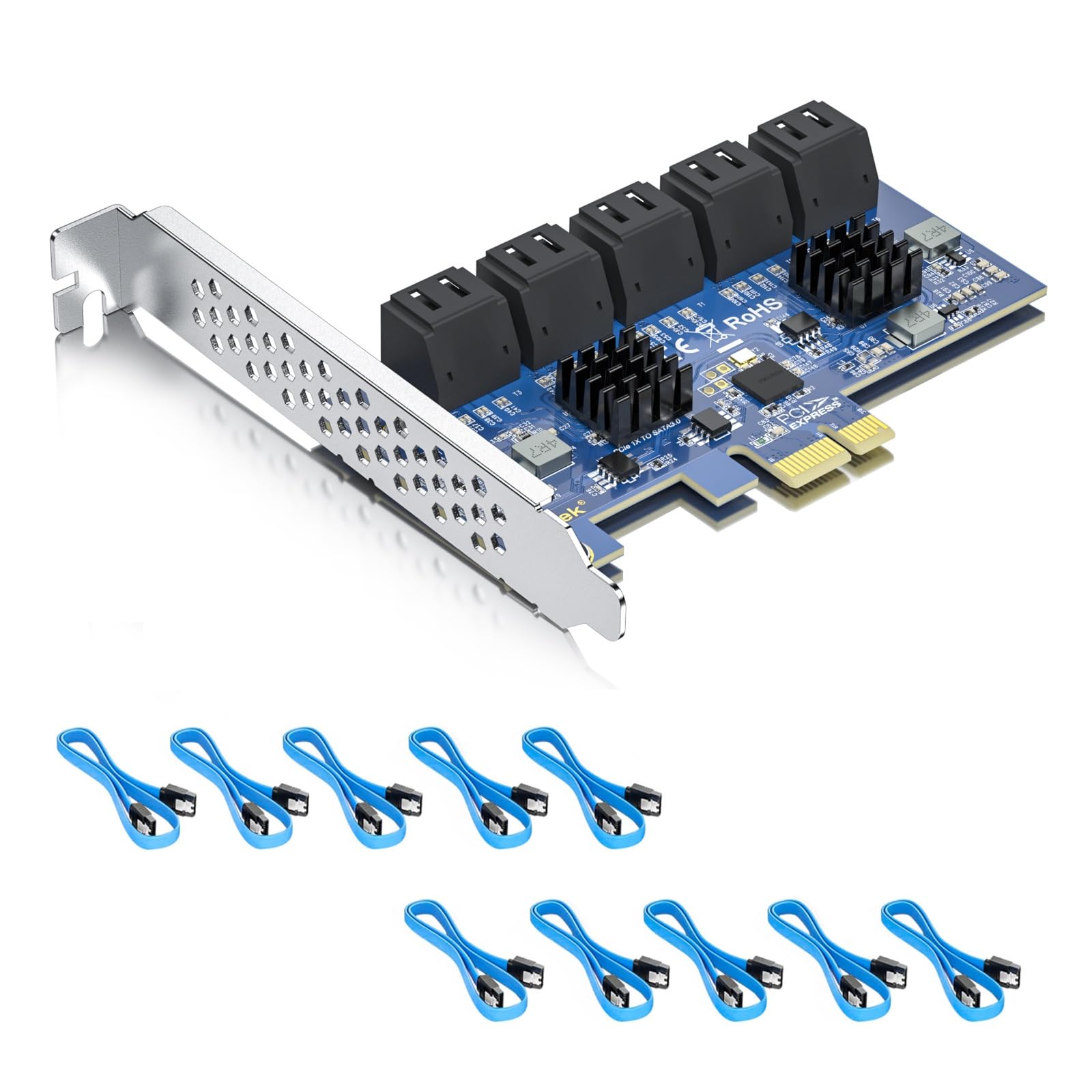
The 10Gtek 10-Port card maximizes port density with a JMB582 plus JMB575 chipset combination driving ten SATA III 6 Gbps ports from a single PCIe 3.0 x1 slot. The card is enterprise-flavored in its OS compatibility list — Windows Server, CentOS, Debian, Ubuntu, FreeBSD, and VMware ESXi 6/7/8 are all explicitly supported — making it a natural fit for home lab environments.
Performance is solid under sustained heavy I/O, with users reporting no errors during extended ZFS scrub operations. The card ships with ten SATA cables, saving the cost of buying them separately. The driver download is required for Windows systems, but Linux distributions pick up the card without intervention.
Reliability is the dividing line with this card. While many users report years of trouble-free operation, a small number have experienced catastrophic failure after several months, including the card bricking all connected drives simultaneously. This appears to affect a specific hardware revision and is difficult to predict before purchase. The PCIe x1 bandwidth cap — approximately 1 GB/s shared across ten ports — also means this card is best suited for HDD arrays rather than high-speed SSD pools.
Why it’s great
- Ten SATA III ports supported on a single PCIe 3.0 x1 slot
- Broad enterprise OS support including VMware ESXi and FreeBSD
- Includes all ten SATA data cables in the box
Good to know
- Small but documented risk of card failure bricking connected drives
- PCIe x1 upstream limits aggregate throughput to under 1 GB/s
FAQ
Can I boot my operating system from a drive connected to a basic storage controller?
Why does my 10-port card only detect 3 or 4 drives in Windows?
Final Thoughts: The Verdict
For most users, the basic storage controller winner is the GLOTRENDS SA3026-C because its ASM1166 chipset delivers flawless plug-and-play compatibility across every major OS at a reasonable cost. If you need ten ports for a media server, grab the MZHOU 10-Port for its exceptional price per port. And for users who require hardware RAID 1 or 10 without taxing the CPU, nothing beats the StarTech PEXSAT34RH.