
Our readers keep the lights on and my morning glass full of iced black tea. As an Amazon Associate, I earn from qualifying purchases.
Shrinking a high-performance AMD build down to a 7-liter case demands a motherboard that delivers full desktop muscle without wasting a single square inch. The right Mini-ITX board balances VRM thermal capacity, storage connectivity, and I/O density — all while fitting inside a footprint barely larger than a hardcover book.
I’m Min — the co-founder and writer behind Gadgets Feed. I’ve spent countless hours analyzing voltage regulator topologies, PCIe lane allocations, and chipset thermal behavior to separate the boards that truly excel in small form factor builds from those that compromise too much.
Whether you are upgrading an existing system or building from scratch, this guide covers the top options to help you choose the best am4 itx motherboard for your specific space and performance demands.
How To Choose The Best AM4 ITX Motherboard
Selecting a Mini-ITX board for the AM4 platform requires evaluating more than just chipset compatibility. The physical constraints of the form factor force unique engineering trade-offs that directly affect your build’s thermal performance, upgrade path, and cable management ease.
VRM Quality And Thermal Headroom
An ITX board’s voltage regulator module (VRM) operates in close proximity to the CPU socket with limited airflow. Look for boards with at least a 6+2 phase design using 50A or higher DrMOS components. The GIGABYTE B550I AORUS PRO AX uses an 8-phase digital VRM with an extended heatsink and aluminum backplate — crucial for sustaining Ryzen 7 and Ryzen 9 processors under sustained all-core loads.
Storage And Expansion Prioritization
Mini-ITX boards offer exactly one PCIe x16 slot and typically one or two M.2 slots. If you need dual NVMe drives without sacrificing PCIe 4.0 bandwidth on the GPU, prioritize boards like the ASUS ROG Strix B850-I that include dedicated Gen5 M.2 cooling. Board positioning of the M.2 slot also matters — rear-mounted SSDs on some ITX boards (like the GIGABYTE B550I) can hit 72°C in tight cases without active cooling.
I/O Connectivity And BIOS Features
Rear I/O density defines the usability of an ITX board. A single USB-C header on the rear panel versus a front-panel header can dictate case compatibility. BIOS Flashback or Q-Flash Plus is non-negotiable for AM4 builds that may require a BIOS update to support Ryzen 5000 series CPUs — the ASRock A520M-ITX/AC includes this feature, letting you flash the BIOS without a CPU installed.
Quick Comparison
On smaller screens, swipe sideways to see the full table.
| Model | Category | Best For | Key Spec | Amazon |
|---|---|---|---|---|
| GIGABYTE B550I AORUS PRO AX | Mid-Range | Dual M.2 with PCIe 4.0 GPU | 8-phase VRM, 2x M.2 (PCIe 4.0 + 3.0) | Amazon |
| ASRock B650I Lightning WiFi | Mid-Range | DDR5 + PCIe 5.0 M.2 | 8+2+1 phase VRM, PCIe 5.0 M.2 | Amazon |
| MSI MPG B850I Edge TI WiFi | Premium | WiFi 7 + 5GbE LAN | 90A SPS VRM, Dual M.2 Gen5 | Amazon |
| ASUS ROG Strix B850-I Gaming WiFi | Premium | Dual PCIe 5.0 M.2 + AI Overclocking | 10+2+1 stages 70A, dual PCIe 5.0 M.2 | Amazon |
| GIGABYTE B850I AORUS PRO | Premium | 5-Year Warranty + WiFi 7 | 8+2+1 stage 80A, 2x M.2 PCIe 5.0 | Amazon |
| ASRock A520M-ITX/AC | Budget | Entry-level SFF build | A520 chipset, DDR4 4733+ OC, onboard WiFi | Amazon |
In‑Depth Reviews
1. GIGABYTE B550I AORUS PRO AX

The GIGABYTE B550I AORUS PRO AX uses a Pure Digital Direct 8-phase VRM with an 8-layer PCB to deliver clean power to Ryzen 5000 series CPUs, even under sustained all-core loads. The extended VRM heatsink paired with an aluminum backplate keeps thermals in check inside compact cases where airflow is naturally restricted.
Storage flexibility is a standout feature here. You get a PCIe 4.0 x16 slot with reinforced UD Armor, a front-side PCIe 4.0 M.2 slot, and a rear PCIe 3.0 M.2 slot — the rear slot runs noticeably hotter (customers report 72°C under load) but still offers dual-NVMe capacity without sacrificing GPU bandwidth. The integrated I/O shield speeds installation, and Q-Flash Plus lets you update the BIOS without a CPU installed — essential for Ryzen 5000 compatibility out of the box.
The board supports DDR4 up to 128GB with Extreme Memory Profile (XMP) support, and features 2.5GbE LAN alongside integrated WiFi 6. Some users report that enabling Above 4G Decoding in the BIOS can disable chipset devices, a known quirk to be aware of. The rear M.2 slot requires full disassembly to service the CMOS battery or replace the Intel AX200 WiFi module, making future maintenance more involved than on ATX boards.
Why it’s great
- Robust 8-phase VRM with extended thermal armor handles Ryzen 7 and Ryzen 9 CPUs
- Dual M.2 slots with PCIe 4.0 on the primary slot preserve GPU bandwidth
- Q-Flash Plus enables BIOS updates without a CPU for processor flexibility
Good to know
- Rear M.2 slot is PCIe 3.0 only and can run hot without active airflow
- No front-panel USB-C header limits case compatibility options
- CMOS battery and WiFi module replacement requires full disassembly of heatsinks and backplate
2. MSI MPG B850I Edge TI WiFi
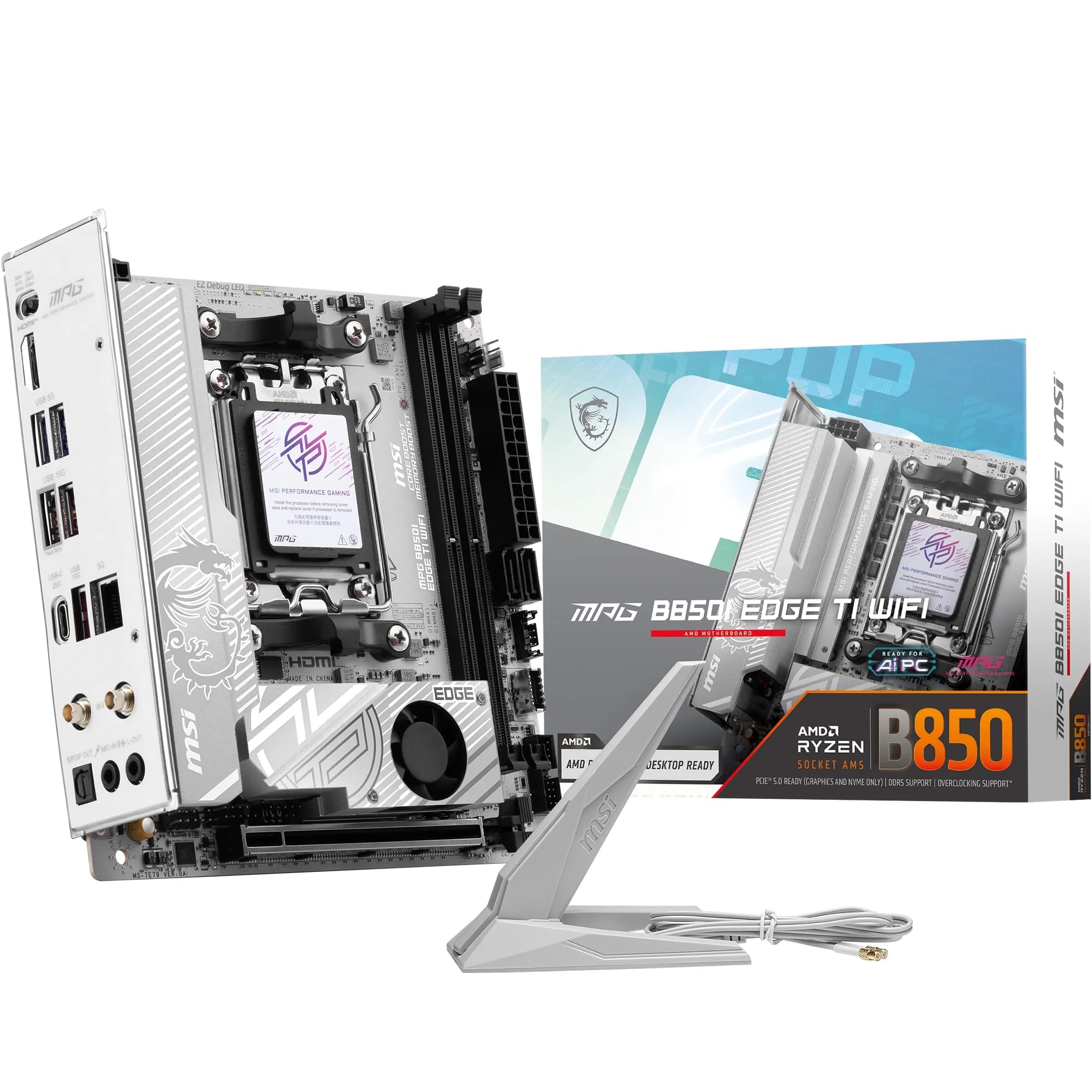
The MSI MPG B850I Edge TI WiFi packs a Direct 8-phase 90A SPS VRM with Core Boost architecture, making it one of the most powerful AM5 ITX boards for Ryzen 9000 series processors. The 7W/mK MOSFET thermal pads and extended heatsink keep VRM temperatures well within range even in cases like the NR200P with a Ryzen 9 7950X installed.
DDR5 memory support reaches 8200+ MT/s in single-DIMM configuration, and the dual M.2 layout includes one Gen5 x4 slot running at 128Gbps and one Gen4 x4 slot. The white PCB design with frosted M.2 shields creates a clean aesthetic that pairs well with white case builds. WiFi 7 with Bluetooth 5.4 and a 5GbE LAN port future-proof network connectivity for high-bandwidth transfers and low-latency gaming.
BIOS Flashback makes CPU-less firmware updates straightforward — valuable given some users reported needing it for initial compatibility. The ITX layout places fan and pump headers in tight clusters, making cable management more complex than on mATX boards. The QR code in the box links to a general guide rather than the specific model, so keep the full manual handy for header locations.
Why it’s great
- 90A SPS VRM handles flagship Ryzen 9 CPUs without thermal throttling
- WiFi 7 and 5GbE LAN provide industry-leading wireless and wired connectivity
- DDR5 overclocking support exceeding 8200 MT/s for memory-intensive workloads
Good to know
- Some units arrived dead; BIOS Flashback is essential for troubleshooting
- ITX layout crowds fan and audio headers, complicating cable routing
- Rear M.2 slot lacks a heatsink; thermal throttling is possible under sustained writes
3. ASUS ROG Strix B850-I Gaming WiFi

The ASUS ROG Strix B850-I Gaming WiFi uses a 10+2+1 power stage solution rated at 70A per stage, delivering exceptional power delivery headroom for Ryzen 9000 series CPUs. The massive VRM heatsink integrated with the I/O cover and high-conductivity thermal pads ensures sustained performance in compact enclosures where airflow is minimal.
Storage configuration is best-in-class for ITX: two onboard PCIe 5.0 M.2 slots — one under a large dedicated heatsink and the second on the rear for additional capacity. This means you can run two Gen5 SSDs simultaneously without sacrificing GPU bandwidth on the PCIe 5.0 x16 slot. The USB-C 20Gbps front-panel header and rear Type-C port provide fast peripheral connectivity, and the 2.5GbE LAN with WiFi 7 covers networking needs.
ASUS includes AI Overclocking, AI Networking II, and AI Advisor utilities that simplify BIOS tuning for less experienced builders. Some users report that the board fails to recognize the Samsung 990 Pro as a bootable NVMe drive despite detecting it as storage — a firmware bug that ASUS may need to address. The MediaTek WiFi module occasionally drops connection, and the rear audio codec exhibits distortion at higher volumes in some units.
Why it’s great
- 10+2+1 power stages with 70A capacity provide extreme VRM headroom for overclocking
- Dual PCIe 5.0 M.2 slots allow two next-gen SSDs without lane sharing
- AI overclocking and networking utilities simplify system optimization significantly
Good to know
- NVMe Gen4 boot compatibility issues reported with Samsung 990 Pro drive
- MediaTek WiFi module can be inconsistent under heavy interference
- Audio codec shows distortion at higher volumes on some production batches
4. GIGABYTE B850I AORUS PRO

The GIGABYTE B850I AORUS PRO offers an 8+2+1 phase 80A Smart Power Stage design that competes directly with higher-priced ASUS and MSI options while including a 5-year warranty — rare for this form factor. The VRM Thermal Guard and M.2 Thermal Guard keep both the power delivery and primary NVMe drive cool during extended gaming sessions or content creation workloads.
Connectivity includes PCIe 5.0 on the primary x16 slot and one M.2 slot, WiFi 7, 2.5GbE LAN, and a USB-C port on the rear I/O. The board ships with two M.2 slots total — one Gen5 and one Gen4 — giving you flexible storage configuration options. EZ-Latch makes GPU removal tool-free, which is a meaningful convenience in tight SFF cases where reaching PCIe latches is physically challenging.
Customer feedback reveals some potential gotchas. The bottom right mounting screw doesn’t align perfectly with some cases, and the chipset fan can be audible in quiet environments (though it can be disabled in BIOS). Networking reliability issues — both WiFi and Ethernet dropping intermittently — have been reported on certain Ryzen 9900X configurations, and the rear I/O only offers six USB ports, which is less than some competing boards provide.
Why it’s great
- 5-year warranty provides exceptional long-term peace of mind for ITX buyers
- 80A SPS VRM with extended thermal guards handles Ryzen 9 CPUs effectively
- EZ-Latch simplifies GPU removal in tight SFF cases without tools
Good to know
- Networking stability issues reported on WiFi and Ethernet with some CPU configurations
- Rear I/O limited to six USB ports; fewer than competing premium ITX boards
- Chipset fan can be audible and requires BIOS tuning to disable
5. ASRock B650I Lightning WiFi

The ASRock B650I Lightning WiFi delivers a compelling value proposition for AM5 ITX builders on a tighter budget. The 8+2+1 phase DrMOS power design supports Ryzen 7000, 8000, and 9000 series CPUs, while the dual DDR5 DIMM slots handle overclocked memory up to 7200+ MT/s in dual-channel configuration — competitive with boards costing significantly more.
Storage is serviced by a primary PCIe 5.0 x4 M.2 slot and a secondary PCIe 4.0 M.2 slot, plus two SATA3 ports for legacy drives or bulk storage. The Phantom Gaming 2.5G LAN and Intel WiFi 6E provide solid networking, and the board includes both front and rear USB-C ports. BIOS Flashback lets you update firmware without a CPU installed — a necessary feature given that many users needed it for initial Ryzen 7000 series compatibility.
Initial boot on some systems takes approximately four minutes with multiple restarts before the BIOS screen appears — this is normal behavior for first-time AM5 POST but can be alarming for new builders. The lack of a second M.2 slot on the rear (requires an additional heatsink) limits expansion options.
Why it’s great
- DDR5 overclocking support up to 7200+ MT/s at a sub-premium price point
- PCIe 5.0 M.2 slot provides next-gen storage speeds without lane sharing
- BIOS Flashback enables CPU-less firmware updates for hassle-free setup
Good to know
- Long-term reliability concerns with some units failing within one year of use
- Initial AM5 POST can take several minutes with multiple automatic restarts
- Second M.2 slot lacks a dedicated heatsink, potentially causing thermal throttling
6. GIGABYTE A620I AX
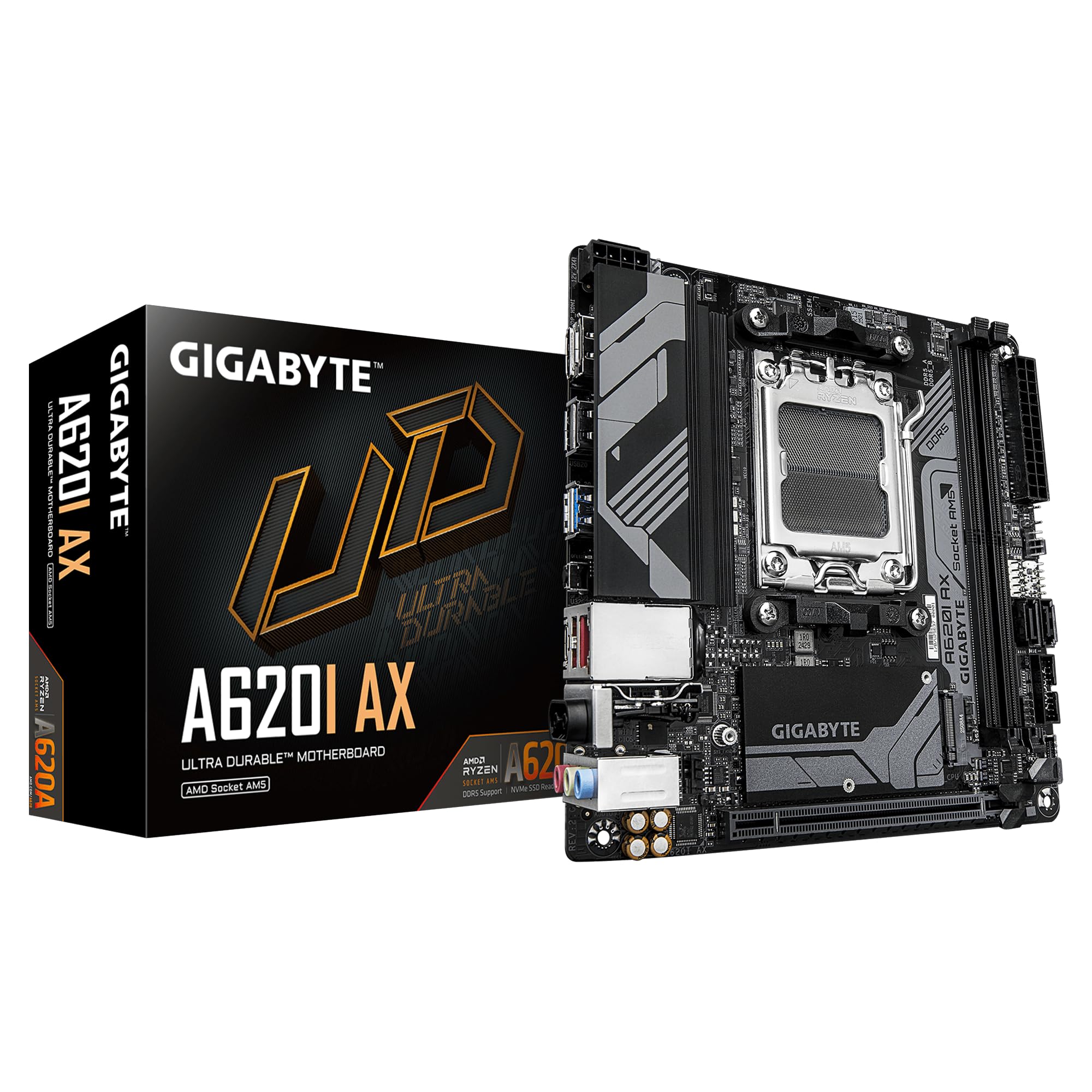
The GIGABYTE A620I AX is the most affordable entry point for an AM5 ITX build, using the A620 chipset that omits PCIe 5.0 support but keeps DDR5 memory compatibility and a compact 6.7-inch square footprint. The 5+2+1 phase digital VRM is sufficient for Ryzen 5 and Ryzen 7 processors, though pushing a Ryzen 9 under sustained loads will test its thermal limits in smaller cases.
Connectivity is decent for the price point: WiFi 6E and 2.5GbE LAN cover networking, while a single USB 3.2 Gen1 Type-C port on the rear handles modern peripherals. The single M.2 slot runs at PCIe 4.0 speeds — enough for fast NVMe SSDs but limiting if you need dual-drive storage. Q-Flash Plus allows BIOS updates without a CPU, and the PCIe EZ-Latch simplifies GPU removal.
The board lacks Precision Boost Overdrive (PBO) support due to the A620 chipset limitation, meaning CPU tuning is more restrictive than B650 or X670 options. Some users report Bluetooth issues that require driver updates to resolve, and the packaging lacks adequate foam protection — Amazon shipments have arrived with the board shifting inside the box. The VRM heatsinks run noticeably warm in cases without active chipset airflow, though this hasn’t caused stability issues in testing.
Why it’s great
- Lowest-cost entry into AM5 ITX with DDR5 memory support
- WiFi 6E and 2.5GbE LAN provide modern networking at a budget price
- Q-Flash Plus enables BIOS updates without a CPU for easy setup
Good to know
- A620 chipset lacks PCIe 5.0 and PBO support, limiting performance tuning
- Single M.2 slot restricts storage expansion compared to B650 alternatives
- VRM thermals run warm under load; best paired with CPUs under 105W TDP
7. ASRock A520M-ITX/AC

The ASRock A520M-ITX/AC is a no-fuss AM4 Mini-ITX board that supports Ryzen 3000, 4000, and 5000 series processors out of the box with a BIOS that offers solid RAM overclocking — one user successfully ran DDR4 at 6000 MHz despite the manual stating a 4799 MHz limit. The A520 chipset omits PCIe 4.0, limiting the primary x16 slot to PCIe 3.0 speeds, but this is irrelevant for most current GPUs that don’t saturate 3.0 bandwidth.
The board includes built-in 2.4/5 GHz WiFi and Bluetooth, eliminating the need for a separate wireless card — a significant convenience for ITX builds where expansion slots are non-existent. An NVMe heatsink is included for the single M.2 slot, and dual chassis fan headers provide adequate cooling control for small form factor cases. The board boots first time with Ryzen 5 3500X and XMP DDR4 configurations, and has been validated for Linux Mint compatibility.
The PCIe x16 slot lacks a metal reinforcement bracket, which is a concern for heavier GPUs that may sag in vertically mounted ITX cases. Some units ship dead out of the box — quality control is inconsistent — and the A520 chipset doesn’t support AMD Smart Access Memory (SAM) in all configurations. The board’s 0.02-pound listed weight is clearly incorrect; actual handling weight is typical for an ITX board at around 1.5 pounds.
Why it’s great
- Works out of the box with Ryzen 3000/4000/5000 CPUs without BIOS updates
- Integrated WiFi and Bluetooth eliminate need for a separate wireless adapter
- DDR4 overclocking potential exceeds official specs, reaching 6000 MHz in some builds
Good to know
- A520 chipset lacks PCIe 4.0 and SAM support, limiting GPU bandwidth potential
- Unreinforced PCIe slot may not securely hold heavy triple-fan GPUs over time
- Quality control is inconsistent; some units arrive non-functional
FAQ
Can I use a Ryzen 5000 series CPU on a B450 ITX board?
Does the A520 chipset support PCIe 4.0 on the M.2 slot?
Why does my Mini-ITX board have only two DIMM slots instead of four?
Final Thoughts: The Verdict
For most users, the am4 itx motherboard winner is the GIGABYTE B550I AORUS PRO AX because it delivers an excellent balance of VRM thermal performance, dual M.2 storage flexibility, and PCIe 4.0 support at a price that undercuts premium alternatives without compromising on the features that matter most in SFF builds. If you need native DDR5 and PCIe 5.0 storage, grab the ASUS ROG Strix B850-I Gaming WiFi. And for the tightest budget where every dollar counts, nothing beats the ASRock A520M-ITX/AC.