
Finding a wireless mouse that doesn’t stutter, doesn’t eat batteries every week, and fits your hand for less than the price of dinner out sounds impossible — but the market is packed with capable contenders that deliver serious specs without emptying your wallet.
I’m Min — the co-founder and writer behind Gadgets Feed. I spend my days parsing through the real-world performance data and customer feedback on dozens of budget peripheral models to separate the genuinely smooth operators from the laggy disappointments.
A cheap wireless mouse doesn’t have to feel cheap when you know exactly which connectivity standard and battery life spec to prioritize. The best cheap wireless mouse earns its place by delivering reliable tracking, a comfortable shape, and rechargeable or long-lasting battery power without introducing input lag into your daily workflow.
How To Choose The Best Cheap Wireless Mouse
The sub- wireless mouse zone is crowded with both gems and duds. Focusing on three critical decision points helps you skip the frustration of a mouse that disconnects mid-scroll or cramps your hand by lunchtime.
Connectivity: 2.4 GHz vs. Bluetooth
A dedicated 2.4 GHz USB receiver offers the most reliable, lag-free connection — ideal for desktop work where you don’t unplug often. Bluetooth adds convenience for switching between a laptop and tablet, but version matters: Bluetooth 5.0 or higher ensures stable pairing and lower power draw. Dual-mode mice (2.4 GHz + Bluetooth) give you the best of both worlds for multi-device setups.
Battery Life and Power Type
This is the biggest differentiator between a budget winner and a constant annoyance. Internal rechargeable batteries save you from buying AA/AAA packs, but check the claimed runtime — 800 mAh cells can deliver weeks of normal use, while mice with mediocre power management may need topping off every few days. Alternatively, some premium budget models use standard batteries but last 12–24 months, meaning you change them once or twice a year.
Ergonomics and Button Layout
Even a budget-friendly purchase should feel right in your hand for hours. Contoured shapes with rubber side grips reduce fatigue, while a low-profile design suits smaller hands or claw grips. Vertical ergonomic mice relieve wrist strain but take a few days to adjust. Check whether side buttons are programmable and DPI adjustment is easily accessible — these features genuinely speed up daily tasks.
Quick Comparison
On smaller screens, swipe sideways to see the full table.
| Model | Category | Best For | Key Spec | Amazon |
|---|---|---|---|---|
| Logitech M510 | Premium Budget | All-day comfort & reliability | 24-month battery life | Amazon |
| AOC Vertical Ergonomic Mouse | Vertical Ergonomic | Wrist strain relief + RGB | 4800 DPI / 200hr battery | Amazon |
| CITLLA L360 | Multi-Device | 3-device fast switching | 40-month battery life | Amazon |
| Kovess Dual Mode | Rechargeable Workhorse | MacBook users & jiggler mode | 800 mAh / 90-day standby | Amazon |
| Anker Vertical Ergonomic | Wrist-Friendly Value | Repetitive strain relief | 3 DPI levels / 1600 max | Amazon |
| TECKNET Rechargeable Silent | Ultra-Quiet Compact | Silent office & small hands | 4800 DPI / 6 levels | Amazon |
| Logitech MK270 Combo | Keyboard + Mouse Set | Full desktop setup on a budget | 36-month keyboard battery | Amazon |
In‑Depth Reviews
1. Logitech M510 Wireless Mouse

The Logitech M510 proves that a budget-friendly price doesn’t mean sacrificing premium feel. Its contoured shape with soft rubber grips and a broad palm area provides genuine all-day comfort for medium to large hands, and the 1000 DPI laser-grade tracking works smoothly on almost any surface without a pad. The sculpted sides and forward/back buttons make navigation effortless, especially for right-handed users who need quick access during spreadsheets or browsing.
Battery life is the headline feature here — up to 24 months from two included AA batteries, with an on/off switch and smart sleep mode to stretch that even further. The tiny Logitech Unifying receiver stays in your laptop port so you never lose it, and it can pair with multiple compatible keyboards and mice simultaneously. The scroll wheel includes side-to-side tilt, giving you horizontal control through photo libraries and wide documents without lifting your finger.
Setup is genuinely plug-and-play with no software required, though Logitech’s SetPoint software unlocks button customization for Windows users. The main trade-off is the lack of adjustable DPI on the fly — you’re locked to 1000 DPI — and the scroll wheel can feel slightly wobbly on some units. Still, for sheer build quality, ergonomic contouring, and battery longevity, the M510 is the safe bet that outperforms its price range.
Why it’s great
- Contoured rubber grips reduce hand fatigue during long sessions
- 24-month battery life practically eliminates battery swaps
- Side-to-side scroll wheel adds horizontal navigation without extra software
Good to know
- Fixed 1000 DPI — no on-the-fly sensitivity adjustment
- Scroll wheel may exhibit slight lateral wobble on certain units
2. AOC Ergonomic Vertical Mouse
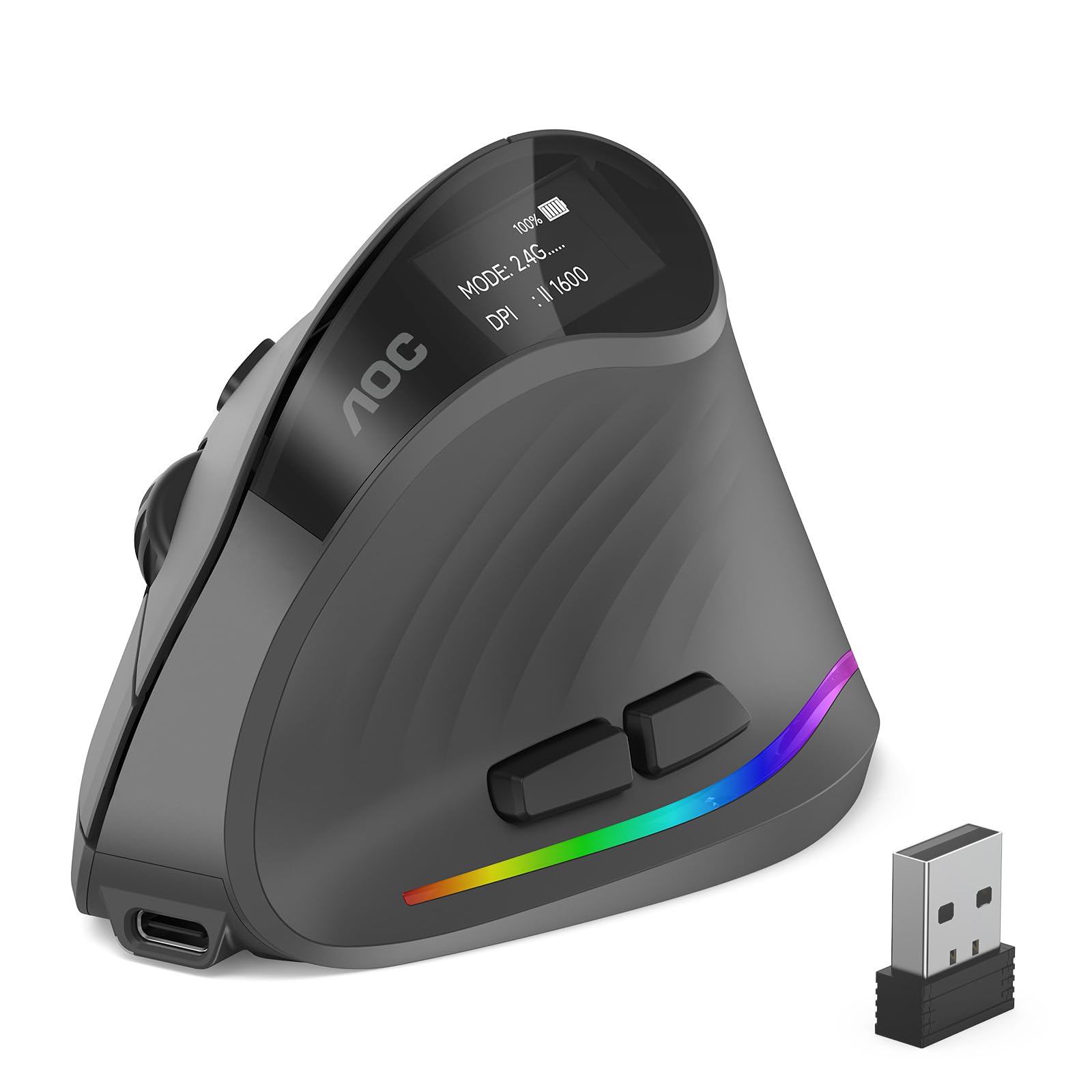
The AOC vertical ergonomic mouse uses a 52-degree handshake angle to reduce wrist twisting and forearm tension, making it a strong contender for anyone dealing with repetitive strain discomfort. It supports triple-mode connectivity — Bluetooth 5.4, 2.4 GHz wireless receiver, and wired USB — so you can easily switch between a desktop, laptop, and tablet without unpairing. The 4800 DPI optical sensor offers five adjustable levels (1000/1600/2400/3200/4800), giving you fine-grained cursor speed control for tasks from photo editing to office documents.
An 800 mAh rechargeable battery delivers up to 200 hours of runtime with the RGB lighting off, and around 40 hours with the customizable LED effects active. The tiny OLED screen on the side shows remaining battery percentage, removing guesswork about when to charge. The left and right clicks operate under 35 dB, making them truly quiet for shared workspaces, though the side buttons and scroll wheel produce normal click sounds.
Fully programmable buttons via AOC’s app allow you to assign shortcuts to boost workflow efficiency. The matte ABS build keeps weight very low, and the non-slip texture ensures a secure grip. The vertical form factor is optimized for small to medium hands — larger hands may find it cramped. Battery longevity on the rechargeable cell is decent but not class-leading, and some users report needing a charge every few days under heavy use with RGB on.
Why it’s great
- 52-degree vertical angle genuinely relieves wrist strain during extended use
- Triple-mode connectivity (BT 5.4, 2.4 GHz, wired) offers total flexibility
- Onboard OLED screen shows exact battery percentage
Good to know
- Designed for small to medium hands; larger hands may feel cramped
- Rechargeable battery life varies significantly with RGB enabled
3. CITLLA Wireless Bluetooth Mouse

The CITLLA L360 is built for users who hate hunting for spare batteries. Its power control system delivers a staggering 40-month battery life from two included AA cells, meaning you can forget about battery swaps for years. The mouse supports three connection methods — 2.4 GHz USB, Bluetooth 1, and Bluetooth 2 — with a dedicated switch button that lets you toggle between up to three paired devices instantly. The 4-way scrolling wheel is the standout feature: it scrolls up, down, left, and right, making document navigation and spreadsheet work substantially faster than a standard wheel.
DPI adjustment offers four levels (1000/1600/2400/3000) via a top button with color-coded LED feedback, so you can fine-tune cursor speed without guessing. The rubber side grips are textured and sweat-proof, providing a secure hold during long work sessions. The full-size body measures 4.6 x 2.6 x 1.6 inches, fitting medium to large hands comfortably, though some users note it runs slightly larger than expected.
Connectivity is rock-solid across both Bluetooth and 2.4 GHz modes, with no noticeable lag for productivity tasks. The silent clicks and smooth scroll wheel make it suitable for shared offices. The main limitation is macOS compatibility — the side forward/back buttons don’t function as expected on Mac without additional configuration, and the manufacturer offers no dedicated customization software. This mouse is a powerhouse for Windows users who want multi-device flexibility and category-leading battery endurance.
Why it’s great
- 4-way scrolling wheel dramatically improves horizontal document navigation
- 40-month battery life from standard AA batteries is best-in-class
- Smooth three-device switching with dedicated top button and LED indicators
Good to know
- Side buttons are not functional on macOS without third-party software
- Slightly larger footprint may not suit ultra-compact laptop bags
4. Kovess Dual Mode Bluetooth Mouse

The Kovess wireless mouse is a well-rounded option for MacBook and iPad users thanks to its dual-mode connectivity that includes Bluetooth 5.2, Bluetooth 3.0, 2.4 GHz USB-A, and 2.4 GHz USB-C — the separate USB-C receiver is a rare and convenient inclusion for modern ultrabooks with only USB-C ports. The 800 mAh rechargeable battery provides about 3 to 4 weeks of typical use on a single charge, with a 90-day standby time, removing the need for disposable batteries entirely.
A practical addition is the built-in mouse jiggler mode: long-pressing the DPI button for three seconds activates random pointer movement to keep your computer awake during presentations, long downloads, or remote desktop sessions. The three adjustable DPI levels (800/1200/1600) are accessible via short press, covering basic productivity needs. The slim, contoured body with a smooth glossy finish and rubber scroll wheel is designed for ambidextrous use, though the shape clearly favors smaller to average hands.
Silent click operation keeps noise under control, and the mouse enters an auto-sleep mode after eight minutes of inactivity to conserve power. The dual-port receiver (USB-A and USB-C integrated) is a clever design touch — you can leave it in your laptop without worrying about losing a separate adapter. The glossy plastic finish is prone to fingerprints and may feel less premium than matte alternatives, and the small footprint means users with XL hands will find it cramped. Still, the jiggler mode and USB-C receiver set it apart for Mac ecosystem users.
Why it’s great
- Includes both USB-A and USB-C 2.4 GHz receivers out of the box
- Jiggler mode keeps computer awake without third-party apps
- 800 mAh rechargeable battery provides weeks of use per charge
Good to know
- Small form factor is not comfortable for large hands
- Glossy plastic finish attracts fingerprints and smudges
5. Anker Vertical Ergonomic Mouse
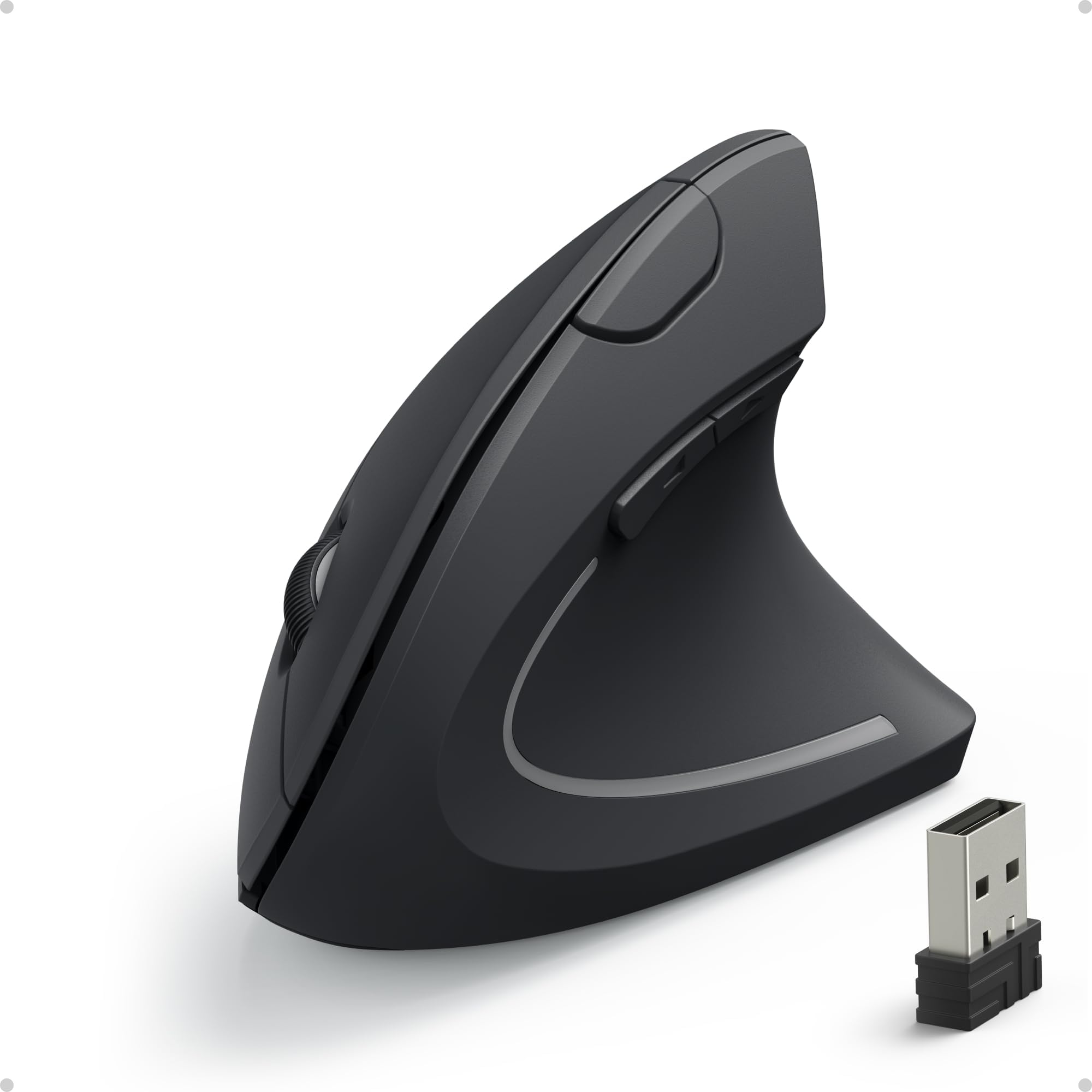
The Anker 2.4G Vertical Ergonomic Mouse is a proven remedy for wrist strain, carpal tunnel, and tennis elbow users who need immediate relief without spending over a hundred dollars. Its vertical handshake design promotes a neutral wrist and arm position, and the rubbery matte grip provides secure handling during long work sessions. The 6-button layout includes forward/back navigation for easy browsing, and the 800/1200/1600 DPI optical tracking works smoothly on most surfaces except transparent glass.
Energy efficiency is handled by an auto sleep mode that engages after 8 minutes of inactivity, completely disconnecting power until you click either button. The mouse uses two AAA batteries (not included), and battery drain varies — some users report excellent longevity, while others note faster drain with continuous use. The 2.4 GHz USB receiver stores conveniently in the bottom compartment, so it’s easy to transport without losing it.
Setup is truly plug-and-play with no drivers needed on Windows or macOS. The vertical form factor requires a 2 to 3 day adjustment period to retrain your muscle memory, but regular users report significant reduction in pain and numbness after consistent use. The tall profile (about 3.5 inches) can get knocked off a cluttered desk, and the sleep mode requires a button press rather than a simple movement to wake, which takes getting used to. It’s a specialized tool for wrist health, not a general-purpose gaming or compact travel mouse.
Why it’s great
- Vertical grip provides meaningful relief for carpal tunnel and arthritis sufferers
- Matte rubber surface ensures secure, non-slip hold during extended use
- Plug-and-play compatibility with Windows, Mac, and Chrome OS
Good to know
- Requires 2 AAA batteries — not included and not rechargeable
- Tall design can be accidentally knocked off a crowded desk
6. TECKNET Rechargeable Silent Mouse
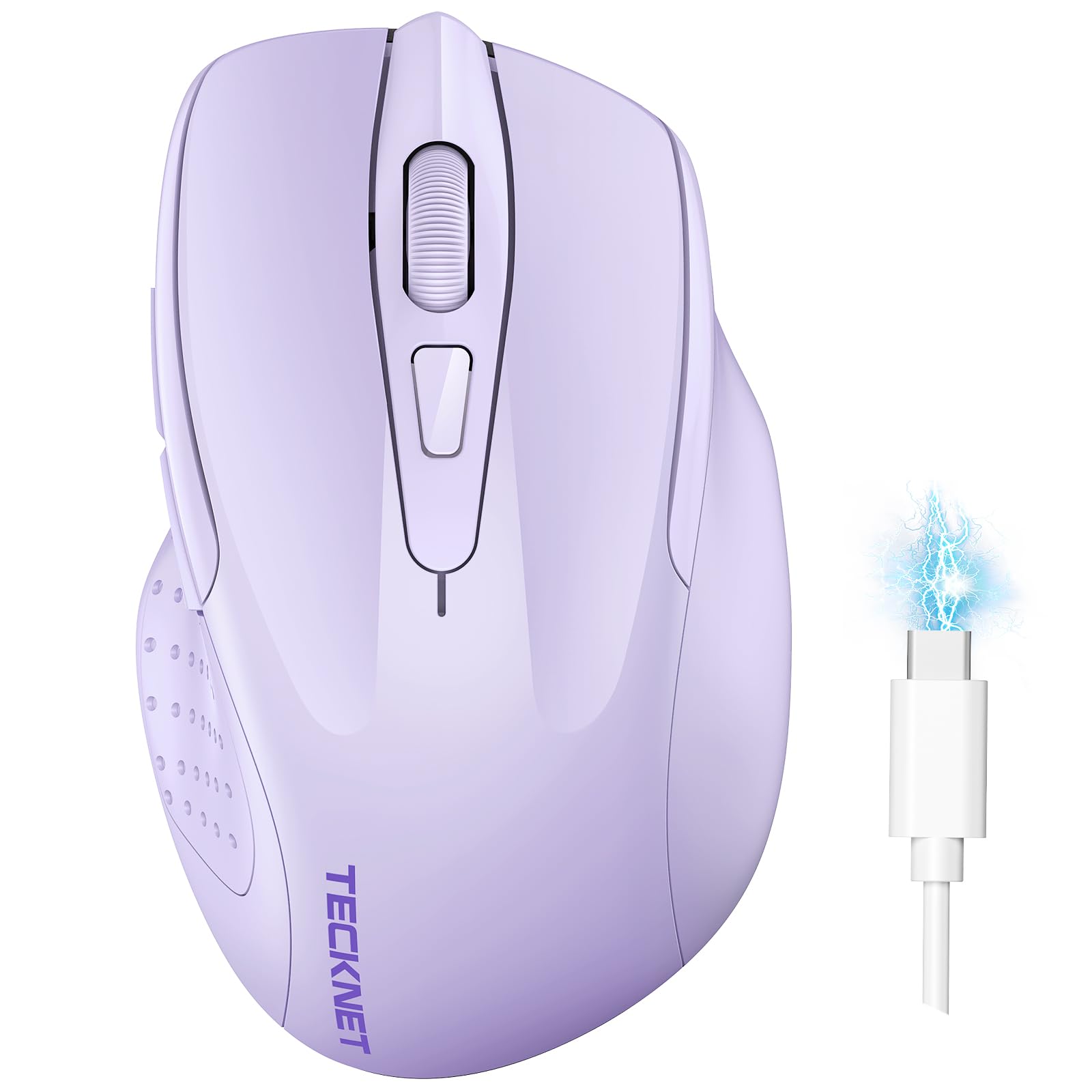
The TECKNET wireless mouse packs a surprising amount of customization into a compact, lightweight body that prioritizes silent operation. It supports dual-device connection via Bluetooth 5.0/3.0 and a 2.4 GHz USB-A receiver, with a simple slide switch toggling between paired devices. The 6-level adjustable DPI (800/1200/1600/2400/3200/4800) gives you fine-grained cursor speed control accessible via a dedicated button, making it easy to slow down for precision work or speed up for larger screens.
The internal rechargeable battery charges fully in about 1.5 to 2 hours via USB-C and delivers roughly 3 months of use based on 2 hours daily operation, according to the manufacturer. In real-world testing, users report around 1 to 1.5 months of heavy daily use before needing a recharge. The silent clicks are genuinely quiet — under 30 dB — making this an excellent choice for libraries, open offices, or late-night work without disturbing others. The lavender color option adds a subtle aesthetic touch for those wanting something beyond standard black or gray.
Ergonomically, this mouse is best suited for small to medium hands. The ambidextrous shape is relatively flat and lightweight at just over 60 grams, making it highly portable. The side buttons are positioned well for right-handed users but are not functional on macOS. Some users note that an “anti-sleep” jiggler mode can activate randomly, causing unwanted cursor movement, and the lack of an on/off switch means the mouse continues drawing power when idle. For the price, the silent clicks and high DPI ceiling are standout features in a compact package.
Why it’s great
- 6 adjustable DPI levels up to 4800 for versatile cursor control
- USB-C rechargeable battery removes the need for disposable cells
- Extremely quiet clicks suitable for shared quiet environments
Good to know
- Side buttons are non-functional on macOS without workarounds
- Random jiggler mode activation can cause unexpected cursor movement
7. Logitech MK270 Wireless Combo

The Logitech MK270 is the complete desktop starter kit for anyone setting up a home office on a tight budget. The full-size keyboard features low-profile, quiet keys with a standard layout including number pad, arrow keys, and eight multimedia hotkeys for instant access to internet, email, play/pause, and volume control. The compact mouse shares the same 2.4 GHz nano receiver, providing a reliable connection up to 33 feet with no noticeable lag or dropouts.
Battery life is the headline spec: the keyboard runs for an incredible 36 months on two included AAA batteries, while the mouse lasts 12 months on a single AA battery. On/off switches on both devices help conserve power when not in use. The keyboard also features a spill-resistant design and sturdy tilt legs for adjustable typing angle, adding durability that stands up to daily coffee-adjacent use.
The mouse is compact and ambidextrous, equally usable by left- and right-handers, with smooth cursor control on most surfaces. The set uses Logitech’s 2.4 GHz receiver — not the Unifying protocol — so you can’t pair additional Logitech devices to the same dongle. The mouse lacks DPI adjustment or side buttons, making it basic compared to standalone budget mice. But if you need a keyboard and mouse that both work reliably out of the box for years, the MK270 combo is the most cost-effective way to get there.
Why it’s great
- Keyboard battery lasts an incredible 36 months on two AAA batteries
- Spill-resistant keyboard design adds peace of mind for messy desks
- Eight multimedia hotkeys provide convenient one-touch access to common functions
Good to know
- Mouse is basic — no DPI adjustment, no side buttons, fixed 1000 DPI
- Uses proprietary 2.4 GHz receiver, not Logitech Unifying protocol
FAQ
Is a 2.4 GHz wireless mouse better than Bluetooth for daily work?
What battery type lasts longer in a budget wireless mouse?
Can a cheap wireless mouse have sensor tracking issues?
Does a vertical ergonomic mouse take time to get used to?
Why do some cheap wireless mice have input lag even with fresh batteries?
Final Thoughts: The Verdict
For most users, the best cheap wireless mouse winner is the Logitech M510 because it combines the most comfortable ergonomic shape in this price bracket with a proven 24-month battery life and rock-solid 2.4 GHz reliability. If you need multi-device switching and hate changing batteries, grab the CITLLA L360 with its 40-month battery life and 4-way scrolling. And for wrist pain relief, nothing beats the AOC Vertical Ergonomic Mouse — its 52-degree angle and 4800 DPI sensor deliver genuine strain reduction without overspending.