
Whether you are shipping products, organizing inventory, or creating professional retail signage, a color label printer that delivers vibrant, smudge-proof results without bleeding ink between labels is the backbone of efficient operations. Getting a machine that handles variable data, offers reliable connectivity, and prints sharp graphics at a usable speed separates a productive workflow from a constant source of frustration.
I’m Min — the co-founder and writer behind Gadgets Feed. I have spent hundreds of hours cross-referencing technical specifications, analyzing customer feedback across thousands of verified reviews, and comparing print engine types to identify the units that genuinely deliver on their promises for this specific subcategory.
This guide breaks down every critical spec and real-world use case so you can invest confidently in the best 4 color label printer that matches your volume, connectivity needs, and print quality expectations.
How To Choose The Best 4 Color Label Printer
Selecting the right printer for color labels is a decision between print engine type, connectivity, and cost per label. The wrong choice can mean faded designs, constant jams, or locked-in consumables that eat your margins. Here are the three factors that matter most.
Print Engine: Laser, Thermal, or ZINK
Color laser printers like the Brother HL-L3220CDW deliver fast, waterproof output using toner, making them ideal for high-volume shipping labels and durable signage. Direct thermal printers produce sharp monochrome prints without ink or toner but cannot print color. ZINK (Zero Ink) technology, found in the Brother ColAura VC500W, uses embedded dye crystals in special paper to produce full-color prints, which is excellent for smaller, photo-quality labels but has a higher per-label cost.
Connectivity and Workflow Integration
A printer that supports Wi-Fi, AirPrint, and a dedicated mobile app lets you print from anywhere in your workspace without plugging in. The Rollo Wireless Shipping Label Printer excels at this with seamless iOS and Android integration, while the Zebra ZD421 favors wired USB and Ethernet for stable, high-security environments. For mobile sellers using Poshmark or Etsy, wireless printing from a phone is a non-negotiable feature.
Label Size and Volume Capacity
Printers like the Brother QL-1110NWB accommodate labels up to 4 inches wide, perfect for large shipping labels and barcodes. The Canon PIXMA TR160 handles standard 8.5 x 11-inch sheets for versatile document and photo printing. High‑volume users should look at the Brother HL-L3220CDW’s 250‑sheet tray to minimize refills, whereas low-volume crafters might prefer the compact ColAura VC500W for on‑demand photo stickers.
Quick Comparison
On smaller screens, swipe sideways to see the full table.
| Model | Category | Best For | Key Spec | Amazon |
|---|---|---|---|---|
| Brother ColAura VC500W | ZINK | Photo labels & craft stickers | ZINK Zero Ink Technology | Amazon |
| Canon PIXMA TR160 | Inkjet | Portable document & photo prints | 5-Color Hybrid Ink System | Amazon |
| Brother QL-1100 | Thermal | Wide format shipping labels | Up to 4″ wide labels | Amazon |
| Rollo Wireless | Thermal | Wireless high-speed shipping | 150mm/s print speed | Amazon |
| Brother HL-L3220CDW | Color Laser | High-volume business documents | 19 ppm duplex color | Amazon |
| Brother QL-1110NWB | Thermal | Wireless wide label printing | Bluetooth & Wi-Fi | Amazon |
| Zebra ZD421 | Thermal | Industrial barcode labels | 203 dpi, Ethernet | Amazon |
In‑Depth Reviews
1. Brother Color Laser Printer (HL-L3220CDW)

This color laser model from Brother delivers crisp text and vibrant graphics at 19 pages per minute in both color and black-and-white, with automatic duplex printing that cuts paper use in half. Its 250-sheet paper tray keeps high-volume jobs running without constant refills, and the manual feed slot handles envelopes and specialty media. The heavy 50-pound chassis signals durable build quality, and the included high-yield toner cartridges get you started immediately.
Wireless connectivity supports printing from laptops, smartphones, and tablets using AirPrint, Mopria, and the Brother Mobile Connect app. Users have reported that initial setup on a Mac can require a self-signed certificate for secure connections, but once configured, the printer is reliable and fast. The compact footprint relative to other color lasers makes it a good fit for a home office or small business desk.
The HL-L3220CDW is print-only, so you lose scanning and copying, but the speed, color accuracy, and low cost per page with high-yield toners make it the most versatile option for general office label tasks. It is compatible with Windows 10/11, Mac OS, and Linux, but not with Windows 7.
Why it’s great
- Fast 19 ppm duplex color printing saves time and paper
- High-yield toner options keep cost per label low over time
- Compact footprint for a full-featured color laser
Good to know
- Setup on Mac can involve extra security steps
- Print-only — no scan or copy functions
- Heavy at about 50 pounds; not easily portable
2. Brother QL-1110NWB Wide Format Thermal Label Printer

This 4-inch wide format thermal printer supports Wi-Fi, Bluetooth, and Ethernet, allowing you to print shipping labels and barcodes directly from an iPhone, Android device, or computer without a wired connection. The direct thermal technology means no ink, toner, or ribbon to replace — just the adhesive-backed labels. It is especially popular among Poshmark and Etsy sellers who need to print 4×6 USPS labels wirelessly on the go.
The QL-1110NWB includes a barcode crop function for selecting specific barcodes from templates, and the free SDKs let developers integrate it into custom inventory systems. It prints at a rapid 69 labels per minute for monochrome output and handles continuous length tape up to 9.8 feet via USB. Users consistently report bold, scannable prints that stick well and look professional.
Setup is straightforward on Windows and Mac, but Linux users may face outdated CUPS drivers. Brother-branded DK rolls are recommended to prevent jams, though some third-party labels work with careful cartridge reuse. The cutter is durable for thousands of labels, making this a long-term investment for active shippers.
Why it’s great
- True wireless printing from iOS and Android without a computer
- High printing speed ideal for batch shipping label runs
- Barcode crop feature saves time managing multiple UPCs
Good to know
- Linux driver support is outdated and may not work
- Brother-branded labels are significantly more expensive than generics
- Initial setup confusing — requires a computer driver download first
3. Rollo Wireless Shipping Label Printer

Rollo’s wireless thermal printer prints one 4×6 label per second at 203 DPI, making it one of the fastest direct thermal options for shipping. It uses AirPrint for iOS and Mac devices and Wi-Fi for Android, Windows, Chromebook, and Linux, with no Bluetooth or driver installation required in most cases. The Rollo Ship Manager app provides discounted shipping rates, reducing the need for third-party shipping platforms.
The print head is rated for about 650,000 labels — four times the lifespan of many competitors — which reduces total cost of ownership for high-volume sellers. Users praise the small footprint, the web-based interface for adjusting settings, and the auto-detection of label sizes that prevents wasted media. It supports label widths from 1.57 to 4.1 inches, making it suitable for barcodes, product stickers, and thank you labels as well as shipping.
Wireless setup has occasionally been problematic, with some users reporting printer name flipping and offline errors that required support intervention. Rollo provides responsive customer service, but the initial experience can be inconsistent. It is not designed for color printing, but if monochrome shipping labels are your primary need, the value proposition is strong.
Why it’s great
- Extremely fast printing at one 4×6 label per second
- Print head rated for 650,000 labels with minimal long-term cost
- Works wirelessly with iOS, Android, Windows, and Linux
Good to know
- Wireless setup can be temperamental on some networks
- Monochrome only — no color label print capability
- Occasional partial label prints reported under heavy use
4. Zebra ZD421 Direct Thermal Desktop Printer
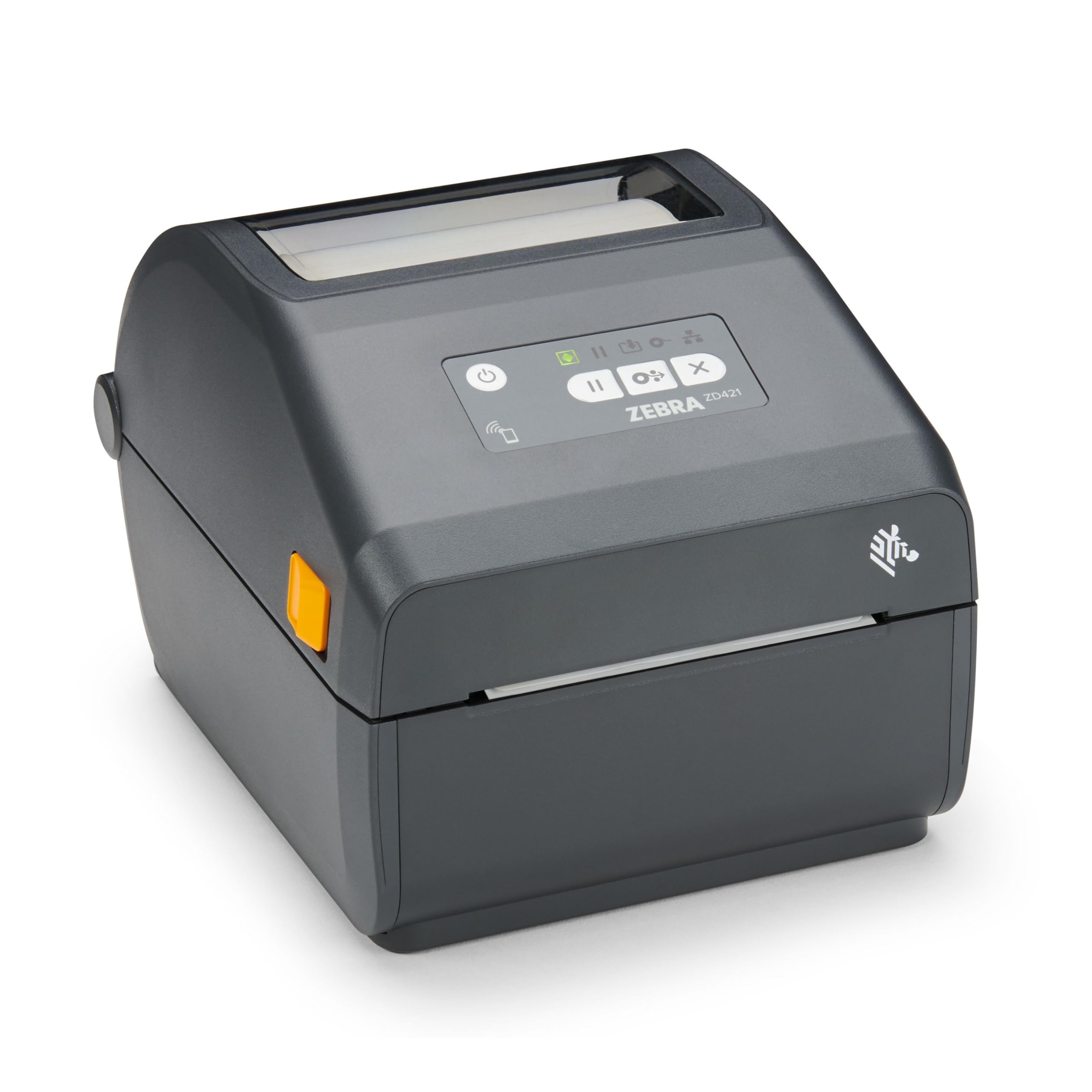
The Zebra ZD421 is a rugged direct thermal printer built for retail and warehouse environments where reliability and network security are paramount. It prints up to 4 inches wide at 203 dpi, producing crisp barcodes and text. The wired USB and Ethernet interfaces ensure stable connections in high-interference settings, and the advanced security protocols protect sensitive data on managed networks.
Users in retail stores report using this printer daily for inventory labeling without jams or performance degradation. The compact 8.7 x 5.9 x 6.9-inch footprint fits neatly on a packing station, and the direct thermal engine eliminates consumable costs beyond label stock. It supports a wide range of pressure-sensitive label materials, making it versatile for product tags, shelf labels, and shipping labels.
A notable limitation is that this model does not include a Wi-Fi card — wireless connectivity requires an optional accessory. Some buyers were caught off guard by this, expecting out-of-box Wi-Fi based on the product positioning. For operations that can accommodate a wired setup, the ZD421’s durability and consistent output justify its position as a premium industrial option.
Why it’s great
- Rock-solid wired connectivity for mission-critical business use
- Durable construction withstands high-volume daily operation
- No ink or toner costs — only label media needed
Good to know
- Wi-Fi requires a separate additional card not included
- Monochrome only — no color label support
- Premium price point suitable for commercial rather than home use
5. Brother ColAura VC500W Color Photo and Label Printer

The ColAura VC500W uses ZINK (Zero Ink) technology, embedding dye crystals directly into adhesive-backed paper so each print develops full color without cartridges. This produces photo-quality labels up to 2 inches wide with a glossy, instantly dry finish. It connects via Wi-Fi and works with a dedicated mobile app, making it simple to design and print labels from a smartphone or tablet.
Crafters, journalers, and small business owners use it for product stickers, scrapbooking, and retail signage. The prints are vivid with good saturation, and the pre-scored backing makes peeling and applying labels quick. The compact white design fits easily on a desk or craft table, and the lack of ink cartridges means no messy refills.
The main drawbacks are a limited template library in the app and the high per-label cost of ZINK paper rolls. Some users also report connectivity hiccups where the printer does not recognize inserted media. For users who need a steady supply of small, high-quality color labels without bulk printing, this is an enjoyable creative tool, but it is not designed for high-volume business label runs.
Why it’s great
- Prints full color without ink or toner cartridges
- Compact, portable design easy to store or carry
- Glossy, instantly dry photo-quality output
Good to know
- Per-label cost is higher than laser or thermal alternatives
- Limited to 2-inch wide labels — not for shipping
- App template library feels sparse for advanced uses
6. Canon PIXMA TR160 Wireless Portable Printer

This lightweight inkjet printer from Canon weighs only 4.5 pounds and fits into most backpacks, making it the top choice for mobile professionals who need to print documents and photos up to 8.5 x 11 inches. Its 5-Color Hybrid Ink System delivers sharp black text and vibrant color graphics, including borderless photo prints. The 1.44-inch monochrome OLED display provides quick access to ink levels and printer status.
Connectivity is handled through the Canon PRINT app, Apple AirPrint, and Mopria Print Service, with Wireless Direct Mode allowing printing without a router. Users consistently praise the Bluetooth pairing speed and the reliable print quality for a portable unit. An optional battery pack is available for completely tether-free operation.
The TR160 is print-only, lacks duplex printing, and uses small ink cartridges that may need frequent replacement in moderate use scenarios. For someone who needs a color printer that can be tossed into a bag for client meetings or remote work, the portability and print quality make it a solid choice.
Why it’s great
- Extremely portable at 4.5 pounds with optional battery
- 5-Color Hybrid Ink System for vibrant photo-quality prints
- Wireless Direct Mode works without a Wi-Fi router
Good to know
- Small ink cartridges can run out quickly with heavy use
- No automatic duplex printing
- Slow power-on time compared to dedicated label printers
7. Brother QL-1100 Wide Format Thermal Label Printer

The Brother QL-1100 is a monochrome thermal printer that handles wide format labels up to 4 inches, making it a favorite for high-volume shipping operations. It prints at 300 dpi for crisp, scannable text and barcodes, and the auto-cut feature slices each label cleanly after printing. The USB host port enables connection to barcode scanners for efficient package processing at a packing station.
Users have printed over 10,000 labels on a single unit with consistent output quality. The “Plug & Label” feature allows printing from a Windows PC without installing full software, and the free SDK supports custom integration for enterprise users. It works with Windows, Mac, and Linux, and uses cost-effective generic label rolls from brands like BETCKEY to keep operating expenses low.
The lack of wireless connectivity is a major limitation for mobile sellers. Setup requires installing drivers from the Brother website, and the cutter mechanism can fail after heavy use — some users report failure around the 10,000-label mark. For a wired, budget-minded shipping station, the QL-1100 offers strong value.
Why it’s great
- 300 dpi resolution delivers crisp, scannable barcodes
- Auto-cut feature saves time in high-volume packing
- Generic label rolls work reliably
Good to know
- Wired only — no Wi-Fi or Bluetooth connectivity
- Cutter mechanism may fail after roughly 10,000 labels
- Monochrome output only; no color label capability
FAQ
Can a direct thermal printer produce color labels?
What does ZINK technology mean for label cost?
How do I calculate the right label width for my workflow?
Final Thoughts: The Verdict
For most users, the best 4 color label printer winner is the Brother HL-L3220CDW because it combines fast duplex color laser output, reliable wireless connectivity, and a low cost per page that scales with growing businesses. If you need wireless shipping labels without ink costs, grab the Rollo Wireless Shipping Label Printer. And for creative crafters who want photo-quality color stickers, nothing beats the Brother ColAura VC500W.