
Finding a 27-inch gaming monitor that delivers a smooth, competitive edge without wrecking your wallet is the single biggest challenge for PC builders and console players alike. The sweet spot of screen real estate, resolution, and refresh rate often feels locked behind a steep paywall, leaving you to wonder if you have to sacrifice image clarity for speed or vice versa. That trade-off ends here.
I’m Min — the co-founder and writer behind Gadgets Feed. My deep dive into this category involved cross-referencing hundreds of customer verified reports to understand which specs actually survive the desk-to-desk reality of demanding gamers, isolating the panels that deliver genuine QHD performance without the usual cost premium.
This guide cuts through the noise to isolate the best 27 inch budget gaming monitor options that prove high refresh rates and sharp resolution no longer require a premium-tier budget.
How To Choose The Best 27 Inch Budget Gaming Monitor
Before you click “add to cart,” you need to understand the three pillars that define the 27-inch budget gaming monitor category: resolution, refresh rate, and panel type. A mistake in any one of these will leave you with a screen that feels either too blurry, too choppy, or too washed out for your favorite games. Here is exactly what to prioritize.
Resolution: 1080p vs. 1440p at 27 Inches
At 27 inches, 1080p (Full HD) starts to look pixelated because the pixel density is loose — you can literally see the individual squares on text and fine details. This is the single biggest rookie mistake in this category. A 27-inch 1440p (QHD) monitor packs roughly 1.77x the pixels into the same space, delivering a sharpness that rivals smaller high-end laptops. For immersive single-player or competitive play where you need to spot enemy edges, QHD is the baseline you want. Stick with 1080p only if your GPU is genuinely too weak to push decent frames at 1440p.
Refresh Rate: The Speed You Actually Need
Refresh rate, measured in Hertz (Hz), dictates how many times the screen updates per second. 60Hz is the standard office-tier level and feels sluggish for fast-paced shooters. 144Hz is the current gold standard for smooth, responsive gameplay. 180Hz to 240Hz reduces motion blur further and gives a tangible advantage in competitive esports titles like Valorant or Overwatch 2. Going above 240Hz, such as 300Hz, offers diminishing returns for most humans but matters for pro-level twitch reflexes. Always match the refresh rate to what your graphics card can actually output in your favorite games.
Panel Technology: IPS, VA, and Fast IPS
IPS (In-Plane Switching) panels are the dominant choice for budget gaming monitors because they offer wide viewing angles and good color accuracy. VA panels deliver deeper blacks and higher contrast but suffer from noticeable dark-level smearing during fast motion. Fast IPS is a newer subcategory that pushes response times down to 1ms or even 0.3ms, almost eliminating ghosting entirely. For this category, prioritize a standard or Fast IPS panel unless you are exclusively playing slow narrative games where contrast matters more than motion clarity.
Quick Comparison
On smaller screens, swipe sideways to see the full table.
| Model | Category | Best For | Key Spec | Amazon |
|---|---|---|---|---|
| AOC Q27G41ZE | QHD IPS | Competitive Gaming | 240Hz (260Hz OC) / 0.3ms MPRT | Amazon |
| Acer Nitro XV272U W2 | QHD IPS | All-Rounder | 240Hz / 0.5ms GTG | Amazon |
| Dell S2725DSM | QHD IPS | Productivity & Casual Play | 144Hz / 1ms MPRT | Amazon |
| ASUS TUF VG27AQM5A | Fast IPS | Pro-Level Performance | 300Hz / 0.3ms GTG | Amazon |
| Alienware AW2725DM | QHD IPS | Build Quality & Color | 180Hz / 1ms GTG | Amazon |
| Samsung Odyssey G5 G53F | QHD IPS | Value QHD Gaming | 200Hz / 1ms MPRT | Amazon |
| ASUS TUF VG27AQ | QHD IPS | G-Sync Reliability | 165Hz (OC) / 1ms MPRT | Amazon |
| LG 27GS50F-B | FHD VA | Entry-Level Console | 180Hz / 1ms MBR | Amazon |
| Pixio PX279 Wave White | FHD IPS | Aesthetic & Value FHD | 240Hz / 1ms GTG | Amazon |
In‑Depth Reviews
1. AOC 27″ QHD Gaming Monitor Q27G41ZE

The AOC Q27G41ZE delivers an absurdly good spec sheet for its placement in the lineup. You get a native 240Hz refresh rate that overclocks to 260Hz via DisplayPort, paired with a 0.3ms MPRT response time on a QHD IPS panel. This combination of resolution and speed usually costs significantly more, making it the undisputed king of value for competitive and immersive gaming alike.
The 300-nit brightness and 1000:1 contrast ratio produce punchy visuals, and the Adaptive-Sync support works with both G-Sync and FreeSync for tear-free gameplay. Owners consistently report vivid colors, no dead pixels, and a massive upgrade from 1080p. The three-sided frameless design also makes multi-monitor setups look seamless.
The stand is the main compromise — it only offers tilt adjustment and can wobble if your desk gets bumped. The OSD buttons are functional but feel a bit cheap. For users who plan to mount this on a VESA arm, these drawbacks vanish, leaving you with one of the most capable budget gaming monitors on the market today.
Why it’s great
- Overclockable 260Hz refresh rate at QHD
- Excellent price-to-specs ratio
- G-Sync compatible for tear-free gameplay
Good to know
- Stand only offers tilt adjustment
- Stand can wobble on unsteady desks
- Brightness maxes out at 300 nits
2. Acer Nitro 27″ WQHD Monitor XV272U W2bmiiprx

The Acer Nitro XV272U W2 is a polished package that nails the essential features: a 27-inch QHD IPS panel running at 240Hz with a response time as low as 0.5ms GTG. It also packs built-in 2-watt speakers, which is a rare and welcome addition for budget gamers who don’t want to wear headphones during casual sessions.
Color accuracy is a standout here with sRGB 99% coverage and a 400-nit brightness rating that clears the HDR 400 threshold. This means highlights pop and colors look rich without oversaturation. The ergonomic stand is the star of the build — it offers height, swivel, pivot, and tilt adjustments, allowing near-perfect desk positioning that many rivals in this tier skip entirely.
Some users have reported backlight bleed in the corners on certain units, and the HDMI ports are limited to HDMI 2.0, which caps console performance. The DP 1.4 port is flawless for PC use. If you value a fully adjustable stand and decent built-in audio, this monitor is a fantastic all-in-one solution.
Why it’s great
- Full ergonomic stand with height, swivel, and pivot
- Built-in 2W speakers for casual use
- High 400-nit brightness with HDR 400
Good to know
- Potential backlight bleed in corners
- HDMI 2.0 limits console refresh rates
- QC can be inconsistent on dead pixels
3. ASUS TUF Gaming 27″ VG27AQM5A

The ASUS TUF VG27AQM5A is the performance ceiling for this category. It pushes a blistering 300Hz refresh rate on a Fast IPS panel with a 0.3ms GTG response time, and it pairs this with ASUS’s Extreme Low Motion Blur Sync (ELMB Sync) technology. ELMB Sync is the killer feature here — it eliminates ghosting and tearing simultaneously, something standard Adaptive-Sync alone cannot do.
Color reproduction hits 95% DCI-P3 coverage, and the 1300:1 contrast ratio is higher than the typical 1000:1 IPS panels, giving darker scenes more depth. Shadow Boost enhances details in dark areas without blowing out bright spots, a tangible advantage for spotting enemies in shadowy corners. The DisplayWidget Center software lets you tweak settings with a mouse instead of fiddling with OSD buttons.
A few users have noted a single dead pixel or minor backlight bleed on arrival, which is a risk at any price point. The integrated 2-watt speakers are passable but not great. For gamers running a high-end GPU like an RTX 5080 or 7900 XTX, this monitor extracts every possible frame from your hardware without breaking the bank.
Why it’s great
- 300Hz refresh rate with ELMB Sync technology
- 0.3ms GTG response time for minimal ghosting
- 95% DCI-P3 color coverage
Good to know
- Potential for dead pixels on arrival
- Built-in sound quality is average
- Requires powerful GPU to fully utilize 300Hz
4. Alienware 27 Gaming Monitor AW2725DM

The Alienware AW2725DM brings a premium aesthetic and robust construction that feels a tier above typical budget offerings. It features a 27-inch QHD IPS panel with a 180Hz refresh rate and 1ms GTG response time. While 180Hz is lower than the 240Hz options, it remains buttery smooth for almost all gaming scenarios and leaves headroom for the GPU to stay efficient.
Color coverage hits 95% DCI-P3 alongside VESA DisplayHDR 400 certification, delivering rich, vivid visuals that make open-world games feel immersive. The stand is exceptionally sturdy with full height, swivel, and tilt adjustments. It also includes a hardware-based low blue light solution that reduces eye strain without washing out colors, a feature missing from many competitors in this tier.
The main drawback is the lack of built-in speakers and a headphone jack, which may require a separate DAC or audio solution. HDMI caps the refresh rate at 144Hz; you must use DisplayPort 1.4 to reach the full 180Hz. For buyers who prioritize build quality, brand reputation, and ergonomic flexibility over raw maximum refresh rate, this is a stellar choice.
Why it’s great
- Rock-solid stand with full ergonomic adjustments
- 95% DCI-P3 color and DisplayHDR 400
- Low blue light without color degradation
Good to know
- No built-in speakers or headphone jack
- 180Hz via DisplayPort only
- Priced slightly above pure budget offerings
5. Dell 27 Plus QHD Monitor S2725DSM

The Dell S2725DSM is the hybrid champion of this category — it delivers a gorgeous QHD IPS panel with a 144Hz refresh rate that satisfies both competitive and productivity use. The 1500:1 contrast ratio is notably higher than the standard 1000:1 found on most IPS monitors, resulting in deeper blacks and better shadow detail that makes games and movies look richer.
Dell included dual 3-watt speakers that outperform the typical 2-watt drivers found on budget monitors, producing a wider frequency range that is genuinely usable for casual viewing. The stand offers full height, tilt, swivel, and pivot adjustments, making it easy to find the perfect viewing angle for long sessions. The 4-star TÜV-certified eye comfort filter reduces blue light without the usual yellow tint.
The 144Hz refresh rate is lower than the 240Hz alternatives, so competitive esports enthusiasts may want a faster panel. The ash white color scheme is clean but might clash with all-black setups. This is the ideal monitor for the gamer who also needs a color-accurate, comfortable screen for 8 hours of work before gaming.
Why it’s great
- Superior 1500:1 contrast ratio for IPS
- Full ergonomic stand with pivot
- Excellent built-in dual 3W speakers
Good to know
- 144Hz is lower than some budget rivals
- Ash white color may not suit all setups
- No USB-C or KVM functionality
6. Samsung 27″ Odyssey G5 G53F

The Samsung Odyssey G5 G53F strikes an intelligent balance with a 200Hz refresh rate and a 1ms MPRT response time on a QHD IPS panel. 200Hz sits in a sweet spot — it is faster than the standard 144Hz/165Hz options but does not demand the extreme GPU horsepower that 240Hz or 300Hz panels require, making it a practical choice for mid-range graphics cards.
The 300-nit brightness and 1000:1 contrast ratio deliver solid, vibrant images, and the Black Equalizer feature brightens dark areas to reveal hidden enemies without washing out bright sections. Auto Source Switch+ automatically detects and swaps between connected devices, a small but appreciated convenience for users with both a PC and console connected simultaneously.
Customer feedback consistently praises the picture quality and easy setup, but the stand is a weak point — it only offers a slight tilt range and feels a bit flimsy compared to competitors. The cable management loop on the stand can also arrive broken. For users willing to use a VESA arm or ignore the basic stand limitations, this monitor delivers excellent QHD speed at a compelling price point.
Why it’s great
- 200Hz offers smoother performance than 144Hz
- Black Equalizer improves shadow visibility
- Auto Source Switch+ for multi-device setups
Good to know
- Stand is basic with limited adjustability
- Brightness maxes out at 300 nits
- Cable management loop can be fragile
7. ASUS TUF Gaming VG27AQ

The ASUS TUF VG27AQ is a proven veteran that has earned its reputation for reliability. It offers a QHD IPS panel with a 165Hz overclockable refresh rate and 1ms MPRT response time. The key differentiator here is official G-Sync Compatibility — NVIDIA users get a guaranteed tear-free experience without the usual guesswork of FreeSync monitors.
The ELMB (Extreme Low Motion Blur) technology works in sync with the refresh rate to reduce ghosting, and the Shadow Boost feature makes dark areas more visible without crushing highlights. The stand is fully adjustable with height, tilt, swivel, and pivot, and build quality is consistently praised across thousands of reviews. The thin bezel design also holds up well over time.
The main drawback is the age of the design — the external power brick is a cable management nuisance, and the HDR implementation is basic. The 165Hz refresh rate is no longer class-leading, but it remains a tried-and-true standard. For anyone building a team green system who wants guaranteed G-Sync operation without spending premium money, this is the safe bet.
Why it’s great
- Official G-Sync Compatible for NVIDIA users
- Full ergonomic stand with all adjustments
- Proven reliability and build quality
Good to know
- External power brick complicates cable management
- HDR10 implementation is basic
- 165Hz is slower than newer budget options
8. LG 27GS50F-B UltraGear
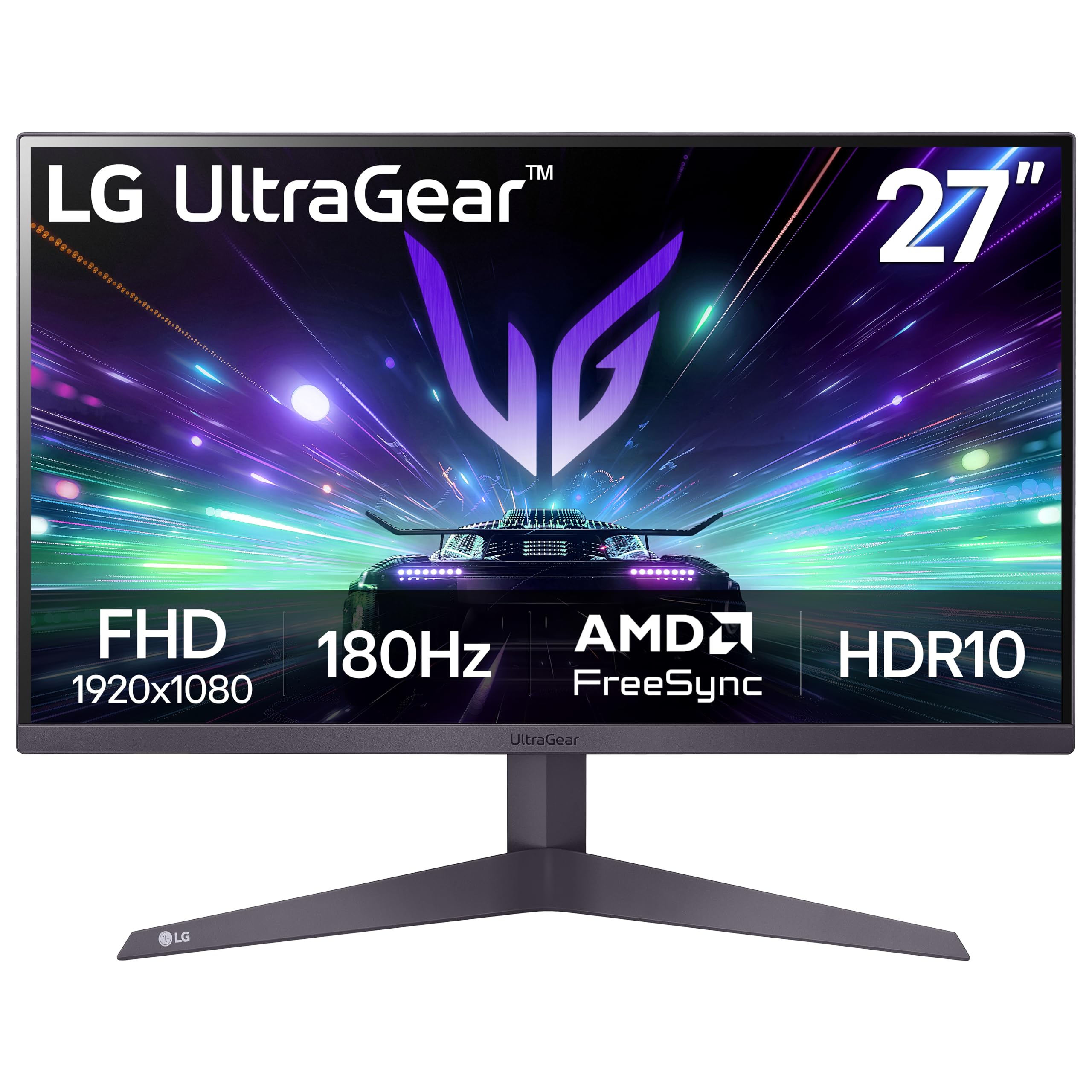
The LG 27GS50F-B is the smart entry-level pick for gamers on the tightest budget or those running older GPUs that cannot handle 1440p. It uses a 27-inch FHD VA panel with a 180Hz refresh rate and 1ms MBR response time. The VA panel gives it a 3000:1 contrast ratio, which is triple what standard IPS monitors offer, delivering true blacks that look fantastic in dark game scenes.
AMD FreeSync support keeps the gameplay smooth, and the Dynamic Action Sync reduces input lag for a more responsive feel. The three-side virtually borderless design looks clean on a desk, and LG’s stability is a huge plus — long-term reviews show these panels hold up well without developing dead pixels or flickering issues.
The 1080p resolution at 27 inches does lose pixel density — text and fine details will not look as sharp as a 1440p panel. The 250-nit brightness is also on the lower side, which can make HDR content feel dim. This monitor is best suited for console gamers or competitive players who prioritize smooth frame rates over absolute visual sharpness.
Why it’s great
- 3000:1 VA contrast ratio for deep blacks
- 180Hz smoothness at a very accessible cost
- Reliable LG build quality
Good to know
- 1080p at 27 inches is less sharp than 1440p
- Only 250 nits peak brightness
- VA panel has some dark-level smearing
9. Pixio PX279 Wave White

The Pixio PX279 Wave White stands out immediately for its unique white chassis — a rare aesthetic in the budget gaming monitor space. Inside, it packs a 27-inch FHD Fast IPS panel with a 240Hz refresh rate and 1ms GTG response time. The Fast IPS panel eliminates the smearing found on VA panels while keeping colors vibrant, making it a strong choice for competitive shooters at 1080p.
The 350-nit brightness is higher than many budget options, ensuring good visibility in brighter rooms. Adaptive Sync support keeps screen tearing at bay, and the built-in speakers are functional for casual audio. The matte anti-glare coating is effective at reducing reflections during intense gaming sessions.
The minor downside is that some units have arrived with a single dead pixel, and the lack of a fully adjustable stand means you only get tilt adjustment. The white color is a bold plus for some setups but a mismatch for all-black battle stations. For the esports-focused gamer who wants 240Hz smoothness on a 1080p budget, this monitor delivers maximum frame-rate headroom for the lowest dollar.
Why it’s great
- 240Hz Fast IPS panel for blur-free gaming
- Unique white design stands out
- 350 nits brightness is above average
Good to know
- Potential for dead pixel on arrival
- Stand only offers basic tilt
- White chassis may not suit all setups
FAQ
Is 1440p worth it on a 27-inch budget monitor?
Can my console run a 1440p 144Hz gaming monitor?
What does 0.3ms vs 1ms response time actually feel like?
Final Thoughts: The Verdict
For most users, the best 27 inch budget gaming monitor winner is the AOC Q27G41ZE because it delivers a overclockable 260Hz QHD IPS experience that was unthinkable at its price point just a year ago. If you want a fully adjustable stand and built-in speakers, grab the Acer Nitro XV272U W2. And for pro-level 300Hz performance with ELMB Sync, nothing beats the ASUS TUF VG27AQM5A.