
Managing a multi-monitor workspace with multiple computers usually ends with a desk full of tangled cables and constant plugging and unplugging. A dedicated switch changes that, letting you control multiple PCs and a quad-monitor setup with a single keyboard and mouse. The right unit preserves your display resolution, keeps USB peripherals connected, and switches between sources without forcing a full reboot.
I’m Min — the co-founder and writer behind Gadgets Feed. I put hundreds of hours into analyzing the technical specifications, port configurations, and real-world user experiences across the KVM landscape to find the units that deliver reliable, high-resolution switching for demanding multi-monitor setups.
For professionals who refuse to sacrifice screen real estate or workflow speed, finding the best 4 monitor kvm switch means balancing resolution support, USB capabilities, and switching reliability against the specific hardware in your setup.
How To Choose The Best 4 Monitor KVM Switch
Selecting a quad-monitor KVM involves more than just counting ports. You need to match the switch’s video capabilities to your graphics hardware, ensure USB connectivity supports all your peripherals, and decide whether features like EDID emulation or hotkey switching matter for your daily workflow.
Video Ports and Graphics Card Compatibility
A true 4-monitor KVM switch requires your computer to output four independent video signals simultaneously. Most switches use a combination of HDMI and DisplayPort inputs, so verify that your graphics card has the exact number and type of ports the switch requires. Some units also support daisy-chaining via DisplayPort MST, but this is not universal and often requires additional configuration.
EDID Emulation
EDID emulation tells each connected PC that a monitor is always present, even when you switch to another computer. Without it, every switch causes a brief monitor disconnect, which can rearrange your open windows, reset resolutions, and trigger application crashes. For a 4-monitor setup, a KVM without EDID emulation will force you to reconfigure your desktop layout constantly.
USB Hub and Peripheral Support
The USB hub built into the KVM switch must handle your keyboard, mouse, headset, microphone, and any other peripherals simultaneously. USB 3.0 ports are essential for high-speed devices like external SSDs, while USB 2.0 ports often work better for mice and keyboards due to lower latency. Also consider whether the switch supplies enough power to charge devices like phones or tablets.
Quick Comparison
On smaller screens, swipe sideways to see the full table.
| Model | Category | Best For | Key Spec | Amazon |
|---|---|---|---|---|
| Sabrent Thunderbolt 4 KVM | Premium | Thunderbolt 4 Workstations | 40Gbps TB4 + 60W PD | Amazon |
| AV Access KD-E30 | Premium | Mixed Desktop & Laptop Setups | EDID Emulation + 100W PD | Amazon |
| TESmart 8K HDMI KVM | Premium | Gaming & High Refresh Rates | 8K@60Hz + 1G Ethernet | Amazon |
| NAWEN DP+HDMI KVM | Mid-Range | 4 PC with 4 Monitors | 8K@30Hz / 4K@144Hz | Amazon |
| ANGEET USB-C KVM | Mid-Range | M1/M2/M3 Mac Users | DisplayLink + 100W PD | Amazon |
| StarTech.com 4-Port DP KVM | Premium | Dual 4K @ 60Hz Displays | Dual DP + Audio | Amazon |
| Vertiv Cybex Secure KVM | Premium | High-Security Environments | NIAP EAL4+ / DPP | Amazon |
| OREI 16×16 HDMI Matrix | Premium | Multi-Screen Installations | 16×16 Matrix + Downscaling | Amazon |
| KTC 32″ 4K Gaming Monitor | Mid-Range | High-Performance Display | 165Hz / 1ms IPS | Amazon |
In‑Depth Reviews
1. Sabrent Thunderbolt 4 KVM Switch (SB-TB4K)

The Sabrent Thunderbolt 4 KVM Switch is designed for users who need full 40Gbps bandwidth and high-resolution display output across two host systems. Three Thunderbolt 4 downstream ports allow you to connect multiple high-speed peripherals, while four USB 3.2 Gen 2×1 ports deliver 10Gbps each for storage devices and input gear. The switch supports 8K@60Hz with DSC1.2 or 4K@144Hz, making it one of the fastest options for high-refresh-rate workflows.
Unlike many KVMs that rely on DisplayLink compression, the Sabrent uses native Thunderbolt 4 passthrough, which means no driver installation is required for basic functionality. The aluminum chassis handles heat dissipation well, though some users report the unit runs warm under extended use. The integrated 70cm cable and clear LED indicators keep the setup clean, and the 60W PD 3.0 charging keeps laptops powered without an extra adapter.
The main trade-off is the lack of EDID emulation, which means switching can cause a brief display renegotiation that may rearrange windows on some systems. This is a known limitation for users who frequently switch between computers during active multitasking. It also does not include a wired remote, relying solely on the top-mounted push button for source selection.
Why it’s great
- Full 40Gbps Thunderbolt 4 speeds with native display output
- Supports 8K@60Hz and 4K@144Hz for high-refresh gaming or design work
- 60W Power Delivery charges laptops directly through the switch
Good to know
- No EDID emulation causes brief monitor blackouts on switch
- Runs warm under load and lacks a wired remote
- High price point compared to DisplayLink-based alternatives
2. AV Access KD-E30 Docking Station KVM Switch
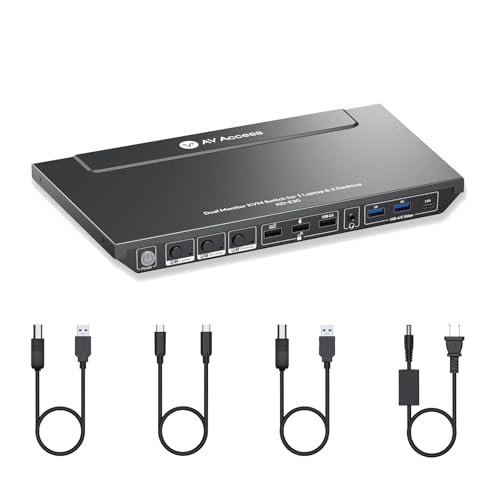
The AV Access KD-E30 is a unique triple-computer KVM that supports one USB-C laptop and two desktop PCs across dual 4K@60Hz monitors. The inclusion of EDID emulation is a major advantage here — it locks monitor EDID data so that switching between computers doesn’t black out screens or reset window positions. The switch also supports high refresh rates like 1440p@144Hz and 1080p@240Hz, catering to gaming as well as productivity.
The 10-port docking station includes USB 3.0, USB-C, USB 2.0, SDXC card slot, and a 3.5mm headset jack, turning a single USB-C connection into a full workstation hub. The 100W USB-C charging port keeps a laptop topped off during heavy use, though the manufacturer recommends using the laptop’s original adapter for maximum charging speed. The automatic wake-up feature ensures connected computers come online instantly when switched to.
A limitation is that macOS does not support MST (multi-stream transport) over USB-C, so Mac users will see mirrored displays rather than an extended dual-monitor setup. The switch also lacks a wired remote, which some users find inconvenient for desktop setups where the KVM unit is mounted under a desk. Build quality is solid metal, and the device has proven reliable over months of daily use.
Why it’s great
- EDID emulation prevents screen resets and window rearrangement
- Supports high refresh rates up to 240Hz for gaming
- 100W PD charging and 1G Ethernet in one unit
Good to know
- MacOS only supports mirrored dual displays via USB-C
- No wired remote included for hidden mounting
- Some users report Ethernet only works for the laptop input
3. TESmart 8K@60Hz HDMI KVM Switch (4 Port)
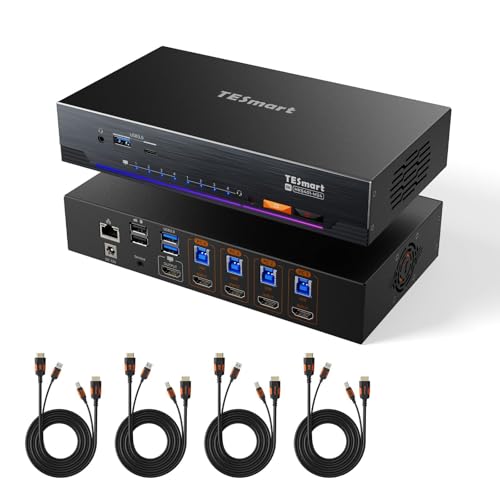
The TESmart 8K KVM switch is built for users who need ultra-high bandwidth and professional-grade EDID management. Supporting HDMI 2.1 with 48 Gbps throughput, it handles 8K@60Hz, 4K@144Hz, and even 1080p@240Hz without compression artifacts. The built-in EDID emulators on each port maintain display identity across all four connected PCs, eliminating the common problem of scrambled icons and reset resolutions after switching.
The 9-in-1 USB 3.0 docking station is a standout feature, offering 4 USB 3.0 ports (2 with 7.5W charging), 2 USB 1.1 ports for low-latency mouse and keyboard input, a 1G Ethernet port, and a 3.5mm audio jack with microphone support. Switching is nearly instantaneous — video switches in under 1 second, and USB reconnects without delay. The switch also supports hotkey triggers, an IR remote, and auto-scan mode for cycling through computers.
The biggest downside is that this is a single-monitor KVM, meaning it only supports one display output. Users with quad-monitor setups would need multiple units to cover all screens. The included cables are limited to 5 feet, which may restrict placement options for larger desks. The unit also has an internal fan that is audible in a quiet room, though most users find it unobtrusive.
Why it’s great
- 8K@60Hz with full HDMI 2.1 bandwidth for future-proof gaming
- EDID emulation on every port prevents display configuration loss
- Near-instant switching with multiple control methods (hotkey, remote, button)
Good to know
- Single monitor output only — not for 4-display KVM setups
- Included cables are short; proprietary length limits placement
- Internal fan may be audible in quiet environments
4. NAWEN HDMI + DisplayPort KVM Switch (4 Monitors / 4 PCs)
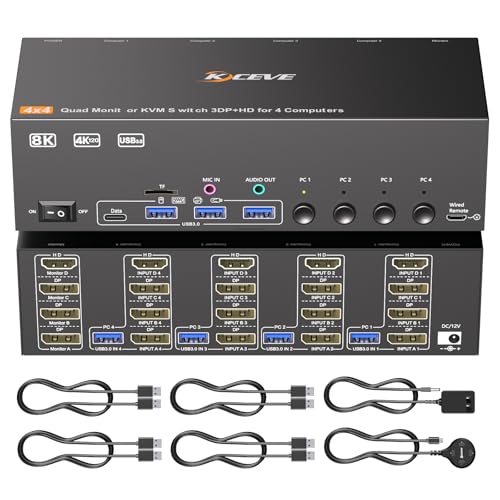
The NAWEN KVM switch is designed for users who need to control four desktop PCs across four monitors simultaneously. It uses a combination of three DisplayPort inputs and one HDMI input per computer, which means your graphics card must have at least three DP ports and one HDMI port. The switch supports resolutions up to 8K@60Hz (using 8K cables) and 4K@144Hz, making it viable for both productivity and gaming.
The compact metal chassis measures just 3.94 x 2.76 x 0.79 inches, roughly one-eighth the size of comparable enterprise KVMs. The 4 USB 3.0 ports support 5Gbps transfer speeds, enough for external SSDs and high-speed peripherals. The wired remote is a welcome addition for hidden mounting, though the remote uses a micro-USB connection that feels outdated. Audio output and microphone input are handled through a 3.5mm jack.
A significant requirement is that this switch does not support any adapters — all four video cables must connect to native ports on your graphics card. It also lacks EDID emulation, so users switching between PCs will experience brief blackouts and potential window rearrangement. The switch does not work with USB-C laptops without an adapter, and the included USB-A male-to-male cables are bulky for some setups.
Why it’s great
- True 4-monitor support for 4 PCs with extended or mirrored modes
- Very small footprint saves significant desk space
- Wired remote and USB 3.0 hub included
Good to know
- Requires graphics card with 3 DP + 1 HDMI native ports
- No EDID emulation causes screen renegotiation during switches
- Not compatible with USB-C laptops without additional adapters
5. ANGEET Thunderbolt 4 KVM Switch (3 Monitors / 2 Computers)
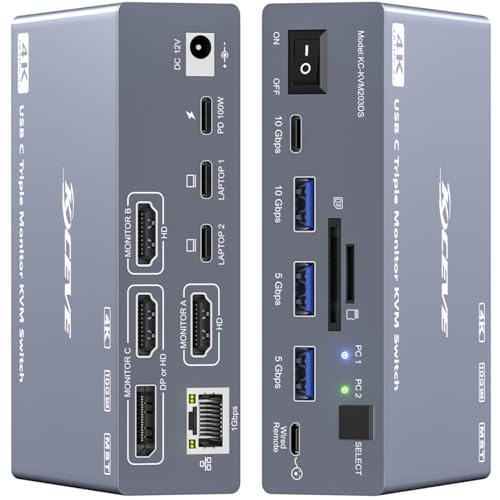
The ANGEET KVM is specifically engineered to solve Apple Silicon’s extended display limitation. Using DisplayLink technology, it enables triple-monitor extended output on M1, M2, M3, and M4 Macs, which normally cap at two external displays. The 12-in-1 docking station includes two Thunderbolt 4 cables, a wired remote, SD/TF card reader, and 2 USB 3.2 ports with 10Gbps bandwidth. Each laptop receives 50W PD charging simultaneously.
Setup requires installing the DisplayLink driver, which is provided on an included USB disk. The switch works with Windows, macOS 11+, and ChromeOS, but is not compatible with Linux. The two Thunderbolt 4 cables handle both video and data, simplifying cable management. The aluminum casing reaches 55-60°C under load, which is within normal operating range for DisplayLink chips but may feel hot to the touch.
The switch does not support EDID emulation, so users switching between computers will experience a 10-15 second reconnection delay and potential window rearrangement. It also does not support keyboard hotkeys — switching is done via the button or wired remote. A minority of users report units failing after extended use due to overheating, though adding active cooling may mitigate this.
Why it’s great
- Enables 3-monitor extended display on Apple Silicon Macs
- 12-port docking station with 10Gbps USB and card reader
- Charges both laptops simultaneously at 50W each
Good to know
- DisplayLink driver required; not plug-and-play out of box
- Gets very hot (55-60°C) under load; active cooling recommended
- No EDID emulation and no hotkey switching
6. StarTech.com 4-Port Dual DisplayPort KVM Switch (SV431DPDDUA2)

The StarTech SV431DPDDUA2 is a TAA-compliant, enterprise-grade KVM designed for four computers with dual DisplayPort monitors. It supports dual 4K@60Hz displays simultaneously across all four connected systems, making it suitable for graphic design, video editing, and CAD work. The switch includes separate 3.5mm microphone and speaker ports, plus two USB ports separate from the HID keyboard and mouse ports for peripheral sharing.
The build quality is robust, with metal casing and rubber feet to keep it stable on a desk. It has been used reliably for years in professional environments without signal degradation. The switch supports both PC and Mac computers, though Mac users may need a dock to convert the DisplayPort signals. The power adapter is universal and includes interchangeable plugs for different regions.
Switching takes about 4-6 seconds and is accompanied by an audible beep, which some users find irritating. The unit occasionally fails to switch computers (roughly 1 in 20-30 attempts), requiring a button press reset. Audio output through the 3.5mm jack has been reported to produce rattling or distorted sound on some units. The price point reflects the enterprise market, but it may feel expensive compared to consumer-oriented alternatives with similar specs.
Why it’s great
- Dual DisplayPort support for dual 4K@60Hz on each of 4 systems
- TAA compliant and built for professional, long-term use
- Separate mic and speaker ports for full audio control
Good to know
- Switching takes 4-6 seconds with an audible beep
- Audio quality via 3.5mm jack can be poor on some units
- Occasional switching failures require manual reset
7. Vertiv Cybex Secure 4K UHD KVM (SC945H-001)
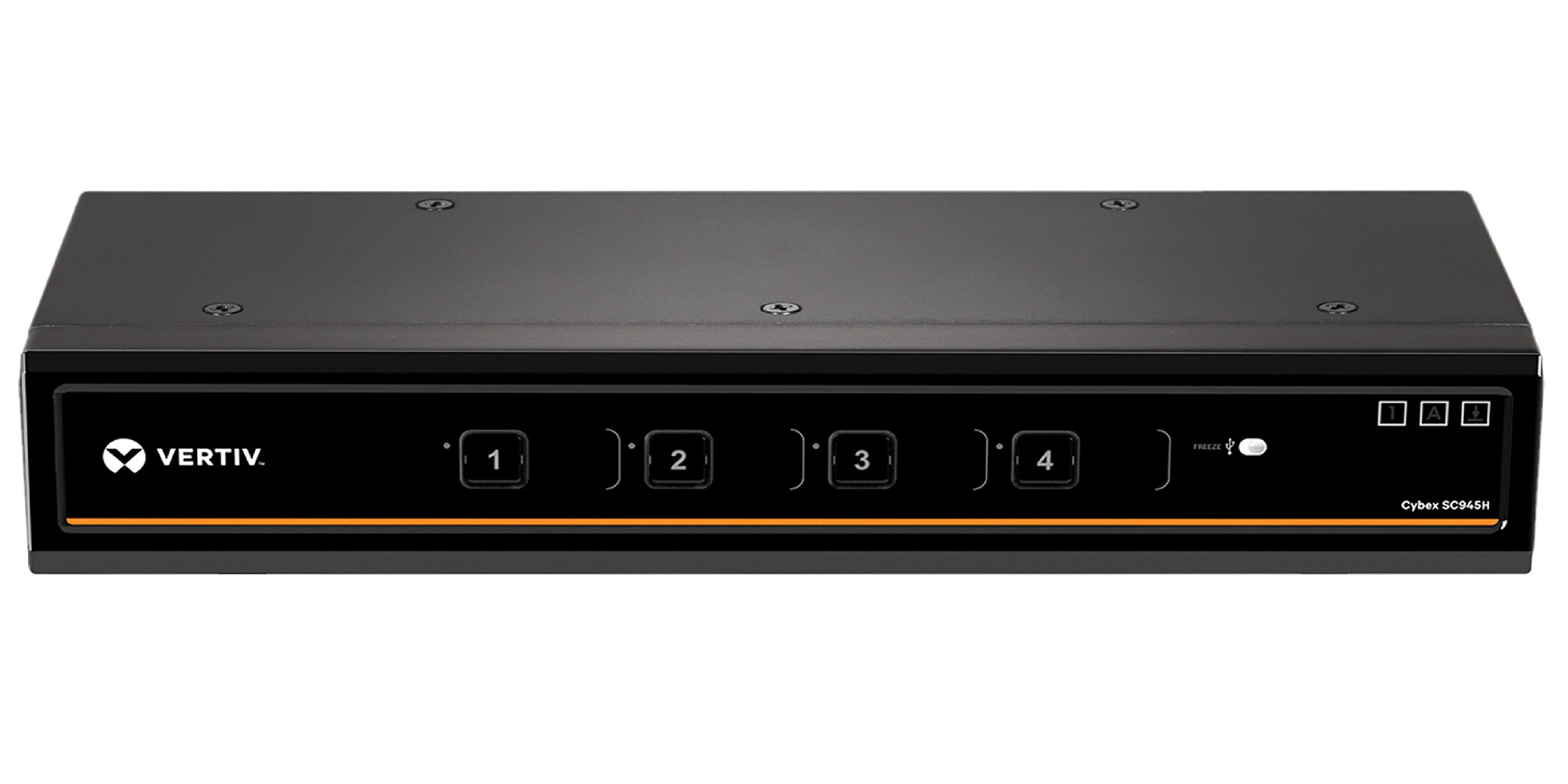
The Vertiv Cybex Secure KVM is built to meet NIAP Protection Profile V3.0 requirements for peripheral-sharing devices in classified and high-security environments. It features a dedicated peripheral port (DPP) that blocks USB peripherals while allowing authentication devices like CAC smart card readers, fingerprint readers, and facial recognition systems. The unit supports HDMI 1.4 with resolutions up to 4K (3840×2160 @ 30Hz).
The metal chassis is built like a tank, designed for government and military installations where physical durability is as important as electronic security. The KVM can be repurposed as a KM (keyboard/mouse only) device, offering flexibility for changing work requirements. No software or drivers are required, and the device uses hardware-based isolation to prevent data crosstalk between connected computers.
This is a single-monitor KVM, not designed for 4-monitor setups, and it only accepts HDMI inputs — no DisplayPort or DVI without adapters. The price reflects its security certifications rather than consumer-friendly features, and it lacks modern conveniences like EDID emulation, hotkey switching, or a user-friendly interface. The documentation is sparse, and customer support is minimal.
Why it’s great
- NIAP EAL4+ certified for high-security environments
- Dedicated peripheral port supports smart card and biometric authentication
- Hardware isolation prevents data leakage between computers
Good to know
- Single monitor output only; HDMI 1.4 limited to 4K@30Hz
- Very expensive due to security certification, not consumer features
- No cables included and documentation is poor
8. OREI 16×16 HDMI Matrix Switch (4K@60Hz)

The OREI 16×16 HDMI Matrix Switch is not a traditional KVM, but a full matrix router designed for complex multi-source, multi-display installations. It allows you to route 16 HDMI sources to 16 displays independently, with each output supporting individual 4K-to-1080p downscaling. This is useful for environments where a mix of 4K monitors and 1080p projectors coexist, such as control rooms, classrooms, or digital signage networks.
The matrix supports 4K@60Hz with 4:4:4 chroma subsampling, HDR10+, Dolby Vision, and HLG. Audio extraction is handled through 16 coaxial ports, and ARC support retrieves audio from compatible displays. Pro-level control options include LAN, RS-232, IR remote, front panel buttons, and a Web GUI, giving integrators flexibility in programming and automation. The intelligent EDID management ensures stable handshakes between diverse source and display combinations.
This device is far beyond the scope of a desktop KVM for multi-monitor setups. It is a rack-mountable, enterprise-class HDMI routing solution. The price is steep, and the 32-port matrix is overkill for a home workstation. It also does not include keyboard/mouse switching functionality — it handles video and audio routing only, so it must be paired with a separate KVM or software solution for complete control.
Why it’s great
- 16×16 matrix routing for complex multi-source, multi-display setups
- Individual 4K-to-1080p downscaling per output for mixed-resolution environments
- Pro control via LAN, RS-232, IR, and Web GUI
Good to know
- Not a KVM — no keyboard/mouse switching, only video/audio routing
- Priced for commercial AV installations, not personal desktops
- Power connector wire is fragile and may disconnect easily
9. KTC 32 Inch 4K Gaming Monitor (H32P22P)

The KTC 32 Inch 4K Gaming Monitor is a fast IPS display with a 165Hz refresh rate and 1ms MPRT response time. It delivers 4K UHD (3840×2160) resolution with a 3000:1 contrast ratio and 121% sRGB color gamut coverage. The Adaptive Sync technology (FreeSync/G-Sync compatible) reduces screen tearing in fast-paced games. It is equipped with HDMI 2.1 and DisplayPort 1.4 ports for next-gen consoles and high-bandwidth PC connections.
The monitor includes a fully adjustable stand with tilt and height adjustment plus 100x100mm VESA mount support. The built-in speakers are typical for a monitor — adequate for system sounds but not for serious audio work. The 32-inch size and 4K resolution provide ample screen real estate for productivity tasks like coding, video editing, and financial analysis. The package includes a DP cable, power cord, and screwdriver for assembly.
This is a standalone monitor, not a KVM switch. It is included in this guide because a true quad-monitor KVM setup requires four high-quality displays, and the KTC H32P22P represents the type of screen you would attach to a 4-monitor KVM system. Users pairing this monitor with a KVM switch should ensure the switch supports 4K@165Hz or the monitor will be bandwidth-limited to lower refresh rates.
Why it’s great
- 165Hz 4K Fast IPS panel with 1ms response time for smooth gameplay
- Adaptive Sync supports both FreeSync and G-Sync
- Fully adjustable stand with VESA mount compatibility
Good to know
- Standalone monitor, not a KVM — requires separate KVM switch for multi-PC control
- Built-in speakers are mediocre; external speakers recommended
- Some users report backlight bleed in dark scenes
FAQ
Does a 4 monitor KVM switch require a specific graphics card configuration?
What is the difference between a KVM switch and a HDMI matrix switch for multi-monitor setups?
Why do some KVM switches get extremely hot during use?
Can I use a 4 monitor KVM switch with Apple Silicon Macs?
Final Thoughts: The Verdict
For most users, the best 4 monitor kvm switch winner is the NAWEN HDMI + DisplayPort KVM Switch because it provides a dedicated, compact, and affordable solution for controlling four PCs across four monitors with USB 3.0 speeds and a wired remote. If you need Thunderbolt 4 bandwidth and high-refresh-rate output, grab the Sabrent Thunderbolt 4 KVM. And for a mixed desktop-and-laptop setup that requires EDID emulation and 100W laptop charging, nothing beats the AV Access KD-E30.