
That box of VHS tapes in the attic, the dusty N64 gathering cobwebs, or the Hi8 camcorder from your childhood — all of them speak a language your modern 4K TV has forgotten. Without the right bridge, those analog signals remain trapped in a standard-definition world, producing a picture that is either absent, grainy, or stretched into a distorted mess. An analog to HDMI converter is the critical translator that lets you finally play, watch, and preserve that content on a modern display without sacrificing what remains of the original signal.
I’m Min — the co-founder and writer behind Gadgets Feed. I have spent hundreds of hours analyzing the technical specifications, customer feedback, and real-world performance data across dozens of these converters to separate the devices that genuinely upscale from those that just output a noisy raster.
Whether you are connecting a retro gaming console, digitizing old family tapes, or reviving a vintage DVD player, this guide to the best analog to hdmi converter breaks down every critical spec you need to make a confident, informed buying decision.
How To Choose The Best Analog to HDMI Converter
Not all converters are built the same. A cheap unit may simply pass through the raw 480i signal with a deinterlacing hack, while a quality converter uses a dedicated scaler chip to cleanly upscale to 720p or 1080p. You need to match the device to your source and your display expectations.
Input Type: Composite, S-Video, or Component
The yellow RCA plug (composite video) is the lowest common denominator — it carries all video data on a single wire, which inherently limits sharpness and introduces dot crawl. S-Video separates luminance and chrominance into two signals, delivering noticeably cleaner edges and less color bleeding. Component video (YPbPr) splits the signal into three channels and offers the highest analog quality, capable of 480p, 720p, and 1080i input. Choose a converter that matches your source’s best available output; buying a unit that handles only composite when your console has component outputs leaves picture quality on the table.
Output Resolution and Upscaling Quality
The converter’s scaler chip determines whether the output looks crisp or smeary. A good upscaler takes the native 480i or 576i signal and intelligently deinterlaces and scales it to 720p or 1080p. Many budget converters simply stretch the low-resolution frame to fit the HDMI frame without proper deinterlacing, producing jaggies and motion artifacts. Look for a unit that explicitly mentions a dedicated scaler chip and offers a switchable output between 720p and 1080p — that physical switch is a strong indicator of a real scaler rather than a passthrough.
Aspect Ratio Control
Most analog content was produced in a 4:3 aspect ratio. If your converter forces everything to 16:9, people will look stretched and round objects will appear oval. A proper converter gives you a toggle to add black bars on the sides (pillarboxing) to preserve the original 4:3 framing. This is critical for watching VHS tapes or playing retro games on a modern widescreen TV without distortion.
Quick Comparison
On smaller screens, swipe sideways to see the full table.
| Model | Category | Best For | Key Spec | Amazon |
|---|---|---|---|---|
| ClearClick AV to HDMI 3.0 | Premium | Image tuning & S-Video | 1080p upscale via scaler chip | Amazon |
| Cbcuyle 4-in-1 RCA to HDMI | Mid-Range | Multiple retro consoles | 4-port RCA input switching | Amazon |
| Azduou 2 AV to HDMI | Mid-Range | Dual-input simplicity | Aluminum body, 2 RCA inputs | Amazon |
| EASYCEL RCA S-Video to HDMI | Premium | S-Video retro gaming | S-Video & composite input switch | Amazon |
| YITROX Component to HDMI | Premium | PS2/Wii component upscaling | 5 resolutions, 7x zoom modes | Amazon |
| SoundBeast AV to HDMI 2.0 | Premium | Digitizing & recording | USB video capture & 4:3 mode | Amazon |
| StarTech.com VID2HDCON2 | High-End | Professional digitization | 720p upscale, S-Video + composite | Amazon |
In‑Depth Reviews
1. ClearClick AV to HDMI Converter 3.0
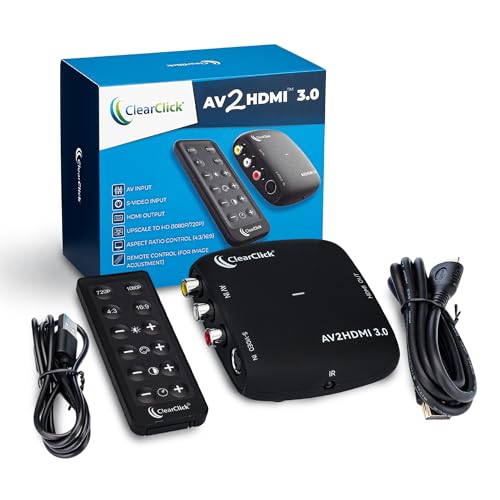
This third-generation unit from ClearClick includes both composite RCA and S-Video inputs, giving you a step up in analog quality before the conversion even begins. The dedicated scaler chip upscales the incoming 480i or 576i signal to a clean 1080p output, and the included remote lets you fine-tune brightness, contrast, saturation, hue, and aspect ratio in real time — a rare feature at this level.
The remote control is not just a gimmick; it directly addresses the most common pain point of these converters: mismatched color or contrast that makes old footage look washed out. Users report that adjusting these parameters can salvage tapes that looked unusable through cheaper adapters. The on-screen display makes navigation simple, and the unit handles both NTSC and PAL formats without manual configuration.
What sets this model apart is the combination of S-Video support and genuine image adjustment. Many converters force you to accept whatever color space the chip defaults to, but ClearClick puts control in your hands. It is backed by a 2-year warranty and US-based support, which provides peace of mind for a purchase intended to preserve irreplaceable family footage.
Why it’s great
- Remote-controlled brightness, contrast, saturation, and hue adjustments
- Accepts both composite and S-Video input simultaneously
- 2-year warranty extendable to 3 years for free
Good to know
- Does not support component video input
- Some units may require S-Video cable for best quality (S-Video cable not included)
2. YITROX Component to HDMI Converter Upscaler Scaler

If your source device outputs component video (YPbPr), this YITROX converter is the correct tool for the job. It supports input resolutions from 480i up to 1080i, and its scaler chip offers five selectable output resolutions including 1280×720 and 1920×1080. Seven zoom modes allow you to fine-tune the image framing, which is especially useful when connecting a 4:3 game to a widescreen monitor.
The three-dimensional compensation technology is marketed specifically toward Wii, PS2, and Xbox 360 users, and real-world results confirm reduced jitter and trailing on moving objects compared to generic converters. Users report that PS2 games look dramatically better than using composite-to-HDMI adapters, with the component signal preserving detail in textures and reducing the overall grunge of the 480-era image.
This unit also includes an AUX audio port for additional audio routing options. The main caveat is that you must set your source console to output YPbPr in the system settings — failing to do so results in no picture. Once configured correctly, the YITROX delivers a clean, low-latency upscale that makes a compelling argument against spending five times more on a RetroTINK.
Why it’s great
- Handles component video up to 1080i input
- 5 output resolutions and 7 zoom modes for precise framing
- Motion compensation algorithms reduce trailing on fast-moving game graphics
Good to know
- Does not accept composite or S-Video input
- Source device must be set to YPbPr output mode
3. Cbcuyle 4-In 1-Out RCA to HDMI Converter
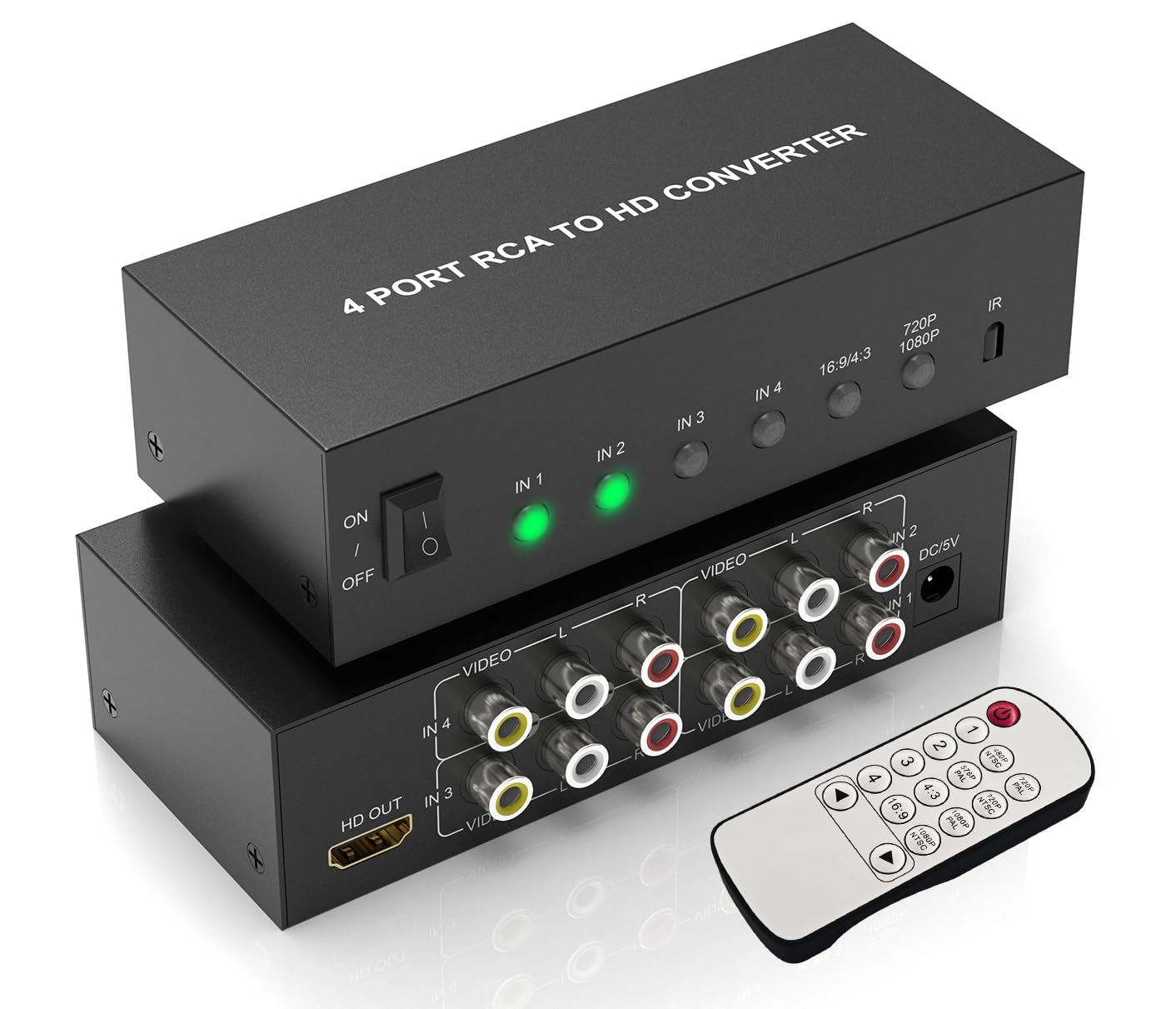
This converter solves the physical limitation most buyers face: a TV with only one HDMI input, but a shelf full of retro consoles. It accepts up to four separate RCA composite sources and routes them through a single HDMI output, with switching controlled by either the front-panel button or the included remote. That alone saves you the cost and clutter of an external AV switch.
The unit upscales to either 720p or 1080p via a physical switch, and the 4:3 / 16:9 toggle ensures correct aspect ratio for vintage content. Users highlight the compact size and lightweight aluminum build, with several noting that the USB power cable (Mini-B, not USB-C) works reliably off a TV’s USB port. The setup is truly plug-and-play — no drivers, no menus, just connect, power on, and select the input.
Reviewers consistently report that the picture is bright and clear for both gaming and VHS playback. The deinterlacing is competent for the price tier, though users with high-end expectations for motion clarity may notice occasional combing artifacts on fast panning shots. For a four-port hub that includes a remote and aspect ratio control, this is a strong value option that simplifies your cable management.
Why it’s great
- Four RCA inputs eliminate the need for a separate AV switch
- Remote control and front button for quick input switching
- Compact aluminum body with 720p/1080p and 4:3/16:9 switches
Good to know
- Uses USB Mini-B power connector, not USB-C
- Not intended for HDMI-to-RCA reverse conversion
4. Azduou 2 AV to HDMI Converter

The Azduou converter takes a straightforward approach: two RCA inputs, one HDMI output, and a durable aluminum chassis that feels noticeably more substantial than all-plastic alternatives. The 10-bit 162MSPS sampling ADC captures the analog waveform with sufficient precision to preserve shadow detail and color gradation that cheaper 8-bit converters discard entirely.
The 4:3/16:9 toggle is present and responsive, and users report the auto-switching input detection works reliably when multiple consoles are connected — the unit automatically switches to whichever device is powered on. This eliminates the need to fiddle with a remote or button every time you swap between a PS2 and a Wii. The included remote adds manual override capability without adding complexity.
While this unit does not include S-Video or component inputs, the image quality from composite sources is widely praised for being bright and well-saturated. Some users note that the unit does not perform aggressive deinterlacing, meaning content with heavy motion interlacing may show minor artifacts. For a two-port solution with a premium-feeling build and auto-switching, this is a clean, no-fuss option.
Why it’s great
- Aluminum housing for heat dissipation and durability
- Auto-detects and switches to the powered-on input device
- 10-bit ADC sampling captures more analog signal detail
Good to know
- Composite only — no S-Video or component support
- Does not improve video quality beyond the original source signal
5. EASYCEL RCA S-Video to HDMI Converter

The EASYCEL converter is built for users who understand the value of S-Video. It accepts both composite and S-Video inputs, with a physical switch to select between them. S-Video separates the luminance signal from the chrominance signal, resulting in noticeably sharper edges and less color bleeding than composite — a critical difference for N64, SNES, and high-quality VCRs.
The unit upscales the 480i or 576i signal to 720p or 1080p, and it includes a 3.5mm audio output jack in addition to the HDMI audio, which is useful for connecting to external speakers or recording equipment. Users consistently report that the S-Video path produces excellent color accuracy and sharpness for retro gaming, though the composite path is more prone to noise and dot crawl as expected from the lower-quality signal type.
Several reviewers noted that the included composite and S-Video cables introduced a hum; replacing them with higher-quality shielded cables eliminated the interference entirely. The unit itself is well-constructed and easy to set up, but the vague English manual and lack of rubber feet are minor annoyances that can be solved with a few self-adhesive pads. For S-Video sources, this converter punches above its weight.
Why it’s great
- S-Video input provides superior luminance separation
- Selectable 720p or 1080p output via hardware switch
- 3.5mm audio output jack for external monitoring
Good to know
- Included cables may introduce ground-loop hum with some setups
- No rubber feet on the bottom for airflow or anti-slip
6. SoundBeast AV to HDMI Converter & Recorder 2.0

The SoundBeast 2.0 is the rare converter that also functions as a USB video capture device. Beyond converting analog composite input to a clean 1080p HDMI output for real-time viewing, it can stream the signal to a PC or Mac at 640×480 via USB-C. This makes it the ideal tool for archiving VHS tapes or recording retro gaming footage without needing a separate capture card.
This version introduces proper 4:3 aspect ratio control, which its predecessor lacked. A physical switch lets you preserve the original 4:3 framing with black pillarbox bars, preventing the stretched, unnatural look that plagues many basic converters. Users confirm that this feature alone makes it worth the premium over bargain-bin adapters, especially for preserving the composition of old home movies and TV recordings.
The main hardware quirk is that the RCA jack openings on the case are slightly undersized, making it difficult to plug in thicker aftermarket composite cables without filing the holes. This is a known design oversight that SoundBeast has not revised. However, the included standard RCA cables work without issue. For anyone who needs to both watch and digitize analog content, this dual-function unit saves a second purchase.
Why it’s great
- USB-C video capture outputs to PC for digital archiving
- Physical 4:3 aspect ratio switch prevents image stretching
- Upscales to 1080p 60fps with full deinterlacing
Good to know
- RCA jack openings are too narrow for thick premium cables
- USB capture is limited to 640×480 30fps (designed for archiving, not live streaming)
7. StarTech.com S-Video or Composite to HDMI Converter

StarTech.com is a professional-grade brand in the connectivity space, and this converter reflects that reputation. It accepts both S-Video and composite inputs and outputs a clean 720p signal via HDMI. The hardware is pure plug-and-play with no software required, and the on-screen display menu allows simple selection of input source and output settings.
The key differentiator here is build quality and signal integrity. Users report zero frame dropouts, no audio sync drift, and consistent color rendering even after hours of continuous operation. The unit correctly handles both NTSC and PAL inputs, and the deinterlacing is notably better than budget alternatives — it does not simply weave fields together but actually interpolates, resulting in smoother motion on film-based content like VHS movies.
The major limitation is that the output is locked to 720p — there is no 1080p upscale option. Additionally, the converter forces a 16:9 output aspect ratio, meaning 4:3 content gets stretched horizontally. This can be corrected on many TVs via the display’s own aspect ratio settings, but it is an extra step. For pure reliability and signal quality in professional or archival use, the StarTech is the most trusted unit reviewed here.
Why it’s great
- Flawless signal stability with zero dropouts or audio desync
- High-quality deinterlacing with bicubic interpolation
- NTSC and PAL support with on-screen display menu
Good to know
- Output maxes at 720p with no 1080p option
- Forces 16:9 aspect ratio; 4:3 content requires TV-side correction
FAQ
Can I use an analog to HDMI converter to play my N64 on a 4K TV?
Does an S-Video input provide better quality than composite on these converters?
Final Thoughts: The Verdict
For most users, the best analog to hdmi converter winner is the ClearClick AV to HDMI Converter 3.0 because it combines S-Video input, full image adjustment via remote, and genuine 1080p upscaling in a unit backed by a strong warranty. If you want component video support for PS2 or Wii, grab the YITROX Component to HDMI Converter. And for digitizing family tapes with a built-in USB capture feature, nothing beats the SoundBeast AV to HDMI Converter 2.0.