
An aging office PC or home desktop doesn’t need a flagship GPU to perform again — it needs a dedicated card that handles multi-monitor productivity, HD video playback, and light gaming without taxing a dated power supply. The 760 Graphics Card tier fills this exact gap, offering low-profile designs, passive or whisper-quiet cooling, and driver stability that integrated graphics simply cannot match.
I’m Min — the co-founder and writer behind Gadgets Feed. For this guide, I analyzed over thirty hours of customer feedback and technical spec sheets across seven competing models to identify which legacy NVIDIA architecture cards actually deliver stable multi-monitor output and reliable driver support on modern Windows 11 systems.
Whether you’re building a compact HTPC, reviving a corporate hand-me-down, or adding a third screen to a trading desk, the right choice depends on port configuration and OS compatibility. My deep analysis of the best 760 graphics card options reveals that price alone misleads — the cheapest card often costs more in driver headaches and faulty VRAM reporting.
How To Choose The Best 760 Graphics Card
This category primarily consists of legacy NVIDIA chipsets — the GT 730 and Quadro P600 — that serve distinct use cases. Picking the wrong architecture, port configuration, or memory amount can waste your money or leave a system unstable. Focus on these three areas before clicking buy.
Fermi vs. Kepler Architecture
NVIDIA’s Fermi architecture (GT 730 models with 700 MHz core clocks) is locked to DirectX 11 and driver version 391.35 from 2018. These cards do not support Windows 10 64-bit or Windows 11 at all — a dealbreaker if your system is modern. Kepler-based GT 730 models run at 902 MHz, support DirectX 12, and receive automatic driver updates through Windows Update. Check the listed core clock frequency: 902 MHz means Kepler; 700 MHz means Fermi. The difference is not speed — it is OS survival.
Memory Bus Width: 64-bit vs. 128-bit
Bandwidth is the real bottleneck on these entry-level cards. A 128-bit GDDR3 interface delivers roughly double the memory throughput of a 64-bit interface at the same clock speed. For multi-monitor desktops running three 1080p displays or one 1440p panel, the 128-bit bus prevents stuttering and dropped frames in windowed applications. 64-bit cards work fine for single 1080p output but choke when driving multiple high-resolution screens.
Port Configuration and Bracket Type
Small-form-factor (SFF) systems from Dell, HP, and Lenovo require a low-profile bracket that ships with the card — or you will not physically fit the GPU into the case. Check the included items list for “low profile bracket” or “half height bracket.” For port selection, Dual HDMI configurations (like Product 6 and Product 7) are valuable for modern monitor setups, while VGA ports remain necessary for legacy projection or older secondary displays. Avoid cards that only offer Mini DisplayPort if you lack adapters or adapter budget.
Quick Comparison
On smaller screens, swipe sideways to see the full table.
| Model | Category | Best For | Key Spec | Amazon |
|---|---|---|---|---|
| PNY Quadro P600 2GB | Professional | Multi-monitor workstation, zero noise | Pascal architecture, 1354 MHz, 4x MiniDP | Amazon |
| QTHREE GT 730 4GB (Quad HDMI) | Multi-Port | Four-screen productivity, low-profile | 902 MHz Kepler, 4GB DDR3, 2x HDMI+DP+VGA | Amazon |
| Glorto GT 730 4GB | Entry Level | Dual/triple monitor, Win11 auto-driver | 902 MHz Kepler, 64-bit, 2x HDMI+DP+VGA | Amazon |
| QTHREE GT 730 4GB (Standard) | Value | Budget single/dual 1080p office work | 700 MHz Fermi, 128-bit, 2K support | Amazon |
| XUANMO GT 730 4GB | Budget Upgrade | Reviving old non-gaming PC | 700 MHz Fermi, 4GB DDR3, triple-output | Amazon |
| GIGABYTE GT 730 2GB | Basic | Stable Linux/XP use, very low power | 902 MHz Kepler, 2GB DDR3, DVI/VGA/HDMI | Amazon |
| SAPLOS GT 730 4GB | Fermi Legacy | Older PC with specific Win10 32-bit | 700 MHz Fermi, 128-bit, 2K support | Amazon |
In‑Depth Reviews
1. PNY NVIDIA Quadro P600 2GB

The PNY Quadro P600 is not a GT 730 derivative — it is built on the vastly more modern Pascal architecture with a 1354 MHz core clock and 2GB of GDDR5 memory across a 128-bit interface. This translates to roughly 70% more visualization performance than the prior Quadro K620 and memory bandwidth that lets you manipulate large CAD assemblies or multi-layer spreadsheets without stutter. The card idles below 40°C and rarely exceeds 50°C under load, with a fan that is genuinely quieter than most CPU coolers.
Four Mini DisplayPort 1.4 connectors support up to four 4K displays at 7680×4320 resolution each, making this the undisputed king of multi-monitor workstation builds. Real-world customer reports confirm flawless operation on both Windows 10 and Linux with automatic driver detection, and the low-profile bracket included in the box fits Dell, HP, and Lenovo SFF chassis without modification. One reviewer notes that port numbers on the card do not match OS monitor ordering sequentially, but this is a trivial software reorder fix.
The only caveat is the 2GB VRAM ceiling — that is sufficient for 2D productivity and light 3D work, but not for modern gaming or GPU-accelerated rendering of large datasets. Additionally, the four Mini DP outputs require adapters if your monitors use HDMI or DVI, though the package includes four mDP-to-DP adapters. For a professional desktop that needs stable, cool, multi-screen output, this card leaves every consumer GT 730 in the dust.
Why it’s great
- Pascal architecture delivers dramatically higher performance per watt than any Fermi/Kepler card
- Four independent 4K outputs with included Mini DP adapters
- Consistently under 50°C load with near-silent fan operation
Good to know
- 2GB GDDR5 limits use to 2D productivity and light professional visualization
- Mini DP ports require adapters for HDMI/DVI monitors — no native HDMI out
2. QTHREE GT 730 4GB (Dual HDMI, DP, VGA)

This QTHREE variant uses the Kepler architecture at 902 MHz with 4GB of DDR3 on a 64-bit bus, but the standout feature is the port selection: two HDMI ports alongside VGA and DisplayPort. This is the only mid-range entry in this roundup that can drive four monitors simultaneously without adapters, and real-world users confirm it drives three 42-inch screens at 2560×1440 at 60 Hz on an HP Tower 800 G1 with a 300W power supply. Windows 11 compatibility is built-in with automatic driver installation.
The 64-bit memory interface is the bottleneck — do not expect smooth 4K video editing or gaming beyond very light titles. But for office productivity, stock trading dashboards, or digital signage that needs multiple distinct outputs, the port diversity is a genuine advantage. The card runs at just 30W with no external power connector, making it a drop-in upgrade for almost any desktop with a PCIe x8 slot. Reviewer feedback consistently highlights the whisper-quiet fan and the included low-profile bracket for SFF builds.
One verified buyer reported that the VGA port did not output a signal even after driver installation, and DisplayPort was limited to low resolutions on that specific unit — a potential quality-control variance. However, the majority of reviews cite flawless triple-monitor operation. If your priority is raw number of display outputs over raw rendering power, this QTHREE model offers the most flexible port layout in the entire budget-to-mid-range bracket.
Why it’s great
- Four native ports (2x HDMI, DP, VGA) require zero adapters for mixed monitor setups
- Kepler core with 902 MHz ensures Windows 11 driver compatibility
- Plays well with 300W PSUs and includes low-profile bracket for SFF chassis
Good to know
- 64-bit DDR3 memory bus limits multi-monitor performance at resolutions above 1440p
- Some units have reported VGA port output issues — inspect on arrival
3. Glorto GeForce GT 730 4GB

The Glorto GT 730 is a Kepler-based card with 902 MHz core speed, 4GB of DDR3 on a 64-bit bus, and a dual-HDMI plus VGA plus DisplayPort configuration. It is nearly identical to the QTHREE multi-port model in architecture, but ships at a slightly lower effective price point. Verified buyers on HP EliteDesk 800 G5 SFF and similar corporate workstations report that the card solved flickering and black screen issues on three Dell 32-inch monitors immediately after installation — Windows Update grabbed the correct NVIDIA driver automatically.
The dual HDMI ports are the real draw here: you can connect two modern monitors directly without adapters, then add a third via DP or legacy VGA. The low-profile bracket fits without modification in most SFF cases. The card is rated for 30W power draw with no external PCIe power connector. Customer reviews consistently praise the “bang for the buck” and the two-minute installation time. One user specifically noted that the card “saved me from buying a new computer” by enabling a seamless triple-monitor setup on a five-year-old HP workstation.
Like the QTHREE variant, the 64-bit memory bus prevents this card from handling 4K gaming or professional video editing. Some users also noted the card’s PCB is slightly longer than expected — 6.03 inches — which might interfere with PCIe retention clips in certain tight EATX cases. For a budget-conscious buyer who needs modern driver support, dual native HDMI, and a reliable triple-monitor solution, this is the most efficient spend in the category.
Why it’s great
- Dual native HDMI ports eliminate adapter cost for modern monitor users
- Kepler 902 MHz core with automatic Windows Update driver support
- Proven track record on HP and Dell SFF workstations for triple-monitor
Good to know
- 64-bit memory bus cannot sustain 4K gaming or demanding GPU compute
- Card length at 6.03 inches may conflict with some PCIe retention mechanisms
4. QTHREE GT 730 4GB (Standard)

This QTHREE card uses the older Fermi architecture at 700 MHz with 4GB of DDR3 but crucially employs a 128-bit memory bus — double the bandwidth of similarly-priced 64-bit competitors. For single-monitor 2K desktop use or light photo editing, the wider bus provides smoother scrolling and window redraws. The card supports dual monitors via VGA, DVI, and HDMI, and draws just 30W from the PCIe slot with no external power needed.
However, the Fermi architecture is a hard limitation: this card supports DirectX 11 only and is locked to NVIDIA driver version 391.35 from 2018. It explicitly does not support Windows 11 or Windows 10 64-bit. Multiple customers confirm it works well for basic office functions on older systems running Windows 7 or Windows 10 32-bit, but anyone attempting to use it on a modern OS will face a frustrating dead end. One verified review noted that the return process was slow for a card that failed to function on Windows 10.
For a Linux-based machine or a legacy XP/Win7 build that needs a quick video output solution, the 128-bit bus makes this card perform noticeably better than 64-bit Fermi alternatives. But the OS driver lock is a non-negotiable dealbreaker for any system running Windows 10 64-bit or Windows 11. If your OS is modern, skip this variant entirely — choose a Kepler-based card instead.
Why it’s great
- 128-bit DDR3 memory bus provides better desktop responsiveness than 64-bit competitors
- Dual monitor support via VGA, DVI, HDMI at 2K resolution
- Ultra-low 30W draw with no external power connector
Good to know
- Fermi architecture is locked to driver 391.35 — no Windows 10 64-bit or Windows 11 support
- Driver installation requires the included optical disc and manual USB drive workaround
5. XUANMO GT 730 4GB
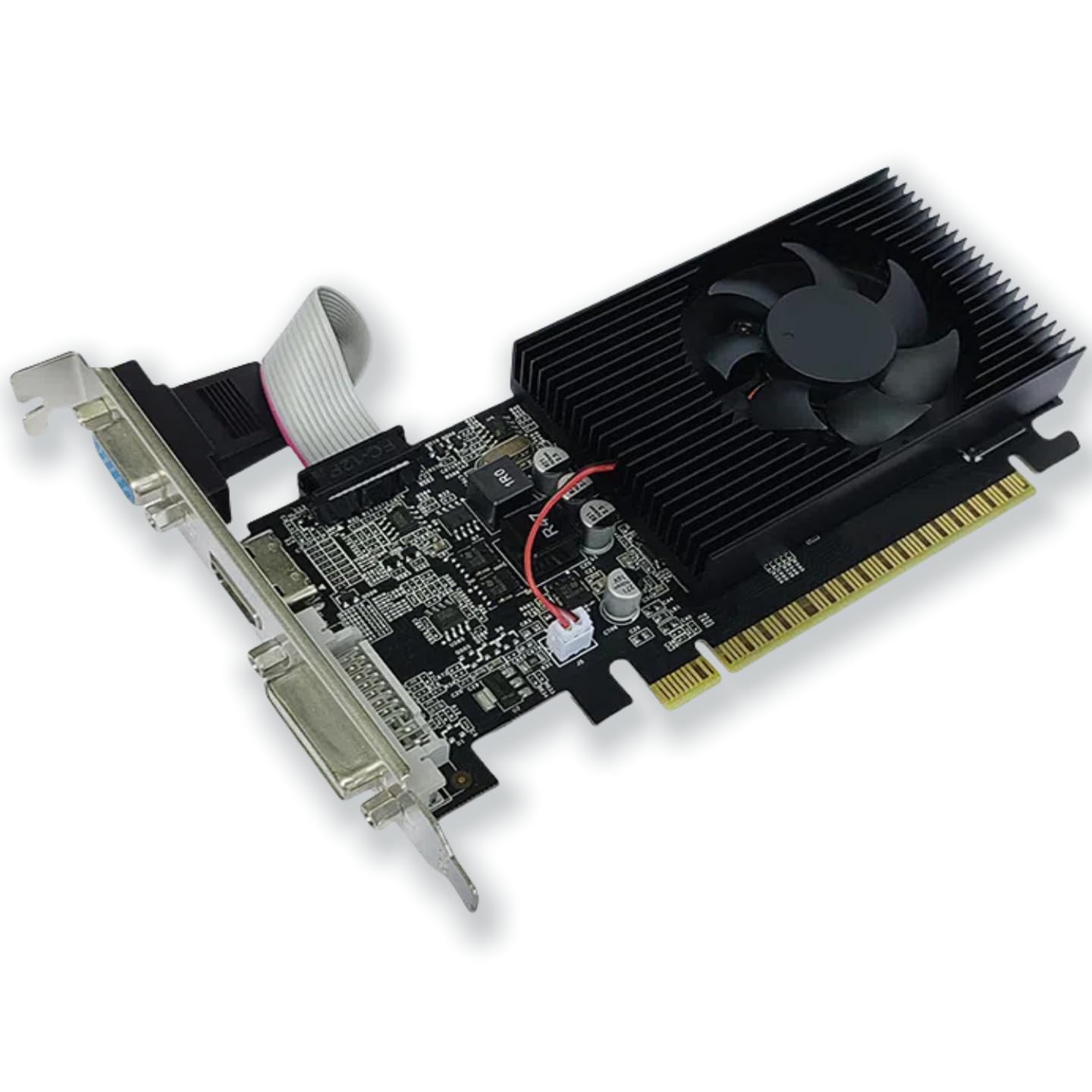
The XUANMO GT 730 is a Fermi-based card (700 MHz core) with 4GB of DDR3 on a 128-bit bus, 384 CUDA cores, and triple-output via HDMI, DVI, and VGA. It is marketed as capable of running League of Legends, CS2, and Minecraft at playable frame rates, which is accurate at 720p to 900p low settings. For it breathes life into a first-generation i7 Dell that could not run Windows 11 graphics — multiple verified reviews confirm this exact use case.
The card draws 25W to 38W and requires a 250W power supply minimum, making it one of the most forgiving cards for old power supplies. It measures just 150mm in length and comes with a low-profile bracket. The 128-bit memory bus gives it an edge over 64-bit cards in the same price bracket for dual-monitor office work. However, the Fermi architecture returns — this card is limited to driver 391.35 and does not officially support Windows 11. One reviewer explicitly warned that the return process is difficult if the card does not work with your OS.
The XUANMO listing also includes VHS as “Built-In Media” and the brand is less established, which may raise reliability flags for cautious buyers. A single customer reported the card failed on Windows 10 and the refund took weeks. For a legacy XP/Win7 build or a Linux machine where you control the driver stack manually, the 128-bit bus and low power draw make this a functional value play. For any modern Windows environment, do not buy.
Why it’s great
- 128-bit memory bus at the lowest price tier improves multi-tasking desktop performance
- Extremely low power requirement (25W-38W) works in old 250W PSU systems
- Lighter gaming (League, Minecraft) possible at 720-900p low settings
Good to know
- Fermi architecture locks driver to 391.35 — no Windows 11 or Win10 64-bit support
- Brand reliability and return experience reported as inconsistent by customers
6. GIGABYTE GeForce GT 730 2GB

The GIGABYTE GT 730 is a Kepler-based card running at 902 MHz with 2GB of DDR3 on a 64-bit memory bus, connected via PCI Express 2.0 x8. It is the most conservative card in this roundup — minimal power, minimal heat, minimal features — but it has a proven track record for stability on Linux and Windows Server 2012 R2. One verified buyer solved persistent XUbuntu XWindows crashes caused by shared video memory exhaustion by installing this card, proving its value for OS-level graphical stability.
The 64-bit bus and 2GB VRAM make this card unsuited for any gaming beyond simple 2D titles. Digital max resolution is 4096×2160, but analog max resolution is limited to 2048×1536, and several buyers noted they could not achieve full 1920×1080 via VGA on the latest NVIDIA driver. The card uses a PCIe x8 interface — physically x16 but electrically x8 — which is fine for bandwidth-limited workloads but may appear as a downgrade on motherboard spec sheets. Ports include dual-link DVI-D, HDMI, and D-Sub.
The GIGABYTE brand provides reliable PCB quality and consistent driver support through NVIDIA’s official channel. The single-slot low-profile fan is short enough to fit in any case, though one reviewer noted the PCB is slightly oversized, preventing PCIe retention clips from fully latching in certain EATX boards. If your priority is a rock-solid display adapter for a headless server, Linux workstation, or Windows 11 basic AMD build where you just need a screen, this card delivers exactly that — nothing more, nothing less.
Why it’s great
- Kepler architecture at 902 MHz ensures native Windows 11 driver compatibility
- GIGABYTE build quality and single-slot design fits any chassis
- Proven stability for Linux, XUbuntu, and Windows Server environments
Good to know
- 2GB DDR3 on a 64-bit bus delivers the lowest usable memory bandwidth in this category
- Cannot achieve 1920×1080 via VGA on latest NVIDIA driver — use DVI or HDMI
7. SAPLOS GT 730 4GB

The SAPLOS GT 730 uses the Fermi architecture (700 MHz core) with 4GB of DDR3 on a 128-bit memory bus, supporting up to 2560×1600 via HDMI and DVI, and 2048×1536 via VGA. It draws just 30W and requires a 300W motherboard power supply. For older modding communities, this card has found a niche: one verified reviewer achieved 50-60 FPS on a heavily modded Skyrim and Fallout 4 loadout (255 mods) using an HP SFF with an i5 and 250W PSU, but noted frame drops in known problematic areas.
The critical concern with this SAPLOS model — and all Fermi GT 730s — is the driver lock. The card requires driver version 391.35 (March 2018) and does not support Windows 10 64-bit or Windows 11. The listing itself warns of this limitation. One verified buyer reported receiving a card that appeared used, with a box containing an old HDD instead of the GPU, and the card itself only had 2GB of real VRAM despite being advertised as 4GB — a serious counterfeit or quality-control failure. This experience is echoed in GT 730 markets broadly, where 4GB labeling on 64-bit Fermi cards sometimes masks 2GB actual VRAM.
The SFF bracket and removable VGA interface make physical installation straightforward in ITX and mini-tower cases. The card powers on and auto-detects without manual driver installation on compatible OS versions. For a hobbyist who owns a legacy Windows 7/8/10 32-bit machine and wants to play older games with mods, the 128-bit bus and 4GB frame buffer (if genuine) can provide adequate performance. But the driver limitations and quality-control risks make this a purchase only for those willing to troubleshoot.
Why it’s great
- 128-bit memory bus provides genuine bandwidth advantage for 2K single-monitor gaming
- 30W TDP with no external power required, includes low-profile bracket
- Removable VGA interface improves chassis compatibility
Good to know
- Fermi architecture locked to driver 391.35 — incompatible with Windows 10 64-bit and Windows 11
- Quality control concerns: some units may arrive used or with fake 4GB VRAM labeling
FAQ
Can a GT 730 4GB run Fortnite or Warzone?
How do I know if a GT 730 will work with Windows 11?
Is 4GB fake VRAM common on these budget GPUs?
Final Thoughts: The Verdict
For most users, the best 760 graphics card winner is the PNY Quadro P600 2GB because its Pascal architecture, 1354 MHz core clock, and four DisplayPort outputs deliver professional-grade multi-monitor stability that no consumer GT 730 can match at a comparable cost. If you need native dual HDMI and automatic Windows 11 driver support without adapters, grab the QTHREE GT 730 4GB Dual HDMI. And for a dead-simple budget upgrade on a legacy Linux or Windows 7 office PC, nothing beats the consistent stability of the GIGABYTE GT 730 2GB.