
The jump to a 1440p OLED monitor with a refresh rate pushing past 360Hz is the single most transformative upgrade you can make for competitive gaming. You leave behind the world of motion blur, ghosting, and washed-out contrast for inky blacks, instantaneous pixel response, and a level of fluidity that makes every flick-shot and track feel physically connected to your aim.
I’m Min — the co-founder and writer behind Gadgets Feed. I’ve spent countless hours analyzing panel technologies, refresh rate curves, response time data, and real-world burn-in testing to separate the true esports champions from the overhyped contenders in this specific high-frequency QHD OLED segment.
This guide is built for the serious player who demands zero compromise between speed and image fidelity. Whether you need the unbreakable smoothness of a 480Hz panel or the immersive real estate of a 240Hz ultrawide, you’ll find the definitive 1440p 400hz monitor that matches your exact competitive and visual standards.
How To Choose The Best 1440p 400Hz Monitor
Selecting the right high-refresh QHD OLED monitor requires weighing panel generation, burn-in protection, connectivity, and your specific use case — whether that’s top-tier competitive play or a mix of fast gaming and content consumption. Here are the critical filters.
Panel Type: QD-OLED vs. WOLED
QD-OLED panels (used by Samsung, MSI, and Dell) deliver higher peak color volume and slightly brighter highlights, but their coating is more reflective and can show a purpleish tint under direct light. WOLED panels (LG and some ASUS models) use a matte or glossy anti-glare coating that manages reflections better and maintains true blacks in any room. For a brightly lit gaming space, WOLED is often the more practical choice.
Burn-in Mitigation Features
Not all OLED care is equal. Look for monitors with a dedicated heatsink (passive or pulsating heat pipe), automatic pixel refresh cycles that run when the monitor is in standby, and static logo/taskbar dimming. Brands like ASUS and Samsung now offer three-year burn-in warranties, which is a strong indicator of long-term reliability.
Connectivity and Bandwidth
A true 1440p 360Hz+ signal requires at least DisplayPort 1.4 with DSC or HDMI 2.1. For future-proofing, DisplayPort 2.1 UHBR20 (found on the ASUS PG27AQWP-W) delivers 80Gbps bandwidth, letting you run full refresh rate without compression. If you plan to use a console alongside your PC, ensure at least one HDMI 2.1 port with 48Gbps bandwidth.
Ergonomics and Footprint
Competitive players often prefer a small desk footprint for aggressive mouse movements. Some monitors, like the Sony INZONE M10S, feature a 4mm thin base. Also check height, tilt, and swivel adjustments — a panel that sits too low or lacks VESA compatibility can limit your setup.
Quick Comparison
On smaller screens, swipe sideways to see the full table.
| Model | Category | Best For | Key Spec | Amazon |
|---|---|---|---|---|
| INNOCN GA27M1Q | Value Flagship | Pure competitive speed | 500Hz / 0.03ms response | Amazon |
| ASUS ROG Swift PG27AQWP-W | Ultra Premium | Best dual-mode versatility | 540Hz WOLED / 0.02ms | Amazon |
| MSI MPG 271QRX QD-OLED | Mid-Range King | Best all-around QD-OLED | 360Hz / 0.03ms response | Amazon |
| ASUS ROG Strix XG27ACDNG | Premium ASUS | ASUS ecosystem & OLED Care | 360Hz / 0.03ms response | Amazon |
| Samsung Odyssey OLED G6 | Samsung Flagship | QD-OLED with anti-glare | 360Hz / 0.03ms response | Amazon |
| Sony INZONE M10S | Esports Ready | Fnatic-tuned pro FPS | 480Hz / 0.03ms response | Amazon |
| ASUS ROG Strix XG27AQDMG | Glossy WOLED | Best color vibrancy under light | 240Hz / 0.03ms response | Amazon |
| LG 27GS93QE | WOLED Value | Budget OLED entry point | 240Hz / 0.03ms response | Amazon |
| LG 34GS95QE | Ultrawide OLED | Immersive 21:9 curved gaming | 240Hz / 800R curve | Amazon |
| INNOCN 49Q1S | Super Ultrawide | 32:9 productivity & gaming | 240Hz / 5120×1440 OLED | Amazon |
| INNOCN 49C1S | Ultrawide LCD | Budget dual-QHD space | 240Hz / 5120×1440 VA | Amazon |
In‑Depth Reviews
1. INNOCN 27″ OLED 2K QHD 500Hz Gaming Monitor (GA27M1Q)

The INNOCN GA27M1Q obliterates the price-to-performance ratio for 1440p OLED monitors by delivering a genuine 500Hz refresh rate on a QD-OLED panel at a price that undercuts the competition by hundreds. The 1,500,000:1 contrast ratio and 99% DCI-P3 color gamut provide the same rich, inky blacks and vibrant highlights you expect from OLED, while the 0.03ms response time makes motion perfectly crisp with zero perceivable ghosting. For competitive titles like Valorant and Overwatch, this is a decisive advantage.
The monitor includes a full ergonomic stand with height, tilt, and swivel adjustment, plus VESA 100x100mm compatibility. You get two DisplayPort 1.4 ports and two HDMI 2.1 ports, allowing you to run 500Hz at full bandwidth with DSC. The built-in LED atmosphere lights and integrated speakers (while not audiophile-grade) add convenience for a clean desk setup. G-Sync compatibility ensures tear-free gameplay with both NVIDIA and AMD GPUs.
The only compromise is the typical QD-OLED reflectivity — in a brightly lit room, you will notice some purple-ish tint on black surfaces. Additionally, the OSD menu could be more intuitive for quick adjustments. But for the raw speed, color fidelity, and price, this is the most compelling high-Hz 1440p monitor available today. You need a high-end PC (9800X3D and 7900 XTX class or better) to push 500 fps in competitive titles, but the hardware simply keeps pace with the panel.
Why it’s great
- 500Hz QD-OLED at a fraction of the price of comparable panels
- Excellent 99% DCI-P3 color and 1,500,000:1 contrast
- Full ergonomic stand, VESA mount, and dual HDMI 2.1
Good to know
- QD-OLED coating shows purple tint in bright rooms
- Requires a very high-end GPU to hit 500fps
2. ASUS ROG Swift 27″ PG27AQWP-W

The ASUS ROG Swift PG27AQWP-W represents the absolute cutting edge of 1440p OLED gaming. It employs a new Tandem OLED technology that boosts peak brightness by 15%, increases color volume by 25%, and extends OLED lifespan by 60% compared to previous WOLED generations. The TrueBlack Glossy panel has zero haze, making text look exceptionally sharp and colors pop with an intensity that even other OLEDs struggle to match. The dual-mode feature lets you switch between QHD at 540Hz and HD at 720Hz, a party trick that is actually useful for frame-rate maximization in esports.
Connectivity is future-proof with DisplayPort 2.1 UHBR20 providing full 80Gbps bandwidth — no DSC compression needed for 540Hz. You get two HDMI 2.1 ports, a full USB 3.2 hub, and a Neo Proximity Sensor that automatically switches the screen to black when you walk away to reduce burn-in risk. The 3-year warranty with burn-in coverage and the included color calibration report give peace of mind for a premium investment. The white chassis and ROG aesthetic will polarize some, but the build quality is impeccable.
The main drawback is the price — this is the most expensive monitor on this list. Additionally, some users have reported minor grey banding in certain gradients, though this is rare and often panel lottery dependent. The speakers are also notably quiet, so you will want dedicated audio. If you demand the absolute highest refresh rate and best HDR brightness from a 1440p OLED, this is the undisputed king, but it requires a corresponding flagship GPU to fully utilize its speed.
Why it’s great
- 540Hz QHD with Tandem OLED for brighter, longer-lasting panel
- DP 2.1 UHBR20 for uncompressed 540Hz
- Neo Proximity Sensor and 3-year burn-in warranty
Good to know
- Very expensive — premium investment for competitive players
- Speakers are quiet; external audio recommended
3. MSI MPG 271QRX QD-OLED

The MSI MPG 271QRX strikes a nearly perfect balance between performance and price. Its 360Hz QD-OLED panel delivers the same vibrant, wide-gamut colors and true black HDR 400 as monitors costing hundreds more, with a 0.03ms response time that makes 360Hz feel buttery smooth. The KVM feature is a notable addition for multi-device setups, letting you control your PC and console with one keyboard and mouse. HDR performance with VESA DisplayHDR True Black 400 is excellent, with highlights that pop while blacks remain truly infinite.
Build quality is solid, with a fully adjustable stand that offers height, tilt, and swivel. MSI OLED Care 2.0 includes pixel refresh, panel shift, and taskbar detection to mitigate burn-in. The monitor also includes a full HDMI 2.1 port (48Gbps) for console gamers, making it a true multi-platform panel. Text clarity is better than many QD-OLEDs thanks to MSI’s clear pixel layout, and the Gaming Intelligence app provides convenient OSD control from your desktop.
The main limitation is the 250 nits SDR brightness, which can feel a bit dim in a brightly lit room compared to higher-end WOLED alternatives. The QD-OLED purple tint in direct light is also present. For most gamers, though, this is the sweet spot — you get 360Hz, QD-OLED color, and KVM functionality at a price that undercuts the premium tiers significantly.
Why it’s great
- Excellent QD-OLED image quality at a mid-range price
- KVM functionality and HDMI 2.1 for multi-device
- Comprehensive OLED Care 2.0 software
Good to know
- SDR brightness is only 250 nits
- QD-OLED shows purple tint in bright rooms
4. ASUS ROG Strix 27″ XG27ACDNG

The ASUS ROG Strix XG27ACDNG is a direct competitor to the MSI 271QRX, offering a 360Hz QD-OLED experience with ASUS’s renowned OLED Care+ suite and a custom heatsink design. The 0.03ms response time ensures zero ghosting, and the 99% DCI-P3 coverage with Delta E < 2 delivers outstanding color accuracy out of the box. ASUS’s OLED Anti-flicker technology further reduces flicker during refresh rate fluctuations, a common annoyance on earlier OLED panels.
The DisplayWidget Center software is a standout, allowing you to adjust OLED care features, switch profiles, and tweak settings with a mouse rather than fumbling with OSD buttons. The 3-year warranty with burn-in coverage removes ownership anxiety. The build quality is robust, with a sturdy adjustable stand that occupies a moderate footprint. G-Sync and FreeSync Premium Pro compatibility are both present for tear-free performance.
One oddity is the low height adjustment range — some users may need a monitor arm to achieve their preferred eye level. The 3.5mm audio jack also introduces a small amount of electronic noise in some units. For those already in the ASUS ecosystem or who prioritize software-driven OLED care, this is an excellent choice that matches the performance of the MSI while adding a bit of polish.
Why it’s great
- Custom heatsink and OLED Anti-flicker technology
- DisplayWidget Center software for easy control
- 3-year warranty with burn-in coverage
Good to know
- Height adjustment range is limited
- No built-in speakers
5. Samsung Odyssey OLED G6 (G60SD)

Samsung’s Odyssey OLED G6 brings a unique Dynamic Cooling System to the 360Hz QD-OLED arena, using a pulsating heat pipe that dissipates heat five times more effectively than standard graphite sheets. This directly addresses the primary burn-in risk for OLEDs — heat — and extends panel life significantly. The Glare Free technology is also notably effective, reducing reflections more than standard QD-OLED coatings and making the inky blacks more consistent in varied lighting conditions.
The 250 nits SDR brightness is standard for QD-OLED, but the HDR brightness from those quantum dot layers is punchy and vivid. The sleek design with a 3.9mm thin profile and CoreLighting ambient backlight looks stunning on a desk. Variable refresh rate with FreeSync Premium Pro keeps motion smooth, and the 0.03ms response time is standard for the category. Samsung’s OLED Safeguard+ includes logo and taskbar detection, plus pixel shift.
Build quality has a notable weak point: the joystick power button has been reported to break with normal use, and Samsung’s warranty has been difficult to claim in some cases. The stand is also screwless and uses a proprietary mechanism — if you want to use a VESA arm, you cannot reuse the included stand parts. For the price, this is a fantastic QD-OLED experience with a superior cooling solution, but the button reliability is a legitimate concern.
Why it’s great
- Pulsating heat pipe cooling for burn-in prevention
- Glare Free coating manages reflections well
- Sleek, ultra-thin design with ambient lighting
Good to know
- Joystick power button has reported durability issues
- Proprietary stand limits VESA arm compatibility
6. Sony INZONE M10S

Sony’s INZONE M10S is purpose-built for competitive FPS, developed in partnership with esports team Fnatic. The 480Hz refresh rate at 1440p with a 0.03ms response time offers the smoothest motion possible in this segment outside of the 540Hz ASUS. The standout feature is the Tournament Mode, which includes a 24.5-inch virtual screen size option and dedicated FPS Pro/Pro+ contrast modes that enhance enemy visibility in dark corners. The low-profile stand is only 4mm thin at its base, freeing up significant desk space for aggressive mouse movements.
The fan-less passive cooling system with a custom heatsink ensures consistent performance without acoustic noise. Connectivity is future-proof with DisplayPort 2.1 UHBR10, two HDMI 2.1 ports, and a full USB hub. The 3-year warranty with burn-in coverage is standard for the premium tier. The factory color calibration report ensures Delta E < 1 accuracy, making it usable for content creation as well.
The main drawbacks are the price premium over competing 480Hz options and the reliance on DSC to achieve 480Hz over DP 1.4. The OSD can also be a bit clunky to navigate. Additionally, the glossy panel coating picks up fingerprints easily. If you are a competitive shooter player who values the Fnatic-tuned FPS modes and the compact stand footprint, the M10S is a fantastic tool, but it is a specialized purchase.
Why it’s great
- 480Hz with Fnatic-tuned FPS Pro modes and 24.5″ virtual size
- Ultra-compact 4mm base for desk space
- Fan-less passive cooling with custom heatsink
Good to know
- Premium price compared to other 480Hz OLEDs
- Requires DSC for 480Hz over DP 1.4
7. ASUS ROG Strix XG27AQDMG

The ASUS ROG Strix XG27AQDMG uses a third-generation WOLED panel with a glossy finish that delivers exceptional image clarity and color vibrancy. The glossy coating eliminates the hazy diffusion of matte OLEDs, making text appear sharper and colors more saturated. The 240Hz refresh rate at 1440p with 0.03ms response time is more than enough for most gamers, offering a perfectly smooth experience with negligible input lag. The custom heatsink and OLED Anti-flicker technology keep the panel safe and comfortable.
Uniform Brightness setting ensures consistent luminance levels across the screen, solving a common OLED pain point. The 3-year warranty with burn-in coverage provides the same peace of mind as the higher-end XG27ACDNG. HDMI 2.1 support means you can run 1440p 240Hz from a PS5 or Xbox Series X without issue. The stand is highly adjustable with a small footprint, and the overall build quality is excellent.
The significant limitation is the refresh rate — at 240Hz, it cannot compete with the 360Hz+ offerings in terms of pure motion clarity for competitive esports. The automatic 6-minute pixel cleaning popup is also a minor annoyance during gameplay. For gamers who prioritize image quality and text clarity over absolute frame rate, this glossy WOLED is a phenomenal choice, but fast-twitch players should look at higher-Hz options.
Why it’s great
- Glossy WOLED delivers exceptional color and text clarity
- Uniform Brightness setting for consistent luminance
- 3-year warranty with burn-in coverage
Good to know
- 240Hz is lower than 360Hz+ competitors
- Pixel cleaning popup can interrupt gameplay
8. LG 27GS93QE Ultragear OLED

The LG 27GS93QE offers the most accessible entry point into 1440p OLED gaming without sacrificing core performance. The 240Hz WOLED panel uses LG’s proven technology, providing true black levels with a 1.5M:1 contrast ratio and VESA DisplayHDR True Black 400 certification. The 0.03ms response time ensures motion is perfectly clear, and the anti-glare WOLED coating handles room lighting better than QD-OLED alternatives, maintaining true blacks without the purple tint issue.
Connectivity is robust with two HDMI 2.1 ports and DisplayPort 1.4, all supporting 240Hz at full bandwidth. The included 2-year warranty covers the OLED panel, and the LG Ultragear OSD gives you FPS, RTS, and Gamer profiles for quick optimization. The stand offers height, tilt, and pivot adjustments, making it very ergonomic for the price. The slim, near-borderless design looks clean on any desk.
The SDR brightness at 400 nits is decent for OLED, but the HDR peak brightness is lower than the QD-OLED alternatives. The 240Hz ceiling is a limitation if you are a hyper-competitive player who can consistently push 360+ fps. For most gamers, the value proposition here is unbeatable — you get genuine OLED quality, full ergonomic adjustment, and HDMI 2.1 at the lowest cost of entry in this category.
Why it’s great
- Best entry price for 1440p OLED gaming
- Anti-glare WOLED coating avoids QD-OLED purple tint
- Full ergonomic stand with pivot adjustment
Good to know
- 240Hz cannot match 360Hz+ for competitive play
- HDR peak brightness is lower than QD-OLED
9. LG 34GS95QE Ultragear OLED

The LG 34GS95QE brings the ultrawide experience to the 1440p OLED space with a dramatic 800R curve and a 21:9 aspect ratio. The 3440×1440 resolution provides that immersive envelope that race and flight simulators crave, while the 240Hz refresh rate and 0.03ms response time keep motion fluid. The VESA DisplayHDR True Black 400 and 1.5M:1 contrast ratio deliver the same deep blacks and vivid highlights as the 27-inch LG OLED, but across a much wider canvas.
Anti-glare with low reflection significantly reduces distractions, making the 21:9 image consistent even with ambient light. The stand provides height, tilt, and swivel adjustments, and HDMI 2.1 support means consoles can also utilize the ultrawide HDR experience. The near-instant response time means zero noticeable backlight ghosting, a common issue on VA ultrawides. G-Sync Compatible and FreeSync Premium Pro keep things tear-free.
Text clarity is typical for OLED (fine for gaming, not as sharp as high-PPI LCDs for heavy spreadsheet work). The 800R curve is very aggressive — some users find it immersive, while others prefer a gentler 1800R curve. The rear-facing OSD button is also awkward to reach. If you want a true wraparound experience for single-player or sim titles, this is the best ultrawide OLED option, but competitive FPS players may prefer a 27-inch flat panel.
Why it’s great
- Immersive 21:9 3440×1440 OLED with 800R curve
- Excellent anti-glare coating
- HDMI 2.1 for console compatibility
Good to know
- 800R curve may be too aggressive for some users
- Rear OSD button is awkward to use
10. INNOCN 49Q1S OLED Curved

The INNOCN 49Q1S is a 49-inch super ultrawide OLED that effectively serves as a dual 27-inch QHD monitor replacement without a bezel gap. The 5120×1440 resolution (32:9 aspect ratio) provides an enormous canvas for productivity multitasking and immersive gaming. The 240Hz refresh rate ensures smooth motion, and the OLED contrast ratio of 1,000,000:1 gives you true blacks for HDR content. The 1800R curve is gentler than the LG 34-inch, making it more comfortable for all-day use.
Connectivity is a standout: USB-C with 90W power delivery charges a laptop while transmitting video, plus dual DisplayPort 1.4, HDMI 2.1, USB hub, and Ethernet (RJ45). The built-in speakers are serviceable for notifications and casual use, though not for critical listening. The PIP/PBP functionality allows you to view two input sources simultaneously, which is excellent for streaming or multitasking workflows.
The main limitation is the reliance on DSC to achieve 240Hz at this resolution, which can cause occasional compatibility quirks with some GPUs. The built-in speakers are also noticeably lacking in volume and bass. The sheer size also requires a deep desk (at least 30 inches) and a powerful GPU to drive games at native resolution. For productivity workers and sim racers, this is a dream panel, but it demands desk space and GPU power to match.
Why it’s great
- Replaces dual monitors with one seamless 49-inch OLED
- USB-C 90W power delivery and Ethernet port
- Excellent 1,000,000:1 contrast ratio for HDR
Good to know
- Requires deep desk and powerful GPU
- Built-in speakers are weak
11. INNOCN 49C1S Curved LCD
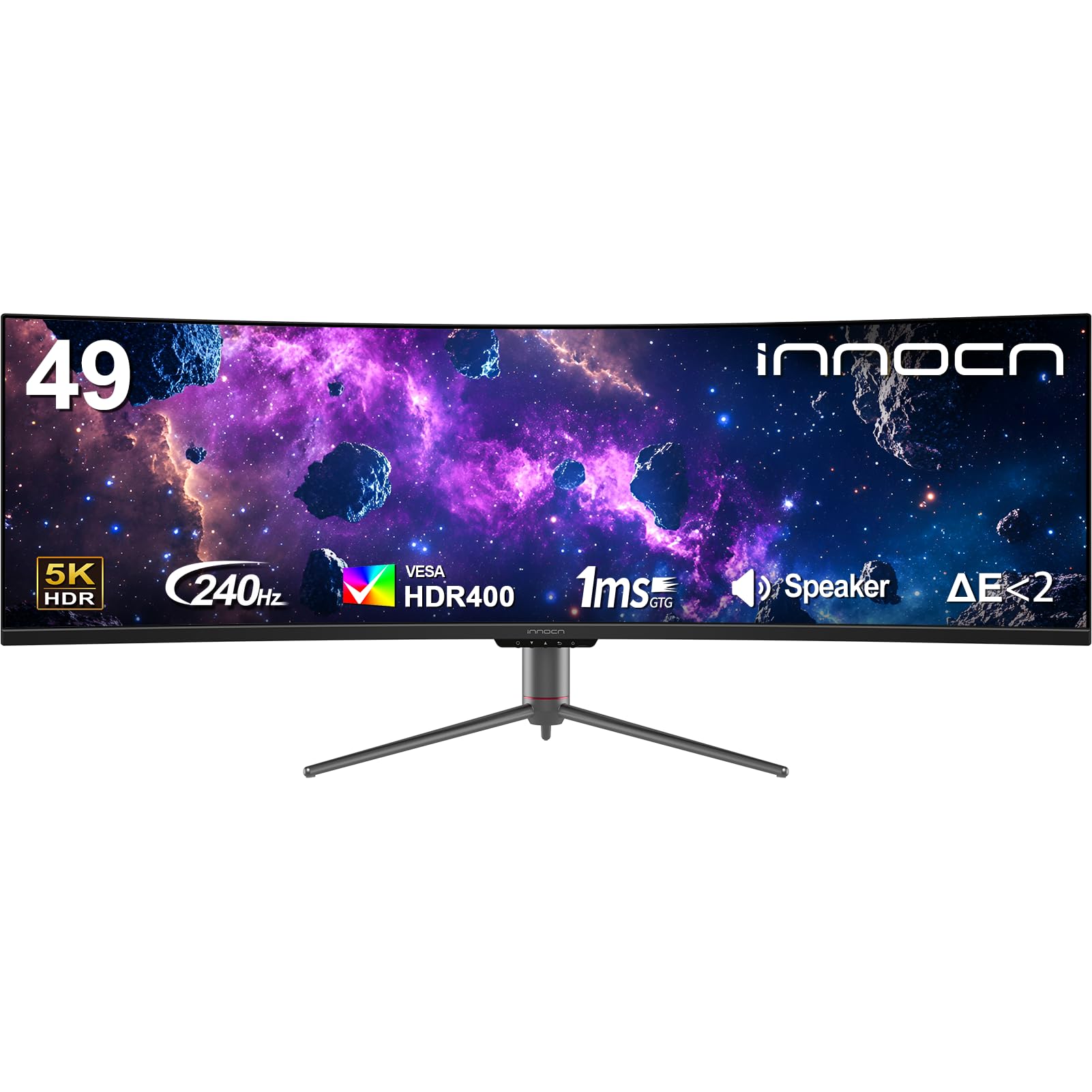
The INNOCN 49C1S offers a budget-friendly entry to the 49-inch super ultrawide segment by using a VA LCD panel rather than OLED. The 5120×1440 resolution and 240Hz refresh rate provide excellent space for multitasking and smooth gaming. The 3000:1 contrast ratio of the VA panel is significantly better than typical IPS, delivering decent black levels for an LCD. The 1800R curve makes the wide canvas comfortable to view without excessive neck movement.
Connectivity is the strongest feature: USB-C with 65W power delivery, dual DisplayPort 1.4, HDMI 2.1, Ethernet, and a full USB hub. The built-in speakers are present for basic audio, and the PIP/PBP functionality works well for multi-source workflows. The stand offers height and tilt adjustment, but no swivel. G-Sync Compatible support helps reduce screen tearing.
The VA panel does exhibit some black-level smearing in dark scenes, a common issue that OLED completely solves. The HDR 400 certification is the bare minimum, and the 3000:1 contrast cannot match OLED’s infinite blacks. If you need the 32:9 productivity space and a high refresh rate on a strict budget, this is a functional and feature-rich monitor, but the image quality gap to OLED is significant. The build quality and warranty support from INNOCN are acceptable for the price bracket.
Why it’s great
- Ultrawide 5120×1440 experience at the lowest price
- Excellent port selection with USB-C 65W and Ethernet
- 240Hz for smooth productivity and gaming
Good to know
- VA panel has black-level smearing
- HDR performance is very limited
FAQ
Is a 360Hz OLED worth it over a 240Hz OLED for competitive gaming?
How do I prevent burn-in on a 1440p OLED gaming monitor?
What GPU do I need to run a 1440p 400Hz monitor?
Final Thoughts: The Verdict
For most users, the 1440p 400hz monitor winner is the INNOCN GA27M1Q because it delivers a genuine 500Hz QD-OLED experience at a price that rivals 360Hz competitors, offering the best balance of speed, color, and value. If you want the absolute highest refresh rate with future-proof DP 2.1 connectivity, grab the ASUS ROG Swift PG27AQWP-W. And for the most well-rounded QD-OLED package with KVM functionality and great software support, nothing beats the MSI MPG 271QRX.