
Standard Gigabit Ethernet chokes when you push large datasets, high-resolution video streams, or multi-node storage clusters. A 40Gb Ethernet switch unlocks aggregate backplane bandwidth measured in hundreds of gigabits per second, eliminating the bottleneck that keeps your workstations waiting on file transfers and your virtual machines starved for throughput.
I’m Min — the co-founder and writer behind Gadgets Feed. I’ve spent hundreds of hours analyzing switching architectures, port configurations, and real-world throughput benchmarks to identify the switches that actually deliver on their 40Gb and multi-gigabit promises.
This guide cuts through the noise to help you pick the right 40gb ethernet switch for your data center, lab, or high-bandwidth production environment.
How To Choose The Best 40Gb Ethernet Switch
Selecting a 40Gb switch for your network requires balancing port density, management features, and thermal design against your specific workload. Whether you are aggregating 10Gb links, connecting high-performance storage, or building a spine-leaf topology, the right switch starts with understanding your throughput demands and physical infrastructure.
Port Configuration And Uplink Strategy
The port mix defines the switch’s role. Switches with dedicated 40Gb QSFP+ ports, like the MikroTik CRS326-24S+2Q+RM, allow direct 40Gb spine connections or 4x10Gb breakout cables for dense 10Gb leaf aggregation. Switches with 10Gb SFP+ uplinks plus 2.5Gb or 1Gb access ports suit edge-of-network deployments where client devices need multi-gig but core links remain at 10Gb. Assess whether you need native 40Gb interfaces or if 4x10Gb breakout capability suffices for your aggregation tier.
Backplane Switching Capacity And Non-Blocking Throughput
The backplane switching capacity in Gbps determines whether all ports can forward traffic at line rate simultaneously. A 24-port 10Gb switch requires at least 480 Gbps of switching capacity to remain non-blocking. For 40Gb ports, each QSFP+ interface demands 80 Gbps of bidirectional capacity. Switches with lower switching fabric than the sum of their port speeds introduce congestion under full load — a critical consideration for video post-production, database replication, or virtualized server clusters.
Management Layer And Security Features
Managed switches offer VLAN segmentation, link aggregation (LACP), QoS, and ACLs for traffic control and security. Layer 2+ switches add static routing for inter-VLAN routing without an external router. Layer 3 switches support dynamic routing protocols like OSPF for larger networks. For lab environments or small businesses, a smart-managed or web-managed switch with a clean GUI may suffice. Enterprise data centers typically require CLI-based management, SNMP monitoring, and 802.1X authentication for access control.
Cooling, Noise, And Physical Form Factor
High-port-count 40Gb and 10Gb switches generate significant heat. Fanless designs exist for lower-power 1Gb and 2.5Gb switches, but most high-throughput switches require active cooling. Check the fan type — some switches use noisy 40mm fans while others employ larger, quieter 80mm fans. For office or lab environments near workstations, look for switches with smart fan speed control or user-replaceable fan modules. Rack-mount depth and included mounting brackets also matter for physical installation.
Quick Comparison
On smaller screens, swipe sideways to see the full table.
| Model | Category | Best For | Key Spec | Amazon |
|---|---|---|---|---|
| MikroTik CRS326-24S+2Q+RM | Premium | Native 40Gb QSFP+ aggregation | 640 Gbps switching capacity | Amazon |
| MokerLink 12 Port 10G Managed | Premium | 10Gb L3 with multi-gig auto-negotiation | 240 Gbps switching capacity | Amazon |
| TP-Link Omada SG3452 | Premium | Omada SDN integrated network | 48x 1Gb + 4x SFP slots | Amazon |
| TRENDnet TEG-S50284 | Premium | Multi-gig 2.5Gb with 10Gb uplinks | 120 Gbps switching capacity | Amazon |
| NICGIGA 48 Port 2.5Gb | Premium | High-density 2.5Gb unmanaged | 240 Gbps switching capacity | Amazon |
| NETGEAR GS748T | Mid-Range | Smart managed 48-port 1Gb | 48 Gbps switching capacity | Amazon |
| YuanLey 54 Port L3 | Mid-Range | L3 managed with 10Gb SFP+ uplinks | 216 Gbps switching capacity | Amazon |
| HPE Instant On 1830 | Mid-Range | Smart-managed Layer 2 with app control | 52 active ports, fanless | Amazon |
| TP-Link SG2452LP | Mid-Range | PoE+ with Omada cloud management | 48 ports, 230W PoE budget | Amazon |
| TRENDnet TEG-524WS | Mid-Range | Web smart managed 48-port 1Gb | 104 Gbps switching capacity | Amazon |
| NETGEAR GS348 | Budget-Friendly | Simple plug-and-play 48-port 1Gb | 48x 1Gb unmanaged | Amazon |
In‑Depth Reviews
1. MikroTik CRS326-24S+2Q+RM

The MikroTik CRS326-24S+2Q+RM is the only switch on this list with native 40 Gbps QSFP+ ports, making it the definitive choice for high-speed spine aggregation or dense 10Gb leaf deployments via breakout cables. Its 24x 10Gb SFP+ ports combined with 2x 40Gb QSFP+ uplinks deliver a non-blocking switching capacity of 640 Gbps — enough to saturate every port simultaneously without drops.
Dual redundant power supplies ensure uptime in production racks, while the full-size USB port simplifies configuration file transfers. You can boot either RouterOS for advanced Layer 3 routing features including OSPF and BGP, or SwOS for a simpler Layer 2 management interface. The metal chassis includes rackmount ears and the fan system, though audible in a data center, keeps the 24 SFP+ modules and QSFP+ optics within safe thermal range.
Users consistently praise the feature-to-price ratio, with many reporting years of uninterrupted service after replacing noisy consumer-grade switches. The learning curve with RouterOS exists, but the Winbox GUI and extensive community tutorials reduce setup time to under an hour for VLAN and LAG configurations.
Why it’s great
- Two native 40Gb QSFP+ ports for spine connectivity
- 640 Gbps switching capacity handles full line-rate forwarding
- Dual redundant PSUs eliminate single points of failure
Good to know
- RouterOS requires dedicated learning time
- Stock fans are audible; Noctua replacements raise temps slightly
2. MokerLink 12 Port 10G Managed Switch
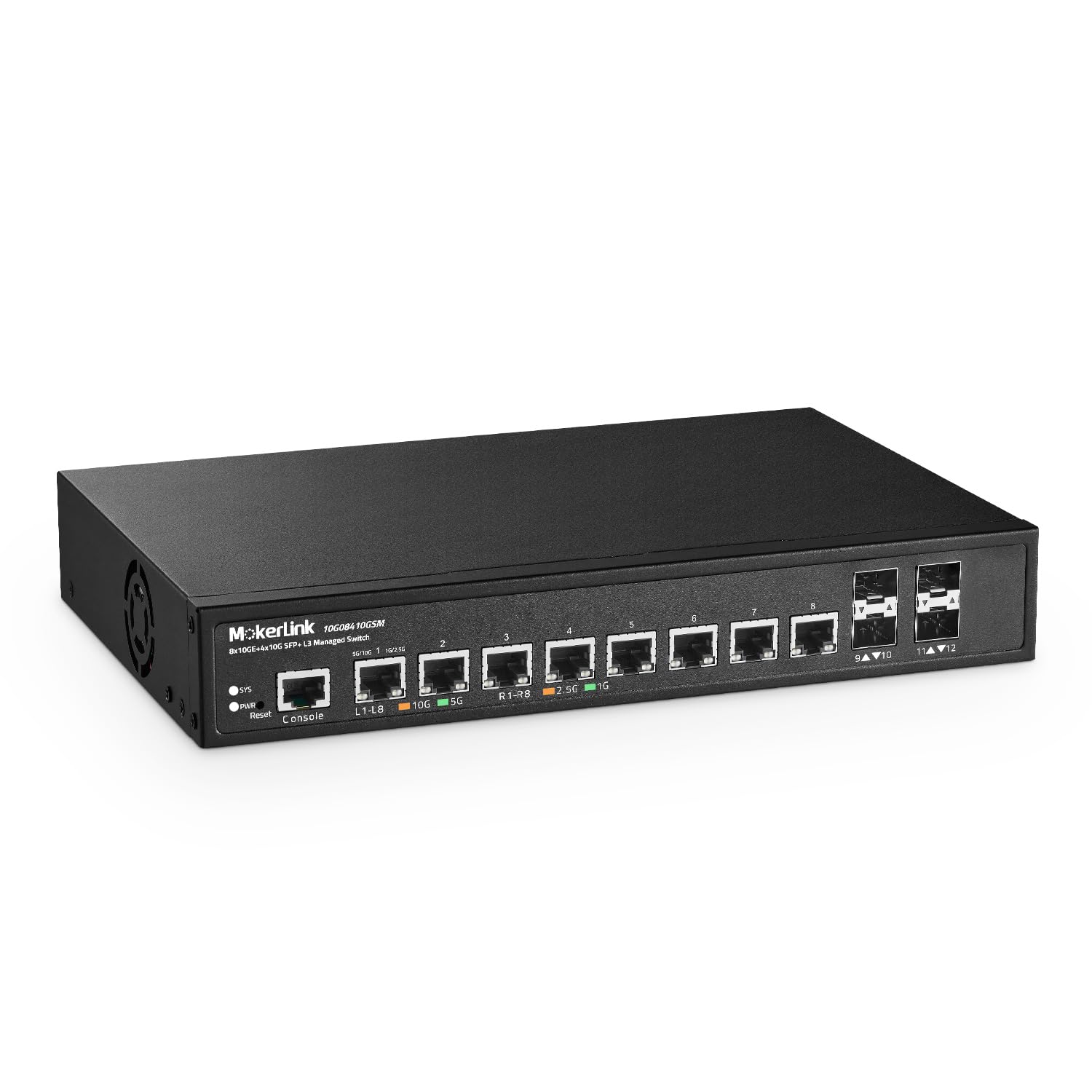
The MokerLink 12-port 10G managed switch packs 8x 10Gb RJ45 Ethernet ports with auto-negotiation down to 100Mb, plus 4x 10Gb SFP+ slots for fiber uplinks. Its 240 Gbps switching capacity ensures non-blocking performance across all twelve 10Gb ports — critical for VMware vSAN traffic, high-speed NAS access, or multi-camera video ingest pipelines.
Layer 3 routing support including static IPv4/IPv6 routes and loopback interfaces allows inter-VLAN routing without an external router, reducing latency in segmented networks. The CLI management via Telnet or SSH gives experienced administrators granular control over ACLs, QoS queues, and storm control settings. The metal desktop enclosure includes rackmount brackets and an industrial-grade fan that users report as quiet enough for a lab environment at distances beyond three feet.
Some users note the initial setup guide contains a minor IP addressing error, but the web-based firmware interface is intuitive once the switch is reachable on the network. No firmware updates were available on the manufacturer’s site at the time of review, which is a consideration for long-term support planning.
Why it’s great
- Eight 10Gb RJ45 ports with multi-rate auto-negotiation
- Full L3 static routing for inter-VLAN traffic
- 240 Gbps non-blocking switching fabric
Good to know
- Setup guide has an IP documentation error
- No official firmware updates available online
3. TP-Link Omada SG3452

The TP-Link Omada SG3452 is a 48-port Gigabit L2+ smart managed switch with four SFP slots, designed to integrate seamlessly into the Omada SDN ecosystem. When paired with an Omada hardware controller or software controller, the SG3452 supports Zero-Touch Provisioning, centralized VLAN management across multiple sites, and remote cloud monitoring via the Omada app.
Standalone management is equally robust, offering CLI via console port or SSH, SNMP, RMON, and dual image firmware for safe upgrades. Security features include 802.1X authentication, DHCP snooping, IP-MAC-Port binding, and DoS defense — meeting the requirements of most business networks. The fanless design keeps the switch silent, making it suitable for open-plan offices or broadcast suites where noise matters.
The web UI requires saving the running configuration to startup config separately, a common TP-Link quirk that catches new users. Once adopted into Omada, VLAN and port configuration becomes straightforward, and the switch maintains stable performance with no reboots required over months of uptime.
Why it’s great
- Omada SDN integration for multi-site cloud management
- Fanless, silent operation for noise-sensitive areas
- Comprehensive L2+ features including static routing
Good to know
- Web UI requires manual save of running config
- SFP slots are 1Gb only, no 10Gb uplink option
4. TRENDnet TEG-S50284
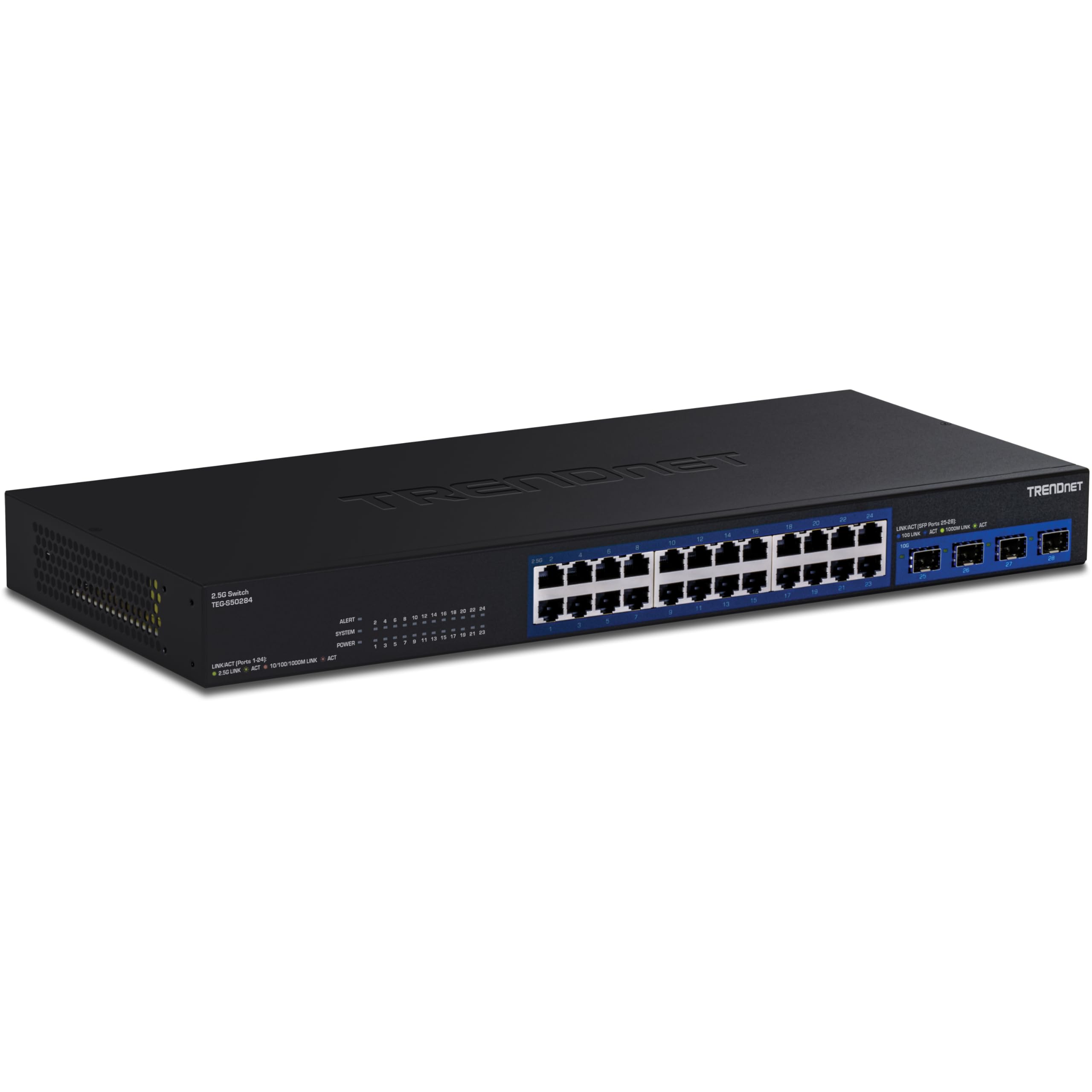
The TRENDnet TEG-S50284 bridges the gap between 1Gb and full 10Gb with 24x 2.5Gb RJ45 ports that operate over existing Cat5e cabling, plus four 10Gb SFP+ uplink ports for backbone connectivity. This configuration is ideal for environments where workstations and APs benefit from 2.5Gb speeds but the core network runs at 10Gb — think video editing suites, school campuses, or medium-sized businesses upgrading incrementally.
NDAA and TAA compliance qualifies the TEG-S50284 for U.S. government and education sector deployments, and TRENDnet backs it with a lifetime manufacturer protection plan. Smart fans automatically adjust speed based on thermal load, keeping noise low during typical operation. The 120 Gbps switching capacity is adequate for the port configuration, though users running all 24 2.5Gb ports plus all four 10Gb SFP+ links at full line rate will approach the fabric limit.
Users report flawless plug-and-play operation with VLAN passthrough for basic segmentation, though the switch is largely unmanaged — no web GUI for advanced QoS or ACL configuration. SFP+ modules run hot in some units, so placing the switch on a cooling rack or adding an external fan helps with sustained high-throughput scenarios.
Why it’s great
- 24x 2.5Gb ports over existing Cat5e cabling
- NDAA/TAA compliant for government use
- Lifetime manufacturer protection included
Good to know
- No web management interface for advanced config
- SFP+ modules can overheat without additional airflow
5. NICGIGA 48 Port 2.5Gb Ethernet Switch
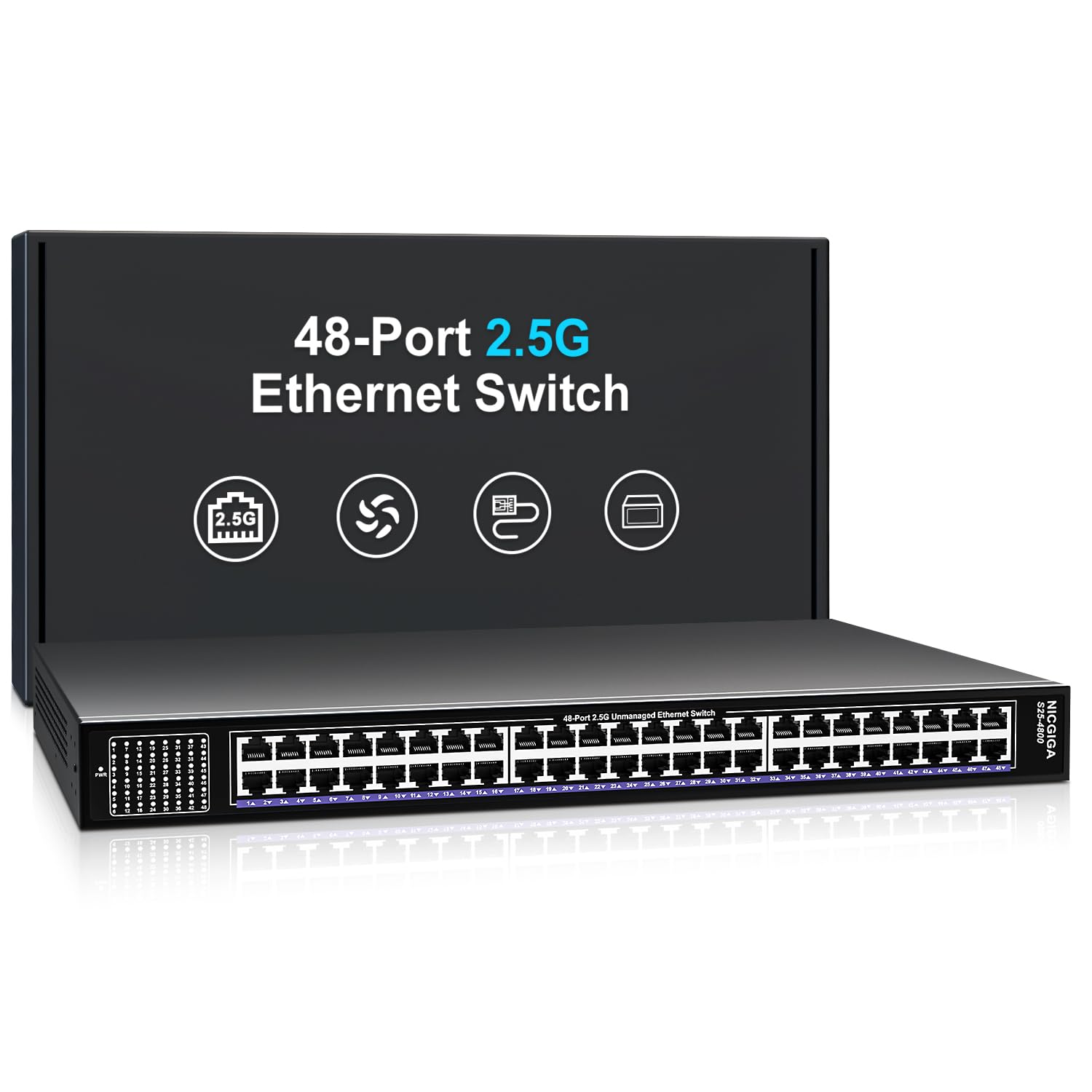
The NICGIGA 48-port 2.5Gb unmanaged switch delivers 48x 100/1000/2500 Mbps auto-negotiating RJ45 ports with a 240 Gbps switching capacity, making it one of the highest-density 2.5Gb solutions available. Deploy this switch when you need to connect dozens of 2.5Gb-capable devices — Wi-Fi 6/7 access points, gaming PCs, or NAS appliances — without any software configuration.
The rugged metal housing includes industrial-grade cooling fans and 4KV surge protection for reliable 24/7 operation. Auto MDI/MDIX eliminates crossover cable requirements, and the included 19-inch rackmount brackets simplify installation in standard server racks. The unmanaged nature means zero DHCP snooping, no VLANs, and no traffic prioritization — pure layer 2 forwarding at line rate.
Performance reviews show iperf3 throughput reaching approximately 2.33 Gbps per link with compatible NICs, and local file transfers hitting 280 MB/s peak when the storage subsystem allows. Some users note the absence of rubber feet and limited manufacturer support documentation, but the switch itself runs silently and maintains stable connections for months.
Why it’s great
- 48 ports of 2.5Gb in a 1U form factor
- 240 Gbps switching capacity handles full line rate
- 4KV surge protection for long-term reliability
Good to know
- Completely unmanaged — no VLAN or QoS support
- Limited manufacturer support documentation available
6. NETGEAR GS748T
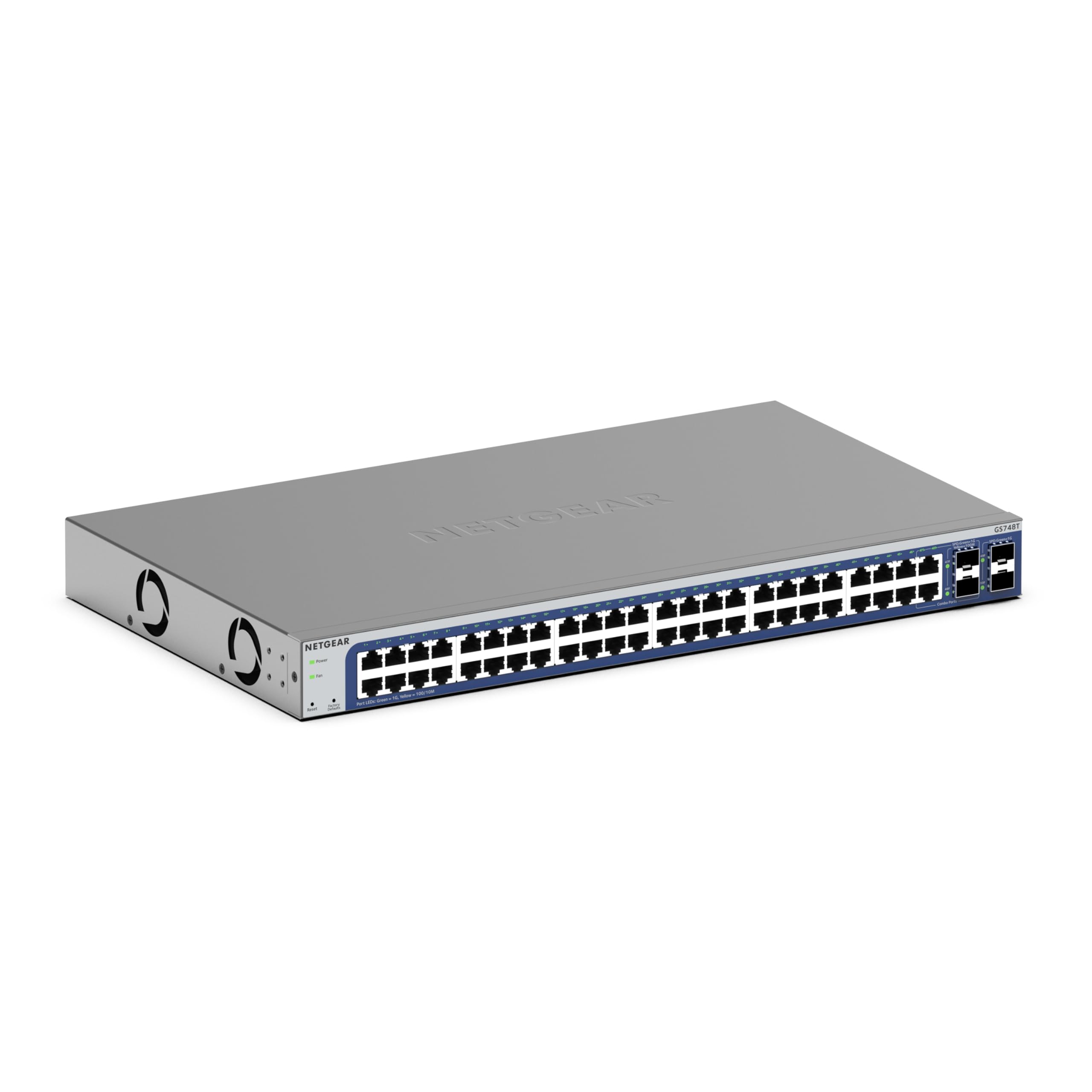
The NETGEAR GS748T is a 48-port Gigabit smart managed switch with four 1Gb SFP ports (two shared) and a one-year subscription to NETGEAR Insight for remote cloud management. The smart managed interface provides VLAN segmentation, link aggregation, SNMP monitoring, and QoS without the complexity of a full Layer 3 CLI — a good fit for IT generalists managing small business networks.
The gray plastic chassis is lighter than full-metal alternatives, though the build quality feels adequate for desk or rack placement. IEEE 802.3az Energy Efficient Ethernet reduces power consumption during low-traffic periods, and the fanless operation keeps the switch silent in open offices. The Insight mobile app allows port enable/disable, PoE monitoring (on PoE models), and network topology views from anywhere.
Some users discovered the switch can be powered via PoE on port 1, eliminating the need for an AC adapter in certain deployments — a useful trick for remote locations or temporary setups. The web management interface is straightforward, though power users may find the lack of SSH CLI limiting for automated configuration scripts.
Why it’s great
- NETGEAR Insight cloud management included for 1 year
- Fanless and energy-efficient design
- Can be powered via PoE on port 1
Good to know
- Plastic chassis, not metal rackmount
- SFP ports are 1Gb only, no 10Gb uplinks
7. YuanLey 54 Port L3 Managed Switch
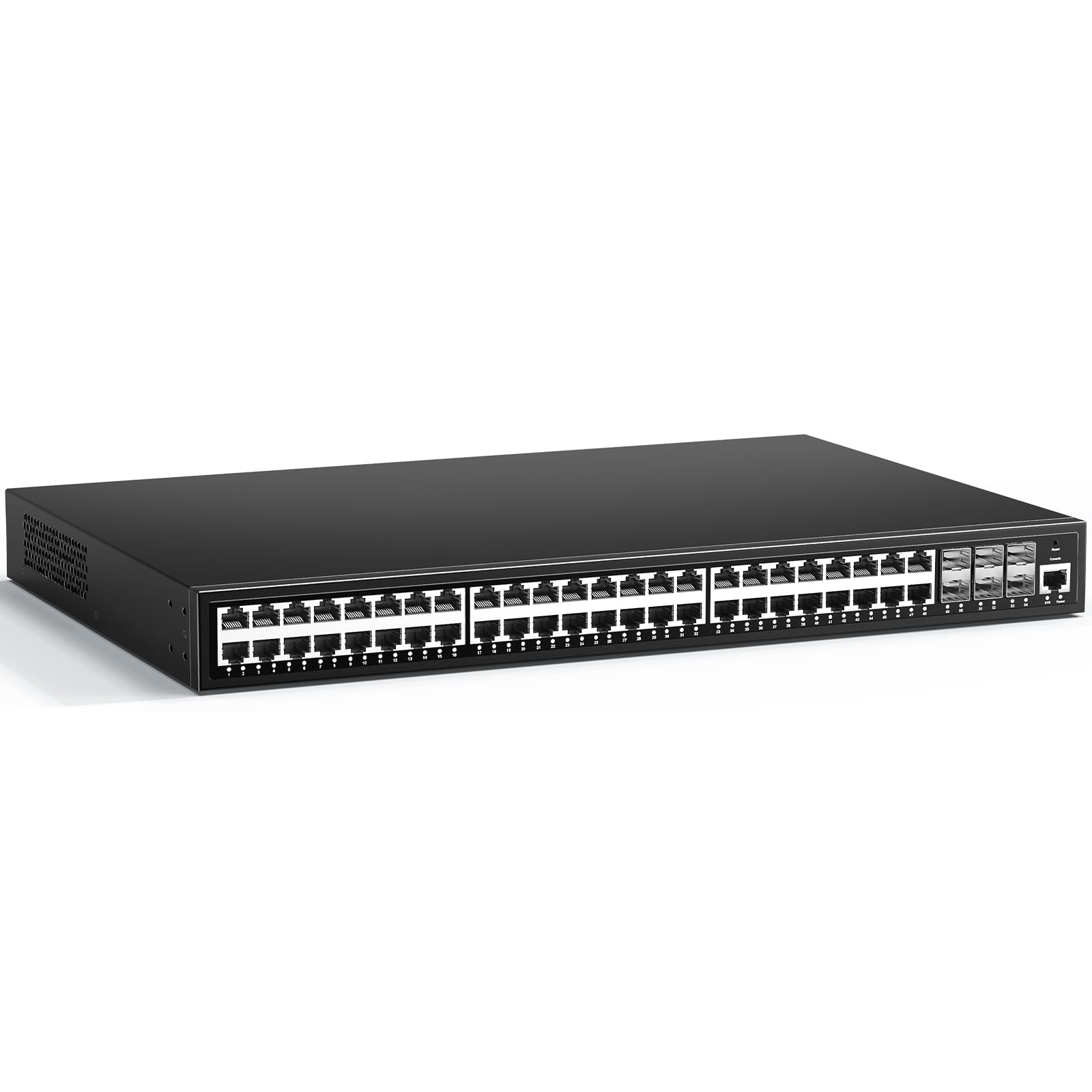
The YuanLey 54-port switch combines 48 Gigabit RJ45 ports with six 10Gb SFP+ uplinks in a fanless metal chassis, offering L3 management features like static routing, 802.1Q VLAN, ACL, IGMP snooping, and 802.1X authentication at a mid-range price point. The 216 Gbps switching capacity ensures the 48 1Gb ports and six 10Gb SFP+ slots can operate near line rate under mixed traffic loads.
Management flexibility includes web GUI, CLI via console or Telnet, and SNMP v1/v2/v3. The quadruple binding of IP-MAC-VLAN-port strengthens access security, while storm control and DHCP snooping protect against common broadcast attacks. The fanless design keeps noise to a minimum, though the metal enclosure can become warm to the touch under heavy PoE load — passive cooling relies on adequate rack airflow.
Multiple users report the switch functioning well for security camera networks and small business LANs, though two reviews note units failing within the first month. The L3 feature set lacks a DHCP server despite being marketed as Layer 3 — static routing and ARP work correctly, but you will need an external DHCP server for automatic IP allocation across VLANs.
Why it’s great
- Six 10Gb SFP+ uplinks for backbone connectivity
- Fanless, quiet operation with metal chassis
- L3 static routing and comprehensive ACL/security features
Good to know
- No DHCP server despite L3 classification
- Quality control issues reported in a minority of units
8. HPE Instant On 1830 48G 4SFP

The HPE Aruba Instant On 1830 is a smart-managed Layer 2 Gigabit switch with 48 RJ45 ports and 4 SFP uplinks, designed for small businesses that want enterprise features without license fees. The Instant On mobile app guides setup in under 10 minutes, while the web GUI provides granular VLAN, QoS, and SNMP management for more advanced users.
The fanless metal chassis is rackmountable with included brackets, and the switch consumes only 17.7 watts at maximum load — among the most energy-efficient 48-port managed switches available. The limited lifetime warranty from HPE provides long-term peace of mind, and the absence of recurring subscriptions means the management interface remains fully functional forever.
The VLAN management GUI is among the best in class for ease of use, with clear visual representations of port assignments and trunk configurations. One user reported a power supply failure after two years, which is unusual for this line, but the lifetime warranty covers hardware defects for the original owner.
Why it’s great
- Instant On app simplifies setup to under 10 minutes
- Fanless, silent, and energy-efficient design
- Limited lifetime warranty with no subscription fees
Good to know
- No CLI for advanced configuration
- SFP ports are 1Gb only, no 10Gb uplink support
9. TP-Link SG2452LP
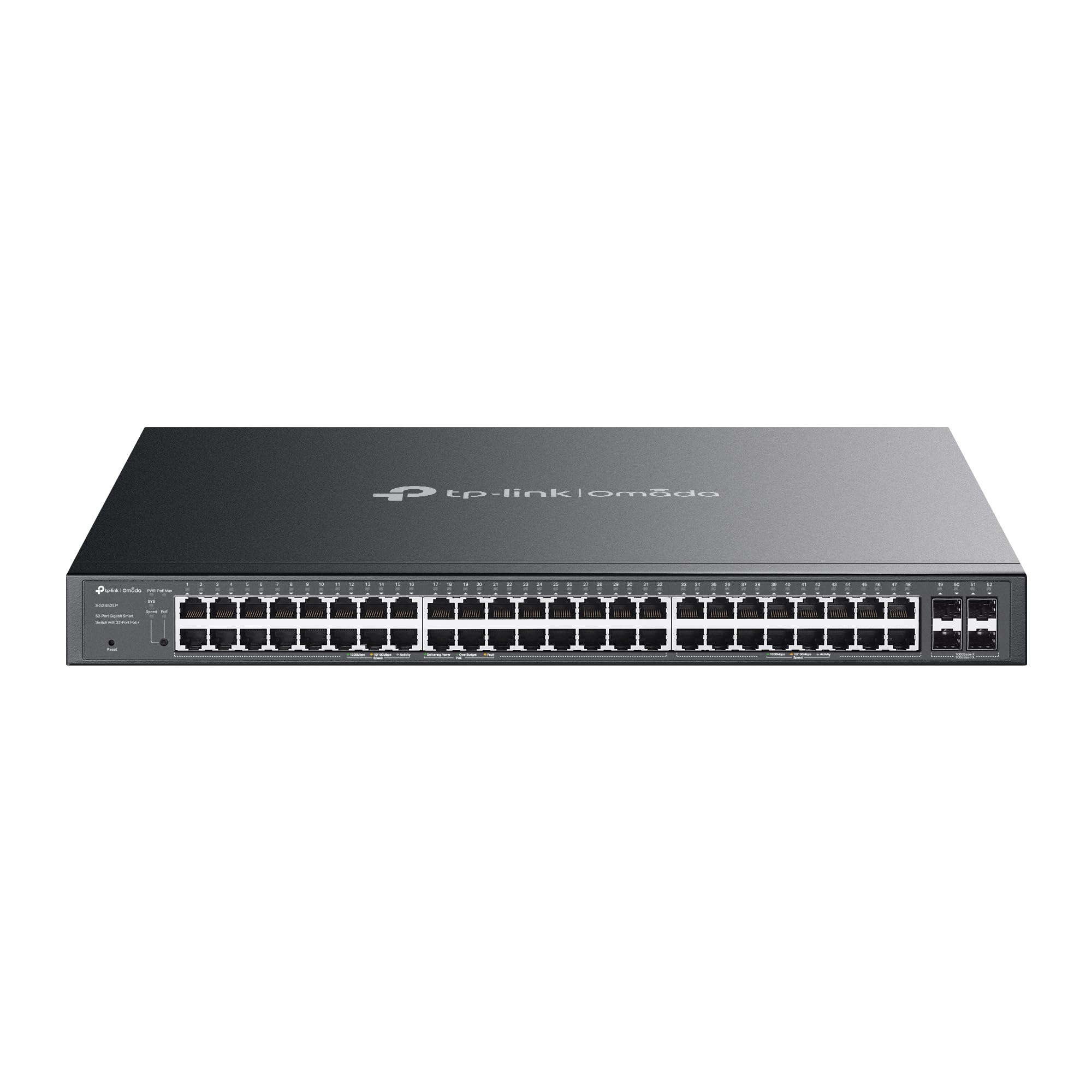
The TP-Link SG2452LP provides 48 Gigabit ports with 32 PoE+ ports delivering a 230W total budget, plus 4 SFP slots, all managed through the Omada SDN platform. This switch is purpose-built for powering IP cameras, wireless access points, and VoIP phones across a single cable, while the fanless chassis keeps acoustics neutral in office or retail environments.
Omada integration enables Zero-Touch Provisioning, remote monitoring via the cloud app, and AI-powered network optimization tools. Standalone management options include web GUI, CLI, SNMP, and RMON for local control. Security features span 802.1X, IP-MAC-Port binding, DHCP snooping, and ACLs — covering the essentials for PCI or HIPAA compliance in small business deployments.
The 5-year manufacturer warranty provides robust protection, and users consistently report the switch running for months without reboots, even with the full PoE budget allocated to cameras and APs. The only trade-off is the 1Gb port speed — this switch will not accelerate 2.5Gb or 10Gb connections, making it best suited for environments where power distribution matters more than raw throughput.
Why it’s great
- 32 PoE+ ports with 230W budget for power-hungry devices
- Omada SDN cloud management with Zero-Touch Provisioning
- Fanless operation and 5-year warranty
Good to know
- All ports are 1Gb, no 2.5Gb or 10Gb uplinks
- PoE budget may be insufficient for 32 high-power devices
10. TRENDnet TEG-524WS

The TRENDnet TEG-524WS is a 52-port Gigabit web smart switch featuring 48 RJ45 ports and 4 shared Gigabit SFP slots with a 104 Gbps switching capacity. The web-based GUI simplifies configuration of VLANs, QoS, IGMP snooping, and link aggregation without the complexity of a full CLI, making it suitable for SMBs and advanced home labs.
NDAA and TAA compliance allows deployment in U.S. government and education networks, and the lifetime manufacturer protection covers the switch for the original owner’s lifetime. The 1U metal rackmount chassis includes a built-in power supply and dual cooling fans that keep the 52 ports thermally stable under sustained load. TRENDnet HIVE cloud management is available for an additional fee, though local web management is fully functional without any subscription.
The switch has been in the field for years with users reporting 7+ years of continuous operation with only a single restart. The web interface is considered basic but functional, and the 4 shared SFP slots can be used for fiber uplinks to connect distant switches or servers. One consistent note: the configuration must be manually saved after changes or it resets on reboot — a minor workflow adjustment that becomes second nature.
Why it’s great
- 52 ports with 4 shared SFP slots for fiber uplinks
- NDAA/TAA compliant for government projects
- Lifetime manufacturer protection included
Good to know
- Configuration must be manually saved or lost on reboot
- Fans are audible in quiet office environments
11. NETGEAR GS348

The NETGEAR GS348 is a straightforward 48-port Gigabit unmanaged switch designed for environments that need maximum port density with zero configuration overhead. Plug in Ethernet cables from any device — printers, cameras, workstations — and the switch forwards traffic immediately without software installation or IP address assignment.
The metal 1U chassis supports desktop or rackmount placement, and the included mounting hardware simplifies installation. IEEE 802.3az Energy Efficient Ethernet reduces power consumption during periods of low activity, and the fanless operation ensures silent running in recording studios, examination rooms, or retail counters. The 3-year limited hardware warranty provides standard coverage for this category of unmanaged switch.
Users consistently rate the GS348 highly for its reliability, with many running it continuously for years without a single reboot. A small number of users noted upload speeds dropping slightly compared to direct router connections (from 950 Mbps to ~800 Mbps), but this is within the normal range for switch forwarding and unlikely to be noticeable in general use. No VLANs, no link aggregation, no management — the GS348 is pure layer 2 forwarding at a budget-friendly entry point.
Why it’s great
- 48 ports of Gigabit Ethernet, plug-and-play, zero configuration
- Fanless, silent operation for noise-sensitive rooms
- Metal rackmount chassis with included hardware
Good to know
- No management features — unmanaged only
- Minor throughput reduction vs. direct router connection
FAQ
Can I use a 40Gb QSFP+ port to connect four 10Gb devices?
What switching capacity do I need for a 48-port 1Gb switch with 10Gb uplinks?
Do 40Gb switches work with standard 10Gb SFP+ modules?
Is a managed switch necessary for a 40Gb network?
What cooling do I need for a 40Gb switch in a home lab?
Final Thoughts: The Verdict
For most users, the 40gb ethernet switch winner is the MikroTik CRS326-24S+2Q+RM because it delivers native 40Gb QSFP+ ports, 640 Gbps switching capacity, and dual redundant power supplies at a price that undercuts enterprise alternatives by thousands of dollars. If you need a managed 10Gb edge switch with Layer 3 features, grab the MokerLink 12 Port 10G Managed Switch. And for high-density 2.5Gb access-layer deployments where unmanaged simplicity is preferred, nothing beats the NICGIGA 48 Port 2.5Gb Switch.