
A cluttered desk with two computers means one thing: a constant game of cable musical chairs. You unplug the keyboard from one machine, plug it into the other, then reach behind the monitor to swap the HDMI cable. A basic KVM switch eliminates that daily ritual, letting you share a single monitor, keyboard, and mouse between two PCs with the press of a button. The effect on your workflow is immediate — no more fumbling, no more lost minutes.
I’m Min — the co-founder and writer behind Gadgets Feed. I’ve spent countless hours analyzing the specifications and user feedback across dozens of KVM switch models to separate the reliable units from the ones that introduce signal dropouts or USB failures.
A well-chosen basic kvm switch turns a messy dual-computer desk into a single, seamless workstation without breaking your budget or requiring advanced technical knowledge to set up.
How To Choose The Best Basic KVM Switch
Not all basic KVM switches are created equal. The cheapest options often skip critical features like EDID emulation or proper USB 3.0 support, which can cause monitor blackouts or sluggish peripheral performance. Understanding a few core specifications will help you pick a unit that actually improves your desk situation instead of creating new headaches.
Resolution and Refresh Rate Support
The display standard the KVM supports determines whether your monitor runs at its native resolution. A switch rated for 4K@60Hz handles most office monitors and basic gaming displays without issue. If you own a high-refresh-rate panel, look for 8K@60Hz or 4K@165Hz support so you don’t lose the smooth motion you paid for. Always verify that your HDMI cables also meet the required bandwidth — cheap cables can bottleneck the signal even if the switch supports it.
USB Port Speed and Peripheral Sharing
The USB standard built into the KVM affects how fast you can transfer files to a shared flash drive and whether modern peripherals like mechanical keyboards with RGB software work properly. USB 3.0 ports offer up to 5 Gbps, while USB 2.0 tops out at 480 Mbps. A switch with at least two USB 3.0 ports ensures your mouse, keyboard, and a storage device all run without lag. Some units also include a dedicated audio port for sharing speakers or a headset between computers.
Switching Method and Build Quality
A basic KVM switch typically offers a front-panel push button, a wired remote, or both. The wired remote is invaluable when you stash the switch behind your monitor or under the desk. Build material matters too — aluminum alloy casings dissipate heat better than plastic and feel more durable during daily button presses. Avoid units that place all ports on different sides of the switch, as they make cable management messy.
Quick Comparison
On smaller screens, swipe sideways to see the full table.
| Model | Category | Best For | Key Spec | Amazon |
|---|---|---|---|---|
| BINZET KVM Switch | Premium | High-refresh gaming & HDR | 8K@60Hz / 4K@165Hz | Amazon |
| BENFEI USB 3.0 HDMI KVM | Premium | Space-saving clamp mount | 8K@60Hz, Clamp Design | Amazon |
| GREATHTEK 8K KVM (Navy) | Mid-Range | Reliable daily home office | 8K@30Hz, USB 3.0×3 | Amazon |
| GREATHTEK 4K KVM (Ink Blue) | Mid-Range | Stable USB 3.0 switching | 4K@60Hz, USB 3.0×3 | Amazon |
| BDFFLY 4K KVM Switch | Mid-Range | Legacy OS compatibility | 4K@60Hz, EDID Adaptive | Amazon |
| UGREEN HDMI KVM Switch | Value | Budget office with 4 USB ports | 4K@60Hz, 4 USB Ports | Amazon |
| IOGEAR GCS32HU | Value | Simple dual-PC setup | 1080p, USB 2.0 | Amazon |
In‑Depth Reviews
1. BINZET KVM Switch HDMI 2 in 1 Out
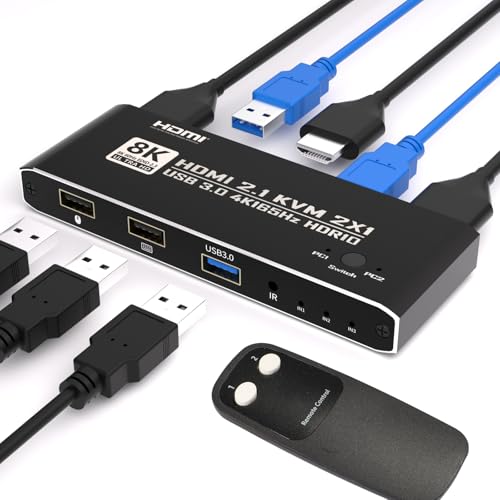
The BINZET KVM Switch tops the list because it delivers premium-tier specs at a mid-range price without cutting corners on build quality. The aluminum alloy casing stays cool under load, and the 8K@60Hz support with full 4:4:4 color means even high-end gaming monitors and design displays run at their native performance. HDR10 and Dolby Vision pass-through ensure streaming services and PS5 games look exactly as intended.
Switching between computers works via a front button or the included infrared remote, giving you the freedom to hide the switch behind the monitor entirely. The single USB 3.0 port is enough for keyboard and mouse, but the switch also passes through spatial audio formats like Dolby Atmos for shared speakers. Users report rock-solid behavior with M2 Macs and Windows gaming rigs, and the plug-and-play setup needs no external power supply.
The only trade-off is the single USB 3.0 port instead of three or four found on some competitors. If you need to share multiple USB devices simultaneously — a flash drive, a printer, and a microphone — you may need a separate hub. But for the vast majority of dual-PC setups, this switch offers the best combination of video performance, build durability, and switching speed.
Why it’s great
- 8K@60Hz and 4K@165Hz support with full 4:4:4 color
- Aluminum alloy casing for heat dissipation and durability
- IR remote control allows hidden switch placement
- HDR10, Dolby Vision, and spatial audio pass-through
Good to know
- Only one USB 3.0 port limits shared peripheral count
- HDMI cables not included in the package
- No hotkey switching option for power users
2. BENFEI USB 3.0 HDMI KVM Switch

The BENFEI KVM Switch solves the most common desk clutter problem — where to put the switch itself — with an adjustable screw clamp that attaches directly to the edge of your monitor or desk. The clamp fits thicknesses from 0.19 to 1.41 inches and includes a rubber cover to protect the monitor’s finish. For anyone who wants the switch completely out of sight, this design is a game-changer.
On the performance side, BENFEI matches the premium tier with 8K@60Hz support and four USB 3.0 ports that handle file transfers at up to 5 Gbps. The USB 3.0 ports are genuine — you can plug in a flash drive, a webcam, a printer, and a hard drive simultaneously without speed degradation. The switch works with Windows, macOS, and Linux out of the box with zero driver installation.
A small subset of users reported that the bottom clamp opening can feel tight on thicker desks, and one user experienced signal issues that damaged monitor ports. While the majority of reviews praise its reliability, the clamp design means the unit attaches to the screen bezel rather than sitting on the desk, which may not work for every monitor mounting situation. The 18-month warranty provides some peace of mind.
Why it’s great
- Adjustable clamp mounts to monitor or desk edge for zero desk footprint
- Four USB 3.0 ports provide 5 Gbps shared data transfer
- 8K@60Hz resolution support with backward compatibility
- Rubber-coated screw protects monitor finish
Good to know
- Some units reported HDMI port failure in isolated cases
- Clamp opening may be too tight for very thick desks
- Video pass-through issues reported with some KVM-only configurations
3. GREATHTEK 8K KVM Switch (Navy Blue)
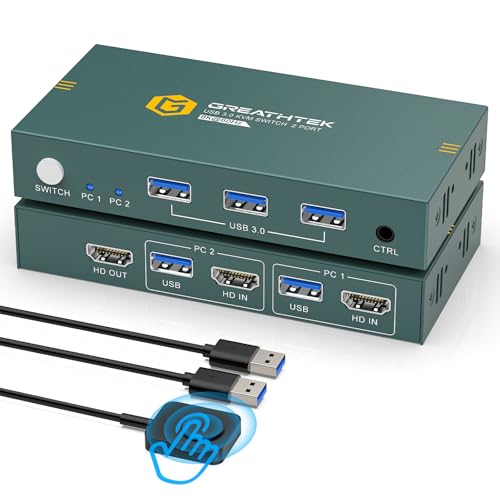
The GREATHTEK 8K KVM strikes an excellent balance between high-resolution support and practical everyday usability. It handles 8K@30Hz and 4K@144Hz, making it suitable for both productivity monitors and gaming displays. Three USB 3.0 ports let you share a keyboard, mouse, and a flash drive or webcam without any noticeable lag, and the aluminum alloy casing adds a surprising amount of durability for its price tier.
Adaptive EDID support is the standout feature here — the switch negotiates display settings automatically between the two connected computers, so you don’t end up with a stretched desktop or a black screen when you switch sources. Users report zero random keyboard disconnects or monitor dropouts, which is rare at this price point. The wired remote and front button give you flexible placement options.
The main caveat is that HDMI cables are not included, so you’ll need to buy three male-to-male HDMI cables separately. The connector is on the front of the unit rather than the back, which can make cable routing slightly less tidy. But for the combination of 8K support, stable EDID behavior, and three USB 3.0 ports, this switch delivers exceptional value for daily office and light gaming use.
Why it’s great
- 8K@30Hz and 4K@144Hz support for high-refresh monitors
- Adaptive EDID prevents black screens and resolution mismatches
- Three USB 3.0 ports with fast, reliable data transfer
- Aluminum alloy build feels premium for the price
Good to know
- HDMI cables not included — requires three separate purchases
- Front-facing connector placement makes cable management harder
- No hotkey switching support
4. GREATHTEK 4K KVM Switch (Ink Blue)
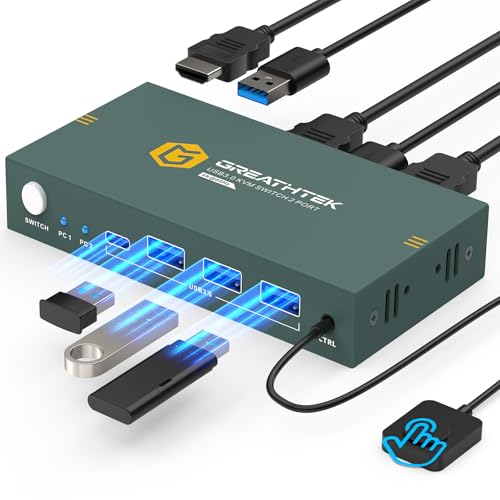
This 4K version from GREATHTEK keeps the same three USB 3.0 port configuration and wired remote as its 8K sibling but drops the resolution ceiling to a perfectly capable 4K@60Hz. For most office workers and home users who don’t own high-refresh-rate monitors, that’s exactly the right spec. The switch supports HDMI 2.0 and HDCP 2.2, so streaming 4K content from Netflix or Disney+ works without DRM issues.
Plug-and-play setup with no external power supply required is a major convenience — just connect the USB and HDMI cables, and both computers recognize the connected peripherals instantly. The wired remote uses a standard 3.5mm audio jack and lets you switch sources from across the desk. Users consistently mention the absence of glitches or keyboard disconnects, which points to solid EDID handling and USB controller quality.
The lack of HDMI cables in the box is again a minor annoyance, and the switch doesn’t support hotkey switching for those who prefer keyboard shortcuts. But the switch handles the core job — sharing a monitor, keyboard, and mouse between two computers — with an admirable level of stability that many budget units fail to achieve. If you don’t need 8K, this is the sweet spot.
Why it’s great
- Stable 4K@60Hz performance with HDMI 2.0 and HDCP 2.2
- Three USB 3.0 ports handle multiple peripherals simultaneously
- True plug-and-play with no external power brick
- No keyboard disconnects or monitor blackouts during switching
Good to know
- HDMI cables not included in the package
- No hotkey switching functionality
- Front-mounted port layout complicates cable routing
5. BDFFLY 4K KVM Switch
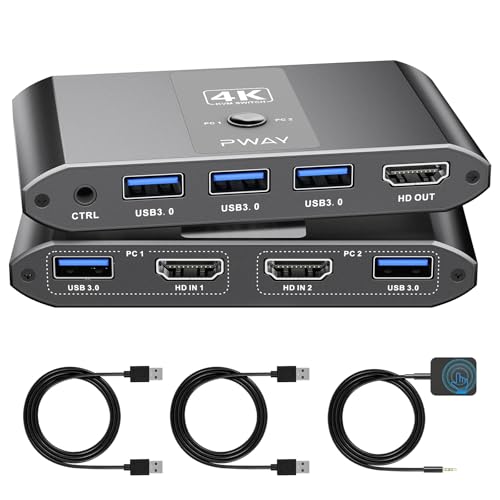
The BDFFLY KVM Switch earns its place with excellent compatibility across older operating systems, including Windows 7, which many modern KVM switches have quietly dropped. If you maintain a legacy machine for a printer, industrial software, or a specific peripheral that only works on Windows 7, this switch will handle it without fuss. The EDID adaptive technology ensures stable image transmission even when switching between a modern laptop and an older desktop.
The package includes two USB-A to USB-A USB 3.0 cables and a 3.5mm audio cable, plus the wired desktop controller. The switch supports 4K@60Hz with backward compatibility down to 1080p. Users report switching speeds under one second when both computers are active, and three to five seconds when waking a sleeping PC. The compact design is barely noticeable at 0.39 inches thick, though the remote button on some units didn’t work out of the box.
A few buyers noted that the remote button stopped functioning, which means the front-panel button becomes the only switching method. The switch also requires three HDMI cables that are not included. Despite these minor QC quirks, the BDFFLY delivers stable 4K sharing with legacy OS support that few competitors offer at this level.
Why it’s great
- Works with Windows 7, 10, 11, Linux, and macOS
- EDID adaptive technology prevents signal instability
- Compact 0.39-inch thickness for easy placement
- Includes USB 3.0 cables and audio cable
Good to know
- Some units had non-functional wired remote buttons
- HDMI cables must be purchased separately
- Remote connector on the front reduces cable tidiness
6. UGREEN HDMI KVM Switch 1 Monitor 2 Computers

UGREEN is a trusted name in cables and adapters, and this KVM switch reflects that reputation for reliable basic functionality at a low price. It offers four USB 2.0 ports — more than any other unit in this roundup — which is useful if you need to share a keyboard, mouse, a printer, and a card reader simultaneously. The switch handles 4K@60Hz and includes two HDMI cables and two USB A-to-B cables in the box.
The switch ships with a desktop controller for remote switching, and the main unit itself is about the size of a deck of cards. Setup is truly plug-and-play across Windows, macOS, and Linux. Reviewers consistently praise its compact footprint and the fact that it works reliably for home office setups where a laptop and a desktop share one monitor. The included cables save you an immediate – compared to competitors that ship empty.
There are clear limitations. The USB ports are USB 2.0, so large file transfers will be noticeably slower. The switch lacks EDID emulation, meaning the display may renegotiate resolution when you switch sources, causing a 3-5 second blackout. One user reported complete failure after two months with USB errors and port cutouts. For a basic office where speed isn’t critical, this is a fine starting point, but the lack of USB 3.0 pushes it below the mid-range options.
Why it’s great
- Four USB 2.0 ports for sharing multiple peripherals
- Includes HDMI cables and USB cables — no extra purchases needed
- Compact deck-of-cards size saves desk space
- Desktop controller included for remote switching
Good to know
- USB 2.0 only — slower file transfers than USB 3.0 alternatives
- No EDID support causes 3-5 second blackouts on switch
- Reliability concerns with some units failing after months
7. IOGEAR 2-Port Full HD KVM Switch

The IOGEAR GCS32HU is the most basic entry in this roundup, limited to 1080p resolution and USB 2.0 speeds. It’s designed for office environments where the monitor is a standard 1080p panel and the peripherals are wired keyboards and mice — no high-refresh gaming, no 4K video editing, no file transfers. What it lacks in specs, it makes up for in simplicity and reliability for its intended use case.
The switch comes with all necessary cables except the monitor HDMI cable, which most monitors include anyway. Setup takes under two minutes, and the port selector sits on a long 6-foot cord, allowing you to stash the switch box out of the way. Users report that it works flawlessly with Windows and Linux — no drivers, no quirks. The Corsair RGB software compatibility loss some users noted is likely a software limitation rather than a hardware issue.
The major limitation is resolution. At 1080p, you lose the ability to run modern 4K or ultrawide monitors, and the USB 2.0 ports won’t keep up with fast flash drives or external SSDs. Some users also reported issues with dual Mac Mini setups, where the screen would go to sleep and fail to wake properly. If your needs are truly basic — two 1080p office machines with a keyboard and mouse — this switch works. But the premium options above cost only slightly more for vastly better specs.
Why it’s great
- True plug-and-play with no driver installation required
- Includes all essential cables except the monitor HDMI
- Long 6-foot selector cord allows hidden box placement
- Works reliably with Windows and Linux
Good to know
- Limited to 1080p — no 4K or ultrawide support
- USB 2.0 only, which limits peripheral and transfer speeds
- Compatibility issues reported with dual Mac Mini setups
FAQ
Do I need an external power supply for a basic KVM switch?
Why does my screen go black for a few seconds when I switch computers?
Final Thoughts: The Verdict
For most users, the best basic kvm switch winner is the BINZET KVM Switch because it delivers 8K video support, an IR remote, and an aluminum build at a price that undercuts most premium alternatives. If you want a switch that attaches directly to your monitor and disappears from your desk entirely, grab the BENFEI USB 3.0 HDMI KVM. And for a rock-solid 4K solution with three USB 3.0 ports and adaptive EDID that won’t break the bank, nothing beats the GREATHTEK 8K KVM Switch.