
Shuffling a single printer cable between two computers is a workflow killer that wastes minutes every day and risks damaging delicate USB ports. A dedicated switch eliminates that friction entirely, letting you toggle a shared printer, scanner, or multi-function device between a work laptop and a personal desktop with one button press — no crawling under desks, no driver conflicts, no wear on your ports.
I’m Min — the co-founder and writer behind Gadgets Feed. I’ve spent hours cross-referencing circuit types, data-transfer ceilings, and real-world compatibility reports across the leading manual and automatic USB switches to determine which models actually deliver reliable printer sharing without introducing new headaches.
This guide cuts through the spec confusion to highlight only the models that solve the real pain of dual-computer printer setups. Whether you need a simple mechanical A/B box or a premium hub with extra ports, you’ll find the best 2 printer usb switch for your exact desk configuration.
How To Choose The Best 2 Printer USB Switch
Not every USB switch is built for printers. Many are designed for mice and keyboards, where momentary disconnection is acceptable, but a printer demands stable, consistent signal integrity during a job. Focus on a few key differentiators to avoid the common pitfalls that lead to failed print jobs or driver corruption.
Manual vs. Automatic Switching
Manual switches use a physical button or rotary dial to move the shared device from one computer to the other. They are entirely mechanical, require no drivers, and work reliably with any operating system. Automatic switches rely on background software that detects which computer is sending a print job and toggles the connection accordingly — convenient, but the software often demands administrator rights and can cause “unsafe removal” errors if the switch doesn’t handle the handshake gracefully.
USB Generation and Data Transfer Speed
A 2 printer USB switch labeled USB 2.0 handles up to 480 Mbps, which is plenty for text documents and standard graphics. USB 3.0 switches offer up to 5 Gbps and are backward compatible with older printers, but they come with a minor caveat: some USB 3.0 switches fail to negotiate correctly with USB 2.0-only devices like certain label printers or audio interfaces. If your printer is strictly USB 2.0, a USB 2.0 switch is often the more reliable choice.
Power Requirements and Signal Integrity
Most dedicated printer switches are bus-powered, drawing power from the host computers. However, if you plan to daisy-chain a USB hub or connect high-power peripherals like external hard drives alongside your printer, look for a switch with an external power supply port (often micro USB or USB-C). Insufficient power can cause intermittent disconnections mid-print — a scenario that can corrupt spooler data and require a printer reboot.
Quick Comparison
On smaller screens, swipe sideways to see the full table.
| Model | Category | Best For | Key Spec | Amazon |
|---|---|---|---|---|
| IOGEAR GUB231 | Manual + Auto | MFC and scanner sharing | USB 2.0, 480 Mbps | Amazon |
| Tripp Lite U215-002 | Manual Only | Reliable plug-and-play setup | USB 2.0, 480 Mbps | Amazon |
| Tripp Lite U359-002 | Manual Only | High-bandwidth USB 3.0 devices | USB 3.0, 5 Gbps | Amazon |
| UGREEN USB 3.0 Switch (B01N6GD9JO) | Manual, 4-Port Hub | Keyboard, mouse + printer combo | USB 3.0, 5 Gbps, 4 ports | Amazon |
| UGREEN USB 3.0 with Remote (B0C8MSP967) | Manual, Remote Control | Hidden-deck setups with USB-C | USB 3.0, 5 Gbps, USB-C port | Amazon |
| Miraview Netmate 202S | Manual Mechanical | Bare-minimum wired peripherals | USB 3.0, 5 Gbps, metal build | Amazon |
| BENFEI HDMI KVM Switch | KVM with USB | Full workspace consolidation | USB 3.0, 5 Gbps, 4 ports | Amazon |
In‑Depth Reviews
1. IOGEAR 2 Port USB 2.0 Switch (GUB231)
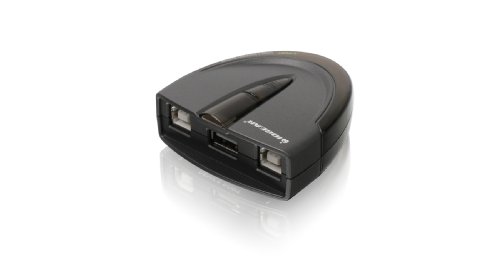
This IOGEAR unit stands out because it offers both a physical push-button and downloadable auto-switching software, giving you the flexibility of manual control with the convenience of hands-free operation when both computers are powered on. It runs at USB 2.0 speeds up to 480 Mbps, which is sufficient for any inkjet or laser printer on the market. The switch-lock function prevents an accidental button press from cutting off another user’s active print job — a critical detail in shared office environments.
Real-world testing shows it works reliably with Brother MFC multi-function printers, including scanner sharing, which many cheaper switches cannot handle. The 5-second buffer pause built into the manual mode ensures connected devices reset properly between toggles. It requires no external power supply, drawing all needed power from the host USB ports. Note that the auto-switching software requires administrator rights to install and is primarily Windows-friendly; Mac users may need to rely on the manual button.
Some thermal label printers, like the Brother QL-500, exhibit intermittent compatibility with the auto mode on macOS, though manual switching works fine. For a standard office multifunction printer or a dedicated document printer shared between a desktop and a laptop, this is the most balanced option available at this tier.
Why it’s great
- Auto-switching software eliminates manual toggling for routine print jobs.
- Switch-lock function prevents accidental disconnection mid-print.
- Works with scanner pass-through on MFC devices, a rare capability among budget switches.
Good to know
- Auto-switching software is Windows-centric and requires admin rights to install.
- Not recommended for specialized thermal or label printers on macOS.
2. Tripp Lite U359-002 USB 3.0 Peripheral Switch

Tripp Lite’s U359-002 is the most future-proofed manual switch in this roundup, supporting SuperSpeed USB 3.0 at 5 Gbps — ten times faster than USB 2.0 alternatives. This bandwidth headroom makes it ideal for sharing a high-resolution webcam, external SSD, or multi-function printer that handles large scan jobs. The one-touch button on the top of the unit provides satisfying tactile feedback, and the blue LEDs clearly indicate which computer controls the connected peripheral at any moment.
Build quality is a step above the competition: the enclosure is solid, and the unit ships with standard USB-A to USB-B cables, avoiding the non-spec-conformant USB-A to USB-A cables that plague cheaper switches. It is plug-and-play with no external power supply needed for most printer setups. Multiple long-term users report flawless operation switching docking stations between work and personal laptops over several years of daily use.
A small but notable drawback: a few units exhibited LED bleed at certain viewing angles, and one user reported that switching required a driver reinstall on the PC side — Tripp Lite acknowledged the issue in some batches. It also does not include cables, so you must budget for two USB 3.0 A-to-B cables. For buyers who prioritize specification compliance and long-term reliability over upfront cost, this model is the clear winner.
Why it’s great
- Full USB 3.0 5 Gbps bandwidth for fast scan and file transfers.
- Uses standard spec-compliant USB cables, a sign of overall build quality.
- Backed by a 3-year warranty from a trusted commercial-grade brand.
Good to know
- No cables included; requires separate purchase of USB 3.0 A-to-B cables.
- Occasional LED bleed and rare driver-reinstallation issues on some systems.
3. Tripp Lite U215-002 USB 2.0 Sharing Switch

The Tripp Lite U215-002 is the quintessential no-fuss manual switch for users who just want to share a printer without installing software or configuring drivers. It ships with two 1.5-foot USB 2.0 A-to-B cables and an installation CD that you will likely never need, because the device is truly plug-and-play across Windows, macOS, and Linux. The physical push-button is responsive and can be mounted with velcro to the underside of a desk for out-of-sight operation.
Multiple verified purchasers have used this switch for years to toggle a printer, scanner, or even a full docking station between two laptops. It requires no external power and works reliably with USB hubs daisy-chained to the output port. A common praise point is that it feels substantially sturdier than the all-plastic alternatives found in the same price range.
The bundled software is best avoided entirely — reviews note it can cause “unsafe removal” errors and synchronization problems. Some early batches had button-sticking issues, though Tripp Lite has since addressed the problem with an internal washer fix. For a simple, durable, cable-included printer switch that does exactly one thing well, this remains a top contender.
Why it’s great
- Includes two USB 2.0 A-to-B cables in the box — no extra purchase needed.
- Sturdy build quality that outlasts plastic competitors over years of use.
- Genuine plug-and-play with no software or drivers required for basic operation.
Good to know
- Bundled software can cause driver conflicts and should not be installed.
- Early batches had button-sticking issues, though current units appear corrected.
4. UGREEN USB 3.0 Switch Selector (B01N6GD9JO)

This UGREEN unit is less a dedicated printer switch and more a full USB-peripheral sharing hub that happens to work perfectly with printers. It offers four USB 3.0 ports on the front, allowing you to connect a printer, keyboard, mouse, and external drive simultaneously and toggle all of them between two computers with a single button press. The data transfer rate reaches 5 Gbps, which is beneficial for transferring large scan files or design documents quickly.
It features an optional USB-C power supply port rated at 5V 2A to support high-power devices like external hard drives or USB cameras without dropouts. The unit is driver-free and supports Windows, macOS, Chrome OS, and Linux. Long-term users report three years of daily use with no failures, although the lightweight plastic enclosure can lift off the desk slightly if stiff cables are plugged into the front ports.
A few caveats: the included USB 3.0 cables arrive tightly kinked from packaging and may need careful straightening. The switch does not support monitor or video transmission, so it cannot replace a KVM. Also, the front-facing ports can be an eyesore for users who prefer a clean desk aesthetic. For anyone who wants to share more than just a printer between two PCs, this is the most practical all-in-one solution.
Why it’s great
- Four USB 3.0 ports let you share multiple peripherals, not just a printer.
- Optional external power port ensures stable operation with high-draw devices.
- Proven long-term reliability with three years of daily use reported.
Good to know
- Included cables can be heavily kinked from packaging and need careful handling.
- Lightweight plastic body may lift off the desk if stiff cables push against it.
5. UGREEN USB 3.0 Switch with Remote (B0C8MSP967)

This upgraded UGREEN model solves the problem of desk clutter by offering both a physical button on the unit and a separate remote controller, allowing you to stash the switch out of sight while keeping switching control on your desk. It features a unique USB-C port alongside three USB-A ports, accommodating modern laptops that rely on USB-C peripherals. The USB-C port also serves as the optional power input, eliminating the need to hunt for a micro-USB cable when powering high-draw devices.
Data transfer speeds reach 5 Gbps, and the switch is backward compatible with USB 2.0 printers. Multiple verified users confirm seamless switching of a keyboard, mouse, webcam, and printer between a Mac and a Windows PC. The remote controller is a small puck with a single button that sits conveniently next to your mouse pad. The switch is plug-and-play across all major operating systems with no software required.
Mac Mini users have reported total failure with hardwired Apple keyboards, where the switch fails to recognize the input even with external power connected. The remote controller also lacks an indicator LED, so you must look at the main unit to see which computer is active. For mixed-OS setups that don’t include a hardwired Apple keyboard, this is a flexible and space-saving option.
Why it’s great
- Remote controller lets you hide the switch and still control it from your desk.
- USB-C port provides modern connectivity and cleaner power input.
- Reliable performance switching multiple device types between PC and Mac.
Good to know
- Hardwired Apple keyboards may not be recognized on Mac Mini setups.
- Remote controller lacks an LED indicator, so active-computer status is not visible at a distance.
6. Miraview Netmate USB 3.0 Manual Sharing Switch (202S)

At its price point, the Miraview Netmate 202S delivers a pure mechanical switching experience that avoids the pitfalls of electronic USB switches entirely. Inside the compact metal housing is a true rotary switch that physically connects the shared device to one computer or the other — no chips, no drivers, no power required. This design eliminates the data errors and contact-bounce issues that plague cheaper push-button switches when used with wireless peripherals.
It supports USB 3.0 speeds up to 5 Gbps and is compatible with USB 2.0 and USB 1.1 devices, though its mechanical nature means it performs best with wired peripherals like a keyboard, mouse, or printer. Users who mounted this switch under their desk report four years of trouble-free operation. The two manual switch buttons are firm and provide clear tactile feedback, though some users find the metal enclosure feels slightly cheap due to its light weight.
A significant limitation: the switch refuses to work with USB 2.0 audio interfaces and some USB 2.0-only devices that require a more sophisticated electronic handshake. It also ships without any cables, so you must supply your own USB 3.0 A-to-B cables. For users who share a simple wired printer or scanner between two computers and value mechanical simplicity above all else, this is a competent and affordable choice.
Why it’s great
- True mechanical switching eliminates data errors and driver conflicts.
- Metal enclosure and compact footprint fit neatly under a desk.
- Proven long-term reliability: several users report years of daily use without failure.
Good to know
- Does not work reliably with USB 2.0 audio interfaces or some legacy USB 2.0-only devices.
- No cables included; you must purchase USB 3.0 A-to-B cables separately.
7. BENFEI USB 3.0 HDMI KVM Switch (B0DBHZ86VS)

This BENFEI unit is a full KVM switch that integrates a 2-port HDMI switcher supporting resolutions up to 8K at 60 Hz with a 4-port USB 3.0 hub, making it a comprehensive workspace consolidation tool. The unique adjustable clamp mount attaches to either a monitor edge or desk edge from 0.19 to 1.41 inches thick, freeing up desk space entirely. It is designed for users who want to share not just a printer but also a 4K monitor, keyboard, mouse, and other USB peripherals between two computers.
The USB 3.0 ports support data transfer speeds up to 5 Gbps, and the HDMI 2.1 pass-through supports 4K at 240 Hz and HDR for demanding visual work. Switching between computers is accomplished via a touch-sensitive button on the unit itself. Many users report that the KVM simplifies a dual-PC setup from three separate cable swaps down to a single button press.
However, this KVM has drawn serious safety concerns: one verified report indicates the unit shorted out two monitor HDMI ports, rendering a 4K monitor and a 1080p monitor unusable. Other users note that the video switching is unreliable and still requires manual cable swapping for some configurations. For dedicated printer sharing alone, this unit is overkill and carries unnecessary risk. It is best suited for users who accept the trade-off in exchange for a single-switch monitor-and-peripheral solution.
Why it’s great
- Combines 8K HDMI switching with a 4-port USB 3.0 hub for full workspace control.
- Adjustable clamp mount saves desk space and eliminates cable clutter.
- Touch-sensitive button provides a clean, modern switching interface.
Good to know
- Serious safety reports of shorted HDMI ports that permanently damaged monitors.
- Video switching can be unreliable, sometimes requiring manual cable swaps.
FAQ
Will a USB 3.0 switch work with my USB 2.0 printer?
Can I use the auto-switching software on macOS?
Why does my switch cause my computer to say “device not recognized”?
Final Thoughts: The Verdict
For most users, the best 2 printer usb switch is the IOGEAR GUB231 because it combines reliable manual switching with optional auto-mode convenience that actually works for multi-function device sharing, including scanner pass-through. If you want full USB 3.0 bandwidth and spec-compliance with a longer warranty, grab the Tripp Lite U359-002. And for a pure mechanical switch that will never suffer from driver conflicts or software failures, nothing beats the Miraview Netmate 202S.