
If you have a box of old parallel-interface hard drives gathering dust, that data isn’t gone — it’s just waiting for the right bridge. A dedicated ATA IDE to SATA converter acts as the translator between your vintage PATA platters and modern motherboards, giving you direct access to decades-old documents, photos, and backups without needing a retro PC.
I’m Min — the co-founder and writer behind Gadgets Feed. I’ve spent hundreds of hours analyzing the transfer speeds, power delivery accuracy, and connector compatibility of dozens of IDE-to-SATA bridge solutions to understand exactly what separates a reliable converter from a drive-killer.
After reviewing seven leading models side-by-side, I can confidently guide you to the smartest choice in the best ata ide to sata converter category, filtering out the units with out-of-spec voltage rails and problematic cables.
How To Choose The Best ATA IDE To SATA Converter
Not every converter is built to deliver clean power or negotiate the older IDE protocol reliably. This section breaks down the three non-negotiable factors that determine whether your data retrieval succeeds on the first plug-in.
Power Supply Quality and Voltage Stability
3.5-inch IDE drives require both a 12V rail for spindle motor spin-up and a 5V rail for the logic board. Cheap converters ship with wall warts that drift far from spec under load, causing the drive to power-cycle repeatedly. Look for a bundled 12V/2A adapter at minimum — and if user reviews mention drives “clicking” or “powering off,” the power supply is suspect. 2.5-inch IDE drives draw power from the USB bus, making this concern primarily a 3.5-inch issue, but the adapter’s internal regulator still matters for signal integrity.
Connector Support: 40-Pin versus 44-Pin IDE
Standard 3.5-inch desktop IDE drives use a 40-pin connector, while 2.5-inch laptop IDE drives use a 44-pin connector (the extra four pins carry power). A true universal converter ships with dual-head IDE cables that accept both types. The 44-pin header is more fragile — verify your converter includes a dedicated 44-pin female port or a 40-to-44 adapter as part of the package. Optical drives (CD/DVD-ROM) also use the same 40-pin or 44-pin interface, so a converter that handles both extends your recovery tool’s range.
Bridge Chipset and ATA Protocol Negotiation
The converter’s internal bridge chipset manages the handshake between the drive’s PATA (Parallel ATA) interface and the USB-to-SATA bridge. Chips that support ATA/ATAPI-66 or higher offer the most reliable compatibility with drives that use 48-bit LBA addressing (necessary for drives over 137 GB). Converters that fail this negotiation often see the drive in Disk Management but report incorrect capacity. A quality bridge also handles the master/slave jumper requirement — most converters expect the drive to be jumpered as “Master” or “Cable Select,” and the manual should explicitly state which.
Quick Comparison
On smaller screens, swipe sideways to see the full table.
| Model | Category | Best For | Key Spec | Amazon |
|---|---|---|---|---|
| StarTech SAT2IDEADP | Converter | SATA dock integration | 48-bit LBA, metal chassis | Amazon |
| SABRENT USB-DS12 | Adapter | 10TB drive support | USB 3.2 Gen 1, UL power adapter | Amazon |
| Unitek Y-3322C | Adapter | USB-C native connection | 6 Gbps throughput, one-touch backup | Amazon |
| Alxum Type-C | Adapter | Simultaneous IDE + SATA | 5 Gbps, hot-swap support | Amazon |
| ULXUUUN USB-C 2-in-1 | Adapter | USB-C to IDE + SATA | 12V/2A adapter, dual-port USB-C | Amazon |
| Belcheri PL329A | Adapter | Triple-drive simultaneous read | 5 Gbps, per-drive activity LEDs | Amazon |
| Warmstor YDJ-120/500 | Adapter | Budget IDE + SATA recovery | 60 MB/s max, 10TB support | Amazon |
In‑Depth Reviews
1. StarTech SATA to 2.5-Inch or 3.5-Inch IDE Hard Drive Adapter (SAT2IDEADP)

StarTech has been a staple in the IT-pro adapter space for years, and the SAT2IDEADP is engineered specifically for users who already own a SATA hard drive docking station. Instead of feeding power and data through a standalone cable, this adapter mounts the IDE drive upright into your dock — transforming the dock into an IDE reader without an extra powered board cluttering your desk. The metal chassis adds enough rigidity to support the weight of a 3.5-inch drive without flexing the pin header.
The adapter natively supports both 40-pin and 44-pin IDE drives via the included headers, and it complies with PATA 66/100/133 standards. The 48-bit LBA compliance ensures drives larger than 137 GB are fully addressable, a critical point for later-era PATA drives. StarTech backs the unit with a two-year warranty and free lifetime technical support, which is rare at this price point and speaks to their confidence in the power delivery design.
This solution works best as a permanent tool in a data-recovery kit rather than a one-off cable, since it requires a separate SATA dock to function. The metal screws included for securing the drive are tiny — some users recommend replacing them with thumbscrews if you swap drives frequently. For IT departments or hobbyists who already own a dock, this adapter is the most elegant way to add IDE support without doubling your power bricks.
Why it’s great
- Converts any SATA dock into an IDE reader, eliminating redundant cabling
- All-metal body dissipates heat and resists pin-header flex
- Two-year warranty with lifetime phone support
Good to know
- Requires a SATA hard drive dock — not a standalone cable
- Small included screws; thumbscrews recommended for frequent swapping
2. SABRENT USB-C to SSD/SATA/IDE Drive Converter (USB-DS12)

SABRENT’s USB-DS12 is one of the few adapters in this space that ships with a UL-listed 12V power adapter — a detail that directly addresses the voltage-drift complaints found in cheaper competitors. The integrated USB-C cable eliminates the need for an extra dongle, and the adapter supports SATA 3Gbps speeds (limited by the USB 3.2 Gen 1 bridge operating at 5 Gbps). The blue LED activity indicator provides clear visual feedback during read/write cycles.
The drive compatibility list covers 2.5-inch, 3.5-inch, and 5.25-inch form factors across SATA and IDE interfaces — including optical drives. The 4-pin Molex power cable connects cleanly to older PATA drives without the pigtail splitting found in some budget kits. Users consistently report successful reads of drives up to 10 TB, and the adapter works plug-and-play on Windows, macOS, and Linux without driver installation.
The one caveat is the fan noise — the adapter includes a small fan that activates with 3.5-inch HDDs (it stays silent for SSDs). Some users have modified the case with taller feet to improve airflow and reduce turbulence noise. The price sits at the premium end of this category, but the UL power supply and generous drive support make it the most trustworthy choice for archiving irreplaceable data from multiple generations of drives.
Why it’s great
- UL-certified 12V adapter delivers clean, stable power to 3.5-inch drives
- Supports 5.25-inch optical drives in addition to 2.5 and 3.5-inch PATA/SATA
- 10 TB capacity ceiling accommodates high-capacity later-era SATA drives
Good to know
- Fan spins audibly during HDD operation; can be modded for quieter airflow
- No on/off switch — drive access requires USB cable disconnect
3. Unitek USB C to IDE and SATA Converter (Y-3322C)
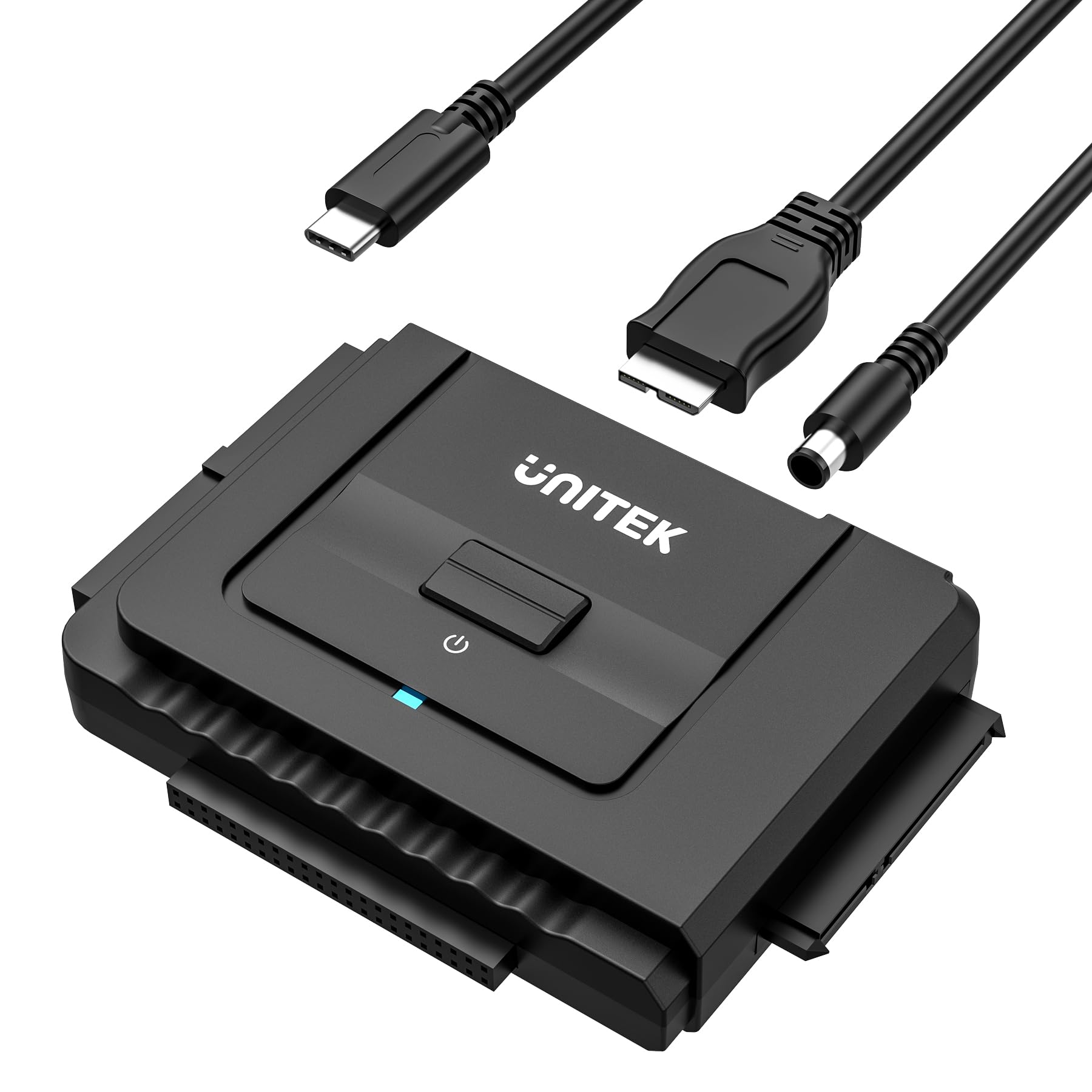
Unitek’s Y-3322C bridges the gap between raw cable adapters and full docks by offering a USB-C-native interface paired with a standard USB 3.0 bridge chip that claims data transfer rates of up to 6 Gbps. The adapter includes both a 40-pin and a 44-pin IDE header, plus a SATA III connector, allowing simultaneous connection of one IDE and one SATA drive. The on/off switch protects the drive from accidental power cycles during removal.
The one-touch backup function works well with the bundled (and poorly reviewed) “ai-otb” software on Windows, but the consensus among experienced users is to skip the software entirely — the device works as a pure plug-and-play drive reader without any third-party overhead. The bundled USB-C to Micro-B cable has been flagged by some users for having a connector channel that is too short to seat fully in the adapter’s port, requiring a replacement cable from a different brand.
At the mid-range price point, the Unitek delivers solid build quality — the PCB sits in a compact enclosure with a glossy finish that resists scratches. The 12V/2A power adapter provides enough headroom to spin up any 3.5-inch drive. If you plan to use the USB-C cable exclusively, order a high-quality aftermarket USB-C to Micro-B cable alongside this unit. For laptops with only USB-C ports, this adapter’s native Type-C connection avoids the need for a clunky dongle.
Why it’s great
- Native USB-C connectivity for modern laptops without a Type-A adapter
- One-touch backup button for automated file transfers
- On/off switch protects drive from hot-plug power surges
Good to know
- Bundled USB-C cable has reported connector length issues; plan to replace it
- Included backup software should be avoided — use Windows File Explorer instead
4. Alxum USB 3.0 to IDE SATA Converter (Type-C)

The Alxum Type-C adapter is designed around the JMicron or similar bridge chipset that handles the ATA-to-USB translation cleanly. It supports reading one IDE drive and one SATA drive simultaneously — but cannot handle two IDE drives at once, a limitation shared by most dual-connector adapters. The bundled 12V/2A power supply provides enough current for 3.5-inch drives, and the hot-swap capability means you can swap drives without rebooting your host computer.
The USB 3.0 interface is backward compatible with USB 2.0 and 1.1, which is relevant when connecting to older PCs that lack USB 3.0 ports. The adapter includes an on/off switch for the power supply, adding a layer of protection when swapping drives. Users consistently report that the adapter is recognized immediately in Windows Disk Management without driver installation, and Linux users confirm lsblk detection without additional modules.
The included USB-C female to USB-A male adapter is handy for backward compatibility, though the adapter itself uses a standard USB 3.0 Micro-B connector on the device side. Some users found that older 80-wire IDE cables with a 40-pin connector seat more securely than cheap ribbon cables. For a mid-range price, this unit delivers reliable performance across a wide variety of IDE drives including Hitachi, WD, and Maxtor from the early 2000s.
Why it’s great
- Supports simultaneous dual-drive access (one IDE + one SATA)
- Hot-swappable for rapid drive testing without system restarts
- On/off switch prevents accidental shorting during drive swap
Good to know
- Does not support two IDE drives simultaneously
- Not compatible with DVD drives on Windows 10 or Mac OS
5. ULXUUUN Hard Drive Reader USB 3.0 to SATA IDE Adapter

The ULXUUUN adapter distinguishes itself through its 2-in-1 USB-C and USB-A cable design, which attaches to the main unit and eliminates the need for separate cables for different laptop ports. The cable includes a USB-C receptacle that a bundled USB-C-to-USB-A adapter plugs into, making the kit truly universal for any modern computer. The 12V/2A power adapter is rated for 24 watts, providing a generous margin for power-hungry 3.5-inch HDDs that might draw peak current during spin-up.
The adapter includes both a 40-pin and a 44-pin IDE connector plus a SATA III connector, covering 2.5-inch and 3.5-inch PATA drives and SATA SSDs. The manual is explicit about the master/slave jumper requirement: for 3.5-inch IDE drives, the jumper must be set to “Master” or “Cable Select” — not “Slave” — unless the drive is the second device on a multi-drive setup. The LED activity indicator flashes blue during reads and stays solid during idle, giving instant visual confirmation of drive communication.
This unit is a good fit for users who need a compact travel kit. The gloss-finished enclosure measures only 3.77 x 2.48 x 0.59 inches, fitting easily into a laptop bag accessory pocket. Some users noted that the adapter could not read a failing SSD, which is expected behavior since the bridge chip cannot negotiate a link with a drive whose translation layer is corrupt — no cable adapter can fix catastrophic logical failure. For operational drives, this unit delivers stable, repeatable reads on both Windows 11 and Linux.
Why it’s great
- Innovative 2-in-1 USB-C/USB-A cable eliminates port-adapter hassle
- 24-watt power adapter handles any 3.5-inch drive without sagging voltage
- Compact form factor fits easily in a laptop bag
Good to know
- Cannot read through catastrophic SSD controller failures
- Glossy finish shows fingerprints quickly
6. Belcheri USB 3.0 to IDE and SATA Adapter (PL329A)
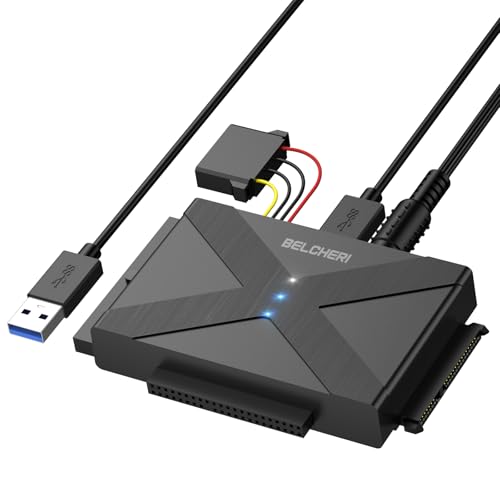
Belcheri’s PL329A is engineered for the specific workflow of reading multiple drives in rapid succession. The adapter supports simultaneous connection of up to three drives: one 2.5-inch IDE, one 3.5-inch IDE, and one 2.5/3.5-inch SATA drive. Each interface has a dedicated activity LED — white for power, blue for SATA, and a second blue for IDE — so you can tell at a glance which drive is transferring data without looking at the file copy dialog.
The USB 3.0 interface provides up to 5 Gbps throughput, though real-world transfer speeds will be limited to the slower of the IDE drive (typically 66-133 MB/s PATA) or the bridge chip’s maximum. The device is genuinely plug-and-play on Windows, Mac, and Linux without driver installation. Several users reported success using this adapter specifically for Playstation 2 and original Xbox hard drive modding, confirming the bridge chip’s compatibility with ATA-over-USB controllers on non-standard hardware.
The physical layout places the IDE and SATA connectors on the edge of the board in a long format, which means the assembly can be slightly unstable on a desk if all three drives are attached simultaneously. The power adapter’s 12V output uses a standard barrel connector, so a longer extension cable can be added for desk-cable management. For data recovery runs involving a stack of old drives, being able to keep all three connected without re-cabling saves significant time.
Why it’s great
- Supports three drives simultaneously — ideal for batch recovery workflows
- Dedicated LED indicators for power, SATA, and IDE activity
- Proven compatibility with console hard drive modding (PS2, Xbox)
Good to know
- Board layout can be unstable on a desk with three drives attached
- Some older IDE drives require careful jumper configuration to be recognized
7. Warmstor SATA/PATA/IDE to USB 2.0 Adapter Converter (YDJ-120/500)

The Warmstor adapter is the entry-level option in this roundup, using a USB 2.0 interface that caps transfer speeds at 60 MB/s. For reading old PATA drives that rarely exceed 66 MB/s themselves, this limitation is less of a bottleneck than it appears — you’re unlikely to saturate a USB 3.0 link with a 15-year-old 40 GB hard drive. The kit includes a 4-pin power splitter cable and an external AC power adapter for 3.5-inch drives, plus a separate SATA data cable for pure SATA connectivity.
The wide compatibility claim covers ATA/ATAPI-66 devices including CD-ROM, DVD-ROM, and 2.5/3.5-inch IDE hard drives. The adapter supports drives up to 10 TB via 48-bit LBA. The instructions note an important caveat: do not force the 4-pin plug of the SATA power cable into the 4-pin socket of the AC power supply cable by mistake — the physical orientation must match exactly, otherwise a pin short could damage the adapter or the drive.
Customer reports are mixed regarding power supply quality: one verified review measured the 12V and 5V rails out of spec, causing a 3.5-inch HDD to power-cycle. Another user reported that a small subset of IDE drives were not accessible, requiring an older dedicated IDE-to-USB cable. For budget-conscious users who need a one-time data recovery from a single drive, this kit works often enough, but the voltage-regulation inconsistency pushes it to the bottom of the overall ranking. It is best treated as a disposable backup tool rather than a professional data-recovery instrument.
Why it’s great
- Lowest price in the category — suitable for one-off recovery jobs
- Supports drives up to 10 TB via 48-bit LBA addressing
- Includes both IDE and SATA connectivity in a single cable kit
Good to know
- USB 2.0 interface caps throughput at 60 MB/s
- Power supply voltage may drift out of spec, causing drive cycling
- 4-pin power cable requires careful orientation to avoid pin shorts
FAQ
Why does my 3.5-inch IDE drive make clicking noises when connected to a converter?
Can I use an ATA IDE to SATA converter with an optical drive like a DVD burner?
Why does Windows Disk Management see my IDE drive but show “No Media” or 0 bytes?
Final Thoughts: The Verdict
For most users, the best ata ide to sata converter winner is the StarTech SAT2IDEADP because it is the only adapter purpose-built for existing SATA dock owners, eliminating redundant power bricks and delivering rock-solid 48-bit LBA support in a metal chassis that can withstand years of regular use. If you need a standalone USB cable kit ready for modern USB-C laptops, grab the Unitek Y-3322C for its native Type-C connectivity and one-touch backup button. And for batch data recovery covering multiple drive generations in a single session, nothing beats the Belcheri PL329A with its triple-drive simultaneous support and per-interface activity LEDs.