
That single USB-C port on your laptop is a bottleneck. Every time you reach for an external drive, a monitor, an SD card, or a wired mouse, you’re playing a game of plug-and-unplug that wastes hours across a workweek. A properly chosen USB-C adapter turns that single port into a central command station, letting you charge, transfer files at multi-gigabit speeds, and drive an external display — all at once.
I’m Min — the co-founder and writer behind Gadgets Feed. I’ve analyzed data sheets, transfer rate tests, and long-term reliability reports from over two dozen USB-C hubs to separate the adapters that actually deliver stable signal throughput from those that overheat or drop connections under load.
Whether you need to connect a 4K monitor, offload camera RAW files, or keep your laptop charged during a presentation, finding the right best usb-c adapter depends on understanding port configurations, power delivery specs, and data transfer ceilings that match your actual workflow.
How To Choose The Best USB-C Adapter
A USB-C adapter is not just a port replicator — it is a signal splitter that must maintain data integrity and power delivery simultaneously. Buying the wrong one means intermittent disconnections, slow file transfers, or a dead battery when you need it most. Focus on these four criteria before clicking add to cart.
Power Delivery Pass-Through Rating
The PD spec determines how much wattage reaches your laptop while the hub is active. A hub advertising 100W input may only deliver 80W-95W to the host after reserving power for its own chipset and downstream ports. Look for models that explicitly state their output wattage — 85W or higher is the benchmark for powering a 14-inch or 16-inch laptop during heavy use. Anything below 60W may slowly drain your battery under load.
Data Transfer Speed Generation
USB 3.2 Gen 1 caps out at 5Gbps, while Gen 2 reaches 10Gbps. The difference is tangible: a 10Gbps hub transfers a 4GB video file in roughly 3.5 seconds versus 7 seconds on a 5Gbps hub. But the host port and cable must also support Gen 2 — pairing a 10Gbps hub with an older 5Gbps port yields no speed gain. If you edit video or handle large datasets directly from external SSDs, a 10Gbps adapter is non-negotiable.
Video Output Resolution and Refresh Rate
Not all HDMI ports are equal. A hub with HDMI 1.4 tops out at 4K 30Hz, which feels sluggish for cursor movement and is unsuitable for gaming or smooth video editing. HDMI 2.0 or DisplayPort Alt Mode supports 4K 60Hz. Dual-monitor setups introduce another constraint — many hubs drop to 1080p 60Hz per display when driving two screens. Confirm the supported resolution and refresh rate for your specific monitor count.
Build Quality and Thermal Management
Aluminum enclosures dissipate heat significantly better than plastic, which matters because sustained high data throughput and PD charging generate measurable heat. A hub that gets uncomfortably hot to the touch may throttle its performance or shorten component lifespan. Also check the cable length — a short integrated cable (9 inches or less) keeps signal integrity high and desk clutter low, while a detachable cable offers easier replacement if damaged.
Quick Comparison
On smaller screens, swipe sideways to see the full table.
| Model | Category | Best For | Key Spec | Amazon |
|---|---|---|---|---|
| UGREEN Revodok 7-in-1 | USB-C Hub | Best Overall Value | 4K HDMI, 100W PD, 5Gbps data | Amazon |
| Anker 7-in-1 Dual Display | Docking Station | Dual Monitor Productivity | Dual HDMI 1080p 60Hz, 10Gbps | Amazon |
| Belkin 5-in-1 MultiPort | USB-C Dock | Premium MacBook Companion | 4K HDMI, 5Gbps, SD/MicroSD | Amazon |
| Acer 10Gbps Hub | USB-C Splitter | Fast Data Transfers | 4x USB-C 3.2 Gen 2, 10Gbps | Amazon |
| Hiearcool 7-in-1 Hub | USB-C Hub | Travel and Meetings | 4K HDMI, 100W PD, 5Gbps | Amazon |
| FORIDA 8-Port USB Hub | USB Hub | Mass USB-A Device Connection | 7x USB-A 3.0, 5Gbps dedicated | Amazon |
| Apple Digital AV Multiport | AV Adapter | Flawless Apple Ecosystem | 4K HDMI, USB-A, USB-C pass-through | Amazon |
In‑Depth Reviews
1. UGREEN Revodok 7-in-1 USB C Hub

The UGREEN Revodok packs 4K HDMI output, 100W Power Delivery pass-through, dual USB-A and one USB-C data ports at 5Gbps, plus SD and MicroSD card readers into a compact aluminum body measuring just 5.1 inches long. That combination of essential ports in a package this small makes it the most balanced adapter for anyone who needs to plug an external drive, a monitor, and a memory card into a laptop simultaneously without hunting for separate dongles.
Customers report reliable long-term performance — one reviewer noted it has been working flawlessly for two years, even on mobile devices that initially required external power. The 100W PD input ensures your laptop receives up to 95W of charging throughput, with 5W reserved for the hub’s chipset and port operations. That means your MacBook Pro or Dell XPS stays juiced during a full workday even with multiple peripherals connected.
Where the Revodok draws the line is at bandwidth: the USB-C and USB-A ports share a 5Gbps bus, and the HDMI output is capped at 4K 30Hz, not 60Hz. If you need dual monitors or higher refresh rates, the Anker dual-display hub below is a better fit. But for the vast majority of users who need one solid external display and fast file access, the UGREEN delivers exceptional bang for the buck.
Why it’s great
- 95W PD pass-through keeps laptops fully charged
- Includes both SD and MicroSD card readers
- Aluminum build dissipates heat effectively
Good to know
- HDMI limited to 4K 30Hz
- No dedicated USB-C data port beyond the PD input
- 5Gbps ceiling shared across USB ports
2. Anker 7-in-1 USB-C Hub Dual Display
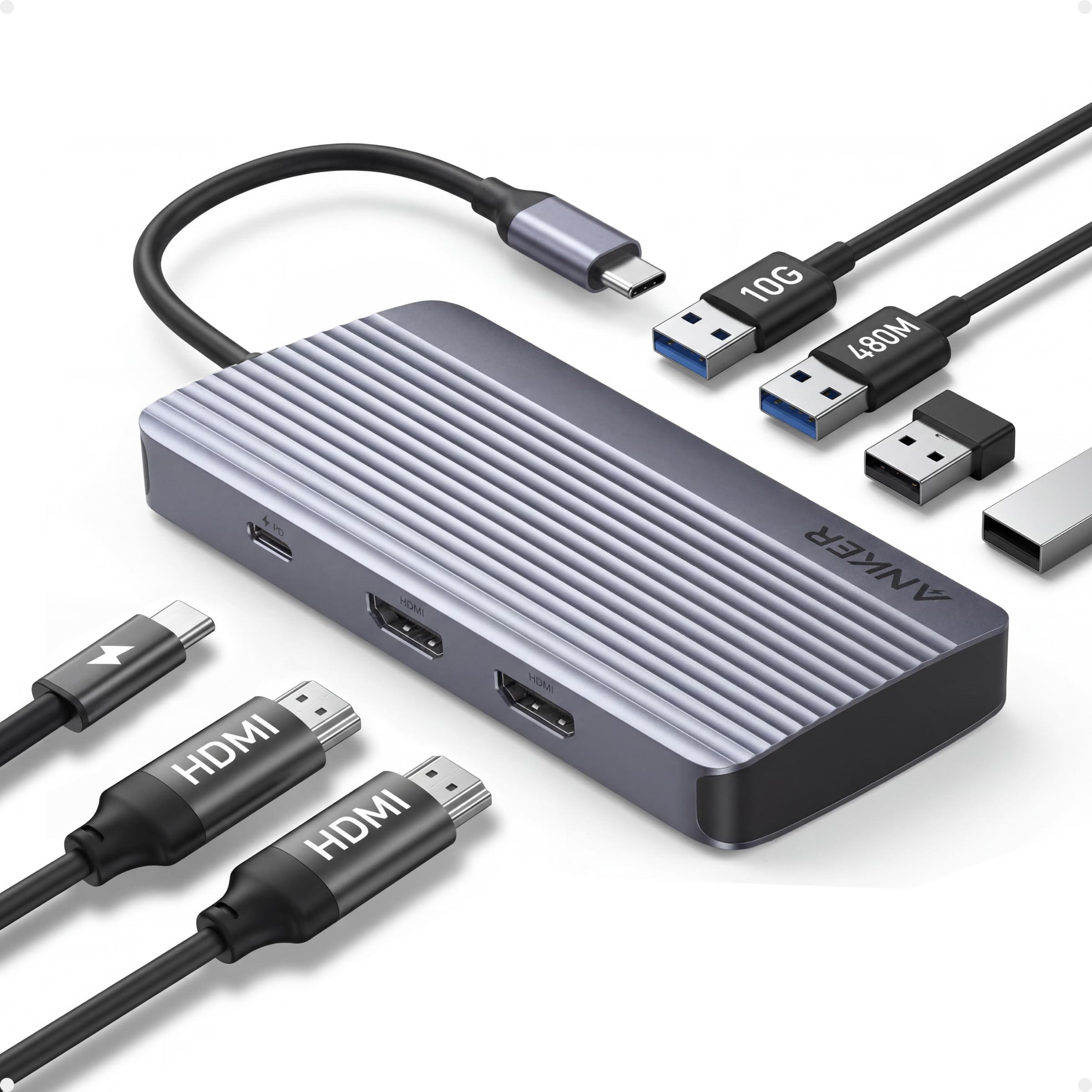
The Anker 7-in-1 is the only hub on this list that supports dual external monitors, outputting 1080p 60Hz to each display simultaneously. That makes it a legitimate tool for spreadsheet-heavy workflows, financial dashboards, or software development where two screens drastically reduce alt-tab fatigue. It also includes a 10Gbps USB-C data port, doubling the transfer ceiling of most 5Gbps hubs.
Power delivery is rated at 100W input with 85W output, and the aluminum chassis stays surprisingly cool even under sustained load — a sign of competent thermal engineering. Customer feedback from engineers and WFH professionals specifically highlights stable dual-monitor operation with no lag on HP and Dell laptops. Anker also backs it with an 18-month warranty, which adds peace of mind for a device that lives in your bag.
The major caveat is that macOS users get mirrored displays on both external monitors rather than extended desktops, limiting usefulness for Mac owners. Additionally, the dual HDMI output is capped at 1080p 60Hz per screen — you cannot run two 1440p or 4K monitors through this hub. If your work demands high-resolution dual monitors, you need a Thunderbolt dock. But for standard 1080p dual-screen productivity, this Anker is the best in its class.
Why it’s great
- True dual-monitor support (1080p 60Hz each)
- 10Gbps USB-C data port for fast transfers
- Excellent thermal performance under load
Good to know
- MacOS mirrors displays rather than extending
- Not compatible with Linux systems
- Dual HDMI limited to 1080p per screen
3. Belkin 5-in-1 MultiPort USB-C Docking Station

Belkin’s 5-in-1 dock focuses on the essentials: 4K HDMI output at 30Hz, two USB-A 3.1 ports transferring at 5Gbps, and dedicated SD 3.0 and MicroSD 3.0 card readers. The polished aluminum casing matches the aesthetic of any MacBook or premium Windows ultrabook, and its 5.98-inch length slips into a laptop sleeve pocket without adding bulk. Photographers and content creators benefit most from the integrated card readers — no extra dongle needed for camera files.
The plug-and-play driverless setup is genuinely seamless: attach it to a MacBook Air, iPad Pro, or Dell XPS and all ports register instantly. One reviewer noted it works perfectly for transferring photo and audio files from a camera and sound recorder to an iPad Pro via USB-C. The 4K HDMI output, while capped at 30Hz, is perfectly adequate for presentations, spreadsheets, or watching video content.
The biggest criticism from long-term users is the loose USB-C connector fit, which can cause intermittent disconnections if the hub is bumped. This appears to be a tolerance issue with the USB-C plug itself rather than the hub’s electronics. If your setup involves frequent plugging and unplugging, the slightly wobbly connection may be an annoyance. For stationary desk use, the Belkin is a reliable, well-built premium adapter.
Why it’s great
- Dedicated SD and MicroSD 3.0 card readers
- Premium aluminum finish matches MacBooks
- Reliable plug-and-play with no driver install
Good to know
- USB-C connector fit can feel loose
- HDMI limited to 4K 30Hz
- No USB-C downstream data port included
4. Acer 10 Gbps USB C Hub
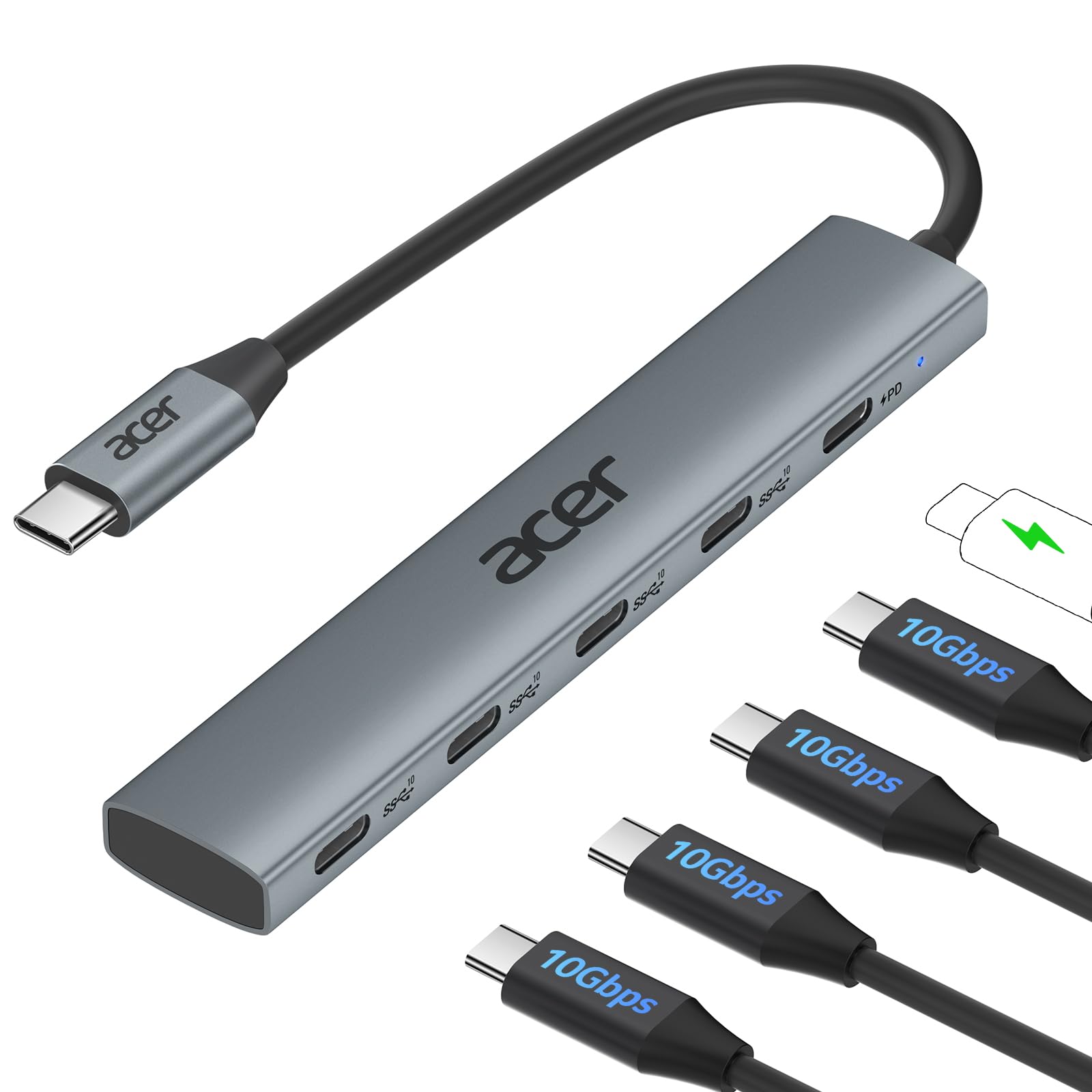
The Acer 5-in-1 hub is a specialized tool for users who prioritize data transfer speed above all else. It offers four USB-C 3.2 Gen 2 ports capable of 10Gbps each — enough to move a 1GB file in roughly one second. This makes it ideal for mobile DJs, videographers, and IT professionals who need to shuttle large files between external SSDs, capture cards, and other USB-C peripherals without bottlenecking.
The 100W PD port provides charging to the host laptop, and the aluminum enclosure keeps temperatures in check during sustained transfers. One reviewer using it with an M1 iMac confirmed genuine 10Gbps throughput when paired with a compatible device and cable. The compact 60-gram weight means it disappears into a bag pocket, and the plug-and-play compatibility spans Windows, macOS, Linux, iPadOS, and Android.
The critical trade-off: this hub has absolutely no video output. There is no HDMI or DisplayPort — it is purely a data and charging hub. Users expecting to connect a monitor will be disappointed. Additionally, the 10Gbps bandwidth is shared across the four USB-C ports, so connecting multiple high-speed devices simultaneously may reduce throughput. If your workflow is 100% data-centric with no display needs, this Acer is a speed demon. For anyone needing video output, look elsewhere.
Why it’s great
- True 10Gbps USB 3.2 Gen 2 on all ports
- 100W PD pass-through charging
- Ultra-compact and lightweight design
Good to know
- No video output whatsoever
- 10Gbps bandwidth is shared across ports
- Some users reported early port failures requiring replacement
5. Hiearcool 7-in-1 USB C Hub

The Hiearcool 7-in-1 mirror’s the UGREEN’s port layout — 4K HDMI, 100W PD, two USB-A 3.0 ports at 5Gbps, and SD/MicroSD readers — but uses a markedly slimmer aluminum chassis that is only 4.17 inches long and 0.34 inches thick. This profile advantage makes it the most bag-friendly option if you swap laptops and meeting rooms frequently. Customers have reported using it reliably for four years with MacBook Pros, iPad Airs, and Samsung phones for data transfer.
Build quality earns consistent praise: the aluminum shell rarely gets warm even during extended sessions with an external monitor and mouse connected. The PD pass-through delivers the full 100W to your laptop, and the plug-and-play setup requires zero configuration across Windows, macOS, and ChromeOS devices. One reviewer specifically mentioned replacing a glitchy Acer dongle and having the Hiearcool work perfectly with a MacBook Air for keyboard, mouse, and monitor.
The recurring note from long-term users is that the USB-C plug has a slight wiggle — not enough to break connection, but enough to feel less confidence-inspiring than a molded plug. Also, like the UGREEN, the HDMI output is 4K 30Hz, not 60Hz. And the 5Gbps data ceiling across the USB-A ports is standard for this price tier. For a slim, portable hub that covers all the basic ports without breaking the bank, the Hiearcool is a fantastic choice.
Why it’s great
- Thinner and shorter than most 7-in-1 hubs
- Proven reliability over multiple years of use
- Excellent heat dissipation from aluminum shell
Good to know
- USB-C plug fit can feel slightly loose
- HDMI limited to 4K 30Hz
- No dedicated USB-C data port
6. FORIDA 8-Port USB Hub
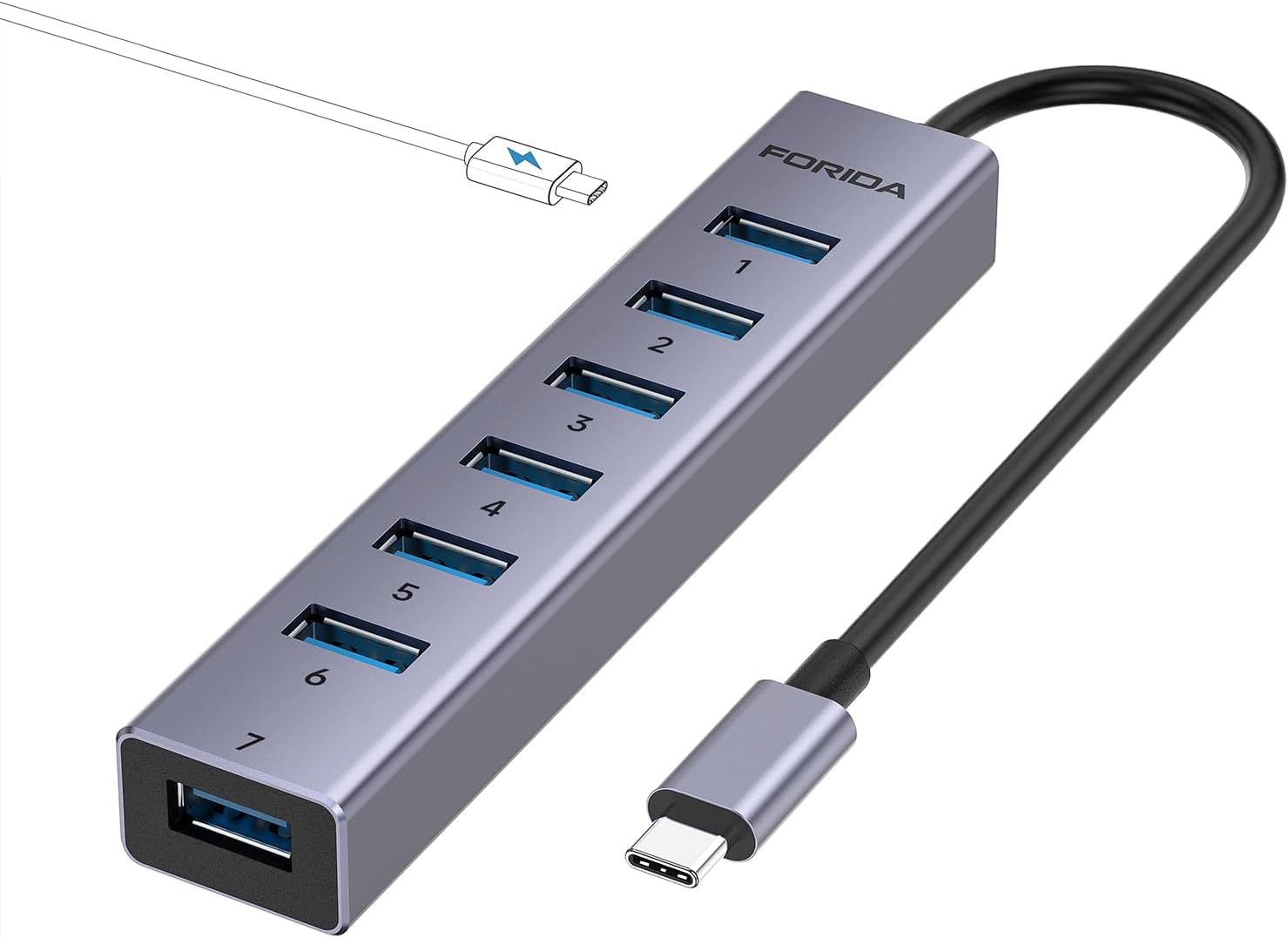
The FORIDA 8-Port hub is a pure USB-A expansion solution — it offers seven USB 3.0 ports all running at 5Gbps, connected to your laptop via a 9.84-inch USB-C cable. This is the adapter to choose if your biggest complaint about modern laptops is the complete absence of USB-A ports for your existing collection of flash drives, wireless mouse receivers, and external hard drives. The compact aluminum body sits on a desk without sliding around.
Customer feedback highlights its plug-and-play simplicity with Macs: one reviewer noted it “worked perfect with my MAC” for adding multiple USB connections. Another user resolved a power delivery issue between their monitor and external drive backups by using this hub as the intermediary. The additional USB-C power port that provides up to 3A to the hub itself ensures that connecting several power-hungry devices simultaneously doesn’t cause dropped connections.
Two significant limitations set this apart from the other adapters on this list. First, the USB-C port is for powering the hub only — it does not charge your laptop or connected devices. Second, the 5V power cable is not included in the package, meaning you must provide your own USB-C power source if you plan to connect multiple high-draw peripherals. This is purely a data expansion hub, not a charging station or video output solution. For expanding USB-A capacity on a desk, it’s effective and affordable.
Why it’s great
- Seven USB-A 3.0 ports in a compact footprint
- Aluminum construction dissipates heat well
- Additional 5V/3A power port for stable operation
Good to know
- No HDMI or video output
- USB-C port only powers the hub, not devices
- Power cable not included in the box
7. Apple USB-C Digital AV Multiport Adapter

Apple’s own USB-C Digital AV Multiport Adapter is the only first-party option on this list, and it shows in the fit, finish, and integration. The compact white plastic body houses three ports: one 4K HDMI output, one USB-A port, and a USB-C pass-through for charging. Build quality is flawless — the USB-C plug seats securely without wobble, and the adapter is immediately recognized by any Mac or iPad running macOS Mojave 10.14.6 or later.
Customers consistently highlight two things: perfect compatibility and reliability. The adapter drives an external monitor with crisp video, charges the host device via the USB-C pass-through, and connects a standard USB flash drive or camera — all simultaneously. One traveling user noted they pair it with an HDMI cable at hotel TVs to stream from an iPhone without paying for in-room movies. The driverless setup is as seamless as Apple promises.
The limitations are ones of capacity and value. This is a 3-port adapter in a world where 7-in-1 hubs exist for less money. There is no SD card slot, no Ethernet, and only a single USB-A port. The HDMI output tops out at 4K 30Hz. And the price is significantly higher than third-party alternatives that offer triple the ports. If you value absolute reliability and operate exclusively in the Apple ecosystem, the peace of mind may be worth it. If you need more ports or faster specs, a third-party hub delivers better value.
Why it’s great
- Flawless plug-and-play with all Apple devices
- USB-C charging passthrough works perfectly
- Solid, wobble-free connector fit
Good to know
- Only 3 ports; no SD card reader
- HDMI limited to 4K 30Hz
- Premium price for limited port count
FAQ
Can a USB-C adapter charge my laptop while also outputting video?
Why does my USB-C hub only output 4K at 30Hz instead of 60Hz?
Can I use a USB-C hub with an iPhone or Android phone?
What is the difference between a USB-C hub and a Thunderbolt dock?
Final Thoughts: The Verdict
For most users, the best usb-c adapter winner is the UGREEN Revodok 7-in-1 because it combines 4K HDMI output, 95W pass-through charging, SD card reading, and dual USB-A ports into an affordable, thermally competent aluminum body that covers every essential port scenario. If you need dual-monitor productivity for Windows work, grab the Anker 7-in-1 Dual Display — it is the only hub in this lineup that drives two external screens simultaneously. And for pure data transfer speed with zero video needs, nothing beats the Acer 10Gbps hub with its four true 10Gbps USB-C ports.