
Stripping down to a 60% layout means sacrificing the numpad, function row, and navigation cluster for maximum mouse-swinging real estate — a trade competitive FPS players and minimalists make willingly. The challenge is finding a board that delivers responsive switches, stable wireless, and customizable firmware without the hollow ping or cheap stabilizer rattle that plagues entry-level options.
I’m Min — the co-founder and writer behind Gadgets Feed. I’ve spent countless hours cross-referencing polling rates, actuation-point granularity, battery capacities, and switch composition across dozens of models to separate the genuinely performance-oriented 60% keyboards from the overpriced or underspecced alternatives.
If you want a board that fits in a backpack, frees up desk space, and still delivers tournament-grade response, reading through this best 60 mechanical gaming keyboard guide will save you time and buyer’s remorse.
How To Choose The Best 60 Mechanical Gaming Keyboard
Downsizing to a 60% form factor eliminates row-count confusion but introduces new trade-offs in connectivity, switch type, and programmability. Understanding these categories helps you match a board to your primary game genre and daily workflow.
Switch Technology: Mechanical vs. Optical vs. Hall Effect
Traditional mechanical switches rely on metal leaf contacts that wear over time and have a fixed actuation point. Optical switches use a light beam to register presses faster with zero debounce delay, while Hall Effect magnetic switches allow dynamic actuation-point adjustment — crucial for rapid-trigger features where a key resets the instant you lift it a fraction of a millimeter.
Wireless Performance: 2.4 GHz vs. Bluetooth
For competitive gaming, a 2.4 GHz connection via a dedicated dongle delivers sub-1 ms latency that rivals wired. Bluetooth 5.0 offers convenience for switching between a PC, tablet, and phone, but adds 4–10 ms of lag unsuitable for twitch shooters. Boards that support both modes — plus a USB-C wired fallback — give the most flexibility.
Programmability and Firmware Layers
QMK and VIA are the gold standard for open-source key remapping and macro creation; they let you rebind any key, adjust lighting, and save profiles directly to the board’s onboard memory. Proprietary software like Razer Synapse or Logitech G HUB offers similar functionality but ties customization to a running background app. Web-based drivers set a lower barrier for entry but often lack advanced features like per-key actuation curves.
Keycap Quality and Sound Profile
Double-shot PBT keycaps resist shine and maintain texture over years, while ABS keycaps feel smoother but develop a glossy wear pattern. Keycap profile — Cherry, OEM, or the spherical MOA — changes typing angle and sound. Gasket-mounted boards with multiple foam layers (EVA, IXPE, silicone) absorb resonance and produce a quieter, deeper “thock” compared to tray-mounted shells that tend to sound hollow or pingy.
Quick Comparison
On smaller screens, swipe sideways to see the full table.
| Model | Category | Best For | Key Spec | Amazon |
|---|---|---|---|---|
| AULA Win60 HE PRO | Hall Effect / Wired | Competitive FPS (Valorant, CS2) | 8000 Hz polling, 0.02 mm RT step | Amazon |
| Razer Huntsman Mini | Optical / Wired | Low-latency zero-debounce play | 1.0 mm optical actuation | Amazon |
| Logitech G PRO X 60 | Wireless / Premium | Tournament travel with carrying case | 1 ms LIGHTSPEED, 5 layers | Amazon |
| Womier Q61 V2 | Gasket / QMK | Customizable thocky typing | 3000 mAh battery, VIA support | Amazon |
| RK ROYAL KLUDGE M65 | 65% / Volume Knob | Multi-device productivity + gaming | 240 h battery (RGB off) | Amazon |
| HITIME M67 JadeStone | IMD Shine-Through | RGB-heavy aesthetic setups | 4000 mAh, QMK/VIA | Amazon |
| XVX M61 Pro | Tri-Mode / Themed | Budget entry with anime aesthetics | 19 RGB modes, hot-swap | Amazon |
In‑Depth Reviews
1. AULA Win60 HE PRO 60%

The AULA Win60 HE PRO brings Hall Effect magnetic switches to a 60% wired chassis at a price that undercuts every other HE board on this list. The 8000 Hz polling rate and 0.02 mm rapid-trigger step distance translate to near-instantaneous re-registration — a tangible advantage in strafe-heavy games like Valorant where counter-strafing accuracy decides engagements. The web-based driver eliminates software installation friction, allowing actuation-point tweaks from any browser.
Build quality is solid for its plastic enclosure, and the double-shot PBT keycaps resist shine better than the ABS caps found on similarly priced boards. The sound profile is muted and slightly hollow out of the box — enthusiasts can add foam or tape mods to deepen the tone. The absence of flip-out feet is a minor ergonomic compromise that a small wedge or wrist rest solves.
Customer reviews consistently praise the responsive magnetic switches and competitive-feeling speed, noting that the typing feel is secondary to the snappy gaming performance. For players moving from a basic membrane or entry-level mechanical board, the upgrade to adjustable actuation and rapid trigger is immediately noticeable.
Why it’s great
- Hall Effect adjustable actuation with 8000 Hz polling
- 0.02 mm rapid-trigger step for near-instant re-registration
- Web-based driver works without software install
Good to know
- No flip-out feet for angle adjustment
- Stock sound is muted/hollow; benefits from modding
- Incompatible with PlayStation consoles
2. Razer Huntsman Mini

Razer’s Huntsman Mini trades magnetic adjustability for pure optical speed — the linear optical switches actuate at 1.0 mm with zero debounce delay, making every keypress feel instantaneous. The matte aluminum top frame gives it a premium heft (1.1 pounds) that anchors the board during frantic play, and the oil-resistant double-shot PBT keycaps maintain a textured grip even after marathon sessions. Snap Tap, available through Razer Synapse 4, prioritizes the latest input between two assigned keys, a feature that directly improves counter-strafing in shooters.
The fixed actuation distance is a legitimate trade-off compared to Hall Effect boards: you cannot fine-tune the point at which a press registers. However, for players who prefer a consistent, linear feel and want the broadest ecosystem of lighting sync (Razer Chroma integrates with over 30 partner brands and Philips Hue), the Huntsman Mini delivers a polished, lag-free experience out of the box. The onboard memory stores up to five profiles, so custom bindings travel with the board.
User feedback highlights the smooth, creamy feel and quiet operation — suitable for late-night gaming without disturbing others. The lack of dedicated arrow keys is the standard 60% compromise, but the compact footprint and rock-solid build quality make it a top choice for competitive players who want a brand with proven esports credibility.
Why it’s great
- Optical switches actuate at 1.0 mm with zero debounce delay
- Aluminum top frame provides premium stability
- Snap Tap feature improves counter-strafe response
Good to know
- Fixed actuation — no adjustable point like Hall Effect boards
- Wired only; no wireless option in this model
- Software required for Snap Tap and Chroma customization
3. Logitech G PRO X 60 Lightspeed

The Logitech G PRO X 60 Lightspeed is built for players who take their keyboard to tournaments. The included hard carrying case, 1 ms LIGHTSPEED wireless, and GX optical switches (available in tactile or linear) make it a complete travel package. The 2.4 GHz connection is indistinguishable from wired in blind testing, and Bluetooth 5.0 covers casual use with tablets or phones. KEYCONTROL technology unlocks five customizable layers, so you can pack macros, media controls, and game-specific bindings into a 61-key layout without losing functionality.
The polybutylene terephthalate (PBT) enclosure is lighter than the Razer’s aluminum frame, contributing to a 1.38-pound total weight that is noticeably portable without feeling flimsy. The keycaps are double-shot PBT with a textured finish that resists shine. One criticism is the price — it sits at the premium end — and the absence of a keycap puller or replacement switches in the box, which feels like an oversight for a board marketed toward enthusiasts. The unique arrow-key layout (using the right-bottom modifier cluster) takes a day or two to learn but frees up space compared to traditional 60% staggered arrows.
Reviews confirm the high build quality, comfortable typing angle, and reliable wireless performance. The board’s sound is average out of the box — neither particularly thocky nor hollow — but the focus here is on esports-grade reliability and portability, not acoustic customization. For competitive players who value tournament-ready wireless and a compact footprint, the PRO X 60 is the most complete premium option.
Why it’s great
- 1 ms LIGHTSPEED wireless with carrying case included
- Five customizable KEYCONTROL layers for deep macro mapping
- GX optical switches with zero debounce delay
Good to know
- No keycap puller or replacement switches included
- Arrow-key layout requires adaptation period
- Sound profile is average without modding
4. Womier Q61 V2 Wireless
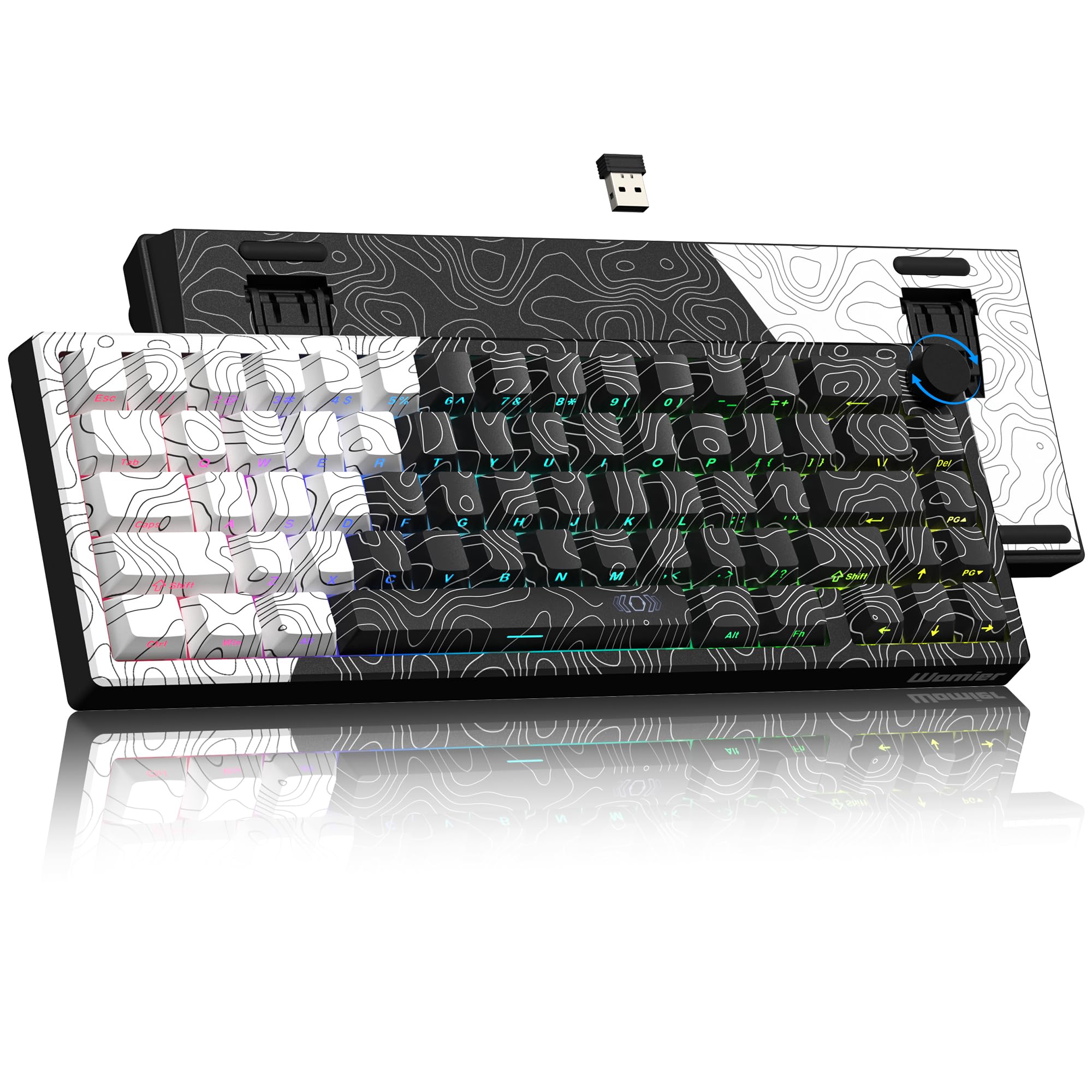
The Womier Q61 V2 delivers gasket-mounted typing with QMK/VIA firmware support at a mid-range price, making it a rare combination in the 60% wireless segment. The gasket mount, paired with a full POM linear switch set and multiple foam layers, produces a creamy, thocky sound profile that rivals boards costing twice as much. The 3000 mAh battery delivers weeks of use on a single charge with RGB off, and the tri-mode connectivity (USB-C, Bluetooth 5.0, 2.4 GHz) covers every scenario from competitive gaming to office multitasking.
The dye-sublimation PBT keycaps in Cherry profile offer even south-facing RGB distribution, though the legends are not shine-through, which can make low-light use challenging for hunt-and-peck typists. The full POM linear switches are heavier than Cherry Reds at 55 gf actuation, providing a snappier rebound but potentially fatiguing for long typing sessions. The VIA software — accessible via wired mode only — grants granular per-key remapping and macro creation that saves directly to the board.
Customer reviews emphasize the satisfying sound, sturdy plastic construction, and versatile connectivity. The primary complaints center on the lube wearing off after a few days of heavy gaming — the switches remain smooth but lose that initial factory-lubed creaminess — and the juvenile-looking stock keycaps. Both are solvable with aftermarket switches and keycap swaps, which the hot-swappable PCB supports.
Why it’s great
- Gasket mount with POM switches delivers thocky sound out of the box
- QMK/VIA firmware for deep key remapping
- 3000 mAh battery with tri-mode connectivity
Good to know
- Switches lose factory lube after heavy gaming sessions
- Stock keycaps are not shine-through
- VIA configuration only works in wired mode
5. RK ROYAL KLUDGE M65
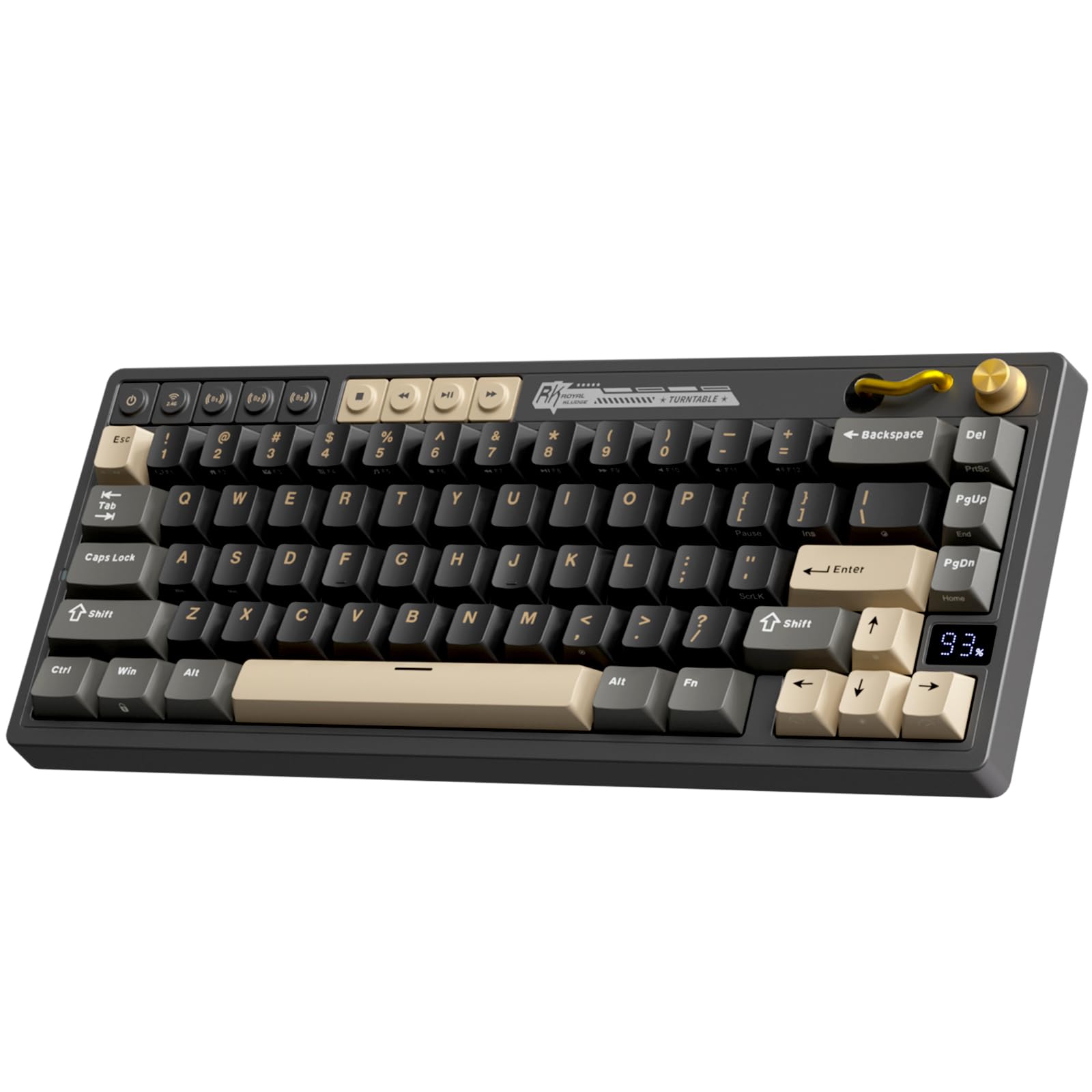
The RK ROYAL KLUDGE M65 is technically a 65% layout — 66 keys with dedicated arrow keys — but its compact footprint and 60-class form factor earn it a spot here for users who cannot live without arrow navigation. The aluminum volume knob and vintage turntable design add a tactile, analog control for audio, and the gasket-mounted Cream switches produce a quiet, crisp sound that suits open-office or shared-room environments. The 240-hour battery life with RGB off is class-leading for wireless boards in this price bracket.
The multi-device switching is handled by dedicated wireless buttons rather than an FN-layer combo, which is a genuine time-saver for users who jump between a desktop, laptop, and tablet. The pre-lubed Cream switches feel buttery smooth out of the box, and the hot-swappable PCB supports both 3-pin and 5-pin switches for future customization. The gasket mount is stiff rather than bouncy — it dampens vibration without adding flex — which some typists may find too rigid for prolonged sessions.
User reviews consistently rate the build quality and value highly, noting that the stabilizers come rattle-free and the keycaps feel premium. The primary downsides are the low battery capacity relative to the claim (some users report shorter real-world runtime) and the unfriendly disassembly process for tinkerers — screw holes are hidden behind rubber feet. For beginners who want a feature-rich wireless board with a volume knob and arrow keys, the M65 delivers excellent value.
Why it’s great
- Dedicated arrow keys in a compact 65% layout
- Aluminum volume knob with vintage turntable design
- 240-hour battery life (RGB off) is class-leading
Good to know
- Gasket mount is stiff, not bouncy
- Low battery capacity may underperform advertised runtime
- Modding requires removing rubber feet to access screws
6. HITIME M67 JadeStone Wireless

The HITIME M67 JadeStone stands out for its innovative IMD (In-Mold Decoration) technology that lets RGB light shine through the keycap pattern itself — a first in the 60% wireless category. The topographic jade-stone design, combined with two LEDs under each stabilizer and five on the space bar, creates a lighting experience that goes beyond the typical under-glow or per-key backlighting. The 4000 mAh battery is the largest capacity in this lineup, supporting extended use across Bluetooth 5.0, 2.4 GHz, and USB-C modes.
The gasket-mounted structure with four layers of silencing foam (PCB single-key slotting included) produces a creamy, low-noise typing feel that is notably softer than the stiffer RK M65. The hot-swappable PCB accepts 3-pin and 5-pin switches, and the pre-lubed transparent linear switches are rated for 80 million keystrokes. QMK/VIA support provides full programmability, though VIA configuration must be done in wired mode and then carries over to wireless use.
Customer feedback highlights the insane value-to-feature ratio, the best-in-class RGB saturation adjustable via FN+PgUp/PgDn, and the satisfying creamy sound. The plastic enclosure feels lightweight but not cheap, and the adjustable foam layers prevent the hollow echo common in budget gasket boards. The only notable omission is the lack of a dedicated knob or media controls — all media commands live on the FN layer.
Why it’s great
- IMD shine-through keycap technology for unique RGB aesthetics
- 4000 mAh battery is the largest in this comparison
- Four-layer foam gasket mount delivers creamy, quiet typing
Good to know
- No dedicated media or volume controls
- VIA programming limited to wired mode
- Plastic enclosure feels lightweight
7. XVX M61 Pro Wireless

The XVX M61 Pro is the most affordable entry point into wireless 60% mechanical gaming, packing a tri-mode connection, hot-swappable PCB, and an eye-catching Great Wave Off Kanagawa theme into a sub- budget. The EVA sound-absorbing foam and IXPE switch pad do an admirable job reducing hollow resonance for a board at this price, producing a pleasantly creamy tone that punches above its cost. The XVX-profile PBT keycaps are double-shot and themed, adding personality without sacrificing durability.
The connectivity options — Bluetooth 5.0, 2.4 GHz, and USB-C — allow pairing with up to five devices, though the 2.4 GHz dongle can be easy to misplace due to its small form factor. The pre-lubed linear switches feel smooth for casual gaming and typing, but the stabilizers show slight rattle in the spacebar and enter key — a common trade-off at this tier that a small amount of dielectric grease can fix. The 19 RGB backlight modes cover the basics without overwhelming customization options.
User reviews overwhelmingly praise the visual aesthetics and sound quality, with multiple buyers noting that the keyboard has held up well after a year of use. The primary frustration is the USB-C cable quality — some users report cable failure after months of daily use, though this is easily remedied with any standard USB-C replacement. For budget-conscious buyers who want wireless flexibility and hot-swappable upgrade potential, the M61 Pro delivers an impressive feature set for the price.
Why it’s great
- Tri-mode connectivity (BT/2.4G/USB-C) at an entry-level price
- Hot-swappable PCB accepts 3-pin and 5-pin switches
- Themed PBT keycaps with sound-dampening foam layers
Good to know
- Stock USB-C cable has durability concerns
- Stabilizers have slight rattle out of the box
- No dedicated arrow keys — FN-layer navigation only
FAQ
Can I use a 60% keyboard without dedicated arrow keys for gaming?
What is the difference between Hall Effect and optical switches for competitive gaming?
How important is gasket mounting in a 60% keyboard?
Can I swap keycaps and switches on any 60% mechanical keyboard?
Final Thoughts: The Verdict
For most users, the best 60 mechanical gaming keyboard winner is the AULA Win60 HE PRO because its Hall Effect magnetic switches, 8000 Hz polling, and rapid-trigger functionality deliver competitive-grade performance at a mid-range price. If you want premium wireless with tournament portability, grab the Logitech G PRO X 60 Lightspeed. And for a creamy, customizable typing experience with QMK/VIA firmware, nothing beats the Womier Q61 V2 Wireless.