
The jump from eight cores to twelve isn’t just a spec sheet increment — it’s the dividing line between a system that chokes under heavy multitasking and one that chews through parallel workloads without breaking a sweat. For gamers who stream, editors who render while browsing, and developers who spin up multiple VMs, a 12-core CPU delivers the headroom that keeps your workflow alive when lesser chips start stuttering.
I’m Min — the co-founder and writer behind Gadgets Feed. Over hundreds of hours analyzing benchmark data, thermal profiles, and real-world workload tests from both the Intel and AMD camps, I’ve mapped out exactly which twelve-core processors deliver genuine performance gains without unnecessary platform costs.
The market now offers everything from efficient mid-range chips to flagship 24-thread monsters. After deep-diving into the specs and community stress tests, I’ve found the best 12 core cpu depends entirely on your workload and upgrade path.
How To Choose The Best 12 Core CPU
Not all twelve-core processors are created equal. Some use eight performance cores plus four efficiency cores, while others pack twelve identical high-performance cores. Your choice determines gaming frames, rendering speed, and upgrade flexibility.
Performance Architecture: P-Cores vs. Full Homogeneous Cores
Intel’s hybrid design splits cores into Performance-cores (P-cores) for heavy lifting and Efficient-cores (E-cores) for background tasks. This works brilliantly for multitasking but can cause thread-scheduling quirks in older games. AMD’s Zen 4 uses twelve full Zen 4 cores across a single chiplet — no scheduling surprises, but slightly higher idle power draw. For pure rendering workloads, identical cores often scale more predictably; for mixed gaming-plus-streaming, the hybrid approach can give you better burst performance.
Platform Longevity: LGA 1700 vs. LGA 1851 vs. AM5
Intel’s LGA 1700 socket supports 12th, 13th, and 14th Gen processors — a proven upgrade path if you already own a Z690 or Z790 board. LGA 1851 is the new home for Intel Core Ultra 200-series chips, offering better memory controllers and native CUDIMM support, but requires a brand-new motherboard. AMD’s AM5 is confirmed to support at least two more processor generations, making it the most future-proof socket for a 12-core investment today.
Thermal and Power Budget Reality
A 12-core CPU pulling 125W at base can spike past 250W under all-core turbo. If you plan to stress the chip for extended rendering sessions, a 240mm or 360mm AIO liquid cooler is non-negotiable. Lower-wattage variants like the AMD Ryzen 9 7900 (65W TDP) offer near-flagship performance with far simpler cooling — ideal for compact builds where airflow is tight and noise matters.
Quick Comparison
On smaller screens, swipe sideways to see the full table.
| Model | Category | Best For | Key Spec | Amazon |
|---|---|---|---|---|
| Intel Core i9-14900K | Flagship | Max gaming + heavy multitasking | 6.0 GHz boost / 24 cores (8P+16E) | Amazon |
| Intel Core Ultra 9 285K | Next-Gen | Stable pro workstation builds | 5.7 GHz boost / 40 MB L3 cache | Amazon |
| Intel Core i9-14900KF | High-Perf | 240 FPS competitive gaming | 6.0 GHz boost / no integrated graphics | Amazon |
| Intel Core i7-14700KF | Workstation | AI generation + database workloads | 5.6 GHz boost / 20 cores (8P+12E) | Amazon |
| AMD Ryzen 9 7900 | Efficient | SFF builds and homelab servers | 65W TDP / 76 MB cache / cooler included | Amazon |
| Intel Core Ultra 7 265KF | Balanced | Light gaming + daily encoding | 5.5 GHz boost / 20 cores (8P+12E) | Amazon |
| Intel Core i7-12700KF | Value | Budget gaming + 4K editing | 5.0 GHz boost / 25 MB L3 cache | Amazon |
| Micro Center Ultra 7 265K Combo | Bundle | All-in-one board + CPU upgrade | 5.5 GHz boost / LGA 1851 + Z890 board | Amazon |
| GEEKOM IT12 Mini PC | Compact | Space-saving office or media PC | 28W TDP / 12-gen i7-1280P / 14 cores | Amazon |
In‑Depth Reviews
1. Intel Core i9-14900K

This is Intel’s current-generation flagship for the LGA 1700 platform, hitting a blistering 6.0 GHz out of the box with Thermal Velocity Boost. The 24-core configuration (8 P-cores + 16 E-cores) makes it a monster for simultaneous gaming, streaming, and encoding — the kind of chip that doesn’t flinch even when you have a browser with forty tabs, a Discord call, and a game all running. Its 125W base power climbs quickly under all-core loads, so a robust 360mm AIO is mandatory for sustained performance.
Owners report exceptional stability in Proxmox homelab setups running 24/7, and the chip handles Cinebench R23 multi-core scores above 40,000 without breaking a sweat. The integrated UHD Graphics 770 is present for troubleshooting, but this chip is clearly designed for a discrete GPU. Platform-wise, it drops into Z690 and Z790 boards with a BIOS update, making it a drop-in upgrade for existing LGA 1700 users who want the highest clocks available without moving to a new socket.
The downside is the known instability issues on early 13th/14th Gen microcode — Intel has addressed this with the 0x12F microcode update, but you must ensure your motherboard BIOS includes this fix. Some reviewers experienced memory controller failure within months, though updated BIOS and proper voltage settings (keeping VCCSA under 1.35V) drastically improve reliability. For pure CPU-bound gaming at 1080p, this chip trades blows with AMD’s X3D parts but wins in mixed productivity scenarios.
Why it’s great
- Highest single-core boost at 6.0 GHz for gaming and burst workloads
- Drop-in upgrade for existing Z690/Z790 motherboards
- Integrated graphics provides backup display output
Good to know
- Requires mandatory BIOS update to 0x12F microcode for stability
- Power consumption spikes past 250W under all-core load
- Some units have reported ring collapse and memory controller failure
2. Intel Core Ultra 9 285K

The Core Ultra 9 285K represents Intel’s shift to the LGA 1851 platform, bringing a refined memory controller that handles four sticks of DDR5 far more reliably than its predecessors. With 24 cores (8 P-cores + 16 E-cores) boosting to 5.7 GHz and a generous 40 MB L3 cache, this chip targets professionals running SolidWorks, CAD rendering, and video encoding who need all-core stability over peak clock speed. Reviewers running Cinebench 2024 saw peak temperatures around 78°C with a 360mm AIO, drawing roughly 205W under sustained load — meaning it runs cooler than the 14900K for similar multi-threaded work.
Engineers in professional CAD environments have reported this chip is markedly more stable than 13th and 14th Gen parts, with zero random crashes during 24-hour burn-in tests. The integrated graphics is usable for basic display output, though you’ll still want a dedicated GPU for any rendering work. Platform cost is the biggest barrier — LGA 1851 motherboards like the Z890 require new DDR5 CUDIMM modules to hit optimal speeds, making this a full-platform investment that only makes sense if you’re building fresh.
The biggest gain over the previous generation is the elimination of the voltage-related instability that plagued Raptor Lake. Memory compatibility is excellent with CUDIMM RAM hitting 4000 MHz on four sticks, and the memory controller doesn’t need aggressive VCCSA tuning. For buyers who value long-term workstation reliability over raw gaming frames, this is the most trustworthy Intel twelve-core-plus option available right now.
Why it’s great
- Excellent thermal performance — runs cooler than 14900K under load
- Stable memory controller supports four DDR5 sticks at high speeds
- Professional-grade stability for CAD and rendering workloads
Good to know
- Requires new LGA 1851 motherboard and potentially CUDIMM RAM
- No cooler included in the box — factor in a quality 360mm AIO
- Gaming performance is good but trails competing X3D chips in some titles
3. Intel Core i9-14900KF

The 14900KF is the 14900K with the integrated graphics stripped out and a slightly more aggressive price point for builders who already own a discrete GPU. It offers the identical 24-core count (8 P-cores + 16 E-cores) and 6.0 GHz boost as its K-suffix sibling, making it a pure compute beast for gaming rigs that don’t need onboard display output. Competitive Fortnite players report a stable 240 FPS even in endgame scenarios without any overclocking, pairing well with a modest 240mm AIO.
Multitasking performance is outstanding — the 32 threads handle simultaneous game, streaming encoder, and browser without any perceptible frame drops. The chip idles around 35°C and peaks at 70-80°C under sustained gaming with an AIO, which is well within safe limits. Where this chip shines is in CPU-bound games where raw clock speed matters more than cache size — titles like CS2, Valorant, and Fortnite see measurable gains over slower-clocked alternatives.
The trade-off is the same stability concern that affects all 14th Gen chips: you must update your BIOS to the latest microcode that includes the Vmin shift fix. Some users experienced degradation after six months with blue screens, and Intel’s RMA process can be frustrating — requiring a refundable upfront payment for a replacement before they receive your faulty chip. If you’re willing to keep your BIOS current and run reasonable voltages, this is the most affordable entry point to a 6.0 GHz 24-core machine.
Why it’s great
- Flagship 6.0 GHz performance without paying for unused integrated graphics
- Excellent for CPU-bound competitive gaming at high frame rates
- Works with existing LGA 1700 boards after BIOS update
Good to know
- No integrated graphics means zero display output without a GPU
- Requires BIOS update for stability fix — check before buying used
- Intel RMA process is costly and time-consuming if the chip fails
4. Intel Core i7-14700KF

The 14700KF sits in a sweet spot between price and core count, offering 20 cores (8 P-cores + 12 E-cores) with a 5.6 GHz boost that rivals the more expensive i9 in many workloads. For AI generation tasks and database-heavy business applications, users report that this chip handles massive inventory spreadsheets with hundreds of rows plus high-res images and POS software simultaneously without any lag. It pairs beautifully with an RTX 4080 Super for AI workload acceleration, delivering smooth generation speeds without stutters.
Gaming performance is excellent — Battlefield 6 and other CPU-intensive titles run flawlessly, and the chip stays surprisingly cool under a 360mm AIO. The extra E-cores over the previous generation make a tangible difference in multitasking scenarios where background tasks like Discord, Chrome, and streaming software run alongside a game. For professional video editors working in Premiere Pro or DaVinci Resolve, the 28 threads chew through timeline rendering and export tasks efficiently.
The catch is platform cost: while the chip itself is priced well, the DDR5 memory and Z790 motherboard required to unlock its full potential add up quickly. Some users noted that the memory prices have been volatile due to supply chain issues, making the total system build more expensive than expected. You also need a quality cooler — a Thermalright Peerless Assassin air cooler works for gaming loads, but sustained rendering benefits from a 240mm or 360mm AIO.
Why it’s great
- 20 cores deliver near-i9 performance for a lower investment
- Excellent multitasking for gaming + streaming + AI workloads
- Runs cool enough with a good air cooler for gaming loads
Good to know
- Requires motherboard BIOS with 0x12F microcode for stability
- No integrated graphics — needs a discrete GPU for display output
- Total platform cost with DDR5 and Z790 can escalate quickly
5. AMD Ryzen 9 7900

The Ryzen 9 7900 is the efficiency champion of the 12-core category, delivering twelve full Zen 4 cores at a 65W TDP that makes it ideal for small-form-factor builds and always-on homelab servers. Unlike Intel’s hybrid architecture, every core here is identical — no scheduling quirks, just consistent performance across all threads. Boost clock hits 5.4 GHz, and the included Wraith Prism RGB cooler is actually usable for stock operation, though aftermarket cooling improves boost behavior significantly.
In SFF builds, this chip is a revelation: owners report daily temperatures between 50-65°C with a 140mm AIO, peaking at 68°C under sustained load. For homelab enthusiasts, undervolting and power-limiting the 7900 to 65W in a 2U chassis still delivers enough performance to run Proxmox with 10-12 VMs, game servers, and Docker containers all simultaneously. The 76 MB cache helps gaming performance punch above its wattage class — it maxes out most game frame rates without needing Precision Boost Overdrive enabled.
The AM5 platform gives you a clear upgrade path to future Ryzen generations, making this a smart long-term investment. The main limitation is that you’re locked to twelve physical cores — no extra E-cores for background tasks. For pure multi-threaded rendering, the 7900 trails the Intel i7-14700KF by about 15-20%, but its power efficiency and platform longevity make it the smarter choice for users who prioritize low heat output and future upgrade options.
Why it’s great
- 65W TDP allows compact, quiet, and cool builds
- AM5 platform guarantees upgrade path to future Ryzen generations
- Included Wraith Prism cooler is adequate for stock operation
Good to know
- Lags behind hybrid Intel chips in heavy multi-threaded rendering
- No E-cores — background tasks share the same cores as foreground apps
- Aftermarket AM5 mounting plate recommended for optimal thermal paste spread
6. Intel Core i7-12700KF

The 12700KF is the budget-friendly entry point to twelve-core performance, offering 8 P-cores and 4 E-cores with a 5.0 GHz boost on the mature LGA 1700 platform. Despite being from the 12th Gen, this chip still holds up remarkably well in 2025 — users report it handles 4K video editing in Premiere Pro and DaVinci Resolve without issue, running 12-16 hours daily for 18 months with zero problems. The unlocked multiplier lets you squeeze extra performance if you have adequate cooling.
Gaming performance is solid for competitive titles like Fortnite and DCS World, where the eight P-cores prevent CPU bottlenecks even with a modern GPU. The chip works well with a 120mm AIO for stock gaming loads, though a 240mm AIO helps maintain turbo boost under extended rendering sessions. The 25 MB L3 cache is smaller than newer chips, but in practice, the difference only shows in specific cache-sensitive workloads like factorio or certain simulation games.
The biggest advantage is platform cost: DDR4 motherboards for LGA 1700 are widely available and significantly cheaper than DDR5 alternatives, letting you allocate more budget to the GPU. The chip does run hot under all-core load — expect temperatures in the 80-85°C range with a mid-range cooler — but it remains stable. For builders on a strict budget who need genuine twelve-core performance for mixed gaming and creative work, this chip offers the best performance-per-dollar in the entire category.
Why it’s great
- Exceptional value for genuine 12-core (8P+4E) performance
- Compatible with affordable DDR4 motherboards
- Still handles 4K video editing and modern gaming after 3+ years
Good to know
- Runs hot — needs at least a 240mm AIO for sustained loads
- 25 MB L3 cache is smaller than current-gen competitors
- No integrated graphics — requires discrete GPU for display
7. Intel Core Ultra 7 265KF

The Core Ultra 7 265KF is Intel’s mid-range option on the new LGA 1851 platform, packing 20 cores (8 P-cores + 12 E-cores) with a 5.5 GHz boost and 36 MB of L3 cache. It slots between the i7 and i9 in terms of core count but delivers a compelling balance for gamers who also do light encoding or streaming. Owners building their first PC report that this CPU handles everyday tasks and modern games effortlessly, pairing well with an affordable air cooler like the Peerless Assassin.
The key improvement over the 12th-14th Gen chips is the absence of the voltage-related instability issues — this Core Ultra generation uses a refined architecture that doesn’t suffer from the Vmin shift problem. Memory compatibility is excellent, with users running 2x48GB Crucial DDR5 kits without any XMP tuning issues on Gigabyte Aorus boards. Boot times on M.2 SSDs are noticeably faster — roughly 35-40% quicker than the previous generation.
The trade-off is that for extreme gaming scenarios where cache size matters most, this chip underperforms compared to AMD’s X3D alternatives. It’s also a new platform, so you’re committing to LGA 1851 with its potentially higher motherboard and CUDIMM RAM costs. If you catch this chip on sale, it becomes a very strong value proposition for someone who wants the latest architecture without stepping up to the Ultra 9 price point.
Why it’s great
- Refined architecture with no 13th/14th Gen voltage instability issues
- Fast memory controller handles large DDR5 kits without problems
- Excellent daily driver for gaming, encoding, and multitasking
Good to know
- New LGA 1851 platform means higher motherboard costs
- Lags behind AMD X3D chips in cache-sensitive gaming
- Research motherboard BIOS compatibility before purchase
8. Micro Center Ultra 7 265K + Asus Z890 Bundle
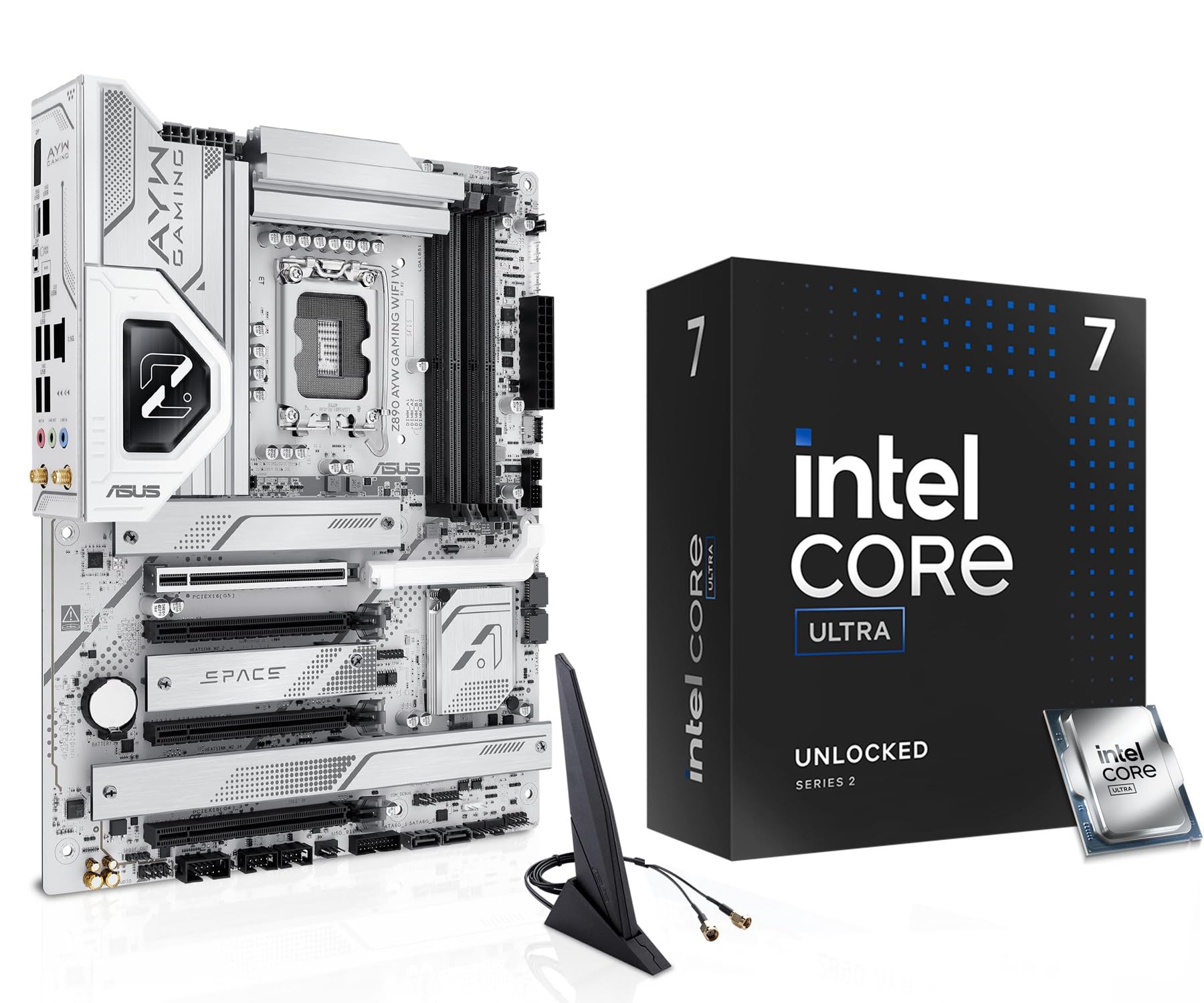
This Micro Center combo bundles the Intel Core Ultra 7 265K with an Asus Z890 AYG Gaming WiFi W motherboard, simplifying the upgrade path for users moving to LGA 1851. The 265K offers 20 cores (8 P-cores + 12 E-cores) boosting to 5.5 GHz, matching the 265KF but with integrated graphics included — useful for troubleshooting or basic display output. The Z890 board features 12+1+2+1 80A DrMOS power stages, ensuring clean power delivery for sustained all-core loads.
The motherboard’s connectivity is modern and well-thought-out: one onboard PCIe 5.0 M.2 slot plus three PCIe 4.0 M.2 slots all with cooling, rear USB 20Gbps Type-C, and front-panel USB-C with up to 30W PD fast charging. The DIY-friendly features like PCIe Slot Q-Release and M.2 Q-Latch make building easier, and the BIOS FlashBack button lets you update the firmware without a CPU installed — critical for compatibility out of the box.
The catch is that this bundle does not include a CPU cooler, and some users noted the PSU requirements are underspecified — you need two 8-pin CPU power connectors, which not all power supplies provide. The quick-start guide lacks detailed instructions, so inexperienced builders should research full manual online before starting. For buyers who want a guaranteed-compatible board and CPU without hunting for individual components, this bundle saves time and ensures everything works together out of the box.
Why it’s great
- Pre-validated combo ensures motherboard compatibility with the CPU
- Z890 board includes PCIe 5.0 M.2 and WiFi 6E support
- Integrated graphics on the 265K for troubleshooting without a GPU
Good to know
- No CPU cooler included — budget for a quality air or liquid cooler
- Requires two 8-pin motherboard power connectors — check your PSU
- Minimal documentation — may require online research for full setup
9. GEEKOM IT12 Mini PC
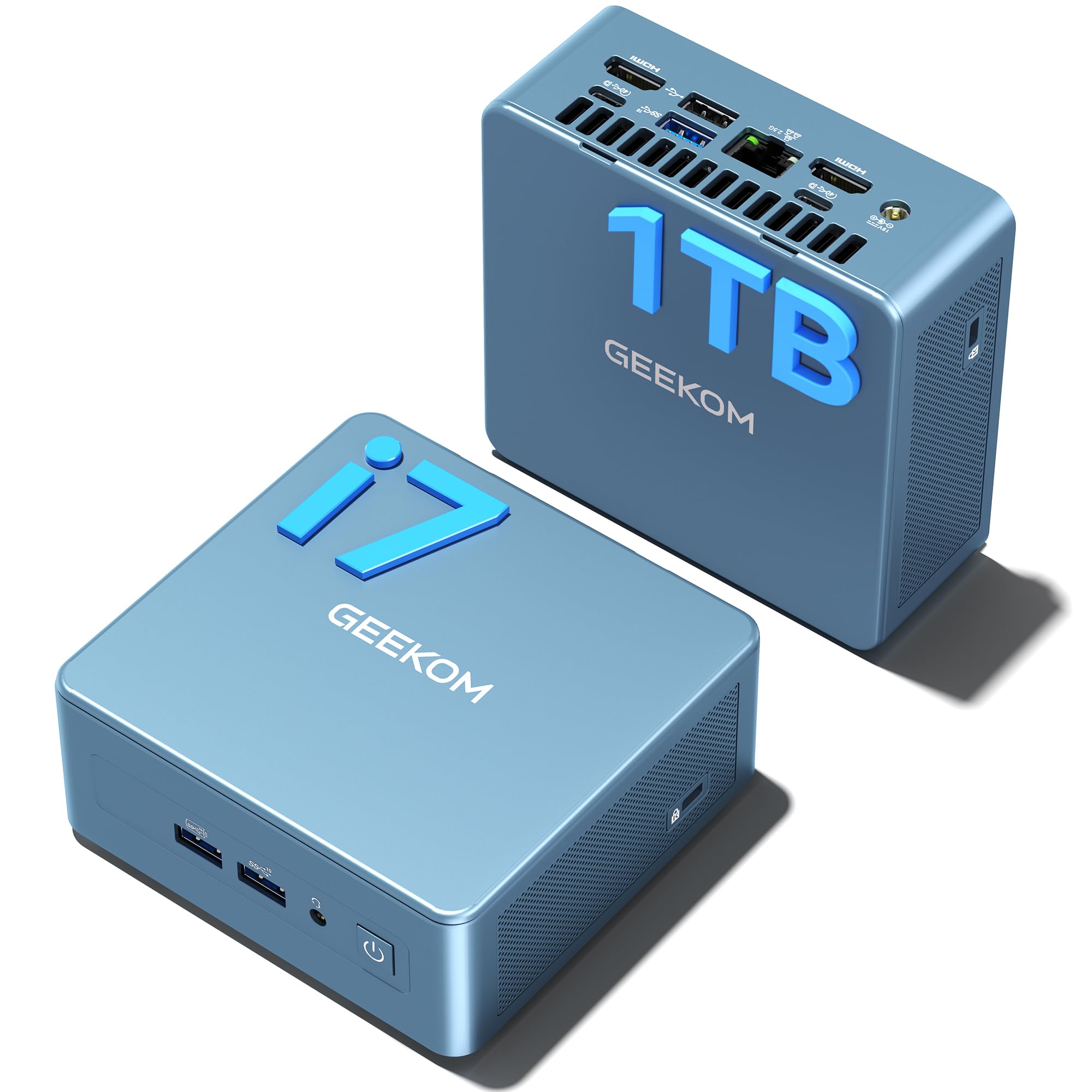
The GEEKOM IT12 is a complete mini PC powered by the Intel Core i7-1280P, a 12th Gen processor with 14 cores (6 P-cores + 8 E-cores) that runs at a low 28W TDP. While not a conventional desktop CPU, it delivers genuine 12th Gen performance in a chassis small enough to mount behind a monitor — ideal for space-constrained offices, media centers, or lightweight homelab servers. The 28W power draw means it uses roughly a quarter of the electricity of a traditional tower PC, making it perfect for 24/7 operation.
Performance is surprisingly capable for its size: users running Adobe InDesign, Photoshop, and Illustrator report identical responsiveness to a 2018 gaming PC with an i7-8700 and RTX 2080 Super. The dual USB4 ports (40Gbps) support 8K display output, and the IceBlast cooling system keeps the unit at a near-silent 38dB even under load. The 1TB NVMe PCIe 4.0 SSD and 16GB RAM (expandable to 96GB) provide enough headroom for daily office work, media streaming, and even light Linux server duties running Docker containers.
The limitation is that this isn’t a CPU you can upgrade — the entire system is sealed, so you’re stuck with the i7-1280P forever. The integrated graphics share system RAM, so it’s not suitable for serious gaming or GPU-accelerated rendering. Some users experienced system freezes when transferring large files over 250GB to external drives, recommending use of the front USB port for external SSDs. For buyers who need a compact, power-sipping workstation for everyday tasks, this is a polished and complete solution.
Why it’s great
- Ultra-low 28W TDP consumes 1/4 the power of a tower desktop
- Complete system ready out of the box with Windows 11 Pro
- Dual USB4 with 40Gbps supports 8K displays and fast data transfers
Good to know
- Non-upgradeable CPU — you’re locked to the i7-1280P forever
- Integrated graphics are weak — avoid gaming or GPU rendering
- Some stability issues reported with large external file transfers
FAQ
Do I need DDR5 memory for a 12-core CPU or will DDR4 work?
How does a 12-core CPU compare to an 8-core for gaming?
Final Thoughts: The Verdict
For most users, the best 12 core cpu winner is the Intel Core i9-14900K because its 6.0 GHz boost and mature LGA 1700 platform deliver unmatched peak performance for gaming and productivity on a socket with extensive motherboard options. If you want next-generation stability and workstation-grade reliability, grab the Intel Core Ultra 9 285K. And for an efficient, future-proof build that sips power and stays cool, nothing beats the AMD Ryzen 9 7900.