
Your motherboard’s built-in Ethernet port died, or maybe it’s just not reliable enough for your file server or firewall build. A dedicated 1 Gig network card isn’t just a repair part — it’s a targeted upgrade that offloads packet processing from your CPU with a proper chipset, adds a second port for a direct router link, or reclaims busted hardware on a legacy system. The key difference between a stable 960 Mbps transfer and random dropouts sits entirely in the controller chip.
I’m Min — the co-founder and writer behind Gadgets Feed. I comb through thousands of verified buyer reports and technical datasheets to isolate which controller chip, PCIe interface revision, and OS compatibility matrix actually delivers sustained wire-speed throughput without driver headaches.
After analyzing the controller silicon, OS support tables, and real-world throughput results across seven competing cards, this guide delivers the clearest breakdown of the best 1 gig network card for your specific hardware and use case.
How To Choose The Best 1 Gig Network Card
Selecting a gigabit NIC comes down to three high-stakes variables: the controller chipset, the PCIe bus generation, and the port count. Ignoring any of these can leave you with a card that refuses to boot in your hypervisor or maxes out at half the rated speed.
Controller Chipset: Intel vs. Realtek
Intel chipsets like the 82574L, 82576, and I210-AT are the gold standard for driver maturity in Linux, FreeBSD, ESXi, and Windows Server. Realtek RTL8111H and RTL8169SC chips are cheaper and fine for standard Windows desktops, but they frequently cause issues in VMware ESXi 7+ or when you need advanced features like VLAN tagging at line rate.
PCIe Interface and Bus Bottlenecks
A PCIe 2.0 x1 lane offers 500 MB/s of bandwidth — well above the 125 MB/s (1 Gbps) a single port needs, so no bottleneck. But older PCI (non-Express) cards max out at 133 MB/s, which caps throughput around 600-700 Mbps. Always verify the bus type matches your motherboard slot. PC software routers and firewalls benefit from the lower CPU overhead of a genuine x1 lane.
Single vs. Dual Port
A single-port card is all you need to replace a dead onboard NIC. Dual-port cards serve two roles: they let a pfSense or OPNsense box manage WAN and LAN without a separate switch, and they allow a NAS or server to bond two 1 Gb links for aggregate throughput. If you only need one Ethernet jack, save the money and stay single-port.
Quick Comparison
On smaller screens, swipe sideways to see the full table.
| Model | Category | Best For | Key Spec | Amazon |
|---|---|---|---|---|
| StarTech.com ST1000SPEXI | Premium | Stable server & workstation OS | Intel I210-AT Chipset | Amazon |
| H!Fiber Dual Intel 82576 | Premium | Software router / firewall builds | Dual Intel 82576 Controller | Amazon |
| BrosTrend 5Gb PCIe Card | Premium | Multi-gig future-proofing | 5 Gbps / 5GBASE-T support | Amazon |
| ULANSeN Dual-Port PCIe | Mid-Range | Dual LAN without Intel premium | Intel 82575/82576 Controller | Amazon |
| StarTech.com ST1000SPEX2L | Mid-Range | Simple plug-and-play desktop | Realtek RTL8111H Chipset | Amazon |
| H!Fiber Intel 82574L PCIe | Mid-Range | ESXi 7 HCL replacement | Intel 82574L Controller | Amazon |
| X-MEDIA XM-NA3500 | Budget | Legacy PCI slot desktop | 32-bit PCI, Realtek RTL8169SC | Amazon |
In‑Depth Reviews
1. StarTech.com 1-Port Gigabit Ethernet Network Card (ST1000SPEXI)

The StarTech ST1000SPEXI uses the Intel I210-AT controller, which is the most universally supported server-grade chip available for a single-port 1 Gig card. Verified user reports show sustained throughput at roughly 960 Mbps out of a theoretical 1000 Mbps — that is 98 percent wire-speed efficiency using standard 1500-byte frames. Linux distributions, Windows Server 2019, and ESXi all recognize this card without any driver hunting.
The card ships with both full-height and low-profile brackets and includes StarTech’s proprietary Connectivity Tools utility for MAC address changing and Wi-Fi auto-switching. Its PCIe x4 slot interface leaves headroom for future multi-gig upgrades, yet it runs remarkably cool — users report temperatures in the high 30s to mid 40s Celsius under a gentle 120mm fan, far cooler than unheatsinked dual-port alternatives.
Some users note the low-profile bracket may leave a slight gap in certain ATX mid-tower cases, but this is a minor fitment issue. If you need one port that simply works with every OS you throw at it — including link aggregation and PXE boot — this is the most reliable single-port pick on the market.
Why it’s great
- Intel I210-AT chip with mature driver tree across Linux, Windows, and FreeBSD
- Excellent thermal performance with no heatsink required
- Includes MAC Address Changer and Wi-Fi Auto Switch utilities
Good to know
- Low-profile bracket fitment can be loose in some cases
- PCIe x4 slot required, though it works in x16 slots
2. H!Fiber Gigabit Dual NIC with Intel 82576 Chip (82576-2T-X1)
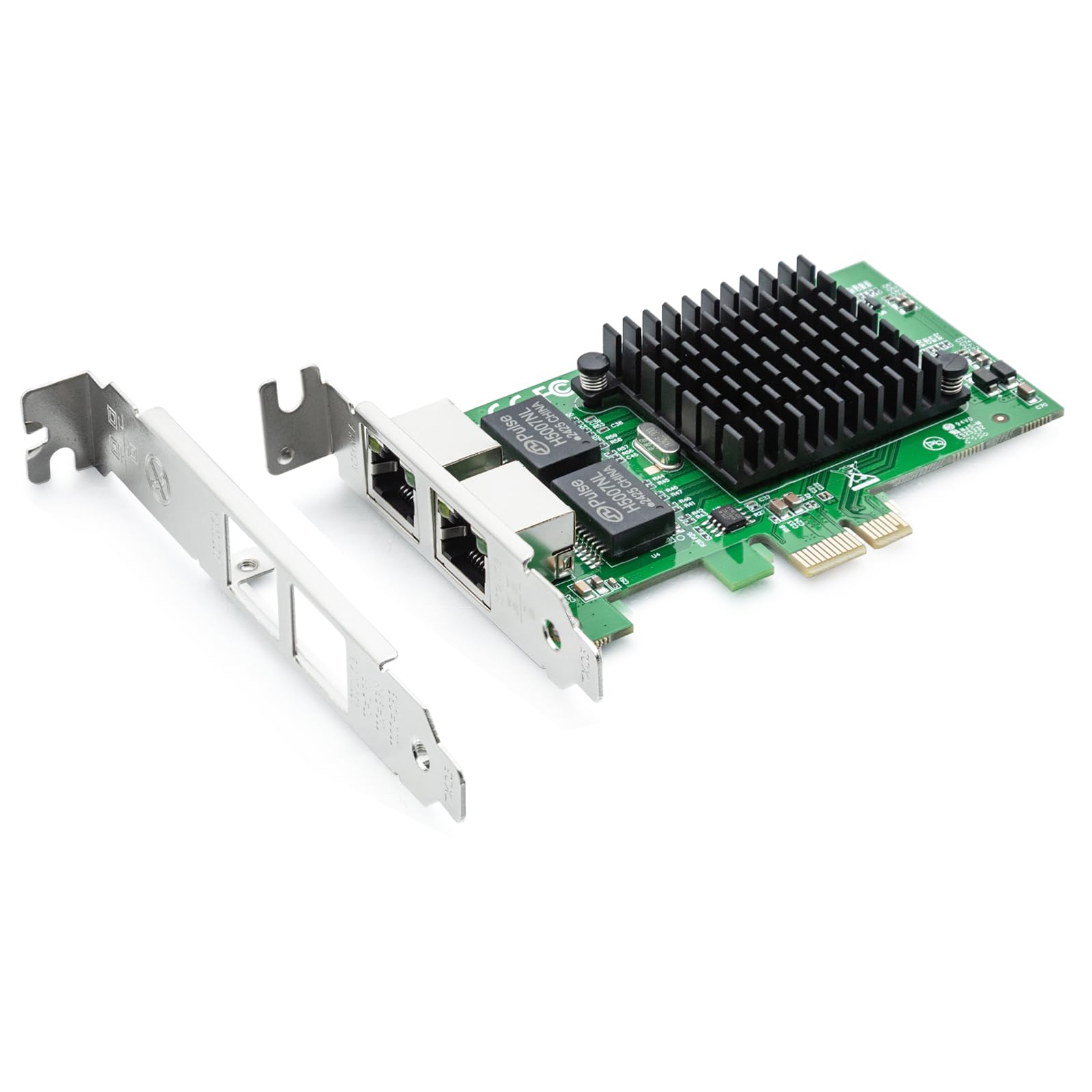
This dual-port NIC from H!Fiber pairs the Intel 82576 controller with two independent RJ45 jacks, each capable of full 1000 Mbps bidirectional throughput. Real-world testing in pfSense and OMV environments shows transfer rates jumping from roughly 600 Mbps (with cheap Realtek onboard NICs) to over 900 Mbps. The PCIe 2.0 x1 lane is sufficient for aggregate traffic across both ports as long as you are not saturating both directions simultaneously.
The card includes both low-profile and full-height brackets, plus a QR code on the PCB that links directly to Intel’s driver page. Buyers running OPNsense, pfSense, or Proxmox report immediate recognition without any manual driver intervention. It is also useful for Windows 11 users who want a dedicated LAN port separate from a router-connected onboard NIC for VLAN segmentation.
Note that this card does not support VMware ESXi 7.0 or above — the 82576 chip was dropped from VMware’s HCL for version 7. If you are building a Type 1 hypervisor host, check for a newer I350-t2 based card instead. For router, firewall, or dual-LAN desktop builds, this is the most cost-effective dual-port Intel solution.
Why it’s great
- Intel 82576 chip provides stable dual-port gigabit for pfSense/OPNsense
- Boosts file transfer speeds to 900+ Mbps vs. typical Realtek onboard NICs
- Both brackets included — fits standard and slim chassis
Good to know
- Not compatible with VMware ESXi 7.0 or newer
- Windows 11 may need manual driver install on first boot
3. BrosTrend 5Gb PCIe Network Card

The BrosTrend card breaks the 1 Gig ceiling with a Realtek chipset that supports 5GBASE-T, delivering five times the throughput of a standard gigabit NIC. Verified users on a 2.1 Gbps fiber plan report download speeds of 2.1 Gbps through a router, proving the card is not just theoretically faster — it actually saturates multi-gig internet connections. Its aluminum heatsink with dense fins keeps the controller cool under sustained load.
This card is limited to Windows 11, Windows 10, and Windows Server 2022 for full 5 Gbps support. Linux users need kernel 6.9 or newer for native driver support. The package includes a low-profile bracket for small-form-factor PCs, and the PCIe x1 slot interface means it fits even budget motherboards without blocking a GPU fan.
If your ISP plan delivers between 1.5 and 5 Gbps, this card saves you from buying a more expensive 10 GbE adapter. For anyone still on a sub-1 Gbps plan, the extra cost provides no benefit — stick to a standard gigabit card.
Why it’s great
- True 5 Gbps throughput — saturates multi-gig fiber plans
- Aggressive alloy heatsink for reliable sustained performance
- Includes both standard and low-profile brackets
Good to know
- Windows-only for full multi-gig support; Linux needs kernel 6.9+
- Realtek chipset — not ideal for ESXi or FreeBSD users
4. ULANSeN Dual-Port PCIe Gigabit Network Card (TXA094)

The ULANSeN TXA094 offers dual-port gigabit connectivity using an Intel 82575 or 82576 controller, similar to the H!Fiber card but at a slightly lower entry point. Verified buyers report plug-and-play behavior on both Windows 11 and Linux Mint 22.1 with zero driver installation — the Intel chipset is recognized natively. Its alloy heatsink is imported and visibly larger than generic NICs, effectively wicking heat away from the controller.
This card supports iSCSI boot, WoL, VLAN filtering, and PXE remote boot. The PCI Express 2.1 x1 lane is backward compatible with x2, x4, x8, and x16 slots, so you can install it in almost any desktop. One user solved a 500 Mbps file transfer bottleneck in a medical imaging workflow — large DICOM files transferred at full gigabit speeds after the upgrade.
The main drawback is ESXi support: this card does not work with VMware ESXi 7.0 or above. If you are building a Windows or Linux dual-LAN workstation or a pfSense box, it is a terrific value. For hypervisor builds, you need an I350-t2 based card instead.
Why it’s great
- Intel chipset for native OS recognition — no driver install needed
- Aggressive alloy heatsink for thermal stability
- Full feature set: iSCSI boot, WoL, PXE, VLAN filtering
Good to know
- Not compatible with VMware ESXi 7.0 or newer
- Drivers for older OS versions require manual download
5. StarTech.com 1 Port PCIe Network Card (ST1000SPEX2L)

The StarTech ST1000SPEX2L is a no-fuss Realtek RTL8111H-based card designed for users who need a quick replacement for a failed onboard NIC. Windows 10, Windows 11, and standard Linux distributions recognize the Realtek chipset out of the box, and the card supports 9K jumbo frames, Wake-on-LAN, and Auto MDIX. The all-black PCB and low-profile bracket make it visually discreet in any build.
Buyers report identical in-use performance to their original motherboard LAN port — no latency penalty, no speed loss. The card is particularly useful for IT pros needing a temporary stopgap for a misbehaving Intel I219-V onboard NIC without rebooting into a complex driver fix. It comes with both a standard bracket and a low-profile bracket, covering full-tower and slim-form-factor cases.
Two caveats: the included CD contains older drivers, so you should download the latest Realtek driver from the web for peak stability. Also, a minority of users report that neither bracket fits their specific case perfectly, leaving a small gap at the mounting screw. For the price, this is a reliable drop-in replacement for most desktop users.
Why it’s great
- True plug-and-play with Windows and Linux — no driver hunt
- Supports 9K jumbo frames and Wake-on-LAN
- Includes both standard and low-profile brackets
Good to know
- Realtek chipset may cause driver issues in ESXi or FreeBSD
- Case bracket fitment can be imperfect on some chassis
6. H!Fiber Gigabit PCIe NIC with Intel 82574L Chip (82574-1T)

This single-port card from H!Fiber uses the Intel 82574L controller, which remains on the VMware ESXi 7 Hardware Compatibility List — a huge advantage over the 82576-based dual-port cards that were dropped. Verified users have successfully deployed this card in a Dell XPS running ESXi 7, where the built-in NIC was unrecognized. Windows 10 auto-detects the card and pulls drivers from Windows Update.
The card supports IEEE 1588 Precision Time Protocol, QoS, and VLAN tagging. It ships with both low-profile and full-height brackets and includes a QR code that shortcuts to Intel’s driver download page. The PCI Express 1.1 x1 lane is more than adequate for a single gigabit port, and the 30-day return plus 3-year warranty provides peace of mind for budget-conscious buyers.
The 82574L chip is older than the I210 series, so raw CPU offload capability is slightly lower. This is irrelevant for most desktop or entry-level server use, but if you need the absolute lowest CPU overhead at line rate, the I210-based StarTech card is a better choice. For ESXi 7 hypervisor projects, this card is a reliable low-cost option.
Why it’s great
- Intel 82574L is on the VMware ESXi 7 HCL
- Auto-detected by Windows 10/11 — no manual driver
- Both brackets plus 3-year warranty included
Good to know
- PCIe 1.1 x1 — lower ceiling for future upgrades
- CPU offload less efficient than I210 series
7. X-MEDIA XM-NA3500 PCI Gigabit Ethernet Adapter

The X-MEDIA XM-NA3500 is the only card in this roundup that uses a 32-bit PCI slot instead of PCI Express. Inside is the Realtek RTL8169SC chipset, a proven workhorse for Windows XP through Windows 11 and Ubuntu Linux. One verified user reported achieving roughly 600 Mbps on a 15-year-old Dell — the bottleneck is the PCI bus itself, which tops out at 133 MB/s (1.06 Gbps) but rarely delivers more than 60-70% of that in real usage.
The card comes with both a standard bracket and a low-profile bracket, plus an included CD with drivers that go all the way back to Windows 98. This makes it an ideal candidate for reviving genuinely old hardware — retro gaming rigs, legacy industrial PCs, or museum-grade servers that lack any PCIe slot. The green PCB is unmistakably retro.
Do not buy this card if your motherboard has a PCIe slot. The PCI bus overhead and lower throughput ceiling make it slower than even the cheapest PCIe gigabit adapter. But if you need to add a 1 Gig port to a vintage machine with only white PCI slots, this is the only option that reliably works across several Windows and Linux generations.
Why it’s great
- Only gigabit card for true legacy 32-bit PCI slots
- Works on Windows 98 through Windows 11
- Both standard and low-profile brackets included
Good to know
- PCI bus bottleneck limits real-world throughput to ~600 Mbps
- Inferior to any PCIe-based gigabit card
FAQ
Will a 1 Gig network card work in a PCIe x16 slot?
Can I use a 1 Gig network card in VMware ESXi 7 or 8?
Final Thoughts: The Verdict
For most users, the best 1 gig network card winner is the StarTech.com ST1000SPEXI because the Intel I210-AT controller offers the broadest OS and hypervisor compatibility with proven 98 percent wire-speed throughput. If you need dual ports for a pfSense firewall or dual-LAN workstation, grab the H!Fiber Dual Intel 82576 NIC. And for an ESXi 7 host on a budget, nothing beats the H!Fiber Intel 82574L single-port card.