
The LGA 1151 socket powered two distinct generations of Intel processors—the 8th and 9th Gen Coffee Lake chips. Finding a worthwhile upgrade for an existing Z370 or Z390 board means navigating a market where old stock and used units mix with a few remaining new-in-box options, making spec knowledge the difference between a smart buy and a costly misstep.
I’m Min — the co-founder and writer behind Gadgets Feed. I’ve spent countless hours analyzing the technical specifications, generational performance deltas, and real-world benchmarks of every meaningful LGA 1151 CPU to separate the genuinely capable chips from the ones that merely look good on paper.
After researching thermal limits, core counts, and platform compatibility, this guide breaks down the very best options available today to help you find the ideal best lga 1151 cpu for your specific build and budget.
How To Choose The Best LGA 1151 CPU
Choosing the right LGA 1151 processor is about balancing core count, clock speed, and platform support. With both 8th and 9th Gen chips sharing the same physical socket but requiring different chipset drivers, understanding the nuances saves you from a costly compatibility mistake.
Core Count vs. Clock Speed for Your Workload
The 9th Gen i9-9900K packs 8 cores and 16 threads at up to 5.0 GHz, making it a monster for both gaming and multi-threaded tasks like video encoding. Meanwhile, the i5-9400 offers 6 cores and 6 threads at a lower 4.1 GHz turbo—perfect for a budget gaming rig or media server where single-threaded performance matters more than raw parallel throughput. For pure gaming at 1440p or 4K, the i9-9900K’s higher clocks matter less than GPU pairing, but for competitive esports titles at high refresh rates, every megahertz counts.
Motherboard Chipset Compatibility
Only motherboards based on Intel’s 300 Series chipsets (Z370, Z390, H370, B360, H310) support LGA 1151 Coffee Lake processors. Z390 boards are the premium choice, offering native USB 3.1 Gen2, better VRM designs for overclocking, and official 9th Gen support out of the box. Z370 boards may require a BIOS update to run a 9th Gen chip like the i9-9900K, so verify the sticker on the box or ask the seller before buying.
Thermal Management and Cooling Requirements
The i9-9900K can draw upwards of 180W under full load when overclocked, demanding a high-end air cooler like the Noctua NH-D15 or a 240mm AIO liquid cooler at minimum. The i5-9400, with its 65W TDP, runs cool enough for the stock Intel cooler, though aftermarket options like the Noctua NH-L9i reduce noise significantly. Always factor in the cost of adequate cooling when budgeting for your LGA 1151 build.
Quick Comparison
On smaller screens, swipe sideways to see the full table.
| Model | Category | Best For | Key Spec | Amazon |
|---|---|---|---|---|
| Intel Core i5-9400 | Mid-Range | Budget gaming & media servers | 6 Cores / 6 Threads, 4.1 GHz Turbo | Amazon |
| Gigabyte Z390 UD | Motherboard | Reliable Z390 platform | Intel Z390 Chipset, 4266 MHz Memory | Amazon |
| MSI Z390-A PRO | Motherboard | Overclocking on a budget | Dual M.2, 4400MHz(OC) DDR4 | Amazon |
| ASUS ROG Strix Z390-F | Motherboard | Premium gaming & RGB | SupremeFX Audio, Aura Sync RGB | Amazon |
| Intel i7-14700KF | Premium | High-end productivity & gaming | 20 Cores (8P+12E), 5.6 GHz Turbo | Amazon |
| AMD RYZEN 7 9800X3D | Premium | World’s fastest gaming CPU | 8 Cores, 96MB L3 Cache, 5.2GHz | Amazon |
| Intel Core i9-9900K | Premium | LGA 1151 performance king | 8 Cores / 16 Threads, 5.0 GHz Turbo | Amazon |
| Intel Core i9-14900K | Premium | Content creation powerhouse | 24 Cores (8P+16E), 6.0 GHz Turbo | Amazon |
| Intel Core Ultra 9 285K | Flagship | Professional CAD & multitasking | 24 Cores (8P+16E), 5.7 GHz, 40MB Cache | Amazon |
In‑Depth Reviews
1. Intel Core i9-9900K Desktop Processor

The i9-9900K remains the definitive performance benchmark for the LGA 1151 platform. With 8 cores and 16 threads running at a 5.0 GHz maximum turbo frequency, it handles modern games, video encoding, and heavy multitasking without breaking a sweat. The integrated UHD Graphics 630 is a bonus for troubleshooting or light media use without a discrete GPU.
Real-world benchmarks show this chip delivering smooth 144Hz gaming in titles like Call of Duty and Forza when paired with a high-end GPU. Overclockers consistently hit 5.0 GHz all-core on decent Z390 boards with good cooling, pushing Cinebench R15 scores past the 2000 mark. The 16 MB L3 cache keeps latency low in CPU-bound scenarios.
Owners caution that power draw can spike past 180W under full load, so a premium air cooler like the Noctua NH-D15 or a 240mm AIO is non-negotiable. The chip runs warm, but with proper thermal paste and case airflow, daily temperatures stay in the mid-70s under heavy workloads.
Why it’s great
- Best-in-socket gaming and multi-threaded performance at 5.0 GHz turbo
- Integrated graphics provide display output without a dedicated GPU
- Strong overclocking headroom on Z390 boards with good VRMs
Good to know
- Runs hot under full load; requires a high-end cooler
- Limited to 300-series motherboards; no PCIe 4.0 support
- Price remains high relative to newer platforms with better efficiency
2. Intel Core i9-14900K Desktop Processor

The i9-14900K represents Intel’s 14th Gen architecture, bringing 24 cores (8 Performance + 16 Efficient) and a blistering 6.0 GHz turbo frequency to the desktop. While it uses the LGA1700 socket rather than LGA 1151, it is included here as a reference point for anyone considering a platform upgrade from older LGA 1151 systems. The 36 MB L3 cache handles demanding workloads with ease.
For content creators, this chip is a beast. Video editing suites like DaVinci Resolve and Adobe Premiere Pro see massive gains from the hybrid architecture, with multi-core rendering times slashed by 30-40% compared to the i9-9900K. Gamers benefit from the single-core speed, pushing frame rates past 400 fps in Valorant and other esports titles when paired with a fast DDR5 kit.
Stability reports are mixed. Some users experienced degradation issues on early batches, though Intel’s microcode updates have addressed the instability. A strong 360mm AIO or custom loop is mandatory to keep temperatures in check during extended all-core workloads like Blender or HandBrake transcoding.
Why it’s great
- Class-leading single-threaded performance at 6.0 GHz turbo
- 24 cores handle heavy multitasking and rendering effortlessly
- Compatible with both DDR4 and DDR5 memory for flexible builds
Good to know
- Requires LGA1700 motherboard and 360mm AIO cooling
- Early batches had stability issues; needs latest BIOS microcode
- Power consumption peaks near 250W under sustained load
3. Intel Core i5-9400 Desktop Processor

The i5-9400 is a solid entry-level LGA 1151 processor for budget-conscious builders. Its 6 cores and 6 threads top out at 4.1 GHz with Intel Turbo Boost, delivering snappy performance in everyday tasks and light gaming. The 65W TDP means it runs cool and quiet, even with the stock cooler, making it ideal for compact builds or home theater PCs.
Owners report excellent stability in 24/7 operation, with one user deploying it in a Plex server with 8 HDDs paired with a Noctua NH-L9i cooler, maintaining temperatures between 40-55°C under load. For light photo editing, Minecraft, or esports titles like Rocket League, the i5-9400 provides a smooth experience without breaking the bank.
The main trade-off is the lack of hyper-threading, which limits performance in heavy multi-threaded workloads like video rendering or compiling code. The stock cooler also has a loud revving fan at higher RPMs; many users recommend replacing it with an aftermarket unit for quieter operation during prolonged use.
Why it’s great
- Budget-friendly price with strong single-core performance
- 65W TDP runs cool; works with stock cooler in quiet builds
- Stable 24/7 operation for media servers and light gaming
Good to know
- No hyper-threading limits multi-threaded workloads
- Stock cooler is loud under load; aftermarket upgrade recommended
- Does not include integrated graphics; requires discrete GPU
4. Intel Core i7-14700KF Desktop Processor

The i7-14700KF is a productivity monster that blurs the line between mainstream and HEDT computing. Its hybrid architecture combines 8 Performance cores and 12 Efficient cores for 20 total threads, reaching up to 5.6 GHz via Turbo Boost Max Technology 3.0. The 33 MB L2 cache accelerates data-heavy tasks like database queries and virtual machine hosting.
Real-world feedback from a fragrance store’s workstation shows this CPU handling a massive database, POS system, high-res product images, and inventory spreadsheets simultaneously with zero perceptible lag. For AI generation and CPU-intensive games like Battlefield 6, users report flawless stability and minimal stuttering when paired with a high-end GPU like the RTX 4080 Super.
This chip is unlocked for overclocking, but Intel recommends updating to the latest motherboard BIOS with microcode 0x12F to address potential Vmin shift instability. A quality tower cooler like the Noctua NH-D15 or a 360mm AIO is essential for sustained all-core workloads. Note that it lacks integrated graphics, so a discrete GPU is mandatory.
Why it’s great
- 20 cores deliver exceptional multi-threaded productivity performance
- 5.6 GHz turbo boost provides snappy single-threaded responsiveness
- Unlocked multiplier allows overclocking headroom with adequate cooling
Good to know
- Requires discrete GPU; no integrated graphics
- Needs high-end cooler for sustained heavy workloads
- Early BIOS revisions may have stability issues; update required
5. Intel Core Ultra 9 285K Desktop Processor

The Core Ultra 9 285K is Intel’s flagship for the LGA1851 platform, offering 24 cores (8 Performance + 16 Efficient) with a 5.7 GHz turbo speed. Its 40 MB L3 cache and improved efficiency cores make it a standout for professional workloads like SolidWorks CAD modeling and video encoding, where thermal stability is paramount.
In professional testing, a SolidWorks workstation using the 285K with an MSI Z890E board and 64GB of DDR5-6000 RAM maintained all 24 cores at 100% utilization during a Cinebench 2024 stress test, peaking at 82°C and drawing around 205W—all while remaining quiet. Users praise its stability compared to previous 13th and 14th Gen chips that had overheating and crashing issues.
This chip requires an Intel 800-series motherboard and supports both DDR4 and DDR5 memory, though achieving high speeds with four sticks of DDR5 may require CUDIMM RAM. It comes without a cooler, so budget for a high-end 360mm AIO or a large air cooler. The integrated Intel Graphics is a bonus for basic display output without a dedicated GPU.
Why it’s great
- Flagship performance with 24 cores and 5.7 GHz turbo boost
- Stable and reliable for professional CAD and rendering workloads
- Integrated graphics provide display output without a discrete GPU
Good to know
- Requires new LGA1851 motherboard; not compatible with LGA1151
- Runs hot under load; needs 360mm AIO or large air cooler
- No cooler included in the box; additional purchase required
6. AMD RYZEN 7 9800X3D Desktop Processor

The Ryzen 7 9800X3D is widely hailed as the world’s fastest gaming processor, leveraging AMD’s 3D V-Cache technology to deliver 96MB of L3 cache. This massive cache pool dramatically reduces memory latency, leading to higher and more consistent frame rates in CPU-bound games like Factorio, Counter-Strike 2, and Microsoft Flight Simulator.
Users upgrading from previous CPUs report “insane gains” even at 1080p resolution where CPU bottlenecks are most pronounced. When paired with an RTX 4090 and 32GB of DDR5-6000 EXPO RAM, one owner achieved the highest FPS they’ve ever seen without any overclocking. The chip’s power efficiency is also noteworthy, with manageable thermals that work well even with a decent air cooler.
While the 9800X3D uses the AM5 socket rather than LGA 1151, it serves as a powerful upgrade path for users willing to switch platforms for unmatched gaming performance. The chip is drop-in ready for AM5 motherboards and supports PCIe 5.0 for future-proof storage and graphics bandwidth.
Why it’s great
- Unmatched gaming frame rates thanks to 96MB 3D V-Cache
- Excellent power efficiency and manageable thermals
- Drop-in compatible with existing AM5 motherboard infrastructure
Good to know
- Requires AM5 motherboard; not compatible with LGA1151
- Cooler not included; budget for an aftermarket solution
- Premium price reflects the performance advantage
7. Gigabyte Z390 UD Motherboard
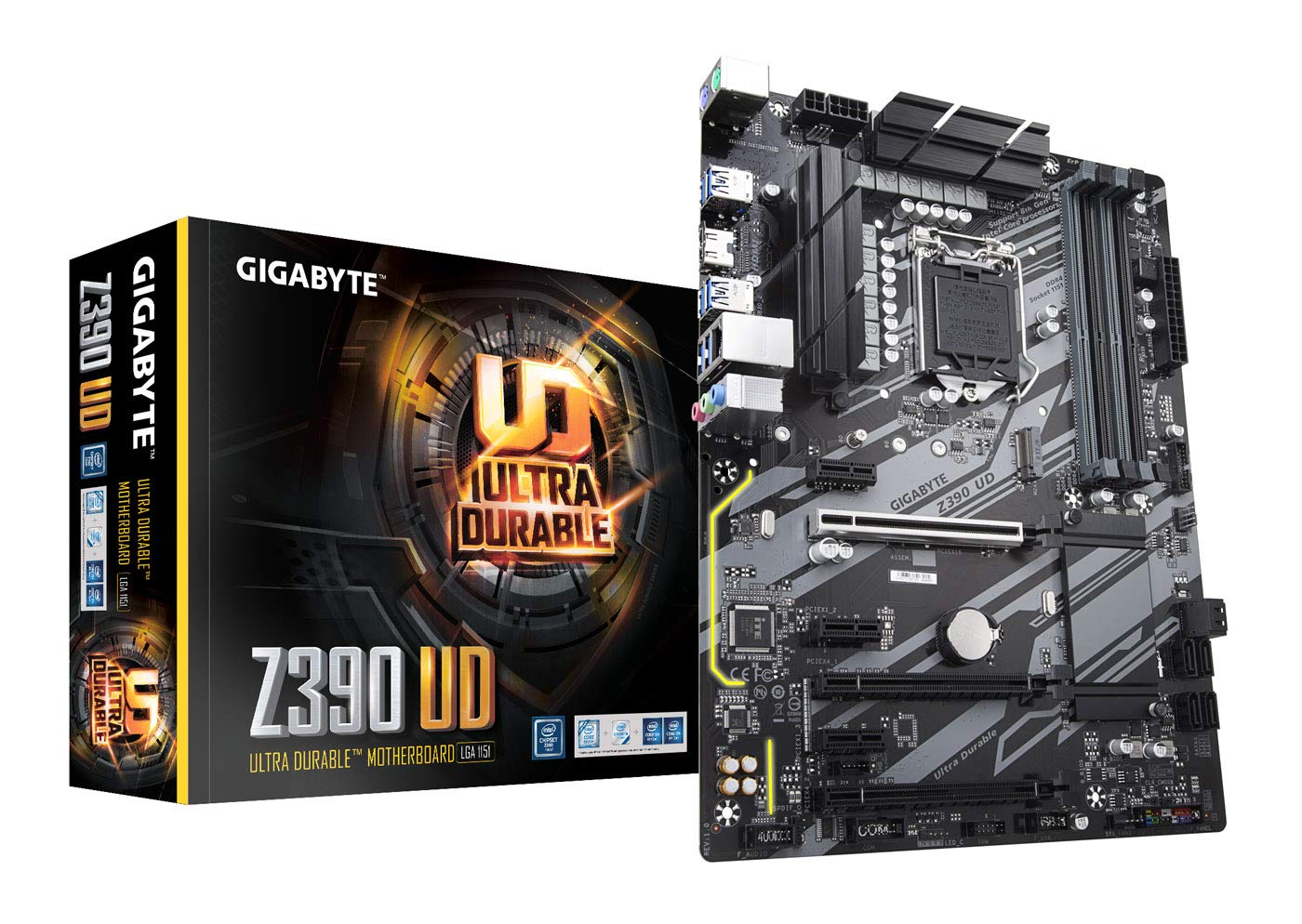
The Gigabyte Z390 UD is a straightforward, no-frills motherboard built around the Intel Z390 chipset, offering native support for 8th and 9th Gen LGA 1151 processors. Its robust VRM design handles overclocking well for mid-range chips like the i5-9600K, while the memory support up to 4266 MHz (OC) ensures fast data access for demanding applications.
Builders appreciate the clean layout with good slot distribution, reinforced PCIe x16 slot for heavy graphics cards, and the subtle yellow LED traces on the back panel I/O that add a touch of style. The Q-Flash feature allows BIOS updates via USB without a CPU installed, a lifesaver when upgrading to a newer 9th Gen chip on an older BIOS revision.
Some users have reported minor defects, including a faulty HDMI port that caused system crashes during boot. The manual is available in English only, and the motherboard lacks built-in Wi-Fi or Bluetooth, so plan for a USB adapter or PCIe card if wireless connectivity is needed.
Why it’s great
- Solid VRM for stable overclocking of 9th Gen CPUs
- Q-Flash allows BIOS updates without a CPU installed
- Good build quality with reinforced PCIe slot
Good to know
- No built-in Wi-Fi or Bluetooth
- Some units may have HDMI port issues
- Manual is English-only; limited documentation
8. MSI Z390-A PRO Motherboard

The MSI Z390-A PRO is designed for enthusiasts who want to push their LGA 1151 CPUs to the limit without overspending on a flagship board. It supports dual-channel DDR4 memory up to 4400 MHz (OC), features Turbo M.2 slots for NVMe SSDs, and includes an extended heatsink design that keeps the VRMs cool during sustained overclocking sessions.
Real-world overclocking reports are impressive. One user achieved a stable 5.0 GHz all-core overclock on an i5-10600K with just 1.29v, seeing Valorant frame rates average over 400 fps. Another pushed an i7-9700KF to 5.0 GHz with memory at 3060 MHz, maintaining temperatures in the mid-60s Celsius on a standard air cooler.
While the board is feature-rich for its price point, some quirks exist. The M.2 screw is tiny and easy to lose, the motherboard emits a loud pop or click on power-on, and the power LED connector spacing may not fit older case wiring. Network drivers are required for Ethernet functionality out of the box, so have a USB drive ready.
Why it’s great
- Excellent overclocking performance with 8+4 pin CPU power
- Memory support up to 4400 MHz (OC) for high-speed kits
- Dual M.2 slots with Turbo interface for fast NVMe storage
Good to know
- Loud pop/click sound on power-on
- Network drivers not pre-installed; requires manual download
- Power LED connector may not fit older cases without adapter
9. ASUS ROG Strix Z390-F Gaming Motherboard

The ASUS ROG Strix Z390-F Gaming motherboard is a premium offering for gamers who demand both aesthetics and performance. Its SupremeFX S1220A audio codec, driven by Japanese capacitors, delivers warm and rich sound that elevates the gaming experience. Aura Sync RGB lighting covers a nearly endless spectrum, synchronizing effects across compatible components and peripherals.
Overclockers praise the board’s AI tuning capabilities, with one user achieving a stable 5.0 GHz overclock on an i9-9900K at just 1.241v with minimal effort. The pre-mounted I/O shield streamlines installation, while the dual M.2 slots support NVMe SSDs for blazing-fast load times. The 5-way Optimization feature intelligently overclocks based on thermal telemetry and smart prediction.
Some buyers reported receiving used units with bent CPU pins, so inspect the package carefully upon delivery and verify the seller’s reputation. The board lacks Wi-Fi and Bluetooth, requiring an expansion card or USB adapter for wireless connectivity. A BIOS update is necessary for 9th Gen CPU compatibility, and the XMP enable setting is buried in a slightly obscure menu location.
Why it’s great
- Premium audio with SupremeFX S1220A codec
- AI overclocking delivers excellent performance with minimal tweaking
- Aura Sync RGB and pre-mounted I/O shield for easy builds
Good to know
- No built-in Wi-Fi or Bluetooth
- Some units may arrive as used or with bent pins
- BIOS update required for 9th Gen CPU support
FAQ
Can I use a 9th Gen Intel CPU in a Z370 motherboard?
Does the Intel Core i5-9400 include integrated graphics?
What is the difference between the Intel Core i9-9900K and the i7-9700K?
What kind of cooler do I need for the Intel Core i9-9900K?
Are LGA 1151 CPUs compatible with LGA 1200 motherboards?
Final Thoughts: The Verdict
For most users, the best lga 1151 cpu winner is the Intel Core i9-9900K because it delivers the highest core count and clock speeds the platform can support, making it ideal for both gaming and productivity on a Z390 board. If you want a budget-friendly upgrade that runs cool and handles light gaming, grab the Intel Core i5-9400. And for professional workloads demanding maximum multi-threaded performance with platform flexibility, nothing beats the Intel Core i7-14700KF for users willing to move to a newer socket.