
Our readers keep the lights on and my morning glass full of iced black tea. As an Amazon Associate, I earn from qualifying purchases.
A wrist-rest that doesn’t collapse after three months. A mouse wheel that doesn’t stutter on a spreadsheet. A keyboard that doesn’t echo through a conference call. For anyone who spends eight or more hours at a desk, the right input gear is the difference between a productive day and a nagging ache that follows you home. The market is flooded with cheap plastic sets that promise comfort but deliver mush, drift, and early failure — a business-ready combo has to earn its place on your desk.
I’m Min — the co-founder and writer behind Gadgets Feed. This guide is the result of weeks of cross-referencing technical specifications, user-verified stress tests, and real-world complaints from heavy typists and IT deployers who need a combo that won’t ghost them after six months.
Whether you are equipping a corporate floor, a home office, or a hybrid desk that shifts between a laptop and a tower, the right business keyboard and mouse combo balances quiet operation, ergonomic support, multi-device flexibility, and a connection you can trust not to drop during a deadline.
How To Choose The Best Business Keyboard And Mouse Combo
A business combo isn’t a consumer convenience purchase — it’s a productivity tool that must survive daily abuse, multi-platform workflows, and often a shared workspace. Three factors separate the gear that earns a permanent spot on the desk from the set that collects dust in a drawer by week three.
Connection Security and Multi-Device Roaming
Standard Bluetooth is convenient but vulnerable to relay attacks and interference in dense office environments. Combos that support Logi Bolt or a dedicated 2.4 GHz receiver with AES encryption offer a locked connection that the IT department can trust. For users who toggle between a work laptop, a personal desktop, and a tablet, look for a combo that remembers at least three paired devices and switches with a dedicated key — not a Bluetooth menu dive.
Ergonomic Architecture and Tension Feedback
Flat keyboards force wrist extension and ulnar deviation over time. A business-grade combo should feature either a wave-profile keywell (like the SABLUTE or Logitech MK650) or a split-frame design with a detachable numpad (like ProtoArc EKM01). The mouse should support your palm arch rather than collapsing it — look for a contoured shape and 2000+ DPI for cursor precision without arm fatigue. Key actuation force matters: membrane scissor-switches around 50g reduce finger strain, while mechanical switches for heavy typists should be tactile but not clicky to avoid disturbing neighbors.
Battery Life That Matches Your Work Rhythm
Nothing kills flow like a dead mouse at 3 PM. Premium combos now offer rechargeable lithium packs rated for weeks of real use (the SABLUTE backlit model packs a 4000mAh cell). For IT departments deploying dozens of units, AA-powered combos with 24-month battery life reduce support tickets. Auto-sleep timing and wake latency are the hidden specs — a combo that takes three seconds to wake every time you return from a meeting will erode your patience faster than any other flaw.
Quick Comparison
On smaller screens, swipe sideways to see the full table.
| Model | Category | Best For | Key Spec | Amazon |
|---|---|---|---|---|
| SABLUTE MA41 | Quiet Membrane | Open-plan offices needing 30dB noise reduction | 10M keystroke durability; 2.4GHz single receiver | Amazon |
| SABLUTE Wave (Backlit) | Rechargeable Wave | Extended sessions with backlight and wrist support | 4000mAh battery; 7-color RGB mouse | Amazon |
| ProtoArc EKM04 | Split Ergonomic | Users wanting a detachable numpad with split frame | Wireless split; 2400 DPI; USB-C rechargeable | Amazon |
| ProtoArc EKM01 Plus | Full-Size Ergo | 3-device Bluetooth/USB switching with memory foam rest | 500mAh battery; 2000 DPI; cushioned palm rest | Amazon |
| Logitech MK650 Biz | Enterprise Secure | IT-managed deployments needing Logi Bolt security | Logi Bolt + BLE; 24mo mouse / 36mo keyboard | Amazon |
| Logitech MK955 Slim | Slim Multi-OS | Larger hands; 3-device workflow across Mac and PC | SmartWheel; 90% reduced click noise | Amazon |
| Razer Pro Type Ultra | Mechanical Premium | Typists who want mechanical feel without click noise | Razer Orange silent switches; 80M click life | Amazon |
In‑Depth Reviews
1. SABLUTE MA41 Wave Keyboard Set
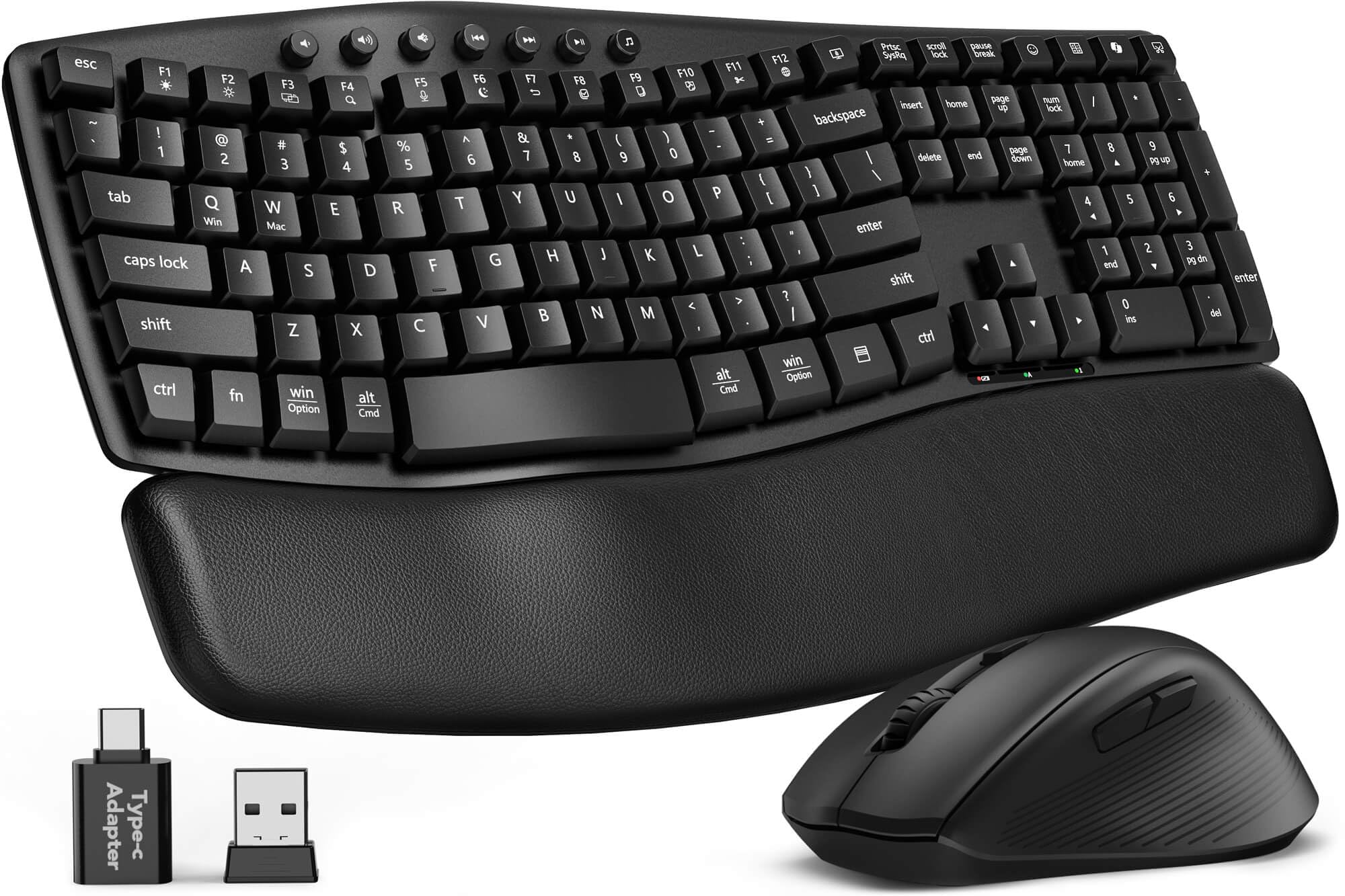
The SABLUTE MA41 hits the ergonomic wave shape that heavy typists crave — a curved keywell that supports natural finger reach — and wraps it in a surprisingly mature build for its tier. The cushioned leather palm rest is the standout feature here: soft enough to reduce contact pressure during eight-hour days, but firm enough not to bottom out. At 30dB, the keystrokes are quieter than a library mouse click, making this the ideal choice for open-plan offices or anyone who records voiceovers while typing.
The 12 productivity shortcuts — including a dedicated AI tool key and calculator — reduce the need to reach for a trackpad during data entry. Laser-etched keys resist fading, and the single 2.4GHz receiver handles both keyboard and mouse, freeing up a USB port. The spill-resistant membrane offers real peace of mind for coffee-desk workers. The wave shape does take a day to acclimate to if you are coming from a flat keyboard, but the payoff in wrist comfort is immediate.
On the downside, the mouse is right-handed only and uses AA batteries (not included), which means you will stock spares unless you switch to rechargeable NiMH cells. The auto-sleep triggers aggressively after only a minute of inactivity, causing a brief wake-up lag on the first keystroke. Despite those quirks, the combination of ergonomic wave, whisper-quiet operation, and a genuinely usable leather rest makes this the most balanced performer for the bulk of business users.
Why it’s great
- 30dB noise level suits shared workspaces and late-night sessions
- Leather palm rest reduces wrist pressure without adding bulk
- 12 one-touch shortcuts speed up repetitive workflows
Good to know
- Auto-sleep engages too quickly, causing a short wake-up delay
- Included batteries not provided; mouse is right-hand sculpted only
2. SABLUTE Ergonomic Wave with Backlit Keyboard

SABLUTE builds on the same wave-profile chassis but upgrades the power system to a 4000mAh rechargeable battery — roughly double the capacity of typical backlit keyboards. In real-world testing described by users, this translates to weeks of daily use between charges even with the backlight on for several hours each day. The faux lambskin leather palm rest feels smoother than the MA41’s version and resists sweat absorption, a critical detail for humid environments or long typing marathons.
The RGB mouse adds a playful element to an otherwise professional set: six fixed colors and five cycling modes, plus three DPI steps (800/1200/1600). More importantly, the mouse packs a 700mAh battery with auto-sleep that doesn’t punish you with an aggressive wake lag. The keyboard’s nine shortcut keys include volume, media, and calculator controls, though the placement of the lock key near the top row can catch experienced typists off guard during fast data entry.
Users who migrated from the classic Logitech K350 wave report near-identical keywell geometry, which means zero adaptation time for long-time wave users. The backlight offers seven color options from cool white to bold purple, letting you match mood or visibility. The only consistent complaint is that the left side of the palm rest feels slightly undersized for larger hands, and the aggressive auto-sleep on the keyboard itself creates a half-second delay on wake that some users find annoying during rapid workflow switching.
Why it’s great
- 4000mAh battery lasts weeks between charges with backlight active
- Wave geometry mirrors the beloved Logitech K350 layout
- RGB mouse with 3 adjustable DPI steps suits varied surfaces
Good to know
- Auto-sleep on keyboard causes brief first-stroke delay on wake
- Left palm rest area is slightly narrow for large hands
3. ProtoArc EKM04 Split Ergonomic Combo
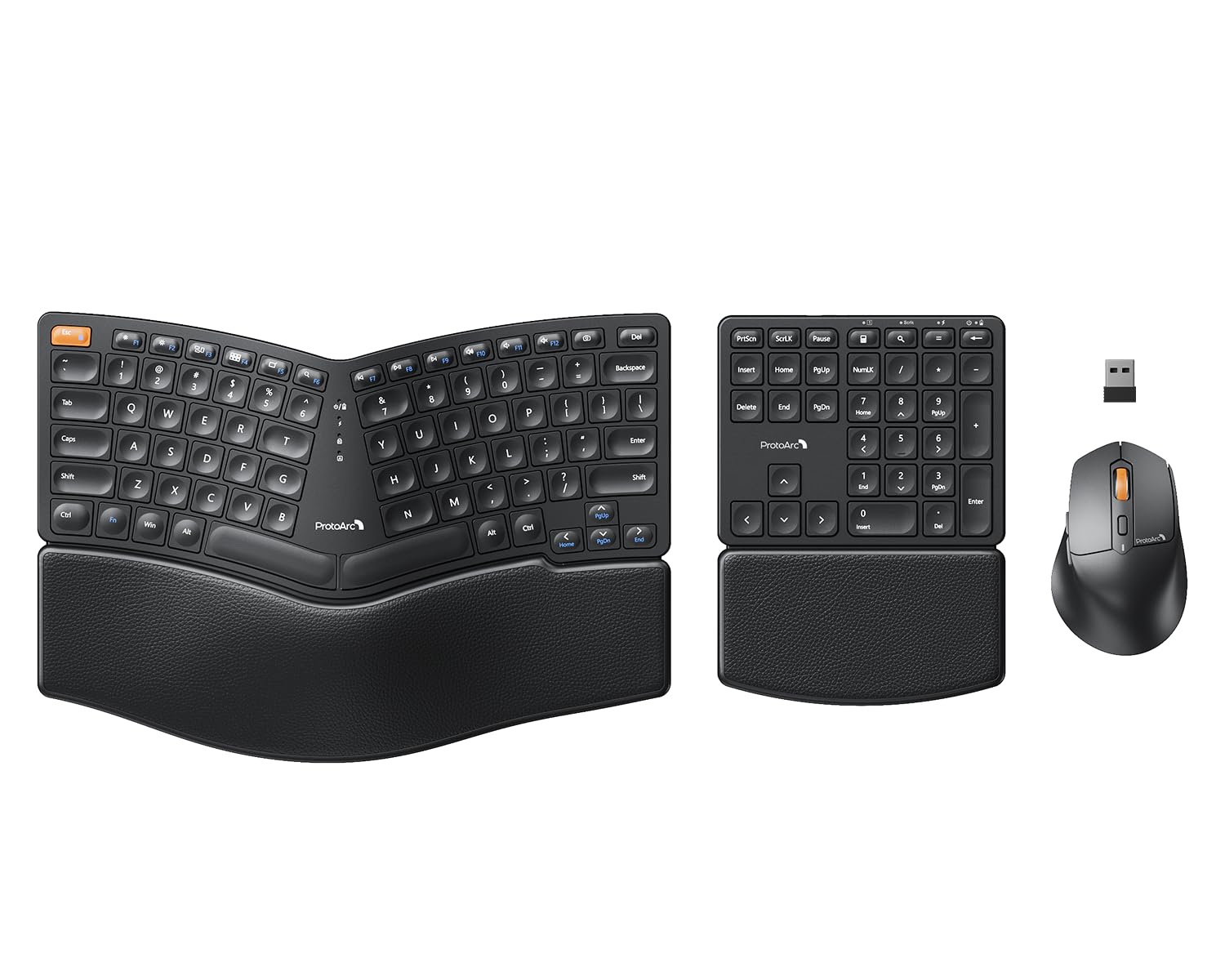
The ProtoArc EKM04 takes a different approach from the wave-keyboard camp by splitting the keyset into two angled halves with a separate numeric keypad. This design forces your shoulders into a relaxed, open position — the same ergonomic principle behind high-end split keyboards costing three times as much. The scissor-switch keys are scooped to cradle your fingertips, and the 114-key layout provides a full function row and dedicated navigation cluster that touch typists will appreciate immediately. The hard palm rest is curved but not cushioned; users who prefer soft support may want a separate gel pad.
Connectivity is strictly 2.4 GHz USB — no Bluetooth, and no macOS compatibility — which simplifies setup but limits device flexibility. The mouse features 2400 DPI with forward/back buttons, though some users report inconsistent movement speed and a sleep mode that requires a button press rather than mere motion to wake. The keyboard and numpad have two adjustable tilt legs only at the rear, lifting the back of the board; you cannot elevate the front edge, which may frustrate users who prefer a negative tilt.
On the plus side, the split format measurably reduced wrist pronation in user reports, with several people noting that chronic forearm pain faded within a week of switching from a standard keyboard. The USB-C rechargeable battery delivers roughly 250 hours of standby, though actual continuous typing time is closer to 10–12 hours per charge. The mouse shape is sculpted specifically for right hands, and the forward/back buttons are placed above the thumb — a position that can cause accidental presses during fast editing work.
Why it’s great
- Split keyset opens shoulders and reduces forearm strain
- Detachable numpad frees desk space when not number-crunching
- Scooped scissor switches provide excellent fingertip feedback
Good to know
- Windows-only via 2.4 GHz USB; no Bluetooth or macOS support
- Mouse wakes only by button press, not movement
4. Logitech Signature MK650 Combo for Business

The Logitech MK650 is the combo that IT departments specify when wireless security cannot be an afterthought. Its Logi Bolt receiver operates in Secure Connections Only Mode with Bluetooth Low Energy Security Mode 1, Level 4 — essentially AES-128 encryption that prevents over-the-air eavesdropping and unauthorized pairing. The keyboard uses two AA batteries rated for up to 36 months, the mouse one AA for up to 24 months; in a deployment of 50 units, that translates to roughly one battery replacement per seat per year. The integrated palm rest is a single molded piece — not cushioned, but contoured enough to provide baseline support without collecting debris.
The SmartWheel on the mouse switches between ratchet scrolling for precise line-by-line navigation and free-spin for long documents — a feature that spreadsheet workers find indispensable. Key action is light and quiet, with a membrane scissor mechanism that requires about 50g of force, reducing finger fatigue during heavy text entry. The keyboard includes a full function row with media and productivity shortcuts, though the screen print key is awkwardly placed next to the lock, requiring a function-key toggle that trips up muscle memory.
Two connection options (Logi Bolt USB receiver or standard BLE) give flexibility, but the Logi Bolt dongle is required for the encrypted mode — standard Bluetooth does not provide the same security layer. Users with larger hands note that the keyboard is slightly compact compared to full-width models, which can feel cramped for wide-shoulder typists. The lack of backlighting is a deliberate trade-off for battery life, but makes the low-contrast charcoal-on-charcoal keycaps hard to read in dim lighting.
Why it’s great
- Logi Bolt with AES-128 encryption meets enterprise IT standards
- SmartWheel free-spin mode speeds up long document scrolling
- 36-month keyboard battery life reduces support overhead
Good to know
- No backlighting; charcoal keycaps are hard to read in low light
- Compact layout may feel narrow for broad-shouldered typists
5. ProtoArc EKM01 Plus Full-Size Wireless

The EKM01 Plus is an evolution of ProtoArc’s split-frame concept into a full-size layout that includes a cushioned memory-foam palm rest — a meaningful upgrade from the hard plastic rest on the EKM04. The split keyframe curves the keysets into a shallow V, reducing ulnar deviation without the extreme angle that some ergonomic boards require. The scissor-switch keys are quiet and responsive, with a travel depth that feels closer to a premium laptop keyboard than a mushy membrane board. Bluetooth and USB receiver connectivity are both supported, and you can pair up to three devices with a dedicated switch key — no software needed for basic switching.
The contoured mouse includes a thumb rest and palm support, which relieves tension for users who grip their mouse during long spreadsheet sessions. The 2000 DPI sensor tracks accurately on most surfaces, and the forward/back buttons are placed high enough to avoid accidental actuation during standard pointer movement. Battery life is rated at roughly 250 hours of standby after a 2-hour USB-C charge, though heavy continuous use will require weekly top-ups. Auto-sleep kicks in after 30 minutes of inactivity, and wake latency is negligible.
The keyboard is not backlit, which is a notable omission at this price point, and the split design requires a short adaptation period — some users report accidental key presses on the first day as their fingers adjust to the curved columns. The overall footprint is large: 20.75 inches wide and 11 inches deep, so measure your desk before ordering. The memory-foam wrist rest is non-removable, which makes cleaning more difficult than a detachable pad. A small number of users report a squeaky right space bar after extended use, though this appears to be a QC variance rather than a design flaw.
Why it’s great
- Memory-foam cushioned palm rest provides genuine wrist relief
- Seamless 3-device switching via Bluetooth or USB receiver
- Quiet scissor-switch keys with satisfying tactile feedback
Good to know
- No backlight; large footprint requires generous desk space
- Right space bar may develop a squeak on some units
6. Logitech MK955 Signature Slim Combo

The MK955 Slim Combo is Logitech’s answer to the professional who carries a laptop between desks and needs one input set that works seamlessly across their desktop, work laptop, and tablet. The K950 keyboard uses laptop-style scissor switches with very short travel, producing a typing sound that is quieter than a MacBook keyboard but slightly louder than the membrane wave boards. The full-size layout includes a numeric keypad and a dedicated row of customizable keys that can be programmed via the Logi Options+ app — macros, app launchers, or media controls, all accessible without leaving your primary workspace.
The M750L mouse is designed for larger hands, with an elongated body that supports a full palm grip rather than forcing a claw. The SmartWheel is the same mechanism found on Logitech’s MX Master series: it toggles between click-ratchet and free-spin modes, making quick work of long code files or web pages. SilentTouch technology reduces click noise by 90%, which is noticeable in a quiet home office — the clicks sound more like a soft tap than a mechanical snap. The mouse supports multi-device pairing via Bluetooth or Logi Bolt, though the Logi Bolt receiver must be purchased separately if you want encryption.
One of the best features is the ability to switch between three paired devices with a single tap on the keyboard — no dongle swapping or Bluetooth reconnections. The build quality is strong: the keyboard uses at least 48% post-consumer recycled plastic, and the mouse 25%, without feeling cheap. The downside is battery: both keyboard and mouse use standard AA batteries rather than rechargeable packs, and there is no low-battery indicator on the keyboard. The mouse battery door is also the receiver storage slot, which is convenient until you lose the door.
Why it’s great
- Instant 3-device switching without software or dongle swapping
- M750L mouse fits large hands with a full palm grip
- SmartWheel free-spin mode accelerates long-document scanning
Good to know
- AA batteries instead of rechargeable; no low-battery indicator
- Logi Bolt secure dongle sold separately
7. Razer Pro Type Ultra + Humanscale Mouse Bundle

This bundle pairs the Razer Pro Type Ultra mechanical keyboard with a Humanscale wireless mouse and a medium-sized Glide mouse pad — a combination that targets the premium end of the business market. The keyboard uses Razer Orange mechanical switches with integrated sound-dampening foam, delivering a tactile bump without the click that disturbs neighbors. The white soft-touch coating and fingerprint-resistant keycaps give it a distinctive look that stands out on a black-out corporate desk. The included cushioned wrist rest attaches magnetically and aligns perfectly with the keyboard’s front edge, providing continuous support across the full width.
The mechanical nature comes with trade-offs. The linear-ish Orange switches have a light actuation force (45g), which some users find too sensitive — accidental key presses are common when resting fingers on home row. The function keys default to media controls; toggling them to standard F-keys requires a firmware tweak in Razer Synapse, and Synapse itself has been criticized for bloatware behavior. The white keycaps show staining over time, though they are removable and washable. The backlight is cool white with a blue tint that looks muddy against the yellow switch housings underneath.
The Humanscale mouse is an ergonomic shape with a 5G optical sensor and multi-host connectivity for up to four devices. It ambidextrous and built for all-day comfort, though its high price reflects the design pedigree rather than raw specs. The Glide mouse pad adds a 3mm thick high-density foam base and a micro-weave cloth surface that works well with any sensor. Overall, this bundle is for the buyer who wants a mechanical typing experience in a work setting and is willing to manage software quirks and keycap maintenance for the pleasure of a tactile, responsive keyboard that will outlast a membrane board several times over.
Why it’s great
- Silent mechanical switches provide tactile feedback without noise
- Magnetic cushioned wrist rest aligns perfectly with keyboard
- 80 million keystroke rating outlasts membrane combos by years
Good to know
- Keys are sensitive — accidental presses common for heavy-handed typists
- Software (Synapse) required to revert function keys to standard
FAQ
What does Logi Bolt’s Secure Connections Only Mode actually protect against?
Is a split-frame keyboard worth the adaptation period for a busy professional?
How does backlighting affect battery life in a business keyboard?
Final Thoughts: The Verdict
For most users, the business keyboard and mouse combo winner is the SABLUTE MA41 because it combines a genuine wave-ergonomic shape, 30dB noise floor, and a usable leather palm rest at a price that makes it easy to deploy across an entire team. If you need encrypted wireless for an enterprise environment, grab the Logitech MK650. And for the ultimate split-frame ergonomics with a detachable numpad, nothing beats the ProtoArc EKM04.