
Our readers keep the lights on and my morning glass full of iced black tea. As an Amazon Associate, I earn from qualifying purchases.
A mushy keyboard and a laggy cursor are productivity killers that no desk setup should tolerate. You need a combo that delivers crisp, reliable input without draining your wallet or frustrating you with connectivity drops. The market is flooded with options, but separating the lasting performers from the instant regrets comes down to understanding a handful of key specs.
I’m Min — the co-founder and writer behind Gadgets Feed. I’ve combed through hundreds of user reports and spec sheets for these budget peripherals to find the combos that actually deliver consistent keystrokes and precise tracking for the long haul.
Whether you are outfitting a home office, a dorm room, or a secondary workstation, this guide to the best budget keyboard and mouse combos cuts through the noise to put only the most reliable options in front of you.
How To Choose The Best Budget Keyboard And Mouse
When you are shopping on a budget, the temptation is to grab the cheapest set and call it a day. But a bad combo will cost you more in frustration and early replacement than a slightly better one. Focus on three pillars: connectivity stability, key feel, and mouse sensor quality. Ignore flashy marketing and look at measurable specs like DPI range, battery requirements, and numeric keypad presence.
Wired vs. Wireless: Stability or Convenience?
Wired combos offer zero-lag input, no driver installation, and infinite uptime. They are the safest bet for desktop users who don’t move their peripherals around. Wireless sets add desk clutter freedom but require batteries or charging. A 2.4GHz wireless connection via a USB-A receiver is much more reliable than budget Bluetooth for sub- combos, so always prioritize a dedicated dongle if you choose wireless.
Key Mechanism and Comfort
Almost every budget combo uses a membrane or scissor-switch mechanism. Membrane keyboards are quiet and cheap but can feel mushy over time. Scissor-switch keys, typical on slim laptop-style boards, offer a crisper, more precise travel and better durability. A built-in palm rest also reduces wrist fatigue during long sessions. For the mouse, look for an ambidextrous or right-handed ergonomic shape — a flat, symmetrical mouse will tire your hand faster.
Mouse DPI and Sensor Quality
DPI (dots per inch) measures how sensitive the mouse is. For general office work and browsing, 800 to 1600 DPI is sufficient. Some budget mice go up to 2400 or even 7200 DPI, which is useful if you have a high-resolution monitor or need faster cursor movement. Optical sensors work well on most surfaces without a mouse pad, while laser sensors sometimes emit a high-pitched whine that can be annoying. Check user feedback about the sensor before buying.
Quick Comparison
On smaller screens, swipe sideways to see the full table.
| Model | Category | Best For | Key Spec | Amazon |
|---|---|---|---|---|
| Redragon S101-3 PRO | Gaming/Work Combo | Custom RGB lighting and programmable macros | 800-7200 DPI mouse | $39.99Amazon |
| MEETION Ergonomic Wave Keys | Ergonomic | Reducing finger and wrist strain | Wave-shaped key layout | $31.34$32.99PrimeAmazon |
| Logitech MK345 | Wireless Workhorse | Long battery life and brand reliability | 3-year keyboard battery life | from $29.99Amazon |
| SABLUTE KM23D | Quiet Productivity | Silent typing and built-in phone holder | 95% noise reduction | $31.99$33.99PrimeAmazon |
| Macally Slimkeycombo | Mac/Compact | Saving desk space and Mac compatibility | 78-key scissor-switch layout | $39.99Amazon |
| HP Pavilion 200 | Office Standard | Reliable wired setup with hotkeys | 1600 DPI wired mouse | $31.99Amazon |
| EDJO Full-Sized Ergonomic | Entry-Level Wired | Simple plug-and-play for any PC | 104-key full layout | $20.99Amazon |
In‑Depth Reviews
1. Redragon S101-3 PRO Gaming Keyboard and Mouse

The Redragon S101-3 PRO punches far above its price point by delivering a fully wired gaming-grade combo with full RGB backlighting and dedicated macro keys. The membrane keyboard uses soft-touch keys that remain quiet even during rapid typing, and the included ergonomic wrist rest helps prevent fatigue. With 6 backlight modes on the keyboard and 10 on the mouse, it offers extensive personalization options rare in this category.
The mouse features an adjustable DPI range of 800 to 7200, making it surprisingly capable for both general browsing and gaming. The bundled software lets you record and store macro commands directly to the hardware, so your settings persist across reboots. Users consistently praise the build quality and solid key feel, noting it outlasts cheaper alternatives without key sticking or paint wear over months of daily use.
On the downside, the mouse uses a wired connection and its lighting does not sync perfectly with the keyboard. A few users mention that the mouse sensor does not remember the DPI setting after the computer restarts. For the price, however, this is a feature-packed set that integrates seamlessly with Windows 10 and 11 without driver headaches.
Why it’s great
- Wide 7200 DPI range covers both office and gaming needs
- Dedicated macro keys and customizable RGB software
- Quiet membrane keys with anti-ghosting for accurate input
Good to know
- Mouse DPI setting does not always survive a system restart
- RGB lighting on mouse is monochrome red, not full RGB
2. MEETION Ergonomic Keyboard and Mouse Wireless Combo
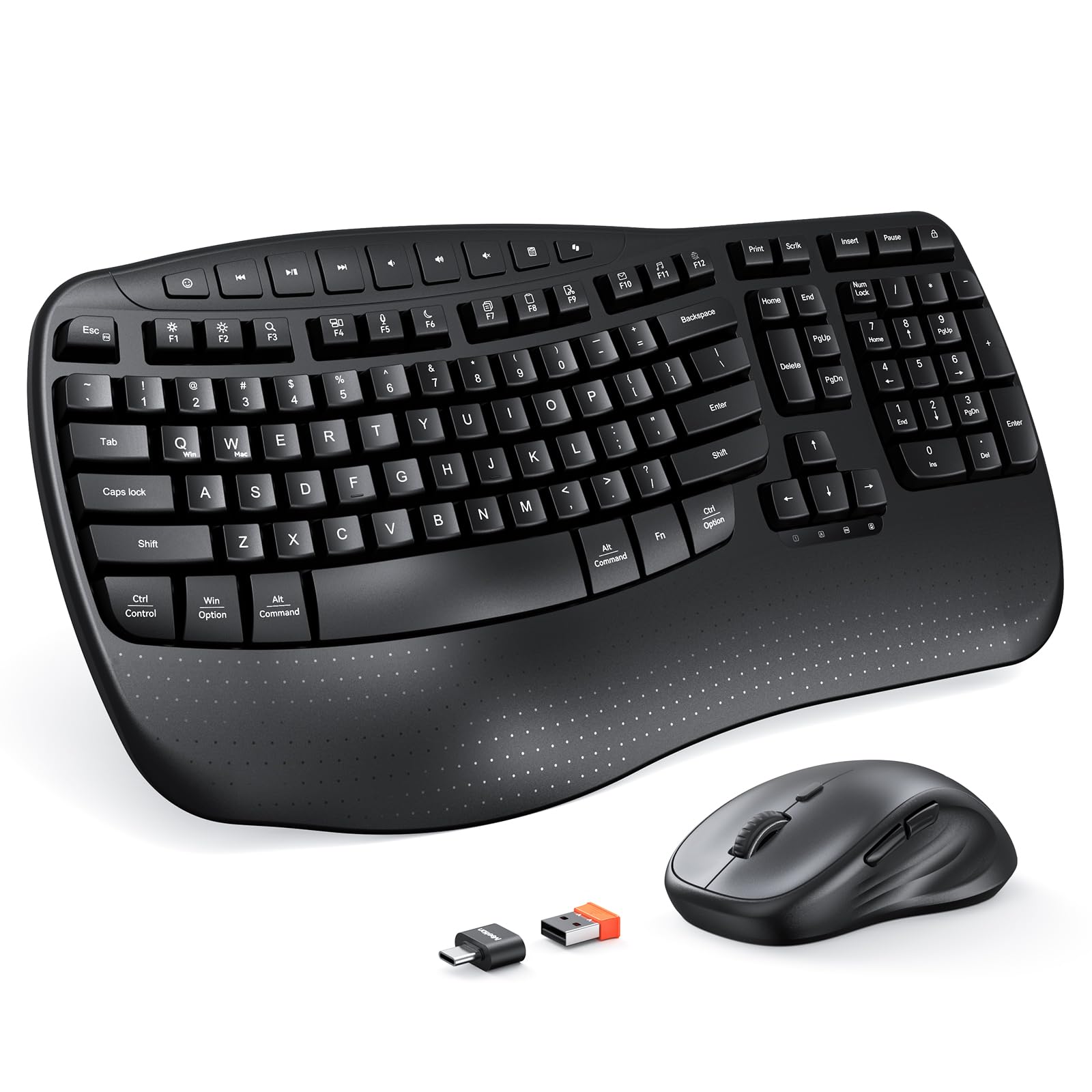
The MEETION combo prioritizes hand health with its sculpted wave key layout and a firm, hard-plastic wrist rest that offers stable support. The keyboard uses a 2.4GHz wireless connection that reaches up to 33 feet, and the single USB-A receiver handles both peripherals without Bluetooth pairing headaches. The wave-shaped key caps align with the natural curve of your fingers, reducing the reach and strain during extended typing sessions.
The mouse provides four adjustable DPI levels, though it is designed for right-handed users only. Battery life is respectable — the keyboard runs on two AAA batteries while the mouse uses one AA battery, and neither is rechargeable. Users report that the keystrokes are pleasantly quiet and have a smooth, consistent feel, making it a solid upgrade for those dealing with wrist discomfort from standard flat keyboards.
Some users have reported intermittent keyboard oversensitivity that occasionally produces double letters, or a need to power-cycle the device when it becomes unresponsive. The mouse scroll wheel can also develop a slightly sandy sound over time. Despite these quirks, the ergonomic design and silent operation make it a standout choice for comfort-focused budget shoppers.
Why it’s great
- Wave-shaped keys and wrist rest reduce finger and wrist strain
- Very quiet keystrokes suitable for shared spaces
- Stable 2.4GHz wireless with an included USB-C adapter
Good to know
- Keyboard can intermittently produce double letters
- Mouse is right-handed only; not ambidextrous
3. Logitech MK345 Wireless Keyboard and Mouse Combo

Logitech’s MK345 is a benchmark for reliability in the budget wireless category. The full-size keyboard includes a comfortable palm rest and a spill-resistant design, while the contoured right-handed mouse provides all-day comfort with smooth, precise tracking. The 2.4GHz wireless connection maintains a stable link up to 10 meters, and the receiver is tiny enough to leave plugged into your laptop without worrying about damage.
Battery performance is the standout metric here: Logitech rates the keyboard at up to three years and the mouse at 18 months from the included Duracell batteries. The keys are quiet and low-profile, with a familiar layout that includes easy-access media keys. Users consistently report that the setup is truly plug-and-play across Windows, macOS, and ChromeOS with zero driver configuration.
The mouse is on the smaller side, which may not suit users with larger hands. Some users also note that after a battery swap, the keyboard sometimes requires a PC restart to re-establish the connection. The function row keys double as media shortcuts, but the icons on the keys are not always intuitive. Still, the combination of brand trust, long battery life, and reliable wireless makes the MK345 a safe choice for anyone who wants a set that simply works.
Why it’s great
- Exceptional 3-year keyboard and 18-month mouse battery life
- Spill-resistant keyboard with a comfortable palm rest
- Flawless 2.4GHz wireless with a reliable brand reputation
Good to know
- Mouse is on the smaller side, less ideal for large hands
- Function row icons are not always clear at a glance
4. SABLUTE KM23D Wireless Keyboard and Mouse Combo
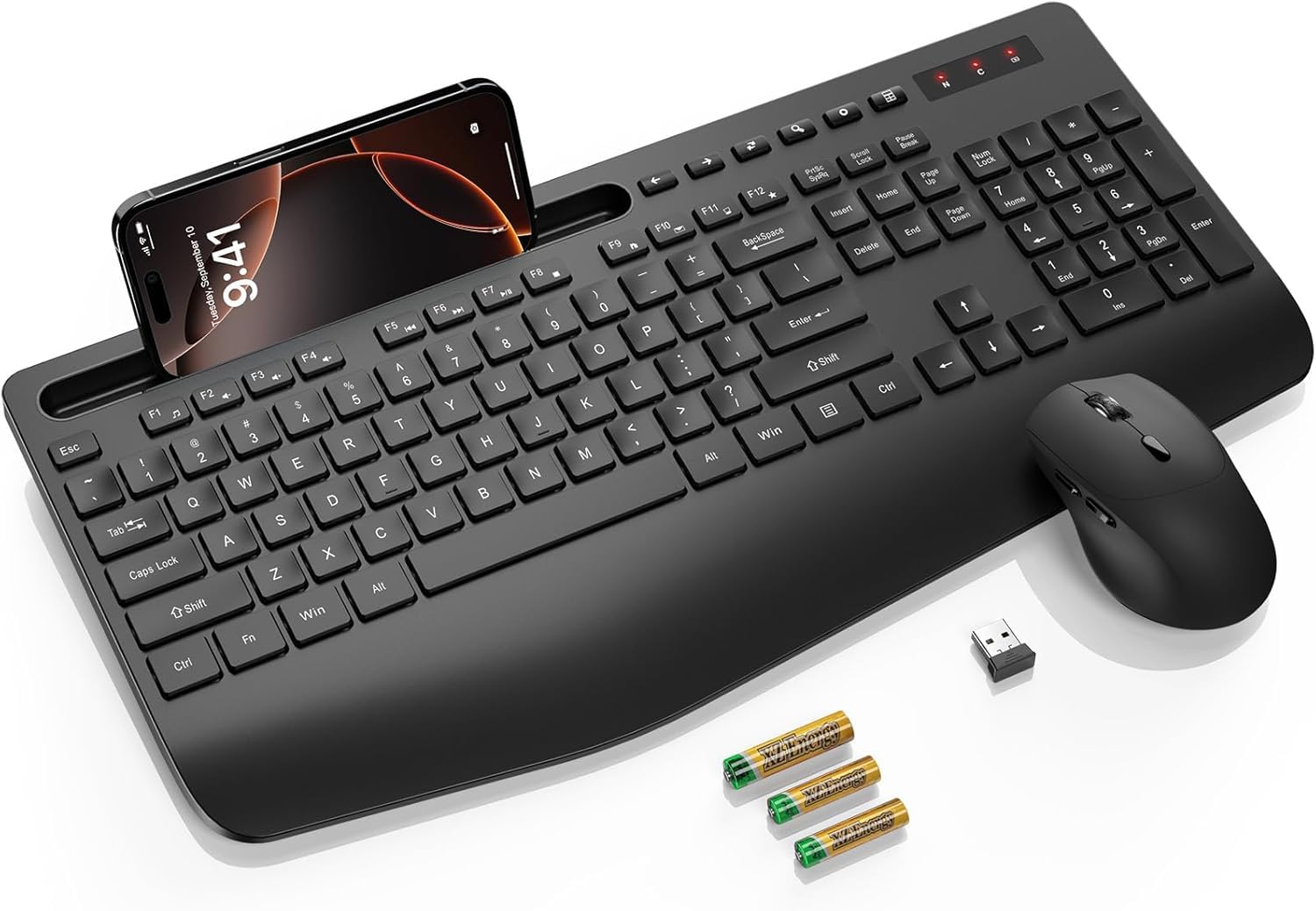
The SABLUTE KM23D distinguishes itself with a built-in phone and tablet holder at the top of the keyboard, capable of accommodating devices up to 11.9 inches. This feature is genuinely useful for multitasking at a desk, letting you keep your phone visible while typing. The keyboard also includes a 2.8-inch wide wrist rest and a 10-degree tilt angle to promote a more natural typing posture.
Noise reduction is a primary selling point: the soft membrane keys are rated to reduce typing noise by 95%, and the mouse uses silent micro-motion technology for virtually inaudible clicks. The 2.4GHz wireless connection is stable up to 33 feet and is powered by the included AAA and AA batteries. The mouse offers three DPI levels (800, 1200, 1600) and has forward and backward navigation buttons for easier web browsing.
A few users have reported that the keyboard can be unresponsive out of the box, requiring a power cycle or a short wait before it connects. The power switch is also recessed and somewhat difficult to find and toggle. Despite these minor issues, the large keycaps with clear lettering and the integrated phone holder make this a unique and functional option for students and office workers who value organization.
Why it’s great
- Built-in phone/tablet holder for efficient multitasking
- Very quiet keystrokes and silent mouse clicks
- Large, readable keycaps with a comfortable wrist rest
Good to know
- Keyboard may be unresponsive initially; power cycle required
- Power switch is tiny and hard to locate
5. Macally USB Wired Keyboard and Mouse Combo

The Macally Slimkeycombo is a space-saving wired set that works seamlessly with both Mac and PC systems. The 78-key layout omits the numeric keypad, which makes the keyboard significantly smaller and easier to fit on cramped desks. The scissor-switch mechanism provides a crisp, stable key feel that resembles a laptop keyboard, and the low profile helps maintain a clean, minimalist desk aesthetic.
The optical mouse uses silent click technology to reduce noise by 90% and offers four DPI settings (800, 1200, 1600, 2400). Its ambidextrous design makes it suitable for left-handed users, and the included 13 shortcut keys offer one-touch access to common commands. Users praise the plug-and-play simplicity — both devices worked immediately without drivers on both macOS and Windows.
The mouse has a slightly smaller footprint than full-size alternatives, which some users with larger hands find cramped. The keyboard lacks a palm rest, so extended typing sessions may require an additional wrist support. Overall, this combo excels for users who prioritize portability, Mac compatibility, and a clutter-free wired connection over ergonomic padding.
Why it’s great
- Compact scissor-switch keyboard saves significant desk space
- Compatible with both Mac and PC without drivers
- Silent mouse clicks and four adjustable DPI levels
Good to know
- No wrist rest or palm support on the keyboard
- Mouse is smaller, possibly cramped for large hands
6. HP Pavilion Wired Keyboard and Mouse 200

The HP Pavilion 200 is a no-nonsense wired combo designed for users who want a reliable daily driver without a single software complication. The full-size keyboard includes a numeric keypad, low-profile chiclet keys for quiet typing, and a built-in palm rest that makes long sessions more comfortable. The top row of F1-F12 keys double as 12 shortcut functions for volume, media, and email, while an additional 12 hotkeys speed up cut, copy, paste, and other common tasks.
The wired mouse offers a 1600 DPI optical sensor with adjustable cursor speed for precise navigation. Its ergonomic contours provide a comfortable grip for all-day use. Users consistently praise the quality of the keyboard for its durability and the immediate response of the wired connection, noting it outperforms wireless sets that can suffer from interference or lag. The package is plug-and-play with any Windows PC via a USB-A port.
The mouse has a noticeable bottom flange that some users report causes it to slide unevenly and feel less precise. The keyboard’s keys are not backlit, which can make typing in dim conditions more difficult. If a wired connection and a full feature set of productivity hotkeys are your priorities, this is one of the most dependable combos in its tier.
Why it’s great
- Durable wired setup with zero lag and no driver setup
- 12 dedicated hotkeys for productivity shortcuts
- Full-size keyboard with palm rest and quiet chiclet keys
Good to know
- Mouse has a bottom flange that can feel unstable
- Keyboard lacks any backlighting for low-light use
7. EDJO Wired Keyboard and Mouse Combo

The EDJO combo is the most straightforward entry-level wired set on this list. It offers a standard 104-key full-size layout with a palm rest and foldable stand, plus 12 multimedia shortcut keys for quick access to music, volume, and email. The wired connection ensures a stable input signal with no battery anxiety, and the symmetrical mouse is designed to work on smooth surfaces without a mouse pad.
The keyboard features anti-slip pads on the bottom to keep it steady during use, and the optical mouse is ambidextrous, making it suitable for left-handed users. Users report that the keyboard feels comfortable for extended use, with quiet and responsive keys that compare well against more expensive options. The setup is truly plug-and-play across Windows, macOS, and ChromeOS without any driver installation.
Several users report that the mouse emits a high-pitched noise from the laser sensor, and its left-click button can develop a squeak over time. The keycaps have been noted as having letters that could be bolder for better visibility. For the absolute lowest cost of entry, it provides a fully functional wired set, but the mouse quality may push some users to consider one of the other options for a more complete experience.
Why it’s great
- Lowest-cost entry point with a full-size wired layout
- Quiet, responsive keys with an ergonomic wrist rest
- 12 multimedia shortcuts for simple productivity gains
Good to know
- Mouse may produce a high-pitched laser noise
- Mouse clicks can become squeaky with extended use
FAQ
Is a wired or wireless budget combo more reliable for gaming?
How important is the numeric keypad on a budget keyboard and mouse set?
Will a budget combo work with macOS, ChromeOS, and Linux?
Final Thoughts: The Verdict
For most users, the best budget keyboard and mouse winner is the Redragon S101-3 PRO because it combines a quiet, durable keyboard with a high-DPI mouse and full RGB customization at a very competitive price. If you want exceptional ergonomics for wrist health, grab the MEETION Wave Keys. And for a brand-name wireless set with incredible battery life, nothing beats the Logitech MK345.
Product prices and availability are accurate as of the date/time indicated and are subject to change. Any price and availability information displayed on Amazon at the time of purchase will apply to the purchase of this product. As an Amazon Associate I earn from qualifying purchases.
CERTAIN CONTENT THAT APPEARS ON THIS SITE COMES FROM AMAZON. THIS CONTENT IS PROVIDED "AS IS" AND IS SUBJECT TO CHANGE OR REMOVAL AT ANY TIME.
Amazon and the Amazon logo are trademarks of Amazon.com, Inc. or its affiliates.