
Your tablet is only as versatile as the accessories you pair with it. A great keyboard case turns a media device into a mobile workstation, while a sturdy floor stand transforms a couch companion into a hands-free presentation tool. The wrong choice means cramped typing angles, wobbly viewing, or a case that doesn’t fit your specific model.
I’m Min — the co-founder and writer behind Gadgets Feed. I’ve spent hundreds of hours analyzing the battery capacities, Bluetooth reliability, hinge durability, and material quality that separate a truly useful tablet accessory from a frustrating paperweight. This guide is the result of that deep spec-level research.
Whether you need a pro-grade typing setup or a rock-solid viewing mount, this guide will help you find the best tablet accessories for your specific screen size and workflow.
How To Choose The Best Tablet Accessories
Tablet accessories fall into two primary camps: keyboard cases that add laptop functionality, and stands that provide ergonomic viewing. The right choice hinges on your tablet model, your daily use case, and how much portability you’re willing to trade for stability.
Model Compatibility Is Everything
A keyboard case designed for a specific iPad generation will not fit a newer model, even if the screen size appears identical. Always check the “Compatible Devices” list and physically compare your tablet’s dimensions against the case’s stated range. Universal cases use adjustable corner straps, which work across many brands but may block side buttons or ports.
Keyboard Connection & Battery Type
Bluetooth keyboards offer flexibility across devices but require periodic charging, typically lasting one to two weeks on a single charge via USB-C. Models using Apple’s Smart Connector draw power directly from the tablet, eliminating charging worries entirely. For floor stands, no charging is needed, but the clamp’s maximum open width must accommodate your device with a case attached.
Build Stability for Stands
A floor stand’s base weight is the single most critical spec for preventing tip-overs. A base under 8 pounds risks instability when the arm is fully extended with a large iPad Pro or Galaxy Tab. Look for aluminum or steel construction with a weighted base and a clamp that rotates 360 degrees for portrait and landscape use.
Quick Comparison
On smaller screens, swipe sideways to see the full table.
| Model | Category | Best For | Key Spec | Amazon |
|---|---|---|---|---|
| Logitech Combo Touch | Premium Case | iPad Air productivity | Apple Smart Connector | Amazon |
| BluuSuuk Floor Stand | Floor Stand | Hands-free bedside use | 11 lb weighted base | Amazon |
| typecase Flexbook | iPad Case | Typing on the go | 360° rotating hinge | Amazon |
| ROADOM Tablet Stand | Desk Stand | Ergonomic desk viewing | 180° tiltable clamp | Amazon |
| FINTIE Keyboard Case | Samsung Case | Samsung A-series typing | Magnetic detachable keyboard | Amazon |
| XCHYTECHER Universal Case | Universal Case | Budget backlit typing | 7-color rainbow backlight | Amazon |
| MoKo Universal Case | Universal Case | Wide device compatibility | Removable Bluetooth keyboard | Amazon |
In‑Depth Reviews
1. Logitech Combo Touch iPad Air 11-inch

The Logitech Combo Touch is the closest you can get to a laptop experience without leaving iPadOS. It connects via Apple’s Smart Connector, so there’s zero Bluetooth pairing and no battery to recharge — it draws power directly from the tablet. The detachable backlit keyboard and flexible kickstand let you switch between typing, sketching, and reading without removing the protective shell.
Logitech integrated the largest Multi-Touch trackpad available for this form factor, supporting gestures like swiping between apps and double-tap to zoom. The keys are well-spaced with a satisfying scissor mechanism and precise backlighting adjustable to three brightness levels. It’s engineered for iPad Air 11-inch M2, M3, M4, and 5th gen models only, so compatibility is tight but the fit is impeccable.
At this tier, build quality is outstanding — the kickstand holds firm on a lap desk and the magnetic attachment to the keyboard is secure. Some users report slight side looseness after extended use, but overall durability ranks far above generic universal cases. If you own an iPad Air and need a true laptop replacement, this is the standard.
Why it’s great
- Smart Connector means no charging or Bluetooth fuss
- Full protection in both tablet and laptop modes without removing the case
- Multi-Touch trackpad supports precise cursor control and gestures
Good to know
- Requires more lap space than a traditional folio case due to kickstand depth
- Some units have reported side material separation after months of use
2. BluuSuuk Tablet Floor Stand

The BluuSuuk floor stand solves the ergonomic problem of looking down at a tablet for hours. Its 11-pound weighted base prevents tipping even when the arm is fully extended with a 13-inch iPad Pro, and the upgraded clamp grips devices up to 12.9 inches securely. The height range from 13.4 to 58.7 inches means it works equally well beside a bed, next to a treadmill, or at a standing desk.
Assembly is straightforward with the included Allen wrench, and the metal construction gives it a premium feel that doesn’t wobble. The 360-degree rotating holder allows quick switching between portrait and landscape orientation. It’s not designed for typing — the clamp isn’t suited for holding a keyboard case in lap position — but for reading, watching, video calls, and recording, it’s exceptional.
One detail worth noting: the clamp is extremely tight out of the box, requiring careful handling to avoid pinching fingers. If you keep a thick protective case on your tablet during clamping, check the maximum clamp opening. For bed-bound users or anyone who needs a fixed, adjustable viewing station, this stand is a significant upgrade over flimsy gooseneck mounts.
Why it’s great
- 11-pound base keeps even large tablets stable at full arm extension
- Wide height range suits sitting, standing, and bed use
- 360-degree rotation for quick switching between orientations
Good to know
- Not designed for typing — better for viewing and recording
- Tight clamp requires caution during insertion and removal
3. typecase Flexbook Keyboard Case for iPad 11th Gen
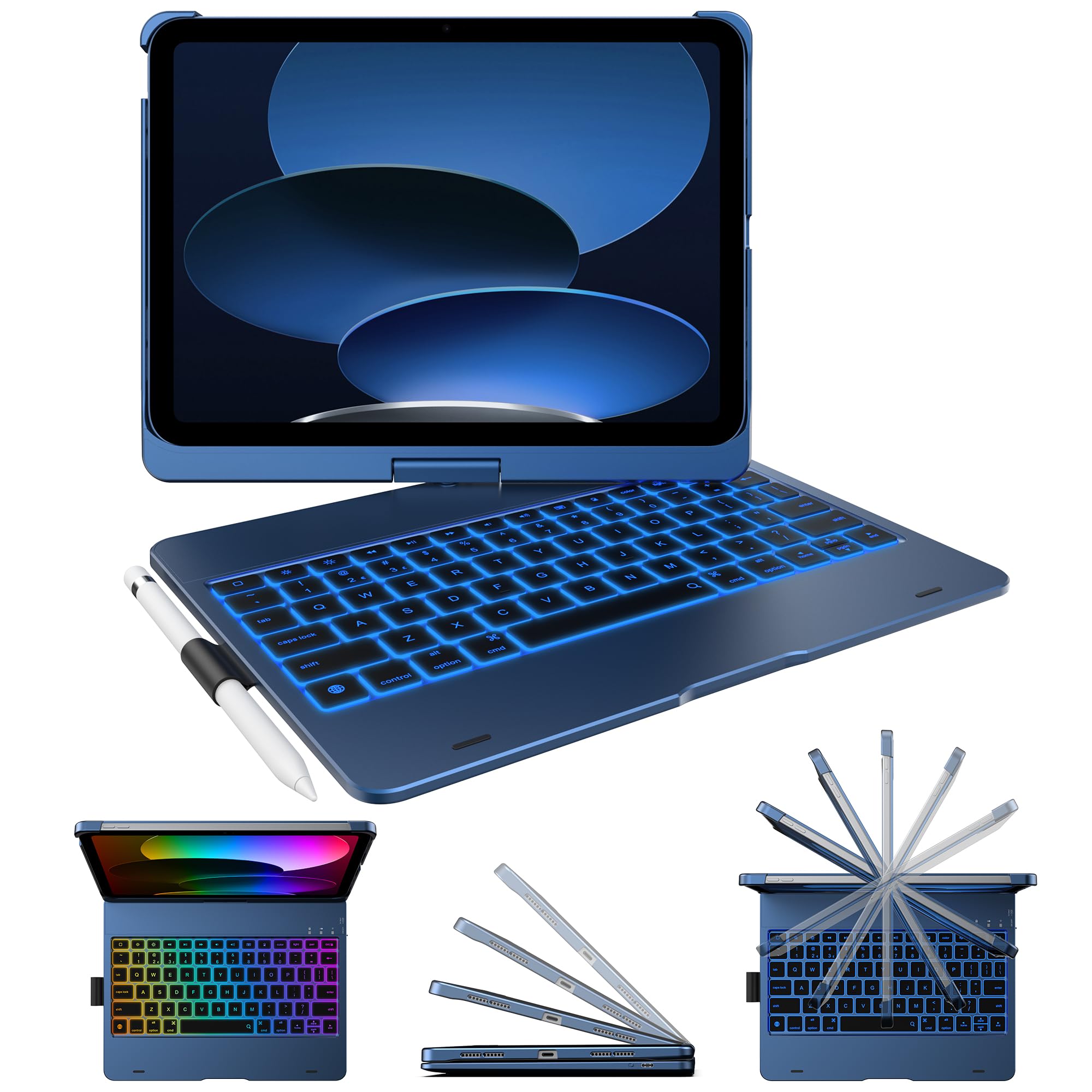
The typecase Flexbook brings iPad-specific precision to a fan favorite form factor. It fits only the iPad 10th Gen (2022) and 11th Gen (A16, 2025) models, which ensures a snug, secure fit around the corners and camera bump. The patented 360-degree hinge is stress-tested for 20,000 cycles, meaning you can rotate the tablet into tent, presentation, or standard laptop mode without worrying about the mechanism loosening over time.
The keyboard features 78 ergonomic scissor-switch keys with an 11-color RGB backlight and multiple lighting modes. A full row of iPadOS shortcut keys — brightness, volume, media controls, home, and search — makes navigation faster than relying solely on the touchscreen. The battery is rechargeable via USB-C and lasts for weeks between charges with the auto-sleep function active. There’s no trackpad, so you’ll rely on touch or a separate mouse.
Protection is a strong suit here: the hard-shell back covers edges and corners, and the built-in Apple Pencil holder keeps the stylus secure. Some users note that the 360-degree rotation means the case can shift slightly when folding closed, and the open top edge leaves the iPad’s top buttons exposed. For iPad owners wanting a laptop-style case without the price of Apple’s Magic Keyboard, this is a compelling mid-range choice.
Why it’s great
- 360-degree hinge with 20,000-cycle durability test for long-term use
- 11-color backlight with multiple brightness levels for dark environments
- Full row of iPadOS shortcut keys improves navigation speed
Good to know
- No trackpad — requires touchscreen or separate mouse for cursor control
- Open top edge offers less protection than fully enclosed cases
4. ROADOM Tablet Stand

The ROADOM stand is the desk-focused alternative to a full floor stand. It accommodates devices from 4.7 to 17.3 inches — covering everything from a phone to a large portable monitor — with a 180-degree tiltable clamp and a 360-degree swivel bracket. The clamp uses protective rubber to prevent scratches and includes anti-slip pads on the base for desk stability.
Construction is ABS plastic with an aluminum alloy arm, which keeps the weight manageable at 1.65 pounds while providing sufficient rigidity for a 15.6-inch portable monitor. The folding design means it collapses for transport, and an included Allen wrench stores inside the base. The adjustable arm lets you raise the screen to eye level, reducing neck strain during long video calls or reading sessions.
One practical limitation: the spring-loaded clamp is quite stiff, and if you push the lower arm too far forward, the stand can become unbalanced. It’s not as heavy-duty as the BluuSuuk floor stand, but for a desk-only setup where you want to lift your tablet off the surface without a permanent mount, the ROADOM is well-engineered for its price tier.
Why it’s great
- Wide compatibility from phones to 17.3-inch monitors
- Folds flat for easy storage and portability
- Aluminum arm provides solid stability without excess weight
Good to know
- Can become unbalanced if lower arm is extended too far
- Clamp tension is very tight, requiring careful device insertion
5. FINTIE Keyboard Case for Samsung Galaxy Tab A11+ & A9+
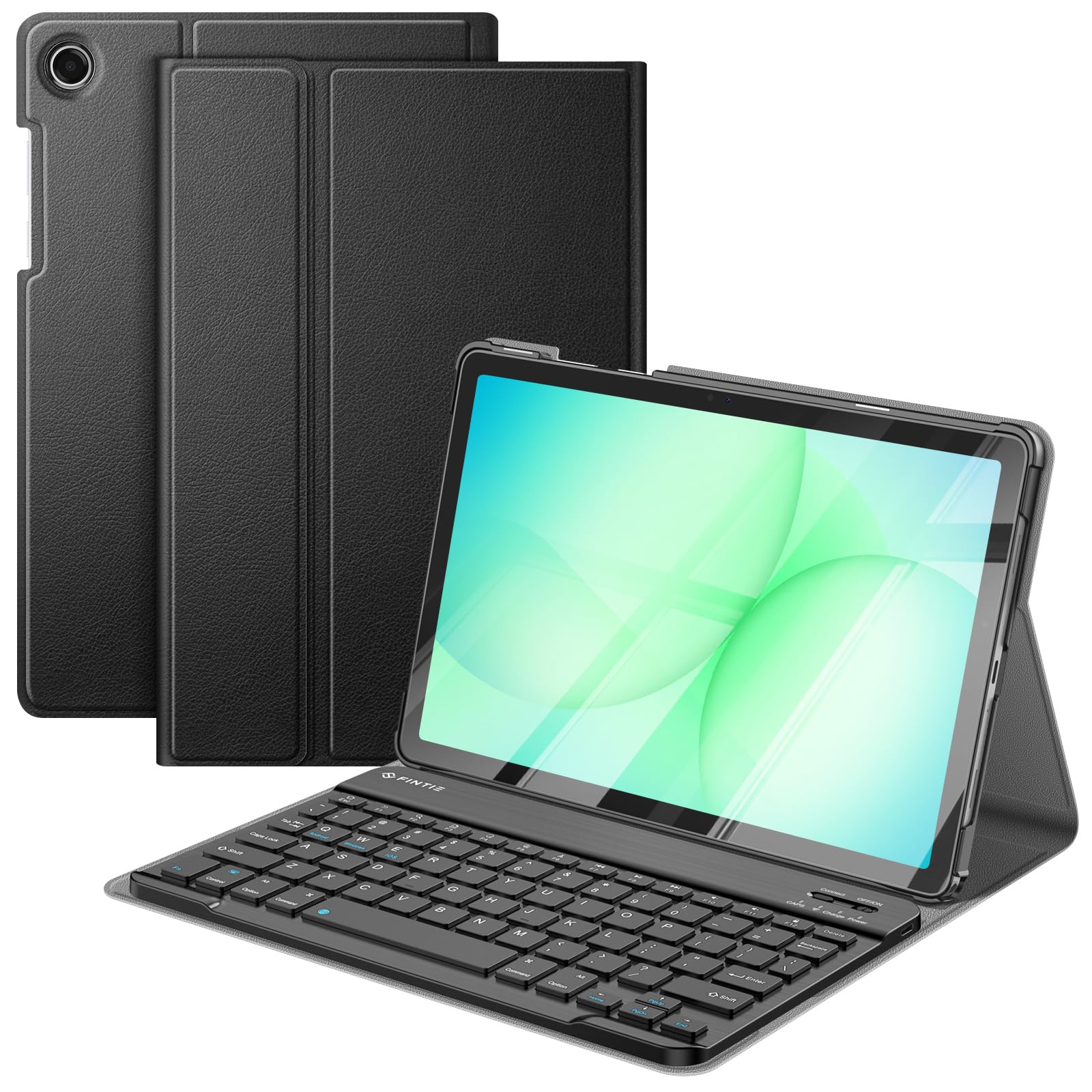
The FINTIE Keyboard Case is a tailored solution for Samsung Galaxy Tab A11+ 2025 and A9+ 2023 models. It uses a magnetically detachable Bluetooth keyboard that connects to the cover via strong magnets and a set of positioning grooves. The keyboard charges via USB-C in about two hours and automatically enters energy-saving mode after 10 minutes of inactivity, extending standby time significantly.
The case itself is constructed from durable PU leather with an anti-slip rubber interior and a polycarbonate shell. It supports three viewing angles by repositioning the keyboard along the cover’s grooves, and it includes an auto sleep/wake function when used in case-only mode. The 78-key scissor-switch keyboard is quiet and responsive, with a 10-meter Bluetooth range.
One thing to note: the cover is heavy, roughly matching the tablet’s own weight, which brings the total package to about 2.5 pounds. The keyboard also rests directly against the screen when the case is folded closed, which could risk scratches over time if debris gets trapped. For Samsung A-series users who want a rugged all-in-one typing solution, this is the best fit available.
Why it’s great
- Perfect model-specific fit for Samsung Tab A11+ and A9+
- USB-C fast charging eliminates battery replacement hassle
- Three adjustable viewing angles for comfortable typing
Good to know
- Cover is heavy, adding significant weight to the total package
- Keyboard rests on the screen when folded, risking scratches over time
6. XCHYTECHER Universal Tablet Keyboard Case with Mouse
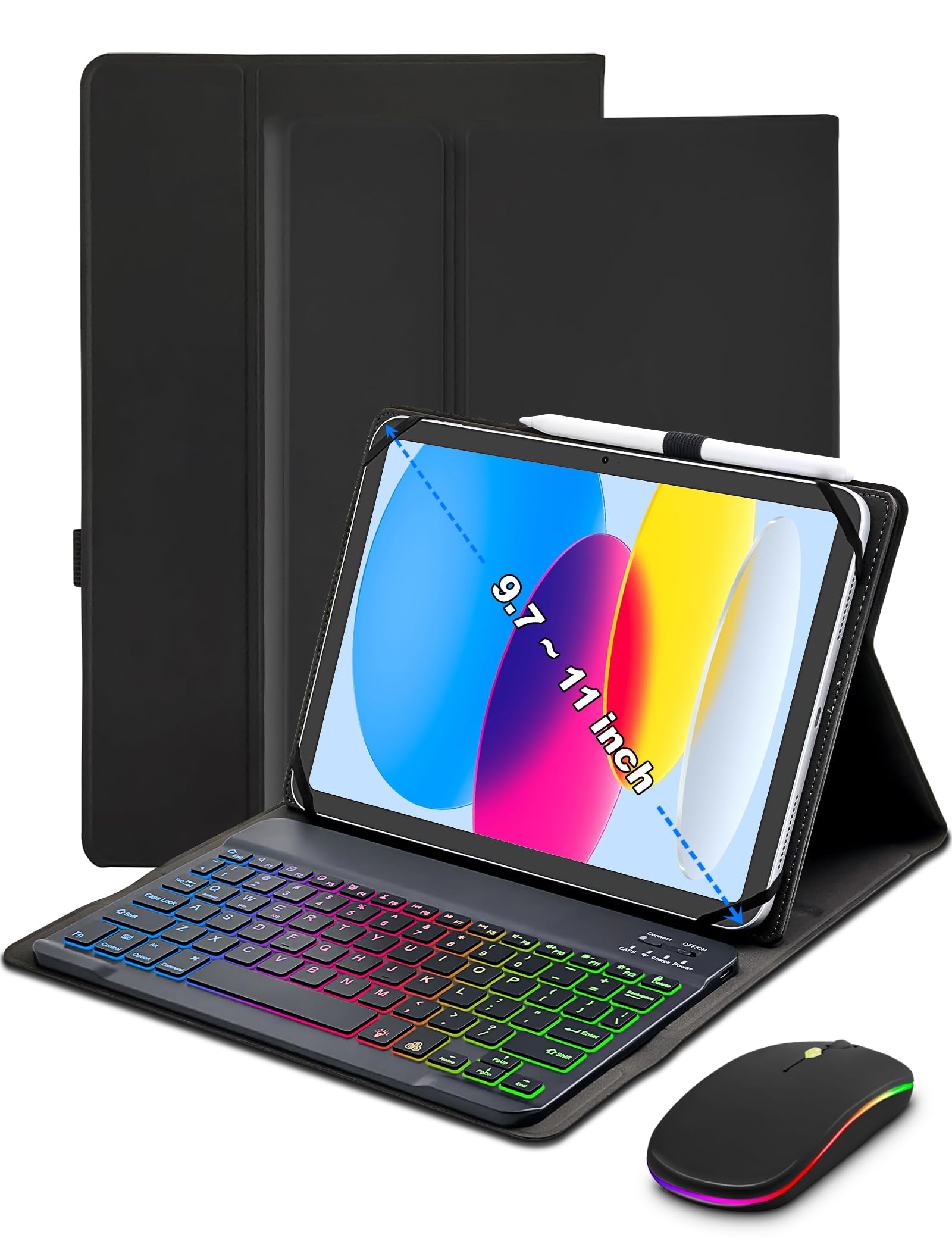
The XCHYTECHER universal case brings RGB lighting and a bundled Bluetooth mouse to the entry-level tablet accessory market. The keyboard case fits tablets from 9 to 11 inches using flexible rubber corner straps that stretch to hold the device securely. It’s compatible with a massive range of tablets, including iPad, Samsung Galaxy Tab, Amazon Fire HD, and many lesser-known Android brands.
The standout feature is the 7-color rainbow backlight with three brightness levels, which can be set to pulsing, steady, or off modes. The keyboard communicates via Bluetooth and charges through USB-C. The included mouse connects via Bluetooth as well, so you get a full desktop-like input setup without needing a USB dongle. The case uses magnetic book-style closure and adds a pen holder on the side.
Downsides are typical for universal designs: the corner straps may feel less secure than a hard-shell case, and Bluetooth pairing can occasionally require a short reconnection delay after the tablet idles. Not ideal for hardcore gaming due to potential latency, but for writing, browsing, and general productivity, the XCHYTECHER offers genuinely impressive value with the added backlight and mouse.
Why it’s great
- Includes both a backlit keyboard and a Bluetooth mouse in one package
- Rainbow backlight with three brightness levels works well in dark rooms
- Fits a vast range of tablets using flexible rubber corner straps
Good to know
- Rubber straps are less protective than a molded hard-shell case
- Bluetooth keyboard occasionally needs a reconnection after idle periods
7. MoKo Universal Tablet Case with Keyboard
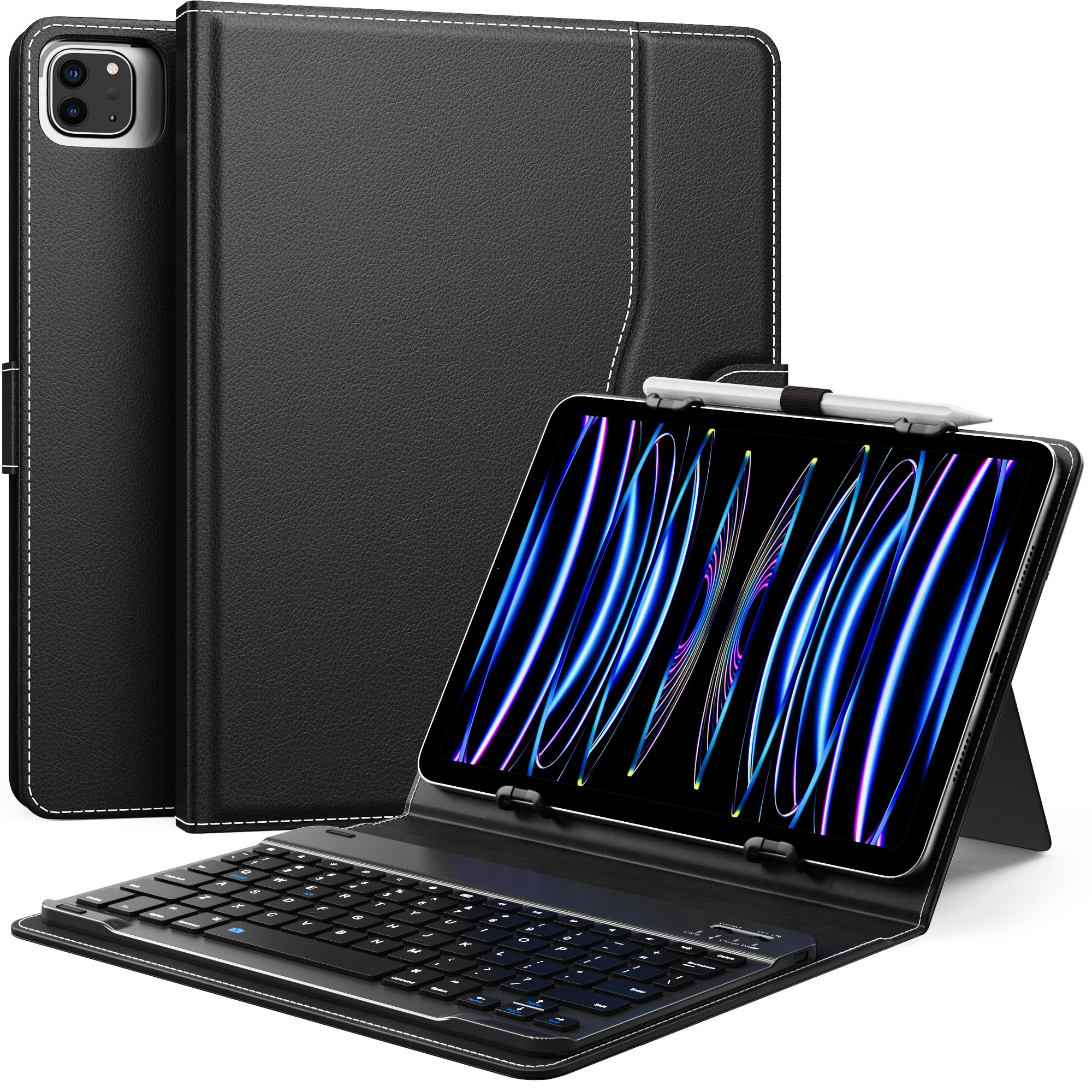
The MoKo universal keyboard case offers a clean, utilitarian approach for users with non-standard tablet sizes. Its compatibility range targets tablets with a width between 6.2 and 7.08 inches and a length between 9.05 and 10.2 inches, covering iPad 6th through 11th gen, most Samsung Galaxy Tab 10 and 11-inch models, Amazon Fire HD 10 and 8 series, and many others. The keyboard is removable via magnetic attachment, and the case includes a built-in kickstand for angled viewing.
The keyboard uses a standard QWERTY layout with 78 keys, runs off a rechargeable battery via USB-C, and connects over Bluetooth. The PU leather cover includes a side pocket for cables or cards and a pen loop for a stylus. The overall weight is 19.4 ounces, which is reasonable for a universal case. The camera cutout on the back is a wide opening, but it may not align perfectly with every tablet model — the Amazon Fire HD 10, for example, has the camera on the left, while the cutout is positioned for the right, requiring case removal for photos.
There’s no auto sleep/wake function, so you’ll need to manually switch the tablet off when closing the case. The kickstand can feel a bit flimsy under heavy tap input. For the price, it’s a well-constructed universal solution that covers a lot of ground, but double-check your tablet’s specific camera and button placement before ordering.
Why it’s great
- Magnetic removable keyboard adds flexibility for tablet-only use
- Side pocket and pen loop offer useful storage for small accessories
- Wide compatibility range covers most major tablet brands and sizes
Good to know
- No auto sleep/wake — must power down tablet manually
- Camera cutout position varies by tablet; may not align perfectly
FAQ
Will a universal keyboard case fit my specific tablet model?
Should I buy a keyboard case or a separate stand and keyboard?
What does a 360-degree swivel hinge do for a tablet case?
Final Thoughts: The Verdict
For most users, the best tablet accessories winner is the Logitech Combo Touch because it offers true laptop functionality with a Smart Connector that eliminates charging and Bluetooth pairing, plus a full trackpad and versatile kickstand. If you want a dedicated hands-free viewing station, grab the BluuSuuk Floor Stand with its rock-solid 11-pound base. And for an affordable typing solution with backlighting, nothing beats the XCHYTECHER Universal Case.