
The sharp ache that radiates from your wrist up through your forearm during a standard workday isn’t just fatigue—it’s a signal that your pointing device is forcing your forearm into unnatural pronation, compressing the median nerve with every click and drag. For anyone spending eight or more hours daily navigating spreadsheets, design canvases, or code editors, the transition from a flat mouse to one designed around handshake posture or thumb-driven cursor control represents the single most effective hardware change for interrupting repetitive strain injury progression.
I’m Min — the co-founder and writer behind Gadgets Feed. My research for this guide involved cross-referencing dozens of customer experiences, studying ergonomic validation data from leading occupational health sources, and analyzing how specific vertical angles and trackball mechanisms actually redistribute load across the wrist and forearm muscles.
Whether you are managing early-stage tingling or looking to prevent future damage, choosing the best ergonomic tool requires understanding which design philosophy—vertical grip versus thumb-trackball—actually matches your hand size, work style, and pain profile, which is exactly what this best carpal tunnel mouse guide delivers.
How To Choose The Best Carpal Tunnel Mouse
Carpal tunnel syndrome develops when the median nerve is compressed as it passes through the carpal tunnel in your wrist. A standard flat mouse forces your forearm into pronation (palm-down position), which twists the median nerve and increases pressure inside the tunnel. Choosing the right mouse means understanding the two dominant ergonomic approaches and matching them to your specific hand anatomy and work habits.
Vertical Angle: The Handshake Position
Vertical mice reorient your hand between 50 and 80 degrees so your forearm remains in a neutral handshake posture. This rotation dramatically reduces the compression on the carpal tunnel and the strain on forearm muscles. Studies cited by Logitech show a 57-degree vertical angle can reduce muscular activity by 10 percent compared to a standard mouse, while Evoluent’s steeper 80-degree design has been a clinical staple for over two decades. A steeper angle offers more relief for advanced symptoms, but may reduce fine cursor control; a moderate angle around 57 degrees balances relief with precision for most users.
Thumb-Trackball: Zero Arm Movement
Trackball mice anchor your hand in one position and let your thumb (or fingers) rotate a ball to move the cursor. This eliminates the repetitive arm and wrist sweeping motions that aggravate carpal tunnel. However, the thumb-driven variety can overwork the thumb adductor muscles and joint, which some users with pre-existing thumb tendonitis find problematic. The precision and learning curve are also different—most users need one to two weeks to build fluency with a trackball. For the right candidate, a trackball can provide relief that even a vertical mouse cannot match.
DPI, Sensor, and Button Customization
A high-DPI sensor (1600 to 4000 DPI) lets you move the cursor across dual monitors with minimal physical movement—critical for reducing daily wrist travel. But sensor lift-off distance also matters: some optical sensors stop tracking when you lift the mouse even a millimeter, forcing repetitive pickup-and-reposition movements. Customizable buttons let you assign common actions (copy, paste, undo, application switching) to a single press, saving dozens of small hand movements per hour. These micro-economies of motion accumulate into significant strain reduction over a work week.
Quick Comparison
On smaller screens, swipe sideways to see the full table.
| Model | Category | Best For | Key Spec | Amazon |
|---|---|---|---|---|
| Logitech MX Vertical | Vertical | Vertical balance & device switching | 57° angle, 4000 DPI, 4-month battery | Amazon |
| Logitech MX Ergo S | Trackball | Trackball precision & 20° tilt | 20° tilt, 120-day battery, 6 buttons | Amazon |
| Evoluent VerticalMouse | Vertical | Maximum vertical angle (80°) | 80° angle, 6 buttons, wired | Amazon |
| Ergodriven Om Vertical | Vertical | OLED display & budget value | 2400 DPI, 5-week battery, OLED | Amazon |
| ProtoArc EM01 NL | Trackball | Adjustable trackball angle (0-20°) | 5 DPI levels, 3-device, adjustable hinge | Amazon |
| Nulea M511 | Trackball | Thumb trackball with tilt stand | 21.7° tilt stand, 4 DPI, 128g | Amazon |
| PHILIPS Ergonomic Mouse | Contoured | Budget-friendly contour & scroll | 500mAh battery, 4000 DPI, dual scroll | Amazon |
In‑Depth Reviews
1. Logitech MX Vertical Wireless Mouse

The Logitech MX Vertical strikes the most balanced compromise between effective carpal tunnel relief and everyday workhorse performance. Its 57-degree angle is ergonomist-approved and has been shown in Logitech’s own research to reduce muscular activity by 10 percent relative to a standard mouse—a statistically significant reduction for anyone logging eight-hour shifts. The 4000 DPI high-precision sensor results in four times less hand movement compared to a traditional 1000 DPI mouse, which directly translates to fewer pronation cycles per workday.
The textured rubber surface and integrated thumb rest provide a secure grip that accommodates a range of hand sizes without forcing the palm into an unnatural stretch. Battery life is exceptional: a full charge lasts up to four months under normal use, and the USB-C port makes top-ups quick. Multi-device switching via the Easy-Switch button or Logitech Flow software lets you move between up to three computers without re-pairing, which is invaluable for workflows spanning a desktop and laptop.
Some users report a tipping sensation when lifting the mouse—the vertical center of gravity takes adjustment—and the absence of a dedicated horizontal scroll wheel is a drawback for spreadsheet-heavy users. The overall build quality is excellent, and the relief it provides for forearm and wrist strain is immediate and reproducible for most buyers. It is the benchmark against which other vertical mice are measured.
Why it’s great
- 57-degree angle measurably reduces muscle strain vs. standard mice
- 4000 DPI sensor cuts hand movement by 4x
- USB-C rechargeable with 4-month battery life
- Seamless multi-device switching (up to 3)
Good to know
- Can feel top-heavy during pick-up and reposition motions
- No dedicated horizontal scroll wheel
- Button programming requires Logitech Options+ software
2. Logitech MX Ergo S Advanced Wireless Trackball Mouse

The MX Ergo S tackles carpal tunnel from the trackball direction: by eliminating arm movement entirely. Instead of pivoting from the wrist, you park your hand on the 20-degree adjustable tilt platform and control the cursor exclusively with your thumb. Logitech claims this angled design reduces muscle strain by 27 percent compared to a non-angled trackball—a figure supported by years of ergonomic validation on the original MX Ergo platform. The clicks are now 80 percent quieter than the previous generation, making this suitable for shared office environments.
Battery performance is extraordinary: a one-minute charge delivers 24 hours of use, and a full charge lasts up to 120 days. The Logi Options+ app unlocks six programmable buttons, including the ability to assign precision mode to a single button, which temporarily reduces cursor speed for detailed selection work. The metal baseplate provides a non-slip foundation, and the trackball itself can be removed for cleaning—important because debris buildup is the primary cause of tracking inconsistency on trackball mice.
The MX Ergo S is a larger device best suited for medium to large hands. Users with smaller palm spans (under four inches across) may find the hand-open position fatiguing, paradoxically creating new tension in the thumb muscles. The learning curve is real: most users need one to two weeks before the thumb-trackball feels natural for detailed work. For users whose carpal tunnel pain is exacerbated by arm movement rather than wrist angle, this ergonomic trackball is the more effective solution than any vertical mouse.
Why it’s great
- Eliminates arm movement entirely for median nerve relief
- 20-degree tilt reduces muscle strain by 27%
- USB-C charging with 120-day battery life
- Quieter clicks than previous generation
Good to know
- Significant learning curve for trackball beginners
- Large size may not suit small hands
- Thumb muscle can fatigue during heavy use
3. Evoluent VerticalMouse Wired Ergonomic Mouse

The Evoluent VerticalMouse is the original—designed by Jack Lo in 1994 and introduced to market in 2002—and remains the gold standard for extreme wrist angle correction. Its 80-degree vertical orientation brings your hand and forearm into a near-fully neutral handshake position, more aggressive than the Logitech MX Vertical’s 57 degrees. This steeper angle can be a deciding factor for users whose carpal tunnel symptoms resist gentler intervention. The wired connection guarantees zero latency and no pairing issues, which some professionals prefer for reliability.
Six customizable buttons include a dedicated middle double-click button actuated by the ring finger—a unique feature that eliminates a common repetitive motion. The Evoluent Mouse Manager software for Windows unlocks near-unlimited button and wheel function assignment, letting you map multiple keyboard shortcuts to single clicks. The finger support prevents your pinkie from rubbing against the desk surface, a thoughtful detail for users who experience pain from friction as well as posture.
The wired-only design and tall profile (roughly three inches high) mean it will not fit under a keyboard tray, which may require desk layout changes. The plastic build feels less premium than the Logitech MX series, and the scroll wheel is louder than average. The absence of an official macOS driver limits customization for Mac users, though third-party utilities like USB Overdrive work adequately. For users who need the maximum possible angle correction and are willing to accept a wired connection, the Evoluent remains the most clinically proven option available.
Why it’s great
- 80-degree vertical angle—the steepest in this guide
- Six buttons with ring-finger double-click feature
- Pinkie support prevents desk friction
- Wired, zero-latency connection
Good to know
- Wired-only design restricts placement options
- No official macOS or Linux driver
- Tall profile won’t fit under a keyboard tray
4. Ergodriven Om Vertical Ergonomic Mouse

The Ergodriven Om packs features typically reserved for premium-tier devices—an onboard OLED screen, four DPI levels (1200 to 2400), five customizable buttons, and silent micro-force switches—into a price point that undercuts most competitors. The vertical orientation is genuine ergonomics, not a shallow tilt: the handshake posture is stable, and the textured plastic provides a confident grip. The OLED display shows your current DPI setting and battery level, eliminating guesswork and the need to open configuration software.
Button customization is refreshingly software-free: you assign functions directly on the mouse in under ten seconds using the onboard screen, which means it works identically on both Windows and macOS without driver installation. The 2.4GHz and Bluetooth dual connectivity covers legacy and modern systems equally well. The rechargeable battery lasts roughly five weeks under typical use, and the unit ships with at least 50 percent charge so you can start using it immediately.
The Om is sized for small to medium hands. Users with larger palm spans report that the smaller body forces an unnatural curl, potentially introducing new wrist strain. The sensor’s liftoff distance exceeds one inch, which means the cursor will continue tracking even when you lift the mouse—a problem if you habitually pick up and reposition. For users with smaller hands seeking genuine vertical ergonomics and excellent customization at a low entry cost, the Om delivers outsized value.
Why it’s great
- Onboard OLED screen for DPI and battery info
- Software-free button customization on the mouse
- Dual connectivity (2.4GHz and Bluetooth)
- Silent micro-force buttons reduce click tension
Good to know
- Too small for users with large hands
- Sensor liftoff distance >1 inch, annoying for reposition
- Limited to preset firmware commands for button mapping
5. ProtoArc EM01 NL Wireless Trackball Mouse

The ProtoArc EM01 NL introduces a genuinely useful innovation for the trackball category: an adjustable hinge that lets you tilt the entire mouse body from 0 to 20 degrees. This means you can start with a flat trackball and gradually increase the angle as your wrist adapts, or fine-tune the tilt until you find the exact position that eliminates forearm tension. The thumb-operated trackball itself is smooth and responsive, and five DPI levels (200 to 1600) give you enough range to match sensitivity to your workflow.
Triple-device connectivity via Bluetooth and the included 2.4GHz dongle lets you switch between a PC, Mac, and tablet with a single button press. The rechargeable lithium battery uses USB-C and delivers weeks of typical use before needing a top-up. The surface is a smooth frosted plastic that resists fingerprints, and the main buttons produce quiet clicks suitable for shared workspaces. The trackball and three internal rollers are user-cleanable, which is essential for maintaining smooth operation over time.
Trackball cleaning frequency is higher than with a standard mouse—lint and debris will degrade performance within days in dusty environments. The back and forward buttons are not functional on macOS, which limits cross-platform utility. The learning curve is steep for users who have never used a trackball: expect one to two weeks before the thumb-control feels intuitive for precision tasks. For users who want the ability to dial in their exact wrist angle and prefer the arm-stationary benefits of a trackball, the ProtoArc offers unmatched adjustability at its price point.
Why it’s great
- Adjustable hinge from 0 to 20 degrees for custom wrist angle
- Triple-device connectivity with easy switching
- User-cleanable trackball and rollers
- USB-C rechargeable with long battery life
Good to know
- Trackball requires frequent cleaning to stay smooth
- Back/forward buttons non-functional on macOS
- Steep learning curve for trackball beginners
6. Nulea M511 Wireless Trackball Mouse
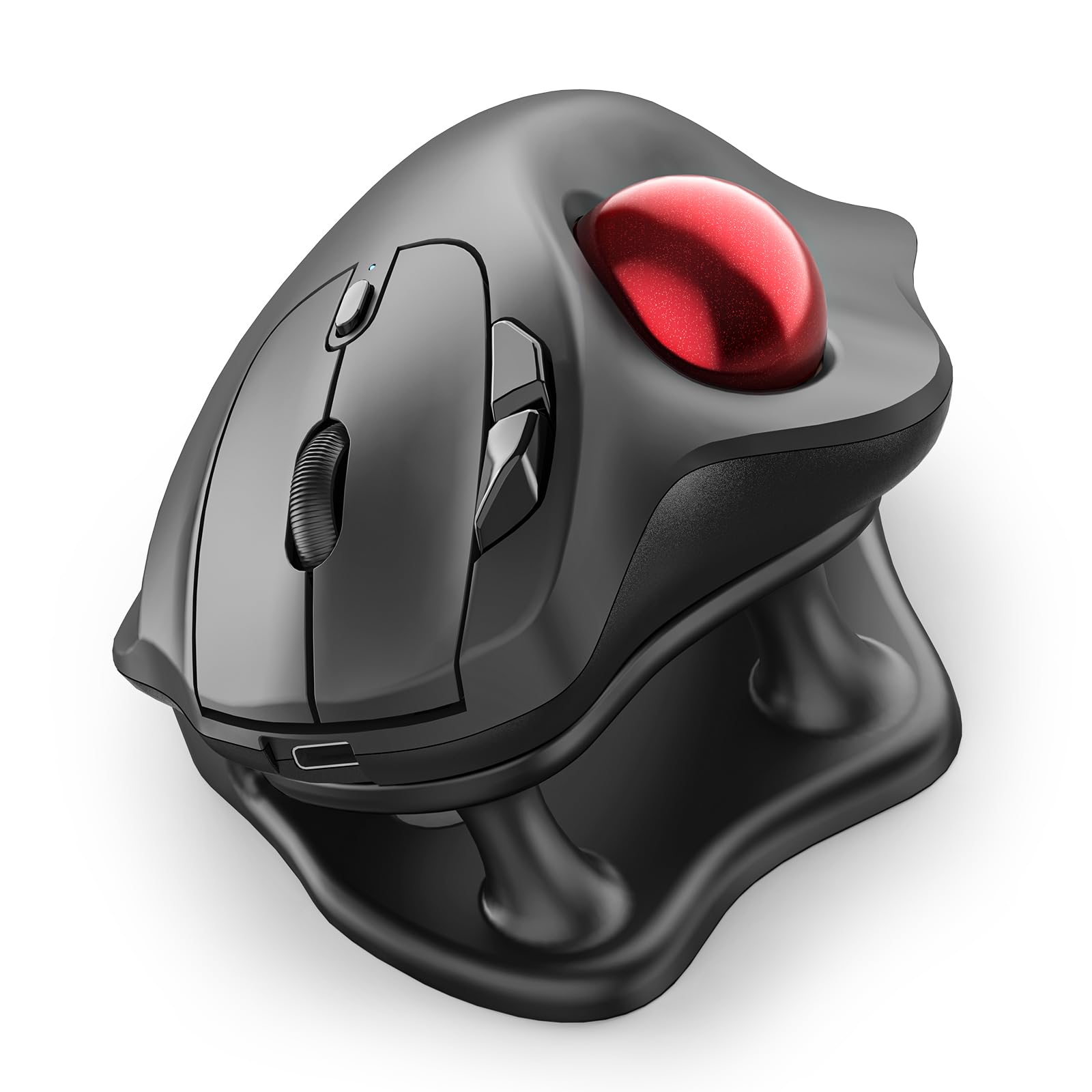
The Nulea M511 delivers a fully silent thumb-trackball experience at an entry-level cost, making it an accessible starting point for carpal tunnel sufferers curious about the trackball approach. The included 21.7-degree tilt stand lifts the rear of the mouse to encourage a more natural forearm angle; however, some users report that this tilt actually worsens wrist angle for tendonitis by forcing the palm into dorsiflexion. The four adjustable DPI levels (400, 800, 1200, 1600) cover basic sensitivity needs across single and dual-monitor setups.
Connectivity spans Bluetooth and a USB receiver, supporting connection to up to three devices with on-the-fly switching. The matte finish and thick rubber feet provide stable tracking, and the rechargeable battery—indicated by a red-to-green LED—eliminates disposable battery waste. The trackball itself glides smoothly on the internal rollers, and the buttons emit zero audible click noise, which is genuinely useful in shared workspaces or late-night sessions.
The M511’s build quality is good but not great: the plastic body feels lighter than the Logitech MX Ergo S, and the lack of adjustable tilt means you are stuck with the included stand’s fixed angle. If that angle does not suit your anatomy, it can create new tension patterns. The sleep mode activation delay is longer than ideal, causing a noticeable pause when the mouse wakes from inactivity. For a first-time trackball buyer at a low entry cost, the M511 provides sufficient value to test whether the trackball philosophy works for your specific carpal tunnel symptoms before committing to a more expensive model.
Why it’s great
- Completely silent operation—no audible clicks or ball noise
- Three-device connectivity via Bluetooth and USB
- Rechargeable with visual battery indicator
- Competitively priced entry point into trackball ergonomics
Good to know
- Fixed 21.7° tilt stand may worsen wrist angle for some
- Sleep mode has noticeable wake-up delay
- Build quality feels lighter than premium alternatives
7. PHILIPS Ergonomic Wireless Mouse

The PHILIPS Ergonomic Mouse is a contoured mouse, not a true vertical mouse—it uses a sculpted right-handed shell and anti-slip thumb rest to improve wrist posture rather than reorienting the hand to a full vertical angle. Its dual scroll wheel layout (main wheel plus thumb-side horizontal wheel) is a genuine productivity feature for users who navigate large spreadsheets or timelines. The five-level DPI range (800 to 4000) covers everything from precise photo editing to high-speed multi-monitor sweeping.
The 500mAh battery delivers up to 200 hours of use, and the emergency top-up feature yields one hour of tracking from a five-minute charge—useful when you forget to charge overnight. The included dual 2.4GHz receiver (USB-A and USB-C) eliminates the need for a separate hub, and Bluetooth connectivity supports up to three paired devices. The clicks are library-quiet, and the matte texture resists sweat buildup during long sessions.
This is a budget-friendly contour mouse, not a medical-grade ergonomic device. Users with moderate to severe carpal tunnel symptoms may find the 20-to-30-degree hand angle insufficient for meaningful relief—this mouse reduces strain but does not eliminate the pronated wrist position. The scroll wheel texture has been reported to cause skin irritation for some users during extended use. For professionals with mild wrist discomfort who prioritize dual-scroll productivity and multi-device connectivity over aggressive angle correction, the PHILIPS is a capable and cost-effective option.
Why it’s great
- Dual scroll wheels (vertical and horizontal) for spreadsheet work
- Five-minute charge gives one hour of emergency use
- Dual USB-A and USB-C receiver included
- Library-quiet clicks for shared office spaces
Good to know
- Contoured shape, not a true vertical mouse
- Limited relief for moderate-to-severe carpal tunnel symptoms
- Scroll wheel texture may cause skin irritation
FAQ
Will a vertical mouse completely cure my carpal tunnel syndrome?
How long does it take to adjust from a standard mouse to a vertical or trackball design?
Can I use a trackball mouse for gaming?
Final Thoughts: The Verdict
For most users, the best carpal tunnel mouse winner is the Logitech MX Vertical because its 57-degree angle provides proven muscular relief without sacrificing the cursor precision and multi-device convenience a professional workflow demands. If you want to eliminate arm movement entirely and are willing to learn thumb-trackball control, grab the Logitech MX Ergo S. And for the steepest wrist correction available in a durable, time-tested design, nothing beats the Evoluent VerticalMouse.