
A desktop PC tethered to a weak or flaky Wi-Fi connection is a machine that can’t breathe. Whether you’re deep into a ranked match, streaming in 4K, or moving multi-gigabyte project files, the wireless link is the primary bottleneck between your rig and the internet — and a poor antenna choice pulverizes the experience. Swapping out a dying internal card or a cheap USB dongle for a purpose-built antenna system is the single most impactful upgrade a desktop user can make, and the results are measured in Mbps and ping milliseconds, not marketing adjectives.
I’m Min — the co-founder and writer behind Gadgets Feed. I’ve spent hundreds of hours poring over chipset documentation, real-user speed tests, and compatibility tables to separate the genuine signal performers from the overhyped boxes, specifically for the desktop PC form factor and its unique antenna-routing challenges.
After analyzing raw throughput figures, antenna gain specs, and cross-platform driver support, I can confidently lay out the most effective options to solve your connection woes. This guide will help you find the best wifi antenna for pc that fits your motherboard, your bandwidth needs, and your budget without the noise.
How To Choose The Best WiFi Antenna For PC
Desktop Wi-Fi hardware has moved past the era of dongles that overheat after an hour of gaming. Every product on this list is defined by three core pillars: the chipset driving it, the antenna morphology, and the interface (PCIe vs. USB). Understanding these elements is the only way to avoid spending money on a card that nerfs your motherboard’s PCIe lanes or doesn’t support your router’s 6 GHz band.
PCIe vs. USB: The Interface Trade-Off
PCIe cards sit directly on the motherboard, drawing power from the slot and maintaining direct access to the chipset’s PCIe lanes for minimal latency overhead. They also place the antenna jacks on a backplate bracket, allowing you to route magnetic antenna bases away from the case’s RF noise. USB adapters are plug-and-play convenient but are limited by USB 3.0’s data ceiling and often suffer from thermal throttling under sustained load. For a permanent desktop rig that demands low ping and consistent throughput, PCIe is the superior architecture.
Antenna Gain (dBi) and Band Configuration
A 5 dBi antenna is the current sweet spot for desktop use — it provides a strong directional boost without narrowing the signal cone to impractical sharpness. Multi-band support (2.4 GHz, 5 GHz, and ideally 6 GHz on Wi-Fi 6E and Wi-Fi 7 cards) future-proofs your rig against router upgrades. Magnetic bases are a huge quality-of-life feature, letting you slap the antenna array on your monitor stand or the side of a steel case for optimal line-of-sight to the router.
Chipset and OS Compatibility
The Intel AX210 chipset dominates the Wi-Fi 6E space for its mature driver support on Windows 11 and Linux, and its compatibility with both AMD and Intel platforms. Wi-Fi 7 cards are shifting toward Qualcomm (like the NCM865 in the MSI Herald-BE) or Mediatek chips. If you run Linux, check chipset-specific driver availability — several Wi-Fi 7 cards lack Linux drivers entirely. Windows 11 is essentially mandatory for 6 GHz band access on these cards.
Quick Comparison
On smaller screens, swipe sideways to see the full table.
| Model | Category | Best For | Key Spec | Amazon |
|---|---|---|---|---|
| TP-Link Archer TBE550E | PCIe Wi-Fi 7 | Maxed-out gaming rigs on Windows 11 | 9300 Mbps tri-band, Bluetooth 5.4 | Amazon |
| MSI Herald-BE | PCIe Wi-Fi 7 | AMD systems needing a Qualcomm chip | 5.8 Gbps, Bluetooth 5.4, MLO | Amazon |
| WAVLINK BE6500 USB | USB Wi-Fi 7 | Quick external upgrade without opening the case | 6452 Mbps, quad 5dBi antennas | Amazon |
| GIGABYTE GC-WBAX210 | PCIe Wi-Fi 6E | Stable, mature Wi-Fi 6E with Linux support | 2400 Mbps, Intel AX210, Bluetooth 5.2 | Amazon |
| TP-Link Archer TXE72E | PCIe Wi-Fi 6E | Budget-friendly 6E upgrade with Bluetooth 5.3 | 5400 Mbps, Intel AX210, dual antennas | Amazon |
| NETGEAR Nighthawk A7500 | USB Wi-Fi 6 | Instant performance boost for older Windows PCs | 1.8 Gbps, USB 3.0, flexible antenna | Amazon |
| WAVLINK AXE5400 | PCIe Wi-Fi 6E | Entry-level 6E with magnetic antennas | 5400 Mbps, Intel AX210, Bluetooth 5.3 | Amazon |
In‑Depth Reviews
1. TP-Link Archer TBE550E

The TP-Link Archer TBE550E is the heaviest hitter on this list, delivering tri-band theoretical throughput of 9300 Mbps across 2.4, 5, and 6 GHz bands. Built around a Wi-Fi 7 chipset that leverages 320 MHz channel widths and 4096-QAM modulation, this card demolishes the throughput ceiling that Wi-Fi 6 cards hit in congested neighborhoods. The included magnetic antenna base with a braided 1m RF cable lets you position the antennas far from the case’s EMI field — a detail that matters when chasing a clean signal on the 6 GHz band.
MLO (Multi-Link Operation) is the killer feature here: the card simultaneously bonds multiple bands, which translates to sub-1ms ping stability in real-world testing reported by users. The multicolor status LED on the magnetic base is configurable via touch switch, blending well with RGB setups without being garish. Bluetooth 5.4 handles controllers and headsets with extended range and lower power draw than older iterations.
Installation is standard PCIe (X1 slot) with a USB header cable for Bluetooth. The included USB drive speeds up driver setup, though some users report needing the latest driver from TP-Link’s site to solve initial high-ping quirks. This card locks 6 GHz access to Windows 11 and has no Linux driver support — a critical constraint for dual-boot builders. For pure Windows gaming rigs, this is the ceiling of wireless performance in a desktop slot.
Why it’s great
- Tops out Wi-Fi 7 tri-band speeds at 9300 Mbps with MLO latency control.
- Magnetic antenna base isolates antennas from case RF noise.
- Bluetooth 5.4 ready for next-gen peripherals.
Good to know
- Exclusively works with Windows 11 — no Windows 10 or Linux support.
- Initial driver may require manual download for optimal ping performance.
2. MSI Herald-BE

The MSI Herald-BE carves a unique niche by using the Qualcomm NCM865 Wi-Fi 7 module instead of the more common Mediatek or Intel chips. This distinction matters significantly for AMD system builders. Intel-based NICs on PCIe cards have historically produced compatibility headaches with Ryzen motherboards — lost Bluetooth, boot cycles, or outright card rejection. The Qualcomm chipset in the Herald-BE sidesteps those gremlins entirely, as confirmed by multiple AMD X570 and B550 owners reporting flawless detection on first boot.
Speeds reach 5.8 Gbps across tri-band operation, with 320 MHz channel support on the 6 GHz band. Multi-Link Operation is present here too, bonding bands to stabilize latency during high-throughput tasks. Bluetooth 5.4 is onboard, and users report working with legacy 2.0 USB headers, a nice backwards-compatibility gesture for older motherboards upgrading to modern wireless.
Installation is a standard PCIe x16 form factor, but note that some boards may require a BIOS tweak to reduce the slot speed to x2 for initial card detection — a minor friction point resolved once drivers are installed. The card ships with a basic driver DVD, but again, downloading the latest version from MSI or Qualcomm is advisable. For anyone running an AMD build who wants Wi-Fi 7 without the chipset lottery, this is the card to buy.
Why it’s great
- Qualcomm NCM865 chipset ensures seamless AMD motherboard compatibility.
- Tri-band 5.8 Gbps with full 320 MHz channel support.
- Retains Bluetooth functionality with older 2.0 headers.
Good to know
- May require initial PCIe speed reduction in BIOS for card detection.
- Driver DVD ships outdated; manual download recommended.
3. WAVLINK BE6500 USB
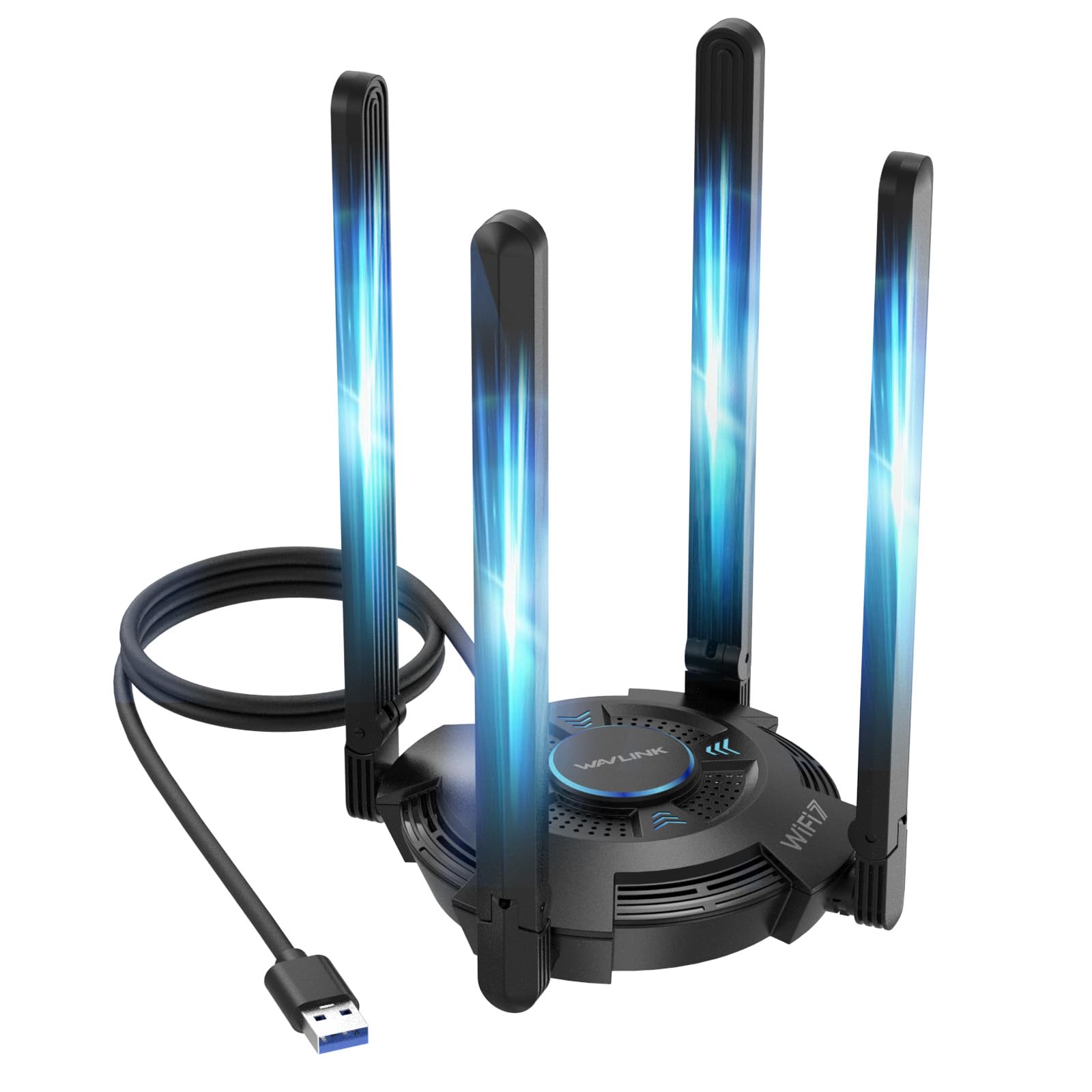
The WAVLINK BE6500 USB adapter chooses an all-external route over internal PCIe, making it the perfect candidate for users who cannot or will not open their PC case — or those with limited free PCIe slots. It packs four adjustable 5 dBi antennas into a standalone unit connected via a USB 3.0 cable. The tri-band BE6500 chipset delivers up to 6452 Mbps aggregated speed, though real-world throughput is capped by the USB 3.0 bus (up to 5 Gbps theoretical).
The built-in driver system is a genuine convenience: plugging the adapter into a Windows 11 or 10 PC triggers an auto-installation popup from the virtual CD drive. Most users report being online within 90 seconds, no website hunting required. An intuitive multicolor LED on the unit shows connection status — blue for connected, pink for hotspot mode, red for error — and a touch switch toggles the lighting.
The 5 dBi antennas are foldable and positionable independently, allowing you to angle them for optimal MIMO performance. A 2-year warranty backs the unit, and WAVLINK provides phone and email support during US business hours. The major catch: this is a Wi-Fi 7 adapter that needs a Wi-Fi 7 router to unlock its full potential. With a standard Wi-Fi 6 router, it back-compatibly drops to Wi-Fi 6 speeds, still a solid upgrade for many.
Why it’s great
- No case opening required — pure plug-and-play via USB 3.0.
- Quad 5dBi antennas provide flexible MIMO positioning.
- Built-in auto-install driver system for Windows 10/11.
Good to know
- USB 3.0 bus limits peak throughput below PCIe equivalents.
- Full Wi-Fi 7 performance requires a compatible Wi-Fi 7 router.
4. GIGABYTE GC-WBAX210

The GIGABYTE GC-WBAX210 represents the gold standard of the Wi-Fi 6E generation, packing Intel’s proven AX210 chipset onto a compact PCIe card. It supports dual-stream operation across 2.4, 5, and 6 GHz bands with a ceiling of 2400 Mbps. This card’s real strength is rock-solid reliability — the AX210 chipset has been in the field for years, meaning its drivers are mature, its thermal profile is well-understood, and its compatibility with both Intel and AMD platforms is effectively universal.
Bluetooth 5.2 is included, though connecting the internal USB header for Bluetooth requires care — some users note the cable is short and sits near the GPU fan, so routing it neatly is worth extra attention. The external antenna is magnetic, letting you stick it to the case or a monitor arm for best reception. Users report significant latency and stability improvements over older Intel 9260/9560 cards, with ping dropping into single digits.
Install is straightforward PCIe (x1 slot) with the low-profile bracket included for small-form-factor builds. The card is recognized by Windows 10 and 11 instantly, and Linux compatibility is excellent — users report it works out of the box with Ubuntu. The asking price sits in the premium range for a Wi-Fi 6E card, but the maturity, stability, and cross-platform support make it a long-term investment that will outlast two or three USB dongles.
Why it’s great
- Industry-standard Intel AX210 chipset with mature drivers across Windows and Linux.
- Excellent latency and stability at 6 GHz after driver manual install.
- Low-profile bracket included for SFF desktops.
Good to know
- Bluetooth header cable is short and must sit clear of GPU fans.
- Premium price for Wi-Fi 6E when Wi-Fi 7 cards are available at similar cost.
5. TP-Link Archer TXE72E

The TP-Link Archer TXE72E brings Wi-Fi 6E to the mid-range price tier without cutting corners on the core chipset. It uses the same Intel AX210 chip as the GIGABYTE card, delivering up to 2402 Mbps on both the 5 and 6 GHz bands, plus 574 Mbps on 2.4 GHz aggregate to a theoretical maximum of 5400 Mbps. The real-world benefit is identical to the premium cards: access to the uncongested 6 GHz band for low-latency gaming and large file transfers.
The card ships with two high-gain antennas that attach to a standard backplate bracket, and includes both standard and low-profile brackets for mini tower cases. Bluetooth 5.3 is a half-step ahead of the GIGABYTE’s 5.2, offering slightly better range and power efficiency. The included Bluetooth header cable must be connected to an F_USB header on the motherboard for Bluetooth functionality — a common requirement on all PCIe Wi-Fi cards with Bluetooth.
Installation requires Windows 10 or 11 for the 6 GHz band, but the card works on Linux with the AX210’s in-kernel drivers. User feedback highlights a significant ping reduction in online games — one user posted before-and-after screenshots showing ping dropping from spikes of 90ms to a steady 15ms. The minor negatives are the short Bluetooth cable that needs careful routing away from GPU fans and the fact that the resource CD is mostly obsolete.
Why it’s great
- Same Intel AX210 chipset as premium cards at a lower price point.
- Dual high-gain antennas with low-profile bracket included.
- Bluetooth 5.3 for improved wireless peripheral performance.
Good to know
- Bluetooth cable must route to motherboard header, often near GPU fans.
- Resource CD is outdated; driver download from Intel is recommended.
6. NETGEAR Nighthawk A7500

The NETGEAR Nighthawk A7500 is a USB 3.0 Wi-Fi 6 adapter that targets users who need an immediate, no-drama boost to their existing PC’s wireless. It caps out at 1.8 Gbps theoretical (AX1800 class), which is lower than the PCIe Wi-Fi 6E cards, but it compensates with extreme ease of installation: plug the dongle into a USB 3.0 port, install the driver from the included thumb drive, and you’re getting Wi-Fi 6 connectivity in under three minutes.
The flexible antenna lets you tilt and swivel the array to find the strongest signal, and users report it transforms machines with dead or dying internal Wi-Fi. One builder using it with a mini PC saw speeds jump from 190 Mbps to 500 Mbps after pairing with an Orbi mesh system. WPA3 encryption is supported, providing future-proof security even at this price tier.
The dongle is bulky — its wide body can block adjacent USB ports, requiring strategic placement on the rear I/O or using a short extension cable. The LED status light is very bright, which may annoy users sensitive to desk glow. This adapter is best understood as a quick fix for a desktop whose internal Wi-Fi died, or for a secondary office machine that needs reliable Wi-Fi 6 without cracking open the case.
Why it’s great
- Ridiculously simple plug-and-install process via USB 3.0.
- Dramatically improves speeds over dead or weak internal Wi-Fi.
- Flexible antenna for fine-tuned signal positioning.
Good to know
- Bulky body crowds adjacent USB ports on tight I/O panels.
- Very bright LED indicator may be distracting in dark rooms.
7. WAVLINK AXE5400
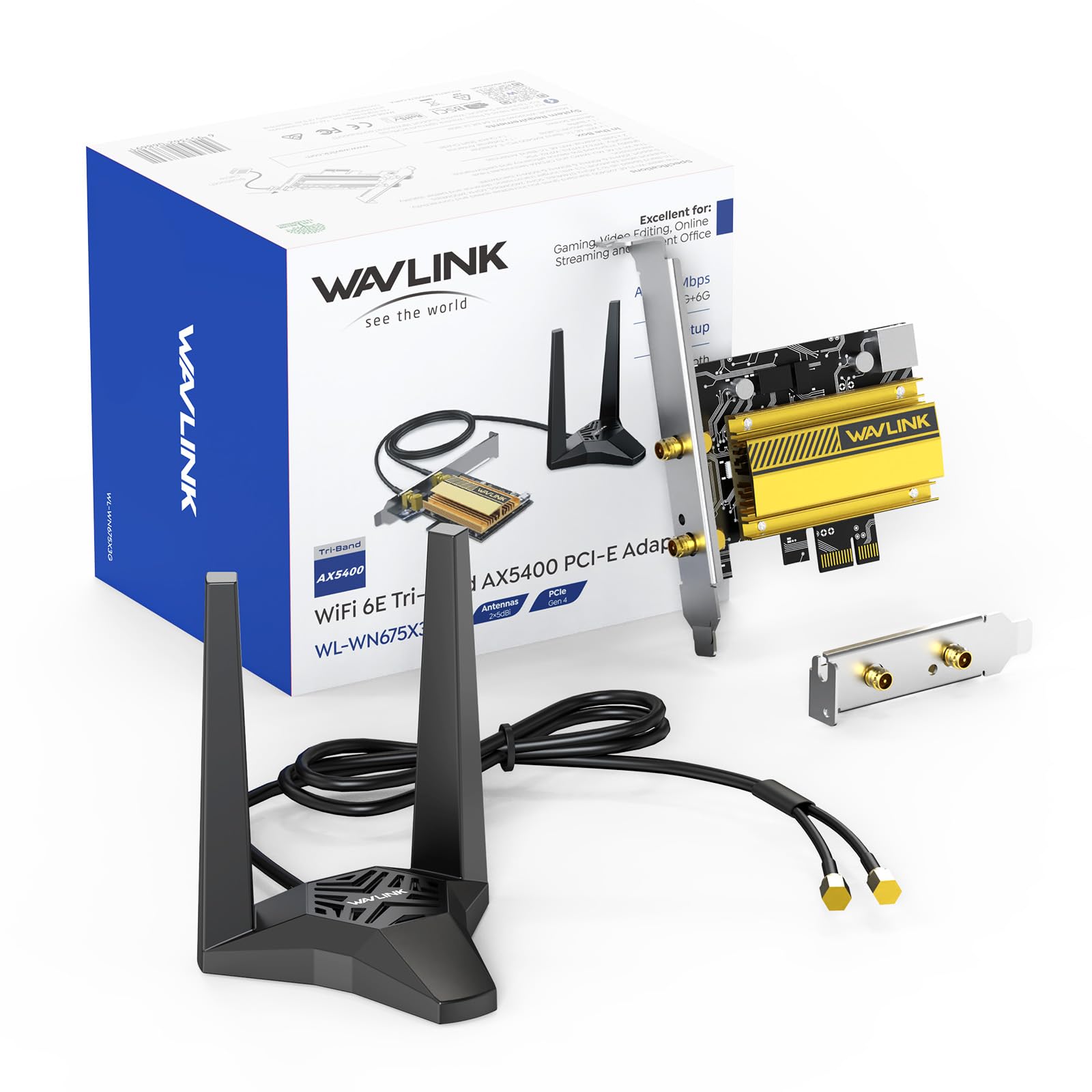
The WAVLINK AXE5400 is the most budget-friendly PCIe Wi-Fi 6E card in this lineup, yet it retains the essential ingredient: the Intel AX210 chipset. This means it delivers the same tri-band architecture (574 Mbps at 2.4 GHz + 2400 Mbps at 5 GHz + 2400 Mbps at 6 GHz) and the same WPA3 security as the TP-Link and GIGABYTE cards. The cost savings come from a more basic antenna set (dual 5 dBi magnetic antennas instead of a dedicated base) and a stripped-back accessory pack.
The magnetic antenna base allows you to stick the antenna array anywhere on a steel case, taking advantage of optimal positioning away from the motherboard’s electrical noise. Installation follows the standard PCIe playbook: X1 slot insertion, Bluetooth header cable routing to the F_USB connector, and driver download from the Intel website (the included driver setup may be slow). Users report the card works seamlessly on both Windows 11 and Ubuntu Linux, and the magnetic base makes repositioning effortless.
The main durability concern comes from a review noting a card failure after 8 hours of use, though the replacement unit performed well thereafter. This is a minor risk at the budget price point. For someone building a new desktop on a strict budget who still wants the 6 GHz band for gaming, the WAVLINK AXE5400 is the entry-level ticket — no feature cuts that matter, just less premium packaging and a slightly higher variance in unit quality.
Why it’s great
- Cost-effective Wi-Fi 6E card with the core Intel AX210 chipset.
- Magnetic antenna base for flexible placement on steel cases.
- Works with Windows 11 and Linux; includes low-profile bracket.
Good to know
- Some reports of initial unit failure, with replacement solving the issue.
- Driver download from Intel needed for fastest setup experience.
FAQ
Can I use a Wi-Fi 7 card with any router or does it need a Wi-Fi 7 router for full speed?
Why does my PCIe Wi-Fi card require a separate USB cable for Bluetooth to work?
Do I need to install drivers from the included CD, or should I download fresh ones?
Will a budget PCIe Wi-Fi card perform similarly to a premium model with the same Intel AX210 chip?
Final Thoughts: The Verdict
For most users, the best wifi antenna for pc is the TP-Link Archer TBE550E because it brings the full Wi-Fi 7 stack — 6 GHz tri-band, MLO, 4096-QAM, and Bluetooth 5.4 — into a desktop-ready PCIe package with a magnetic antenna base that solves the real-world signal positioning problem. If you need flawless AMD compatibility without the chipset headache, grab the MSI Herald-BE with its Qualcomm module. And for the budget-conscious builder who still demands the 6 GHz band for low-latency gaming, nothing beats the value of the WAVLINK AXE5400 at the entry level.