
Our readers keep the lights on and my morning glass full of iced black tea. As an Amazon Associate, I earn from qualifying purchases.
Finding a monitor that delivers true 4K clarity without sacrificing motion clarity is the core challenge for serious gamers and creative professionals alike. Most high-resolution panels introduce noticeable ghosting or input lag that undermines the visual fidelity, turning fast-paced scenes into a blurry mess. The pursuit of a display that renders every pixel instantly, without smearing, defines the modern high-performance monitor market.
I’m Min — the co-founder and writer behind Gadgets Feed. My analysis of this category focuses exclusively on measurable performance metrics like pixel response time, refresh rate overhead, and input latency, backed by hundreds of hours of spec comparison and market research to separate genuine performers from marketing claims.
This guide evaluates the best options that combine ultra-high resolution with pixel-level response speed, helping you choose the best 4k 1ms monitor for your specific needs and budget.
How To Choose The Best 4K 1ms Monitor
Selecting a monitor that delivers both 4K resolution and a true 1ms response time requires understanding several interconnected specifications. A 1ms rating alone is meaningless if the panel can’t maintain it at high frame rates or if the refresh rate is too low to benefit from it. Focus on the interplay between response time, refresh rate, and panel type.
GtG vs. MPRT Response Time
Gray-to-Gray (GtG) measures how fast a pixel changes color, while Moving Picture Response Time (MPRT) measures how long a pixel stays visible. A 1ms GtG rating is more reliable for gaming because it directly indicates pixel transition speed. MPRT can be manipulated through backlight strobing, which may cause flicker or reduce brightness. Always prioritize a 1ms GtG rating over an MPRT rating.
Panel Technology and Motion Handling
IPS panels offer the best color accuracy and viewing angles but typically have slower GtG transitions than OLEDs. Fast IPS technology has closed this gap significantly. VA panels provide superior contrast ratios, especially with Mini-LED backlighting, but can suffer from slower dark pixel transitions. OLED panels deliver near-instantaneous 0.03ms GtG response times, offering unmatched motion clarity.
Refresh Rate Pairing
A 1ms response time is only fully utilized at refresh rates of 144Hz or higher. At 60Hz, the 16.67ms frame interval makes a 1ms panel irrelevant. Look for monitors with at least 160Hz to maximize the benefit of the fast response time, ensuring every frame is rendered before the next one arrives, effectively eliminating perceived motion blur during fast camera pans or character movements.
Quick Comparison
On smaller screens, swipe sideways to see the full table.
| Model | Category | Best For | Key Spec | Amazon |
|---|---|---|---|---|
| ASUS ROG Strix XG27UCS | Premium | Competitive Gaming & Creative Work | 1ms GtG / 160Hz / Fast IPS | Amazon |
| ASUS ROG Strix XG32UCWMG | Flagship | Uncompromised Motion Clarity | 0.03ms GtG / 240Hz / OLED | Amazon |
| Samsung Odyssey Neo G8 G85NB | High-Contrast | HDR Gaming & Immersion | 1ms GtG / 240Hz / Mini-LED VA | $749.99$1,299.99Amazon |
| GIGABYTE M27UP | Versatile | Dual-Mode Gaming & KVM Use | 1ms GtG / 160Hz / SuperSpeed IPS | $329.99Amazon |
| LG 27G810A-B Ultragear | Value Performer | Dual-Mode Gaming with G-Sync | 1ms GtG / 180Hz / IPS | $449.99$599.99Amazon |
| KTC H32P22P | Budget Entry | Multi-Tasking & Casual Gaming | 1ms MPRT / 165Hz / Fast IPS | $449.99Amazon |
In‑Depth Reviews
1. ASUS ROG Strix 27” 4K HDR400 USB-C Gaming Monitor (XG27UCS)

The ASUS ROG Strix XG27UCS is a remarkably well-rounded 27-inch monitor that delivers true 4K UHD resolution with a 160Hz refresh rate and a native 1ms GtG response time. Its Fast IPS panel provides vibrant colors covering 130% sRGB and 95% DCI-P3, making it equally adept for fast-paced gaming and color-sensitive creative work. The inclusion of ASUS Extreme Low Motion Blur Sync (ELMB SYNC) technology allows you to enable backlight strobing alongside variable refresh rate, eliminating ghosting without introducing the usual brightness penalty.
Connectivity is a standout feature here, with a USB-C port supporting DisplayPort Alt Mode and 15W power delivery, plus DisplayPort 1.4 and HDMI 2.1 inputs. The tripod socket on the stand is a clever addition for streamers, and the DisplayWidget Center software provides mouse-based OSD control. The 400-nit brightness with DisplayHDR 400 certification offers a tangible improvement in highlight detail, though true HDR enthusiasts will still want a higher-tier panel.
Build quality is premium, with a metal-reinforced stand that offers height, tilt, swivel, and pivot adjustments. The compact base footprint is ideal for smaller desks. The matte screen surface effectively cuts reflections without introducing the graininess seen on some competitors. For users seeking a single monitor that handles both competitive gaming and professional content creation without compromise, the XG27UCS delivers exceptional versatility.
Why it’s great
- True 1ms GtG with ELMB SYNC for tear-free motion clarity
- USB-C with DP Alt Mode simplifies laptop connectivity
- Excellent color accuracy out of the box
Good to know
- HDR performance is modest despite HDR400 certification
- On-screen menu navigation is slightly finicky
2. ASUS ROG Strix 32” 4K OLED Gaming Monitor (XG32UCWMG)

The ASUS ROG Strix XG32UCWMG represents the absolute peak of motion clarity in the 4K monitor category, featuring a 32-inch WOLED panel with a 0.03ms GtG response time and dual-mode capability reaching 240Hz at 4K and an astonishing 480Hz at Full HD. The TrueBlack Glossy surface eliminates the hazy diffusion layer found on most OLED monitors, delivering exceptional sharpness and contrast with near-perfect black levels thanks to the 1,500,000:1 contrast ratio and VESA DisplayHDR 400 True Black compliance.
ASUS has integrated serious burn-in protection with the Neo Proximity Sensor, which detects user presence and automatically dims the screen when you step away. The A.I. Assistant includes Dynamic Crosshair and Dynamic Shadow Boost features that adjust in real-time based on on-screen content. Color accuracy is professional-grade with 99% DCI-P3 coverage and Delta E < 2, making this monitor viable for color-critical video editing and photo work. Connectivity is comprehensive with two HDMI 2.1 ports, DisplayPort 1.4 with DSC, and USB-C with 15W power delivery.
Motion handling is genuinely transformative for competitive gaming. The 480Hz FHD mode eliminates any perceptible motion blur, while native 4K at 240Hz offers a level of fluidity that IPS panels cannot match. The main trade-off is that glossy screen is prone to reflections in bright rooms, and the automatic input switching can be inconsistent. For users who prioritize motion clarity above all else and have the GPU horsepower to drive 240Hz 4K, this is the definitive performer in the category.
Why it’s great
- 0.03ms GtG response time eliminates all perceptible blur
- 480Hz FHD mode for esports-level fluidity
- Professional-grade color accuracy with 99% DCI-P3
Good to know
- Glossy screen reflects room light significantly
- Auto-input switching can be unreliable
3. Samsung 32″ Odyssey Neo G8 G85NB

The Samsung Odyssey Neo G8 G85NB is a 32-inch 4K gaming monitor that uses Quantum Mini-LED backlighting behind a VA panel to achieve a 1,000,000:1 contrast ratio and 2,000-nit peak brightness with Quantum HDR2000 certification. This combination delivers HDR performance that rivals OLED in dark scenes while exceeding it in sustained brightness, making it one of the most visually impactful monitors for high-dynamic-range gaming. The 240Hz refresh rate and 1ms GtG response time match the fastest IPS competitors.
The 1000R curvature wraps around your peripheral vision, creating an immersive experience that flat panels cannot replicate. The matte display surface effectively eliminates reflections without sacrificing perceived sharpness. AMD FreeSync Premium Pro certification ensures tear-free gameplay with both AMD and NVIDIA GPUs. Color reproduction is vibrant with Quantum Dot technology, though out-of-box calibration tends toward oversaturation that requires manual adjustment for accurate DCI-P3 performance.
Some units have reported scan lines when operating at 240Hz, which can be mitigated by dropping to 120Hz or adjusting the refresh rate timing. The stand is functional but can wobble slightly on uneven surfaces. The aggressive curve may take days to adapt to for users coming from flat panels. For gamers who prioritize contrast ratio and HDR impact alongside 4K resolution and fast response times, the Neo G8 offers a combination that remains unmatched by flat IPS alternatives in its price tier.
Why it’s great
- 2000-nit peak brightness delivers stunning HDR
- Deep blacks with 1,000,000:1 contrast ratio
- 240Hz at 4K matches fastest competitors
Good to know
- 1000R curve requires adjustment period
- Scan line issues reported at 240Hz on some units
4. LG 27G810A-B 27-inch Ultragear 4K UHD IPS Gaming Monitor

The LG 27G810A-B Ultragear strikes the best balance of 4K clarity, high refresh rate, and motion handling at a mid-range price point. Its 27-inch IPS panel delivers native 4K UHD at 180Hz with a true 1ms GtG response time, but the real differentiator is the dual-mode functionality that can switch to Full HD at 360Hz with a single hotkey press. This gives you the flexibility to enjoy story-driven titles in full 4K detail while maintaining esports-grade fluidity for competitive shooters.
Color accuracy is strong with 95% DCI-P3 coverage and DisplayHDR 400 certification, providing punchy highlights and good color saturation without the expense of an OLED panel. NVIDIA G-Sync and AMD FreeSync Premium compatibility ensure tear-free performance across both PC and console gaming. The 4-pole headphone jack with DTS HP:X spatial audio is a thoughtful inclusion for immersive headphone gaming without needing an external DAC.
Build quality is excellent with a sturdy stand offering height, tilt, swivel, and pivot adjustments. The narrow bezel design complements a multi-monitor setup. One minor complaint is the audible fan noise in completely silent rooms, which may be noticeable during low-volume gameplay. For the vast majority of gamers who want 4K clarity with competitive-grade responsiveness without paying flagship prices, the LG 27G810A-B represents the most compelling value proposition in the category.
Why it’s great
- Dual mode offers both 4K 180Hz and FHD 360Hz flexibility
- Excellent color accuracy with 95% DCI-P3 coverage
- Full G-Sync and FreeSync Premium compatibility
Good to know
- Audible fan noise can be distracting in quiet rooms
- Height adjustment range is somewhat limited
5. GIGABYTE M27UP 27″ SS IPS 4K Gaming Monitor
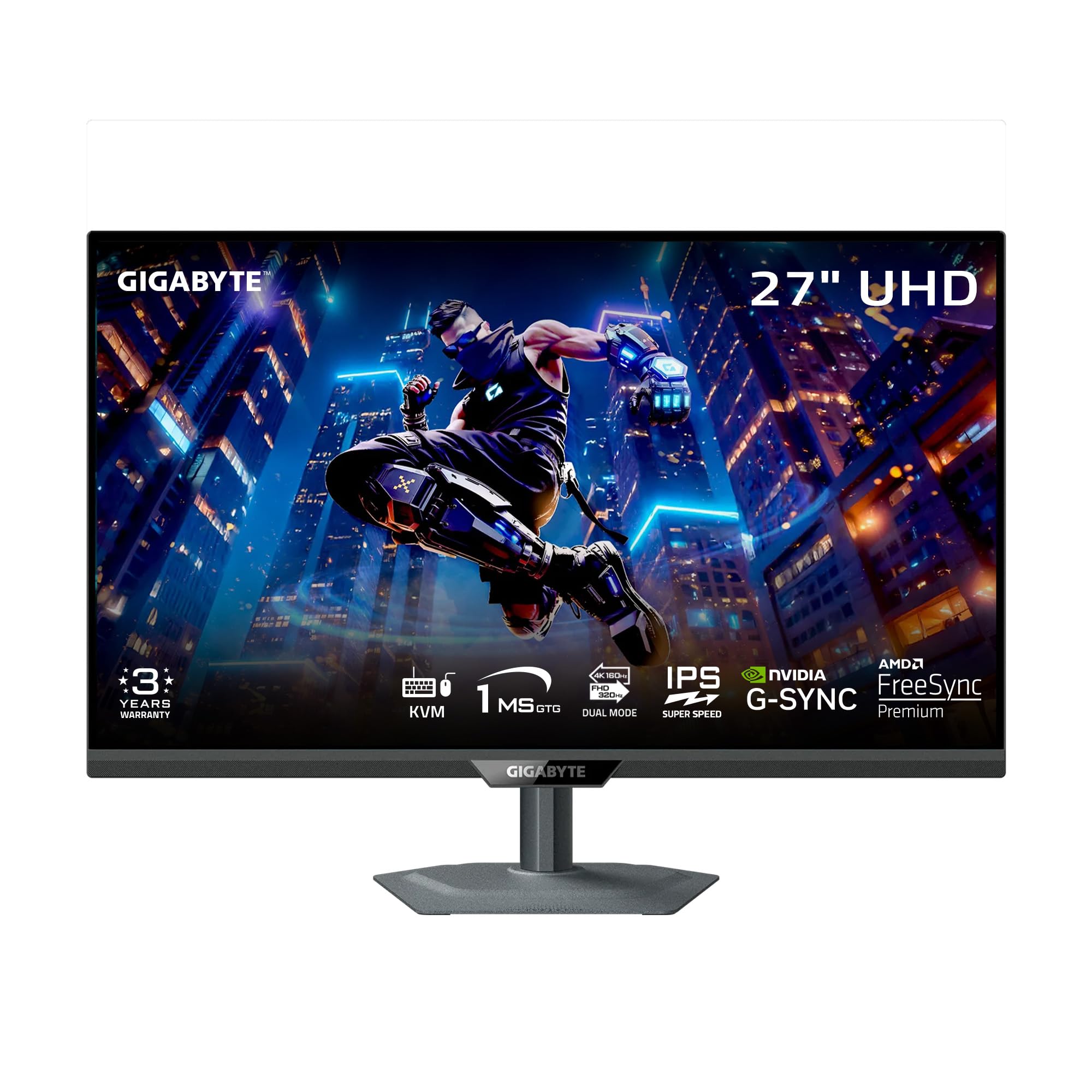
The GIGABYTE M27UP delivers a dual-mode experience similar to the LG Ultragear but at a slightly more accessible price point, offering 4K at 160Hz or Full HD at 320Hz with a 1ms GtG response time. What sets it apart is the inclusion of a USB-C port with KVM functionality, allowing you to control two connected devices with a single keyboard and mouse setup. This makes it a productivity powerhouse for users who split their time between a gaming PC and a work laptop.
The SuperSpeed IPS panel delivers 125% sRGB color gamut coverage and 8-bit color depth, producing vibrant and accurate visuals suitable for both gaming and content consumption. VESA DisplayHDR 400 certification provides adequate highlight brightness for an improved visual experience, though the HDR performance is not class-leading. GIGABYTE’s Tactical Switch 2.0 allows instant mode switching between refresh rates and aspect ratios, and the Smart OD feature dynamically adjusts overdrive to minimize ghosting.
The ergonomic stand provides full height, tilt, swivel, and pivot adjustment with a stable metal base. The monitor includes an Aim Stabilizer Sync, GameAssist, and PIP/PBP modes. Some users report a slight vignette effect at the corners and the necessity to be centered for optimal viewing angles due to IPS glow. For users who need a single monitor that seamlessly transitions between gaming and professional multitasking with KVM support, the M27UP offers exceptional versatility.
Why it’s great
- Built-in KVM simplifies dual-device workflow
- Dual mode with 320Hz FHD for competitive gaming
- Full ergonomic adjustment with metal stand
Good to know
- Vignette effect noticeable on solid white backgrounds
- Viewing angles require centered seating position
6. KTC 32 Inch 4K Gaming Monitor (H32P22P)

The KTC H32P22P is a 32-inch 4K gaming monitor that brings high-refresh-rate gaming to an entry-level budget without sacrificing the core 4K resolution and 165Hz refresh rate combination. Its Fast IPS panel achieves a 1ms MPRT response time, delivering smooth motion clarity for fast-paced gaming. The 3000:1 contrast ratio is higher than typical IPS panels, providing deeper blacks and better shadow detail than expected at this price point.
Color reproduction spans 121% sRGB with 1.07 billion colors, resulting in vibrant and reasonably accurate visuals for a budget offering. Adaptive Sync technology supports both FreeSync and G-Sync, minimizing screen tearing across compatible GPUs. Connectivity includes HDMI 2.1 ports and DisplayPort 1.4, enabling full 4K 165Hz performance with modern consoles and PCs. The 100mm x 100mm VESA mount compatibility allows for flexible desk mounting.
The stand offers only tilt adjustment, which is a notable limitation for ergonomic setup. The menu system has a learning curve and can be unintuitive. Some users report a non-active display area of about 0.5cm around the edges, which may be distracting during productivity work. For budget-conscious gamers who prioritize the 4K 165Hz combination and are willing to compromise on build quality and ergonomics, the KTC H32P22P represents a solid entry point into high-refresh 4K gaming.
Why it’s great
- Affordable 4K 165Hz combination with HDMI 2.1
- Better-than-typical IPS contrast at 3000:1
- Vibrant 121% sRGB color gamut
Good to know
- Stand offers tilt only, no height adjustment
- Menu interface has a steep learning curve
- Non-active display area visible on screen edges
FAQ
Does a 1ms response time really matter for gaming?
What is the difference between dual mode monitors and standard monitors?
Can I use a 4K 1ms monitor with an HDMI 2.0 graphics card?
Does a 1ms response time cause eye strain?
Final Thoughts: The Verdict
For most users, the best 4k 1ms monitor winner is the LG 27G810A-B Ultragear because it combines a true 1ms GtG response time with a versatile dual-mode feature that switches between 4K 180Hz and FHD 360Hz, all at a mid-range price that provides exceptional value. If you want uncompromised motion clarity with OLED-level black performance, grab the ASUS ROG Strix XG32UCWMG. And for high-contrast HDR gaming in an immersive curved format, nothing beats the Samsung Odyssey Neo G8 G85NB.
Product prices and availability are accurate as of the date/time indicated and are subject to change. Any price and availability information displayed on Amazon at the time of purchase will apply to the purchase of this product. As an Amazon Associate I earn from qualifying purchases.
CERTAIN CONTENT THAT APPEARS ON THIS SITE COMES FROM AMAZON. THIS CONTENT IS PROVIDED "AS IS" AND IS SUBJECT TO CHANGE OR REMOVAL AT ANY TIME.
Amazon and the Amazon logo are trademarks of Amazon.com, Inc. or its affiliates.