
Building a high-core-count AMD Ryzen workstation or a future-proof gaming rig hinges on one non-negotiable spec: slot count. Every expansion card, every NVMe drive, and every stick of DDR5 RAM needs a physical home, and the wrong motherboard leaves you juggling trade-offs between storage, graphics, and connectivity. The AM5 motherboard with most slots isn’t just about raw numbers — it’s about giving you the freedom to populate a dual-GPU workstation, a multi-tiered NVMe RAID array, and a full kit of high-speed DDR5 without sacrificing a single lane of bandwidth.
I’m Min — the co-founder and writer behind Gadgets Feed. I specialize in dissecting motherboard PCB layouts, chipset lane allocation, and PCIe bifurcation schemes to find the boards that deliver genuine expansion without hidden bottlenecks or shared bandwidth gotchas.
After cross-referencing technical specs, customer validation, and real-world build reports, the best am5 motherboard with most slots comes down to a few standout contenders that maximize both memory and storage pathways for demanding AMD Ryzen systems.
How To Choose The Best AM5 Motherboard With Most Slots
Slot count isn’t just a tally — it’s a puzzle of chipset lanes, CPU lanes, and physical board real estate. Understanding how these interact prevents you from buying a board that promises six M.2 slots only to have half of them disabled when you install a second graphics card.
PCIe Lane Allocation vs. Physical Slot Count
AMD’s AM5 platform uses a combination of CPU Gen5 lanes (typically 24 or 28 on Ryzen 7000/9000) and chipset lanes that share bandwidth upstream. A board with seven M.2 slots might look impressive, but if four of those share a single x4 link back to the CPU, populating them all simultaneously cuts each drive’s effective bandwidth. The best AM5 motherboards with most slots design their PCIe and M.2 configs to minimize lane contention — usually by dedicating CPU lanes to the primary GPU and two Gen5 M.2 slots while routing the remaining drives through Gen4 chipset lanes that run at full speed.
Memory Slot Capacity and Overclocking Headroom
Every full-size AM5 ATX board offers four DIMM slots, but not all can drive four sticks of high-frequency DDR5 at EXPO-rated speeds. A board rated for DDR5-8000+ in dual-channel often drops to DDR5-5200 or lower with all four slots populated. Serious slot maximizers look for boards with robust memory trace routing (preferably 8-layer PCBs) and explicit support for 192GB or 256GB kits at speeds above DDR5-6000, ensuring you don’t sacrifice bandwidth for capacity.
Physical PCIe Slot Spacing for Multi-GPU
A board may list three PCIe x16 slots, but if they’re spaced too tightly, the second and third slots become unusable with dual-slot graphics cards. Look for boards that support x8/x8 or x8/x8/x4 bifurcation and have at least two slots of physical clearance between the primary and secondary x16 slots. The premium pick in this guide uses a true x8/x8 dual PCIe 5.0 layout with extra spacing for dual-slot coolers, making it a genuine multi-GPU option for creators and AI workloads.
Quick Comparison
On smaller screens, swipe sideways to see the full table.
| Model | Category | Best For | Key Spec | Amazon |
|---|---|---|---|---|
| ASUS ROG Strix X870E-E Gaming | Premium | Maximum M.2 expansion | 5x M.2 slots (3x Gen5) | Amazon |
| ASRock X870 Taichi Creator | Premium | Dual 10GbE + 5GbE LAN | Dual PCIe 5.0 x16 + 10GbE | Amazon |
| GIGABYTE X870 AORUS Elite WiFi7 | Mid-Range | Best value X870 with 4x M.2 | 4x PCIe 5.0 M.2 + USB4 | Amazon |
| MSI MAG X870 Tomahawk WiFi | Mid-Range | USB4 40Gbps + 5G LAN | 4x M.2 + USB4 40Gbps | Amazon |
| Micro Center Ryzen 5 7600X + ASUS B650E MAX | Budget | Entry-level CPU + board combo | 3x M.2 slots (1x Gen5) | Amazon |
In‑Depth Reviews
1. ASUS ROG Strix X870E-E Gaming WiFi

The ASUS ROG Strix X870E-E Gaming WiFi is the undisputed champion of slot density on the AM5 platform, offering five onboard M.2 slots — three of which run at PCIe 5.0 x4 speeds. This configuration allows you to build a massive NVMe RAID array without sacrificing a single PCIe slot for a storage controller. The 18+2+2 power stage design rated at 110A per stage supplies clean, stable voltage to even a Ryzen 9 9950X under sustained all-core workloads, while the Dual USB4 Type-C ports on the rear I/O provide ultra-high-bandwidth connectivity for external SSDs and high-resolution displays.
ASUS includes its Dynamic OC Switcher and Core Flex technologies, which automatically switch between single-core boost and all-core overclocks depending on workload — a feature that multiplies the board’s value for users who both game and create. The PCIe Slot Q-Release Slim and tool-free M.2 Q-Latch system make swapping components almost effortless, and the integrated AI Overclocking and AI Cooling II automate tuning without requiring manual BIOS expertise. Some early adopters reported M.2 slot detection issues at high memory overclocks, but subsequent BIOS revisions have largely resolved those edge cases.
The massive aluminum heatsink array connected by an L-shaped heatpipe keeps both the VRM and all five M.2 drives at safe operating temperatures during prolonged stress tests. With Wi-Fi 7, Realtek 5Gb Ethernet, and a full complement of USB 10Gbps and 20Gbps front-panel headers, this board covers every expansion need a power user could realistically demand. The 192GB DDR5 ceiling (with four DIMM slots) supports heavy multitasking and virtual machine hosts, making this the definitive choice for anyone whose build revolves around maximum storage slots.
Why it’s great
- Five M.2 slots with three running at Gen5 speeds — unmatched storage expansion on AM5
- 18+2+2 phase 110A VRM delivers rock-solid power delivery for Ryzen 9 overclocking
- Dual USB4 Type-C ports plus Wi-Fi 7 provide future-proof external connectivity
Good to know
- Hefty 2.4kg weight and E-ATX dimensions require careful case selection
- DDR5 training with four sticks at high speeds can be slow — expect longer initial POST times
2. ASRock X870 Taichi Creator ATX
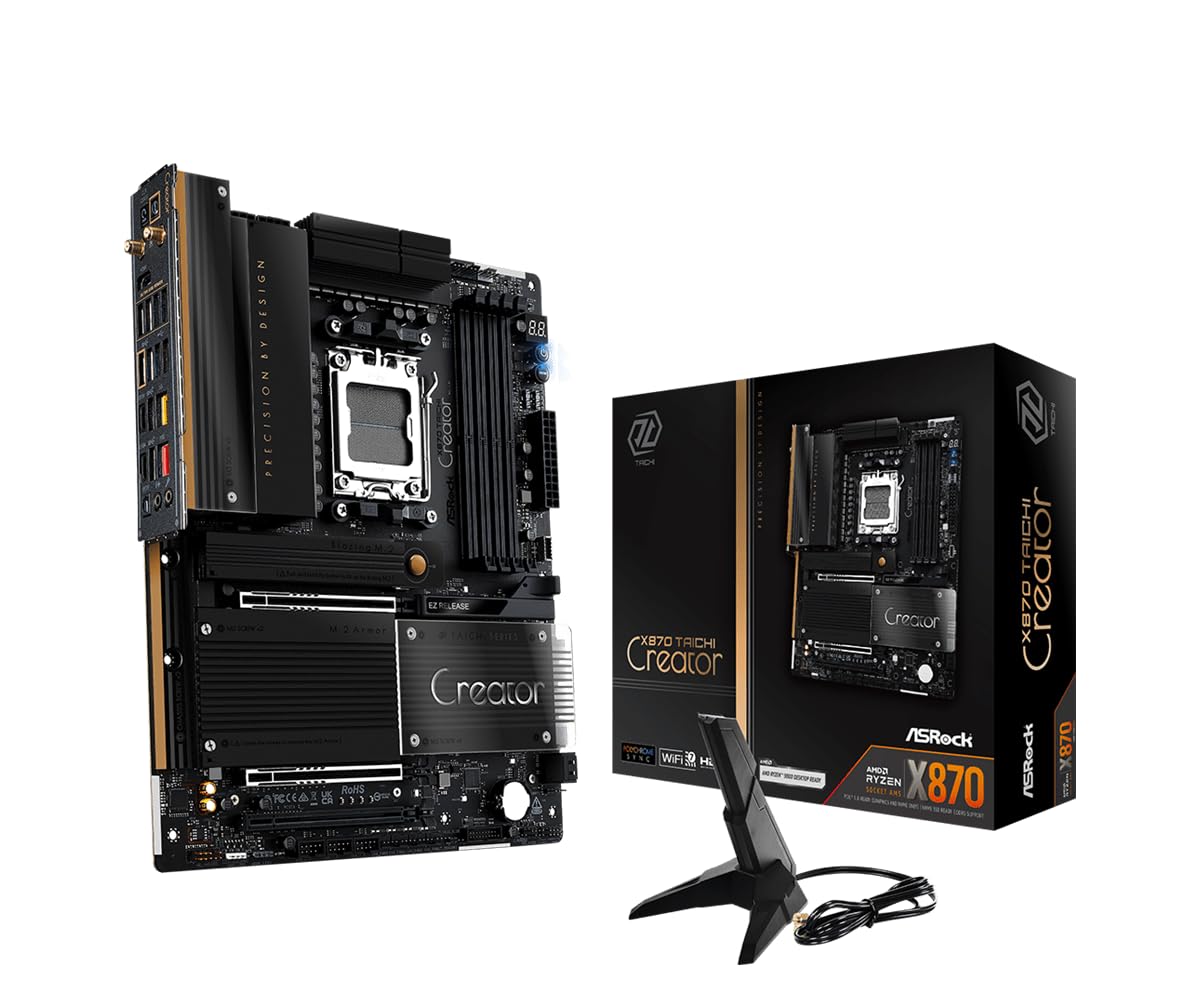
The ASRock X870 Taichi Creator is purpose-built for workstation users who need maximum expansion without sacrificing network throughput. It offers four M.2 slots — two PCIe Gen5 x4 and two PCIe Gen4/Gen3 — plus dual full-size PCIe 5.0 x16 slots that operate in x8/x8 bifurcation mode, enabling genuine dual-GPU setups for rendering, AI training, or simulation workloads. The headline feature is dual LAN: a Marvell (Aquantia) 10GbE controller and a Realtek 5GbE controller, making this the cheapest AM5 board to include 10-gigabit Ethernet and eliminating the need for a dedicated network add-in card.
The 18+2+1 phase 80A SPS VRM is paired with an enlarged heatsink armor that handles a Ryzen 9 9950X3D under sustained water-cooled loads without thermal throttling. The rear I/O delivers dual USB4 Type-C ports (40 Gbps, with one supporting 36W PD for charging), twelve USB-A ports, and BIOS Flashback functionality for easy firmware updates. Builders report that the tool-less M.2 heatsink and GPU EZ Release mechanism streamline the installation process considerably, and the board’s weighty build quality inspires confidence during handling.
Real-world stability reports from users running dual RTX 3090 cards in x8/x8 mode confirm the board maintains rock-solid PCIe link stability, though the second GPU’s clearance to the audio connector is tight — one reviewer noted a 1mm gap would have been ideal. Memory support extends to DDR5-8000+ (OC) with 256GB maximum capacity across four DIMM slots, and the Realtek ALC4082 audio codec with Nahimic software delivers clean near-field sound for content review. For creators who prioritize wired networking throughput above all else, this board’s dual high-speed Ethernet configuration is unmatched at its tier.
Why it’s great
- Dual 10GbE + 5GbE LAN eliminates the need for a dedicated NIC — saves a PCIe slot
- Dual PCIe 5.0 x16 slots with x8/x8 bifurcation enable true dual-GPU builds
- Dual USB4 Type-C ports with 40 Gbps and PD charging for versatile external connectivity
Good to know
- Some units have been reported DOA, so verify POST immediately upon arrival
- Second GPU can press against the audio connector — measure clearances for dual-slot cards
3. GIGABYTE X870 AORUS Elite WiFi7

The GIGABYTE X870 AORUS Elite WiFi7 strikes an exceptional balance between slot count and price, offering four PCIe 5.0 M.2 slots and dual USB4 Type-C ports at a mid-range price point. Every M.2 slot runs at Gen5 speeds — a rarity at this level — allowing you to populate a full set of high-speed NVMe drives without worrying about which slot drops to Gen4. The 16+2+2 phase VRM keeps a Ryzen 7 9800X3D comfortably cool under sustained gaming loads, and the VRM and M.2 Thermal Guard heatsinks maintain safe temperatures even during extended encoding sessions.
USB4 implementation here is full-featured with 40 Gbps throughput on both Type-C ports, supporting 8K display output and external GPU enclosures. The EZ-Latch system provides tool-free installation for both M.2 drives and the GPU, simplifying the build process significantly. Real-world user reports confirm flawless EXPO memory tuning with DDR5-6000 kits, and Wi-Fi 7 connectivity delivers wireless throughput of 5-6 Gbps with low latency — competitive with wired 5GbE for most streaming and file transfer use cases.
The 5-year warranty offered by GIGABYTE adds long-term peace of mind, and the Q-Flash BIOS update button allows firmware updates without a CPU installed. The board’s layout provides generous spacing between the primary PCIe x16 slot and the first M.2 slot, ensuring GPU airflow isn’t obstructed. Builders who want the storage expansion of a premium board without paying the premium price will find this Elite model delivers four Gen5 M.2 slots and dual USB4 at a value proposition that rivals higher-priced competitors.
Why it’s great
- Four PCIe 5.0 M.2 slots at a mid-range price — unmatched storage value on X870
- Dual full-speed USB4 Type-C ports with 40 Gbps for displays and high-speed peripherals
- 5-year warranty provides long-term confidence in the board’s durability
Good to know
- Some early BIOS versions exhibited USB stability quirks — update to latest revision
- The VRM heatsink is large but still comfortable in standard ATX cases
4. MSI MAG X870 Tomahawk WiFi

The MSI MAG X870 Tomahawk WiFi brings enterprise-level connectivity to a mid-range price, featuring a built-in USB4 port with 40 Gbps throughput and a 5G LAN controller. The board offers four M.2 slots (including Gen5 support on the primary slot) and four DDR5 DIMM slots supporting up to 128GB of memory at 7800 MHz. The extended PWM heatsink design and enhanced circuit layout ensure stable power delivery for Ryzen 9 processors, with the BIOS interface receiving consistent praise for its user-friendly overclocking controls and fan tuning curves.
User reports highlight the board’s rock-solid stability with Ryzen 9 9950X3D processors and 192GB DDR5-6000 kits — a combination that pushes the platform to its limits. The Audio Boost 5 isolated audio circuit delivers clean signal for gaming headsets and desktop speakers, and the LED debug display provides instant feedback during troubleshooting. The tool-free M.2 heatsink design streamlines drive installation, and the Clear CMOS button on the rear I/O makes BIOS experimentation less punishing.
Some early adopters experienced extended boot times during memory training (over one minute) and occasional WiFi packet drops, though MSI’s BIOS updates have addressed the most common complaints. The board’s SATA port count is limited compared to some competitors — only four SATA 6Gbps ports are present — so users migrating large SATA drive arrays should verify their requirements. For builders who prioritize USB4 and 5G LAN connectivity in a well-priced package with a straightforward BIOS experience, the Tomahawk delivers reliable performance with minimal configuration friction.
Why it’s great
- Integrated USB4 40Gbps port eliminates the need for a separate controller card
- 5G LAN and Wi-Fi 7 provide dual high-speed networking options
- User-friendly BIOS with excellent overclocking and fan curve controls
Good to know
- Limited to four SATA 6Gbps ports — not ideal for large HDD arrays
- Some users report WiFi packet drops and slow boot times on early BIOS versions
5. Micro Center Ryzen 5 7600X + ASUS B650E MAX Gaming WiFi
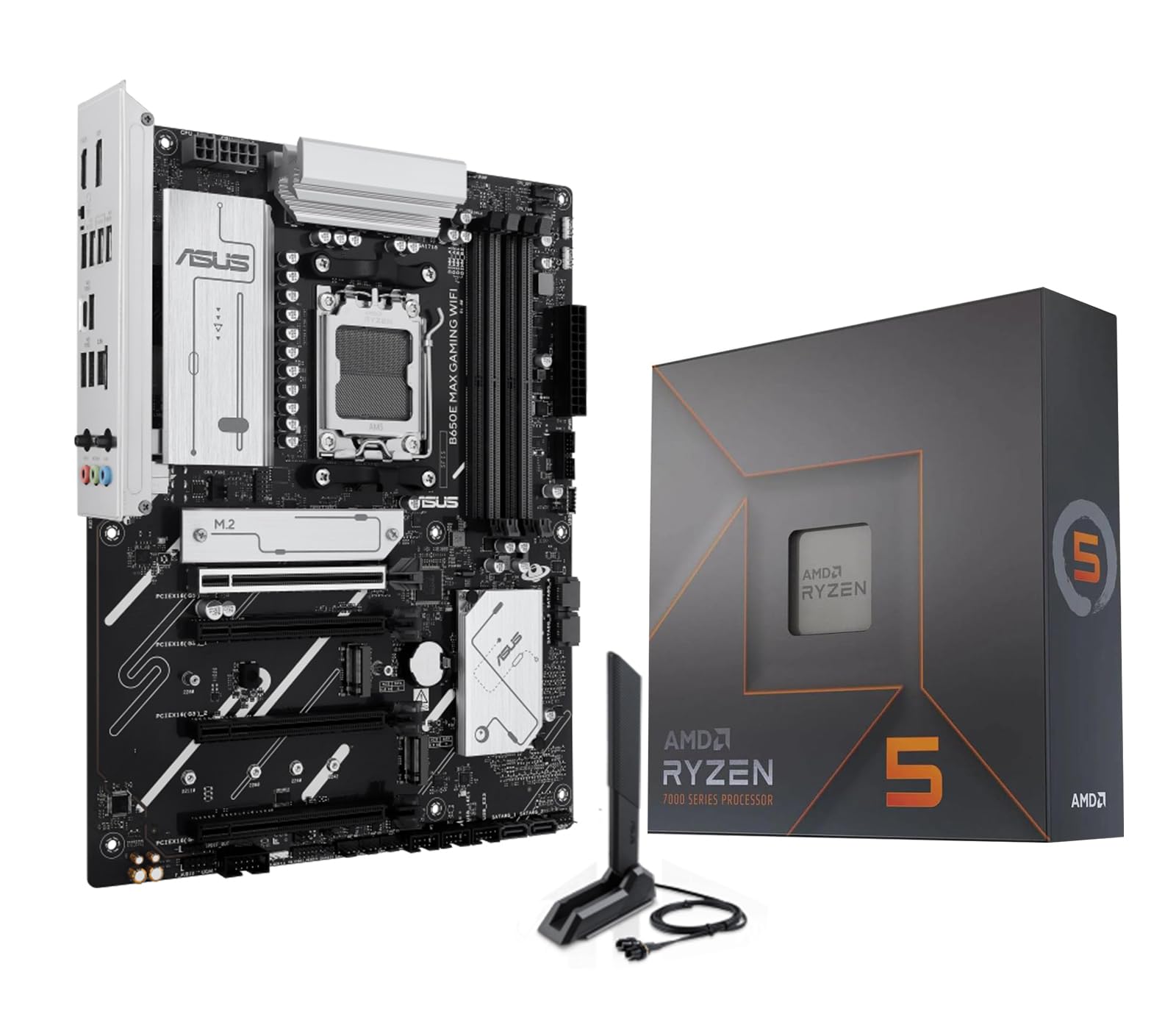
The Micro Center combo of a Ryzen 5 7600X processor and ASUS B650E MAX Gaming WiFi motherboard offers the most accessible entry point into the AM5 platform with a slot count that still supports modern expansion. The B650E chipset provides one PCIe 5.0 x4 M.2 slot and two PCIe 4.0 M.2 slots, plus four SATA 6Gbps ports and four DDR5 DIMM slots supporting up to 256GB of memory. The 8+2+1 phase power design with a 6-layer PCB delivers stable power for the 6-core 7600X and leaves headroom for a future CPU upgrade to an 8-core or 12-core Ryzen 9000-series processor.
ASUS includes its Q-LED Core diagnostic system, BIOS FlashBack for firmware updates without a CPU, and Fan Xpert 2+ for automated fan curve optimization — features that dramatically simplify the building process for first-time AM5 adopters. The Wi-Fi 6E and Bluetooth 5.3 module provides adequate wireless connectivity for gaming and streaming, though it lacks the Wi-Fi 7 found on higher-tier boards. New PC builders consistently report that the pre-mounted I/O shield and clear onboard labeling make this one of the easiest AM5 combos to assemble correctly on the first try.
The board supports dual-channel DDR5 at speeds up to 8000 MHz (OC), though hitting those frequencies with four DIMMs populated may require manual tuning. The three addressable RGB Gen 2 headers and Aura Sync software provide full lighting customization for those building a visually cohesive system. While the three M.2 slot count is lower than the X870 boards in this guide, it’s sufficient for a primary boot drive, a game library, and a scratch disk — making this combo a logical starting point for budget-conscious builders who plan to upgrade to a higher-slot-count board later without overspending upfront.
Why it’s great
- Includes a Ryzen 5 7600X CPU and B650E motherboard in one purchase — simplifies buying
- BIOS FlashBack and Q-LED Core make troubleshooting accessible for new builders
- Three M.2 slots (one Gen5) provide adequate storage expansion for most users
Good to know
- B650E chipset limits total M.2 count to three — not for those needing maximum slots
- The 8+2+1 VRM is adequate for the 7600X but may limit high-core Ryzen 9 overclocking
FAQ
Does populating all four M.2 slots on an X870 board reduce GPU bandwidth?
Can I run DDR5-8000 on four DIMM slots with an X870 motherboard?
What is the practical difference between B650E, X870, and X870E for expansion slots?
Final Thoughts: The Verdict
For most users, the best am5 motherboard with most slots winner is the ASUS ROG Strix X870E-E Gaming WiFi because it offers five M.2 slots — three at Gen5 speeds — without compromising GPU lane bandwidth or memory overclocking stability. If you need dual high-speed wired networking without sacrificing a PCIe slot, grab the ASRock X870 Taichi Creator with its dual 10GbE and 5GbE LAN. And for the best value M.2 expansion in the mid-range, nothing beats the GIGABYTE X870 AORUS Elite WiFi7 with four Gen5 M.2 slots and dual USB4.