
Manual time cards and spreadsheets invite rounding errors, buddy punching, and hours of reconciliation every pay period. A biometric time clock eliminates these pain points by tying each punch to a unique physical characteristic—fingerprint, face, or palm—so you pay only for time actually worked.
I’m Min — the co-founder and writer behind Gadgets Feed. I’ve spent countless hours dissecting the technical specifications, reading through hundreds of real-world user experiences, and comparing the core architectures of the leading models on the market to bring you a guide built on genuine research.
Whether you run a small retail shop, a growing construction crew, or a busy office, finding the perfect best biometric time clock means balancing accuracy, employee usability, and long-term operational costs.
How To Choose The Best Biometric Time Clock
Selecting the right biometric time clock for your business goes beyond just picking the cheapest model. You need to consider how your employees will interact with the device daily, how the data flows into your payroll system, and what happens when the power goes out or the internet drops. Focus on the authentication methods, the software ecosystem, and the physical build quality.
Authentication Methods: Fingerprint, Face, Or Palm?
Each biometric type has trade-offs. Optical fingerprint sensors are the most common and affordable but can struggle with dry, wet, or worn-down fingertips. Capacitive and advanced optical sensors improve accuracy significantly. Face and palm scanning offer contactless operation—ideal for hygiene-conscious environments—but typically require a subscription for cloud features. Consider your workforce’s physical work environment: construction sites might need more rugged readers while a clean office can use standard optical sensors.
Cloud vs. Local vs. Hybrid Architecture
Cloud-based clocks sync data to a remote server, allowing you to run reports and manage employees from a phone or laptop. These usually come with a monthly fee. Local-only clocks store data on the device or a connected PC, eliminating recurring costs but limiting remote access. Hybrid models, like the NGTeco W3, offer local operation with optional WiFi sync, giving you the best of both worlds. Evaluate your need for real-time oversight against your budget for ongoing subscription fees.
Power Backup Data Safety
A sudden power cut can erase unsaved punches if the clock lacks a battery backup. Models with built-in rechargeable batteries, such as the NGTeco TC2 with its 2000mAh cell, keep recording during outages and preserve all data until the connection is restored. This is critical for 24/7 operations or businesses in areas with unstable power grids. Always check the battery capacity and whether it maintains full data integrity.
Quick Comparison
On smaller screens, swipe sideways to see the full table.
| Model | Category | Best For | Key Spec | Amazon |
|---|---|---|---|---|
| NGTeco W3 | Mid-Range | Small office, no subscription | 2.4GHz WiFi + Offline | Amazon |
| Tymelix KNT313 | Mid-Range | Offline operation, fast pairing | 0.5s sensor, IC Cards | Amazon |
| uAttend JR2000 | Mid-Range | Cloud payroll integration | WiFi + Ethernet | Amazon |
| uAttend JL2500 | Mid-Range | Wall-mount compact design | WiFi, 1x C battery backup | Amazon |
| Allied Time CB4100 | Premium | Multi-modal verification | Face + Palm + Badge | Amazon |
| Allied Time B07Y5M3N78 | Premium | Advanced security layers | Face + Palm + Fingerprint | Amazon |
| uAttend JR1000 | Premium | Large team tracking | WiFi + Ethernet | Amazon |
| uAttend JR2500 | Premium | Detail-oriented reporting | Ethernet, Unlimited users | Amazon |
| NGTeco TC2 | Mid-Range | Power outage resilience | 2000mAh Backup Battery | Amazon |
In‑Depth Reviews
1. NGTeco W3

The NGTeco W3 strikes an excellent balance between cost and functionality for small businesses. It connects via 2.4GHz WiFi to sync data with the NGTeco Time App, but crucially it does not require WiFi to operate—employees can clock in and out offline, with data syncing later. This hybrid approach eliminates the internet dependency that plagues pure cloud clocks while still offering the convenience of remote report access.
The fingerprint scanner is quick for most users, though a small percentage of employees with very dry or worn skin may experience registration difficulties. The Auto Punch Mode is a standout feature for shift changes, automatically recording punches without requiring employees to press buttons, which speeds up throughput during busy periods. The accompanying free app sends time reports directly to your email, completely skipping the monthly subscription treadmill.
Customer support receives consistently high marks, with users specifically praising representatives like Joseph and John for helping with setup and configuration. The absence of a monthly fee combined with solid hardware makes this an attractive entry point for businesses wanting to modernize attendance tracking without ongoing financial commitment.
Why it’s great
- Operates fully offline without WiFi
- No monthly subscription fees
- Auto Punch Mode for faster clock-ins
Good to know
- App requires same WiFi for report generation
- Fingerprint sensor may struggle with dry skin
2. NGTeco TC2

The NGTeco TC2 upgrades the formula with dual-band WiFi support (2.4GHz and 5GHz) for a more stable, faster connection. This is a meaningful improvement for offices where 2.4GHz congestion causes interference, as 5GHz offers a cleaner channel. The 2000mAh internal backup battery is the headline feature here—it keeps the clock running through power outages, preventing lost punches during blackouts that plague many competing models.
The cloud management is handled through AWS servers in the US with end-to-end encryption, providing strong data security assurance. Remote management via the mobile app and web portal gives busy managers real-time visibility into attendance without being tied to the office. Shift customization is flexible, supporting fixed, rotating, part-time, and department-specific schedules out of the box.
User feedback highlights responsive customer support, with technicians like Joseph and Smiles assisting with initial setup. The color scheme is a clean black-white design that blends into most office environments. The compact form factor—about 4 inches wide—saves desk or wall space. At this price point with no monthly fees and a backup battery, it is a compelling choice for businesses that cannot afford downtime.
Why it’s great
- 2000mAh internal backup battery
- Dual-band WiFi (2.4GHz + 5GHz)
- AWS cloud storage with encryption
Good to know
- Batteries not included
- Tabletop mounting only
3. Tymelix KNT313
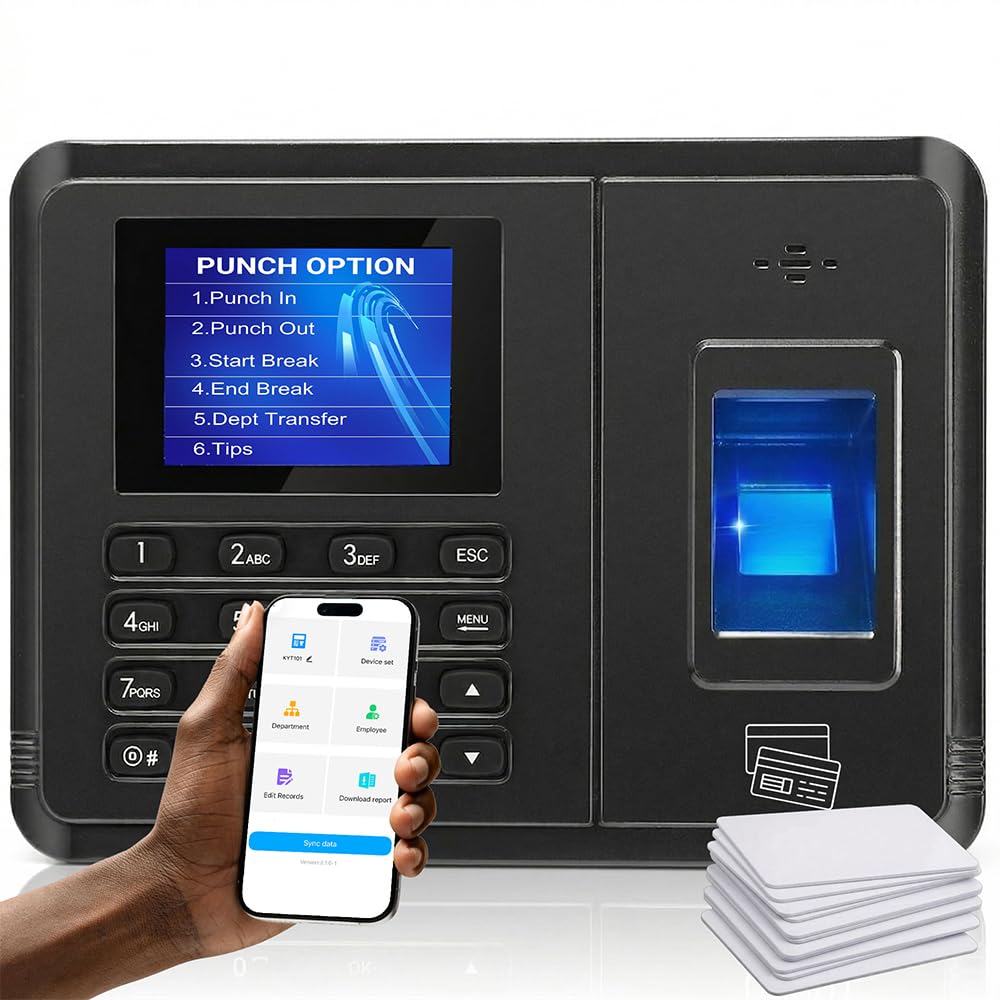
The Tymelix KNT313 is built for environments where WiFi is unreliable or nonexistent. Instead of cloud-dependent syncing, it uses proprietary wireless pairing technology to connect directly to your phone via an app in about 5 seconds. All attendance data stays stored locally on the device, which is a massive privacy and reliability advantage for construction sites, warehouses, or remote job sites where internet access is intermittent.
The biometric sensor claims a 0.5-second recognition speed and supports wet or dry fingerprints, a common pain point for optical sensors. It also offers three punch options: fingerprint, IC card (10 cards included), or PIN code. The smart auto-calculation engine tracks multi-level overtime (OT1, OT2, weekly OT) and automatically deducts lunch and break times according to your custom rules. This eliminates manual payroll calculations entirely.
Data is protected during power outages by a built-in storage buffer, not a battery, which ensures no punches are lost even if the unit loses power mid-operation. Reports can be exported in four formats (including raw data and salary reports) covering weekly, bi-weekly, semi-monthly, and monthly pay periods. The 1-year warranty and lifetime US-based support provide a safety net. For businesses prioritizing offline reliability and zero monthly fees, this is a top contender.
Why it’s great
- Fully offline operation, no WiFi needed
- 0.5s fingerprint sensor works with wet/dry skin
- Auto overtime and lunch deduction tracking
Good to know
- App interface may be complex for non-tech users
- Reports only accessible when synced to phone
4. uAttend JR2000

The uAttend JR2000 is a cloud-centric time clock that truly shines when paired with its subscription service. The device itself supports fingerprint, RFID, and PIN entry, but the real muscle is in the back-end cloud platform. Real-time data access from any device, automatic cloud backups, and seamless ADP/Gusto payroll integration make this a powerhouse for businesses that want to minimize weekly admin overhead.
Setup can be finicky—some users report initial “Set Administrator Code” errors that require customer support intervention. However, once configured, the interface is intuitive. The JR2000 supports multiple branches and locations, with mounting options that have proven durable even when installed outdoors for months. The offline data mode is a critical safety net: if the internet goes down, the clock stores punches locally and syncs them when the connection is restored.
The subscription cost is an important factor to accept before purchase. While the monthly fee unlocks advanced reporting, payroll tax filing, and real-time access, it is an ongoing expense. Users on bi-weekly pay schedules should verify that break deduction rules match their policies, as some reviewers noted that the system can automatically include breaks in hours worked. Overall, this is a excellent choice for growing businesses that value automated payroll over upfront savings.
Why it’s great
- Cloud-based with real-time remote access
- Seamless ADP/Gusto payroll integration
- Offline data mode for internet outages
Good to know
- Requires ongoing monthly subscription
- Initial setup may need customer support
5. uAttend JL2500

The uAttend JL2500 is a smaller, wall-mountable sibling in the uAttend lineup, designed for spaces where desk real estate is at a premium. At just 2.72 inches wide, it fits neatly by a doorway or on a narrow wall section. It uses a single C battery for backup, which is less robust than the integrated rechargeable batteries found in premium models but still provides basic continuity during brief outages.
The fingerprint scanner is fast and reliable, with users praising its accuracy. The clock connects via WiFi and syncs seamlessly to the uAttend cloud dashboard. The accompanying app for Android and iOS allows managers to remotely monitor attendance, generate reports, and adjust employee records. The subscription model grants lifetime free replacements and unlimited customer support, which adds long-term value for businesses that dislike hardware-only warranties.
Some users note that the wall-mounting bracket feels relatively flimsy, so you may want to supply your own heavy-duty screws for a secure installation. The ongoing subscription requirement is clearly stated, but it is a dealbreaker for those seeking a one-time purchase. For businesses that want a compact, professional-looking time clock with robust backend features and are comfortable with the monthly fee, the JL2500 fits the bill.
Why it’s great
- Ultra-compact, wall-mountable design
- Fast and accurate fingerprint scanner
- Lifetime free replacements with subscription
Good to know
- Requires ongoing monthly subscription
- Included wall bracket may need reinforcement
6. Allied Time CB4100
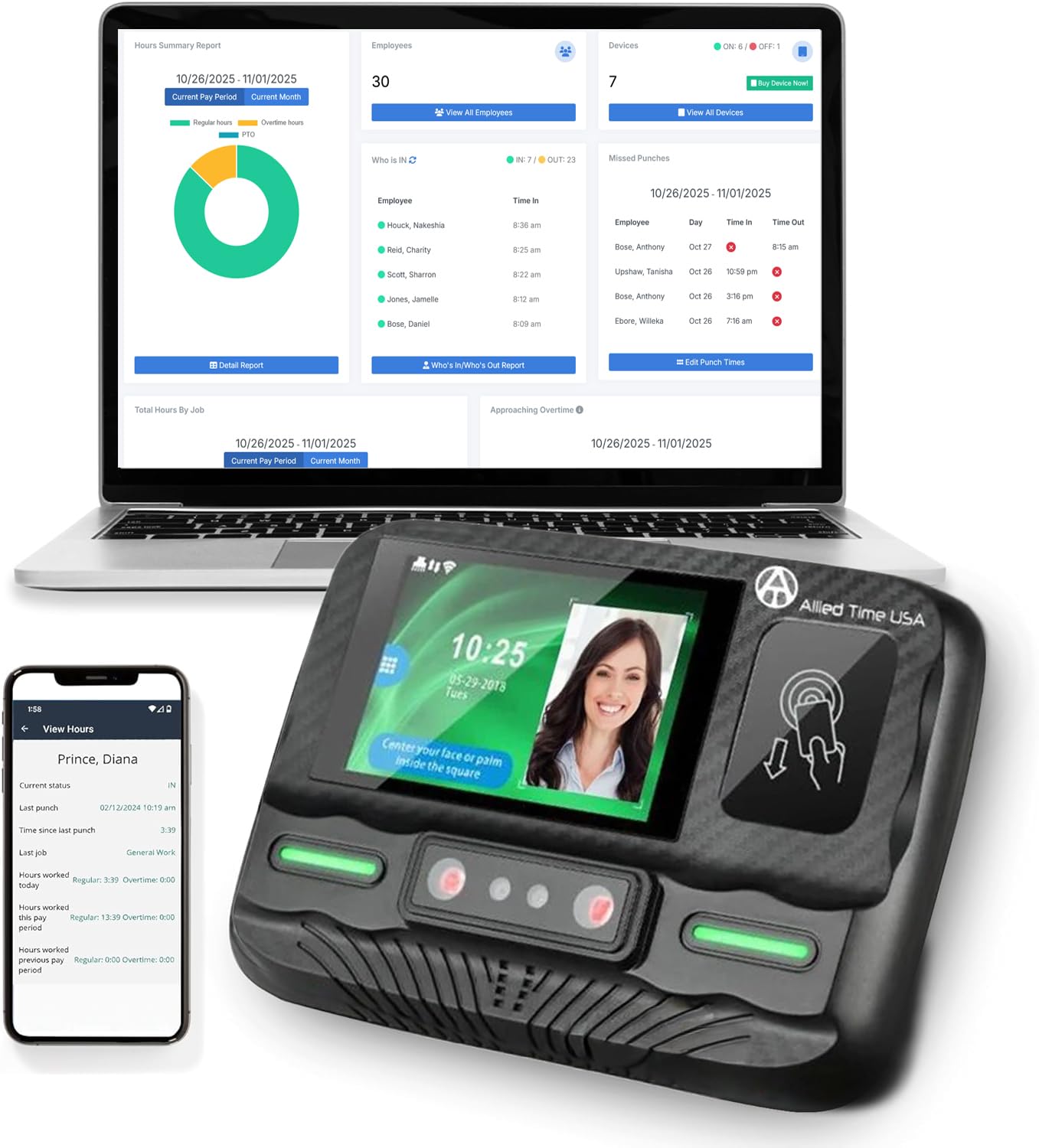
The Allied Time CB4100 takes a multi-modal approach to authentication: employees can clock in using contactless RFID badges, face scanning, or palm scanning. This flexibility is especially beneficial in industries where employees frequently wear gloves or have dirty hands, such as construction, manufacturing, or food service. The palm scanner is a particularly hygienic option, as it requires no physical contact with the device.
The clock is WiFi-ready and can be deployed within minutes. The web-based reporting software offers a 30-day free trial, after which a monthly fee of applies for up to 9 employees. The reports are compatible with ADP, Gusto, and SurePayroll, and you can export CSV files directly. The free mobile app includes GPS tracking for remote employees, making this a solid choice for businesses with field workers.
The hardware interface could use refinement—some users find it unclear whether the clock has registered a punch without checking the phone app. The inclusion of a lifetime warranty and US-based support is a strong selling point. For businesses that want to offer multiple biometric options to accommodate diverse work conditions and are comfortable with the moderate monthly fee, the CB4100 is a versatile solution.
Why it’s great
- Multiple clocking options: face, palm, badge
- GPS tracking app for remote employees
- Lifetime warranty and US-based support
Good to know
- Hardware status indicator is unclear
- Monthly subscription after 30-day trial
7. Allied Time B07Y5M3N78

This Allied Time model is the most security-oriented option in this guide, offering facial recognition, palm scanning, and fingerprint scanning in a single unit with a metal housing. The all-metal frame is significantly more durable than the plastic enclosures found on most competitors, making it suitable for high-traffic environments or rough handling. It connects via Ethernet, which provides the most stable network connection for critical data transmission.
The multi-modal biometric approach virtually eliminates buddy punching—a single employee cannot clock in for another using any method. The web-based platform includes automated alerts for early/late punches and approaching overtime, job tracking, and CSV exports. The subscription after the 30-day trial starts at about per month for up to 30 users, which is reasonable for the depth of features. The mobile app adds geo-fencing and optional selfie capture for an extra layer of location-based verification.
Customer service is a mixed bag—some users report excellent support while others describe terrible experiences with key code sync issues. Setup is straightforward for most, but the Ethernet-only connectivity may limit placement options if you don’t have a wired network drop nearby. For businesses that prioritize maximum security features and are willing to navigate a subscription fee, this unit delivers exceptional peace of mind.
Why it’s great
- Triple biometric security: face, palm, fingerprint
- Durable metal housing
- Geo-fencing and selfie verification options
Good to know
- Ethernet only—no WiFi
- Mixed customer service experiences
8. uAttend JR1000
The uAttend JR1000 is designed as a scalable entry point for businesses that anticipate growth. It supports an unlimited number of employees, which is rare at this hardware price point. The clock offers three punch methods—fingerprint, RFID, and PIN—and connects via WiFi or Ethernet for flexible network placement. The build quality is solid, with a clear screen and a sturdy wall-mounting bracket that feels more substantial than the JL2500’s.
The cloud platform is where the JR1000 shows its value. Real-time data syncs automatically, and you can view attendance records, edit punches, and generate reports from any device with a browser. The subscription is required for full functionality, starting at around per month for up to 9 employees. The automatic cloud backups and payroll integration streamline the end-to-end process from clock-in to paycheck.
Users consistently compliment the fast biometric scanner and the intuitive interface. The compact form factor is professional-looking and does not dominate the wall space. The subscription is a non-negotiable cost, but the bundle includes lifetime free replacements and unlimited customer support. For small businesses that are growing and want a cloud-native system with room to scale, the JR1000 is a smart investment.
Why it’s great
- Supports unlimited employees
- Cloud sync with real-time access
- Sturdy professional build quality
Good to know
- Subscription required for full features
- No battery backup included
9. uAttend JR2500
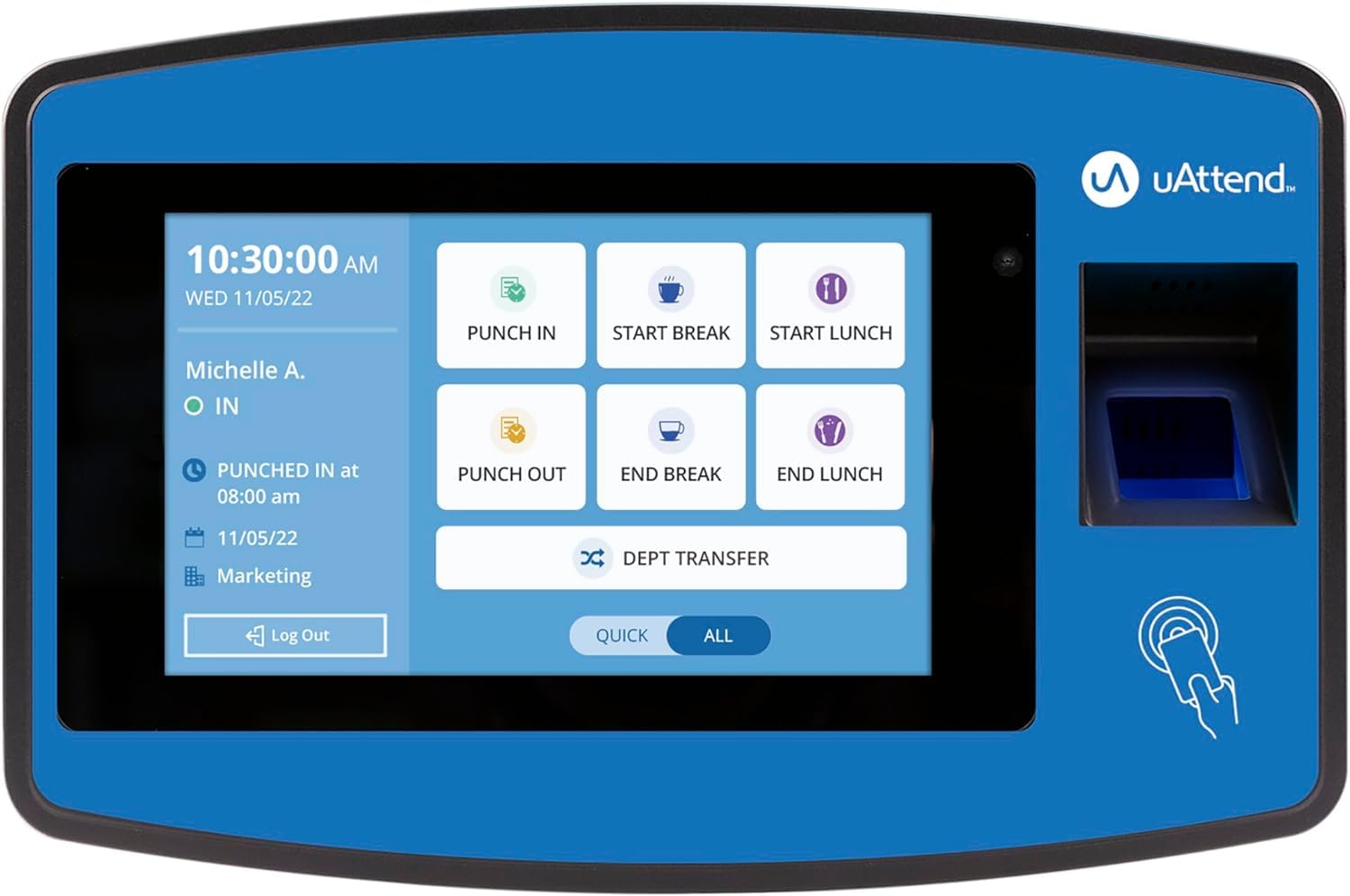
The uAttend JR2500 is the most feature-packed unit in the uAttend lineup, designed for businesses that want deep reporting and time-off tracking. It offers the same three punch methods—fingerprint, RFID, PIN—but adds more sophisticated cloud features like detailed labor cost analysis, attendance trend reports, and vacation/PTO tracking. The Ethernet-only connectivity is a deliberate choice for maximum network stability, ensuring that sync never drops due to WiFi interference.
The hardware is compact at 11 inches wide and can be wall-mounted. Setup is straightforward, and users report that the biometric scanner is accurate to the second. The cloud dashboard allows editing of missed punches, setting up vacation requests, and exporting payroll data to popular systems like ADP and Gusto. The pricing structure is per employee per month with a monthly minimum, plus a annual W-2/1099 fee.
This clock replaces paper timesheets completely, and reviewers appreciate the reduction in administrative chaos. The automatic cloud backups mean you never lose a punch record. The subscription model is clearly communicated, though some users find the additional W-2 fee unexpected. For businesses that need robust reporting, time-off management, and are committed to a cloud-first workflow, the JR2500 is the pinnacle of the uAttend ecosystem.
Why it’s great
- Advanced reporting with labor cost analysis
- Time-off and vacation tracking built-in
- Ethernet for reliable network sync
Good to know
- Ethernet only—no WiFi option
- Additional fees for W-2/1099 processing
FAQ
What fingerprint sensor technology works best for a dry or wet workforce?
How does a cloud subscription affect my monthly costs over 3 years?
Can a biometric time clock prevent buddy punching effectively?
Final Thoughts: The Verdict
For most users, the best biometric time clock winner is the NGTeco W3 because it offers a robust offline-capable fingerprint scanner, a free app with email reports, and zero monthly fees, making it the most cost-effective solution for small to medium teams. If you need power outage resilience and dual-band WiFi, grab the NGTeco TC2. And for a truly offline-first system that handles overtime and lunch deductions automatically without any internet dependency, nothing beats the Tymelix KNT313.