
Finding a replacement cooler for an LGA 775 motherboard feels like searching for a needle in a landfill. The socket is ancient by modern standards, but thousands of legacy office PCs, home servers, and media centers still rely on it daily — and the original fans are either grinding their bearings or spinning at full speed like a tiny jet engine.
I’m Min — the co-founder and writer behind Gadgets Feed. I’ve spent countless hours cross-referencing socket compatibility lists, TDP ratings, and physical dimensions to separate the genuine LGA 775 drop-in solutions from the listings that will leave you with a useless hunk of metal.
A proper heatsink can squeeze another decade out of that old Core 2 Quad machine, and this guide breaks down the concrete specs you need to get the best 775 cpu cooler for your retro build or zombie server.
How To Choose The Best 775 CPU Cooler
Socket 775 coolers live in a weird zone: they must be old enough to fit the four-hole push-pin pattern but capable enough to cool processors that run hot by modern efficiency standards. Most buyers are not looking for overclocking monsters — they need a drop-in replacement that quiets down a spinning jet engine and prevents thermal throttling on a Core 2 Quad Q6600 or an old Xeon 3XXX chip.
Socket Hard Stop: The Four Push-Pin Pattern
The defining constraint of any LGA 775 cooler is the mounting mechanism. The socket uses four plastic push-pins spaced 72mm apart in a square pattern. Many modern coolers ship with backplates and screw kits that simply do not fit the 775 board’s mounting holes. If a product description does not explicitly list “LGA 775” or “Socket T,” assume it will not lock in place without aftermarket adapter hardware. The Intel OEM coolers and a handful of third-party models like the Akasa AK-CCE-7106HP retain the native push-pin design.
Height Ceilings in Legacy Cases
Most 775-era computers were housed in slim-line, mini-tower, or compact desktop chassis with strict height limits. An aftermarket tower cooler like the SilverStone Heligon HE01 stands 164mm tall and will not fit inside a standard Dell Optiplex 755 or an HP Compaq dc5800 case. For those form factors, a low-profile cooler under 30mm is mandatory. Measure the internal clearance from the CPU IHS to the side panel before buying anything taller than a soda can.
Thermal Design Power (TDP) Budgeting
The original Intel stock coolers were rated for specific TDP ranges. The light aluminum heatsink with a 90mm fan (like the Intel E97375-001) supports CPUs up to 65W, covering most Core 2 Duo and entry-level Core 2 Quad chips. Copper-core options (like the Intel D60188-001) handle the 95W to 105W Xeon and Quad Extreme processors. If you are running a Pentium D or a hot-clocked QX9770, you need the copper core or the SilverStone’s six heat-pipe design to avoid immediate throttling.
Noise Level and Fan Age
The original 775 fans are notorious for their 30 dB to 45 dB roar. A replacement cooler with a modern PWM fan will drop your system noise from “leaf blower” to “gentle hum.” Look for fans with a minimum speed below 1000 RPM at idle. The SilverStone Heligon includes a 140mm fan with a quiet mode (500–1200 RPM) that is barely audible, whereas the Intel OEM units run at a fixed 2500 RPM and will always be audible. If silence is your priority, the Akasa’s S-Flow blades and PWM control give you the best acoustics for a socket 775 board.
Quick Comparison
On smaller screens, swipe sideways to see the full table.
| Model | Category | Best For | Key Spec | Amazon |
|---|---|---|---|---|
| SilverStone Heligon HE01 | Premium Tower | High TDP / Overclocking | 6 heat-pipes, 300W TDP | Amazon |
| Intel D60188-001 | Mid-Range OEM | Xeon / Quad Extreme CPUs | Copper core, 35W TDP rated | Amazon |
| Akasa AK-CCE-7106HP | Mid-Range LP | Low profile / HTPC | 30mm height, copper core | Amazon |
| Intel E97375-001 | Entry-Level | 65W CPUs / Drop-in | Aluminum, 90mm fan, 2500 RPM | Amazon |
| Intel E97376-001 | Entry-Level | Q6600 / Office PC | Copper, 30 dB noise | Amazon |
In‑Depth Reviews
1. SilverStone Heligon HE01

The Heligon HE01 is massive — a 164mm-tall tower with a nickel-coated copper base and six soldered heat-pipes that wick heat from the CPU into a dense aluminum fin stack. This is the only cooler in the list rated for CPUs up to 300W TDP, making it the legitimate choice if you are running an overclocked Core 2 Extreme or a modern chip on a 775 board via a modified BIOS. The included 140mm fan spins from a silent 500 RPM up to 2000 RPM in performance mode, and real-world results show an i5 3570K at 4.6 GHz hitting only 65°C under load in quiet mode.
Socket 775 compatibility is confirmed, but the physical footprint is aggressive. The heatsink is wide enough to block the first PCI-E x16 slot on some micro-ATX boards, and it overlaps two RAM slots, which means you need low-profile memory. The fan clips are tight, and installing the unit in a cramped case is not for the impatient. Users report that attaching the 140mm fan is difficult in tight chassis spaces, and the cooler comes with a 3-pin connector rather than a modern 4-pin PWM header, so adjust fan curves through the BIOS.
Compared to a Hyper 212 Evo, this cooler runs over 20°C cooler on the same 125W load, and dual-fan setups drop VRM temperatures significantly by directing airflow over the voltage regulators. If your chassis can accommodate the height and you need absolute thermal headroom for a hot 775-era processor, the Heligon justifies its premium price with genuine performance that leaves every other option in the dust.
Why it’s great
- Six heat-pipes and copper base provide class-leading heat dissipation for high-TDP 775 processors.
- Adjustable 140mm fan with quiet mode (500–1200 RPM) for near-silent operation at idle.
- Supports dual fan configuration for extreme cooling on overclocked chips.
Good to know
- 164mm height will not fit in slim or compact 775-era cases.
- Blocks the first PCI-E slot and two RAM slots on most boards.
- 3-pin fan connector requires BIOS fan control setup rather than automatic PWM curves.
2. Intel D60188-001 Copper Core Cooler

The Intel D60188-001 is an OEM copper-core heatsink originally bundled with Intel Xeon 3XXX server processors, and it is one of the most reliable drop-in upgrades for a 775 workstation. The aluminum fin array sits atop a solid copper slug that dramatically improves heat transfer compared to all-aluminum designs, making it suitable for the 95W to 105W quad-core chips that tend to push entry-level coolers past their limit. Users report that it revived a quad-core system that had been entering thermal shutdown after five minutes of operation.
The fan uses a standard 4-pin PWM connector, so the motherboard can dynamically adjust speed based on CPU temperature — a feature the older fixed-speed Intel coolers lack. At 12V and 0.60A, the 3.5-inch fan moves enough air to keep a Xeon 3XXX or a Core 2 Quad Q6700 below its throttle threshold even under sustained synthetic loads. The entire unit weighs 15.52 ounces, which is heavier than the all-aluminum option but adds no stress to the push-pin mounting system.
One important caveat: a small number of buyers reported that this specific unit did not fit their LGA 775 board, likely due to slight revisions in the push-pin mechanism between motherboard generations. Verify that your board uses the standard 72mm square pattern before purchasing. If it fits, this cooler breathes fresh air into a hot-running 775 quad and does so with genuine Intel-manufactured reliability.
Why it’s great
- Copper core provides significantly better thermal transfer than aluminum for high-TDP Xeon and quad-core CPUs.
- 4-pin PWM fan allows automatic speed control for quieter idle operation.
- Genuine Intel OEM quality with UL and CE regulatory approvals.
Good to know
- Some users report compatibility issues with certain 775 motherboard revisions.
- Heavier than all-aluminum coolers; ensure push-pins are fully seated to avoid board flex.
3. Akasa AK-CCE-7106HP Low Profile Cooler
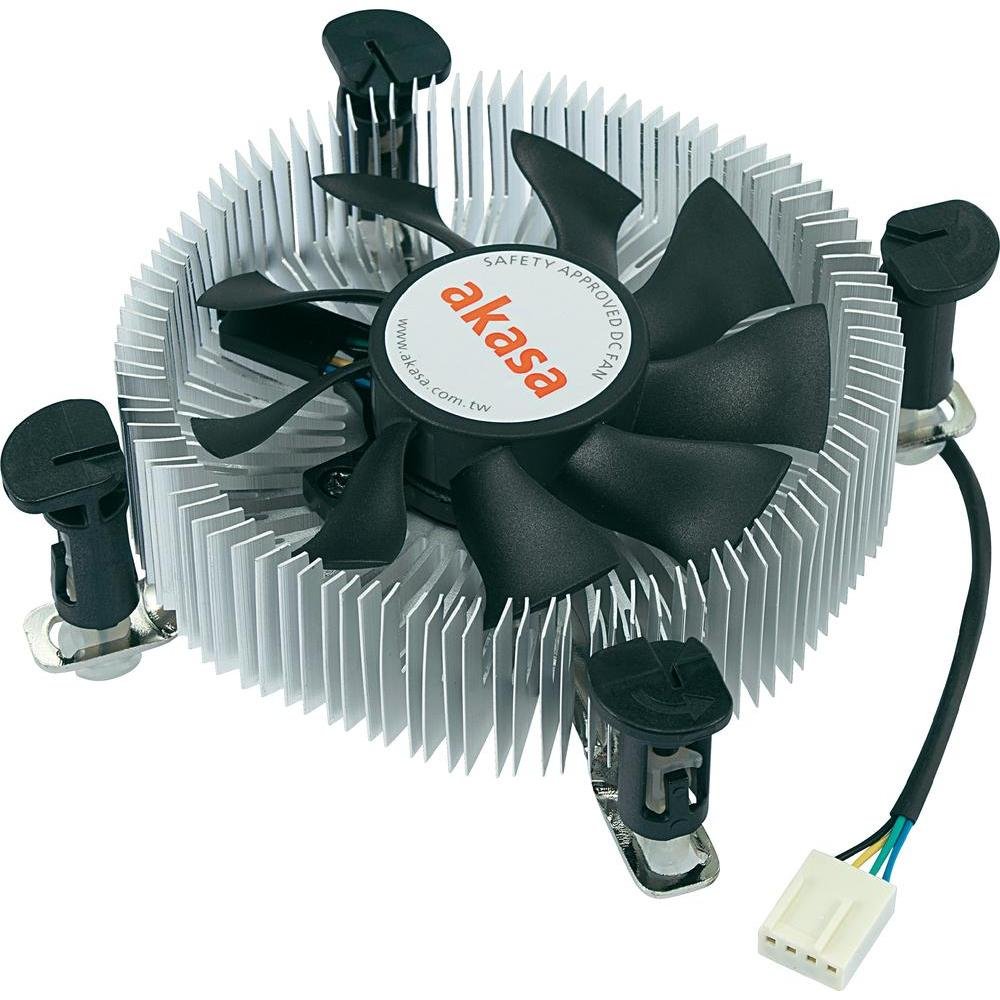
The Akasa AK-CCE-7106HP is the go-to cooler for anyone running a 775 chip inside a compact chassis, HP MicroServer Gen8, or a slim media center case. Standing under 30mm tall, it is a wafer-thin heatsink that combines an aluminum body with a full-height copper core in the center, giving it a thermal advantage that larger all-aluminum OEM coolers cannot match. One user reported that it replaced an Arctic Freezer 7 LP and ran cooler at both idle and full load while being noticeably quieter.
The embedded 80mm PWM fan uses S-Flow blades that push air directionally across the fin array while maintaining low noise levels. At idle, the fan can drop to 600 RPM and be virtually silent, yet it keeps the CPU below critical temperatures even under Prime95 stress testing. The unit ships with pre-applied thermal paste, which simplifies installation for first-time builders. The Intel-approved push-pins ensure maximum compatibility with the 775 socket and also cover 1155 and 1156 boards if you later upgrade the platform.
Because the cooler is so compact, it does not interfere with RAM slots or the PCI-E lanes, which is a common headache with tower coolers on legacy boards. The only trade-off is that the 80mm fan needs to spin faster under heavy load compared to a 120mm alternative, but at 3000+ RPM it remains quieter than the Arctic Freezer it replaces. For a budget-friendly, low-profile 775 solution that fits inside tiny office cases, the Akasa is the clear winner.
Why it’s great
- Ultra-low 30mm profile fits inside slim office chassis, HTPC cases, and HP MicroServer Gen8.
- Copper core improves cooling over all-aluminum designs of the same size.
- PWM fan with S-Flow blades runs silently at idle (600 RPM) while maintaining good airflow.
Good to know
- 80mm fan may struggle to cool a full 130W chip under sustained 100% load without higher noise.
- Pre-applied thermal paste is decent but enthusiasts should swap for a higher-performance compound.
4. Intel E97375-001 Aluminum Cooler

The Intel E97375-001 is the entry-level OEM heatsink that came stock on thousands of 775 office desktops, and as a replacement unit it gets the job done for systems running 65W TDP processors. The all-aluminum construction keeps the weight to nearly nothing, and the 90mm fan spins at a fixed 2500 RPM, pushing enough air to cool a Core 2 Duo E6550 or a Pentium D 915 without issue. Users confirm it works perfectly as a drop-in replacement for HP desktop computers and standard LGA 775 boards.
Installation is straightforward: the four Intel push-pins line up directly with the 72mm square holes on the motherboard, and the unit includes thermal grease pre-applied or separately in the package. The noise level is rated at 30 dB, which is the quietest of the Intel OEM coolers in this lineup, though it is still audible at full speed — you are not getting silent operation from a 90mm fan at 2500 RPM. The power connector is a standard 4-pin, but the fan runs at a fixed speed on many 775 boards that lack voltage control on the CPU header.
The major limitation is the 65W TDP cap. If you try to cool a Core 2 Quad Q6600 (105W) with this unit, expect thermal throttling under sustained load. The push-pin mechanism is also the weak point: several users noted that the plastic ends break if you remove the cooler multiple times, so this is best thought of as a one-and-done install. For a cheap, reliable, and correctly-sized replacement for a low-power 775 office machine, the E97375-001 delivers exactly what it promises.
Why it’s great
- Lowest entry cost for a fully-compatible LGA 775 drop-in replacement.
- Lightweight aluminum design puts no stress on the motherboard.
- Genuine Intel OEM part with exact fit for standard 72mm push-pin pattern.
Good to know
- 65W TDP limit means it cannot cool 95W+ quad-core processors or Xeons without throttling.
- Fixed-speed 2500 RPM fan is audible and lacks PWM control for quiet idle.
- Push-pin clips are fragile and can break if the cooler is removed and reinstalled.
5. Intel E97376-001 Copper Cooler
The Intel E97376-001 sits in a sweet spot between the all-aluminum E97375 and the bulkier D60188-001: it offers a copper core in a compact form factor that fits most standard 775 cases without the height concerns of the SilverStone. This unit is a natural match for the legendary Core 2 Quad Q6600, a 105W chip that often caused the stock aluminum cooler to hit thermal limits. Multiple buyers confirmed that this cooler kept their Q6600 “below the minimum temperature” and stopped the thermal shutdown behavior that plagued their original units.
At 30 dB, the noise output is low enough for an office environment, though it is not silent. The 4-pin connector allows PWM control, which helps the fan downclock when the CPU is idle. One user noted that the installation required “light engineering modifications,” which suggests the push-pin alignment may need slight adjustment on some boards — but after the fix, the cooling performance was transformative. The copper construction gives it a noticeable weight advantage over the six heat-pipe monster from SilverStone while still handling the 95W to 105W range better than the aluminum-only option.
The biggest downside is the lack of a detailed specification sheet from Intel — the product listing is sparse, and some buyers received units that felt like surplus stock without proper packaging. The included thermal paste is adequate, but most enthusiasts will want to clean it off and apply their own high-quality compound. For a tight-budget build that needs more thermal headroom than the aluminum cooler provides, the E97376-001 is the simple copper upgrade that just works.
Why it’s great
- Copper core handles 95W+ quad-core chips better than aluminum-only alternatives.
- Compact size fits in standard 775 cases without clearance issues.
- 4-pin PWM connector enables automatic fan speed control.
Good to know
- Some units may require minor modification for perfect push-pin alignment on certain boards.
- Packaging and included thermal paste feel like surplus OEM stock rather than retail quality.
FAQ
Will a modern LGA 1200 cooler fit a 775 socket?
Why does my 775 cooler still run at full speed all the time?
Can I use thermal paste from a modern CPU cooler on a 775 chip?
Final Thoughts: The Verdict
For most users, the best 775 cpu cooler winner is the Intel D60188-001 Copper Core Cooler because it combines genuine OEM fitment, a copper core that handles 95W+ quad chips, and a 4-pin PWM fan that keeps noise under control. If you need a low-profile unit for a slim case like the HP MicroServer Gen8, grab the Akasa AK-CCE-7106HP. And for extreme cooling on an overclocked 775 build, nothing beats the SilverStone Heligon HE01.