
Muting and unmuting your microphone mid-sentence is the single most disruptive action in remote work and online gaming. A dedicated button for push to talk transfers that control from your keyboard or mouse to a switch you can activate without breaking your rhythm — whether that means a foot pedal under your desk or a wireless button clipped to your belt.
I’m Min — the co-founder and writer behind Gadgets Feed. My analysis here is based on comparing the actuation methods, switch durability, programming flexibility, and real-world feedback across dozens of hours of research into PTT-specific hardware.
This guide breaks down the best foot switches, wireless buttons, and professional pedals that actually solve the problem of accidental unmutes and keyboard clutter. If you’re looking for the most reliable button for push to talk, these are the models that real users and reviewers consistently confirm as functional and durable.
How To Choose The Best Button For Push To Talk
Selecting a PTT button means deciding between a foot pedal, a hand-held wireless button, or a dedicated desktop switch. Each format solves a different use case — gaming, professional radio communication, or remote conferencing — and each has specific specs that determine whether it will actually work for your setup.
Foot Pedal vs. Wireless PTT Button
Foot pedals are ideal when you need both hands free for keyboard and mouse work. They connect via USB and present as a standard HID keyboard, so any software that responds to a keypress — Discord, Zoom, Teams, games — will recognize them instantly after programming. Wireless Bluetooth buttons like the PRYMEBLU target mobile apps such as Zello and ESChat, operating at 2.4 GHz with an advertised two-year battery life from a single CR2032 coin cell. Choose foot pedals for desktop workflows; choose wireless for mobile or radio-integrated use.
Switch Type and Actuation Feel
Foot pedals generally use either mechanical switches, which provide a distinct audible click and tactile bump, or optical switches, which are near-silent and rely on an infrared beam being broken. Optical switches are preferred for streaming and recording where microphone bleed from a loud click is unacceptable. Mechanical switches give you a clear sense of engagement but may annoy others in a shared office. The iKKEGOL Upgraded pedal with optical switch is designed specifically for quiet operation, while the standard iKKEGOL and Powboro units use mechanical contacts that produce a noticeable click.
Programmable Software and Platform Compatibility
Most USB foot pedals require a one-time configuration on Windows using proprietary software to map the pedal to a specific keyboard key or mouse button. After programming, the settings are stored on the device’s internal memory, meaning the pedal will retain that function when plugged into Linux or Mac systems. The Heil FS-3 is an exception — it is a completely analog, software-free device with a 1/4-inch TS plug designed specifically for ham radio transceivers, not computers. Verify that the software can be downloaded from a currently active website before purchasing, as some third-party pedals suffer from abandoned software support.
Quick Comparison
On smaller screens, swipe sideways to see the full table.
| Model | Category | Best For | Key Spec | Amazon |
|---|---|---|---|---|
| iKKEGOL Upgraded Optical Switch Pedal | Foot Pedal | Quiet operation in streaming | Optical switch (silent) | Amazon |
| iKKEGOL Dual Foot Switch | Foot Pedal | Two separate PTT keys | Aluminum alloy base | Amazon |
| PRYMEBLU BT-PTT-Z MINI | Wireless Button | Zello and PoC apps on mobile | 2-year battery life | Amazon |
| Heil FS-3 Foot Switch | Analog Foot Switch | Ham radio transceivers | 1/4-inch TS plug | Amazon |
| iKKEGOL USB Foot Pedal (Standard) | Foot Pedal | Budget desktop PTT | Mechanical switch | Amazon |
| iKKEGOL Foot Pedal Switch (2019) | Foot Pedal | Entry-level PTT with software | 100kg weight capacity | Amazon |
| Powboro Triple USB Foot Switch | Foot Pedal | Three-pedal macro control | Optical switch type | Amazon |
In‑Depth Reviews
1. iKKEGOL Upgraded USB Single Foot Pedal Optical Switch

The iKKEGOL Upgraded pedal is the only model in this lineup using an optical infrared switch, which means zero audible click when you press it. That alone makes it the best button for push to talk if you record voiceovers, stream gameplay, or sit in an open-plan office where a loud mechanical click would disturb others. The pedal measures in at 5.8 ounces with a wide, ergonomic surface that your foot finds easily without looking.
Programming is handled through the ElfKey software available from the manufacturer’s website. You can assign any single keypress, mouse click, or multimedia command, and the configuration saves to the pedal’s onboard memory. The unit is rated to bear over 100 kilograms of static weight and includes four TPU rubber pads to prevent sliding on hardwood floors.
The optical switch delivers a smooth, linear feel with no tactile bump. Some users reported that after several weeks of daily use the pedal occasionally misses presses or needs replugging on startup, though the majority of reviews praise its quiet, reliable performance for PTT use in Discord and Zoom. If silent foot activation is your priority, this is the pedal to beat.
Why it’s great
- Completely silent optical switch ideal for streaming and recording
- Wide pedal surface is comfortable for prolonged use
- Onboard memory retains programming across different computers
Good to know
- Some units may develop intermittent press detection over time
- Software download requires visiting the manufacturer’s website
2. iKKEGOL USB Double 2 Foot Switch Control Pedal

The iKKEGOL dual pedal offers two independent switches in a single aluminum-alloy chassis, making it a serious option if you need separate actions for push to talk and a secondary function like muting your microphone or toggling camera. The base plate is rated for over 100 kilograms of static weight, so it stays planted under your desk regardless of how aggressively you stomp during a tense game.
Each pedal is a mechanical switch with an audible click that provides clear tactile confirmation. The USB cable is long enough to route behind a desk, and the unit works with Windows, Mac, and Linux after initial configuration using the provided software. Users report that the dual-pedal layout is comfortable for US size 9 feet and that the pedals are spaced far enough apart to avoid accidental presses.
The main limitation is that the software does not support saving profiles, so if you want different key mappings for different games or apps, you will need to reconfigure each time. The digital nature of the switch — activation occurs at roughly the halfway travel point — makes it unsuitable for reflex-intensive timing but perfect for secondary macro functions in MMOs or PTT in voice chat.
Why it’s great
- Two independent pedals for separate PTT and mute functions
- Aluminum alloy base is exceptionally sturdy and weight-rated
- Audible click provides confident activation feedback
Good to know
- Software lacks profile saving; manual reconfiguration needed per app
- 50% travel-to-actuation limits its use for twitch-reliant commands
3. iKKEGOL USB Foot Pedal (Standard Mechanical)
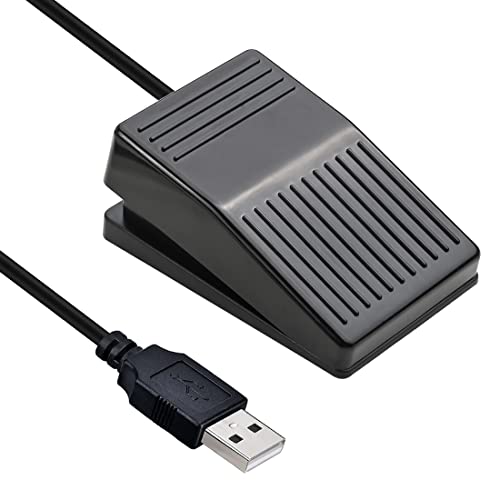
This standard iKKEGOL foot pedal strips away the frills and delivers a reliable mechanical single-pedal PTT solution at an entry-level price point. It measures 3.9 inches long by 2.5 inches wide, making it one of the more compact designs suited for sliding under a desk riser. The rubber feet on the underside prevent movement on hardwood floors, a common complaint with cheaper alternatives.
Programming is handled through downloadable software that runs on Windows 2000 through Windows 11, as well as Mac. After mapping the pedal to a single key — the backslash or spacebar are popular choices — the device retains the assignment internally and functions as a plug-and-play HID keyboard on any operating system. Multiple users report using this pedal specifically as a Discord push-to-talk switch with no driver issues.
The mechanical switch produces a distinct click that can be heard through an open microphone. Several reviewers noted that the pedal requires the Zoom window to be in focus for the keystroke to register, a common software limitation of platform-specific PTT integrations rather than a hardware flaw. For a no-fuss, budget-friendly pedal that works out of the box, this is the safest choice.
Why it’s great
- Compact footprint fits easily under most desks
- Retains programmed key mapping without drivers
- Broad OS compatibility from Windows 2000 to Windows 11
Good to know
- Audible click may bleed into microphone during streaming
- Requires target application window to be in focus on some platforms
4. PRYMEBLU Bluetooth Wireless PTT Button BT-PTT-Z MINI

The PRYMEBLU BT-PTT-Z MINI is a dedicated wireless PTT button designed for push-to-talk mobile apps like Zello, Wave Communicator, ESChat, and Unity. This is not a foot pedal — it is a small, hand-held or belt-clipped button that pairs over Bluetooth to an iOS or Android smartphone. The unit weighs just 14.2 grams and uses a single CR2032 coin cell battery that the manufacturer rates for up to two years of typical use.
Pairing is automatic once you select the device in the PTT app’s settings. The included adjustable Velcro strap lets you attach the button to a steering wheel, arm, belt, or instrument panel — a critical feature for drivers who need to communicate on Zello without touching their phone. The button trigger a PTT signal with a roughly half-second delay, which is standard for Bluetooth HID implementations.
This is a single-purpose device that does not require any software configuration. It is not compatible with Kodiak-based apps, which is an important verifiction step before purchase. For field workers, security personnel, or any scenario where you need hands-free PTT on a smartphone, the PRYMEBLU is the most purpose-built option in this guide.
Why it’s great
- Wireless Bluetooth PTT with two-year battery life
- Extremely lightweight at 14.2 grams with Velcro strap
- Seamless pairing with Zello and other PoC apps
Good to know
- Not compatible with Kodiak-based apps
- Small on/off switch requires disassembly to access
5. Heil FS-3 Single Channel Foot Switch

The Heil FS-3 is a professional-grade analog foot switch built specifically for amateur radio transceivers. It does not connect to a computer — it terminates with a commercial 1/4-inch TS plug that interfaces with Heil CC-1 and AD-1 cable systems to control the transmit/receive PTT function on a ham radio. The construction quality sets it apart: a solid chrome hinge bar runs through the top and bottom plates, secured with C-fasteners instead of threaded screws that can loosen over time.
The foot switch is a single-channel design with a mechanical contact that provides a decisive click when pressed. An 8-foot shielded cable gives you ample range from the transceiver to your foot. This is a zero-software, zero-programming device — you step on it, it closes the PTT circuit on the radio, and you transmit. The Heil name carries weight in the amateur radio community, and reviews consistently confirm the build quality lives up to expectations.
This switch is not useful for computer PTT or mobile apps. It is designed for a specific radio ecosystem and should only be purchased if you own a compatible Heil headset and cable system. For anyone working in a ham radio shack, the FS-3 is the standard by which other foot switches are measured.
Why it’s great
- Industrial-grade chrome hinge construction with C-fasteners
- Direct analog PTT control with no software needed
- 8-foot shielded cable for flexible placement
Good to know
- Only compatible with Heil CC-1/AD-1 and ham radio systems
- Not a USB device; cannot be used with computer software
6. iKKEGOL USB Foot Pedal Switch (Upgraded Version)

This iKKEGOL model is the 2020 upgraded version of the company’s original foot pedal, featuring a pressure-based switch design with a wide, large pedal surface. It is sold as a standard HID device that can be programmed to output keyboard keystrokes or mouse clicks when triggered by foot. The unit is rated to bear over 100 kilograms of weight, and the four TPU rubber feet keep it planted on hard flooring.
Software setup is straightforward for Windows users, and the configuration saves to the pedal’s built-in memory. Verified buyers report using it successfully for Microsoft Teams mute toggling, Discord PTT, and transcription play/pause. The switch produces a modest click on activation, though several users noted the pedal slides on hard floors and required adhesive tape to stay fully in place during heavy use.
The main trade-off at this price is ergonomics: some users with larger feet found the pedal requires careful foot positioning to avoid accidental activation or missed presses. The audible click also makes it less ideal for quiet recording environments. For a low-cost entry point into dedicated PTT controls, this pedal gets the job done without breaking your budget.
Why it’s great
- Lowest price point for a functional USB PTT foot pedal
- Onboard memory saves programming across reboots
- High weight capacity (100kg) indicates robust build
Good to know
- Slides on hard floors without added grip tape
- Poor foot ergonomics for some users; accidental presses possible
7. Powboro USB Foot Switch Triple 3 Pedal Control

The Powboro triple foot switch packs three independent optical pedals into a single 4.5-inch-wide enclosure. This is the highest-pedal-count option in the lineup, intended for users who need multiple PTT channels, mute toggles, or macro triggers available at foot level. The optical switch mechanism means the pedals operate silently, making them suitable for studio use where noise is a concern.
The device presents as a standard HID keyboard and can be programmed using downloadable software. Each pedal can be assigned a different keypress, mouse button, or joystick input. The rubber feet on the base keep the unit stable on hard floors, and the ergonomic contouring of the pedals makes them easy to differentiate by feel without looking.
The most significant risk with this model is software support. Multiple customer reviews report that the manufacturer’s website for software downloads is no longer operational, leaving buyers unable to configure the pedals. This is a critical failure point for a programmable device. If you purchase this unit, confirm the software is available before the return window closes. For users who successfully configure it, the triple-pedal layout is powerful for complex workflows.
Why it’s great
- Three independent pedals for multi-function PTT control
- Optical switches provide silent operation
- Compact footprint despite three pedal surfaces
Good to know
- Software download website reported as no longer functional
- Several users report cheap plastic build and short lifespan
FAQ
Can I use a USB foot pedal for PTT on a console like PlayStation or Xbox?
Do I need to install software every time I use the pedal?
Why does my foot pedal only work when the Zoom or Teams window is active?
Final Thoughts: The Verdict
For most users, the button for push to talk winner is the iKKEGOL Upgraded Optical Switch Pedal because it combines silent operation with reliable HID programming and a comfortable wide pedal surface at a mid-range price. If you need two independent PTT or mute actions, grab the iKKEGOL Dual Foot Switch. And for mobile Zello or ESChat use, nothing beats the PRYMEBLU BT-PTT-Z MINI.