
Scattered external drives, disappearing cloud subscriptions, and the nagging fear of a single drive failure wiping out years of photos and documents are the reality most home users live with. A dedicated two-bay enclosure pulls those disparate storage islands into a single, private, always-on network reservoir that every device in your home can reach simultaneously.
I’m Min — the co-founder and writer behind Gadgets Feed. I’ve spent over a hundred hours analyzing chipset benchmarks, RAID configuration workflows, and real-world transfer throughput across dozens of models to separate genuine performance from marketing noise in this specific form factor.
This guide evaluates eight distinct units through the lens of a serious home user who wants centralized, private file storage without monthly fees. If you need a reliable 2-bay nas storage solution that balances access speed, data safety, and ease of use, the analysis below pinpoints where your money actually matters.
How To Choose The Best 2-Bay NAS Storage
A two-bay enclosure is a deliberate compromise between cost, physical footprint, and storage flexibility. Understanding where that compromise hurts most helps you pick the unit that fits your actual workload, not just the cheapest option on the shelf.
Processor Core Count Tells You What It Can Actually Run
An ARM Cortex-A55 chip found in entry-level units handles basic file sharing and scheduled backups without complaint, but it chokes on real-time video transcoding or Docker containers. An Intel Celeron J4125 or N5105 x86 processor in more capable models delivers 4K Plex streaming, multiple Docker services, and even lightweight virtual machines. If you only need file storage, ARM saves money. If you want a home media server or a self-hosted app platform, the x86 cost is mandatory.
RAID, SHR, and the Real Cost of Redundancy
With two bays, RAID 1 mirrors data across both drives, so one drive can fail without losing anything—but you lose half your raw capacity. Synology’s Hybrid RAID (SHR) does the same thing but allows you to use two different-sized drives without wasting space unevenly. RAID 0 gives you full capacity but zero protection. Beginners often assume RAID 1 is mandatory for safety, but if you have a solid external backup strategy and use the NAS only for non-critical media, JBOD or even a single-drive setup might be smarter for space efficiency.
RAM, Cache, and Bottlenecks You Actually Feel
Units with 1 GB or 2 GB of RAM handle single-user file operations fine, but multiple concurrent connections, running Surveillance Station with a few cameras, or seeding BitTorrent will push memory limits fast. Models offering upgradeable SO-DIMM slots let you drop in 8 GB or 16 GB later. M.2 NVMe cache slots—found on premium two-bay units like the Asustor AS5402T—dramatically accelerate random I/O for databases and photo libraries without filling a drive bay with an SSD.
Quick Comparison
On smaller screens, swipe sideways to see the full table.
| Model | Category | Best For | Key Spec | Amazon |
|---|---|---|---|---|
| Synology DS225+ (8TB Bundle) | Premium | Power users needing Docker + 2.5GbE | Intel J4125 / 2GB RAM / 2.5GbE | Amazon |
| Asustor AS5402T | Premium | NVMe caching + 2.5GbE networking | Intel N5105 / 4GB RAM / 4x M.2 | Amazon |
| BUFFALO SoHo 220 8TB | Mid-Range | Out-of-box backup with drives included | 8TB (2x4TB) / RAID 1 defaults | Amazon |
| Synology DS223 | Mid-Range | Secure home hub + surveillance | Realtek RTD1619B / 2GB RAM | Amazon |
| BUFFALO LinkStation 720 4TB | Mid-Range | Plug-and-play private cloud | 4TB (2x2TB) / DDR3 / 1GbE | Amazon |
| ZimaBlade 7700 Kit | Mid-Range | DIY homelab and Docker tinkering | Intel x86 / 16GB RAM / PCIe slot | Amazon |
| UGREEN NASync DH2300 | Budget-Friendly | First-time NAS for photo backup | Realtek RTD1296 / 4GB RAM | Amazon |
| Synology DS223j | Budget-Friendly | Simple backup target on a budget | Realtek RTD1619B / 1GB RAM | Amazon |
In‑Depth Reviews
1. Synology DS225+ (8TB Bundle with Seagate IronWolf)
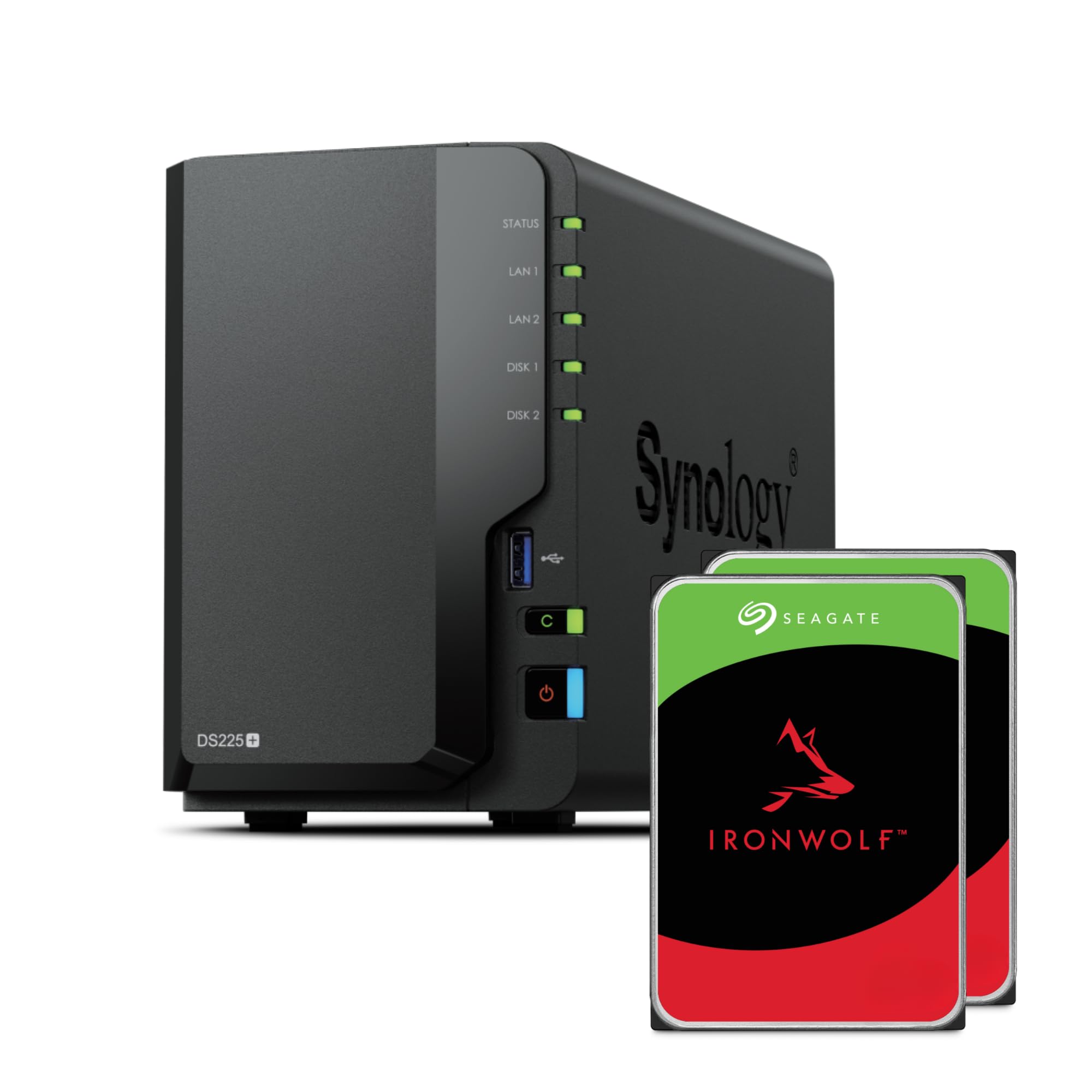
The DS225+ equips the proven Intel Celeron J4125 — a quad-core x86 chip that handles Docker containers, Plex hardware transcoding, and Synology Photos indexing without bogging down. The bundled 8 TB pair of Seagate IronWolf drives (2x4TB) are CMR-based and rated for 24/7 NAS workloads, which removes the guesswork of buying compatible disks separately. The dual LAN configuration (2.5 GbE plus 1 GbE) gives you headroom for link aggregation if your network supports it, though the stock 2 GB DDR4 non-ECC RAM feels tight for heavy multitasking — the SO-DIMM slot is user-upgradeable to 6 GB.
Synology’s DiskStation Manager (DSM) operating system remains the gold standard for ease of use, with a package center that includes Hyper Backup, Drive for file sync, and Surveillance Station. The bundled Btrfs file system enables snapshot-based protection, so you can roll back accidental file deletions or ransomware attacks in seconds. Real-world sequential reads over a single 2.5 GbE link hover around 280 MB/s, limited more by the spinning drives than the network pipe.
The two-year warranty covers the enclosure, but the included IronWolf drives carry their own limited warranty from Seagate. A minority of users report compatibility warning messages after DSM updates flagged third-party drives; as of DSM 7.3, Synology officially reversed that restriction. For a buyer who wants a turnkey system with serious media and Docker capabilities out of the box, this bundle delivers genuine value.
Why it’s great
- Quad-core x86 processor handles Docker and Plex transcoding smoothly
- Bundled Seagate IronWolf drives are CMR NAS-rated for 24/7 reliability
- Dual 2.5GbE/1GbE LAN ports support link aggregation
Good to know
- Stock 2 GB RAM is low for heavy multitasking; upgrade is recommended for power users
- Setup experience demands some research beyond the quick-start guide
- Some users encountered drive compatibility warnings after DSM updates
2. Asustor AS5402T

The AS5402T distinguishes itself with four M.2 NVMe SSD slots that can serve as high-speed cache or a full flash storage pool — a feature unprecedented in the two-bay form factor. The Intel N5105 quad-core processor clocks at 2.0 GHz burst to 2.9 GHz and includes an integrated Intel UHD Graphics unit capable of hardware-accelerated transcoding for Plex and Emby. Dual 2.5 GbE ports deliver up to 5 Gbps aggregate throughput, and the expandable DDR4 memory (4 GB stock, up to 16 GB) gives virtual machines and heavy container workloads breathing room.
Asustor’s ADM operating system is functional and stable but slightly less polished than Synology’s DSM; some users report that advanced features like Docker or virtualization require more command-line comfort. The hardware, however, clearly targets the enthusiast who values raw specs over hand-holding. The HDMI 2.0b output allows direct 4K media playback to a TV without needing a separate streaming box, and the USB 3.2 Gen 2 ports provide 10 Gbps external expansion.
No drives are included, so you need to budget for two SATA HDDs or SSDs plus optional NVMe sticks. The chassis is all-metal and runs cooler than plastic alternatives, though the fan is audible under sustained load. If your workflow demands low-latency database access or you want to run several Docker containers alongside media serving, the AS5402T justifies its premium tier with that unique M.2 expansion.
Why it’s great
- Four M.2 NVMe slots for cache or flash pool — unmatched in 2-bay category
- Intel N5105 with UHD Graphics enables smooth 4K Plex transcoding
- Dual 2.5GbE ports with upgradeable RAM up to 16 GB
Good to know
- ADM software is less beginner-friendly than DSM
- Diskless; HDDs and NVMe drives purchased separately
- Fan noise is noticeable under heavy workloads
3. BUFFALO LinkStation SoHo 220 8TB

The SoHo 220 is a rare breed in this comparison: a two-bay unit that ships with hard drives pre-installed and pre-configured in RAID 1, giving you 4 TB of usable mirrored storage without touching a screwdriver. The Marvell ARMADA-385 dual-core processor is modest, but it handles SMB file sharing, Time Machine backups for Mac, and Direct Copy from a USB drive without complaint. The 5400 RPM drives are optimized for quiet, low-power operation rather than peak throughput.
BUFFALO’s web-based interface is deliberately minimalist — there is no app store, no Docker support, and no Btrfs snapshots. What it does, it does reliably: automated backups from up to 15 networked computers via NAS Navigator 2, secure folder-level access control, and subscription-free cloud access through the company’s own mobile apps. The metal chassis and 24/7 US-based support add reassurance for small offices that just want a set-and-forget backup appliance.
Some users have reported firmware updates breaking specific features like DLNA media streaming, though BUFFALO often releases patched firmware within weeks. The unit also lacks a built-in USB port on the front for quick device backups, which the pricier LinkStation 720 series adds. For a business user or family that wants zero configuration and immediate data redundancy, the SoHo 220 delivers that specific promise faithfully.
Why it’s great
- Hard drives included and pre-configured in RAID 1 — true plug-and-play
- Metal chassis with 3-year warranty and 24/7 US-based support
- Direct Copy from USB devices without a PC
Good to know
- No app store, Docker, or advanced file system features like snapshots
- Firmware updates have occasionally broken DLNA functionality
- Read/write speeds are modest due to the 5400 RPM drives and ARM processor
4. Synology DS223

The DS223 occupies the middle tier of Synology’s two-bay lineup, swapping the entry-level J series’ ARM Cortex-A55 for the faster Realtek RTD1619B quad-core processor and doubling the RAM to 2 GB. This jump makes a real difference when running Synology’s Surveillance Station with two or three IP cameras — motion detection recording and remote viewing remain responsive, whereas the DS223j would stutter. The metal enclosure also dissipates heat more effectively than the plastic shell of the budget model.
DSM is the headline feature here: Hyper Backup, Drive, Moments, and the full package catalog run smoothly. The DS223 supports SHR, so you can mix a 4 TB drive with an 8 TB drive and get 4 TB of mirrored storage without wasting the larger drive’s entire capacity. However, the Realtek chipset is ARM-based, meaning no Docker, no hardware Plex transcoding, and no virtual machine support — this is purely a file storage and surveillance appliance, not a homelab platform.
The drive trays are tool-less for 3.5-inch HDDs, but some users report the front cover can be finicky to close after inserting drives. The single 1 GbE port is adequate for most home backups but becomes a bottleneck if you frequently transfer large media files. If you need Synology’s unmatched software ecosystem but don’t need x86 flexibility, the DS223 is the sweet spot that skips the premium of the Plus series while keeping core features intact.
Why it’s great
- Synology DSM with full backup suite and Surveillance Station support
- SHR allows mixing different capacity drives without wasting space
- Metal enclosure and tool-less 3.5-inch drive trays
Good to know
- ARM processor excludes Docker, VMs, and Plex hardware transcoding
- Single 1 GbE port limits aggregate transfer speeds
- Front cover can be difficult to snap back into place
5. BUFFALO LinkStation 720 4TB

The LinkStation 720 is BUFFALO’s refined take on the personal cloud concept, shipping with two 2 TB drives pre-installed and pre-set to RAID 1 for 2 TB of mirrored storage. The dual-core MediaTek processor and DDR3 memory are dated by 2024 standards but perfectly adequate for single-user file access, Time Machine backups, and streaming a few 1080p video files. The included NAS Navigator utility simplifies discovery on Windows and macOS, and the closed operating system reduces the attack surface from third-party app vulnerabilities.
BUFFALO emphasizes a “subscription-free personal cloud” — the LinkStation 720 enables remote access through its proprietary WebAccess feature without monthly fees. Integration with Dropbox, Azure, and OneDrive is also available for hybrid cloud workflows. The package includes a Cat 6a Ethernet cable and a 2-year warranty with 24/7 US-based support, which is reassuring for buyers who want a single support contact for both the enclosure and the drives.
The biggest limitation is the DDR3 memory and lack of any expansion slots — this unit cannot run Docker, Plex, or any third-party software. A few users have also reported that the DLNA media server stopped working after a firmware update, though BUFFALO typically issues a fix within a quarter. If you need a set-and-forget appliance that centralizes your family’s documents and photos without any tinkering, the LinkStation 720 delivers that narrow use case exceptionally well.
Why it’s great
- Drives pre-installed in RAID 1 — no assembly or configuration required
- Closed OS reduces third-party attack surface
- 24/7 US-based support for both hardware and software issues
Good to know
- No support for Docker, Plex, or any third-party applications
- DDR3 memory is a generation behind current standards
- Firmware updates have occasionally broken the DLNA media server
6. ZimaBlade 7700 x86 Home Server & 2-Bay NAS Kit
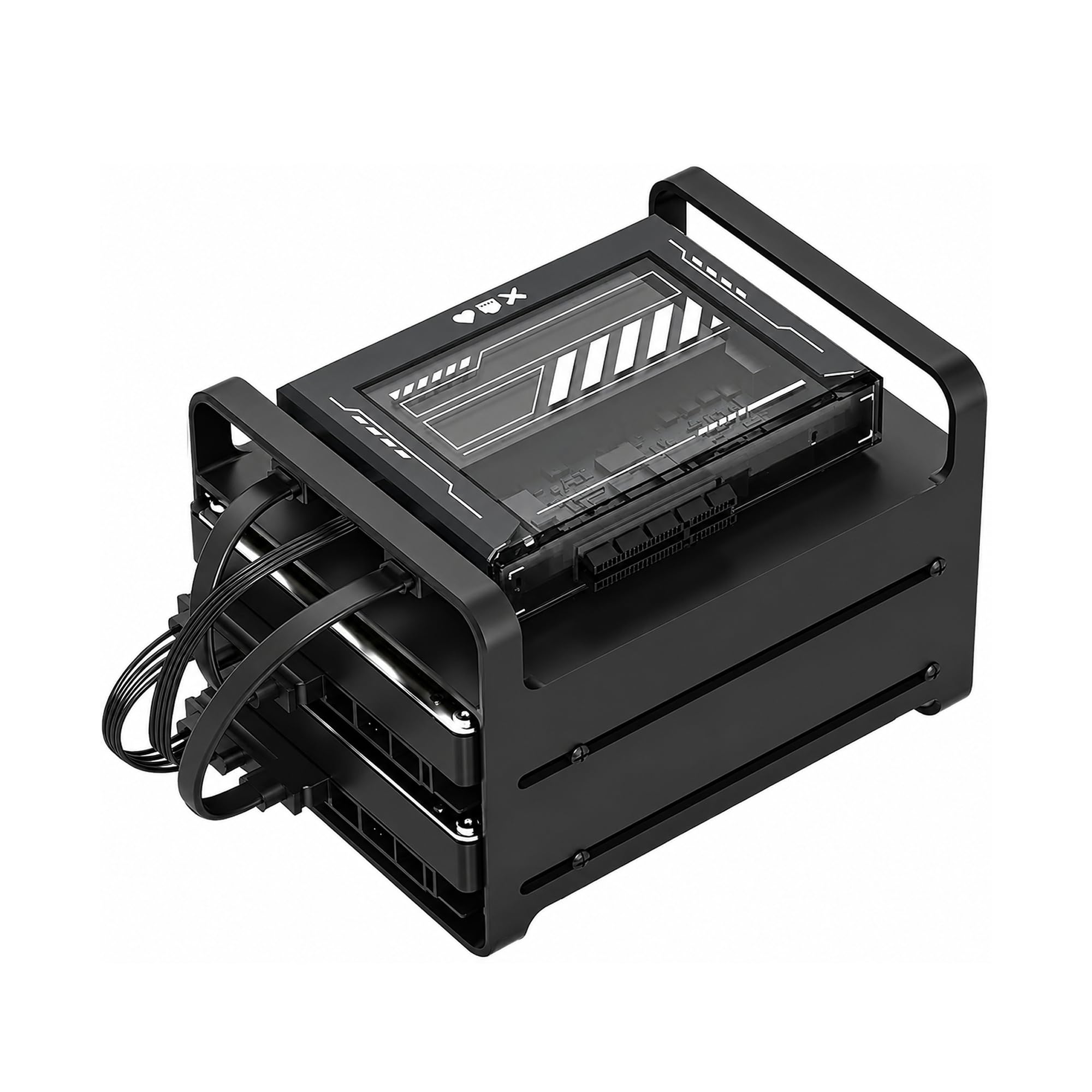
The ZimaBlade 7700 is not a traditional NAS appliance — it is a compact x86 single-board computer that ships with a metal drive cage for two SATA drives, 16 GB of RAM pre-installed, and CasaOS preloaded on an included SSD. This makes it a remarkably capable Docker host, Plex direct-play streamer, and Home Assistant hub all in one package. The open-frame design exposes the motherboard and cables, which suits tinkerers but looks messy on a shelf.
The Intel quad-core x86 processor runs Debian, TrueNAS, Proxmox, or any standard Linux distribution, giving you complete OS freedom. The PCIe x4 slot lets you add a 10 GbE network card, a Wi-Fi module, or additional SATA controllers — expansion potential that no consumer two-bay appliance can match. CasaOS provides a clean web dashboard for beginners, but the device truly shines when you replace it with TrueNAS Scale or Ubuntu Server for advanced container orchestration.
This kit is not beginner-friendly: there is no guided setup wizard for file sharing, no RAID management interface in CasaOS, and the open-frame chassis provides zero dust or physical protection for the drives. The 16 GB RAM is generous at this price tier, but the processor lacks the GPU cores needed for hardware transcoding, so Plex direct play works but real-time encoding will fall to software. For a hobbyist who values modularity over polish, the ZimaBlade 7700 is an extraordinary value.
Why it’s great
- x86 platform runs any Linux OS — unmatched software flexibility
- 16 GB RAM and PCIe slot for 10GbE or additional storage expansion
- CasaOS preloaded provides a friendly web dashboard for beginners
Good to know
- Open-frame design leaves drives and cables exposed to dust
- No hardware transcoding — Plex transcoding hits CPU hard
- Not beginner-friendly; requires comfortable Linux terminal skills
7. UGREEN NASync DH2300

The UGREEN NASync DH2300 targets the user who has never owned a NAS before and wants to escape recurring Google Drive or iCloud payments. The Realtek RTD1296 quad-core processor and 4 GB of soldered RAM provide enough headroom for AI-powered photo tagging, automatic backup from phones and laptops, and 4K HDMI output for direct media playback. The maximum capacity of 64 TB (using two 32 TB drives in RAID 0) is far more than most home users will ever need.
UGREEN’s operating system is streamlined for photo management: the AI album automatically tags faces, objects, and locations, and the app detects duplicate or similar images for cleanup. File transfers over the 1 GbE port top out around 125 MB/s, which is standard for this price tier. The DH2300 explicitly does not support Docker, virtual machines, or Plex installation via container — it is a dedicated file and photo appliance, not a homelab platform.
The chassis is plastic and does not isolate drive vibration well; users who install enterprise-grade HDDs may notice audible humming that requires DIY acoustic damping. The lack of a USB-C port is a minor oversight for direct backups from modern laptops. For someone who wants a simple, affordable migration path off cloud subscriptions with AI photo organization as the killer feature, the DH2300 delivers that specific value proposition cleanly.
Why it’s great
- AI-powered photo album with face, object, and location tagging
- 4 GB RAM and 4K HDMI output for direct media playback
- Supports up to 64 TB capacity with RAID 0 configuration
Good to know
- No Docker, virtual machine, or Plex container support
- Plastic chassis does not dampen drive vibration well
- 1 GbE port is adequate but not future-proof for multi-user access
8. Synology DS223j

The DS223j is the most affordable entry into the Synology ecosystem, pairing the Realtek RTD1619B quad-core processor with just 1 GB of non-upgradeable RAM. That RAM ceiling is the single most important spec to understand: it limits simultaneous connections, chokes Surveillance Station beyond two cameras, and prevents running Docker or any heavy package. For pure file storage — backing up three computers and syncing phone photos to a RAID 1 array — it works flawlessly and sips power.
Synology’s DSM operating system is the same full-featured platform found on the DS223 and DS225+, minus the packages that require more memory. Hyper Backup, Drive, and Audio Station run fine; Synology Photos with AI indexing will be noticeably slower on the 1 GB configuration. The plastic enclosure is lightweight but contributes to higher drive temperatures under sustained load compared to the metal-clad DS223.
The DS223j supports scheduled power on/off, which is a welcome energy-saving feature for home users who only need network access during waking hours. Setting up RAID 1 is a few clicks through the intuitive DSM wizard, and the USB port allows attaching an external drive for Hyper Backup Vault replication. If your needs are strictly basic network storage and you want the best software ecosystem at the lowest entry cost, the DS223j fills that role accurately.
Why it’s great
- Most affordable Synology NAS with full DSM software access
- Scheduled power on/off reduces electricity cost
- Simple RAID 1 setup wizard perfect for beginners
Good to know
- 1 GB RAM is non-upgradeable — limits multitasking and app usage
- Plastic enclosure retains more heat than metal models
- No Docker, no hardware transcoding, no surveillance beyond 2 cameras
FAQ
Can I use regular desktop hard drives in a 2-bay NAS?
How does a 2-bay NAS compare to a cloud storage subscription over five years?
What is the real maximum transfer speed I should expect from a 2-bay NAS?
Final Thoughts: The Verdict
For most users, the 2-bay nas storage winner is the Synology DS225+ (8TB Bundle) because the Intel J4125 processor and pre-installed IronWolf drives deliver Docker support, Plex transcoding, and Btrfs snapshots without requiring separate drive purchases. If you want blistering NVMe cache speeds and are comfortable with a less polished OS, grab the Asustor AS5402T. And for a budget-friendly entry into the Synology ecosystem that prioritizes simple file backup, nothing beats the Synology DS223j.