
Our readers keep the lights on and my morning glass full of iced black tea. As an Amazon Associate, I earn from qualifying purchases.
If you buy a 19 inch server rack cabinet and get the depth wrong, your gear will not fit. A rack that is too shallow turns a tidy closet into a mess where your receiver or deep switch simply will not mount. This guide covers nine options, from compact wall-mount boxes to full-size floor-standing racks, so you match the interior space to your actual equipment.
I’m Min — the co-founder and writer behind Gadgets Feed. This guide is built by comparing the manufacturers’ published specifications and the patterns across verified customer reviews, so you get each pick’s real strengths and trade-offs instead of marketing spin.
You need to know usable depth, weight limits, and cooling needs to get a clean, cool, and secure setup. That is what you will find here.
How To Choose The Best 19 Inch Server Rack Cabinet
Before you buy, focus on three measurements: the usable mounting depth (how far back a device can reach), the total U height (how many devices you can stack), and the weight capacity (how much total gear the cabinet can hold). Get these right and your equipment fits securely and runs cool.
Prioritize Usable Mounting Depth Over Everything
The “total depth” of a cabinet (say 24 inches) is not the same as the space between the front and rear rails where your gear actually sits. Many racks lose 3–5 inches of that depth to the door, back panel, and cable management space. Always check the manufacturer’s stated maximum mounting depth — if you own a deep receiver or a full-size UPS (uninterruptible power supply, a large battery backup), 20 inches of usable depth is a safe baseline.
Wall Mount vs Floor Stand
Wall-mount cabinets save floor space and work well for up to about 18U (rack units, each U is 1.75 inches high) of gear. They need a sturdy wall (studs or concrete) to handle the weight. Floor-standing models (typically 22U to 42U) sit on casters (small wheels) or leveling feet and can hold much heavier loads — up to 1,600 lbs (about 726 kg) for enterprise-grade units. Pick wall mount if floor space is tight; pick a floor stand if you plan to expand or need to support multiple heavy UPS units.
Cooling and Airflow
A dense rack full of switches, routers, and servers generates heat. Look for cabinets that include at least one top-mounted fan (120mm, or about 4.7 inches, is standard) and have ventilated doors or side panels. If the rack is wall-mounted in a tight space, an active fan becomes critical to keep gear below its thermal limit.
Quick Comparison
On smaller screens, swipe sideways to see the full table.
| Model | Category | Best For | Key Spec | Amazon |
|---|---|---|---|---|
| Sysracks 9U 24″ Deep | Wall / Floor | Deep home lab gear | 24″ overall depth | $299.97Amazon |
| StarTech 9U Fully Assembled | Wall Mount | Zero-assembly install | 198 lb capacity | $343.99$372.06Amazon |
| Sysracks 15U 24″ Deep | Wall / Floor | Medium IT deployments | 15U / 55 lb self-weight | $399.97Amazon |
| Tecmojo 18U Mesh Door | Wall / Floor | Large AV / IT setups | 18U / 176 lb capacity | $399.90Amazon |
| StarTech 22U Enterprise | Floor Stand | Heavy enterprise gear | 1764 lb capacity | $876.99Amazon |
| Sysracks 42U 35″ Deep | Floor Stand | Full homelab expansion | 42U / 35″ deep | $1,249.00$1,339.97Amazon |
| Tecmojo 12U Glass Door | Wall Mount | Budget wall-mount setup | 12U / 110 lb capacity | $169.90Amazon |
| RackPath 9U Wall Mount | Wall Mount | Value 9U enclosure | 9U / 110 lb capacity | $159.98Amazon |
| NavePoint 9U 2-Fan | Wall Mount | Active cooling priority | 2 built-in fans | from $403.99Amazon |
In‑Depth Reviews
1. Sysracks 9U Wall Mount Server Rack Cabinet 24” Deep
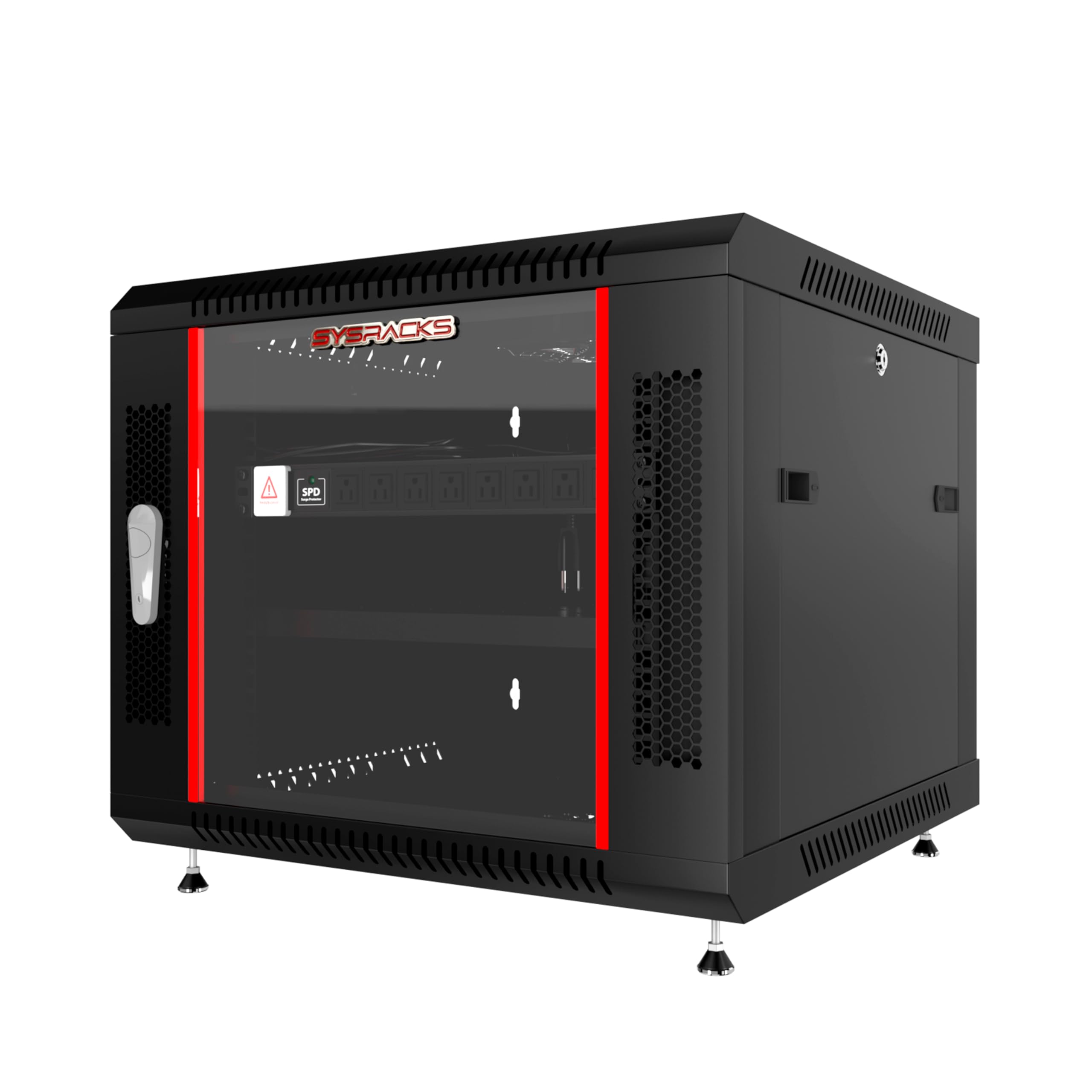
20 inches of usable depth makes the Sysracks 9U Wall Mount Server Rack Cabinet 24” Deep the top pick for anyone who needs to fit a deep AV receiver or a full-size UPS without moving to a floor-standing cabinet.
Buyers report that the included 15A surge-protected PDU and a full-size fixed shelf make this a true all-in-one kit. The rack supports up to 133 lbs (about 60 kg) when wall-mounted or 200 lbs (about 91 kg) on its leveling feet, and it weighs 55 pounds itself, so it feels planted and stable. The locking glass door and ventilated side panels keep gear visible, secure, and breathing.
The honest limit is that assembly takes care — one reviewer noted the top fan can block the top U slot, so you may need to put shallow gear in that position. Overall, it is the deepest, most feature-complete 9U cabinet at a mid-range investment.
Why it’s great
- 20″ usable depth fits deep AV and IT gear
- Includes PDU, shelf, brush panels, and leveling feet
- 133 lb wall-mount / 200 lb floor-rated capacity
Good to know
- Top fan may block the top U slot if gear is deeper than 1″
- Requires careful squaring during assembly
2. StarTech 4-Post 9U Wall Mount Network Cabinet

The Sysracks 9U beats this on depth and included extras, but the StarTech wins on convenience — it ships fully assembled. No sorting screws, no manual. You take it out of the box, mount the wall bracket, and hang it. That time savings alone can be worth the premium if you are setting up a client site or just want a clean install this weekend.
The 9U cabinet gives you adjustable mounting depth from 2.4 to 18.9 inches, so you can position short patch panels and deeper 17-inch switches in the same rack without wasted space. The mesh front door and side panels provide plenty of passive airflow, and you can add up to four optional 120mm fans (sold separately) if your gear runs hot. Reviewers consistently mention the heavy-gauge steel and the included 1U shelf as standout value.
Choose this over the top performer if your priority is zero assembly time and you do not need the extra few inches of usable depth or the included PDU. It is the pro’s choice for speed and reliability. skip it if you have gear deeper than 18.9 inches — you need the Sysracks.
Where it shines
- Ships fully assembled — hang and load in minutes
- Adjustable mounting depth from 2.4″ to 18.9″
- 198 lb weight capacity for heavier gear
Worth noting
- Fans not included (requires ACFANKIT12)
- Mounting tabs may need slight bending for perfect fit
3. Sysracks 15U Wall Mount Server Rack Cabinet 24” Deep

If you are building a home lab with a full-size UPS, a patch panel, a 24-port PoE switch, and a couple of NAS units, this 15U cabinet gives you the vertical space. It shares the same 24-inch overall depth (20 inches usable) as the 9U model, but adds 6 extra U slots — a 67% capacity increase — without taking any more floor depth.
The kit includes two vented steel shelves and a rack-mount PDU, so you can organize heavy items like amps or receiver units on the bottom shelf and keep patch panels up top. The unit weighs 55 pounds, and owners mention the heavy-gauge steel and precise alignment make assembly straightforward. One buyer mentioned the industrial-grade lock feels reassuringly solid. The locking glass door and removable side panels give you full access for cable management.
One reviewer did mention an initial dent on the top corner and that the side doors feel a bit flimsy despite their locks. The seller shipped a replacement top panel quickly, which speaks to their customer service. If you need 15U of space and a full accessory kit at a mid-range price, this is your cabinet. pass on it if you only need a few slots — the 9U is cheaper and easier.
What stands out
- Spacious 15U with 20″ usable depth for deep gear
- Includes 2 shelves, PDU, fan, brush panels, and leveling feet
- Industrial-grade lock and heavy-gauge steel construction
The trade-offs
- Some reports of minor cosmetic dents in shipping
- Side panels feel less sturdy than main frame
4. Tecmojo 18U Wall Mount Rack Elite Collection
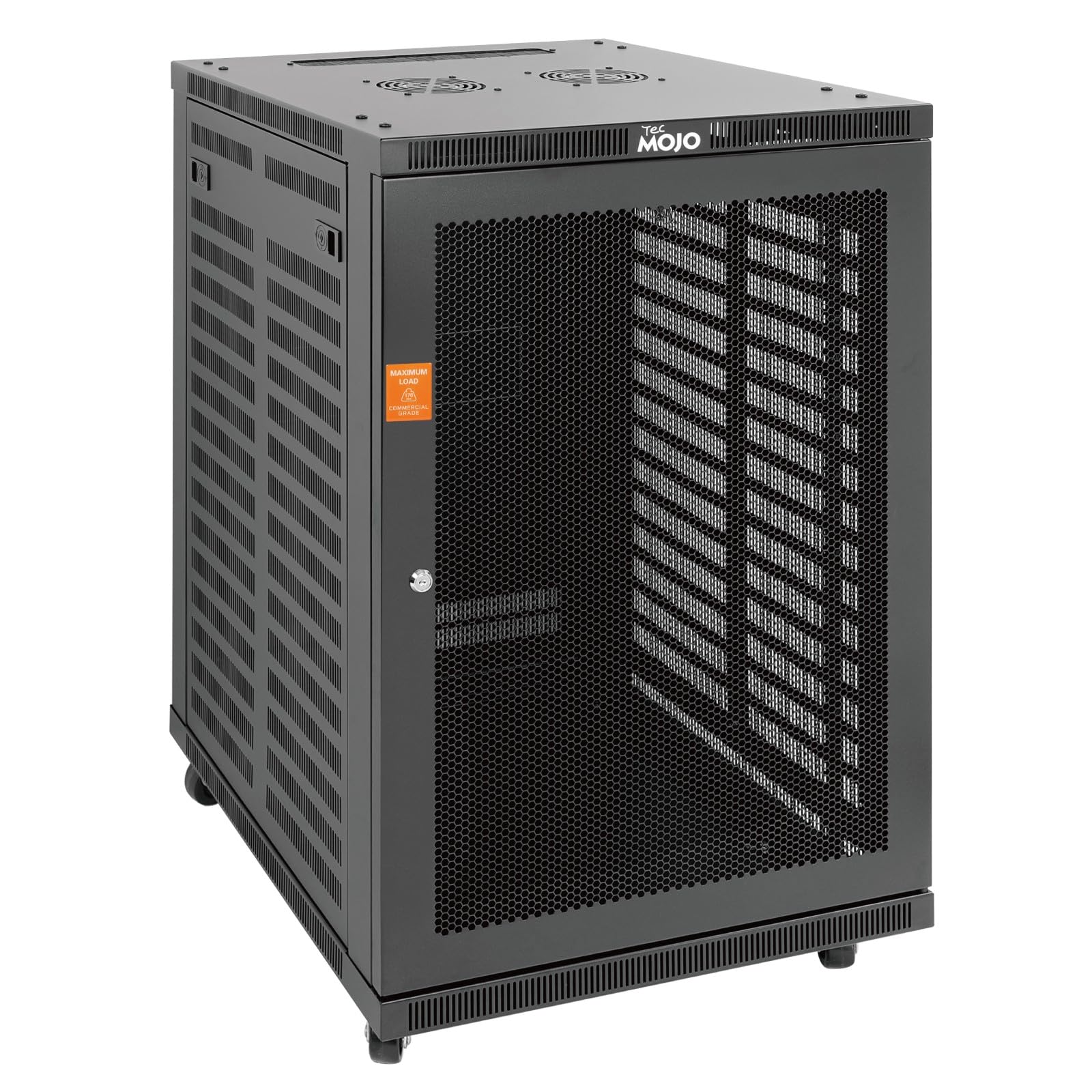
The single number that matters most in this category is the 176-pound wall-mount capacity, and this 18U cabinet scores strongly with that rating. That is enough to hold a rack full of amplifiers, DSP units, and network switches, all supported by a 76.7-pound cabinet made from premium cold-rolled steel. The maximum mounting depth of 21.3 inches gives you room for deep Crown and QSC amps that the shallower 12U Tecmojo could not fit.
The catch with this large a wall-mount cabinet is its physical size. At 35.6 inches high and 23.6 inches deep, it is a substantial presence on your wall, and you must mount it into studs or concrete with serious hardware. The included casters let you use it as a floor-standing unit if your wall cannot handle the weight, but the mesh door and top fans (sold separately for some versions) keep airflow decent either way.
Reviewers praise the build quality and the responsive customer service from Tecmojo. If you need 18U of space and 21.3 inches of usable depth in a wall-mount form factor, this rack offers strong value compared to premium brands at a lower price point.
The upsides
- 176 lb wall-mount capacity supports heavy AV/IT loads
- 21.3″ maximum mounting depth fits deep amps and servers
- Comes with casters for floor-standing flexibility
Keep in mind
- Very heavy (76.7 lbs) — needs sturdy wall mounting
- Some versions ship without fans (check the listing)
5. StarTech 22U Enterprise-Grade Server Rack Cabinet

What you actually get at this lower price is a 22U rack with a weight capacity of 1,764 pounds (about 800 kg) — nearly a ton of gear — that can handle multiple UPS units, deep servers, and large network switches. Nothing else in this lineup comes close; the Tecmojo 18U, for example, holds 176 pounds wall-mounted, which is a tenth of what this StarTech can support on its casters and leveling feet.
The downside you accept is assembly time. This rack ships flat-packed in a heavy box (62.6 kg or 138 lbs) and takes a couple of hours to put together, though customers note the tolerances are precise and the result is rock-solid. The adjustable mounting depth ranges from 5.7 to 33.0 inches, giving you the flexibility to mix short patch panels with full-depth servers. The lockable glass front door and removable side panels provide security and easy access.
For the price, you are getting enterprise-grade build quality, universal compatibility, and a lifetime warranty with free technical support. If you need a 22U rack that can handle a dense data-closet or server-room load, this is worth the premium over the mid-range floor-standing options. It is the exact budget buyer it is perfect for: someone who needs a heavy-duty floor-standing rack for a dense server-room load and is willing to assemble it themselves to save money, but who should it’s not for you if they only need wall-mount capacity — the Sysracks 9U is far simpler.
Why we’d pick it
- Massive 1,764 lb static capacity for heavy enterprise gear
- Adjustable depth from 5.7″ to 33″ for mixed equipment
- Lifetime warranty with 24/5 technical assistance
A few caveats
- Heavy box and requires significant assembly time
- Some reviews note packaging damage in transit
6. Sysracks 42U Home Server Rack Cabinet 35″ Deep

This is the rack for serious homelab enthusiasts who plan to fill every U. At 42U tall (7 feet) and 35 inches deep, it can hold a full stack — a 48-port switch, a patch panel, multiple NAS units, a full-size server, a UPS, and more. The 1,600-pound (about 726 kg) static capacity means you can load it up without worrying about sag.
The feature that serves this buyer best is the included 8-outlet PDU, fixed shelf, cable entry brushes, and locking casters: everything you need to start populating the rack right after assembly. Reviewers highlight the light gray color as a clean look that matches Unifi gear, and the locking glass door makes it easy to monitor LED status without opening the door. The open back and sides allow a floor-standing AC unit to be installed for active cooling if your lab runs over 30 amps.
The honest limit is assembly — at 55 pounds of packaged steel, it takes time and two people to stand it upright. A couple of reviewers also mentioned needing more cage nuts (the square nuts that hold equipment in place) than the included pack, so you may want to order a spare bag. If you are planning a full-size homelab that will grow over the years, this rack gives you the room and support you need. look elsewhere if you only have a few devices — the 9U Sysracks is far more practical.
Strong points
- 42U of space with 35″ depth for deep servers and UPS units
- 1,600 lb static capacity handles a fully loaded rack
- Includes PDU, shelf, casters, and cable management brushes
Before you buy
- Large and heavy — assembly requires two people
- Only a small bag of cage nuts included; may need more
7. Tecmojo 12U Wall Mount Server Cabinet

On price and value, the Tecmojo 12U is the most affordable lockable cabinet in this guide, offering 12U of space, a 110-pound (about 50 kg) weight capacity, and a glass door with a lock. It covers the basics for a small home network with a few switches and a patch panel without overspending. Reviewers point out it assembles in about 20 minutes with the included cardboard wall-mounting template.
What you give up is usable depth. As one reviewer put it, “Crown/QSC amps barely fit; Yamaha receiver is 2 inches too long.” If your gear is shallow (standard network switches and patch panels), this depth is fine. If you own deep AV receivers or full-size UPS units, look at the 24-inch-deep options above.
The one clear reason to choose it is if you are budget-conscious, need a secure, tidy enclosure for shallow networking gear, and value quick assembly over depth expansion. The 3-year manufacturer warranty adds peace of mind. steer clear if you have deep AV gear — you need the Sysracks 24-inch-deep models.
What we like
- Lowest price point in the lineup for a lockable 12U cabinet
- Quick 20-minute assembly with wall-mount template
- 3-year manufacturer warranty
The downsides
- Only 14.2″ usable depth — too shallow for most AV gear
- Locking latch feels loose according to some reviewers
8. RackPath 9U Wall Mount Network Rack Cabinet

17.7-inch total depth with a pre-installed 120mm cooling fan and lockable glass door at a more accessible price than many 9U options — the RackPath 9U is for budget-conscious home lab users with shallow equipment who want an included fan and glass door out of the box. The steel feels thick and the powder-coat finish is even, giving it a premium appearance; numbered rails and labeled hardware make assembly easier than some similarly priced competitors.
What that entry-level price actually gets you is a fully unassembled cabinet with some compromises: the included top-mounted fan is “too deep; blocks top U slot if longer-depth items mounted there,” meaning the top U may be unusable with switches deeper than about 1 inch. The lock is easy to pick (not a real security feature), and there are no dust filters included, so you will need to add those yourself in dusty environments.
The one reason to choose this over the NavePoint or Tecmojo is the combined value of an included fan, lockable side panels, and a glass door at a lower cost. For a basic home lab with shallow equipment, it is a solid value play.
Why it’s great
- Pre-installed 120mm quiet cooling fan included
- Lockable glass door and removable side panels
- Thick steel with even powder-coat finish
Good to know
- Included fan blocks top U slot for deeper gear
- No dust filters or wall-mount template included
9. NavePoint 9U Server Rack Enclosure – 17.7″ Deep

If cooling is your top concern on a budget, the NavePoint 9U stands out because it ships with two built-in top fans, not just one — the top-pick StarTech 9U ships with zero fans included. For any dense 9U load — a PoE switch, a patch panel, and a router — having that second fan means better airflow and lower internal temperatures. The 132-pound (about 60 kg) weight capacity is also solid for the class.
What you give up is build polish. The directions are notoriously poor (described as “horrible” by one reviewer), and the stock fans are loud enough that many buyers replace them with quiet 120mm PC fans using a 12VDC (12-volt direct current, standard for PC fans) adapter. The assembly takes 1.5 to 2 hours, and some reviewers found fine metal whiskers inside that needed cleaning. The door hinge tab arrived broken for one buyer, though Navepoint shipped a replacement quickly.
Choose this over the top pick if you do not mind spending a bit of time on assembly and a quick fan swap in exchange for the lowest price among the 9U options. The customer service is responsive, and the rack itself is sturdy once built. skip it if you want a turnkey experience — the StarTech 9U assembled is much faster.
Where it shines
- Two integrated top fans for active cooling
- 132 lb weight capacity handles dense loads
- Responsive US-based customer support
Worth noting
- Stock fans are loud; most buyers swap them out
- Directions are poor and assembly can take 2 hours
Understanding the Specs
Usable Mounting Depth
This is the real space between the front and rear mounting rails where your equipment sits. Total cabinet depth is always larger because it includes the door, back panel, and cable management space. Always check the “maximum mounting depth” spec — if you own a full-size receiver or a deep UPS (uninterruptible power supply), look for at least 20 inches.
U Height (Rack Units)
One U equals 1.75 inches of vertical space. A 9U rack gives you about 15.75 inches of usable vertical space. Measure the height of every device you plan to install (switch: 1U, patch panel: 1U, UPS: 2U, etc.) and add them up before buying. Leave about 1U of space for airflow between high-heat devices.
Weight Capacity
This is the maximum total weight the rack can safely support when mounted. Wall-mount racks typically top out around 130–200 lbs (about 59–91 kg). Floor-standing models can handle over 1,000 lbs (about 454 kg). Weigh your gear (or check its specs) and make sure the total is well below the rack’s stated limit — aim for 80% or less for a safety margin.
Active Cooling (Fans)
Built-in fans (usually 120mm, about 4.7 inches) pull hot air out of the top of the cabinet. If your rack holds more than a couple of switches and a router, you want at least one fan. For dense loads, look for two fans or the ability to add optional units. Note the fan noise level — cheap fans can be loud enough that you may want to swap them for quieter PC fans.
FAQ
What does 9U mean on a server rack cabinet?
How deep should my 19-inch rack cabinet be for a home lab?
Can I wall mount a 15U server rack cabinet?
Do I need a cooling fan in my server rack cabinet?
What is the difference between a glass door and a mesh door on a rack cabinet?
Final Thoughts: The Verdict
For most buyers, the 19 inch server rack cabinet winner is the Sysracks 9U 24″ Deep because it offers the best balance of usable depth, included accessories (PDU, shelf, fan), and build quality at a mid-range price. If you want zero assembly time and a proven brand, grab the StarTech 9U Fully Assembled. And for a full-size homelab that will grow over years, the massive capacity of the Sysracks 42U 35″ Deep is the one to beat.
Product prices and availability are accurate as of the date/time indicated and are subject to change. Any price and availability information displayed on Amazon at the time of purchase will apply to the purchase of this product. As an Amazon Associate I earn from qualifying purchases.
CERTAIN CONTENT THAT APPEARS ON THIS SITE COMES FROM AMAZON. THIS CONTENT IS PROVIDED "AS IS" AND IS SUBJECT TO CHANGE OR REMOVAL AT ANY TIME.
Amazon and the Amazon logo are trademarks of Amazon.com, Inc. or its affiliates.