
Our readers keep the lights on and my morning glass full of iced black tea. As an Amazon Associate, I earn from qualifying purchases.
Finding a 3d printer under $300 that actually prints reliably and doesn’t turn into a constant tinkering project is the real challenge. You want a machine that turns your ideas into real objects fast, without a steep learning curve or hidden costs. This guide tells you which models deliver on that promise, whether you’re buying for a curious kid, a classroom, or your own home workshop.
I’m Min — the co-founder and writer behind Gadgets Feed. This guide is built by comparing the manufacturers’ published specifications and the patterns across verified customer reviews, so you get each pick’s real strengths and trade-offs instead of marketing spin.
You will find seven of the best options at this price. They range from compact beginner-friendly units to surprisingly capable high-speed machines. Each is reviewed here to help you pick the right 3d printer under $300 for your actual projects.
How To Choose The Best 3D Printer Under $300
At this price point, you don’t have to settle for a noisy, unreliable machine that needs constant manual calibration. The key is knowing which features are worth paying for and which are just marketing hype. Focus on three things: the leveling system, the print speed and structure, and the filament compatibility.
Auto Bed Leveling is a Lifesaver
A printer that auto-levels its build plate (the surface your model sticks to) will save you a ton of frustration. Instead of manually turning screws and using a piece of paper to check the nozzle gap, the machine probes the bed at multiple points and compensates for any tilt. Look for a model with “auto-leveling” — it almost guarantees a perfect first layer, which is the foundation of any successful print.
Speed, Structure, and Firmware Matter More Than You Think
A printer’s top speed in mm/s (millimeters per second, or how fast the print head moves) tells you how quickly it can trace the outline of your model. But real-world speed also depends on acceleration (how fast it reaches that speed) and the firmware’s ability to handle vibrations. A CoreXY printer (a type of frame where the print head is moved by belts on both the X and Y axis at the same time) is generally faster and more stable than a “bed slinger” (a printer where the print bed itself slides back and forth). Also, printers that run on Klipper firmware (a fast, flexible software system) can calculate movement much quicker, leading to fewer visible flaws.
Direct Drive vs. Bowden and Nozzle Temperature
Most printers under $300 now use a direct drive extruder (where the motor that pushes the filament is mounted right on the print head). This is great because it handles flexible filaments like TPU (a rubber-like material) much better than a Bowden setup (where the motor is on the frame and pushes the filament through a long tube). Also, check the maximum nozzle temperature — a hotend that reaches 300°C (degrees Celsius, the temperature needed to melt the filament) lets you print stronger materials like ABS, plus it can push filament faster without clogging.
Quick Comparison
On smaller screens, swipe sideways to see the full table.
| Model | Category | Best For | Key Spec | Amazon |
|---|---|---|---|---|
| Anycubic Kobra X | Premium | Multicolor & speed | 600 mm/s + Native 4-color | $299.99$459.99Limited time dealAmazon |
| ELEGOO Centauri Carbon | Premium | Enclosed & carbon fiber | 320°C nozzle, 38.5 lbs | $359.99Amazon |
| Creality K2 SE | Mid-Range | Beginners & reliability | Auto-level, 27.5 lbs | from $549.00Amazon |
| Creality Ender-3 V3 KE | Mid-Range | Community & modding | 500 mm/s, Sprite extruder | from $378.08Amazon |
| FLASHFORGE Adventurer 5M | Mid-Range | Workhorse simplicity | 600 mm/s, 23.8 lbs | from $349.00Amazon |
| Sovol T300 | Value | Large & Klipper firmware | 600 mm/s, 37.4 lbs | $199.00Amazon |
| Entina Tina2 Plus | Budget | Kids & absolute beginners | 250 mm/s, 9.93 lbs | $209.99$229.99Amazon |
In-Depth Reviews
1. Anycubic Kobra X

The Kobra X earns the top spot because it offers native 4-color printing right out of the box — no other printer on this list comes with a multi-filament system built in at this price, making it the ideal choice for hobbyists who want vibrant multi-material models without manual spool swaps.
It reaches a top speed of 600 mm/s. The first layer is handled by the LeviQ 3.0 system (uses 49-point auto bed leveling to sense and flatten the build surface), so adhesion is reliable. The built-in AI camera detects spaghetti failures (when the print head lays down loose filament instead of a solid model) and pauses the print. Buyers report 265 hours of printing with only one user-error failure, and they note the quiet operation at 45 dB (decibels, about as loud as a quiet conversation).
Its 260mm³ build cube (roughly 10 inches on each side) gives you more room than the FLASHFORGE Adventurer 5M’s 220mm³. The hardened steel nozzle handles temperatures up to 300°C, so it prints both flexible TPU and rigid PLA easily. If you want multicolor capability without moving to a much more expensive printer, this is the one to beat.
Why it’s great
- Native 4-color capability at this price is unmatched
- Blazing 600 mm/s speed with AI failure detection
Good to know
- Some users report initial adhesion issues that require tweaking slicer settings
- The ACE Pro unit is not compatible with the older ACE system
2. ELEGOO Centauri Carbon

The Centauri Carbon is heavier and denser than the Kobra X — it weighs 38.5 pounds compared to the Kobra X’s 20.9 pounds — and that weight comes from its rigid die-cast aluminum frame. This gives it a stability advantage, particularly noticeable when you push it to 500 mm/s printing speeds and the built-in vibration compensation keeps the layers perfectly aligned. It also has a fully enclosed chamber, which the Kobra X does not, making it far better for printing advanced filaments like carbon-fiber-reinforced PLA that need a stable, warm environment.
Its 320°C brass-hardened steel nozzle is the hottest in this lineup. It features a dual-sided build plate with a special PLA-specific surface that sticks well without needing glue. Owners mention it prints a benchy in 18 minutes with beautiful detail, and the built-in chamber camera lets you monitor time-lapse videos from your phone.
The catch: at this price point, you get a single-color printer. If you need multicolor, the Anycubic Kobra X leads there. But if you want to print strong, heat-resistant parts out of materials like carbon fiber PETG and you value the consistency that an enclosed, heavy frame provides, the Centauri Carbon is your machine. Buyers who want advanced materials should choose this over the Ender-3 V3 KE.
Where it shines
- Rock-solid die-cast frame for vibration-free high-speed prints
- 320°C nozzle unlocks carbon fiber and other advanced filaments
Worth noting
- First unit reliability concerns reported; support process can be slow
- Single-color only — no built-in multi-material system
3. Creality K2 SE
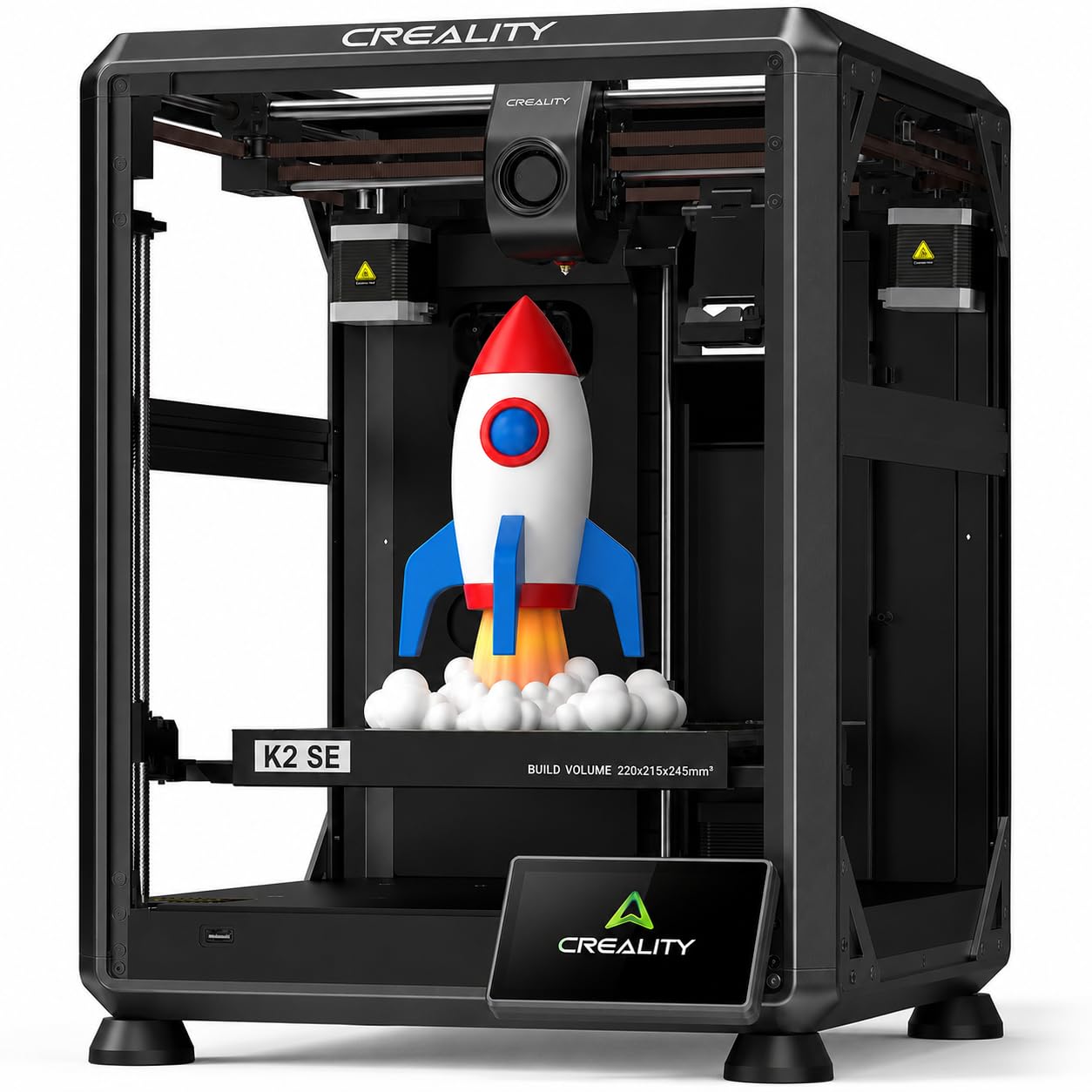
Picture a beginner who just unboxed a printer and has no idea what “leveling the bed” means — the K2 SE is designed specifically for that buyer. Creality claims you can go from unboxing to your first print in three minutes, and the auto-calibration handles everything. It uses a CoreXY structure for a travel speed of 600 mm/s and 20000 mm/s² acceleration, making it 12 times faster at moving around than a basic “bed slinger” design.
It uses a durable, steel-tipped copper nozzle with a titanium alloy heatbreak (a part that stops heat from creeping up into the cold end), and it can be swapped out with one hand in seconds. The nozzle heats up to 300°C in 75 seconds, and pre-installed damping pads reduce vibrations. Reviewers who upgraded from an Ender 3 say the K2 SE is a “premium experience” — they report 30-plus prints with zero failures and praise the auto-leveling as “spot-on.” A few customers note you need a glue stick as a release agent, otherwise the first layer sticks too well to the PEI (polyetherimide, a flexible magnetic sheet) plate.
The built-in sleep mode and power-loss recovery (lets the printer resume a print after a power cut) add to its reliability. It weighs 27.5 pounds, and at 17.5 x 17.1 x 22.4 inches it is compact enough for a desk. If you want multicolor later, you need Creality’s separate CFS (Creality Filament System) unit, which costs extra. For a first printer that just works, this is the easiest path. skip it if you plan to print advanced materials like carbon fiber from day one — the enclosed ELEGOO Centauri Carbon is better for that. And with a 600 mm/s travel speed and 20,000 mm/s² acceleration, the K2 SE moves 12 times faster than a basic bed slinger.
What stands out
- Unbox to first print in 3 minutes with effortless auto-leveling
- Fast CoreXY structure with vibration-dampening pads for quiet operation
The trade-offs
- Must use a glue stick as a release agent for clean removal
- Multicolor requires an additional CFS unit (not included)
4. Creality Ender-3 V3 KE

500 mm/s is the single number that matters most in this category, and the Ender-3 V3 KE scores it at the top of the pack. This printer’s top speed of 500 mm/s is competitive with the fastest on this list, but what makes it a value standout is the combination of features you get for the money. It uses a Sprite direct extruder with a 60W ceramic heater and a bi-metal heatbreak, meaning it can reliably print PLA, PETG, ABS, and flexible TPU (95A hardness) at up to 300°C without clogging. The CR Touch auto-leveling sensor probes the bed at multiple points to guarantee that flawless first layer.
The downside is that it is a “bed slinger” design (the bed moves back and forth), so it is inherently less rigid than a CoreXY frame like the one in the Creality K2 SE. Some reviewers point out the fans are “somewhat loud,” and a minority report a feed issue after initial use that led to a clog. However, the massive online community around the Ender-3 platform means you have endless modding potential and troubleshooting guides at your fingertips. It takes about 10 minutes to install the X-axis carriage, and once set up, it produces prints with a 0.1mm accuracy (100 microns, visibly smooth layers).
It has a 220 x 220 x 250 mm print volume, dual fans for rapid cooling, and a filament runout sensor. The rich modding ecosystem lets you upgrade almost any part later, from the hotend to the cooling fan. That makes it a strong investment for a hobbyist who wants to grow. If you like the speed of the K2 SE but want the proven community support of the Ender line, the Ender-3 V3 KE is your call, delivering a price-to-value read that rewards long-term tinkerers.
The upsides
- Excellent print accuracy at 0.1 mm with strong direct drive extruder
- Huge online community and endless modding potential
Keep in mind
- Bed-slinger design limits speed compared to CoreXY frames
- Some users report feed issues after initial use
5. FLASHFORGE Adventurer 5M

What you actually get at this lower price is a workhorse you can set on a desk and forget about. The Adventurer 5M hits an impressive 600 mm/s peak speed through its CoreXY structure, and the full-auto one-click leveling makes every first layer virtually foolproof. The nozzle heats to 200°C in just 35 seconds, and the PEI coated spring steel plate provides excellent grip for PLA, PETG, and TPU right out of the box without needing glue.
Where this printer really shines is consistency. Reviewers report running it daily for months with zero issues — one user says they have 40-plus prints over six months without a single jam or adhesion failure. The built-in vibration compensation eliminates ghosting, and the power-loss recovery and filament runout sensor mean you never lose a long print to a power cut or an empty spool. It comes with a 0.4mm nozzle, but you can swap to a 0.6mm one for carbon fiber filaments if needed.
The one limitation is its small build volume at 220 x 220 x 220 mm — roughly an 8.6-inch cube. That is perfect for toys, prototype parts, and small functional objects, but you cannot print large helmets or wide brackets in one piece. For someone who wants a no-fuss, reliable daily driver that prints small parts fast and accurately, the Adventurer 5M is a top choice — the exact budget buyer it is perfect for is someone who prioritizes speed and reliability over build size.
Why we’d pick it
- Extremely reliable workhorse with months of daily use reported
- CoreXY design for fast 600 mm/s speed with vibration compensation
A few caveats
- Small 220 mm build cube limits single-piece size
- No enclosure kit available, making ABS printing harder
6. Sovol T300

If raw speed and a large build volume are your top priorities, the Sovol T300 is the sleeper hit of this list. It runs on Klipper firmware with a 64-bit microcomputer, which enables a blazing 600 mm/s print speed and 12000 mm/s² acceleration, letting it print a Benchy in just 13 minutes — that is 73% faster than most other printers at this price. It also has an 81-point auto leveling system that heats the bed first to match actual printing conditions, so your first layer is dialed in perfectly.
Its all-metal body and industrial-grade linear rails (precision metal tracks that guide the print head) make it extremely sturdy, and the 1000W AC heating bed (a powerful heating element underneath the build plate) can reach 60°C in just 30 seconds. The direct drive extruder has a 6.5:1 gear ratio for precise control, even with flexible materials. However, the Sovol T300 is large at 19.8 x 24.84 x 32.72 inches and weighs 37.4 pounds — that is nearly 4 times heavier than the 9.93-pound Entina Tina2 Plus, so you need a dedicated, sturdy table for it.
One honest limit is that some shoppers say receiving units with quality-control issues, like an X-gantry (the horizontal bar the print head slides on) that was tilted 2-3mm out of the box, requiring significant bed adjustment. Another reviewer reported a snapped Y-axis tensioner on day one. For a buyer who has some tinkering experience and wants a massive, high-speed machine they can fine-tune, the T300 offers incredible performance per dollar — just be ready for potential initial tweaking.
Strong points
- Insane speed: prints a Benchy in 13 minutes with Klipper firmware
- Large all-metal frame with industrial linear rails for stability
Before you buy
- Heavy 37.4 lb unit requires a dedicated, sturdy table
- Some quality-control issues reported by early buyers
7. Entina Tina2 Plus

At just 9.93 pounds and 11.4 x 8.6 x 8.6 inches, the Tina2 Plus is the smallest and lightest printer here — small enough to sit on a child’s desk without taking over the room. It comes fully assembled with no setup required, and the ceramic hotend heats up in just 40 seconds. Its print speed of 250 mm/s is a 2.4x gap behind the 600 mm/s FLASHFORGE Adventurer 5M, but for its intended audience of kids and absolute beginners, that speed is more than enough to learn on.
The Poloprint Cloud app gives you access to 1,500+ preloaded models, and integrated WiFi lets you start prints from your phone without touching the printer. The PEI spring steel magnetic build plate makes removing finished prints a breeze — just flex the plate and the model pops off. The dual Z-axis structure and auto-leveling help reduce print failures, and safety-conscious buyers will appreciate the partially enclosed frame that keeps hot and moving parts away from little fingers.
Some buyers report that the app can be slow and has caused connectivity issues, with one user reporting a “registration failed” error after two prints that made the WiFi feature unusable. The included white filament spool is also quite small, and you will need an adaptor kit (which you can print yourself) to use standard-sized spools. It is perfect for a family with a curious 10-year-old who wants to print toys and STEM projects without any technical hassle.
What we like
- Truly plug-and-play with zero assembly required
- Lightweight and compact design perfect for a child’s desk
The downsides
- App reliability issues reported; WiFi connectivity can fail
- Small included spool requires a printed adaptor for larger rolls
Understanding the Specs
Print Speed (mm/s)
This number (millimeters per second) tells you how fast the print head moves. A 600 mm/s printer is 2.4 times faster on paper than a 250 mm/s one. But real-world speed also depends on acceleration (how quickly it reaches that speed) and the firmware’s ability to handle corners without leaving marks. Klipper firmware, used by the Sovol T300, handles this better than stock firmware on most budget printers.
Hotend Temperature (°C)
The maximum temperature the nozzle can reach matters because different filaments melt at different temperatures. PLA melts around 200°C, PETG around 240°C, and ABS needs about 270°C. A printer with a 300°C maximum, like the ELEGOO Centauri Carbon at 320°C or the Anycubic Kobra X at 300°C, can handle all these materials plus carbon-fiber-reinforced filaments, giving you more creative freedom.
Build Volume (mm)
This measures the maximum size of the object you can print in one piece. A 220 x 220 x 220 mm volume (used by the FLASHFORGE Adventurer 5M) is about 8.6 inches per side, which is fine for action figures and small tools. A 260mm³ cube (like the Anycubic Kobra X) gives you 40% more space, enough for a small helmet or a large bracket. If you need big prints, the Sovol T300’s spec is the largest here.
Auto Bed Leveling
This feature uses sensors to automatically measure the build plate’s tilt and compensate for it so the first layer sticks evenly. Without it, you have to manually turn screws and slide a piece of paper under the nozzle until the gap is just right — a process that takes 10-15 minutes. “81-point” leveling (Sovol T300) is more thorough than “49-point” (Anycubic Kobra X), but any auto-leveling system is a massive step up from manual leveling.
FAQ
What does auto bed leveling actually do for my prints?
Can I print flexible TPU with a budget 3D printer?
Is a CoreXY frame always better than a bed slinger for speed?
Final Thoughts: The Verdict
If you want one dependable pick, the 3d printer under $300 winner is the Anycubic Kobra X because it combines a 600 mm/s speed with native multicolor capability at this price point. If you want an enclosed machine for advanced materials like carbon fiber, grab the ELEGOO Centauri Carbon. And for a truly beginner-friendly experience with auto-leveling and a fast setup, the standout is the Creality K2 SE.
Product prices and availability are accurate as of the date/time indicated and are subject to change. Any price and availability information displayed on Amazon at the time of purchase will apply to the purchase of this product. As an Amazon Associate I earn from qualifying purchases.
CERTAIN CONTENT THAT APPEARS ON THIS SITE COMES FROM AMAZON. THIS CONTENT IS PROVIDED "AS IS" AND IS SUBJECT TO CHANGE OR REMOVAL AT ANY TIME.
Amazon and the Amazon logo are trademarks of Amazon.com, Inc. or its affiliates.