
Our readers keep the lights on and my morning glass full of iced black tea. As an Amazon Associate, I earn from qualifying purchases.
Specs are compiled from manufacturer listings and verified buyer reviews and can change over time — please confirm the key details on the product page before buying.
A fuzzy, grainy, or flat-looking stream usually depends on your camera. A dedicated streaming camera makes you look sharp and natural on screen — no more washed-out colors or laggy motion. This guide covers five options, from plug-and-play webcams to serious mirrorless setups, matched to different budgets and streaming styles.
I’m Min — the founder and writer behind Gadgets Feed. This guide is built by comparing the manufacturers’ published specifications and the patterns across verified customer reviews, so you get each pick’s real strengths and trade-offs instead of marketing spin.
You will find exactly what sets each camera apart in resolution, frame rate (how many images per second), autofocus (auto-focusing on your face), and low-light performance. That helps you confidently pick the right camera for streamers for your setup without wasting money on specs you will never use.
Quick Picks
- Elgato Facecam 4K — Best Overall
- Razer Kiyo V2 X Streaming Webcam — Value Power
- OBSBOT Tiny SE 1080P 100FPS Webcam — Smart Tracker
- Tenveo NDI PTZ Camera AI Auto Tracking — Best Overall
- Sony Alpha 6700 — Pro Studio
How To Choose The Best Camera For Streamers
Picking a streaming camera depends on a few key decisions that affect how polished your stream looks. Here is what to think about before you buy.
Resolution and Frame Rate
Most streamers aim for at least 1080p (1920×1080 pixels) at 60 FPS (frames per second, or how many full images the camera sends each second). That gives you a sharp, smooth picture on Twitch or YouTube without overloading your computer. Higher resolutions like 1440p (2560×1440 pixels) or 4K (3840×2160 pixels) add future-proofing, but you need a strong PC and fast internet to stream them at a usable bitrate (the amount of data sent per second). Frame rate matters for motion — 60 FPS keeps fast hand movements or gameplay reactions looking natural.
Autofocus and AI Tracking
A camera that quickly locks onto your face and keeps you centered makes a huge difference. Basic webcams sometimes drift or hunt for focus when you move. More advanced options use AI humanoid detection or face tracking (technology that recognizes a person’s face or body shape) to follow you around the room. This is essential if you stand up, gesture, or move during a stream.
Low-Light Performance
Not every streamer has a studio with professional lighting. Cameras with larger sensors (the part that captures light), like a Sony 1/2.8” CMOS (a type of sensor roughly 0.35 inches diagonally), or dual native ISO (a technology that lets the sensor handle bright and dark scenes with less noise) handle dim rooms much better. They keep your face visible and the noise low, so you do not look grainy during evening streams. If you rely on a single ring light, a webcam with a premium sensor matters more than high megapixels (millions of pixels that determine detail).
Quick Comparison
On smaller screens, swipe sideways to see the full table.
| Model | Best For | Resolution | Frame Rate | Sensor | Amazon |
|---|---|---|---|---|---|
| Elgato Facecam 4K | Best Overall | 4K | 60 FPS | Sony STARVIS 2 CMOS | $199.99Amazon |
| Razer Kiyo V2 X | 1440p Streaming | 1440p | 60 FPS | 3.7 MP | $74.99$99.99Amazon |
| OBSBOT Tiny SE | AI Tracking | 1080p | 100 FPS | 1/2.8″ Stacked CMOS | $79.00$89.00Limited time dealAmazon |
| Tenveo NDI PTZ | Multi-Camera Production | 1080p | 60 FPS | Sony 1/2.8″ CMOS | $394.99Amazon |
| Sony Alpha 6700 | Professional Production | 4K | 60 / 120 FPS | 26 MP APS-C Exmor R | $1,498.00Amazon |
In‑Depth Reviews
1. Elgato Facecam 4K

The only webcam here that delivers true 4K60 video with a Sony STARVIS 2 sensor — a sensor designed for low-light surveillance cameras, making it very sensitive to light — that takes standard 49mm camera lens filters.
This webcam gives you that cinematic, DSLR-like quality without the complexity of a mirrorless rig. The Sony STARVIS 2 CMOS sensor and Elgato Prime Lens technology deliver sharp 4K resolution at 60 FPS, so your face stays crisp and colors look natural. You can screw on any standard 49mm lens filter — just like a real camera lens — to add effects or control glare. Buyers report using it 5 to 8 times a week and getting comments on video quality from their chat. The free Camera Hub software gives you manual control over exposure (brightness) and color, and settings save to built-in flash memory so they stick between computers. It is heavier on the wallet than a basic 1080p webcam, and some owners mention it is picky about cables — you will want a high-speed USB-C connection directly to your PC rather than a hub.
Why it’s great
- 4K60 video with a Sony STARVIS 2 sensor gives you sharp, vibrant footage even in moderate light
- Accepts standard 49mm lens filters so you can add polarizers or diffusion just like a DSLR
- Built-in flash memory saves your settings — plug into any PC and they are ready
Good to know
- Requires a direct USB-C 3.0 connection to your PC — hubs can cause issues
- Lens is wide at 20mm; using digital zoom drops the image below 4K
- AI subject tracking works but reduces overall video quality
Best for: Streamers who want the cleanest 4K picture without learning a full camera system.
Skip if: You need built-in AI tracking or you do not have a free USB-C 3.0 port on your PC.
2. Razer Kiyo V2 X Streaming Webcam

A sharp 1440p webcam with fast autofocus and a wide-angle lens, for less than the Elgato Facecam 4K.
If you are streaming at 1080p but want the option to push a sharper signal, the Kiyo V2 X gives you 1440p at 60 FPS — a 3.7 MP effective still resolution that beats most 2 MP webcams hands down. The fast autofocus keeps you sharp whether you lean in for a close-up or pull back to show your full setup. Razer Synapse software lets you tune color and lighting with presets or manual sliders. Unlike the OBSBOT Tiny SE that relies on a motorized gimbal for tracking, this is a fixed lens with a wide-angle view — you get flexible framing without moving parts. A built-in mic handles audio in a pinch, though customers note it is mediocre and better replaced with a dedicated mic for streaming. Some reviewers point out random black frames or flickering in certain setups, possibly tied to USB bandwidth settings.
Why it’s great
- 1440p at 60 FPS delivers noticeably sharper video than standard 1080p webcams
- Wide-angle lens lets you show your full streaming setup easily
- Integrated privacy shutter twists to cover the lens instantly
Good to know
- Built-in mic is usable for office calls but not great for streaming audio
- Some users see occasional black flicker that may require software tweaks
- Can look grainy in dark rooms without extra lighting
Best for: Streamers who want 1440p clarity and reliable autofocus without spending on a 4K camera.
Skip if: You need AI tracking or you prefer to stream in 4K at 60 FPS.
3. OBSBOT Tiny SE 1080P 100FPS Webcam

A tiny webcam that follows your every move with an AI-powered motorized gimbal — it physically pans and tilts to keep you centered.
This is the camera to grab if you pace, gesture, or move around while you stream. The OBSBOT Tiny SE uses an AI gimbal to pan and tilt as you move, with zone tracking and bodypart tracking so you can lock onto hands or upper body. It delivers 1080p at 100 FPS — noticeably smoother than 60 FPS — and 720p at 150 FPS if you prioritize fluid motion over resolution. The 1/2.8” Stacked CMOS sensor with dual native ISO and staggered HDR keeps the image clean in low light, which buyers confirm works well for office use and streaming. Gesture control lets you trigger tracking or zoom with a hand signal. One reviewer noted a rare software glitch where the camera faces down and needs a restart. At a price that undercuts many fixed-lens webcams, you get motorized tracking that normally costs much more.
The case for it: The 1080p at 100 FPS combined with AI zone tracking gives you buttery-smooth video that follows you automatically, which is rare at this price bracket.
The catch: The motorized gimbal can occasionally glitch and lose its position, requiring a software restart — not ideal for critical live streams without a backup.
Best for: Solo streamers who move around on camera and want automatic framing without a second person behind the camera.
Skip if: You need 4K resolution or you cannot risk any software glitch during a live broadcast.
4. Tenveo NDI PTZ Camera AI Auto Tracking
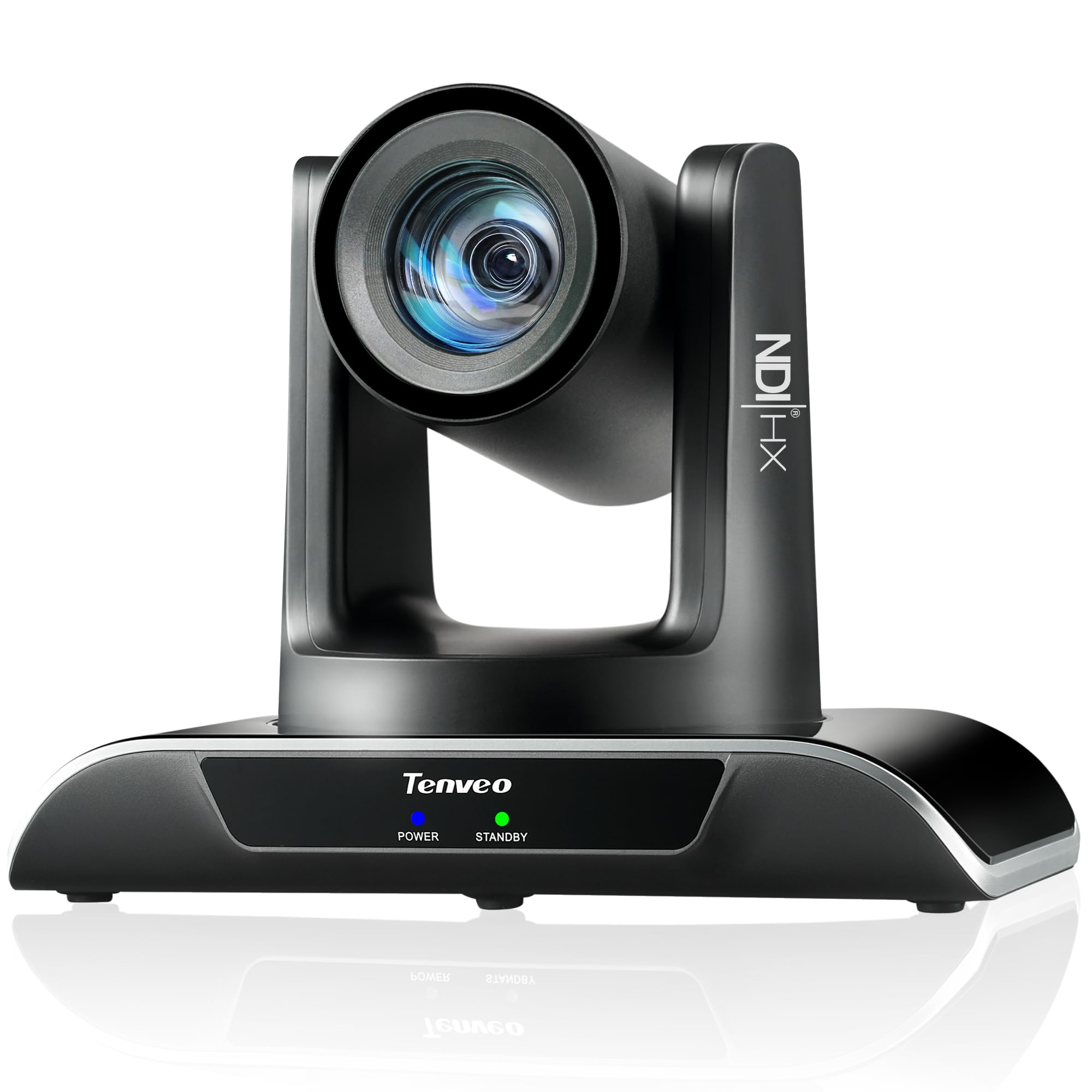
A professional PTZ (Pan-Tilt-Zoom) camera that brings 20X optical zoom and NDI workflow to live streaming — far beyond what any desktop webcam can offer.
This Tenveo camera is built for streamers who run multi-camera productions or stream from a larger space like a church, theater, or studio. It delivers 1080p at 60 FPS with a Sony 1/2.8” CMOS sensor and a 20X optical zoom — that is real glass zoom, not digital cropping. The AI humanoid plus face auto-tracking locks onto a presenter and follows them smoothly, even if they get partially blocked. It supports HDMI, LAN, and USB3.0 outputs simultaneously, plus NDI (Network Device Interface — a technology that sends high-quality video over your Ethernet network) for low-latency IP streaming. PoE (802.3af, Power over Ethernet — sending power and data through one cable) lets you power it over a single Ethernet cable if you have a PoE switch. Buyers praise the crisp picture quality and fast autofocus even in lower light. One buyer mentioned that while it supports HDMI, LAN, and USB, the PoE feature depends on your network — it can feel laggy if the network is not ideal. The package includes a remote control, wall mount, and a 3-year standard warranty with lifetime technical support.
Why it’s great
- 20X optical zoom brings distant subjects into clear view without losing quality
- NDI support lets you run multiple cameras over your network without long HDMI cables
- AI tracking with dual human body and face detection keeps the subject centered even when partially occluded
Good to know
- No built-in microphone — you will need a separate audio solution
- PoE support can be inconsistent depending on network hardware and setup
- Larger and heavier than a typical webcam — needs a sturdy mount or tripod
Best for: Multi-camera live productions that need NDI, optical zoom, and reliable AI tracking in larger spaces.
Skip if: You need a simple plug-and-play webcam for a desk setup with minimal gear.
5. Sony Alpha 6700

This mirrorless camera shoots 4K120p from a 6K oversampled readout — it captures more detail than needed then shrinks it, giving you extra sharpness — with 10-bit color, leaving every other webcam here behind.
If you are ready to move past webcams entirely, the Sony Alpha 6700 is a serious interchangeable-lens camera that excels at both video and photo. It uses a 26.0 MP APS-C format Exmor R back-illuminated CMOS sensor with BIONZ XR processing, giving you 4K video at 60p from a 6K oversampled readout — that means extra sharpness and rich color depth. It also captures 4K at 120p for silky-smooth slow motion. The dedicated AI processor handles real-time subject recognition for people, animals, and moving objects, and the 759 autofocus points keep tracking fast and reliable. It records in 4:2:2 10-bit (a color sampling technique that captures twice the color information of 4:2:0, crucial for professional color grading) with Long GOP or All Intra formats, giving you professional-grade color grading flexibility. Shoppers say the AI autofocus is incredible and fast, though the menu system takes time to learn. The in-body stabilization is decent but not steady enough for smooth handheld walking shots without a gimbal. This is an investment, but it is also a true hybrid camera you could use for professional video production outside of streaming.
The case for it: The 6K oversampled 4K60p recording with 10-bit color and AI autofocus is the gold standard for streamers who want broadcast-quality video from a compact body.
The downside: You will need to buy a lens separately (it uses the Sony E-mount system), and the complex menu setup has a steep learning curve for new users.
Best for: Professional streamers and content creators who want interchangeable lenses and the highest possible video quality from a compact APS-C camera.
Skip if: You want a simple USB webcam with no extra gear — this needs a lens, power, and a capture card or HDMI connection.
Understanding the Specs
Resolution and Frame Rate
Resolution (1080p, 1440p, 4K) determines how many tiny dots make up your image — more dots mean sharper detail. Frame rate (30 FPS, 60 FPS, 100 FPS) is how many of those images the camera sends per second. For streaming, 1080p at 60 FPS is the balance: sharp enough to look great on most platforms and smooth enough to handle fast hand movements or webcam pans. 4K at 60 FPS looks spectacular but demands more upload bandwidth and PC processing power to encode. Higher frame rates like 100 FPS or 120 FPS are useful if you slow down footage in editing or want extra smoothness on high-refresh-rate monitors.
Sensor Size and Low-Light Quality
The physical sensor (the chip inside the camera that captures light) is what determines low-light performance. A larger sensor — like a 1/2.8″ (about 0.35 inches diagonally) or APS-C (Advanced Photo System type-C, about 1.1 inches diagonally, much larger than a phone camera) — collects more light, which means cleaner video in a dimly lit room. The 1/2.8” stacked CMOS found in many good streaming cameras uses stacked layers to reduce noise and improve dynamic range (the range between the brightest and darkest parts of the image that still show detail). Dual Native ISO and staggered HDR (High Dynamic Range) are technologies that help the camera handle both bright and dark areas of the frame without washing out or crushing shadows. If you stream without a studio lighting setup, prioritize camera models with larger sensors for a naturally brighter, cleaner picture.
FAQ
What is the minimum resolution I need for streaming?
Do I need 4K for streaming?
What is the difference between PTZ and fixed webcam?
Do I need a separate microphone with these cameras?
Will a webcam work with OBS or Streamlabs?
How does AI tracking work in streaming cameras?
What is NDI and do I need it?
Can I use a mirrorless camera like the Sony Alpha 6700 as a webcam?
How important is autofocus for a streaming camera?
What is a good frame rate for streaming?
Final Thoughts: The Verdict
For most streamers, the camera for streamers winner is the Elgato Facecam 4K because it delivers true 4K60 video with a premium Sony sensor and DSLR-style lens filters in a simple webcam form factor. If you want AI tracking that follows your movements, grab the OBSBOT Tiny SE. And for professional multi-camera productions with optical zoom and NDI workflow, the Tenveo NDI PTZ Camera is the pick for larger spaces and networked setups.
How We Picked
We do not accept paid placement, and we did not hands-on test every unit. Instead, we match each pick to a real buyer and use-case by comparing the manufacturers’ published specifications against the patterns in verified customer reviews — so you get each pick’s real strengths and trade-offs instead of marketing copy.
Sources & Methodology
Specifications: manufacturer listings and product documentation. Review insights: verified customer reviews, as of July 2026. Pricing: not shown on this page (it changes often); check the current price via the retailer link.
As an Amazon Associate, Gadgets Feed earns from qualifying purchases. This does not affect which products we feature.
Product prices and availability are accurate as of the date/time indicated and are subject to change. Any price and availability information displayed on Amazon at the time of purchase will apply to the purchase of this product. As an Amazon Associate I earn from qualifying purchases.
CERTAIN CONTENT THAT APPEARS ON THIS SITE COMES FROM AMAZON. THIS CONTENT IS PROVIDED "AS IS" AND IS SUBJECT TO CHANGE OR REMOVAL AT ANY TIME.
Amazon and the Amazon logo are trademarks of Amazon.com, Inc. or its affiliates.