
Our readers keep the lights on and my morning glass full of iced black tea. As an Amazon Associate, I earn from qualifying purchases.
Specs are compiled from manufacturer listings and verified buyer reviews and can change over time — please confirm the key details on the product page before buying.
You still have that box of cassettes in the closet — mixtapes, family recordings, live concerts. They play fine today, but magnetic tape degrades over time, and finding a working Walkman gets harder every year. The real question is which gadget turns those analog memories into digital MP3 files without costing you hours of frustration or forcing you to become a part-time audio engineer.
I’m Min — the founder and writer behind Gadgets Feed. This guide is built by comparing the manufacturers’ published specifications and the patterns across verified customer reviews, so you get each pick’s real strengths and trade-offs instead of marketing spin.
This roundup of cassette to mp3 converter options covers the specs and real-world quirks you need to know before buying.
Quick Picks
- KLIM K7 Cassette Player with 32GB SD Card — Top Performer
- KLIM K7 Cassette Player with 16GB SD Card — Kit Champion
- Reshow Cassette Player Recorder with USB-C — Auto-Reverse Pick
- Gracioso Portable Shoebox Cassette Recorder Converter — Multi-Deck Utility
- SEMIER Small Cassette Player Recorder with AM/FM Radio — Radio + Conversion Combo
- DIGITNOW USB Cassette Player, Portable Walkman Stereo Tape to MP3 Converter — Budget No-PC Option
How To Choose The Best Cassette To MP3 Converter
You do not need to spend a lot to save your old tapes, but you do need the right workflow. Some converters record directly to a USB flash drive or SD card without a computer, while others rely on Audacity software and a USB-C cable. Your pick depends on how much fiddling you are okay with.
Direct recording vs. computer-required conversion
A direct-to-USB or direct-to-SD converter means you insert a blank thumb drive or memory card, press play and record, and the MP3 files save automatically — no PC, no software, no drivers. The trade-off is that most of these units record at a fixed 128 Kbps (kilobits per second, a measure of audio quality) bit rate, which is fine for spoken word and casual music but not audiophile-grade. Computer-based digitization (like using Audacity) gives you more control over bit rate and track splitting, but it adds an extra step and requires a laptop.
Auto-reverse and side flipping
Many vintage cassettes have Side A and Side B recorded back to back. An auto-reverse mechanism automatically switches to the other side when the first side finishes, so the recording keeps going without you hovering over the deck. Without it, you have to manually flip the tape — easy to miss and restart. If you digitize a stack of tapes, auto-reverse saves serious time.
Power: batteries vs. USB vs. AC adapter
Think about where you will set up. A USB-powered converter runs off any standard phone charger or laptop port, ideal for a desk. Battery-only options give you portability for on-the-go use but chew through cells quickly during long recording sessions. A few models also include an AC adapter for steady wall power. The most flexible units offer at least two power options so you are not stuck mid-conversion.
Quick Comparison
On smaller screens, swipe sideways to see the full table.
| Model | Best For | Recording Method | Auto-Reverse | Power Source | Amazon |
|---|---|---|---|---|---|
| KLIM K7 (32GB) | Premium self-contained converter | Direct to SD card | No | Rechargeable battery (1000mAh) | Amazon |
| KLIM K7 (16GB) | Value-tier SD converter kit | Direct to SD card | No | Rechargeable battery (1000mAh) | Amazon |
| Reshow Cassette Player | USB-C computer conversion | USB-C to computer | Yes | AA batteries or USB-C | Amazon |
| Gracioso Shoebox Recorder | Multi-format conversion | USB drive / SD card / Audacity | No | 4 C batteries or Type-C | Amazon |
| SEMIER Cassette Converter | Radio + conversion combo | USB drive / Micro SD card | No | AC adapter or 4 AA batteries | Amazon |
| DIGITNOW USB Cassette Player | Budget no-computer option | Direct to USB flash drive | Yes | USB port or 2 AA batteries | Amazon |
In‑Depth Reviews
1. KLIM K7 Cassette Player with 32GB SD Card
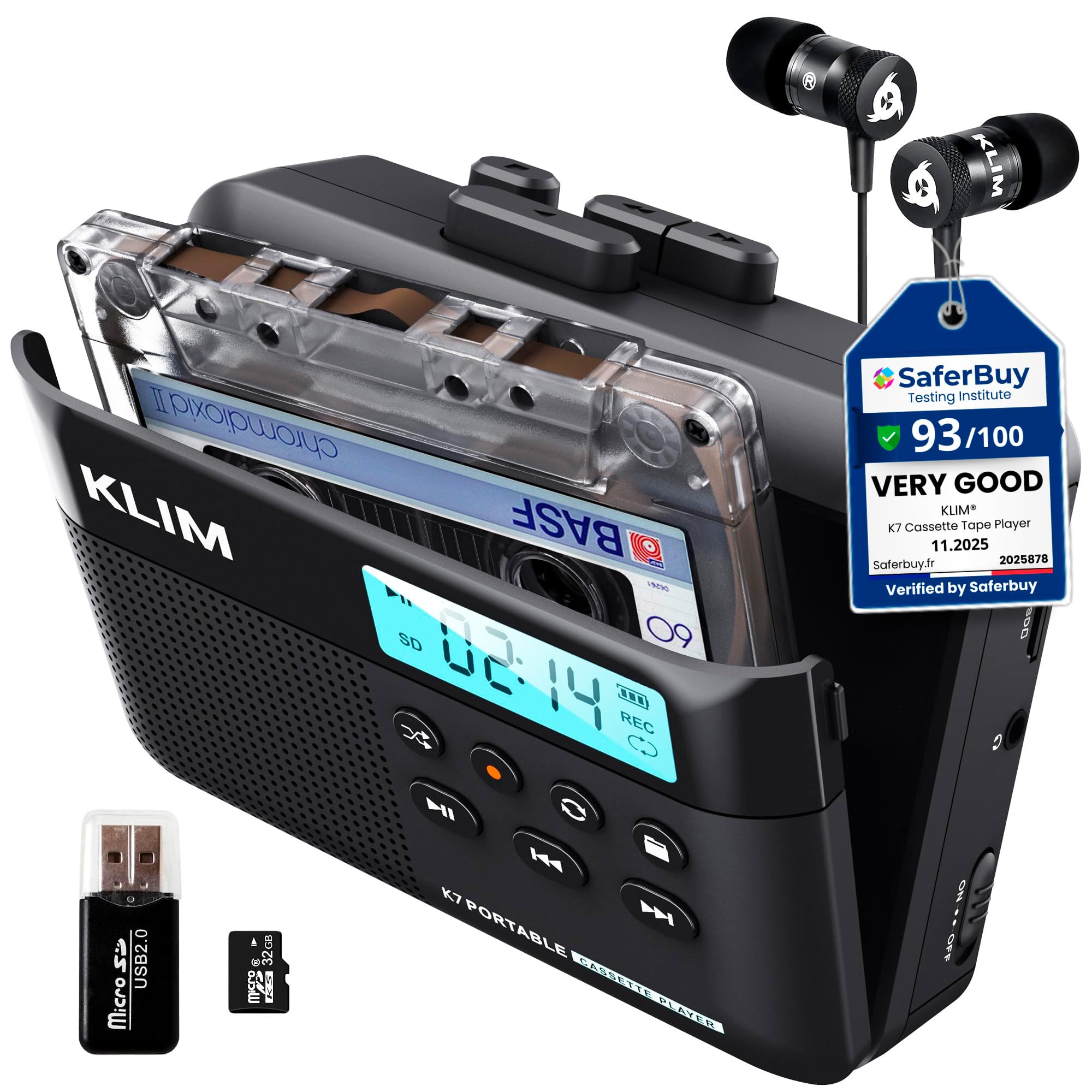
The self-contained converter that keeps everything you need in one box — no guesswork.
The KLIM K7 with the 32GB SD card saves you from ever opening a laptop: you insert your tape, pop the included 32GB SD card (a removable memory card used in cameras and phones) into the slot, press play and record, and the unit saves each file as TAPE001.MP3 directly to the card. No computer, no software, no extra cables. The bit rate (the amount of data stored per second of audio) locks at 160kbps, and buyers report this sounds good for spoken-word and most music. The 1000mAh (milliamp-hour, a measure of battery capacity) rechargeable battery takes about 2 hours to charge and handles roughly two full cassettes per charge, and you can keep recording while it is plugged in via USB-C. That makes it more convenient for long sessions than the Reshow, which requires a computer for every conversion. One limitation: the K7 does not support recording onto cassette tapes — it only records to the SD card. It also has no auto-reverse, so you must manually flip the tape when the first side finishes. The built-in speaker has been described as “meh” and “tinny” by multiple owners, so for listening, you will want to use the included earbuds or the 3.5mm headphone jack. Unlike the 16GB K7 variant, this version includes a 32GB SD card and a card reader in the package, giving you more storage from the start.
Why this pick stands out
- Self-contained: no computer or app needed for conversion
- Includes 32GB SD card, card reader, earbuds, and USB-C cable
- Rechargeable 1000mAh battery charges in 2 hours
- Solid build quality backed by a 5-year assurance
Where it comes up short
- No auto-reverse — you flip the tape by hand
- Cannot record onto blank cassette tapes
- Built-in speaker sound quality is described as “meh”
- Fixed 160kbps bit rate with no option to change it
Reach for this if: you want a quiet desk tool that converts a stack of cassettes to MP3 without ever opening a laptop — the 32GB card holds dozens of albums.
Look elsewhere if: you need auto-reverse for long two-sided recordings or want to send audio back onto blank tapes.
2. KLIM K7 Cassette Player with 16GB SD Card
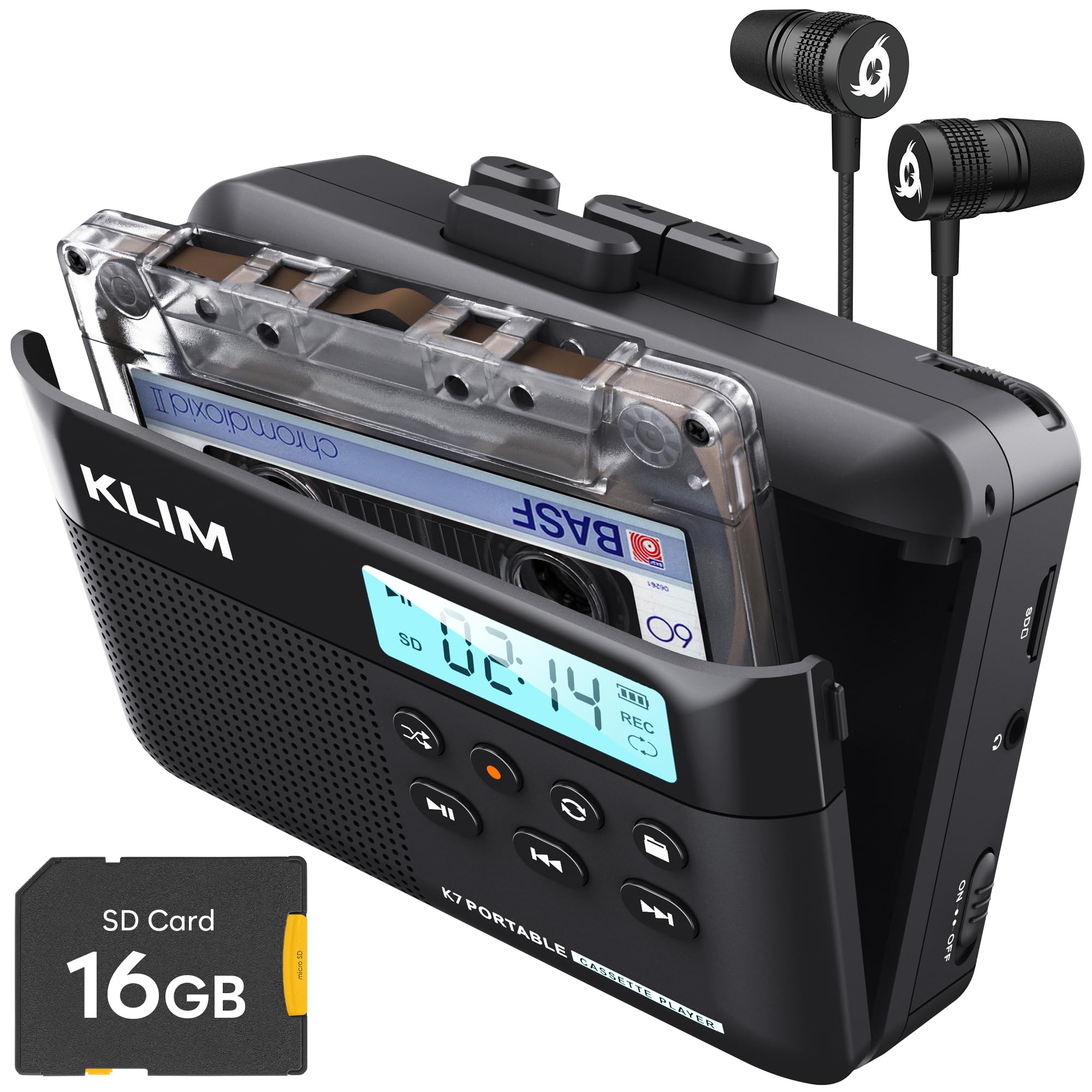
The same reliable converter engine with a smaller SD card for a more budget-friendly entry point.
This is essentially the same KLIM K7 hardware as the 32GB version above, but it ships with a 16GB SD card and a card reader instead of the larger capacity. The operation is identical: insert your tape, pop the SD card into the slot, press play and record, and each side saves as an MP3 file directly to the card. One reviewer described the included documentation as “sparse but intuitive,” and another noted the unit “auto-shuts off when the tape ends, then resumes recording after you flip the tape.” The same 1000mAh rechargeable battery powers it for about two cassettes, and it charges fully in 2 hours.
The catch is the same as its higher-capacity sibling: no auto-reverse, no recording onto blank tapes, and the built-in speaker is not great for critical listening. However, for someone with just a handful of tapes — say ten or fewer — the 16GB card offers plenty of space. One reviewer noted that the “fixed recording level prevents clipping” (avoiding distortion from a signal that is too loud), which is a real advantage over some competitors that let the audio distort. Where the 32GB version includes a larger storage card, this one leaves you room in your budget to buy more cards later if needed. It also includes a 5-year assurance from KLIM. If you only have a small stack of cassettes, this model saves you money over the 32GB version without sacrificing any recording quality.
What works well
- Direct-to-SD conversion — no computer involved
- 16GB SD card, card reader, earbuds, and USB-C cable included
- 1000mAh rechargeable battery lasts ~2 cassettes per charge
- 5-year assurance adds confidence
What to consider
- Must flip tape manually; no auto-reverse
- Cannot record onto cassette tapes — playback and SD recording only
- Earbuds are basic; upgrade recommended
- SD card auto-plays after any operation — a minor quirk
Best suited for: owners with a small collection of tapes who want proven, straightforward digitization without spending extra on storage you may not fill.
The trade-off: you get less free storage from the start (16GB vs. 32GB), and the full feature set is identical — pick the card size that matches your collection.
3. Reshow Cassette Player Recorder with USB-C

The USB-C bridge that digitizes your tapes through a computer while playing them in stereo.
The Reshow Cassette Player digitizes tapes through a computer, giving you full control over the end result. Instead of recording directly to an SD card like the KLIM K7, it connects to your computer via a USB-C cable (included), and you use your own software (like Audacity, a free audio editor) to capture the audio. The advantage is that you get full control over bit rate, format, and track splitting — you are not locked into a single recording setting. Owners mention that “USB-C digitization to MP3 works great for saving music,” and the unit also features auto-reverse, which means it automatically switches to Side B when the first side ends, so you do not have to sit through every tape. It is powered by either 2 AA batteries or USB-C, giving you flexibility.
However, unlike the direct-to-USB or direct-to-SD recorders, the Reshow requires a computer and recording software at every session — no standalone recording. The built-in speaker is decent for casual playback, and the included earphones are basic; owners recommend your own headphones for better sound. The play button has been described as “temperamental” by one reviewer, and rewind is slow. Still, for someone who already has Audacity installed or prefers to control every aspect of the digitization, the Reshow offers a level of flexibility that the self-contained recorders cannot match. The auto-reverse alone saves you from flipping every tape by hand, something the KLIM K7 and Gracioso require.
Why this works
- Auto-reverse handles both sides without manual flipping
- USB-C connection uses your computer’s recording software
- Two power options: AA batteries or USB-C
- Compact and lightweight for portable use
Where it lags
- Requires a computer and separate recording software (Audacity)
- Play button can be temperamental; rewind is slow
- Included earphones are basic
- No standalone recording — cannot save MP3s without a PC
Choose this for: the auto-reverse feature if you digitize whole albums without interruption, and you do not mind keeping a laptop nearby for the recording software.
skip it if: you want a true one-button conversion that saves MP3s to a drive with no computer — that is what the KLIM K7 and DIGITNOW do better.
4. Gracioso Portable Shoebox Cassette Recorder Converter

A shoebox-style deck that records in three different directions and plays just as many formats.
The Gracioso is the most versatile converter on this list because it offers three distinct recording paths: you can save cassette audio directly to a USB flash drive or TF (micro SD) card (a tiny memory card used in phones and action cameras), record music from a flash drive onto a blank cassette, or use Audacity software (linked in the manual) to transfer tape music to a computer. It also plays from tape, USB drive, or TF card, and includes a 3W (watt, a measure of speaker power) speaker for playback. The retractable handle makes it easy to carry, and it runs on 4 C-size batteries or the included Type-C power cable — note: you need 4 C batteries, which are not included.
The biggest warning comes from a real buyer: “Worked for ~1 hour then stopped recording after 12 songs.” The recording light and thumb drive blinked, but no audio saved. Other customers note that the instructions are minimal and you may need to look up a YouTube video to figure out the ports — specifically, use the USB-C charging port with the supplied C-to-C cable to digitize. On the positive side, several reviewers praise the “excellent sound, no static” and the “super possibilities” from a single device. At dimensions of about 1.85 inches thick and 9.65 inches wide, it is larger and more boxy than the portable Walkman-style players, but it packs more physical controls. This is the only model here that can also make new mixtapes on blank cassettes — something no other pick can do.
Why it stands out
- Three conversion methods: USB, SD card, or computer (Audacity)
- Can also play and record audio from USB/SD to blank cassettes
- 3W speaker for decent built-in audio
- Retractable handle for easy transport
The honest catch
- One buyer mentioned recording failure after 1 hour / 12 songs
- Requires 4 C-size batteries (not included)
- Port setup can be confusing — YouTube tutorials may be needed
- Larger and bulkier than portable Walkman-style converters
Reach for this if: you want a do-everything deck that also records blank tapes from digital sources — a true bridge between old and new formats.
Look elsewhere if: reliability is your top priority and you need a converter that simply works every time without extra steps or potential hardware quirks.
5. SEMIER Small Cassette Player Recorder with AM/FM Radio

A compact all-in-one that plays tapes, tunes into AM/FM, and digitizes to USB or Micro SD.
The SEMIER Cassette Converter is the only model in this roundup that includes an AM/FM radio alongside the tape deck and MP3 converter. It records directly to a USB flash drive or Micro SD card without needing a computer, using one-touch recording: insert the drive, set the switch to “tape/off”, press play, then hold the REC button until the red light comes on. It also captures audio from the built-in microphone or from external sources, and the integrated DSP (digital signal processor, a chip that improves sound quality) chip with an extended antenna provides clear radio reception (AM 520–1710 kHz, FM 87–108 MHz).
The build quality draws mixed feedback. One owner reported the “door barely stays closed” and that the unit “stopped dubbing early in use” after digitizing about 8 tapes — the recording to USB failed and error messages appeared when transferring to a PC. On the other hand, multiple buyers love the “compact size” and say it “works great” for recovering spoken-word oral history recordings. At 1.48 pounds it is noticeably heavier than the KLIM K7 (7.7 ounces) — because the radio components add bulk. The instructions are described as “poor” and you may need to press two buttons (play + record) simultaneously to get recording to start. If you want a radio first and a tape converter second, this model saves you from buying two separate devices.
What you get
- Plays AM/FM radio with DSP chip and extended antenna
- Direct recording to USB or Micro SD card — no computer needed
- Built-in microphone for recording external audio
- Compact 7.5 x 1.2 x 4 inch footprint
What to watch for
- Reliability concern: one owner reported failure after digitizing ~8 tapes
- Cassette door may not stay fully closed over time
- Instructions are minimal — you may need to experiment to start recording
- Heavier than most portable converters at 1.48 pounds
Best for: someone who also wants a bedside radio and can tolerate a little trial-and-error with the controls.
The cautious note: the USB recording reliability appears inconsistent across units — if you have a large collection, a more proven converter like the KLIM K7 or DIGITNOW may be safer.
6. DIGITNOW USB Cassette Player, Portable Walkman Stereo Tape to MP3 Converter

The thrifty auto-reverse walkman that saves MP3s directly to a USB thumb drive with no PC involved.
The DIGITNOW BR607 is the most affordable path to converting cassettes without a computer. Plug a USB flash drive (FAT32 format, up to 128GB) into the interface, insert your tape, and the unit converts music to 128 Kbps MP3 files directly onto the drive. It includes auto-reverse, meaning it automatically flips to Side B when the first side ends — a feature typically only found on more expensive models like the Reshow. You can also play tapes through the 3.5mm AUX jack to car speakers or headphones via the included earphones.
Reviewers point out “excellent digital copy quality from 1994 cassette” and say the “conversions sound good.” The catch is the learning curve: the directions are described as “confusing due to many languages,” and several owners note that you must “press RECORD to stop” — the recording logic is not intuitive. It also requires a “small USB drive (half gig works)” and some users found it “finicky to start” — unplugging and replugging the USB often fixes stalls. The auto mode sometimes fails to split tracks correctly, so most users prefer manual mode. It weighs 0.3 kilograms and runs on USB power or 2 AA batteries. Note: USB flash drive and batteries are not included. For the price, you get auto-reverse and direct-USB recording — features that cost significantly more in the Reshow or KLIM models.
Why it earns a spot
- Auto-reverse for hands-free two-side recording
- Direct to USB flash drive — no computer needed
- Lightweight (0.3 kg) and compact like a classic Walkman
- 18-month warranty
Where it frustrates
- Confusing multilingual instructions; unintuitive recording process
- Requires a small USB drive (not included) — newer large drives may not work
- Auto mode track splitting is unreliable; manual mode preferred
- Unit may stall and need a USB re-plug to restart recording
Reach for this if: you have a tight budget but still want auto-reverse and the convenience of saving MP3s straight to a thumb drive.
The reality check: be prepared to spend the first session learning its quirks — buyer reports confirm it works well once you figure out the button sequence, but the initial frustration is real.
Understanding the Specs
Recording method: direct vs. computer-based
This is the biggest decision fork. A direct converter saves MP3 files to a USB flash drive or SD card by itself — you press play and record, and the unit handles the rest. Computer-based converters (like the Reshow) send audio via USB-C to your laptop, where you control bit rate, format, and track splitting in software like Audacity. Direct is simpler and faster for batch work; computer-based gives you higher quality and more control but requires you to sit at a desk with a PC.
Auto-reverse and its value
Auto-reverse means the mechanism flips the tape head to continue playing (and recording) Side B without you touching the deck. If you digitize spoken-word albums or long mixtapes, this saves you from manually ejecting, flipping, and restarting every 30–45 minutes. Models without auto-reverse (like the KLIM K7 and Gracioso) require you to flip the tape by hand, which is fine for a few cassettes but tedious for a whole box.
Bit rate and file quality
Most direct-to-USB converters record at a fixed 128 Kbps (kilobits per second, the standard measure of digital audio data rate) or 160 Kbps MP3 — fine for casual listening and spoken word. If you want higher fidelity (e.g., 256 Kbps or 320 Kbps), you need a converter that routes audio through a computer, where your recording software can encode at whatever bit rate you choose. Tape itself is a noisy analog medium, so very high bit rates do not always produce a noticeable improvement, but you should know the limit before you buy.
Power flexibility
USB-powered converters plug into any phone charger or laptop port, letting you digitize all day without battery anxiety. Battery-only models (especially those requiring 4 C or 2 AA cells) cost more in the long run and may die mid-conversion. The best converters offer a mix: USB for desk work and batteries for portable use. The Gracioso and Reshow both accommodate this, while the KLIM K7 is entirely rechargeable via USB-C.
FAQ
Can I convert cassettes to MP3 without a computer?
Which converter has the best sound quality for music?
What does auto-reverse do for recording?
How long does it take to convert a 60-minute cassette to MP3?
Will these converters play damaged or old tapes?
Are USB flash drives included with these converters?
Can I record from a converter onto blank cassette tapes?
Which model is most reliable for long-term use?
Final Thoughts: The Verdict
For most people, the clear winner among the cassette to mp3 converter options is the KLIM K7 with 32GB SD Card because it combines self-contained direct-to-SD recording, a rechargeable battery, a complete accessory kit, and the most consistent reliability in this price range. If auto-reverse is non-negotiable for you and you are comfortable with computer-based digitization, grab the Reshow Cassette Player. And if your budget is absolutely tight but you still want direct USB recording and auto-reverse, the DIGITNOW USB Cassette Player delivers value if you are willing to learn its quirks.
How We Picked
We do not accept paid placement, and we did not hands-on test every unit. Instead, we match each pick to a real buyer and use-case by comparing the manufacturers’ published specifications against the patterns in verified customer reviews — so you get each pick’s real strengths and trade-offs instead of marketing copy.
Sources & Methodology
Specifications: manufacturer listings and product documentation. Review insights: verified customer reviews, as of July 2026. Pricing: not shown on this page (it changes often); check the current price via the retailer link.
As an Amazon Associate, Gadgets Feed earns from qualifying purchases. This does not affect which products we feature.
Product prices and availability are accurate as of the date/time indicated and are subject to change. Any price and availability information displayed on Amazon at the time of purchase will apply to the purchase of this product. As an Amazon Associate I earn from qualifying purchases.
CERTAIN CONTENT THAT APPEARS ON THIS SITE COMES FROM AMAZON. THIS CONTENT IS PROVIDED "AS IS" AND IS SUBJECT TO CHANGE OR REMOVAL AT ANY TIME.
Amazon and the Amazon logo are trademarks of Amazon.com, Inc. or its affiliates.