
Our readers keep the lights on and my morning glass full of iced black tea. As an Amazon Associate, I earn from qualifying purchases.
Specs are compiled from manufacturer listings and verified buyer reviews and can change over time — please confirm the key details on the product page before buying.
You know the struggle: a tight budget often means picking between a mouse that feels like a cheap toy or one that falls apart after a few months. You want a wired gaming mouse that reacts instantly in firefights, fits your hand comfortably for hours, and stays under your budget. This guide picks five wired mice that actually deliver real gaming performance without the premium price tag, so you can spend your money on the game itself instead of the gear.
I’m Min — the founder and writer behind Gadgets Feed. This guide is built by comparing the manufacturers’ published specifications and the patterns across verified customer reviews, so you get each pick’s real strengths and trade-offs instead of marketing spin.
If you are looking for a wired gaming mouse that offers high DPI (dots per inch — how fast the cursor moves), programmable buttons, durable mechanical switches, and customizable RGB (color-changing) lighting without a high cost, our selection of the best cheap gaming mouse options has you covered. cheap gaming mouse
Quick Picks
- Logitech G203 Wired Gaming Mouse — Best Overall
- Razer DeathAdder Essential Gaming Mouse — Pro Feel
- Redragon M617 Ultralight Honeycomb Shell Wired Gaming Mouse — Lightest Pick
- Redragon M602 Ergonomic RGB Gaming Mouse — Button Heavy
- XVX G705 Wired Gaming Mouse — Best Style
How To Choose The Best Cheap Gaming Mouse
Picking the right budget gaming mouse depends on three factors that affect how it feels and performs in real games. Here is what to focus on so you avoid the common traps.
Weight and Build
A lighter mouse lets you flick your wrist faster in shooters without tiring as quickly. Models under 100 grams (about 3.5 ounces) feel nimble; anything significantly heavier can feel sluggish. The build material also matters — a honeycomb shell, for instance, cuts weight dramatically but may leave holes that collect dust.
Sensor and DPI
The DPI (dots per inch) setting controls how fast the cursor moves on screen. A higher DPI means the cursor zips across with small hand movements, ideal for frantic fights. Most budget mice offer adjustable DPI, meaning you can switch between slow precise aiming and fast sweeping turns with a button press. You do not need the highest DPI number — but having a range of 6,400 to 12,000 DPI gives you room to find your balance.
Button Count and Software
Extra programmable buttons let you map keyboard shortcuts like reload, crouch, or weapon swap directly onto the mouse. The more buttons, the fewer keystrokes you need mid-game. Software support is key here — some brands let you remap every button, adjust lighting, and save profiles to the mouse itself, while others require the software running in the background.
Quick Comparison
On smaller screens, swipe sideways to see the full table.
| Model | Best For | Sensor DPI | Weight | Buttons | Amazon |
|---|---|---|---|---|---|
| Logitech G203 | All-round value | 8,000 DPI | 85g (est.) | 6 | Amazon |
| Razer DeathAdder Essential | Larger hands | 6,400 DPI | 96g (est.) | 5 | Amazon |
| Redragon M617 | Ultra-lightweight | 10,000 DPI | 41g | 5 | Amazon |
| Redragon M602 | Maximum buttons | 7,200 DPI | — | 8 | Amazon |
| XVX G705 | Style & extra features | 12,000 DPI | — | 7 | Amazon |
In‑Depth Reviews
1. Logitech G203 Wired Gaming Mouse

The well-rounded contender that balances speed, build, and comfort without the usual compromises.
The Logitech G203 delivers what most budget gamers actually need: an 8,000 DPI optical sensor that tracks without filtering or smoothing, meaning your cursor follows your hand naturally with no artificial lag. The six-button layout includes a middle DPI cycle button so you can toggle through up to five sensitivity settings mid-match — useful when you need slow aim for sniping and fast turns for close-quarters.
Mechanical primary buttons use tensioned metal springs, which buyers report feels crisp and gives “good scroll wheel resistance” even after everyday use. The LIGHTSYNC RGB (color-changing) lighting syncs with other Logitech gear or reacts to what is on your screen. One reviewer noted it was “the best ‘cheap’ mouse you can buy”, noting the 1,000Hz polling rate (how often it reports position to your PC) keeps movements smooth. The trade-off noted by several users: the cable is less flexible than some competitors, so a bungee cord helps keep it from catching.
Why it works
- 8,000 DPI sensor with zero smoothing for precise tracking.
- Mechanical metal-spring buttons give satisfying, reliable clicks.
- G Hub software is easy to use and does not require a login.
Before you buy
- Cable is stiffer than braided alternatives; a bungee is recommended.
- Scroll wheel reportedly develops issues after roughly 1.5 years for some users.
Solid all-rounder: Best for gamers who want a reliable, well-built mouse with great sensor specs and don’t mind a slightly stiffer cable.
The single catch: Scroll wheel longevity is a common sore point after a year and a half of daily use, based on reviewer feedback.
2. Razer DeathAdder Essential Gaming Mouse

The ergonomic giant that fits larger palms and rewards you with satisfying, precise clicks.
Razer’s DeathAdder shape is famous for a reason: it is long and contoured specifically for right-handed users with bigger hands, so your whole palm rests naturally rather than cramping. The 6,400 DPI optical sensor is lower than the 10,000 DPI rating on the Redragon M617, but for most gamers, 6,400 DPI offers plenty of room for on-the-fly sensitivity adjustment through the dedicated DPI buttons.
Mechanical switches are rated for up to 10 million clicks, backed by a 2-year warranty. Owners mention that the mouse offers “smooth, accurate tracking” and “comfortable shape for long sessions.” The ridged rubber scroll wheel gives you tactile control. The honest downside: several reviewers report scroll wheel jitter after 6-13 months — one buyer mentioned their white DeathAdder Essential “lasted 13 months before scroll wheel jittered (common malfunction)”. Treat it as a reliable companion for a year or so at a very accessible price point.
Strong points
- Large, well-contoured shape ideal for bigger hands.
- 10-million-click mechanical switches with a 2-year warranty.
- Razer Synapse software allows full remapping of all 5 buttons.
Watch out for
- Scroll wheel malfunction is a known issue after 6-13 months.
- At 6,400 DPI, it has a lower top-end sensitivity than most rivals here.
Best for larger hands: Pick this if you prioritize hand fit and mechanical-click feel over the highest DPI number — the shape is the star. If your hands are on the smaller size, the Logitech G203 or Redragon M617 will likely suit you better.
What to expect: Scroll wheel reliability is the weak link; many users accept it as a good value for roughly a year of use before swapping it out.
3. Redragon M617 Ultralight Honeycomb Shell Wired Gaming Mouse
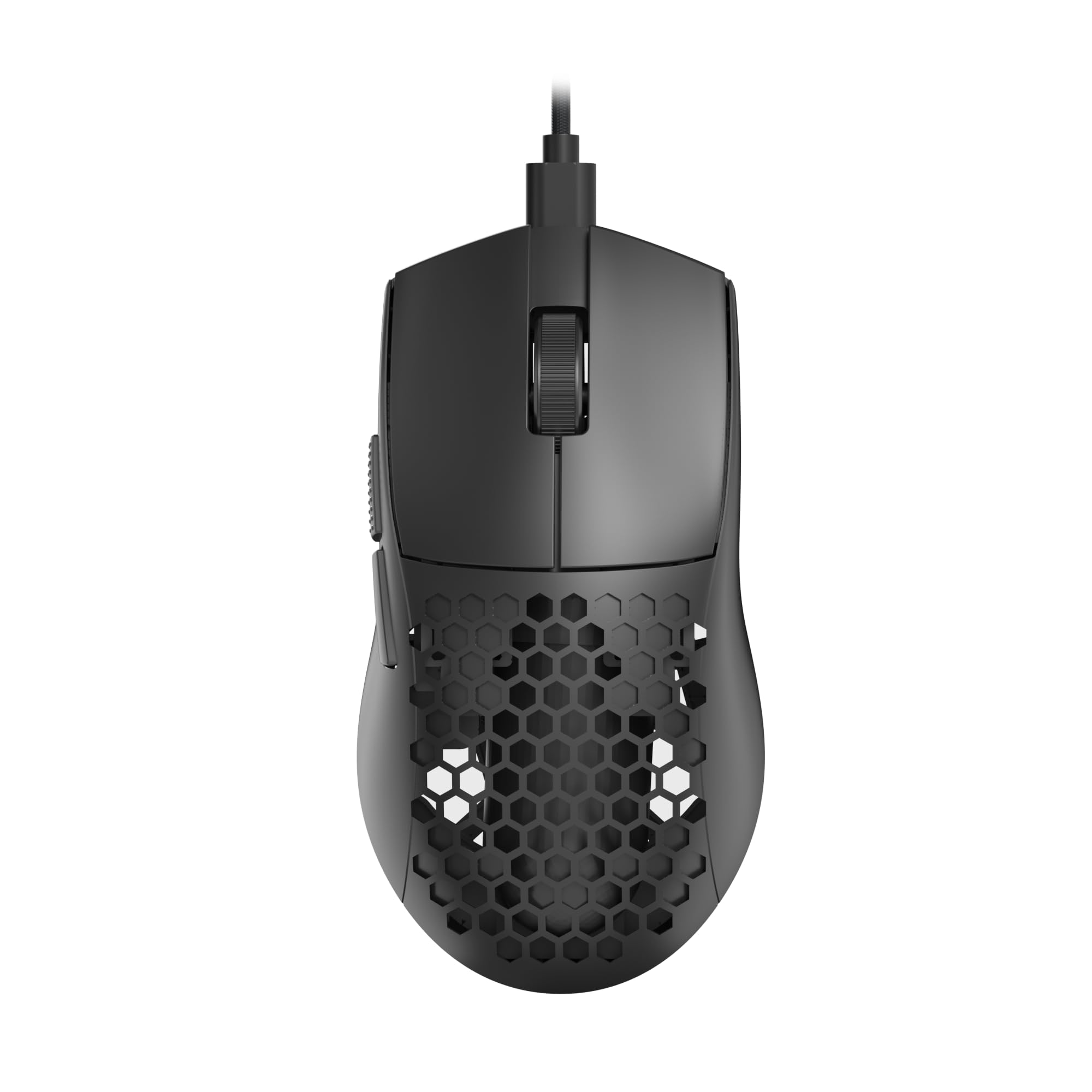
The featherweight that almost disappears in your hand during marathon sessions.
At just 41 grams, this mouse feels like nothing, making it ideal for low-sensitivity gamers who fling their arm across the mousepad. The honeycomb shell design cuts weight without sacrificing structure, though it does leave open holes that can collect dust or crumbs. The sensor goes up to 10,000 DPI — compared to the Razer DeathAdder Essential’s 6,400 DPI, so you have more headroom for ultra-fast cursor speeds if you want them.
The paracord cable is lightweight and drag-free, giving you a near-wireless feel. The software is Windows-only, so Linux users cannot tweak settings, and the lights may stay on even when your PC is off.
What stands out
- Ultra-light 41g honeycomb shell reduces arm fatigue during long sessions.
- Paracord cable feels almost wireless and drag-free.
- 10,000 DPI with 5 customizable settings for versatile play.
Keep in mind
- Honeycomb holes are prone to collecting dust and are tough to clean.
- Software is Windows-only; no configuration support on Linux.
Speed-first shooter pick: Grab this if you want the lightest possible mouse for fast flicks and low-sensitivity aiming — the 41g weight is transformative.
Fair warning: The open honeycomb shell needs regular cleaning, and the lack of Linux software support may be a blocker for some users.
4. Redragon M602 Ergonomic RGB Gaming Mouse

The macro-heavy workhorse with 8 buttons for bound commands and a proven long-term track record.
Launched in 2015, the M602 has a 96.8% positive sharing rate and a reputation for durability that newer mice have not yet earned. The 7,200 adjustable DPI sensor sits between the budget and mid-range balance, responding consistently in both shooters and office work.
Customers note it is “comfortable, lightweight, durable” and that the “scroll wheel and functions work well after years.” One reviewer called it a “great budget gaming mouse (~)” and liked the matte plastic with textured grips. The RGB offers 7 modes, including an off preset so you can kill the lights. The catch: there is no lift-off calibration (the sensor still tracks when you lift the mouse), and the middle button requires a hard press. Designed primarily for palm grip, not claw or fingertip.
What is good
- 8 programmable buttons with full macro editing via Redragon software.
- Proven 96.8% positive sharing rate and years of durability feedback.
- 7 RGB modes with an off preset for distraction-free gaming.
Heads up
- No lift-off calibration means the sensor tracks when lifted.
- Best suited for palm grip only; not comfortable for claw or fingertip grip styles.
Macro masters: Choose this if you love mapping complex commands to extra buttons and want a mouse with a proven track record over many years. But if you prefer to lift and reposition your mouse in shooters, the G203 or M617 handles that better.
The trade-off: The lack of lift-off detection and palm-grip-only shape mean it is not for quick lifts or fingertip players.
5. XVX G705 Wired Gaming Mouse

The topographic design stands out on your desk while the 12,000 DPI sensor keeps up in-game.
The XVX G705 offers the highest peak DPI in this lineup at 12,000, so you can push cursor speeds far beyond what most budget mice allow. The 12 RGB lighting modes access nearly 16.8 million colors, and you can adjust brightness and speed through the software. The soft braided cord “minimizes restriction,” reviewers point out, and makes it “feel near-cordless” — a clear upgrade from the stiffer cable on the Logitech G203.
One owner reported it “seems to be THE best wired mouse available” and praised the software for being better than Logitech’s G Hub. The ergonomic shape includes non-slip rubber grips on both sides for better control. The 18-month warranty gives extra confidence. The caveat: the software is 64-bit only, so older systems may struggle to install or run it.
Why it shines
- 12,000 DPI sensor offers the highest top-end sensitivity here.
- Braided cord feels nearly wireless and reduces drag.
- 7 programmable buttons with 12 customizable RGB modes.
Check before buying
- Configuration software is 64-bit only; not compatible with older 32-bit systems.
- Brand is listed as HITIME, which may be less familiar than Logitech or Razer.
Style meets top-end speed: Pick this if you want the highest DPI ceiling in the budget tier and a unique topographical look that stands out.
The limitation: The 64-bit-only software may not run on older or low-power machines, so verify your system before committing.
Understanding the Specs
DPI (Dots Per Inch)
DPI measures how far the cursor moves for each inch you move the mouse. A higher DPI means the cursor zips farther with the same hand movement — useful for fast turns in shooters. Adjustable DPI lets you press a button to switch between slow, precise aim (low DPI) and fast sweeping movements (high DPI) without changing hardware. Most budget mice offer a range from 800 DPI up to 12,000 DPI.
Polling Rate (Hz)
The polling rate tells you how often the mouse reports its position to your computer, measured in hertz (Hz). A 1,000Hz polling rate means the mouse communicates its position 1,000 times per second, which feels instant and smooth on-screen. Lower rates like 125Hz can introduce a tiny delay you may notice in fast games. Look for mice with at least 1,000Hz for competitive play.
FAQ
How many DPI do I need for a cheap gaming mouse?
Is a wired mouse better than wireless for budget gaming?
What is the difference between membrane and mechanical switches in a mouse?
Can I use a gaming mouse for office work?
Will a cheap gaming mouse work with Mac or Linux?
How long do budget gaming mice last?
What does polling rate mean for gaming?
Are all cheap gaming mice the same shape?
Final Thoughts: The Verdict
For the majority of shoppers, the cheap gaming mouse winner is the Logitech G203 because it delivers an 8,000 DPI sensor, durable mechanical switches, excellent software, and a proven track record at a price that does not hurt. If you want the lightest possible mouse for fast flicks, grab the Redragon M617. And for larger hands that need real ergonomic contouring, the standout is the Razer DeathAdder Essential in this budget tier.
How We Picked
We do not accept paid placement, and we did not hands-on test every unit. Instead, we match each pick to a real buyer and use-case by comparing the manufacturers’ published specifications against the patterns in verified customer reviews — so you get each pick’s real strengths and trade-offs instead of marketing copy.
Sources & Methodology
Specifications: manufacturer listings and product documentation. Review insights: verified customer reviews, as of July 2026. Pricing: not shown on this page (it changes often); check the current price via the retailer link.
As an Amazon Associate, Gadgets Feed earns from qualifying purchases. This does not affect which products we feature.
Product prices and availability are accurate as of the date/time indicated and are subject to change. Any price and availability information displayed on Amazon at the time of purchase will apply to the purchase of this product. As an Amazon Associate I earn from qualifying purchases.
CERTAIN CONTENT THAT APPEARS ON THIS SITE COMES FROM AMAZON. THIS CONTENT IS PROVIDED "AS IS" AND IS SUBJECT TO CHANGE OR REMOVAL AT ANY TIME.
Amazon and the Amazon logo are trademarks of Amazon.com, Inc. or its affiliates.