
Our readers keep the lights on and my morning glass full of iced black tea. As an Amazon Associate, I earn from qualifying purchases.
Specs are compiled from manufacturer listings and verified buyer reviews and can change over time — please confirm the key details on the product page before buying.
If you just need a laptop for email, web browsing, streaming, and writing documents, you do not need a gaming powerhouse or a high-end workstation. The problem is that the entry-level aisle is full of models that look the same on a store page but feel completely different the first time you try to run a few browser tabs at once. This guide cuts through the noise to find the basic Windows laptops that actually deliver a smooth everyday experience without costing a fortune.
I’m Min — the founder and writer behind Gadgets Feed. This guide is built by comparing the manufacturers’ published specifications and the patterns across verified customer reviews, so you get each pick’s real strengths and trade-offs instead of marketing spin.
You want a basic windows laptop that won’t slow you down after a few months. The right specs make the difference between a smooth daily driver and a frustrating paperweight — here is what matters and which models deliver.
Quick Picks
- Acer Aspire Go 15 (AMD Ryzen 7) — Top Performer
- Lenovo V15 (AMD Ryzen 3) — Best Value
- Dell Inspiron 3530 — Solid & Dependable
- ASUS Vivobook Go 15 — Fast & Nimble
- HP 15.6″ FHD Laptop (N100) — Family Favorite
- Acer Aspire Go 15 (Intel Core 3) — Long Haul
- 2026 Windows 11 Pro Laptop (SAGAWHALE) — Budget Choice
- HP Portable Laptop (Intel Celeron) — Entry Level
How To Choose The Best Basic Windows Laptop
A basic Windows laptop lives or dies on three specs: the processor (CPU), the memory (RAM), and the storage drive. Get these right and your laptop stays snappy for years. Get them wrong and you will feel the lag within months.
Processor Power: Cores and Speed
The processor (the brain of the laptop) determines how quickly it can handle tasks. Look for a processor with a base speed of at least 2.0 GHz. An Intel Core i3 or a modern AMD Ryzen 3 or Ryzen 5 with four or more cores will handle browsing, streaming, and office work without stuttering. Avoid older Celeron or Pentium models, as they can struggle with even basic multitasking.
RAM: The Multitasking Buffer
RAM (random-access memory) is the short-term memory your laptop uses to keep multiple apps running at once. 8GB is the baseline for a smooth experience. If you tend to have many browser tabs, a document, and a music app open simultaneously, 8GB is essential. 16GB is a bonus if you do heavy spreadsheet work or keep many applications running. A laptop with 4GB of RAM will likely feel sluggish and freeze frequently.
Storage: SSD vs. eMMC
The type of storage directly impacts how fast your laptop boots up and opens programs. An SSD (solid-state drive) is much faster than an eMMC (embedded MultiMediaCard) drive. A 128GB or 256GB SSD is the minimum we recommend. eMMC storage, often found on very cheap models, is slow and has limited space that can fill up quickly with Windows updates, making the laptop feel slow over time.
Quick Comparison
On smaller screens, swipe sideways to see the full table.
| Model | Best For | Processor | RAM | Storage | Amazon |
|---|---|---|---|---|---|
| Acer Aspire Go 15 (Ryzen 7) | Powerful Everyday Use | AMD Ryzen 7 7730U (4.5 GHz) | 16GB DDR4 | 512GB PCIe Gen4 SSD | $549.99Amazon |
| Lenovo V15 (Ryzen 3) | Student & Business Value | AMD Ryzen 3 7320U (4.1 GHz) | 16GB DDR5 | 512GB SSD | $499.99Amazon |
| Dell Inspiron 3530 | Reliable Performance | Intel Core i3-1305U (4.5 GHz) | 8GB DDR4 | 512GB SSD | $478.00Amazon |
| ASUS Vivobook Go 15 | Fast & Light | AMD Ryzen 5 7520U (4.3 GHz) | 8GB | 512GB | $443.00Amazon |
| HP 15.6″ FHD (N100) | Budget Family Laptop | Intel N100 (3.4 GHz) | 8GB | 256GB SSD | $429.99$799.00Limited time dealAmazon |
| Acer Aspire Go 15 (Core 3) | Exceptional Battery Life | Intel Core 3 N355 (3.9 GHz) | 8GB DDR5 | 128GB UFS | $375.99Amazon |
| 2026 Windows 11 Pro Laptop | Ultra-Budget Option | Intel 4425Y (1.7 GHz) | 16GB | 256GB SSD | $289.99$339.99PrimeAmazon |
| HP Portable Laptop | Lowest Price Point | Intel Celeron N4120 (2.6 GHz) | 16GB DDR4 | 64GB eMMC | $269.99$699.99Limited time dealAmazon |
In‑Depth Reviews
1. Acer Aspire Go 15 (AMD Ryzen 7)

Serious power for basic tasks — a Ryzen 7 processor in a no-frills package.
This Acer Aspire Go 15 feels faster than its price suggests. It is built around an AMD Ryzen 7 7730U processor that hits a max speed of 4.5 GHz, so you get performance that handles heavy multitasking and even light gaming without hesitation. Buyers report it runs “very fast” and handles games like Sims 4 and Cities Skylines without issue. The 16GB of DDR4 memory and 512GB PCIe Gen4 SSD provide plenty of space and speed for all your files and apps.
The 15.6-inch Full HD IPS (1920 x 1080) screen is sharp and detailed. If the display looks a little yellow tinted from the start, reviewers mention it is an easy fix by disabling the eye shield setting. It includes a backlit keyboard and a Copilot key for quick AI assistance. At this price, the speakers can sound quiet to some, but overall it is a well-rounded machine that punches above its class for anyone who wants a basic laptop that does not feel basic.
Unlike the Acer Aspire Go 15 with the Core 3 processor, this version uses faster DDR4 16GB RAM versus 8GB, giving it a smoother edge when running many applications at once. If you just need a simple machine for school or home, this one gives you room to grow.
The Real Strengths
- Fast Ryzen 7 7730U processor hits 4.5 GHz, making even heavy tasks feel smooth.
- 16GB of RAM and a 512GB SSD give you lots of headroom for multitasking and storage.
- The 15.6-inch FHD IPS screen delivers clear, sharp visuals for movies and work.
The Honest Trade-Offs
- Some owners mention the speakers feel quiet even at max volume.
- A few users had issues with Bluetooth pairing and USB drive recognition.
- The size is not ideal for using on your lap for long periods.
Grab it for: Anyone who wants a basic laptop that can handle more demanding apps, light gaming, and heavy multitasking without slowing down.
Look elsewhere if: You need very loud built-in speakers or a compact ultra-portable that is comfortable to use on your lap.
2. Lenovo V15 (AMD Ryzen 3)
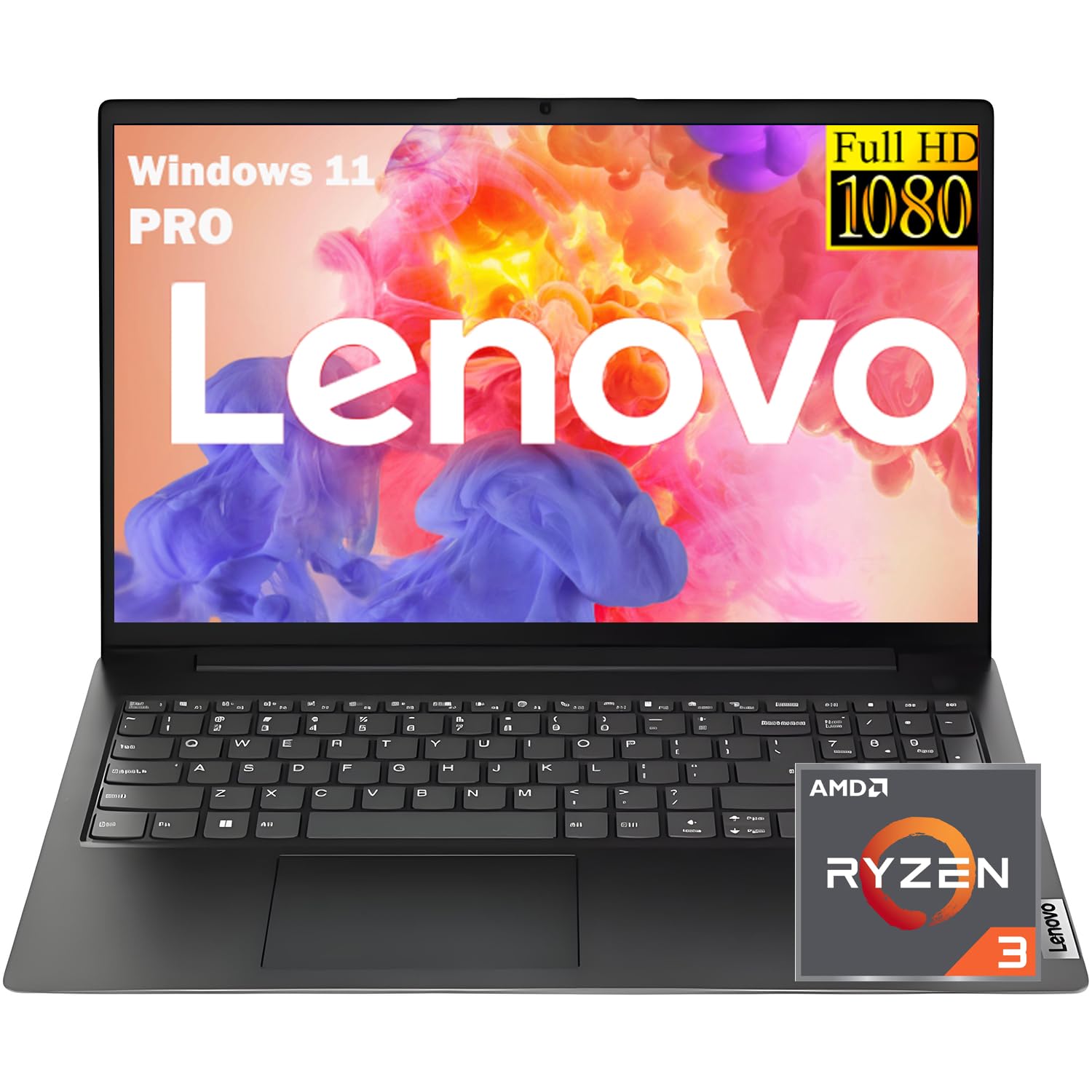
A student or business laptop that packs 16GB of DDR5 RAM at a mid-range price.
The Lenovo V15 focuses on what matters for everyday productivity. It is powered by an AMD Ryzen 3 7320U processor that reaches up to 4.1 GHz, which feels snappy for web browsing, document editing, and streaming. The real highlight is the 16GB of DDR5 memory, which is a generous amount for this price tier and ensures you can have many browser tabs and applications open at once without lag. It also comes with a 512GB SSD for quick boot-ups and file access.
The 15.6-inch Full HD anti-glare display (1920 x 1080) keeps reflections down, making it easier to work in a bright room. It includes an RJ-45 Ethernet port, which is great for a stable wired connection in a dorm or office. Customers note the setup is easy and the laptop runs without lag for typical tasks, though some report the real-world battery life is closer to 3 hours.
Compared to the Acer Aspire Go 15 with the Ryzen 7, this Lenovo uses slower RAM (DDR5 16GB compared to the Acer’s 16GB DDR4 — both are good, but the Lenovo uses the newer DDR5 standard) and a less powerful Ryzen 3 processor. It is a smarter pick for someone who needs more memory than raw CPU speed for their daily workflow.
Smart pick for: Students and office workers who need a fast, responsive laptop with enough RAM to handle heavy multitasking without pricey extras.
3. Dell Inspiron 3530

A trustworthy all-rounder with a crisp 15.6-inch FHD display and a fast Core i3.
The Dell Inspiron 3530 is the kind of laptop that does not call attention to itself — it just works. It is equipped with a 13th-generation Intel Core i3-1305U processor that can turbo up to 4.5 GHz, giving it plenty of power for everyday office work and streaming. The 8GB of DDR4 RAM is enough for smooth multitasking, and the 512GB SSD provides ample and fast storage. Buyers consistently praise its fast boot times and quiet operation.
The 15.6-inch Full HD (1920 x 1080) display is crisp and bright. Dell includes ComfortView software, which is a TUV Rheinland-certified solution that cuts down on blue light to keep your eyes comfortable during long sessions. The lift hinge tilts the keyboard for a more comfortable typing angle, which is a thoughtful touch. Some buyers mention the battery is decent but not exceptional, and a few wish for a webcam shutter and num/caps lock indicator lights.
It does not have the generous 16GB RAM of the Lenovo V15, but the Dell Inspiron 3530 offers a balanced package from a well-known brand with on-site service support.
Where It Excels
- Fast Intel Core i3-1305U processor with a max speed of 4.5 GHz for responsive daily use.
- Large 512GB SSD provides quick file access and plenty of room for your documents and media.
- The TUV Rheinland certified ComfortView software helps reduce eye strain during long work sessions.
Where It Falls Short
- Battery life is decent for light use but not outstanding — reported around 6 hours.
- No webcam shutter or indicator lights for Num/Caps Lock, which can be inconvenient.
- Built-in speakers could be louder for media consumption.
Reach for this if: You want a dependable, no-surprises laptop from a major brand with solid performance and a comfortable screen for long workdays.
Consider something else if: You need maximum battery life for all-day unplugged use or want a laptop with a backlit keyboard and a webcam privacy shutter.
4. ASUS Vivobook Go 15

Slim and quick — a Ryzen 5 processor in a lightweight chassis made for portability.
The ASUS Vivobook Go 15 is designed for people who want a fast, portable laptop without spending a fortune. At its core is an AMD Ryzen 5 7520U processor that reaches up to 4.3 GHz, making it snappier than many similarly priced Intel options for everyday tasks like browsing and streaming. It comes with 8GB of RAM and a generous 512GB of storage, which is plenty of room for documents, photos, and media. Reviewers point out it handles multitasking well without lag and praise its clear, crisp 15.6-inch NanoEdge display.
The laptop is built to military-grade durability standards, and features a webcam privacy shield for added security. It supports Wi-Fi 5 and Bluetooth 5.1 for fast connections, and the SonicMaster speakers deliver crisp, multi-dimensional sound. Reviewers highlight the useful USB-C port and fast charging as strong features for a budget-friendly machine. One caveat is that the RAM is soldered to the motherboard (2x4GB dual channel), so you cannot upgrade it later.
In terms of raw processor clock speed, the Ryzen 5 7520U at 4.3 GHz falls slightly behind the Dell Inspiron 3530’s Core i3-1305U at 4.5 GHz, but for real-world use, the ASUS feels just as responsive and the 512GB storage is a bonus at its price tier.
A nimble choice for: Students and on-the-go users who want a lightweight, fast laptop with a big screen and a large solid-state drive.
5. HP 15.6″ FHD Laptop (N100)

A balanced family laptop with a large anti-glare screen and a full keyboard with number pad.
The HP 15.6″ FHD Laptop is built for sharing. It is powered by an Intel N100 processor that runs up to 3.4 GHz paired with 8GB of RAM, which handles multiple browser tabs, streaming, and Office for web without major slowdown. The 256GB SSD provides fast boot times and enough storage for a family’s worth of documents and photos. Shoppers say that it charges quickly and feels reliable for daily use.
The 15.6-inch Full HD IPS anti-glare display (1920 x 1080) reduces reflections, making it easier to use in bright living rooms or near a window. It includes a full-size keyboard with a numeric keypad, which is handy for entering data in spreadsheets. With Wi-Fi 6 support, you get a fast and stable internet connection for Zoom calls and streaming. The package includes lifetime Office for the web, but do note that it is the web-based version, not the downloadable desktop apps.
Unlike the HP Portable 14-inch model, this HP delivers a proper Full HD screen (1920 x 1080) instead of the 1366 x 768 resolution, meaning text and images will look noticeably sharper. It is heavier than some ultra-portables at 3.64 lbs, but that is a fair trade-off for the larger screen and full keyboard.
What Works Well
- Full HD IPS anti-glare screen makes it easy on the eyes in bright rooms.
- Full-size keyboard with a numeric keypad is excellent for typing and data entry.
- Wi-Fi 6 support ensures fast and stable internet for video calls.
The Downsides
- The N100 processor is not as fast as a Core i3, so heavy multitasking may cause slight lag.
- Some buyers found the web version of Office limiting and wished for the desktop app.
- A small number of users reported start-up issues, requiring multiple restarts.
Best suited for: A household with one shared laptop used by multiple people for web browsing, schoolwork, streaming, and light office tasks.
Not ideal if: You need a laptop for heavy multitasking or demanding software, or if you prefer the polished feel of a more powerful processor.
6. Acer Aspire Go 15 (Intel Core 3)

The battery champion — a 12.5-hour runtime that outlasts nearly every other basic laptop.
If your biggest worry is running out of power during the day, the Acer Aspire Go 15 (Intel Core 3) is the strongest choice. It is powered by an 8-core Intel Core 3 N355 processor running at 3.9 GHz, and it includes 8GB of DDR5 memory. The real headline is the 12.5 hours of battery life — a 3.1x gap compared to the 4-hour battery of the 2026 Windows 11 Pro Laptop. Buyers report that it charges from dying to 93% in about 30 minutes and lasts over 5 hours in their real-world use.
The 15.6-inch Full HD IPS display (1920 x 1080) with a narrow bezel gives you a sharp, detailed view for movies and browsing. It has a useful set of ports: two USB Type-C ports (one handles charging up to 45W), two USB 3.2 ports, and HDMI 2.1. It also has a Copilot key for AI assistance and includes Acer’s BluelightShield to reduce eye strain. The storage is 128GB UFS, which is faster than eMMC but less spacious than an SSD, so you may need an external drive or a compatible SSD upgrade.
It is a step ahead of the Acer Aspire Go 15 with the Ryzen 7 in terms of battery stamina, but the Ryzen 7 model offers more storage and RAM (512GB vs 128GB, 16GB vs 8GB). The HP Portable 14-inch has a similar battery claim of 10.25 hours, but the Acer’s faster processor (3.9 GHz vs 2.6 GHz) gives it a clear edge in daily responsiveness.
Built for the long day: Students, remote workers, or anyone who works away from an outlet and needs a laptop that keeps going from morning to evening.
7. 2026 Windows 11 Pro Laptop (SAGAWHALE)
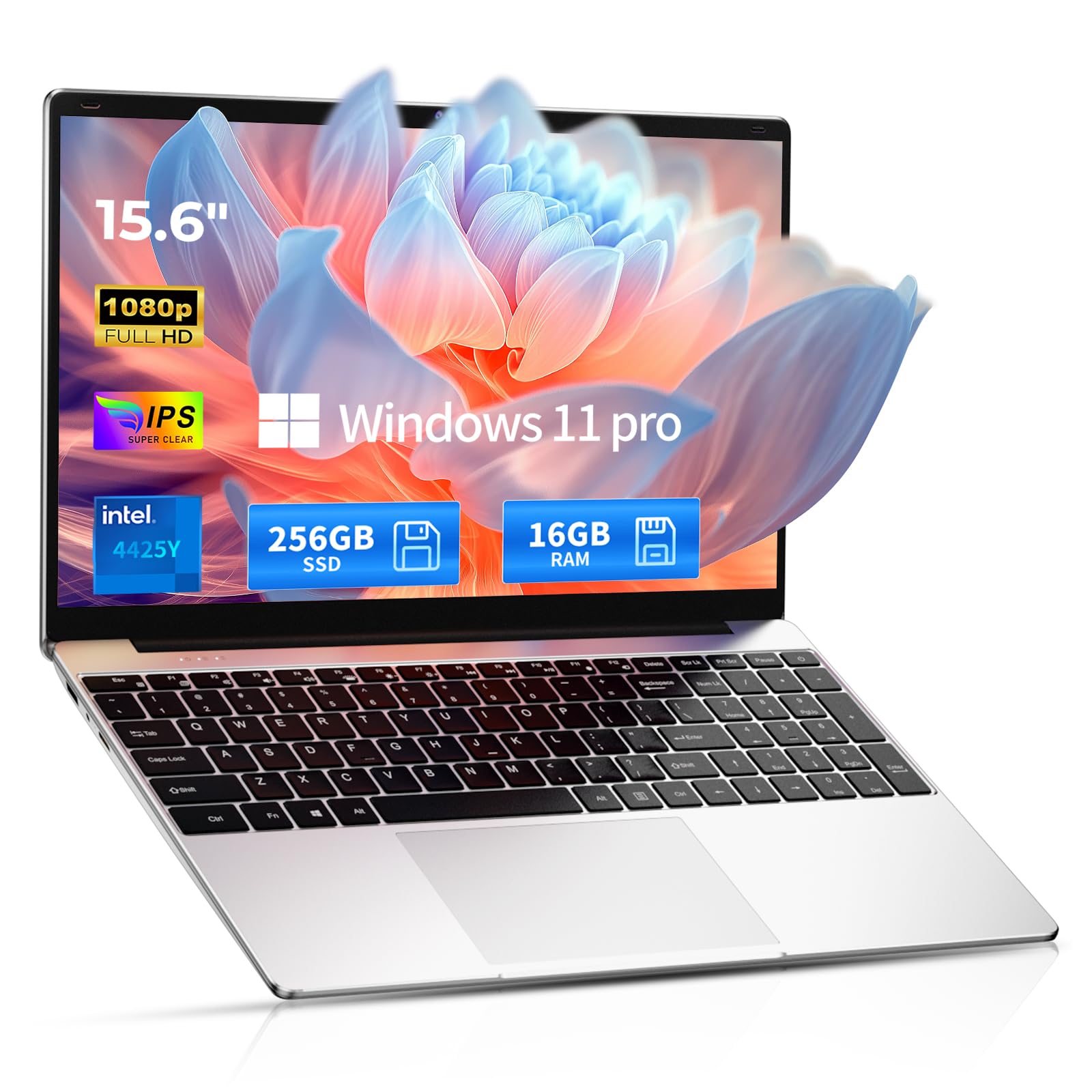
An ultra-budget machine with a generous 16GB of RAM but a slower processor.
The 2026 Windows 11 Pro Laptop makes one trade-off to hit a low price: it uses an Intel 4425Y processor that runs at just 1.7 GHz. The 2.3x speed gap between this and the Acer Aspire Go 15 (Core 3) is noticeable. However, it does offer 16GB of RAM and a 256GB SSD, which are strong specs for the price and allow for smooth app switching once things are loaded. Owners mention the setup is easy, the keyboard is good, and program loading is smooth for basic tasks.
The 15.6-inch Full HD IPS display (1920 x 1080) is crisp and suitable for streaming and office work. It is lightweight at 3.5 lbs, making it easy to carry. The battery is rated at 4 hours, though customers note real-world use is closer to 3 hours. A few buyers reported they could not log back in after the first day or that there was no way to connect an external monitor for a dual-screen setup, which may be a dealbreaker for some.
It has a 2:1 RAM advantage over the HP 15.6″ FHD Laptop (16GB vs 8GB) and a faster SSD. But the very low processor speed (1.7 GHz) means it is best suited for the simplest tasks — email, basic web browsing, and document editing.
Upsides at This Price
- 16GB of RAM allows you to keep many apps and tabs open without slowdown.
- The 256GB SSD provides fast boot times and quick file access.
- The 15.6-inch Full HD IPS screen offers clear visuals for the price.
Downsides to Know
- The Intel 4425Y processor at 1.7 GHz is slow and may struggle with heavy multitasking.
- Battery life is short at around 3 hours in real-world use.
- No way to connect an external monitor for a dual-screen setup according to some buyers.
Good for: A very tight budget where a bit more RAM is valued over raw processing speed, and tasks are limited to simple web and document work.
skip it if: You need a responsive computer for anything beyond basic browsing and typing, or if you depend on a second monitor for your workflow.
8. HP Portable Laptop (Intel Celeron)

The cheapest option here, offering a lot of RAM but a slow processor and low-resolution screen.
The HP Portable Laptop is the budget entry point. Its Intel Celeron N4120 processor has a maximum speed of 2.6 GHz, and the screen resolution is 1366 x 768 — a 41% drop in pixels compared to the 1920 x 1080 screens found on the Acer Aspire Go 15 models. This means text and images will look less sharp, and the 220-nit brightness can make it hard to see in bright rooms. Buyers confirm this, with one calling it “comically slow” and noting “constant stuttering/freezing” and poor screen visibility.
On the plus side, this HP comes with 16GB of DDR4 RAM, which helps with switching between open applications. It also includes 1 Year of Office 365. The storage is a 64GB eMMC drive, which is slower than an SSD and has limited space — some buyers mention needing to constantly delete files to run Windows updates. It includes an RJ-45 Ethernet port and an HDMI output for connecting to a monitor. Some buyers found it works well for specific hobby software like Cricut and Glowforge after a minor hard drive upgrade.
The HP 15.6″ FHD Laptop at a higher price tier delivers a much better experience with its Full HD screen and faster N100 processor. This model is best reserved for very simple, single-use tasks where budget is the absolute priority.
The Good
- 16GB of DDR4 RAM is a high amount for this price point, helping with app switching.
- Includes RJ-45 Ethernet port for a stable wired internet connection.
- Comes with 1 Year of Office 365 for document work.
The Not-So-Good
- The processor is very slow, causing stuttering and freezing even in basic apps like Chrome.
- The 1366 x 768 resolution screen has poor visibility in bright rooms.
- The 64GB eMMC storage is slow and fills up quickly, requiring constant file management.
Only for: The most constrained budget where the priority is the lowest possible cost, and the user will stick to one or two simple apps at a time.
Look elsewhere if: You plan to run multiple programs, browse the web with many tabs, or want a screen that is comfortable to look at in a well-lit room.
Understanding the Specs
Processor: The Engine
The processor (also called the CPU) is the brain of the laptop. It is measured in gigahertz (GHz) — the higher the number, the faster it can process information. For a basic laptop, aim for at least 2.0 GHz. Also look for the number of cores (at least 4) for better multitasking. Intel Core i3 and AMD Ryzen 3/5 are good choices. Intel Celeron or Pentium processors often feel slow, even for basic tasks.
RAM: The Workspace
RAM (random-access memory) is your laptop’s short-term memory for running apps. Think of it as your desk space — the more you have, more you can spread out your work. 8GB is the minimum we recommend for a smooth experience. 16GB is great if you keep many browser tabs and applications open at the same time. 4GB laptops will struggle and freeze.
Storage: The File Cabinet
Storage is where your files, apps, and Windows live. An SSD (solid-state drive) is much faster than an eMMC drive. An SSD makes your laptop feel snappy, booting up in seconds. eMMC is slower and often smaller. For a basic laptop, a 128GB or 256GB SSD is the balance. Avoid 64GB eMMC unless your storage needs are extremely light and you are okay with a slower system.
Screen Resolution & Panel
Resolution determines how sharp text and images look. Full HD (1920 x 1080) is the standard for a clear, crisp picture. The lower 1366 x 768 resolution (often called HD) looks noticeably blurrier. An IPS panel offers better colors and wider viewing angles than a standard TN panel, so you can see the screen clearly from the sides. It is worth paying a little more for a Full HD IPS screen.
FAQ
Is 4GB of RAM enough for a basic Windows laptop?
What is the difference between an Intel Celeron and an Intel Core i3 processor?
Is a 1366 x 768 resolution screen good enough?
Can I upgrade the RAM in my basic laptop later?
How long should the battery last on a basic Windows laptop?
What is the difference between Windows 11 Home and Windows 11 Pro?
Is a bigger SSD or more RAM more important for performance?
Should I buy a laptop with an AMD Ryzen or an Intel processor?
What does “S Mode” mean on a Windows laptop?
Is a laptop with 64GB of eMMC storage enough for Windows 11?
Final Thoughts: The Verdict
If you want one dependable pick, the basic windows laptop winner is the Acer Aspire Go 15 (Ryzen 7) because it offers the best blend of fast processor speed, generous 16GB RAM, and a large 512GB SSD for a price that feels like a steal. If you want the longest battery life for all-day work away from an outlet, grab the Acer Aspire Go 15 (Core 3). And for the best balance of value and performance for a student or office worker, the Lenovo V15 with 16GB of RAM and a modern processor is a smart pick.
How We Picked
We do not accept paid placement, and we did not hands-on test every unit. Instead, we match each pick to a real buyer and use-case by comparing the manufacturers’ published specifications against the patterns in verified customer reviews — so you get each pick’s real strengths and trade-offs instead of marketing copy.
Sources & Methodology
Specifications: manufacturer listings and product documentation. Review insights: verified customer reviews, as of July 2026. Pricing: not shown on this page (it changes often); check the current price via the retailer link.
As an Amazon Associate, Gadgets Feed earns from qualifying purchases. This does not affect which products we feature.
Product prices and availability are accurate as of the date/time indicated and are subject to change. Any price and availability information displayed on Amazon at the time of purchase will apply to the purchase of this product. As an Amazon Associate I earn from qualifying purchases.
CERTAIN CONTENT THAT APPEARS ON THIS SITE COMES FROM AMAZON. THIS CONTENT IS PROVIDED "AS IS" AND IS SUBJECT TO CHANGE OR REMOVAL AT ANY TIME.
Amazon and the Amazon logo are trademarks of Amazon.com, Inc. or its affiliates.