
Our readers keep the lights on and my morning glass full of iced black tea. As an Amazon Associate, I earn from qualifying purchases.
Specs are compiled from manufacturer listings and verified buyer reviews and can change over time — please confirm the key details on the product page before buying.
Picking a premium mechanical keyboard means deciding between raw speed, built-in controls, or a clean wireless desk. Some boards let you tune the trigger point to a hair, others pack a full Stream Deck inside the frame, and a few aim for a low-profile, clutter-free feel — each fits a different daily use.
I’m Min — the founder and writer behind Gadgets Feed. This guide is built by comparing the manufacturers’ published specifications and the patterns across verified customer reviews, so you get each pick’s real strengths and trade-offs instead of marketing spin.
The right 500 dollar keyboard matches how you actually work or play — if you need a compact speed monster for competitive rounds, a full-size wireless board for a clean desk, or a utility deck with built-in macro controls.
Quick Picks
- SteelSeries Apex Pro TKL Gen 3 OmniPoint 3.0 HyperMagnetic Switches — Top Performer
- Logitech G915 X Lightspeed Low-Profile Wireless Gaming Keyboard — Wireless Champiom
- Razer BlackWidow V4 Pro Wired Mechanical Gaming Keyboard — Command Center
- Corsair Galleon 100 SD RGB Mechanical Wired Gaming Keyboard — Ultimate Utility
- Corsair K100 RGB Mechanical Gaming Keyboard — Speed Master
How To Choose The Best 500 Dollar Keyboard
All the keyboards on this list perform at a very high level, but the best one for you depends on form factor, switch type, and if you need built-in macro integrations. Here is what to focus on.
Form Factor: Full-Size vs Tenkeyless
A full-size keyboard gives you a numpad (a separate number pad on the right) and dedicated macro keys, which helps if you work with numbers or like extra programmable buttons. A tenkeyless (TKL) board, like the SteelSeries Apex Pro TKL, is more compact and frees up mouse space — a big deal for competitive gamers who lower their sensitivity. At 13.98 inches wide versus the Corsair Galleon 100 SD at 17.3 inches wide, it lets you keep your mouse closer without sacrificing core functionality.
Switch Technology: Mechanical vs Hall Effect
Traditional mechanical switches, like the Cherry MX Speed Silver, register a press when a metal leaf touches a contact at a fixed point. Hall Effect (magnetic) switches, like the OmniPoint 3.0 in the SteelSeries, detect magnet position without physical contact — giving you 40 levels of adjustable actuation from 0.1mm to 4.0mm. That adjustability lets you set a very light tap for gaming and a deeper press for typing to avoid accidental keystrokes. Hall Effect switches are also more durable since they have no metal contacts to wear out.
Extra Features: Stream Deck Integration and Polling Rate
Some keyboards, like the Corsair Galleon 100 SD, integrate a full Stream Deck right into the chassis — giving you a dynamic LCD screen and programmable keys without needing a separate device. Polling rate, measured in Hz, tells you how often the keyboard reports its position to your PC. Standard keyboards report at 1,000Hz, while premium boards like the Corsair K100 and Galleon 100 SD hit 4,000Hz or 8,000Hz respectively, which can translate to lower input latency in fast-paced shooters.
Quick Comparison
| Model | Best For | Switch Type | Polling Rate | Weight | Amazon |
|---|---|---|---|---|---|
| SteelSeries Apex Pro TKL Gen 3 | Competitive Gaming / Adjustable Actuation | OmniPoint 3.0 (Hall Effect) | — | — | $173.99$239.99Amazon |
| Logitech G915 X Lightspeed | Wireless Desk / Low-Profile Typing | GL Blue Clicky (Mechanical) | — | 38 Ounces | Amazon |
| Razer BlackWidow V4 Pro | Macro Command / Full-Size Battlestation | Orange Tactile (Mechanical) | — | 5 Pounds | Amazon |
| Corsair Galleon 100 SD RGB | Stream Deck All-In-One / Creative Workflow | MLX Pulse (Mechanical, Hot-Swappable) | 8,000Hz | 3.1 Pounds | Amazon |
| Corsair K100 RGB | High-Speed Mechanical / Cherry MX Speed | Cherry MX Speed Silver (Mechanical) | 4,000Hz | — | Amazon |
In‑Depth Reviews
1. SteelSeries Apex Pro TKL Gen 3 OmniPoint 3.0 HyperMagnetic Switches

The only keyboard that lets you tune the trigger point per game — and buyers report it speeds up Fortnite edits.
This keyboard wins on adjustability. The OmniPoint 3.0 Hall Effect switches give you 40 levels of actuation (from 0.1mm to 4.0mm), so you can set a hair-trigger for rapid strafing in an FPS and a deeper press for typing to stop accidental presses. Owners mention “no input delay” and say it noticeably increased their edit and build speed in Fortnite — a real edge in competitive play.
At 84 keys, the TKL form factor (tenkeyless, meaning no number pad) is 13.98 inches wide, while the Corsair Galleon 100 SD is 17.3 inches wide, which frees up mouse space on a crowded desk. The OLED Smart Display lets you tweak profiles without opening software, and features like Rapid Trigger and Protection Mode (which reduces surrounding key sensitivity) cut down on missed inputs. It feels built to last, with a heavy, non-slip frame and PBT keycaps (a durable plastic that resists shine) that resist shine over time. Its adjustable actuation and Rapid Trigger give you the fastest, most responsive feel for competitive gaming.
What stands out
- Adjustable actuation (0.1-4.0mm) for game-specific tuning
- Compact TKL frees mouse space while keeping full functionality
- Protection Mode prevents accidental key presses in clutch moments
Trade-offs to know
- No dedicated macro keys for complex productivity workflows
- Plastic enclosure feels solid but less premium than an aluminum frame
The competitive pick: Choose this if you game seriously and want the fastest, most customizable response in a tidy footprint.
Skip if: You need a numpad for data entry or prefer the clack of a traditional mechanical switch.
2. Logitech G915 X Lightspeed Low-Profile Wireless Gaming Keyboard

The slim wireless board that outlasts almost every other full-size keyboard — up to 800 hours with the lights off.
At only 23mm high and weighing 38 ounces, the G915 X is built for a minimalist battleground. The low-profile GL Blue Clicky switches have a 1.3mm actuation point and 3.2mm total travel — that is a short, crisp stroke that feels fast without bottoming out hard. Customers note it is the “best typing feel” out of seven boards they tried, with a satisfying clicky sound that stays quiet enough for a shared space.
Battery life is the real standout here: up to 36 hours with RGB at 100%, up to 90 hours at 50%, and up to 800 hours with RGB off. You can top it up while playing via USB-C. The brushed aluminum top plate and double-shot PBT keycaps feel premium, and tri-mode lets you switch between Lightspeed wireless, Bluetooth, and wired on the fly.
The wireless edge: It outlasts almost every other wireless board in a full-size layout, and the low-profile design makes it a joy to type on for hours.
Best for the clean desk setup: Grab this if you want a quiet, responsive wireless keyboard with long battery life and a slim silhouette.
A real limitation: Some reviewers point out the spacebar can be overly sensitive and register a resting thumb press.
3. Razer BlackWidow V4 Pro Wired Mechanical Gaming Keyboard

A heavy desk anchor with a Command Dial and 8 macro keys — but shoppers say key failures after roughly nine months.
This keyboard is for the person who wants tactile feedback without loud clicks. The Orange switches deliver a satisfying bump but stay quiet enough for late-night sessions. The Command Dial and eight dedicated macro keys let you map complex game commands or productivity shortcuts, while the magnetic plush leatherette wrist rest with underglow provides a comfortable rest for long sessions.
At 5 pounds (61% heavier than the Corsair Galleon 100 SD), it is a desk anchor that will not slide around. The 5052 aluminum alloy top case and doubleshot ABS keycaps feel sturdy. However, longevity is a concern — one reviewer noted the Tab key became intermittent after nine months, with missed or double presses. The ABS keycaps will also develop a shiny patina over time, unlike the PBT caps on some competitors. It is a premium-feeling command deck, but its durability record gives you a real reason to consider alternatives.
The commanding edge
- Command Dial + 8 macro keys for deep shortcut customization
- Quiet, tactile Orange switches with a cushioned wrist rest
- Aluminum top case and underglow lighting look great on a desk
Honest durability check
- Some users report key failures after 9-12 months of moderate use
- ABS keycaps wear down and develop a gloss over time
Command lover’s pick: Choose this if you want tactile quiet switches, a dial, and macro keys all in one sturdy package with a premium wrist rest.
Worth noting: If long-term reliability is your top concern, look toward Hall Effect switches that have no metal contact points to wear out.
4. Corsair Galleon 100 SD RGB Mechanical Wired Gaming Keyboard
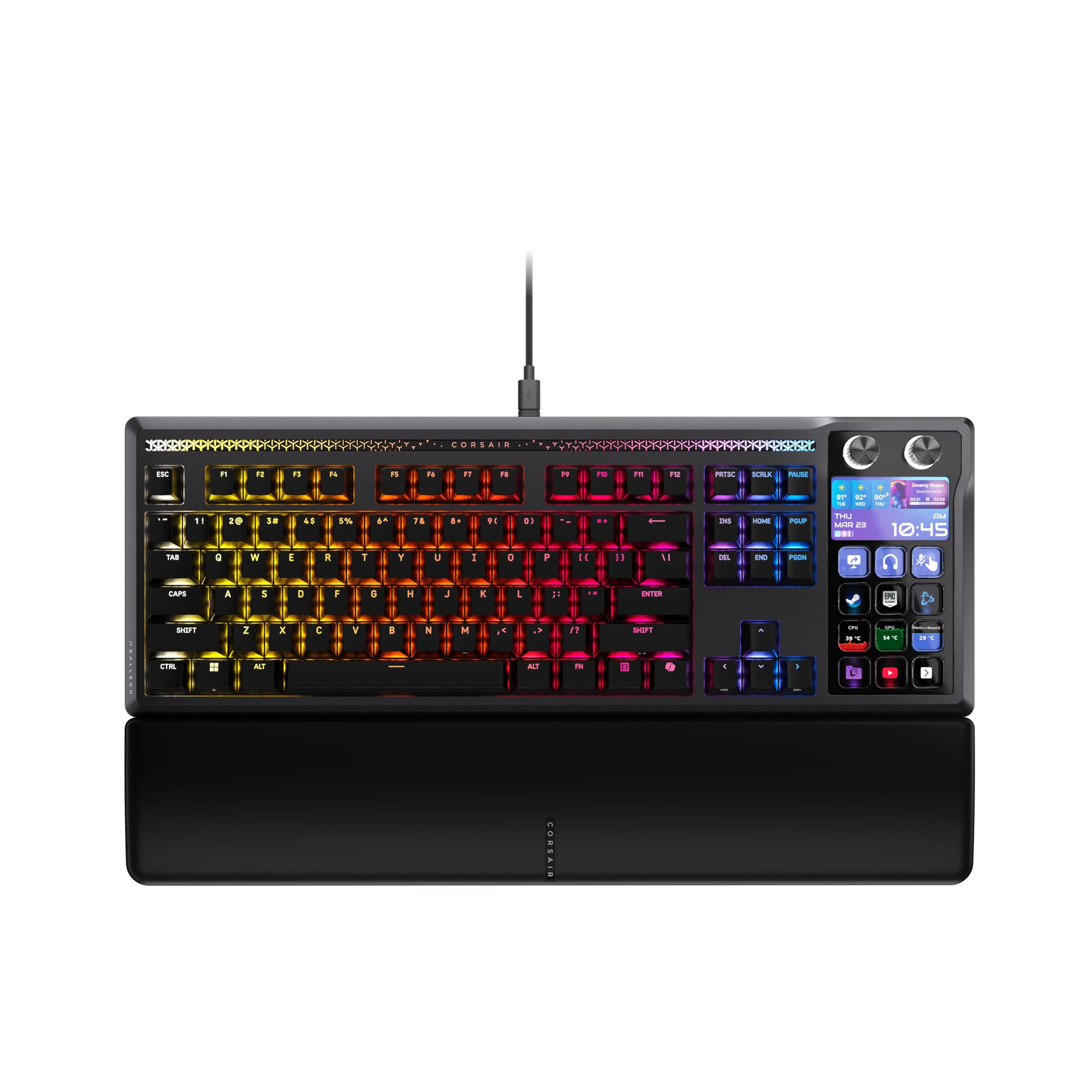
A keyboard that replaces a separate Stream Deck with a 5-inch LCD screen and 8,000Hz reporting — but needs two USB-C cables to power it.
This is the most utility-packed keyboard on the list. It integrates a full Elgato Stream Deck with a customizable 5-inch LCD display, letting you control apps like Discord and Spotify, switch scenes, or run complex multi-action macros without a separate device. Buyers call it “amazing 2 devices in 1” and note it cleans up the desk considerably for streamers and multitaskers.
Underneath, the MLX Pulse hot-swappable switches offer a “thocky” feel — a deeper, more satisfying sound than clicky switches — and you can easily swap them for other 3- or 5-pin switches if you want a different feel. The 8,000Hz hyperpolling (eight times the reporting rate of a standard 1,000Hz board) and FlashTap SOCD (simultaneous opposing cardinal directions, meaning it handles pressing W and S at the same time) give you ultra-responsive inputs for advanced movement techniques in competitive games. At 3.1 pounds, it is considerably lighter than the Razer BlackWidow V4 Pro. However, it requires two USB-C cables to power the full setup, and some early units arrived defective — check your unit immediately to avoid hassle.
Your Stream Deck and keyboard in one: If you stream, create macros, or control multiple apps from your keyboard, this is the most efficient way to do it without extra gear.
Productivity & streamer pick: Grab this if you want an all-in-one keyboard with dynamic LCD controls and a satisfying thocky typing feel.
A consideration: The build quality is excellent, but the plastic PBT keycaps feel a bit cheap relative to the high price point.
5. Corsair K100 RGB Mechanical Gaming Keyboard
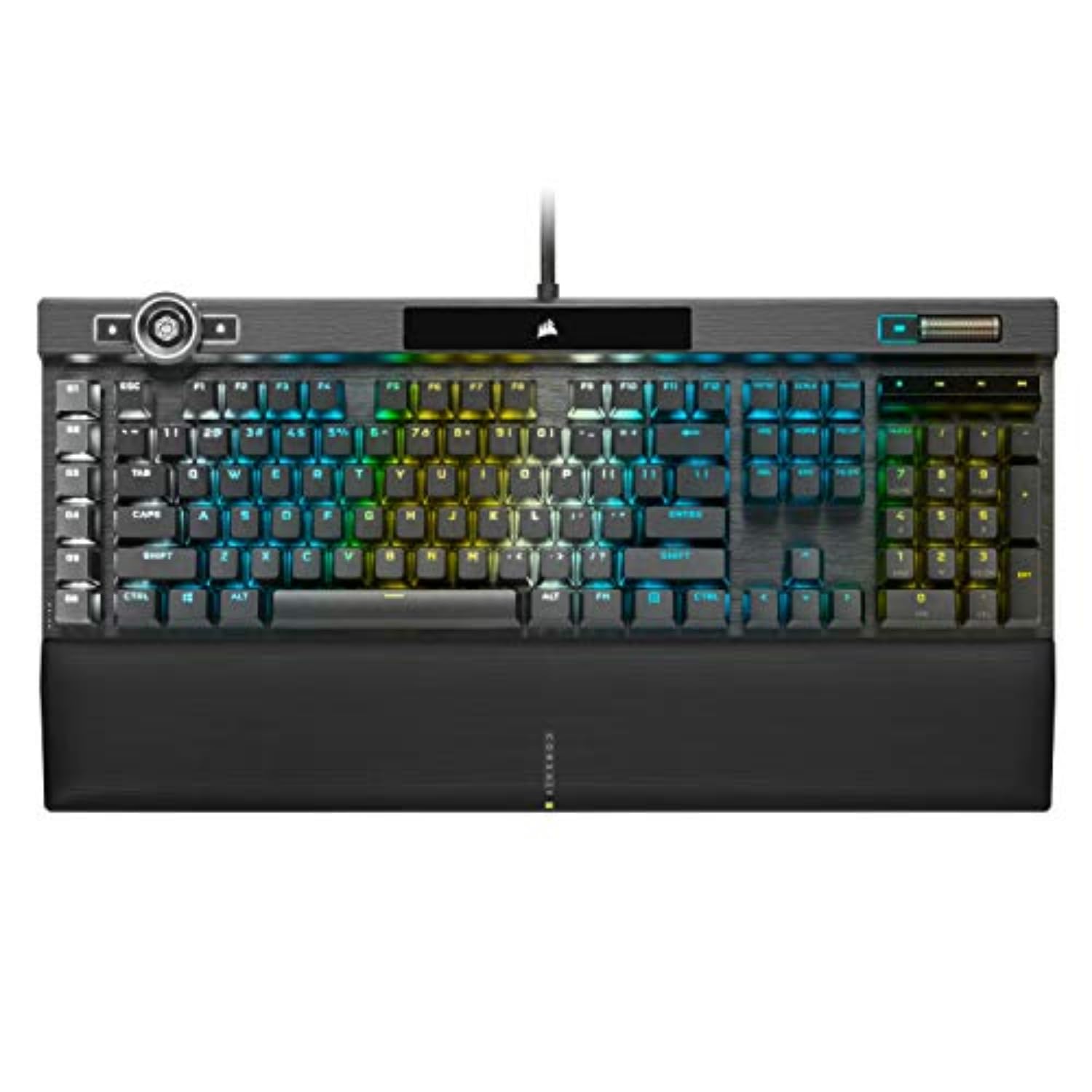
The Cherry MX Speed Silver switch fires at just 1.2mm — among the fastest mechanical triggers — but its short travel can cause accidental presses.
The Cherry MX Speed Silver switches deliver the classic mechanical feel with the fastest actuation in a physical switch. The Cherry MX Speed Silver switches actuate at just 1.2mm — among the fastest in a physical mechanical switch — and are rated for 100 million keystrokes. Paired with Corsair’s AXON hyper-processing, the K100 achieves native 4,000Hz hyper-polling and 4,000Hz key scanning, which translates to faster throughput and more responsive inputs than a standard 1,000Hz board. Buyers report it provides “fast, light-touch typing” and feels “crisp, well-crafted” with “quiet operation” for a mechanical board.
The build is premium: a durable aluminum frame, dynamic per-key RGB backlighting with a 44-zone three-sided LightEdge, and an iCUE control wheel for adjusting lighting and media on the fly. With 104 keys, it matches the Logitech G915 X in layout but adds six dedicated macro keys for deeper customization. The trade-off is that it uses Cherry MX Speed Silver switches, which have a short actuation and can lead to accidental presses if you are not used to them. The battery in the wireless version is non-replaceable, and some users find the iCue software resource-heavy.
The speed advantage
- Cherry MX Speed Silver switches actuate at 1.2mm for lightning-fast inputs
- 4,000Hz hyper-polling for lower latency in competitive gaming
- Aluminum frame, 44-zone LightEdge, and an iCUE control wheel
Things to consider
- Short actuation can cause accidental presses before you adjust
- Non-replaceable battery in the wireless version
- iCue software can feel heavy and requires setup to unlock full potential
The mechanical purist’s pick: Choose this if you love the responsive feel of Cherry MX Speed switches and want the fastest polling in a classic full-size chassis.
Better alternatives exist if: You prefer Hall Effect adjustability for gaming, or want the wireless convenience and battery life of the Logitech G915 X.
Understanding the Specs
Actuation Point (Switch Sensitivity)
This is the distance you need to press a key before it registers. Standard mechanical switches usually actuate around 2mm. The SteelSeries Apex Pro TKL lets you adjust this from 0.1mm (a feather-light tap) to 4.0mm (a deeper, deliberate press). A shorter actuation makes inputs faster, but if set too light, you may accidentally trigger keys. For competitive gaming, a light actuation (around 1mm) helps rapid strafing; for typing, a deeper press prevents mistakes.
Polling Rate (How Often Your Keyboard Talks to Your PC)
Measured in Hz, this tells you how many times per second your keyboard reports its key state to the computer. A standard gaming keyboard runs at 1,000Hz (once per millisecond). Premium boards like the Corsair K100 (4,000Hz) and the Corsair Galleon 100 SD (8,000Hz) report 4x to 8x more frequently, which can shave a fraction of a millisecond off input lag. This matters most in fast-paced shooters where every frame counts.
FAQ
What makes Hall Effect switches different from Cherry MX switches?
Can I swap keycaps on all these keyboards?
Which keyboard has the best battery life for wireless use?
What is SOCD and do I need FlashTap?
Does a higher polling rate (4,000Hz vs 8,000Hz) make a real difference?
Will a TKL keyboard feel cramped for everyday typing?
Are PBT keycaps always better than ABS keycaps?
What does hot-swappable mean for switches?
Which keyboard is quietest for an office or shared room?
Can I use these keyboards with a Mac?
Final Thoughts: The Verdict
For the majority of shoppers, the 500 dollar keyboard winner is the SteelSeries Apex Pro TKL Gen 3 because its Hall Effect switches deliver the fastest, most adjustable response in a compact TKL build — backed by real buyer proof of improved gaming performance. If you want a wireless, low-profile desk feel with exceptional battery life, grab the Logitech G915 X Lightspeed. And for the ultimate utility keyboard with a built-in Stream Deck and LCD controls, the Corsair Galleon 100 SD RGB is a unique all-in-one solution that cleans up your desk and streamlines your workflow.
How We Picked
We do not accept paid placement. Every pick is matched to a real buyer and a real use-case; we do not hands-on test units.
Sources & Methodology
Specifications: manufacturer listings and product documentation. Review insights: verified customer reviews, as of July 2026. Pricing: not shown on this page (it changes often); check the current price via the retailer link.
As an Amazon Associate, Gadgets Feed earns from qualifying purchases. This does not affect which products we feature.
Product prices and availability are accurate as of the date/time indicated and are subject to change. Any price and availability information displayed on Amazon at the time of purchase will apply to the purchase of this product. As an Amazon Associate I earn from qualifying purchases.
CERTAIN CONTENT THAT APPEARS ON THIS SITE COMES FROM AMAZON. THIS CONTENT IS PROVIDED "AS IS" AND IS SUBJECT TO CHANGE OR REMOVAL AT ANY TIME.
Amazon and the Amazon logo are trademarks of Amazon.com, Inc. or its affiliates.