
Our readers keep the lights on and my morning glass full of iced black tea. As an Amazon Associate, I earn from qualifying purchases.
Specs are compiled from manufacturer listings and verified buyer reviews and can change over time — please confirm the key details on the product page before buying.
Picking a budget-friendly mouse usually means scrolling through dozens of models that all look the same, until your wrist starts aching or the click goes mushy a few months in. What actually separates a good affordable mouse from a regretful purchase is how its core specs—sensor accuracy, switch durability, and battery life—match your daily grind, whether that is eight hours of spreadsheets or a late-night gaming session.
I’m Min — the founder and writer behind Gadgets Feed. This guide is built by comparing the manufacturers’ published specifications and the patterns across verified customer reviews, so you get each pick’s real strengths and trade-offs instead of marketing spin.
Here is a clear, honest rundown of the top options in today’s market for the affordable computer mouse category, with each model judged on longevity, comfort, and real-world performance.
Quick Picks
- Logitech G502 Hero High Performance Wired Gaming Mouse — Top Performer
- Logitech M330 Silent Wireless Mouse — Best Value
- Razer DeathAdder Essential Gaming Mouse — Gamer Pick
- HP 400 Quiet Wireless Mouse — Travel Champ
- AOC 2.4GHz Ergonomic Vertical Mouse — Ergo Comfort
- TECKNET Ergonomic Vertical Mouse — Budget Comfort
- Uineer Wireless Ergonomic Vertical Mouse — Compact Ergo
How To Choose The Best Affordable Computer Mouse
Before you click “buy”, a few specs decide whether a mouse feels great after three months or ends up in a drawer. Here is what to check.
DPI and Sensor Type
DPI (dots per inch) tells you how many pixels the cursor moves for each inch you slide the mouse. A higher DPI like 6400 or 25600 means the cursor zips across the screen with tiny hand movements—great for gaming or high-res monitors. A lower DPI like 800 or 1200 gives you precise, slow cursor control for detailed design work. For most office tasks, anything from 1200 to 4800 DPI is plenty.
Button Count and Programmable Features
More buttons mean more shortcuts without reaching for the keyboard. Mice with 5 to 11 programmable buttons let you assign macros (a recorded series of actions triggered by one click) or app-specific commands. If you edit video or play complex games, extra buttons save a ton of time. If you only browse the web, 2-3 extra buttons are usually enough.
Ergonomics and Hand Orientation
Comfort is not just about padding. The shape of the mouse determines how your wrist sits. A vertical mouse keeps your hand in a handshake position, which reduces forearm strain compared to a flat mouse. An ambidextrous design works for left or right hands. Mice built for right-handed users have a contoured thumb rest that lefties cannot use comfortably. Measure your hand size (palm to fingertip) and match it to the mouse dimensions.
Battery Type and Life
Wired mice never need charging but tether you to the PC. Wireless mice run on either a built-in rechargeable battery (you plug in via USB-C) or replaceable AA/AAA batteries. A longer battery life—like 18 or 24 months on a single AA—means less hassle. Rechargeable mice with a battery life of 200 hours need charging every few weeks with heavy use.
Quick Comparison
| Model | Best For | DPI | Battery Life | Buttons | Amazon |
|---|---|---|---|---|---|
| Logitech G502 Hero | Gaming & Power Users | 25,600 DPI | Wired | 11 | $37.99$69.99Amazon |
| Logitech M330 Silent | Office & Quiet Work | Optical 1000 DPI | 18 months | 3 | $19.92$22.99Amazon |
| Razer DeathAdder Essential | Budget Gaming | 6,400 DPI | Wired | 5 | $19.99$29.99Amazon |
| HP 400 Quiet | Travel & Ambidextrous Use | 6,000 DPI | 24 months | 5 | $31.99Amazon |
| AOC Vertical | Ergonomic Office Work | 4,800 DPI | 200 hours (rechargeable) | 7 | $19.99$29.99Limited time dealAmazon |
| TECKNET Vertical | Wrist Pain Relief | 4,800 DPI | 12 months (2x AAA) | 6 | $22.99$26.99PrimeAmazon |
| Uineer Vertical | Compact Desk Setup | 2,400 DPI | Rechargeable (1 week+) | 6 | $22.99Amazon |
In‑Depth Reviews
1. Logitech G502 Hero High Performance Wired Gaming Mouse

A wired heavyweight that brings pro-grade sensor accuracy and deeper customization than anything else here.
You get pinpoint cursor control with tiny hand movements thanks to the HERO 25K sensor tracking up to 25,600 DPI (dots per inch, the measure of how far the cursor moves per inch of mouse movement) with zero smoothing—precision that budget wired mice cannot match. The Logitech G502 Hero also gives you 11 programmable buttons and a dual-mode hyper-fast scroll wheel that toggles between free-spin for rapid scrolling and notched for line-by-line control. You can arrange up to five 3.6-gram weights inside the chassis—a feature absent from every other affordable mouse here—to dial in the exact heft you prefer.
On the downside, it is heavier than the HP 400 or Logitech M330, especially after adding the tuning weights. The Logitech G Hub software can be clunky; buyers report that using the Onboard Memory Manager app instead of G Hub solves the headache. One reviewer noted that it “lasted ~4 years” before the left click became too sensitive, which is similar in durability to the Razer DeathAdder but with far more button options.
Customization king: If you want adjustable weight tuning, 11 programmable shortcuts, and a scroll wheel that shifts from free-spin to notched, this wired mouse gives you that depth at a price comparable to simpler wireless models.
Heads-up on software: The G Hub software has known quirks—several buyers suggest skipping it and using Logitech’s Onboard Memory Manager instead for a smoother setup.
Reach for this if… you game seriously, edit video, or want a mouse that can store profiles onboard and remember them even when you plug into a different PC.
Look elsewhere if… you prefer a wireless setup, need silent clicks, or have a very small hand that might find the G502’s larger frame tiring over long sessions.
2. Logitech M330 Silent Wireless Mouse

A near-silent daily driver that lasts a year and a half on one AA battery without fussing over charging.
The Logitech M330 Silent uses SilentTouch technology to reduce over 90 percent of clicking sounds, so your office or library stays quiet. Its 18-month battery life on a single AA battery is rated longer than the TECKNET vertical at 12 months with 2x AAA, meaning fewer battery swaps. The wireless range reaches up to 33 feet (10 meters), and the USB-A receiver stores inside the mouse body, so you cannot lose it. Owners mention that the “battery lasts over 14 months with 10-12h daily use,” which lines up closely with the official estimate.
One trade-off: the side grips are smooth plastic rather than rubbery silicone, which some users find “kinda slippery and awkward” compared to the M310. It is also right-handed only, unlike the ambidextrous HP 400. The sensor is a basic optical 1000 DPI—fine for office work but not adjustable for gaming like the Razer DeathAdder’s 6400 DPI.
Quiet confidence
- Near-silent clicks (over 90% noise reduction) keep shared spaces peaceful
- 18-month battery life on one AA outlasts every other wireless mouse here
- Plug-and-play setup with no software needed—works on Windows, Mac, ChromeOS, Linux
What you give up
- Non-slip rubber grips are missing on the sides—smooth plastic only
- Fixed 1000 DPI sensor with no sensitivity adjustment, so it is not suited for gaming
The silent winner for office work: Buy this if you share a desk or hate the sound of clicking—the battery endurance and whisper-quiet clicks make it the most sensible daily mouse for non-gamers.
Not for you if… you need DPI switching for gaming or prefer a rechargeable battery you never have to replace.
3. Razer DeathAdder Essential Gaming Mouse

A wired gaming legend that packs a 6400 DPI sensor and mechanical switches at a price that undercuts most wireless office mice.
The Razer DeathAdder Essential delivers a high-precision 6,400 DPI optical sensor (dots per inch—it tracks fast flicks without skipping) with on-the-fly sensitivity adjustment via dedicated DPI buttons. Its mechanical switches are rated for up to 10 million clicks, backed by a 2-year warranty. The 5 programmable buttons can be remapped through Razer Synapse software for macros (recorded multi-step actions triggered by one press) and game profiles. Customers note it “lasted ~4 years before left click became too sensitive,” which is strong durability for a budget-tier wired mouse.
The catch? It is a wired mouse, so you lose the desk-cleanness of the wireless HP 400 or Logitech M330. Also, the scroll wheel is a known weak point—reviewers report “scroll wheel jitter after 6-12 months” as a common issue. At 6400 DPI versus the AOC vertical’s 4800 DPI, the Razer offers a higher sensitivity ceiling for faster cursor movement, but the AOC offers more ergonomic relief.
Great entry-level gaming: The responsive sensor, rubber side grips, and customizable DPI make this the cheapest way to get a real gaming-grade wired mouse without stepping into the Logitech G502’s price range.
Known scroll weakness: Several long-term users reported the scroll wheel acting up after 6–12 months—worth knowing if you rely heavily on middle-click shortcuts.
Best for… gamers on a tight budget who want a solid wired performer with a proven sensor and reliable physical buttons.
skip it if… you need a silent wireless mouse for shared workspaces or want the extra programmability of the G502’s 11 buttons.
4. HP 400 Quiet Wireless Mouse
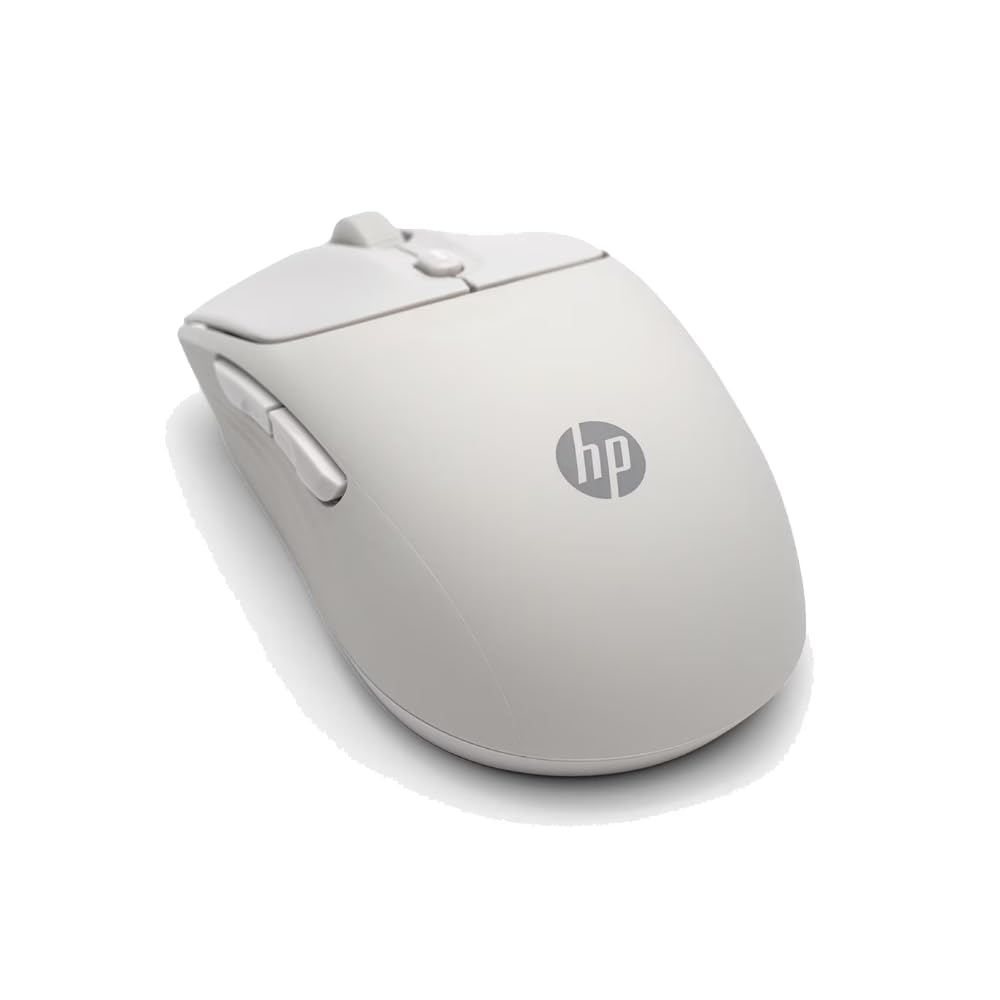
A soft-touch, ambidextrous wireless mouse with 6000 adjustable DPI and a 24-month battery that works for both hands.
The HP 400 Quiet uses dual-mode connectivity (Bluetooth or 2.4GHz dongle) and a 24-month battery life that ties with the TECKNET on paper but runs on a single AA instead of two AAA batteries. Its silicone rubber enclosure feels soft to the touch and is easy to wipe clean—a nice perk for shared desks or travel. The adjustable DPI goes up to 6,000, giving you higher sensitivity than the Uineer (2,400 DPI max) or the AOC vertical (4,800 DPI), making it a rare budget ambidextrous mouse with a real DPI range. Reviewers mention the “smooth wheel and buttons” and call it “an excellent budget anywhere 3s alternative.”
It is not rechargeable, so you will need to keep spare AA batteries handy, unlike the AOC or Uineer which have internal rechargeable cells. The 5 buttons include a Microsoft Wheel button for shortcuts, but the side buttons are not programmable on macOS—a limitation shared with the TECKNET vertical.
Travel-friendly comfort
- Ambidextrous shape works for left-handed users—rare at this price
- Soft silicone rubber is comfortable and easy to sanitize
- 24-month battery life on a single AA lasts as long as any wireless mouse in this guide
Limitations
- Not rechargeable—AA battery replacement required every few years
- Side buttons do not function on macOS
Ideal for travelers and lefties: If you switch between laptops on the go and need a mouse that works with either hand, the HP 400’s ambidextrous shape and long battery life make it the best fit in this list.
Not ideal if… you prefer a rechargeable mouse that never needs battery swaps, or if you use macOS and need all five buttons to work.
5. AOC 2.4GHz Ergonomic Vertical Mouse
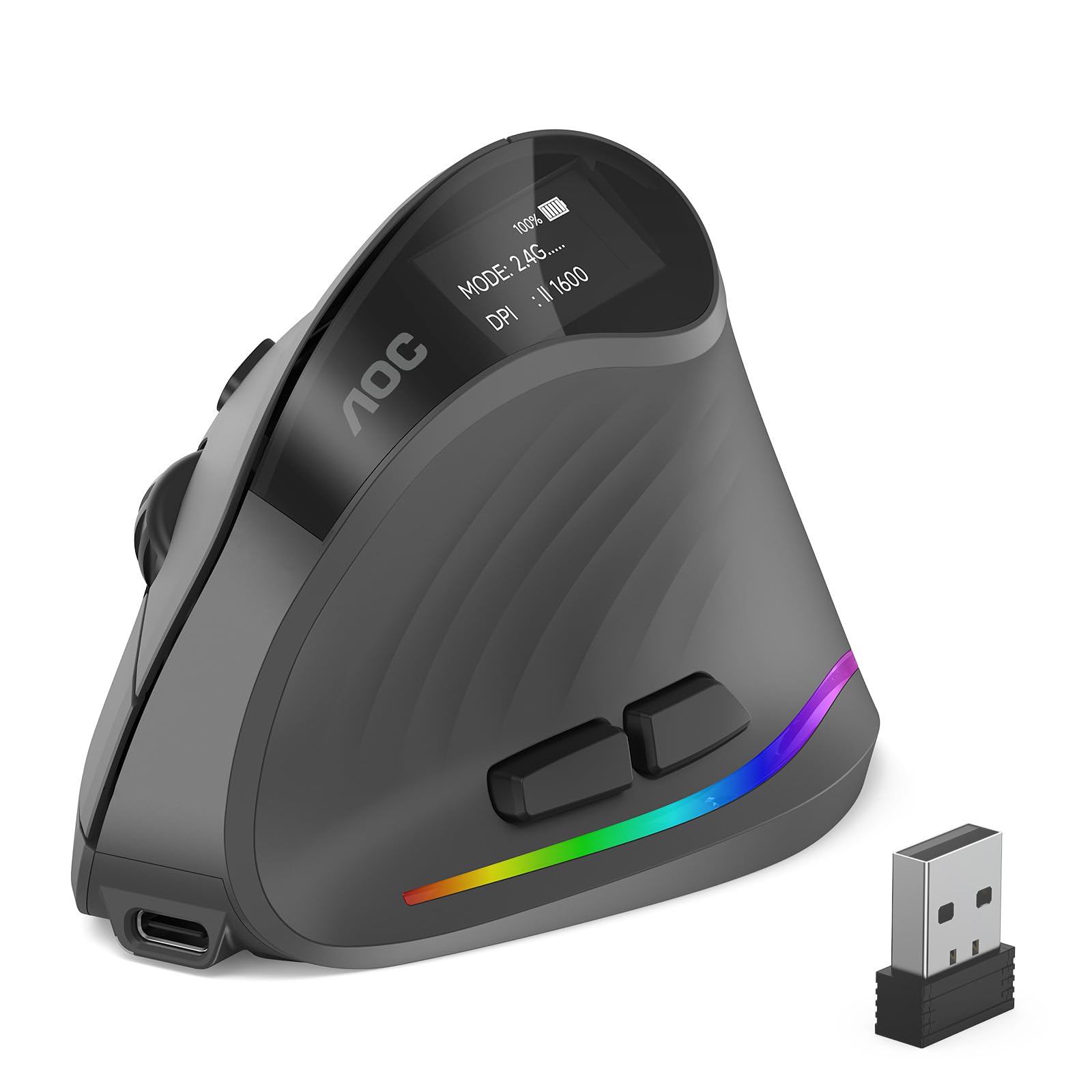
A vertical mouse with a 52-degree angle and 7 programmable buttons that fights wrist strain while you work.
The AOC ergonomic vertical mouse positions your hand at a 52° vertical angle (imitating a handshake) to reduce twisting in the forearm. It connects three ways—Bluetooth 5.4, 2.4GHz wireless, or USB wired—and lets you switch between up to three devices. The 7 programmable buttons and RGB lighting (customizable via a downloadable app) add versatility missing from the simpler M330. With 4800 DPI adjustable across 5 levels (1000/1600/2400/3200/4800), you get faster cursor movement than the Uineer’s 2400 DPI cap, though lower than the Razer’s 6400 DPI. The internal rechargeable battery is rated for 200 hours, which spares you from buying batteries.
The trade-off is that it is designed for small-to-medium hands only; the manufacturer explicitly states it is “not recommended for large hands.” Buyers also note the “battery life is fine for daily home office use, though shorter than alkaline batteries.” The left/right clicks are quiet (under 35dB), but the other buttons click audibly—so it is not fully silent like the M330.
Ergonomic with extra buttons: The 52° vertical tilt and 7 programmable buttons give you both wrist relief and task efficiency that a basic vertical mouse cannot match.
Hand size matters: AOC explicitly warns this fits small-to-medium hands best—large-palmed users should look at the TECKNET vertical instead.
Who should buy it: Office workers, designers, and coders with small-to-medium hands who want three-device switching and silent main clicks in a vertical shape.
Who should pass: Large-handed users, or anyone who needs fully silent clicks on all buttons (the M330 or HP 400 are better choices).
6. TECKNET Ergonomic Vertical Mouse

A vertical mouse with 6 adjustable DPI levels and a 12-month battery that prioritizes wrist relief on a budget.
The TECKNET ergonomic vertical mouse uses a near-vertical palm angle to keep your wrist straight. It offers 6 DPI levels (800/1200/1600/2400/3200/4800) and connects via Bluetooth 5.0/3.0 and 2.4GHz USB-A. The 6 buttons (including side buttons) are programmable, and the left/right clicks are silent—though the other buttons click normally. The battery life is listed at 12 months using two AAA batteries (not included), which is shorter than the Logitech M330’s 18-month single-AA life. Reviewers point out it is “great for carpal tunnel or arthritis.” and one reviewer with carpal tunnel reported their “symptoms subsided within 2 days” after switching.
The main downsides: it is right-handed only and the side buttons do not work on macOS. The vertical shape also has a steeper learning curve than a traditional mouse. At 4.74 inches long, it is a bit bigger than the AOC vertical, which some smaller-handed users found “too large for small hands.”
Wrist relief first
- 6 DPI levels give fine-grained speed control from 800 to 4800 DPI
- Silent left/right clicks are library-friendly
- 36-month warranty (after registration) offers long-term confidence
What to watch
- Requires 2 AAA batteries (not included) and has a 12-month battery life versus the Logitech M330’s 18-month run
- Side buttons are non-functional on macOS
Perfect for wrist-pain sufferers: If you have carpal tunnel or arthritis, the TECKNET vertical design and silent clicks offer serious relief without spending on premium ergonomic brands.
Not for you if… you hate buying batteries (grab the rechargeable AOC or Uineer instead) or need macOS side-button support.
7. Uineer Wireless Ergonomic Vertical Mouse
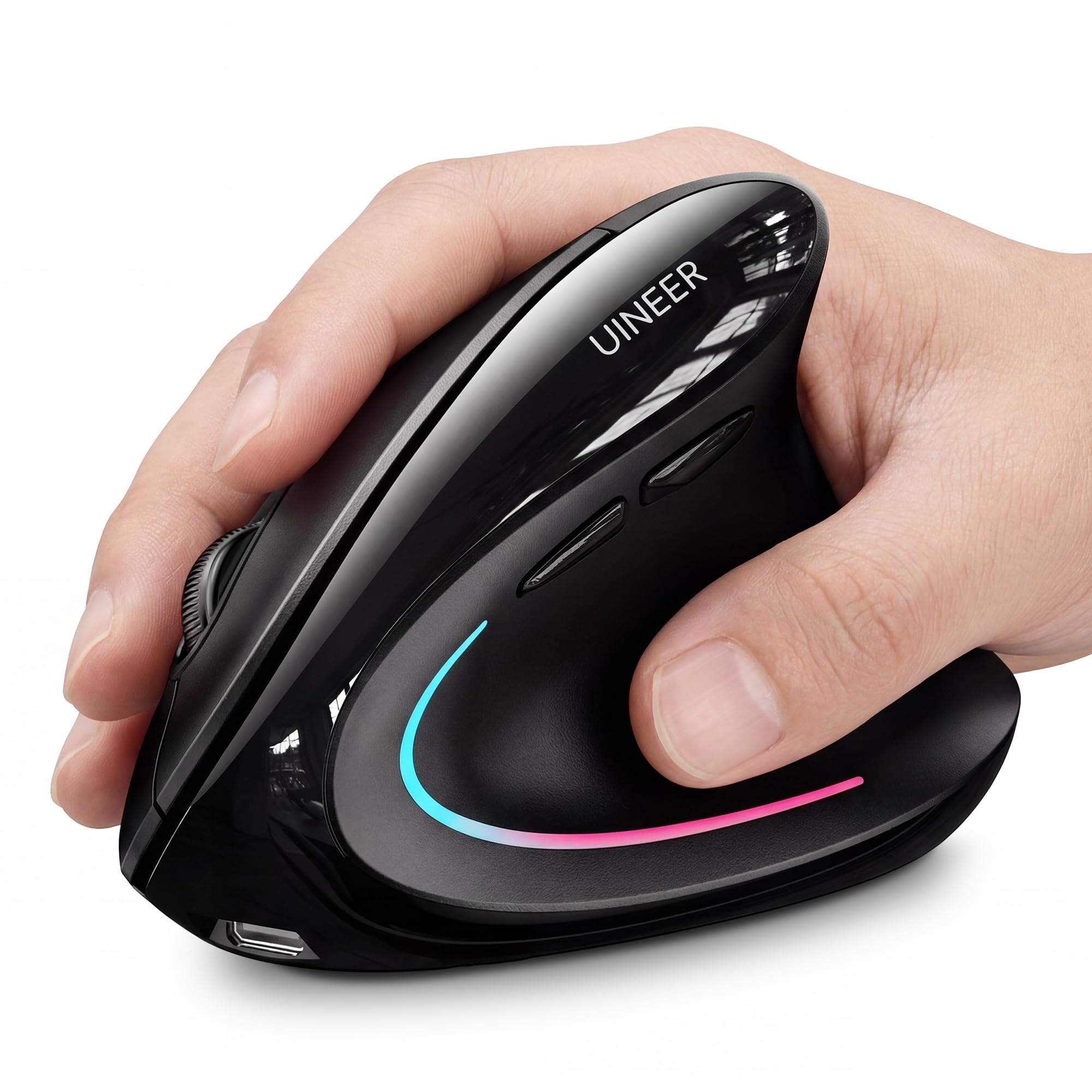
A compact, rechargeable vertical mouse with 7-color ambient lighting that fits small hands and small desks.
The Uineer vertical mouse features a handshake grip that keeps your wrist straight and comes with a built-in rechargeable battery—no AA or AAA swaps needed. Its 4 adjustable DPI levels (800/1200/1600/2400) are lower than the AOC’s 4800 DPI or the TECKNET’s range, but for everyday office tasks and document work, 2400 DPI is plenty. The 6 buttons include side keys for forward/back navigation, though they do not work on macOS. It also has a 7-color ambient light on the palm area (cannot be turned off, but it runs off the internal battery). Buyers praise its “excellent ergonomics for small-to-medium hands” and note it “reduces wrist/forearm strain.”
The downsides: the maximum DPI is 2400, versus 4800 on the AOC and TECKNET, so it feels slower if you have a high-resolution monitor. One buyer mentioned the “wheel squeaked after 3 weeks” until they greased it, which suggests minor build quality variance. At 71 grams, it is noticeably lighter than the G502 Hero (which has adjustable metal weights), so some users found it “too light” for their preference.
Rechargeable and compact: The built-in battery and small footprint make this a tidy option for minimalist desks—just plug it in every week or two, no disposable batteries.
DPI ceiling: With a max of 2400 DPI, this is best for standard office apps and browsing, not for high-DPI gaming or 4K editing where faster cursor movement helps.
Ideal for small-handed users: The compact size and rechargeable battery make it a solid pick for students, remote workers, or anyone at a smaller desk who wants vertical ergonomics.
Look elsewhere if… you need faster cursor speeds (above 2400 DPI) for gaming or large monitors, or if you prefer wireless with replaceable batteries.
Understanding the Specs
DPI — Dots Per Inch
DPI measures how sensitive the mouse is to movement. A higher DPI (like 6400 or 25600) means the cursor moves farther across the screen when you move the mouse a short distance. This matters most for gaming (fast flicks) and high-resolution monitors. A lower DPI (800–1600) gives finer control for precision tasks like photo editing. Adjustable DPI lets you toggle between speeds on the fly via a dedicated button, which is useful if your daily work mixes browsing and detailed design.
Battery Life — Wireless Endurance
Measured in months (for replaceable batteries) or hours (for rechargeable models). A longer battery life—like 18 or 24 months on a single AA—means you rarely think about power. Rechargeable mice with a 200-hour rating need charging every few weeks with heavy daily use. “Auto-sleep” is a standard feature that kicks in after 10–30 minutes of inactivity to save power. If you dislike managing cables, opt for a longer battery life or a rechargeable model with a USB-C port.
FAQ
What DPI level is best for everyday office work?
Is a vertical mouse really better for wrist pain?
How long does a wireless mouse battery last?
Can I use a gaming mouse for office work?
Will a vertical mouse fit my large hand?
What is the difference between Bluetooth and 2.4GHz wireless?
Are silent click mice good for gaming?
How many programmable buttons do I need?
Do all wireless mice work with MacBooks?
What does “mechanical switch” mean in a mouse?
Final Thoughts: The Verdict
For most buyers, the affordable computer mouse winner is the Logitech M330 Silent because it combines near-silent clicks, an 18-month battery life, and a comfortable shape at a price that beats most competitors. If you need a high-DPI gaming mouse with adjustable weight tuning, grab the Logitech G502 Hero. And for wrist-pain relief with a rechargeable battery, the AOC Vertical is your best bet.
How We Picked
We do not accept paid placement. Every pick is matched to a real buyer and a real use-case; we do not hands-on test units.
Sources & Methodology
Specifications: manufacturer listings and product documentation. Review insights: verified customer reviews, as of July 2026. Pricing: not shown on this page (it changes often); check the current price via the retailer link.
As an Amazon Associate, Gadgets Feed earns from qualifying purchases. This does not affect which products we feature.
Product prices and availability are accurate as of the date/time indicated and are subject to change. Any price and availability information displayed on Amazon at the time of purchase will apply to the purchase of this product. As an Amazon Associate I earn from qualifying purchases.
CERTAIN CONTENT THAT APPEARS ON THIS SITE COMES FROM AMAZON. THIS CONTENT IS PROVIDED "AS IS" AND IS SUBJECT TO CHANGE OR REMOVAL AT ANY TIME.
Amazon and the Amazon logo are trademarks of Amazon.com, Inc. or its affiliates.