
Our readers keep the lights on and my morning glass full of iced black tea. As an Amazon Associate, I earn from qualifying purchases.
Specs are compiled from manufacturer listings and verified buyer reviews and can change over time — please confirm the key details on the product page before buying.
Reaching behind your computer to swap cables every time you switch between a work laptop and a gaming PC is a drag. A 4K KVM switch (a box that lets you share your monitor, keyboard, and mouse between two computers) solves that with one button press. This guide cuts through the spec sheets to find the model that actually delivers on its promises for your specific setup.
I’m Min — the founder and writer behind Gadgets Feed. This guide is built by comparing the manufacturers’ published specifications and the patterns across verified customer reviews, so you get each pick’s real strengths and trade-offs instead of marketing spin.
For most people, the JCYMELE 4K@144Hz DP KVM Switch is the one to get because it delivers the full 144 Hz refresh rate, stable USB power, and an included desktop controller. If you want Thunderbolt 4 and 40 Gbps, the SABRENT remains the higher-bandwidth option. 4k kvm switch ownership means trusting one box to handle the handoff between your machines every single day.
Quick Picks
- JCYMELE 4K@144Hz KVM Switch — Best Overall
- SABRENT Thunderbolt 4 KVM Switch — Premium Pick
- DXchip 8K Displayport 1.4 and HDMI 2.1 KVM Switch — Best for Gamers
- ATLAHET 8K 60Hz HDMI KVM Switch — Budget Champion
- TJCXELE DisplayPort KVM Switch — Pure DP Performer
How To Choose The Best 4K KVM Switch
The wrong KVM switch can leave you with a blank screen, a dead USB port, or a painful cable mess. Focus on these three things to get the right one for your desk.
Video Resolution and Refresh Rate
This is the biggest trap for first-time buyers. A switch that says “4K” might only handle 4K at 60 Hz — fine for spreadsheets, frustrating for a 144 Hz gaming monitor. If you play PC games, you need a switch that lists 4K@144Hz or higher (some premium models now hit 8K@60Hz). Your graphics card and monitor must support the same refresh rate for the switch to pass it through without stuttering.
Two monitors mean double the bandwidth. For dual-screen setups, each computer must have two separate video outputs (two HDMI ports or two DisplayPort ports). The switch does not create a second signal — it only routes the two signals your computer already produces.
Ports and USB Speed
Beyond video, a KVM switch also shares your keyboard, mouse, and other accessories. USB 3.0 ports (the standard rectangular USB type) offer up to 5 Gbps of data transfer — enough for a fast external SSD (solid-state drive) or a webcam. Thunderbolt 4 ports push that to 40 Gbps, ideal for multiple high-speed drives or high-resolution video conferencing gear. Count the ports you need: most dual-monitor KVMs include four USB ports, but if you use a printer, a webcam, a microphone, and a DAC (digital-to-analog converter for audio) at the same time, confirm the switch has enough.
Check whether the switch needs an external power supply (a separate 12V adapter). Cheaper switches sometimes try to draw power from your computer’s USB port, which can starve USB devices like webcams or external hard drives. A dedicated power adapter keeps everything running stable.
Switching Methods and Build Quality
Most models offer a physical button on the unit and a remote button you can keep on your desk. Hotkey switching (pressing a keyboard shortcut like Ctrl + Ctrl) is rarer at entry-level prices — some switches explicitly do not support it, which can be a dealbreaker if you want to keep the unit hidden. The remote cable length matters: a short 1.5-meter (about 5-foot) cable limits where you can stash the switch. A separate power switch is a nice bonus because it lets you reboot the KVM without unplugging cables when a device does not re-sync.
If you are picky about visual clutter, a model with all the connection ports on the back and a clean front panel keeps your desk looking tidy. One buyer note said that a forward-facing USB port made cable management messy even though the switch itself functioned well.
Quick Comparison
| Model | Best For | Max Resolution | USB Speed | Video Ports | Amazon |
|---|---|---|---|---|---|
| ATLAHET 8K 60Hz HDMI | HDMI-only dual-monitor value | 8K@60Hz / 4K@120Hz | USB 3.0 up to 5 Gbps | 2x HDMI in / 2x HDMI out | from $94.99Amazon |
| DXchip 8K DP+HDMI | Gamers with DP monitors | 8K@60Hz / 4K@144Hz | USB 3.0 up to 5 Gbps | 1x DP + 1x HDMI per comp | $67.99Amazon |
| TJCXELE DisplayPort KVM | Pure DP workspace | 4K@144Hz | USB 3.0 up to 5 Gbps | 2x DP per computer | $69.99Amazon |
| JCYMELE 4K@144Hz DP | Extended mode daily driver | 8K@60Hz / 4K@144Hz | USB 3.0 up to 5 Gbps | 2x DP per computer | $69.99Amazon |
| SABRENT Thunderbolt 4 | Mac/PC power users | 8K@60Hz (DSC) / 4K@144Hz | Thunderbolt 4 up to 40 Gbps | Thunderbolt 4 / USB-C DP Alt | $299.89Amazon |
In‑Depth Reviews
1. JCYMELE 4K@144Hz KVM Switch
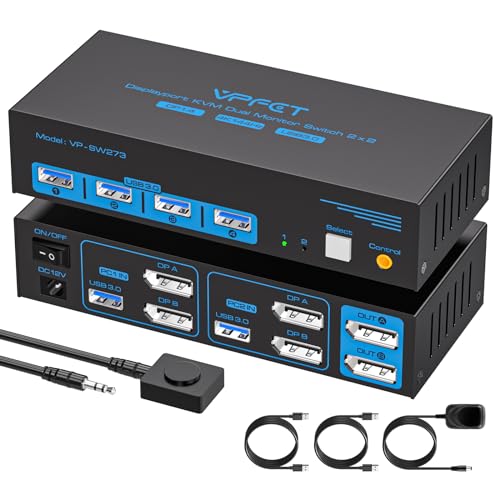
The workhorse that keeps two monitors humming at full speed without the price premium.
This is the balance for anyone running a dual-PC setup with DisplayPort monitors. The JCYMELE pushes up to 4K@144Hz and even 8K@60Hz, which means your gaming monitor stays buttery-smooth while your productivity monitor runs spreadsheets in extended mode. Buyers report using extended mode every day to spread work across both screens, handling external drives at full USB 3.0 speed (5 Gbps) with no lag. Unlike the SABRENT Thunderbolt 4 model below that skips hotkey switching, this one gives you a physical button on the unit and a detachable desktop controller, so you can stash the box under the desk and still switch with a tap.
The 12V external power adapter keeps USB devices like webcams and portable SSDs stable — a real upgrade over cheaper switches that starve peripherals by pulling power from your computer’s USB port. The extended-mode support is a lifesaver for multitaskers: you can drag a browser window from one screen to the other without any flicker, according to buyers. The trade-off is that each computer needs two DP ports, so you must confirm your graphics card supports dual DisplayPort output.
Why it earns the top spot
- Delivers 4K@144Hz and 8K@60Hz — matches the DXchip and TJCXELE on raw speed but at a more accessible price point.
- Owners mention it runs smoothly after a full year of daily switching between work and personal PCs.
- Four USB 3.0 ports with stable external power so your webcam and external drive never drop out during a switch.
The one limitation
- Requires two DP ports on each computer — no HDMI option here, unlike the ATLAHET HDMI model below.
- DP cables are not included, so factor in the extra cost if you do not already own them.
Reach for this if: You want the full 144 Hz refresh rate on a dual-monitor DP setup without spending Thunderbolt money.
Look elsewhere if: Your computer has only one DP port — you would need the DXchip model that mixes DP and HDMI inputs.
2. SABRENT Thunderbolt 4 KVM Switch

The speed demon for Mac and PC users who need Thunderbolt bandwidth at their fingertips.
If your desk is home to a Thunderbolt-equipped MacBook Pro and a high-end Windows PC, this SABRENT is the only KVM on this list that handles the handoff at 40 Gbps. That is eight times faster than the USB 3.0 speed of the other four picks here, which means you can edit 4K video directly off an external SSD connected to the switch without waiting on file transfers. It supports up to 8K@60Hz with DSC (Display Stream Compression, a way to shrink video data) or 4K@144Hz, which buyers have confirmed works on dual 4K monitors with a MacBook Pro M5 and a Mac mini M4. The switch also provides up to 60W of Power Delivery charging (PD 3.0, a standard for fast charging over USB-C) through its USB-C ports, so a connected laptop charges while you work.
The catch is that customers note no EDID emulation (the switch does not “remember” your monitor’s resolution settings when switching) and no keyboard/mouse emulation, meaning switching can take 15 to 25 seconds and your monitors may go blank for a moment. One reviewer flagged that the device runs hot and they added a heatsink (a metal block that draws heat away) to keep it comfortable. If you need instant switching and a perfect, flicker-free transition, the JCYMELE or TJCXELE models above will feel snappier despite their lower data speeds. This is a specialist tool: best for creative pros who need Thunderbolt throughput and can tolerate a slower handoff.
The Thunderbolt advantage
- Three Thunderbolt 4 ports at 40 Gbps — class-leading USB speed vs the 5 Gbps on every other pick here.
- Charges your laptop at up to 60W via USB-C PD 3.0 while switching between machines.
- Sturdy aluminum body with LED source indicators for a premium desk feel.
The known trade-off
- Switching takes 15-25 seconds and can cause a brief blank screen — much slower than the instant push-button swaps on the JCYMELE or TJCXELE.
- Runs very hot; some buyers added an aftermarket heatsink for confidence.
Best for: Creative pros who move massive files between a MacBook Pro and a PC and who value Thunderbolt speed over switching speed.
skip it if: You need a KVM for gaming — the JCYMELE or DXchip models give you faster, more reliable switching at a much lower cost.
3. DXchip 8K Displayport 1.4 and HDMI 2.1 KVM Switch
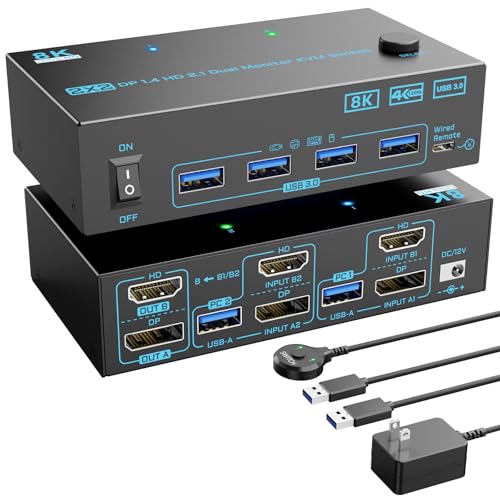
The flexible hybrid that mates a DisplayPort gaming monitor with an HDMI productivity screen.
Most dual-monitor KVMs demand the same port type from both computers — all DP or all HDMI. The DXchip breaks that rule: each computer connects via one DisplayPort 1.4 and one HDMI 2.1, which is a lifesaver if your gaming rig uses a DP monitor and your work laptop only has HDMI out. It pushes 4K@144Hz and 8K@60Hz, so your gaming screen hits its full refresh rate, while the HDMI side handles 4K@60Hz comfortably. Reviewers point out easy switching between a work PC and a personal PC sharing three monitors with no signal loss.
Like the TJCXELE below, the USB 3.0 ports run at 5 Gbps and require an external 12V power supply — the product listing explicitly warns you to connect the USB cable from each computer to power the switch and transfer data. A thoughtful detail is the separate power switch that lets you reboot the KVM without unplugging cables when a device does not re-sync. The downside: a buyer noted that USB devices lose power momentarily during a switch, which can cause a pop sound from powered speakers. If you use desktop speakers, you may want to plug them directly into your computer instead of through the KVM.
What makes it flexible
- Supports mixed DP+HDMI inputs per computer — unique among these mid-range picks; the TJCXELE and JCYMELE require two identical port types.
- Physical button and wired remote give two ways to switch; one reviewer noted the remote made cable management easy.
- Separate power switch eliminates the need to unplug cables when you need to re-sync the KVM.
The gotcha
- USB devices lose power briefly during a switch, which can cause a pop sound from powered speakers — a known trade-off at this price.
- No audio switching, so your speakers and headset need to be connected directly to your computer.
Reach for this if: Your desk mixes a DisplayPort gaming screen and an HDMI work screen in a dual-PC setup.
Look elsewhere if: You want instant, uninterrupted USB device power during switches — the JCYMELE handles transitions more smoothly.
4. ATLAHET 8K 60Hz HDMI KVM Switch

The HDMI-only workmate that covers dual monitors and USB devices without breaking your budget.
If your entire setup runs on HDMI — both monitors and both computers have HDMI out — the ATLAHET is the pick that saves you money without cutting corners on the basics. It supports up to 8K@60Hz and 4K@120Hz, which is more than enough for productivity work, streaming, and casual gaming. The four USB 3.0 ports at 5 Gbps handle a keyboard, mouse, printer, and webcam without complaint. Shoppers say it works as advertised with a desktop and a laptop sharing dual monitors and USB peripherals, and they appreciate the remote switch button that lets them hide the main unit behind the desk for cleaner cable management.
There are two notable limits. First, keyboard hotkey switching is not supported — you switch via the panel button or the external cable controller, so the unit must stay reachable unless you use the remote. Second, the product explicitly warns against using a docking station or adapter cable, which can cause incompatibility. If you rely on a USB-C dock to connect your laptop, pick the DXchip or JCYMELE instead. For a pure HDMI dual-monitor desk where the computers sit close enough for a cable reach, this works perfectly.
Why it is a value leader
- Supports 8K@60Hz and 4K@120Hz over HDMI — covers high-res needs for most non-Thunderbolt users.
- Four USB 3.0 ports with an external 12V adapter keep peripherals powered and stable.
- Buyers praise the remote switch for enabling a clean, hidden installation.
The catch
- No hotkey switching — you must use the physical button or the included remote cable, so the unit or remote must sit on your desk.
- Does not work with docking stations or adapter cables; your computers need native HDMI ports.
Best for: HDMI-only workspaces where both computers have native HDMI outputs and you want a budget-friendly dual-monitor KVM with a remote.
pass on it if: You use a USB-C dock or adapter — the DXchip or JCYMELE models handle mixed port types much more reliably.
5. TJCXELE DisplayPort KVM Switch
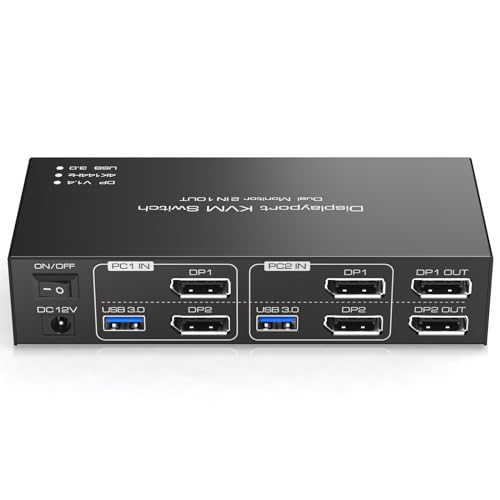
The no-surprises dual-monitor DP switch that buyers call a “monster worth the cable management.”
If your desk is all-DisplayPort — two monitors per computer, all running over DP — this TJCXELE gives you a clean, simple way to swap between them at up to 4K@144Hz. The switch supports video bandwidth up to 48 Gbps (the total data the cable can carry) and USB 3.0 data transfer at 5 Gbps, which is ten times faster than USB 2.0. The 12-month return or replacement warranty adds confidence at this price. Buyers specifically note the easy switching between work PC and gaming PC, with dual-monitor support at high refresh rates. One reviewer described the setup as “worth the cable management monster,” meaning you will need patience and (if you have a third monitor) the physical switch button may not work as expected.
The build quality feels good in the hand, according to several buyers, and the included desktop controller gives you a convenient way to hide the main box. The product dimensions are 7.8 x 5.7 x 2.2 inches (about 20 x 14.5 x 5.6 cm) — a bit larger than the JCYMELE, so measure your desk space. Because it is DP-only, it is less flexible than the DXchip if you ever need to connect an HDMI laptop. If you know your setup is pure DisplayPort forever, this is a reliable, well-reviewed choice.
Where it excels
- Pure DP 1.4 with full bandwidth — supports 4K@144Hz and compatibility with DP 1.2 for older monitors.
- Buyers describe the build as solid and the switch between computers as quick and reliable.
- Desktop controller included for convenient switching without reaching under the desk.
The limitation
- No HDMI input option — unlike the DXchip, which mixes DP and HDMI, you are locked into DisplayPort hardware.
- Some buyers mention messy cable management; the product does not include zip ties.
Best for: Gamers with a dual-DP graphics card who want a solid, no-nonsense DP KVM at a fair price.
it’s not for you if: Your setup includes any HDMI screens or laptops — grab the DXchip for its mixed-port flexibility.
Understanding the Specs
4K@144Hz vs 8K@60Hz
These numbers describe the maximum resolution and the maximum refresh rate (how many times per second the screen redraws) the KVM can pass through. For PC gaming, 4K@144Hz means your 144 Hz monitor can run at its full speed without stuttering. 8K@60Hz is future-proofing for ultra-high-resolution monitors but is overkill for most desks today — 8K monitors are still rare and expensive. If you are buying for a 4K 144 Hz gaming monitor, any switch listed as 4K@144Hz or 8K@60Hz will handle it fine. The actual output also depends on your graphics card, cable quality, and monitor, not just the switch.
EDID Emulation
EDID (Extended Display Identification Data) is a small data file your monitor sends to your computer telling it what resolutions and refresh rates it supports. A KVM with EDID emulation “remembers” that information even when the switch is not actively sending the signal to the computer. Without it, your computer may “forget” the monitor exists during a switch, which can rearrange your desktop icons or cause a blank screen for several seconds. Among these picks, only the SABRENT Thunderbolt model explicitly lacks EDID emulation — a major reason its switching can feel slow. If you hate desktop icon shuffling, look for a switch that mentions EDID support in its specs.
FAQ
Can I use a 4K KVM switch with a gaming console like a PS5?
Do I need two video ports on my computer for a dual-monitor KVM?
Does a KVM switch affect my mouse and keyboard performance?
How do I switch between computers — buttons, hotkeys, or remote?
Will a KVM switch work with both Windows and macOS?
Can I share a webcam and microphone through a KVM switch?
Does a KVM switch support extended mode and mirror mode?
Will a KVM switch charge my laptop over Thunderbolt?
Is the SABRENT Thunderbolt 4 KVM worth the higher price tag?
How long do KVM switches typically last?
Final Thoughts: The Verdict
For most users working with a dual-PC, dual-monitor setup, the best 4K KVM switch is the JCYMELE 4K@144Hz DP KVM Switch because it delivers the full 144 Hz refresh rate, stable USB power, and an included desktop controller. If you need mixed DP and HDMI inputs to bridge a gaming DP monitor and a work HDMI laptop, grab the DXchip 8K DP+HDMI KVM. And for creative professionals who depend on Thunderbolt 4’s 40 Gbps throughput and 60W laptop charging, the SABRENT Thunderbolt 4 KVM is the premium choice — just be ready for a slower, 15-to-25-second switching handoff.
How We Picked
We do not accept paid placement. Every pick is matched to a real buyer and a real use-case; we do not hands-on test units.
Sources & Methodology
Specifications: manufacturer listings and product documentation. Review insights: verified customer reviews, as of July 2026. Pricing: not shown on this page (it changes often); check the current price via the retailer link.
As an Amazon Associate, Gadgets Feed earns from qualifying purchases. This does not affect which products we feature.
Product prices and availability are accurate as of the date/time indicated and are subject to change. Any price and availability information displayed on Amazon at the time of purchase will apply to the purchase of this product. As an Amazon Associate I earn from qualifying purchases.
CERTAIN CONTENT THAT APPEARS ON THIS SITE COMES FROM AMAZON. THIS CONTENT IS PROVIDED "AS IS" AND IS SUBJECT TO CHANGE OR REMOVAL AT ANY TIME.
Amazon and the Amazon logo are trademarks of Amazon.com, Inc. or its affiliates.